# ᴾᵒCat: Structure & Subsystems

# Structure

## Document scope 

This document aims to provide both an in-depth description of structural elements and general architecture, as well as a basis for understanding the way all the subsystems and devices are connected throughout the PocketQube.

In addition in the following link you can find the PCB design repository: [https://github.com/nanosatlab/pocat-hw](https://github.com/nanosatlab/pocat-hw)

## General structure

This project follows the PocketQube mechanical standard. It doesn’t however specify the way that the inner part of the spacecraft needs to be organised. As a result, considering the very little space available and the complexity of the avionics, the proposed solution for the inner structure will be presented below.

[![General_Structure.png](https://wiki.nanosatlab.space/uploads/images/gallery/2024-11/scaled-1680-/general-structure.png)](https://wiki.nanosatlab.space/uploads/images/gallery/2024-11/general-structure.png)

In this representation, we can distinguish different parts that make up the structure. In <span style="color: rgb(45, 194, 107);">**green**</span>, we can see the outer boards, which form the external part of the satellite. On the bottom exterior board, we will find the killswitches, while the deployer sliding backplate will be the only PCB in contact with the deployer rail. Regarding the top exterior board, this part will be replaced by the payload used for each satellite. If the payload can be implemented on a single PCB (Payload board), this top exterior board could remain in place. In the case of our payloads, both the K-Band and the L-Band, the top exterior board will be replaced by the payload board.

In **<span style="color: rgb(53, 152, 219);">blue</span>**, we can see the only two internal structures that are not PCBs. The bottom structure will house the battery and act as an interface between the bottom exterior board and the sliding plate, connecting them with the rest of the subsystem stack. This structure will be made of PTFE (Teflon). The top structure, made of 7075 Aluminium Alloy, will be used for the K-Band, acting as the interface between the payload and the rest of the subsystem stack. Additionally, both structures will allow the lateral boards to be screwed into them.

In **<span style="color: rgb(224, 62, 45);">red</span>**, we find the PCBs that form the various subsystems. From top to bottom, these are: the Payload board (for the payload, additional PCBs may be added inside the payload), the OBC and COMMS board, the EPS board, and the ADCS board. These PCBs will be connected to each other via the vertical connectors, shown in cyan, which allow electrical interconnection between all the PCBs in the stack.

In <span style="color: rgb(126, 140, 141);">**gray**</span>, the spacers distribute the force from the tightened screws, preventing the vertical pins from bearing the full load.

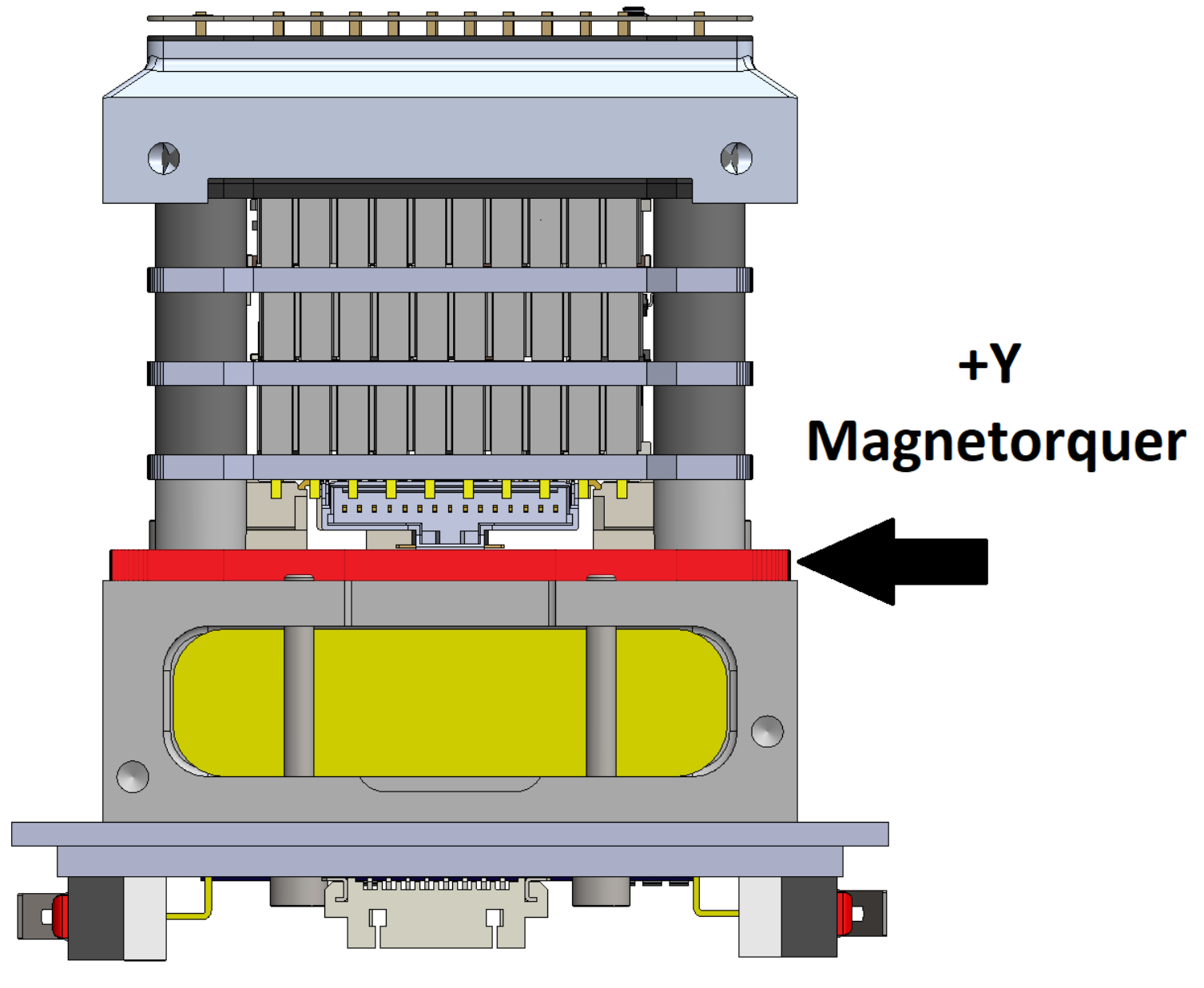
Finally, in **<span style="color: rgb(241, 196, 15);">yellow</span>**, we see the +Y magnetorquer and the battery. The +Y magnetorquer will be attached and screwed into the bottom structure.

![KBand_Structure_withOutOneLateral_colored.png](https://wiki.nanosatlab.space/uploads/images/gallery/2024-11/scaled-1680-/kband-structure-withoutonelateral-colored.png)

The core of the satelite comprises a set of PCBs containing the main circuitry. These are supported by Polytetrafluoroethylene (PTFE), commonly known as Teflon, which encases and protects the internal battery. Additionally, there are screw holes to secure the internal stack and mounts for the lower PCB and side boards. The other structure, made of 7075 aluminum, supports the K-Band payload and is located at the top of the PCB stack. It also includes screw holes to secure the internal stack and payload, as well as mounts for the upper PCB and side boards.

The 3D CAD model of the satellite is located in the attached documents folder in .STEP format Regarding the screws and spacers, all are stainless steel (INOX). The upper screws that go through the entire satellite along the Y axis are ISO7380 M3x35mm. The other screws are ISO14580, varying in length but all M2. Concerning the spacers, these are M3, with a main length of 4mm, and additional ones that can be added as needed up to 4.6mm.

To secure screws onto structures, Helicoils are used, allowing stainless steel screws to be screwed into materials like PTFE or aluminum without causing damage. This is because stainless steel is much harder than PTFE or aluminum and could potentially damage them if screwed directly. Therefore, the Helicoil acts as an intermediary between the screw and the material, ensuring a secure fixation without damage.

## Structural materials

At this stage, the materials intended for the satellite structure will be specified. In the attached DML file, more detailed information is provided regarding the properties, location, and outgassing parameters of these materials. Here, we will offer a more general overview of the materials to be used.

- **7075 Aluminum Alloy:** This material is used for the top structure of the satellite, which supports the K-Band payload. It is a high-strength material with excellent mechanical properties, making it ideal for this application. It is also lightweight, which is crucial for a satellite and prevent intermodulation interference between the Top and Bottom boards.
- **Polytetrafluoroethylene (PTFE):** This material is used for the bottom structure of the satellite, which houses the battery and serves as an interface between the lower exterior board and the sliding plate. It has low friction and high chemical resistance, making it a suitable choice for this function.
- **Stainless Steel (INOX):** This material is used for screws and spacers that secure components together, such as the side panels and bottom PCBs. It is a durable, corrosion-resistant material, making it ideal for this purpose.
- **FR-4:** This material is used for the PCBs that form the various subsystems of the satellite. Once the PCBs are soldered and tested, a conformal coating will be applied to protect them from moisture and other external factors.
- **RT/DUROID 5880:** This material is used for the K-Band antenna, as it has excellent dielectric properties and is suitable for high-frequency applications.

## Interfaces

The satelite according to the 1P standard, consist of a 50 x 50 x 50 mm3 cube, placed onto a 64 x 58 mm2 interface board, the latter acting as the mechanical interface between the satellite and the deployer pod. The contact is done by having the PCB edges represented in grey in the figure below slide into the deployer rails, with the cube being fixed and later launched along the +Z direction. Lastly, this interface board serves only the purpose described above, and in the -Y direction, another PCB is mounted in order to house the circuitry correspondent to the ventral side of the cube.[![Axis_PQ.png](https://wiki.nanosatlab.space/uploads/images/gallery/2024-11/scaled-1680-/axis-pq.png)](https://wiki.nanosatlab.space/uploads/images/gallery/2024-11/axis-pq.png)

The interface between subsystems is established through vertical pins, allowing electrical connections between the different stacked PCBs. A distinction must be made between the Payload pins and those of the subsystems.

- **Subsystem stack:** The vertical connections between different PCBs will be established using vertical connectors, allowing the pins to pass through all the PCBs until they reach the required one. Each subsystem features 4 vertical connectors, each with 10 pins, providing a total of 40 pins for distributing various signals, sensors, and others components.

[![interface_betweenSubSystems.png](https://wiki.nanosatlab.space/uploads/images/gallery/2024-11/scaled-1680-/interface-betweensubsystems.png)](https://wiki.nanosatlab.space/uploads/images/gallery/2024-11/interface-betweensubsystems.png)

- **Payload:** there are three different types of vertical connectors. The PCB connecting the payload to the OBCCOMMS uses the same connector as the rest of the subsystem stack, while different connectors are used on the RF Front-End Top PCB. Another vertical connector, an SMP connector, is used in the payload to carry the RF signal from one level to another. In figure below the three types of connectors can be observed.

[![closseLook_interfaceKBand.png](https://wiki.nanosatlab.space/uploads/images/gallery/2024-11/scaled-1680-/closselook-interfacekband.png)](https://wiki.nanosatlab.space/uploads/images/gallery/2024-11/closselook-interfacekband.png)

- **Mag +Y:** It is also important to highlight the connection between the magnetorquer and the ADCS, as this is also done with vertical pins. If we section the satellite in half, these pins would look as below:

[![Interface_MagADCS.png](https://wiki.nanosatlab.space/uploads/images/gallery/2024-11/scaled-1680-/interface-magadcs.png)](https://wiki.nanosatlab.space/uploads/images/gallery/2024-11/interface-magadcs.png)

## Mass budget and moments of inertia

<table border="0" cellpadding="0" cellspacing="0" id="bkmrk-component-manufactur" style="border-collapse: collapse; width: 699px; height: 1008px;" width="587"><colgroup><col style="width: 276.75px;" width="230"></col> <col style="width: 273.75px;" width="228"></col> <col style="width: 104.75px;" width="59"></col> <col style="width: 116.75px;" width="70"></col> </colgroup><tbody><tr style="height: 15.0pt;"><td class="xl63" height="20" style="height: 15.0pt; width: 173pt;" width="230">**Component**</td><td class="xl63" style="border-left: none; width: 171pt;" width="228">**Manufacturer / Supplier**</td><td class="xl63" style="border-left: none; width: 44pt;" width="59">**Mass (g)**</td><td class="xl63" style="border-left: none; width: 53pt;" width="70">**Source**</td></tr><tr style="height: 15.0pt;"><td class="xl63 align-center" colspan="4" height="20" style="height: 15.0pt;">**Screws**</td></tr><tr style="height: 15.0pt;"><td class="xl64" height="20" style="height: 15.0pt; border-top: none;">M2x6 Torx ISO14580</td><td class="xl64" style="border-top: none; border-left: none;">FIXNVIS</td><td align="right" class="xl64" style="border-top: none; border-left: none;">0,2</td><td class="xl64" style="border-top: none; border-left: none;">Measured</td></tr><tr style="height: 15.0pt;"><td class="xl64" height="20" style="height: 15.0pt; border-top: none;">M2x20 Torx ISO14580</td><td class="xl64" style="border-top: none; border-left: none;">FIXNVIS</td><td align="right" class="xl64" style="border-top: none; border-left: none;">0,5</td><td class="xl64" style="border-top: none; border-left: none;">Measured</td></tr><tr style="height: 15.0pt;"><td class="xl64" height="20" style="height: 15.0pt; border-top: none;">M2x5 Torx ISO14580</td><td class="xl64" style="border-top: none; border-left: none;">FIXNVIS</td><td align="right" class="xl64" style="border-top: none; border-left: none;">0,2</td><td class="xl64" style="border-top: none; border-left: none;">Measured</td></tr><tr style="height: 15.0pt;"><td class="xl64" height="20" style="height: 15.0pt; border-top: none;">M3x35 Hex ISO7380</td><td class="xl64" style="border-top: none; border-left: none;">FIXNVIS</td><td align="right" class="xl64" style="border-top: none; border-left: none;">1,7</td><td class="xl64" style="border-top: none; border-left: none;">Measured</td></tr><tr style="height: 15.0pt;"><td class="xl65 align-center" colspan="4" height="20" style="height: 15.0pt;">**Spacers**</td></tr><tr style="height: 15.0pt;"><td class="xl64" height="20" style="height: 15.0pt; border-top: none;">M3x4 Spacer</td><td class="xl64" style="border-top: none; border-left: none;">RAF Electronic Hardware / MOUSER</td><td align="right" class="xl64" style="border-top: none; border-left: none;">0,2</td><td class="xl64" style="border-top: none; border-left: none;">Datasheet</td></tr><tr style="height: 15.0pt;"><td class="xl64" height="20" style="height: 15.0pt; border-top: none;">M3x0.5 Spacer</td><td class="xl64" style="border-top: none; border-left: none;">TORRAS</td><td align="right" class="xl64" style="border-top: none; border-left: none;">0,1</td><td class="xl64" style="border-top: none; border-left: none;">Measured</td></tr><tr style="height: 15.0pt;"><td class="xl64" height="20" style="height: 15.0pt; border-top: none;">M2x5 Spacer</td><td class="xl64" style="border-top: none; border-left: none;">Bivar / MOUSER</td><td class="xl64" style="border-top: none; border-left: none;">&lt;0.1</td><td class="xl64" style="border-top: none; border-left: none;">Datasheet</td></tr><tr style="height: 15.0pt;"><td class="xl65" colspan="4" height="20" style="height: 15.0pt;">Power Energy</td></tr><tr style="height: 15.0pt;"><td class="xl64" height="20" style="height: 15.0pt; border-top: none;">Solar Cell</td><td class="xl64" style="border-top: none; border-left: none;">Lightricity</td><td align="right" class="xl64" style="border-top: none; border-left: none;">1,4</td><td class="xl64" style="border-top: none; border-left: none;">Datasheet</td></tr><tr style="height: 15.0pt;"><td class="xl64" height="20" style="height: 15.0pt; border-top: none;">LiPo Battery</td><td class="xl64" style="border-top: none; border-left: none;">DNK</td><td align="right" class="xl64" style="border-top: none; border-left: none;">34</td><td class="xl64" style="border-top: none; border-left: none;">Measured</td></tr><tr style="height: 15.0pt;"><td class="xl66 align-center" colspan="4" height="20" style="height: 15.0pt;">**Subsystem and outer PCBs**</td></tr><tr style="height: 15.0pt;"><td class="xl64" height="20" style="height: 15.0pt; border-top: none;">Bottom PCB with components</td><td class="xl64" style="border-top: none; border-left: none;">In-house</td><td align="right" class="xl64" style="border-top: none; border-left: none;">16,6</td><td class="xl64" style="border-top: none; border-left: none;">Measured</td></tr><tr style="height: 15.0pt;"><td class="xl64" height="20" style="height: 15.0pt; border-top: none;">Sliding Plate</td><td class="xl64" style="border-top: none; border-left: none;">In-house</td><td align="right" class="xl64" style="border-top: none; border-left: none;">8,4</td><td class="xl64" style="border-top: none; border-left: none;">Measured</td></tr><tr style="height: 15.0pt;"><td class="xl64" height="20" style="height: 15.0pt; border-top: none;">Lateral PCB with component</td><td class="xl64" style="border-top: none; border-left: none;">In-house</td><td align="right" class="xl64" style="border-top: none; border-left: none;">11,1</td><td class="xl64" style="border-top: none; border-left: none;">Measured</td></tr><tr style="height: 15.0pt;"><td class="xl64" height="20" style="height: 15.0pt; border-top: none;">Y+ Mag PCB with components</td><td class="xl64" style="border-top: none; border-left: none;">In-house</td><td align="right" class="xl64" style="border-top: none; border-left: none;">6,6</td><td class="xl64" style="border-top: none; border-left: none;">Measured</td></tr><tr style="height: 15.0pt;"><td class="xl64" height="20" style="height: 15.0pt; border-top: none;">AOCS PCB with components</td><td class="xl64" style="border-top: none; border-left: none;">In-house</td><td align="right" class="xl64" style="border-top: none; border-left: none;">10,2</td><td class="xl64" style="border-top: none; border-left: none;">Measured</td></tr><tr style="height: 15.0pt;"><td class="xl64" height="20" style="height: 15.0pt; border-top: none;">EPS PCB with components</td><td class="xl64" style="border-top: none; border-left: none;">In-house</td><td align="right" class="xl64" style="border-top: none; border-left: none;">9,3</td><td class="xl64" style="border-top: none; border-left: none;">Measured</td></tr><tr style="height: 15.0pt;"><td class="xl64" height="20" style="height: 15.0pt; border-top: none;">OCB-COMMS PCB with components</td><td class="xl64" style="border-top: none; border-left: none;">In-house</td><td align="right" class="xl64" style="border-top: none; border-left: none;">9,2</td><td class="xl64" style="border-top: none; border-left: none;">Measured</td></tr><tr style="height: 15.0pt;"><td class="xl65 align-center" colspan="4" height="20" style="height: 15.0pt;">**Structure**</td></tr><tr style="height: 15.0pt;"><td class="xl64" height="20" style="height: 15.0pt; border-top: none;">Bottom structure</td><td class="xl64" style="border-top: none; border-left: none;">PCBWay</td><td align="right" class="xl64" style="border-top: none; border-left: none;">30</td><td class="xl64" style="border-top: none; border-left: none;">Measured</td></tr><tr style="height: 15.0pt;"><td class="xl65 align-center" colspan="4" height="20" style="height: 15.0pt;">**Payload: K-band**</td></tr><tr style="height: 15.0pt;"><td class="xl64" height="20" style="height: 15.0pt; border-top: none;">K-band antenna</td><td class="xl64" style="border-top: none; border-left: none;">PCBWay</td><td align="right" class="xl64" style="border-top: none; border-left: none;">0,7</td><td class="xl64" style="border-top: none; border-left: none;">Measured</td></tr><tr style="height: 15.0pt;"><td class="xl64" height="20" style="height: 15.0pt; border-top: none;">Support FR-4 PCB</td><td class="xl64" style="border-top: none; border-left: none;">PCBWay</td><td align="right" class="xl64" style="border-top: none; border-left: none;">7,6</td><td class="xl64" style="border-top: none; border-left: none;">Measured</td></tr><tr style="height: 15.0pt;"><td class="xl64" height="20" style="height: 15.0pt; border-top: none;">RF top PCB with components</td><td class="xl64" style="border-top: none; border-left: none;">PCBWay</td><td class="xl64" style="border-top: none; border-left: none;"> </td><td class="xl64" style="border-top: none; border-left: none;"> </td></tr><tr style="height: 15.0pt;"><td class="xl64" height="20" style="height: 15.0pt; border-top: none;">Top structure</td><td class="xl64" style="border-top: none; border-left: none;">PCBWay</td><td align="right" class="xl64" style="border-top: none; border-left: none;">24,3</td><td class="xl64" style="border-top: none; border-left: none;">Measured</td></tr><tr style="height: 15.0pt;"><td class="xl64" height="20" style="height: 15.0pt; border-top: none;">RF bottom PCB with components</td><td class="xl64" style="border-top: none; border-left: none;">PCBWay</td><td align="right" class="xl64" style="border-top: none; border-left: none;">9,2</td><td class="xl64" style="border-top: none; border-left: none;">Measured</td></tr><tr style="height: 15.0pt;"><td class="xl64" height="20" style="height: 15.0pt; border-top: none;">Interface PCB with components</td><td class="xl64" style="border-top: none; border-left: none;">PCBWay</td><td class="xl64" style="border-top: none; border-left: none;"> </td><td class="xl64" style="border-top: none; border-left: none;"> </td></tr><tr style="height: 15.0pt;"><td class="xl65 align-center" colspan="4" height="20" style="height: 15.0pt;">**Flat Wires**</td></tr><tr style="height: 15.0pt;"><td class="xl64" height="20" style="height: 15.0pt; border-top: none;">3 pin PicoBlade - PicoClasp</td><td class="xl64" style="border-top: none; border-left: none;">Molex / MOUSER</td><td align="right" class="xl64" style="border-top: none; border-left: none;">0,3</td><td class="xl64" style="border-top: none; border-left: none;">Measured</td></tr><tr style="height: 15.0pt;"><td class="xl64" height="20" style="height: 15.0pt; border-top: none;">10 pin PicoBlade - PicoClasp</td><td class="xl64" style="border-top: none; border-left: none;">Molex / MOUSER</td><td align="right" class="xl64" style="border-top: none; border-left: none;">1,2</td><td class="xl64" style="border-top: none; border-left: none;">Measured</td></tr><tr style="height: 15.0pt;"><td class="xl64" height="20" style="height: 15.0pt; border-top: none;">15 pin PicoBlade - PicoClasp</td><td class="xl64" style="border-top: none; border-left: none;">Molex / MOUSER</td><td align="right" class="xl64" style="border-top: none; border-left: none;">1,8</td><td class="xl64" style="border-top: none; border-left: none;">Measured</td></tr></tbody></table>

- The total weight of the Payload KBand is 41.8 g.
- The combined weight of the subsystems PCBs (no PL) is 28.7 g.
- The outer boards with solar cells, the total weight amounts to 76.4 g.
- The weight of all screws used in the satellite is 12.52 g.
- The total weight of spacers used in the satellite is 3.6 g.
- The Bottom structure, including the internal battery, weighs 64.0 g.
- The total weight of the flat wires is 6.9 g.

**The total weight of the satellite is 234 g**. A mass below 250 g, thus meeting the mass requirement specified in the PocketQube standard.

Considering possible variations such as varying solder amounts on PCBs, cable lengths for flat wires and the Helicoils (though their weight is negligible), a tolerance of ±15 g is added to the final weight of the satellite. Regarding the Center of Mass (CoM) in relation to spacecraft geometry , Moments of Inertia (MoI) relative to the CoM , and with respect to both the CoM and spacecraft coordinate frame, the following results have been obtained:

 ![image.png](https://wiki.nanosatlab.space/uploads/images/gallery/2024-11/scaled-1680-/YCUimage.png) ![image.png](https://wiki.nanosatlab.space/uploads/images/gallery/2024-11/scaled-1680-/DDEimage.png)

[![image.png](https://wiki.nanosatlab.space/uploads/images/gallery/2024-11/scaled-1680-/vyEimage.png)](https://wiki.nanosatlab.space/uploads/images/gallery/2024-11/vyEimage.png)

## Pin description from the OBC perspective

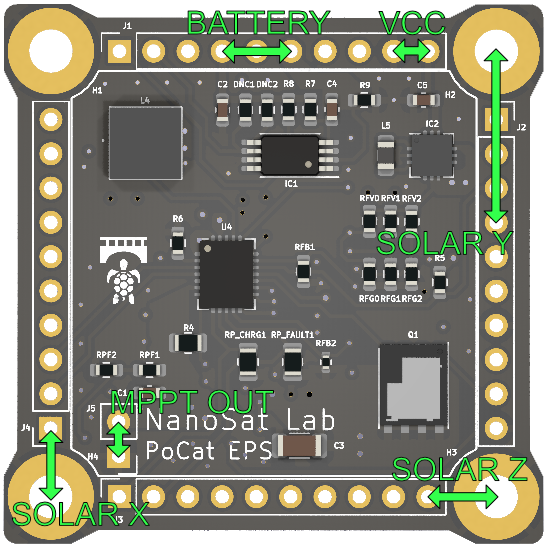
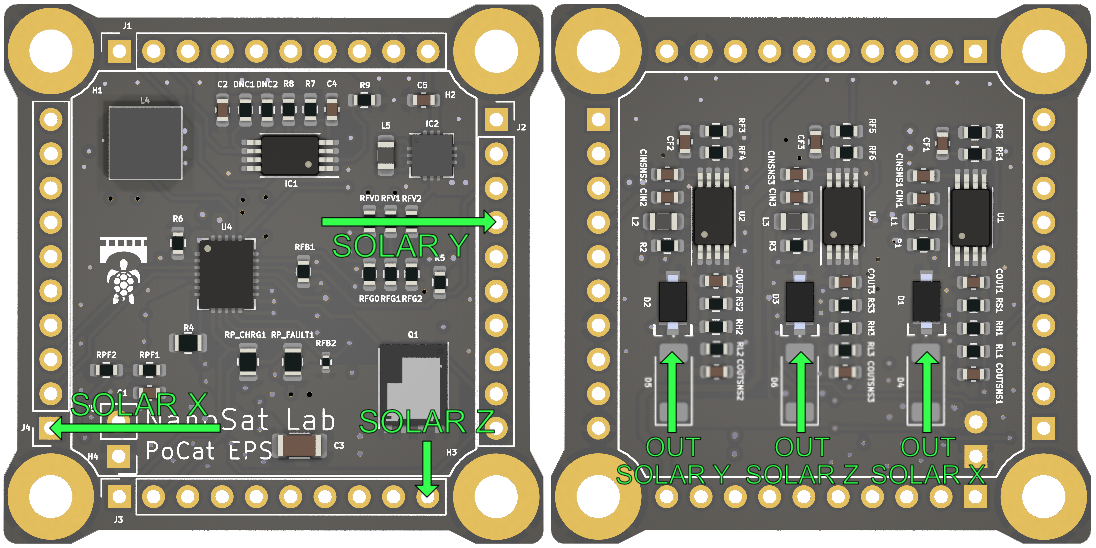
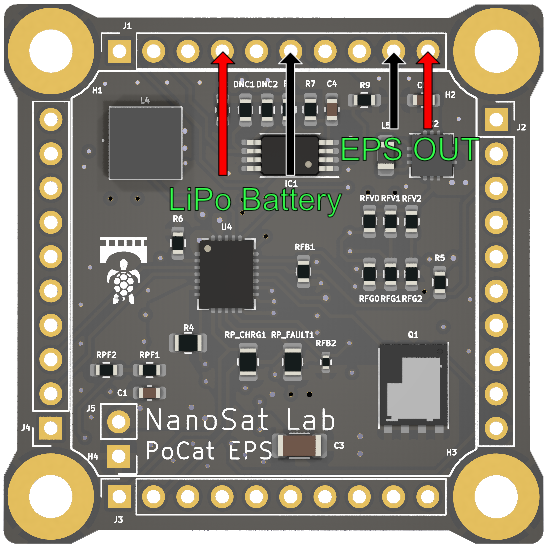
<table border="1" id="bkmrk-pin-name-description" style="border-collapse: collapse; width: 103.827%; height: 1223.1px;"><colgroup><col style="width: 15.9455%;"></col><col style="width: 11.0012%;"></col><col style="width: 14.0914%;"></col><col style="width: 18.9121%;"></col><col style="width: 40.0492%;"></col></colgroup><tbody><tr style="height: 29.7833px;"><td class="align-center" style="height: 29.7833px;">**Pin Name**</td><td class="align-center" style="height: 29.7833px;">**Connector**</td><td class="align-center" style="height: 29.7833px;">**Pin Number**</td><td class="align-center" style="height: 29.7833px;">**Type**</td><td class="align-center" style="height: 29.7833px;">**Description**</td></tr><tr style="height: 29.7833px;"><td style="height: 29.7833px;">SDA1</td><td style="height: 29.7833px;">J1</td><td style="height: 29.7833px;">1</td><td style="height: 29.7833px;">I2C</td><td style="height: 29.7833px;">I2C1 data bus</td></tr><tr style="height: 29.7833px;"><td style="height: 29.7833px;">SCL1</td><td style="height: 29.7833px;">J1</td><td style="height: 29.7833px;">2</td><td style="height: 29.7833px;">I2C</td><td style="height: 29.7833px;">I2C1 clock bus</td></tr><tr style="height: 29.7833px;"><td style="height: 29.7833px;">UART\_RX</td><td style="height: 29.7833px;">J1</td><td style="height: 29.7833px;">3</td><td style="height: 29.7833px;">UART</td><td style="height: 29.7833px;">UART RX bus</td></tr><tr style="height: 29.7833px;"><td style="height: 29.7833px;">KILLSWITCH+</td><td style="height: 29.7833px;">J1</td><td style="height: 29.7833px;">4</td><td style="height: 29.7833px;">Digital</td><td style="height: 29.7833px;">Killswitch positive terminal.</td></tr><tr style="height: 29.7833px;"><td style="height: 29.7833px;">PFO</td><td style="height: 29.7833px;">J1</td><td style="height: 29.7833px;">5</td><td style="height: 29.7833px;">Digital Input</td><td style="height: 29.7833px;">Battery fail status pin</td></tr><tr style="height: 29.7833px;"><td style="height: 29.7833px;">BATT-</td><td style="height: 29.7833px;">J1</td><td style="height: 29.7833px;">6</td><td style="height: 29.7833px;">Power</td><td style="height: 29.7833px;">Negative terminal of the battery</td></tr><tr style="height: 24.3833px;"><td style="height: 24.3833px;">NC</td><td style="height: 24.3833px;">J1</td><td style="height: 24.3833px;">7</td><td style="height: 24.3833px;">Not connected</td><td style="height: 24.3833px;">Free pin for testing &amp; debugging.</td></tr><tr style="height: 29.7833px;"><td style="height: 29.7833px;">UART\_TX</td><td style="height: 29.7833px;">J1</td><td style="height: 29.7833px;">8</td><td style="height: 29.7833px;">UART</td><td style="height: 29.7833px;">UART TX bus</td></tr><tr style="height: 29.7833px;"><td style="height: 29.7833px;">GND</td><td style="height: 29.7833px;">J1</td><td style="height: 29.7833px;">9</td><td style="height: 29.7833px;">Power</td><td style="height: 29.7833px;">Ground pin</td></tr><tr style="height: 29.7833px;"><td style="height: 29.7833px;">VCC</td><td style="height: 29.7833px;">J1</td><td style="height: 29.7833px;">10</td><td style="height: 29.7833px;">Power</td><td style="height: 29.7833px;">General Power line: 3.3V</td></tr><tr style="height: 29.7833px;"><td style="height: 29.7833px;">STM32\_PA15</td><td style="height: 29.7833px;">J2</td><td style="height: 29.7833px;">1</td><td style="height: 29.7833px;">GPIO</td><td style="height: 29.7833px;">Pin connected to STM32 PA15 pin, user defined</td></tr><tr style="height: 29.7833px;"><td style="height: 29.7833px;">SWO</td><td style="height: 29.7833px;">J2</td><td style="height: 29.7833px;">2</td><td style="height: 29.7833px;">Serial-Wire Data P</td><td style="height: 29.7833px;">STM32 debug pin</td></tr><tr style="height: 29.7833px;"><td style="height: 29.7833px;">BATT\_NTC</td><td style="height: 29.7833px;">J2</td><td style="height: 29.7833px;">3</td><td style="height: 29.7833px;">Analog</td><td style="height: 29.7833px;">Battery temperature NTC sensor</td></tr><tr style="height: 29.7833px;"><td style="height: 29.7833px;">SOLAR\_Y</td><td style="height: 29.7833px;">J2</td><td style="height: 29.7833px;">4</td><td style="height: 29.7833px;">Power</td><td style="height: 29.7833px;">Solar panel output voltage, Y axis</td></tr><tr style="height: 29.7833px;"><td style="height: 29.7833px;">SEL\_PH2</td><td style="height: 29.7833px;">J2</td><td style="height: 29.7833px;">5</td><td style="height: 29.7833px;">Digital Output</td><td style="height: 29.7833px;">Selector for the photodiode multiplexer</td></tr><tr style="height: 29.7833px;"><td style="height: 29.7833px;">SEL\_PH1</td><td style="height: 29.7833px;">J2</td><td style="height: 29.7833px;">6</td><td style="height: 29.7833px;">Digital Output</td><td style="height: 29.7833px;">Selector for the photodiode multiplexer</td></tr><tr style="height: 29.7833px;"><td style="height: 29.7833px;">GND</td><td style="height: 29.7833px;">J2</td><td style="height: 29.7833px;">7</td><td style="height: 29.7833px;">Power</td><td style="height: 29.7833px;">Ground pin</td></tr><tr style="height: 29.7833px;"><td style="height: 29.7833px;">HEATER\_PWR</td><td style="height: 29.7833px;">J2</td><td style="height: 29.7833px;">8</td><td style="height: 29.7833px;">Power</td><td style="height: 29.7833px;">Power line that goes to the heater</td></tr><tr style="height: 29.7833px;"><td style="height: 29.7833px;">BURNCOMMS</td><td style="height: 29.7833px;">J2</td><td style="height: 29.7833px;">9</td><td style="height: 29.7833px;">Digital Output</td><td style="height: 29.7833px;">COMMS antenna thermal knife enable</td></tr><tr style="height: 29.7833px;"><td style="height: 29.7833px;">GND</td><td style="height: 29.7833px;">J2</td><td style="height: 29.7833px;">10</td><td style="height: 29.7833px;">Power</td><td style="height: 29.7833px;">Ground pin</td></tr><tr style="height: 29.7833px;"><td style="height: 29.7833px;">SOLAR\_Z</td><td style="height: 29.7833px;">J3</td><td style="height: 29.7833px;">1</td><td style="height: 29.7833px;">Power</td><td style="height: 29.7833px;">Solar panel output voltage, Z axis</td></tr><tr style="height: 29.7833px;"><td style="height: 29.7833px;">STM32\_PB0</td><td style="height: 29.7833px;">J3</td><td style="height: 29.7833px;">2</td><td style="height: 29.7833px;">GPIO</td><td style="height: 29.7833px;">Pin connected to STM32 PB0 pin, user defined</td></tr><tr style="height: 29.7833px;"><td style="height: 29.7833px;">ADCS\_POWER</td><td style="height: 29.7833px;">J3</td><td style="height: 29.7833px;">3</td><td style="height: 29.7833px;">Power</td><td style="height: 29.7833px;">ADCS Power line: 3.3V</td></tr><tr style="height: 29.7833px;"><td style="height: 29.7833px;">RST\_DRIVERS</td><td style="height: 29.7833px;">J3</td><td style="height: 29.7833px;">4</td><td style="height: 29.7833px;">Digital Input</td><td style="height: 29.7833px;">Active low ADCS current driver reset</td></tr><tr style="height: 29.7833px;"><td style="height: 29.7833px;">ADC\_PH</td><td style="height: 29.7833px;">J3</td><td style="height: 29.7833px;">5</td><td style="height: 29.7833px;">Analog Input</td><td style="height: 29.7833px;">Photodiode array output</td></tr><tr style="height: 29.7833px;"><td style="height: 29.7833px;">P/L\_POWER</td><td style="height: 29.7833px;">J3</td><td style="height: 29.7833px;">6</td><td style="height: 29.7833px;">Power</td><td style="height: 29.7833px;">Payload Power line: 3.3V</td></tr><tr style="height: 29.7833px;"><td style="height: 29.7833px;">SEL\_PH0</td><td style="height: 29.7833px;">J3</td><td style="height: 29.7833px;">7</td><td style="height: 29.7833px;">Digital Output</td><td style="height: 29.7833px;">Selector for the photodiode multiplexer</td></tr><tr style="height: 29.7833px;"><td style="height: 29.7833px;">VCC\_UMBILICAL</td><td style="height: 29.7833px;">J3</td><td style="height: 29.7833px;">8</td><td style="height: 29.7833px;">Power</td><td style="height: 29.7833px;">Umbilical power line</td></tr><tr style="height: 29.7833px;"><td style="height: 29.7833px;">FAULT</td><td style="height: 29.7833px;">J3</td><td style="height: 29.7833px;">9</td><td style="height: 29.7833px;">Digital Input</td><td style="height: 29.7833px;">Battery charging fault status pin</td></tr><tr style="height: 29.7833px;"><td style="height: 29.7833px;">CHRG</td><td style="height: 29.7833px;">J3</td><td style="height: 29.7833px;">10</td><td style="height: 29.7833px;">Digital Input</td><td style="height: 29.7833px;">Battery charging monitoring pin</td></tr><tr style="height: 29.7833px;"><td style="height: 29.7833px;">SOLAR\_X</td><td style="height: 29.7833px;">J4</td><td style="height: 29.7833px;">1</td><td style="height: 29.7833px;">Power</td><td style="height: 29.7833px;">Solar panel output voltage, X axis</td></tr><tr style="height: 29.7833px;"><td style="height: 29.7833px;">CHRGOFF</td><td style="height: 29.7833px;">J4</td><td style="height: 29.7833px;">2</td><td style="height: 29.7833px;">Digital Output</td><td style="height: 29.7833px;">Battery charging enable pin</td></tr><tr style="height: 29.7833px;"><td style="height: 29.7833px;">CLPROG</td><td style="height: 29.7833px;">J4</td><td style="height: 29.7833px;">3</td><td style="height: 29.7833px;">Analog Input</td><td style="height: 29.7833px;">MPPT output current monitoring pin</td></tr><tr style="height: 29.7833px;"><td style="height: 29.7833px;">SDA3</td><td style="height: 29.7833px;">J4</td><td style="height: 29.7833px;">4</td><td style="height: 29.7833px;">I2C</td><td style="height: 29.7833px;">I2C3 data bus</td></tr><tr style="height: 29.7833px;"><td style="height: 29.7833px;">NRST</td><td style="height: 29.7833px;">J4</td><td style="height: 29.7833px;">5</td><td style="height: 29.7833px;">NRST</td><td style="height: 29.7833px;">STM32 NRST signal</td></tr><tr style="height: 34.5833px;"><td style="height: 34.5833px;">SWDIO</td><td style="height: 34.5833px;">J4</td><td style="height: 34.5833px;">6</td><td style="height: 34.5833px;">Serial-Wire Data I/O</td><td style="height: 34.5833px;">STM32 debug port</td></tr><tr style="height: 32.3667px;"><td style="height: 32.3667px;">SWCLK</td><td style="height: 32.3667px;">J4</td><td style="height: 32.3667px;">7</td><td style="height: 32.3667px;">Serial-Wire Clock</td><td style="height: 32.3667px;">STM32 debug port</td></tr><tr style="height: 29.7833px;"><td style="height: 29.7833px;">DAC\_PL</td><td style="height: 29.7833px;">J4</td><td style="height: 29.7833px;">8</td><td style="height: 29.7833px;">Analog Output</td><td style="height: 29.7833px;">STM32 DAC output for payload</td></tr><tr style="height: 29.7833px;"><td style="height: 29.7833px;">ADC\_PL</td><td style="height: 29.7833px;">J4</td><td style="height: 29.7833px;">9</td><td style="height: 29.7833px;">Analog Input</td><td style="height: 29.7833px;">STM32 ADC input for payload</td></tr><tr style="height: 29.7833px;"><td style="height: 29.7833px;">SCL3</td><td style="height: 29.7833px;">J4</td><td style="height: 29.7833px;">10</td><td style="height: 29.7833px;">I2C</td><td style="height: 29.7833px;">I2C3 clock bus</td></tr></tbody></table>

## I2C map

<table border="1" id="bkmrk-subsystem-device-add" style="border-collapse: collapse; width: 100%; height: 357.443px;"><colgroup><col style="width: 13.9679%;"></col><col style="width: 11.0012%;"></col><col style="width: 13.597%;"></col><col style="width: 16.0692%;"></col><col style="width: 45.3646%;"></col></colgroup><tbody><tr style="height: 29.7869px;"><td class="align-center" style="height: 29.7869px;">**Device**</td><td class="align-center" style="height: 29.7869px;">**Bus**</td><td class="align-center" style="height: 29.7869px;">**Address**</td><td class="align-center" style="height: 29.7869px;">**Board**</td><td class="align-center" style="height: 29.7869px;">**Description**</td></tr><tr style="height: 29.7869px;"><td class="align-center" style="height: 29.7869px;">TMP112</td><td class="align-center" style="height: 29.7869px;">I2C1-3.3 V</td><td class="align-center" style="height: 29.7869px;">1001000</td><td class="align-center" style="height: 29.7869px;">P/L3 frontend top</td><td class="align-center" style="height: 29.7869px;">Temperature sensor for payload 3</td></tr><tr><td class="align-center">TCN75-P/L2</td><td class="align-center">I2C1-3.3V</td><td class="align-center">1001000</td><td class="align-center">P/L2 frontend bot</td><td class="align-center">Temperature sensor for payload 2</td></tr><tr style="height: 29.7869px;"><td class="align-center" style="height: 29.7869px;">TCN75-Lat +X</td><td class="align-center" style="height: 29.7869px;">I2C3-3.3 V</td><td class="align-center" style="height: 29.7869px;">1001001</td><td class="align-center" style="height: 29.7869px;">Lateral +X</td><td class="align-center" style="height: 29.7869px;">Temperature sensor for PQ +X face</td></tr><tr style="height: 29.7869px;"><td class="align-center" style="height: 29.7869px;">TCN75-Lat +Z</td><td class="align-center" style="height: 29.7869px;">I2C3-3.3 V</td><td class="align-center" style="height: 29.7869px;">1001010</td><td class="align-center" style="height: 29.7869px;">Lateral +Z</td><td class="align-center" style="height: 29.7869px;">Temperature sensor for PQ +Z face</td></tr><tr style="height: 29.7869px;"><td class="align-center" style="height: 29.7869px;">TCN75-Lat -X</td><td class="align-center" style="height: 29.7869px;">I2C3-3.3 V</td><td class="align-center" style="height: 29.7869px;">1001011</td><td class="align-center" style="height: 29.7869px;">Lateral -X</td><td class="align-center" style="height: 29.7869px;">Temperature sensor for PQ -X face</td></tr><tr style="height: 29.7869px;"><td class="align-center" style="height: 29.7869px;">TCN75-Lat -Z</td><td class="align-center" style="height: 29.7869px;">I2C3-3.3 V</td><td class="align-center" style="height: 29.7869px;">1001100</td><td class="align-center" style="height: 29.7869px;">Lateral -Z</td><td class="align-center" style="height: 29.7869px;">Temperature sensor for PQ +Z face</td></tr><tr><td class="align-center" style="height: 29.7869px;">TCN75-Top +Y</td><td class="align-center" style="height: 29.7869px;">I2C3-3.3 V</td><td class="align-center" style="height: 29.7869px;">1001101</td><td class="align-center" style="height: 29.7869px;">Top +Y</td><td class="align-center" style="height: 29.7869px;">Temperature sensor for PQ +Y face</td></tr><tr style="height: 29.7869px;"><td class="align-center" style="height: 29.7869px;">TCN75-Bot -Y</td><td class="align-center" style="height: 29.7869px;">I2C3-3.3 V</td><td class="align-center" style="height: 29.7869px;">1001110</td><td class="align-center" style="height: 29.7869px;">Bottom -Y</td><td class="align-center" style="height: 29.7869px;">Temperature sensor for PQ -Y face</td></tr><tr style="height: 29.7869px;"><td class="align-center" style="height: 29.7869px;">TCN75-ADCS</td><td class="align-center" style="height: 29.7869px;">I2C3-3.3 V</td><td class="align-center" style="height: 29.7869px;">1001111</td><td class="align-center" style="height: 29.7869px;">ADCS</td><td class="align-center" style="height: 29.7869px;">Temperature sensor for the magnetorquer drivers</td></tr><tr style="height: 29.7869px;"><td class="align-center" style="height: 29.7869px;">BD2606MVV</td><td class="align-center" style="height: 29.7869px;">I2C3-3.3 V</td><td class="align-center" style="height: 29.7869px;">1100110</td><td class="align-center" style="height: 29.7869px;">ADCS</td><td class="align-center" style="height: 29.7869px;">Magnetorquer driver</td></tr><tr><td class="align-center">MMC5983MA</td><td class="align-center">I2C3-3.3V</td><td class="align-center">0110000</td><td class="align-center">ADCS</td><td class="align-center">Magnetometer</td></tr><tr style="height: 29.7869px;"><td class="align-center" style="height: 29.7869px;">IIM-42652</td><td class="align-center" style="height: 29.7869px;">I2C3-3.3 V</td><td class="align-center" style="height: 29.7869px;">1101000</td><td class="align-center" style="height: 29.7869px;">ADCS</td><td class="align-center" style="height: 29.7869px;">Inertial Momentum Unit</td></tr><tr style="height: 29.7869px;"><td class="align-center" style="height: 29.7869px;">DS2782</td><td class="align-center" style="height: 29.7869px;">I2C3-3.3 V</td><td class="align-center" style="height: 29.7869px;">0110100</td><td class="align-center" style="height: 29.7869px;">EPS</td><td class="align-center" style="height: 29.7869px;">Battery sensor</td></tr></tbody></table>

# Attitude Determination and Control System (ADCS)


# Subsystem Description

<h2 id="bkmrk-document-scope">Document scope</h2>
<p id="bkmrk-%C2%A0">In satellite systems, the ADCS is essential to maintain the proper orientation and stability of the spacecraft. This section will initially present the ADCS of the project, presenting some inicial concepts needed for understanding the theory and finishing with some requirements and the physical architecture of the ADCS with other subsystems.</p>
<h2 id="bkmrk-state-of-the-art">State of the art</h2>
<p id="bkmrk-the-limited-space-an" style="text-align: justify;">The limited space and power constraints of the PocketQubes pose significant challenges for the design and implementation of subsystems, particularly the ADCS. Thanks to the rapid development of micro-electronics, micro electromechanical systems and integrated circuits, the miniaturization of PQ technology is accelerating.&nbsp;</p>
<p id="bkmrk-the-adcs-is-formed-b" style="text-align: justify;">The ADCS is formed by the attitude determination part, which is the responsible of determine the 3D orientation of the PQ. It uses sensors to obtain information about the environment to determine its orientation. The most common sensors used are magnetometers, Sun sensors, earth sensors, gyroscopes and star trackers. The ADCS that has been developed in this project, is formed by a gyroscope, a magnetometer and photodiodes used as Sun sensors.</p>
<p id="bkmrk-concerning-attitude-" style="text-align: justify;">Concerning attitude control, it can be achieved passively using magnets located inside the PQ and gravity-gradient stabilization. Additionally, active attitude control can be implemented with actuators such as reaction wheels or magnetorquers. Magnetorquers are the most common actuators used in PQ and will be used in this project. Because of the extremely tight available space, they will be incorporated into the internal layers of the Solar Panels PCBs.</p>
<h2 id="bkmrk-initial-concepts" style="text-align: justify;">Initial concepts</h2>
<h3 id="bkmrk-coordinate-reference" style="text-align: justify;">Coordinate reference frame</h3>
<p id="bkmrk-in-order-to-understa">In order to understand this subsystem, some terms must be defined:</p>
<ul id="bkmrk-frame%3A-coordinate-sy">
<li class="null"><strong>Frame:</strong> Coordinate system of the 3D space that follows the right-hand&nbsp;rule.</li>
<li class="null"><strong>Body frame: </strong>Cartesian frame with its origin at the centre of mass of the&nbsp;satellite.</li>
<li class="null"><strong>Reference frame:</strong> A determined known frame.</li>
<li class="null"><strong>v<sub>b</sub>:</strong> Representation of vector v in the body frame.<br></li>
<li class="null"><strong>v<sub>r</sub>: </strong>Representation of vector v in the reference frame.</li>
</ul>
<p id="bkmrk-it-is-recommended-fo" style="text-align: justify;">It is recommended for the reader to understand a vector as a unique entity in the 3D space. It is essential to distinguish between the vector entity, and the representation of the vector with respect to a frame. The representation of the vector will vary depending.</p>
<h4 id="bkmrk-inertial-frame">Inertial frame</h4>
<p id="bkmrk-as-an-inertial-frame">As an inertial frame, the Earth Centered Inertial frame (ECI) will be used. It is a global cartesian reference frame that has its origin at the center of the Earth. <a href="https://wiki.nanosatlab.space/uploads/images/gallery/2024-10/eci.png" target="_blank" rel="noopener"> <img class="align-right" src="https://wiki.nanosatlab.space/uploads/images/gallery/2024-10/scaled-1680-/eci.png" alt="ECI.png" width="316" height="217"> </a></p>
<ul id="bkmrk-x-axis-points-to-the">
<li class="null">X axis points to the Vernal Equinox.</li>
<li class="null">Y axis completes the set with the right-hand rule.</li>
<li class="null">Z axis aligned with the Earth&rsquo;s rotation axis.</li>
</ul>
<p id="bkmrk-%C2%A0-1"></p>
<p id="bkmrk-%C2%A0-2"></p>
<p id="bkmrk-%C2%A0-3"></p>
<p id="bkmrk-" class="align-right">&nbsp; &nbsp; &nbsp; &nbsp; &nbsp; &nbsp; &nbsp; &nbsp; &nbsp; &nbsp; &nbsp; &nbsp; &nbsp; &nbsp; &nbsp; &nbsp; &nbsp; &nbsp; &nbsp; &nbsp; &nbsp; &nbsp; &nbsp; &nbsp; &nbsp; &nbsp; &nbsp; &nbsp; &nbsp; &nbsp; &nbsp; &nbsp; &nbsp; &nbsp; &nbsp; &nbsp; &nbsp; &nbsp; &nbsp; &nbsp; &nbsp; &nbsp; &nbsp; &nbsp; &nbsp; &nbsp; &nbsp; &nbsp; &nbsp; &nbsp; &nbsp; &nbsp; &nbsp; &nbsp; &nbsp; &nbsp; &nbsp; &nbsp; &nbsp; &nbsp; &nbsp; &nbsp; &nbsp; &nbsp; &nbsp; &nbsp; &nbsp;Figure 1: ECI frame chematic&nbsp; &nbsp; &nbsp; &nbsp; &nbsp; &nbsp; &nbsp;&nbsp;</p>
<h4 id="bkmrk-body-frame">Body frame</h4>
<p id="bkmrk-the-body-frame-will-" style="text-align: justify;">The body frame will have its origin at the centre of the PocketQube. The axis definition is the following:</p>
<ul id="bkmrk-x-axis-aligned-with-">
<li class="null" style="text-align: justify;">X axis aligned with the PocketQube width, parallel to the sliding plate and perpendicular to the direction of<br>insertion into the PocketQube deployer.</li>
<li class="null" style="text-align: justify;">Y axis aligned with the PocketQube height direction, pointing upwards from the sliding plate.</li>
<li class="null" style="text-align: justify;">Z axis aligned with the PocketQube length, the direction of insertion into the PocketQube deployer and<br>completing the right handed reference frame.</li>
</ul>
<p id="bkmrk--1"><a href="https://wiki.nanosatlab.space/uploads/images/gallery/2024-10/axis-pq.png" target="_blank" rel="noopener"><img class="align-center" src="https://wiki.nanosatlab.space/uploads/images/gallery/2024-10/scaled-1680-/axis-pq.png" alt="Axis_PQ.png"></a></p>
<p id="bkmrk-%C2%A0-%C2%A0-%C2%A0-%C2%A0-%C2%A0-%C2%A0-%C2%A0-%C2%A0-%C2%A0-%C2%A0-">&nbsp; &nbsp; &nbsp; &nbsp; &nbsp; &nbsp; &nbsp; &nbsp; &nbsp; &nbsp; &nbsp; &nbsp; &nbsp; &nbsp; &nbsp; &nbsp; &nbsp; &nbsp; &nbsp; &nbsp; &nbsp; &nbsp; &nbsp; &nbsp; &nbsp; &nbsp; &nbsp; &nbsp; &nbsp; &nbsp; &nbsp; &nbsp; &nbsp; &nbsp; &nbsp; &nbsp; &nbsp; &nbsp; &nbsp; &nbsp;Figure 2: Satellite body frame schematic</p>
<h3 id="bkmrk-quaternions">Quaternions</h3>
<p id="bkmrk-quaternions-are-a-ma" style="text-align: justify;">Quaternions are a mathematical concept equivalent to a rotation matrix. They are used in software for their computational efficiency and to avoid singularities. According to Euler&rsquo;s Theorem, any rotation is a rotation about a fixed axis, which is represented by the unit vector 𝐞. The angle of rotation is represented by <strong>𝜃</strong>. In other words, for any rotation matrix 𝐀, there is a unique 𝐞 and 𝜃 that uniquely define the rotation with respect to the right-hand convention. A quaternion 𝐪 is a four-dimensional vector where the first component is called the scalar part, and the last three components are the vector part. The quaternion is related to the Euler axis-angle in the following manner:</p>
<p id="bkmrk--2"><a href="https://wiki.nanosatlab.space/uploads/images/gallery/2024-10/cecimage.png" target="_blank" rel="noopener"><img class="align-center" src="https://wiki.nanosatlab.space/uploads/images/gallery/2024-10/scaled-1680-/cecimage.png" alt="image.png" width="139" height="74"></a></p>
<p id="bkmrk-if-%F0%9D%90%B4%F0%9D%91%96%F0%9D%91%97-is-the-elemen">If <strong>𝐴𝑖𝑗</strong> is the element of 𝐀 in its <strong>𝑖-th</strong> row and <strong>𝑗-th</strong> column, then:</p>
<p id="bkmrk-%C2%A0-%C2%A0-%C2%A0-%C2%A0-%C2%A0-%C2%A0-%C2%A0-%C2%A0-%C2%A0-%C2%A0--1" class="align-center"><a href="https://wiki.nanosatlab.space/uploads/images/gallery/2024-10/BFbimage.png" target="_blank" rel="noopener"><img src="https://wiki.nanosatlab.space/uploads/images/gallery/2024-10/scaled-1680-/BFbimage.png" alt="image.png" width="215" height="75"></a> &nbsp; &nbsp; &nbsp; &nbsp; &nbsp; &nbsp; &nbsp; &nbsp; &nbsp; &nbsp; &nbsp; <a href="https://wiki.nanosatlab.space/uploads/images/gallery/2024-10/j0zimage.png" target="_blank" rel="noopener"><img src="https://wiki.nanosatlab.space/uploads/images/gallery/2024-10/scaled-1680-/j0zimage.png" alt="image.png" width="206" height="99"></a></p>
<p id="bkmrk-therefore%2C-a-quatern" class="align-left">Therefore, a quaternion 𝐪 can be expressed as a function of its rotation matrix 𝐀 using&nbsp;these properties:</p>
<p id="bkmrk--3"><a href="https://wiki.nanosatlab.space/uploads/images/gallery/2024-10/Obzimage.png" target="_blank" rel="noopener"><img class="align-center" src="https://wiki.nanosatlab.space/uploads/images/gallery/2024-10/scaled-1680-/Obzimage.png" alt="image.png" width="292" height="126"></a></p>
<p id="bkmrk-where-%F0%9D%9C%80-is-the-vecto" style="text-align: justify;">Where <strong>𝜀</strong> is the vectorial part of the quaternion. Note that if 𝜃 = 180&ordm;, the vector 𝐞 is indeterminate. In such cases, 𝐞 is parallel to any non-zero column of 𝐀. Additionally, it&rsquo;s crucial to maintain the sign convention.</p>
<p id="bkmrk-for-any-rotation-mat" style="text-align: justify;">For any rotation matrix, there exist two corresponding quaternions that differ only in&nbsp;sign. For instance, a rotation of 𝜃 = 180&ordm; and another of 𝜃 = 540&ordm; are equivalent, but&nbsp;the resulting quaternions are opposite. To uphold the sign convention, it&rsquo;s necessary&nbsp;to ensure that the scalar part is positive, i.e., to enforce 𝜃 ≦ 180&ordm;. This is achieved by&nbsp;changing the sign of the entire quaternion if the scalar part is negative.</p>
<p id="bkmrk-there-is-an-essentia" style="text-align: justify;">There is an essential property for achieving attitude control in the ADCS. If there are two quaternions, <span class="katex"><strong><span class="katex-mathml">q1</span></strong><span class="katex-html" aria-hidden="true"><span class="base"><span class="mord"><span class="msupsub"><span class="vlist-t vlist-t2"><span class="vlist-r"><span class="vlist-s">​</span></span></span></span></span></span></span></span> and <span class="katex"><strong><span class="katex-mathml">q2</span></strong><span class="katex-html" aria-hidden="true"><span class="base"><span class="mord"><span class="msupsub"><span class="vlist-t vlist-t2"><span class="vlist-r"><span class="vlist-s">​</span></span></span></span></span></span></span></span>, and <span class="katex"><strong><span class="katex-mathml">q1</span></strong><span class="katex-html" aria-hidden="true"><span class="base"><span class="mord"><span class="msupsub"><span class="vlist-t vlist-t2"><span class="vlist-r"><span class="vlist-s">​</span></span></span></span></span></span></span></span> is conjugated and then multiplied by <strong><span class="katex"><span class="katex-mathml">q2</span></span></strong>, the resulting quaternion represents the relative rotation between the two quaternions.</p>
<p id="bkmrk--4"><a href="https://wiki.nanosatlab.space/uploads/images/gallery/2024-11/YFximage.png" target="_blank" rel="noopener"><img class="align-center" src="https://wiki.nanosatlab.space/uploads/images/gallery/2024-11/scaled-1680-/YFximage.png" alt="image.png"></a><br></p>
<p id="bkmrk-in-this-case-qerror-">In this case <strong>qerror </strong>would be the quaternion that represents the rotation needed to align <strong>q1</strong> to <strong>q2</strong>. The qerror can also be named <strong>error quaternion</strong>.</p>
<p id="bkmrk-%C2%A0-4" style="text-align: justify;"></p>
<h3 id="bkmrk-orbital-propagator">Orbital propagator</h3>
<p id="bkmrk-an-orbital-propagato" style="text-align: justify;">An orbital propagator is used to determine the position and velocity of the satellite at&nbsp;a given instant of time, given by the initial position of the satellite and the velocity at&nbsp;this position. In the satellite we are using the J2 propagator, whose main property is<br>that it accounts for the Earth&rsquo;s oblateness while propagating the orbit. Additionally, this&nbsp;propagator is ideally for our PQ because of the balance of memory requirements and&nbsp;complexity fits in the OBC.</p>
<p id="bkmrk-%C2%A0-5" style="text-align: justify;">There are more precise orbital propagators like the SGP4 model which accounts for atmospheric drag and other secular effects apart from the Earth oblateness, but it is much&nbsp;more complex, and it requires more memory than the one available in our satellite.</p>
<h3 id="bkmrk-geomagnetic-field-mo">Geomagnetic field model</h3>
<p id="bkmrk-the-geomagnetic-fiel" style="text-align: justify;">The geomagnetic field model is essential for calculating the Earth&rsquo;s magnetic field at&nbsp;specific coordinates and dates. This model helps to understand and predict the variations&nbsp;in the Earth&rsquo;s magnetic field.&nbsp;In this work, the IGRF model is used, but simplified up to order 2 , commonly referred to as the Tilted Dipole model. The Tilted Dipole model approximates the Earth&rsquo;s magnetic&nbsp;field as a dipole that is tilted relative to the Earth&rsquo;s rotational axis. Despite its simplicity,&nbsp;this model provides a reasonably accurate representation of the geomagnetic field for&nbsp;many practical purposes.&nbsp;The coefficients for the Tilted Dipole model are derived from the IGRF model, which is&nbsp;updated every five years based on satellite and ground-based observations .</p>
<h2 id="bkmrk-physical-architectur">Functional architecture</h2>
<p id="bkmrk--5"><a href="https://wiki.nanosatlab.space/uploads/images/gallery/2024-10/figure-3-3-2-1-drawio.png" target="_blank" rel="noopener"><img class="align-center" src="https://wiki.nanosatlab.space/uploads/images/gallery/2024-10/scaled-1680-/figure-3-3-2-1-drawio.png" alt="Figure 3_3_2.1.drawio.png"></a></p>
<p id="bkmrk-%C2%A0-%C2%A0-%C2%A0-%C2%A0-%C2%A0-%C2%A0-%C2%A0-%C2%A0-%C2%A0-%C2%A0--2">&nbsp; &nbsp; &nbsp; &nbsp; &nbsp; &nbsp; &nbsp; &nbsp; &nbsp; &nbsp; &nbsp; &nbsp; &nbsp; &nbsp; &nbsp; &nbsp; &nbsp; &nbsp; &nbsp; &nbsp; &nbsp; &nbsp; &nbsp; &nbsp; &nbsp; &nbsp; &nbsp; &nbsp; &nbsp; Figure 3: ADCS functional architecture schematic with the rest of the subsystems</p>
<p id="bkmrk-the-adcs-in-the-pock" style="text-align: justify;">The ADCS in the PocketQube serves as an interface between the outer boards and the inner PCBs of the satellite. As shown in [Figure 3], the ADCS is connected to three main structural components: the outer boards, the inner +Y magnetorquer PCB, and the on-board computer (OBC).</p>
<p id="bkmrk-on-the-outer-boards%2C" style="text-align: justify;">On the outer boards, there are magnetorquers used for the &plusmn;X, -Y, and &plusmn;Z axis, photodiodes, and some temperature sensors. Additionally, the +Y magnetorquer is connected just below the ADCS PCB. This location is chosen due to space constraints within the PocketQube, as it is not optimal to place it on the top board, where the payload will be inserted.</p>
<p id="bkmrk-finally%2C-the-adcs-is" style="text-align: justify;">Finally, the ADCS is connected to the OBC, which is responsible for processing all data gathered by the ADCS. The connections between the ADCS and the OBC are not simple power lines each has a specific function:</p>
<ul id="bkmrk-i2c-conection%3A-this-">
<li class="null" style="text-align: justify;"><strong>I2C conection: </strong>This connection is primarily used for transmitting data from the sensors to the OBC using the I2C protocol, enabling full-duplex communication between the sensors and the OBC.</li>
<li class="null" style="text-align: justify;"><strong>GPIOD conection: </strong>The GPIOD is an output from the OBC used to send signals of 0 volts or 3.3 volts. In the ADCS, it serves as an input for the multiplexer.</li>
<li class="null" style="text-align: justify;"><strong>Analog to digital converter (ADC):</strong> This is an input to the OBC used to convert the signal from the operational amplifier multiplexer into a digital value.</li>
</ul>
<h2 id="bkmrk-requirements">Requirements</h2>
<table id="bkmrk-ss-id-description-ad" style="width: 100%;">
<thead>
<tr>
<th style="width: 6.79852%;">SS</th>
<th style="width: 13.1026%;">ID</th>
<th style="width: 80.0989%;">DESCRIPTION</th>
</tr>
</thead>
<tbody>
<tr>
<td style="width: 6.79852%;">ADCS</td>
<td style="height: 29.7969px; width: 13.1026%;">ADCS-0000</td>
<td style="height: 29.7969px; width: 80.0989%;">The communication between the chips of the ADCS and the OBC must be conducted via I2C.</td>
</tr>
<tr>
<td style="width: 6.79852%;">ADCS</td>
<td style="height: 29.7969px; width: 13.1026%;">ADCS-0010</td>
<td style="height: 29.7969px; width: 80.0989%;">The PQ must be able to detumble using the BDOT algorithm.</td>
</tr>
<tr>
<td style="width: 6.79852%;">ADCS</td>
<td style="height: 29.7969px; width: 13.1026%;">ADCS-0020</td>
<td style="height: 29.7969px; width: 80.0989%;">The satellite must be able to point the Payload at the nadir angle using the magnetic control law.</td>
</tr>
<tr>
<td style="width: 6.79852%;">ADCS</td>
<td style="height: 29.7969px; width: 13.1026%;">ADCS-0030</td>
<td style="height: 29.7969px; width: 80.0989%;">The ADCS must be able to estimate the satellite's position in an inertial reference frame.</td>
</tr>
<tr>
<td style="width: 6.79852%;">ADCS</td>
<td style="height: 29.7969px; width: 13.1026%;">ADCS-0040</td>
<td style="height: 29.7969px; width: 80.0989%;">The ADCS must be able to obtain the magnetic field in an inertial reference frame.</td>
</tr>
<tr>
<td style="width: 6.79852%;">ADCS</td>
<td style="height: 29.7969px; width: 13.1026%;">ADCS-0050</td>
<td style="height: 29.7969px; width: 80.0989%;">&nbsp;All sensors used in the ADCS must be calibrated and characterized by temperature.</td>
</tr>
<tr>
<td style="width: 6.79852%;">ADCS</td>
<td style="height: 29.7969px; width: 13.1026%;">ADCS-0060</td>
<td style="height: 29.7969px; width: 80.0989%;">The magnetorquers must have a reliable current supply to ensure optimal performance.</td>
</tr>
<tr>
<td style="width: 6.79852%;">ADCS</td>
<td style="height: 29.7969px; width: 13.1026%;">ADCS-0070</td>
<td style="height: 29.7969px; width: 80.0989%;">The ADCS must have a fail-safe mechanism to enter a safe mode in case of anomalies.</td>
</tr>
<tr>
<td style="width: 6.79852%;">ADCS</td>
<td style="height: 29.7969px; width: 13.1026%;">ADCS-0080</td>
<td style="height: 29.7969px; width: 80.0989%;">The ADCS sensor's calibration parameters must be able to be modified via telecommand.</td>
</tr>
</tbody>
</table>
<p id="bkmrk--6"></p>

# Hardware Design

<h2 id="bkmrk-introduction">Introduction</h2>
<p id="bkmrk-the-hardware-of-the-">The hardware of the Attitude Determination and Control System (ADCS) is essential for the satellite&rsquo;s operation. Without it, the satellite would be unable to gather critical data about its orientation and environment in space, which is necessary for executing various functions. The ADCS hardware enables the satellite to determine its position, control its orientation, and stabilize itself, ensuring that it can carry out mission objectives such as data collection and communication.</p>
<h2 id="bkmrk-design-choices">Design Choices</h2>
<p id="bkmrk-the-philosophy-used-" class="align-justify">The design of the ADCS follows a simple philosophy, all components and sensors are selected for their low power use, good performance, and reasonable cost. The goal was to choose parts that are reliable and fit within the PocketQube&rsquo;s limited power and budget.</p>
<h3 id="bkmrk-actuator-selection">Actuator selection</h3>
<p id="bkmrk-there-were-several-o">There were several options for implementing an actuator in the PocketQube. As explained in the ADCS introduction section, there are two ways to achieve attitude control: passive control, using a magnet as an actuator, and active control, using reaction wheels or magnetorquers.</p>
<p id="bkmrk-the-passive-option-w">The passive option was considered, as it is the primary method used for achieving attitude control. However, one drawback of this approach is the limited control over pointing precision.</p>
<p id="bkmrk-for-the-active-optio">For the active option, using reaction wheels was discarded because the size and power consumption requirements of a PocketQube are incompatible with this approach. Thus, the remaining option for active attitude control was the magnetorquers. This technique is relatively new, and this would be one of the first PocketQubes to implement it. Additionally, it offers the pointing accuracy needed to conduct the required measurements. For these reasons, magnetorquers were chosen.</p>
<h3 id="bkmrk-2.2-sensors-election">Sensors election</h3>
<p id="bkmrk-regarding-the-sensor">Regarding the sensors, the main objective was to find ones compatible with the I2C protocol.</p>
<h5 id="bkmrk-why-the-i2c-protocol">Why the I2C protocol is the selected in the Satellite?</h5>
<p id="bkmrk-the-i2c-protocol-is-">The I2C protocol is mainly used for enabling communication between multiple integrated circuits on the same board with minimal wiring. It is based on a two-wire serial communication protocol, which uses one line for data, called SDA, and another for the clock signal, called SCL, allowing for simple, low-speed data exchange over short distances.</p>
<p id="bkmrk-i2c-is-used-in-appli">I2C is used in applications where several peripheral devices (like sensors, memory devices, or display drivers) need to communicate with a central microcontroller or processor. It also has low power consumption, which is crucial in satellite applications.</p>
<h4 id="bkmrk-magnetometer" class="align-left"><span style="white-space: pre-wrap;">2.2.1 Magnetometer&nbsp;</span></h4>
<p id="bkmrk-the-magnetometer-ic-" class="align-justify"><span style="white-space: pre-wrap;">The magnetometer IC that will be used for the ADCS is the MMC5983MA, developed by MEMSIC, is a high-precision, 3-axis magnetometer known for its small size and low power consumption, making it particularly suitable for small satellite applications like PocketQubes. </span><strong><strong style="white-space: pre-wrap;">Datasheet: </strong></strong><a href="https://www.mouser.es/ProductDetail/MEMSIC/MMC5983MA?qs=B6kkDfuK7%2FD5qasHMdEt2g%3D%3D&amp;srsltid=AfmBOoolEfvipVy7FJLoqHgLsC1AVTKanAlYcqGP-y0GW5scunskQM-J" target="_blank" rel="noopener"><strong><strong>MMC5983MA</strong></strong></a></p>
<table id="bkmrk-attribute-specificat" class="align-left" style="width: 36.6667%; height: 335.766px;"><colgroup><col style="width: 52.6882%;"><col style="width: 144px;"></colgroup>
<tbody>
<tr style="height: 29.7969px;">
<th class="align-left" style="width: 52.6882%; height: 29.7969px;">
<p class="align-left">Attribute</p>
</th>
<th class="align-left" style="width: 47.1064%; height: 29.7969px;">
<p class="align-left">Specification</p>
</th>
</tr>
<tr style="height: 29.7969px;">
<td class="align-left" style="width: 52.6882%; height: 29.7969px;">
<p class="align-left">Name</p>
</td>
<td class="align-left" style="width: 47.1064%; height: 29.7969px;">
<p class="align-left">MMC5983MA</p>
</td>
</tr>
<tr style="height: 46.5938px;">
<td class="align-left" style="width: 52.6882%; height: 46.5938px;">
<p class="align-left">Supplier/Manufacturer</p>
</td>
<td class="align-left" style="width: 47.1064%; height: 46.5938px;">
<p class="align-left">Mouser, Memsic</p>
</td>
</tr>
<tr style="height: 29.7969px;">
<td class="align-left" style="width: 52.6882%; height: 29.7969px;">
<p class="align-left">Power Consumption</p>
</td>
<td class="align-left" style="width: 47.1064%; height: 29.7969px;">
<p class="align-left">212.19 &mu;W</p>
</td>
</tr>
<tr style="height: 29.7969px;">
<td class="align-left" style="width: 52.6882%; height: 29.7969px;">
<p class="align-left">Field Range</p>
</td>
<td class="align-left" style="width: 47.1064%; height: 29.7969px;">
<p class="align-left">&plusmn; 8 G</p>
</td>
</tr>
<tr style="height: 29.7969px;">
<td class="align-left" style="width: 52.6882%; height: 29.7969px;">
<p class="align-left">Resolution</p>
</td>
<td class="align-left" style="width: 47.1064%; height: 29.7969px;">
<p class="align-left">0.25 mG per LSB</p>
</td>
</tr>
<tr style="height: 29.7969px;">
<td class="align-left" style="width: 52.6882%; height: 29.7969px;">
<p class="align-left">Operation Bits</p>
</td>
<td class="align-left" style="width: 47.1064%; height: 29.7969px;">
<p class="align-left">16 bits</p>
</td>
</tr>
<tr style="height: 63.5938px;">
<td class="align-left" style="width: 52.6882%; height: 63.5938px;">
<p class="align-left">Sensitivity</p>
</td>
<td class="align-left" style="width: 47.1064%; height: 63.5938px;">
<p class="align-left">&plusmn; 4096 Counts/G</p>
</td>
</tr>
<tr style="height: 46.7969px;">
<td class="align-left" style="width: 52.6882%; height: 46.7969px;">
<p class="align-left">RMS Noise</p>
</td>
<td class="align-left" style="width: 47.1064%; height: 46.7969px;">
<p class="align-left">0.4 mG</p>
</td>
</tr>
</tbody>
</table>
<p id="bkmrk-" class="align-left"><a href="https://wiki.nanosatlab.space/uploads/images/gallery/2024-11/scaled-1680-/figure-3-3-2-2.png" target="_blank" rel="noopener"><img class="align-center" src="https://wiki.nanosatlab.space/uploads/images/gallery/2024-11/scaled-1680-/figure-3-3-2-2.png" alt="Figure 3_3_2.2.png" width="307"></a></p>
<h4 id="bkmrk-2.2.2-gyroscope%C2%A0"><span style="white-space: pre-wrap;">2.2.2 Gyroscope&nbsp;</span></h4>
<p id="bkmrk-%C2%A0" class="align-left"><span style="white-space: pre-wrap;">The Gyroscope IC that will be used for the ADCS is the IIM-42652, manufactured by TDK InvenSense, is a compact, high-performance 6-axis Inertial Measurement Unit (IMU) combining a 3-axis accelerometer and 3-axis gyroscope. Its design and capabilities make it well-suited for small satellites like PocketQubes, which require efficient, low-power, and reliable orientation and motion data for various tasks such as attitude determination, stabilization, and control. </span><strong><strong style="white-space: pre-wrap;">Datasheet: </strong></strong><a href="https://www.mouser.es/ProductDetail/TDK-InvenSense/IIM-42652?qs=CiayqK2gdcJdwMEsK7YW9Q%3D%3D&amp;srsltid=AfmBOooQgLCdj-TJUO-oGfkUxMYJVj1H6Fm9TOB7DYsMrJaHo7nFtnDU"><strong><strong>IIM-42652</strong></strong></a></p>
<table id="bkmrk-attribute-specificat-1" class="align-left"><colgroup><col><col></colgroup>
<tbody>
<tr>
<th>
<p>Attribute</p>
</th>
<th>
<p>Specification</p>
</th>
</tr>
<tr>
<td>
<p>Name</p>
</td>
<td>
<p>IIM-42652</p>
</td>
</tr>
<tr>
<td>
<p>Supplier/Manufacturer</p>
</td>
<td>
<p>Mouser, TDK InvenSense</p>
</td>
</tr>
<tr>
<td>
<p>Power Consumption</p>
</td>
<td>
<p>1.91 mW</p>
</td>
</tr>
<tr>
<td>
<p>Scale Range</p>
</td>
<td>
<p>&plusmn;15.625 &deg;/s, &plusmn;31.25 &deg;/s,</p>
<p><span style="white-space: pre-wrap;"> &plusmn;62.5 &deg;/s, &plusmn;125 &deg;/s, &plusmn;250 &deg;/s</span></p>
</td>
</tr>
<tr>
<td>
<p>Operation Bits</p>
</td>
<td>
<p>16 bits</p>
</td>
</tr>
<tr>
<td>
<p>Sensitivity Scale Factor</p>
</td>
<td class="align-left">
<p class="align-left">2097.2 LSB/(&deg;/s), 1048.6 LSB/(&deg;/s),</p>
<p><span style="white-space: pre-wrap;"> 524.3 LSB/(&deg;/s), 262 LSB/(&deg;/s),</span></p>
<p>&ccedil; 131 LSB/(&deg;/s)</p>
</td>
</tr>
<tr>
<td>
<p>RMS Noise</p>
</td>
<td class="align-left">
<p class="align-left">0.038 &deg;/s-rms</p>
</td>
</tr>
</tbody>
</table>
<p id="bkmrk--1"><a href="https://wiki.nanosatlab.space/uploads/images/gallery/2024-11/scaled-1680-/figure-3-3-2-3.png" target="_blank" rel="noopener"><img src="https://wiki.nanosatlab.space/uploads/images/gallery/2024-11/scaled-1680-/figure-3-3-2-3.png" alt="Figure 3_3_2.3.png" width="292"></a></p>
<h4 id="bkmrk-2.2.3-temperature-se"><span style="white-space: pre-wrap;">2.2.3 Temperature Sensors&nbsp;</span></h4>
<p id="bkmrk-the-temperature-sens"><span style="white-space: pre-wrap;">The temperature sensors that will be used are named TCN75A, createdby Microchip Technology, designed for low-power applications and precise temperature measurement. Its compact size, low power usage, and simplicity make it suitable for use in small satellite platforms like PocketQubes, especially where basic thermal monitoring is needed. </span><strong><strong style="white-space: pre-wrap;">Datasheet: </strong></strong><a href="https://www.mouser.es/ProductDetail/Microchip-Technology/TCN75AVOA?qs=RnzODY3cU8uyxNch7Rq2Kw%3D%3D"><strong><strong>TCN75AVOA</strong></strong></a></p>
<table id="bkmrk-attribute-specificat-2" class="align-left"><colgroup><col><col></colgroup>
<tbody>
<tr>
<th>
<p>Attribute</p>
</th>
<th>
<p>Specification</p>
</th>
</tr>
<tr>
<td>
<p>Name</p>
</td>
<td>
<p>TCN75A</p>
</td>
</tr>
<tr>
<td>
<p>Supplier/Manufacturer</p>
</td>
<td>
<p>Mouser, Microchip Technology</p>
</td>
</tr>
<tr>
<td>
<p>Power Consumption</p>
</td>
<td>
<p>1.65 mW</p>
</td>
</tr>
<tr>
<td>
<p>Field Range</p>
</td>
<td>
<p>-40 &deg;C to 125 &deg;C</p>
</td>
</tr>
<tr>
<td>
<p>Accuracy</p>
</td>
<td>
<p>&plusmn;1 &deg;C</p>
</td>
</tr>
<tr>
<td>
<p>Resolution</p>
</td>
<td class="align-left">
<p class="align-left">0.0625 &deg;C to 0.5 &deg;C</p>
</td>
</tr>
<tr>
<td>
<p>Operation Bits</p>
</td>
<td class="align-left">
<p class="align-left">16 bits</p>
</td>
</tr>
</tbody>
</table>
<p id="bkmrk--2"><a href="https://wiki.nanosatlab.space/uploads/images/gallery/2024-11/scaled-1680-/figure-3-3-2-4.png" target="_blank" rel="noopener"><img src="https://wiki.nanosatlab.space/uploads/images/gallery/2024-11/scaled-1680-/figure-3-3-2-4.png" alt="Figure 3_3_2.4.png" width="277"></a></p>
<h4 id="bkmrk-2.2.4-photodiodes%C2%A0"><span style="white-space: pre-wrap;">2.2.4 Photodiodes&nbsp;</span></h4>
<p id="bkmrk-the-slcd-61n8-is-a-r"><span style="white-space: pre-wrap;">The SLCD-61N8 is a reliable and cost-effective silicon photodiode designed for light sensing and power generation. It provides visible to infrared sensitivity, high efficiency, low capacitance, and excellent durability. The choice of photodiode is flexible, and alternative models with similar wavelength sensitivity to sunlight can also be considered for use. </span><strong><strong style="white-space: pre-wrap;">Datasheet: </strong></strong><a title="" href="https://es.farnell.com/advanced-photonix/slcd-61n8/photodiode-planar-chip/dp/1218991?srsltid=AfmBOoptFjDwAB4FuKINqCnSZbkCw32HnSryCplaK-RBeWsVTnQvu2gE" target="_blank" rel="noopener">SLCD-61N8</a></p>
<table id="bkmrk-attribute-specificat-3" class="align-left"><colgroup><col><col></colgroup>
<tbody>
<tr>
<th>
<p>Attribute</p>
</th>
<th>
<p>Specification</p>
</th>
</tr>
<tr>
<td>
<p>Name</p>
</td>
<td>
<p>SLCD-61N8</p>
</td>
</tr>
<tr>
<td>
<p>Supplier/Manufacturer</p>
</td>
<td>
<p>Mouser, Advanced Photonix</p>
</td>
</tr>
<tr>
<td>
<p>Short Circuit Current</p>
</td>
<td>
<p>170 &mu;A</p>
</td>
</tr>
<tr>
<td>
<p>Open Circuit Voltage</p>
</td>
<td>
<p>0.4 V</p>
</td>
</tr>
<tr>
<td>
<p>Maximum Sensitivity Wavelength</p>
</td>
<td class="align-left">
<p class="align-left">930 nm</p>
</td>
</tr>
<tr>
<td>
<p>Acceptance Half Angle</p>
</td>
<td class="align-left">
<p class="align-left">60 deg</p>
</td>
</tr>
</tbody>
</table>
<p id="bkmrk--3"><a href="https://wiki.nanosatlab.space/uploads/images/gallery/2024-11/scaled-1680-/figure-3-3-2-5.png" target="_blank" rel="noopener"><img src="https://wiki.nanosatlab.space/uploads/images/gallery/2024-11/scaled-1680-/figure-3-3-2-5.png" alt="Figure 3_3_2.5.png" width="277"></a></p>
<h2 id="bkmrk-pcb-design">PCB Design</h2>
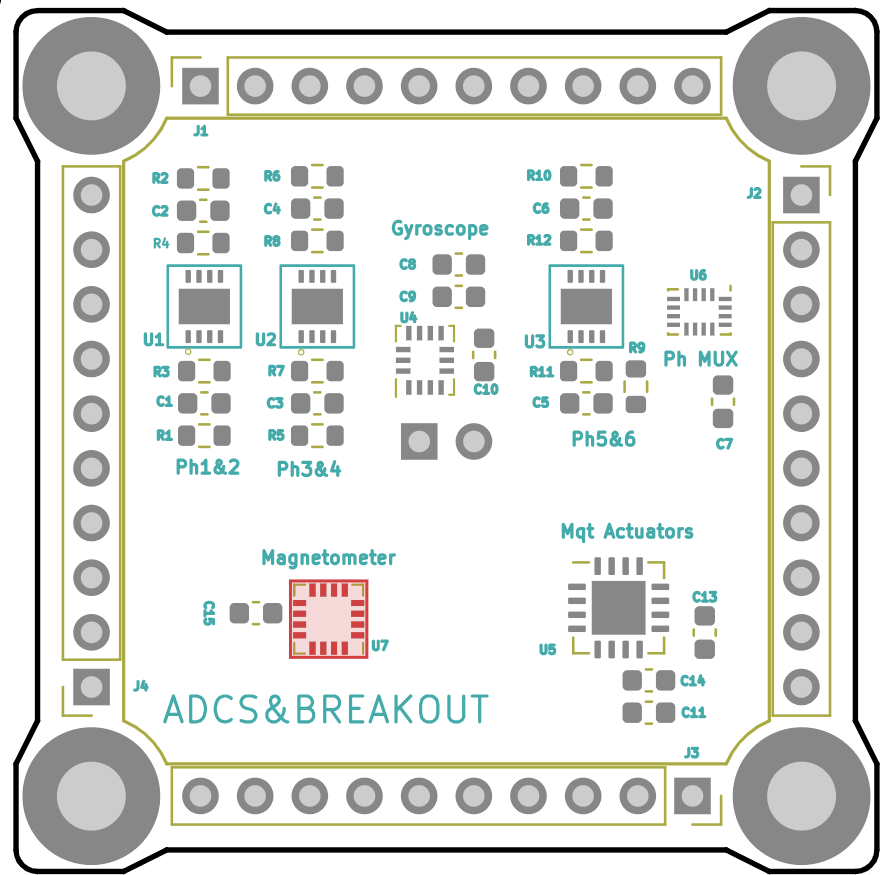
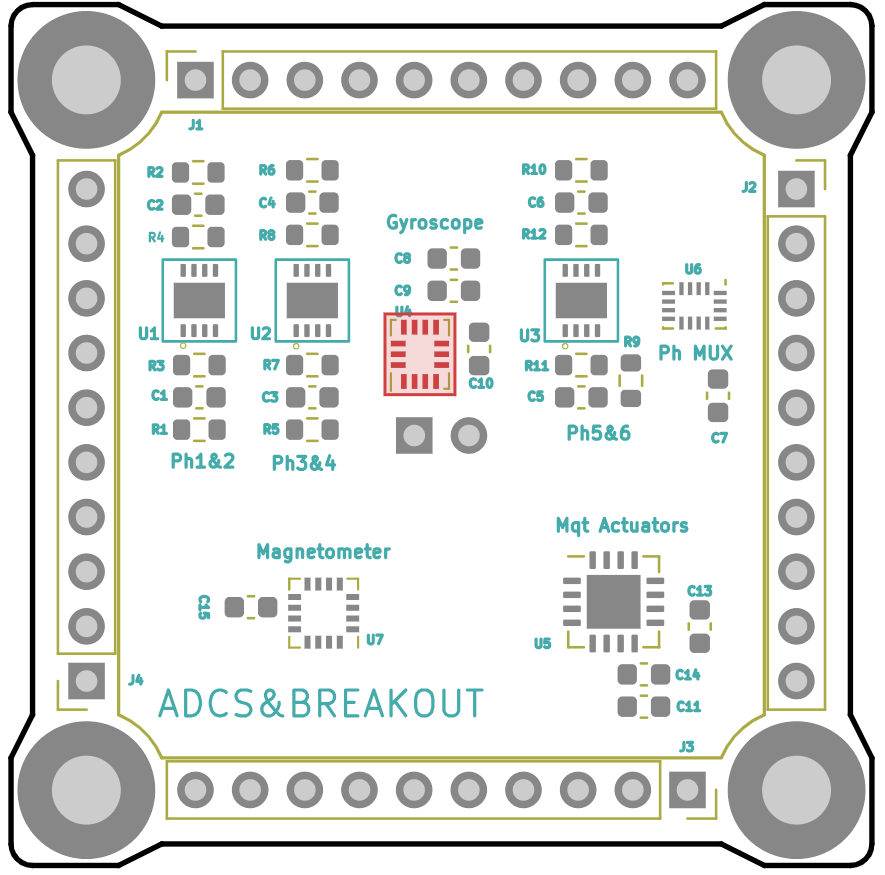
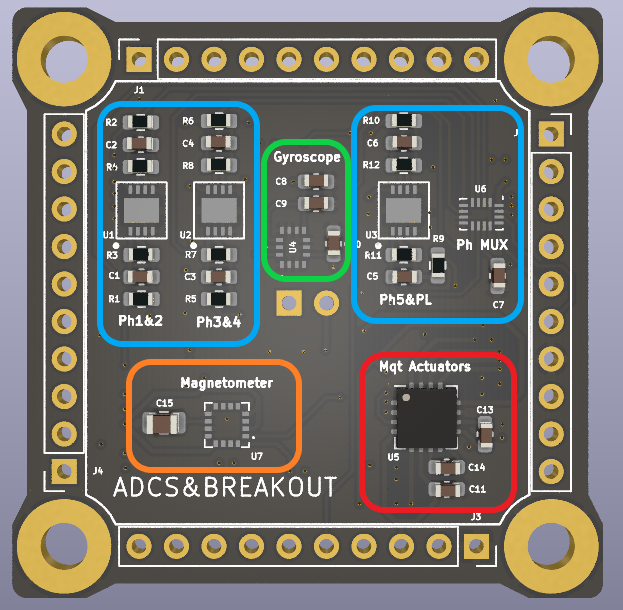
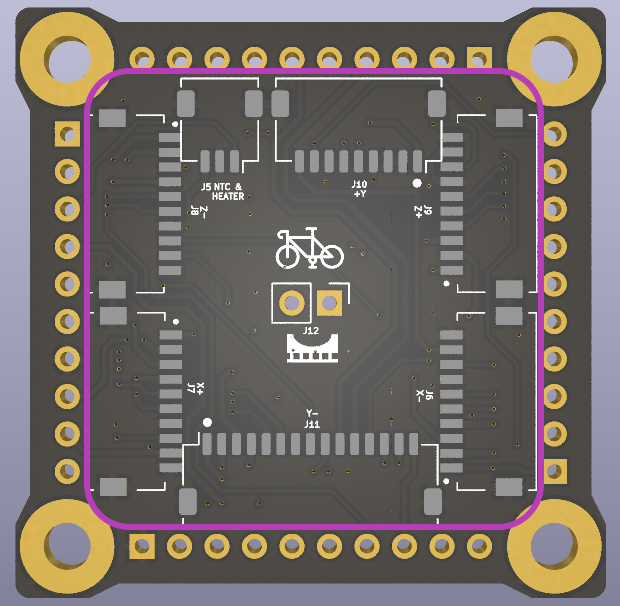
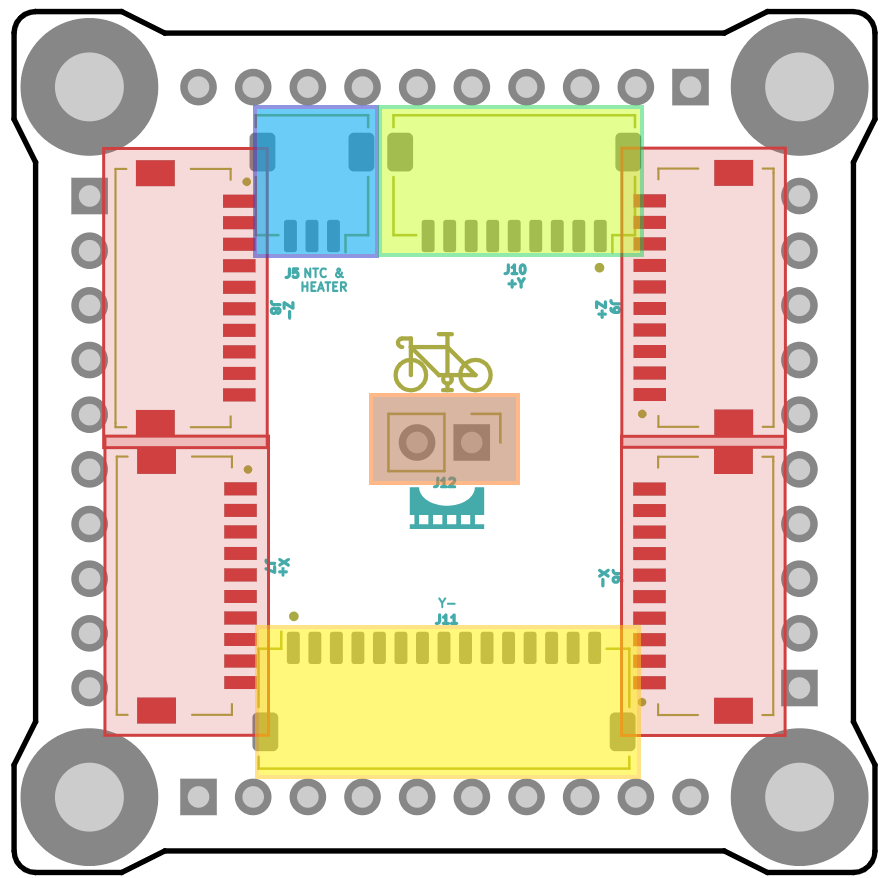
<p id="bkmrk-this-is-the-pcb-desi">This is the PCB design of the ADCS. The board is also used as an interface between the other subsystems and the outer boards and the battery. It is divided into 5 different blocs.</p>
<p id="bkmrk-%C2%A0-%C2%A0-%C2%A0-%C2%A0-%C2%A0-%C2%A0-%C2%A0%C2%A0-%C2%A0-%C2%A0-%C2%A0"><span style="white-space: pre-wrap;">&nbsp; &nbsp; &nbsp; &nbsp; &nbsp; &nbsp; &nbsp; &nbsp; &nbsp; &nbsp; &nbsp;</span><img src="https://wiki.nanosatlab.space/uploads/images/gallery/2024-10/scaled-1680-/pcb-front.png" alt="PCB front.png" width="300" height="294"><span style="white-space: pre-wrap;">&nbsp; &nbsp; &nbsp; &nbsp; &nbsp; &nbsp; &nbsp; &nbsp; &nbsp;</span><a href="https://wiki.nanosatlab.space/uploads/images/gallery/2024-10/pcb-back.png"><img src="https://wiki.nanosatlab.space/uploads/images/gallery/2024-10/scaled-1680-/pcb-back.png" alt="PCB back.png" width="300" height="293"></a></p>
<ul id="bkmrk-photodiode-block%3A-th">
<li><strong><strong style="color: rgb(53, 152, 219);">Photodiode block:</strong></strong><span style="color: rgb(53, 152, 219); white-space: pre-wrap;"> </span><span style="color: rgb(0, 0, 0);">This block is responsible for receiving information about the sunlight received on the surface of the PocketQube. A photodiode is located on each lateral board, as well as on the top and bottom boards. Each photodiode receives sunlight and generates a current in response. This current is amplified using an operational amplifier, which also converts the intensity into voltage so it can be read by the Analog-to-Digital Converter (ADC) of the On-Board Computer (OBC). The OBC in order to select a photodiode to read, it controls a multiplexer used for selecting the output of a specific operational amplifier.</span></li>
<li><strong><strong style="color: rgb(45, 194, 107); white-space: pre-wrap;">Gyroscope block: </strong></strong><span style="color: rgb(0, 0, 0);">This section of the PCB is in charge of obtaining the information about what angular velocity is rotating the satellite in all three axis. It is formed by the IIM-42652 chip and some resistors.</span></li>
<li><strong><strong style="color: rgb(230, 126, 35); white-space: pre-wrap;">Magnetometer: </strong></strong><span style="color: rgb(0, 0, 0);">This part of the PCB serves to measure the value of the magnetic field at the PocketQube coordinates. The chip used is the MMC5983MA and is accompanied by a capacitor.</span></li>
<li><strong><strong style="color: rgb(224, 62, 45); white-space: pre-wrap;">Magnetorquer driver: </strong></strong><span style="color: rgb(0, 0, 0);">This chip is the responsible for providing the selected current to the magnetorquers. In order to make the chip work, a LED has been added for each magnetorquer in its outer board. The IC used is the BD2606MVV followed by three capacitors.</span></li>
<li><strong><strong style="color: rgb(132, 63, 161);">Bottom</strong></strong><span style="color: rgb(132, 63, 161); white-space: pre-wrap;"> </span><strong><strong style="color: rgb(132, 63, 161);">connectors</strong></strong><span style="color: rgb(132, 63, 161);">:</span><span style="color: rgb(0, 0, 0); white-space: pre-wrap;"> In the backside of the PCB there are located 7 connectors. These connectors are used as an interface for each outer board of the Satellite. These pins contains the Photodiodes inputs and the magnetorquer connexions. In addition it also is used for connecting the temperature sensors located in the outer boards to the OBC and for connecting the battery heater and the battery temperature sensor.</span></li>
</ul>
<h3 id="bkmrk-full-schematic">Full schematic<a href="https://wiki.nanosatlab.space/uploads/images/gallery/2024-11/scaled-1680-/shchematic.png" target="_blank" rel="noopener"><img src="https://wiki.nanosatlab.space/uploads/images/gallery/2024-11/scaled-1680-/shchematic.png" alt="shchematic.png"></a></h3>
<h4 id="bkmrk-passive-components">Passive components</h4>
<table id="bkmrk-componentvaluetypequ" class="align-center" dir="ltr" style="table-layout: fixed; font-size: 10pt; font-family: Arial; width: 817px; border-collapse: collapse; border: none; height: 567.984px;"><colgroup><col style="width: 185.4px;"><col style="width: 59.4px;"><col style="width: 59.4px;"><col style="width: 59.4px;"><col style="width: 155.4px;"></colgroup>
<tbody>
<tr style="height: 21.9844px;">
<td style="overflow: hidden; padding: 2px 3px; vertical-align: bottom; height: 21.9844px;">
<p><strong><strong>Component</strong></strong></p>
</td>
<td style="overflow: hidden; padding: 2px 3px; vertical-align: bottom; height: 21.9844px;">
<p><strong><strong>Value</strong></strong></p>
</td>
<td style="overflow: hidden; padding: 2px 3px; vertical-align: bottom; height: 21.9844px;">
<p><strong><strong>Type</strong></strong></p>
</td>
<td class="align-right" style="overflow: hidden; padding: 2px 3px; vertical-align: bottom; text-align: right; height: 21.9844px;">
<p style="text-align: right;"><strong><strong>Quantity</strong></strong></p>
</td>
<td class="align-center" style="overflow: hidden; padding: 2px 3px; vertical-align: bottom; height: 21.9844px;">
<p class="align-center"><strong><strong>Manufacturer number</strong></strong></p>
</td>
</tr>
<tr style="height: 21px;">
<td style="overflow: hidden; padding: 2px 3px; vertical-align: bottom; height: 21px;">
<p>R3</p>
</td>
<td style="overflow: hidden; padding: 2px 3px; vertical-align: bottom; height: 21px;">
<p>2k&Omega;</p>
</td>
<td style="overflow: hidden; padding: 2px 3px; vertical-align: bottom; height: 21px;">
<p>Resistor</p>
</td>
<td class="align-right" style="overflow: hidden; padding: 2px 3px; vertical-align: bottom; text-align: right; height: 21px;">
<p class="align-right" style="text-align: right;">1</p>
</td>
<td style="overflow: hidden; padding: 2px 3px; vertical-align: bottom; height: 21px;">
<p>RC0603FR-132KL</p>
</td>
</tr>
<tr style="height: 21px;">
<td style="overflow: hidden; padding: 2px 3px; vertical-align: bottom; height: 21px;">
<p>R4</p>
</td>
<td style="overflow: hidden; padding: 2px 3px; vertical-align: bottom; height: 21px;">
<p>2k&Omega;</p>
</td>
<td style="overflow: hidden; padding: 2px 3px; vertical-align: bottom; height: 21px;">
<p>Resistor</p>
</td>
<td class="align-right" style="overflow: hidden; padding: 2px 3px; vertical-align: bottom; text-align: right; height: 21px;">
<p class="align-right" style="text-align: right;">1</p>
</td>
<td style="overflow: hidden; padding: 2px 3px; vertical-align: bottom; height: 21px;">
<p>RC0603FR-132KL</p>
</td>
</tr>
<tr style="height: 21px;">
<td style="overflow: hidden; padding: 2px 3px; vertical-align: bottom; height: 21px;">
<p>R7</p>
</td>
<td style="overflow: hidden; padding: 2px 3px; vertical-align: bottom; height: 21px;">
<p>2k&Omega;</p>
</td>
<td style="overflow: hidden; padding: 2px 3px; vertical-align: bottom; height: 21px;">
<p>Resistor</p>
</td>
<td class="align-right" style="overflow: hidden; padding: 2px 3px; vertical-align: bottom; text-align: right; height: 21px;">
<p class="align-right" style="text-align: right;">1</p>
</td>
<td style="overflow: hidden; padding: 2px 3px; vertical-align: bottom; height: 21px;">
<p>RC0603FR-132KL</p>
</td>
</tr>
<tr style="height: 21px;">
<td style="overflow: hidden; padding: 2px 3px; vertical-align: bottom; height: 21px;">
<p>R8</p>
</td>
<td style="overflow: hidden; padding: 2px 3px; vertical-align: bottom; height: 21px;">
<p>2k&Omega;</p>
</td>
<td style="overflow: hidden; padding: 2px 3px; vertical-align: bottom; height: 21px;">
<p>Resistor</p>
</td>
<td class="align-right" style="overflow: hidden; padding: 2px 3px; vertical-align: bottom; text-align: right; height: 21px;">
<p class="align-right" style="text-align: right;">1</p>
</td>
<td style="overflow: hidden; padding: 2px 3px; vertical-align: bottom; height: 21px;">
<p>RC0603FR-132KL</p>
</td>
</tr>
<tr style="height: 21px;">
<td style="overflow: hidden; padding: 2px 3px; vertical-align: bottom; height: 21px;">
<p>R11</p>
</td>
<td style="overflow: hidden; padding: 2px 3px; vertical-align: bottom; height: 21px;">
<p>2k&Omega;</p>
</td>
<td style="overflow: hidden; padding: 2px 3px; vertical-align: bottom; height: 21px;">
<p>Resistor</p>
</td>
<td class="align-right" style="overflow: hidden; padding: 2px 3px; vertical-align: bottom; text-align: right; height: 21px;">
<p class="align-right" style="text-align: right;">1</p>
</td>
<td style="overflow: hidden; padding: 2px 3px; vertical-align: bottom; height: 21px;">
<p>RC0603FR-132KL</p>
</td>
</tr>
<tr style="height: 21px;">
<td style="overflow: hidden; padding: 2px 3px; vertical-align: bottom; height: 21px;">
<p>R12</p>
</td>
<td style="overflow: hidden; padding: 2px 3px; vertical-align: bottom; height: 21px;">
<p>2k&Omega;</p>
</td>
<td style="overflow: hidden; padding: 2px 3px; vertical-align: bottom; height: 21px;">
<p>Resistor</p>
</td>
<td class="align-right" style="overflow: hidden; padding: 2px 3px; vertical-align: bottom; text-align: right; height: 21px;">
<p class="align-right" style="text-align: right;">1</p>
</td>
<td style="overflow: hidden; padding: 2px 3px; vertical-align: bottom; height: 21px;">
<p>RC0603FR-132KL</p>
</td>
</tr>
<tr style="height: 21px;">
<td style="overflow: hidden; padding: 2px 3px; vertical-align: bottom; height: 21px;">
<p>R1</p>
</td>
<td style="overflow: hidden; padding: 2px 3px; vertical-align: bottom; height: 21px;">
<p>100&Omega;</p>
</td>
<td style="overflow: hidden; padding: 2px 3px; vertical-align: bottom; height: 21px;">
<p>Resistor</p>
</td>
<td class="align-right" style="overflow: hidden; padding: 2px 3px; vertical-align: bottom; text-align: right; height: 21px;">
<p class="align-right" style="text-align: right;">1</p>
</td>
<td style="overflow: hidden; padding: 2px 3px; vertical-align: bottom; height: 21px;">
<p>AC0603FR-13100RL</p>
</td>
</tr>
<tr style="height: 21px;">
<td style="overflow: hidden; padding: 2px 3px; vertical-align: bottom; height: 21px;">
<p>R2</p>
</td>
<td style="overflow: hidden; padding: 2px 3px; vertical-align: bottom; height: 21px;">
<p>100&Omega;</p>
</td>
<td style="overflow: hidden; padding: 2px 3px; vertical-align: bottom; height: 21px;">
<p>Resistor</p>
</td>
<td class="align-right" style="overflow: hidden; padding: 2px 3px; vertical-align: bottom; text-align: right; height: 21px;">
<p class="align-right" style="text-align: right;">1</p>
</td>
<td style="overflow: hidden; padding: 2px 3px; vertical-align: bottom; height: 21px;">
<p>AC0603FR-13100RL</p>
</td>
</tr>
<tr style="height: 21px;">
<td style="overflow: hidden; padding: 2px 3px; vertical-align: bottom; height: 21px;">
<p>R5</p>
</td>
<td style="overflow: hidden; padding: 2px 3px; vertical-align: bottom; height: 21px;">
<p>100&Omega;</p>
</td>
<td style="overflow: hidden; padding: 2px 3px; vertical-align: bottom; height: 21px;">
<p>Resistor</p>
</td>
<td class="align-right" style="overflow: hidden; padding: 2px 3px; vertical-align: bottom; text-align: right; height: 21px;">
<p class="align-right" style="text-align: right;">1</p>
</td>
<td style="overflow: hidden; padding: 2px 3px; vertical-align: bottom; height: 21px;">
<p>AC0603FR-13100RL</p>
</td>
</tr>
<tr style="height: 21px;">
<td style="overflow: hidden; padding: 2px 3px; vertical-align: bottom; height: 21px;">
<p>R6</p>
</td>
<td style="overflow: hidden; padding: 2px 3px; vertical-align: bottom; height: 21px;">
<p>100&Omega;</p>
</td>
<td style="overflow: hidden; padding: 2px 3px; vertical-align: bottom; height: 21px;">
<p>Resistor</p>
</td>
<td class="align-right" style="overflow: hidden; padding: 2px 3px; vertical-align: bottom; text-align: right; height: 21px;">
<p class="align-right" style="text-align: right;">1</p>
</td>
<td style="overflow: hidden; padding: 2px 3px; vertical-align: bottom; height: 21px;">
<p>AC0603FR-13100RL</p>
</td>
</tr>
<tr style="height: 21px;">
<td style="overflow: hidden; padding: 2px 3px; vertical-align: bottom; height: 21px;">
<p>R9</p>
</td>
<td style="overflow: hidden; padding: 2px 3px; vertical-align: bottom; height: 21px;">
<p>100&Omega;</p>
</td>
<td style="overflow: hidden; padding: 2px 3px; vertical-align: bottom; height: 21px;">
<p>Resistor</p>
</td>
<td class="align-right" style="overflow: hidden; padding: 2px 3px; vertical-align: bottom; text-align: right; height: 21px;">
<p class="align-right" style="text-align: right;">1</p>
</td>
<td style="overflow: hidden; padding: 2px 3px; vertical-align: bottom; height: 21px;">
<p>AC0603FR-13100RL</p>
</td>
</tr>
<tr style="height: 21px;">
<td style="overflow: hidden; padding: 2px 3px; vertical-align: bottom; height: 21px;">
<p>R10</p>
</td>
<td style="overflow: hidden; padding: 2px 3px; vertical-align: bottom; height: 21px;">
<p>100&Omega;</p>
</td>
<td style="overflow: hidden; padding: 2px 3px; vertical-align: bottom; height: 21px;">
<p>Resistor</p>
</td>
<td class="align-right" style="overflow: hidden; padding: 2px 3px; vertical-align: bottom; text-align: right; height: 21px;">
<p class="align-right" style="text-align: right;">1</p>
</td>
<td style="overflow: hidden; padding: 2px 3px; vertical-align: bottom; height: 21px;">
<p>AC0603FR-13100RL</p>
</td>
</tr>
<tr style="height: 21px;">
<td style="overflow: hidden; padding: 2px 3px; vertical-align: bottom; height: 21px;">
<p>C1</p>
</td>
<td style="overflow: hidden; padding: 2px 3px; vertical-align: bottom; height: 21px;">
<p>100pF</p>
</td>
<td style="overflow: hidden; padding: 2px 3px; vertical-align: bottom; height: 21px;">
<p>Capacitor</p>
</td>
<td class="align-right" style="overflow: hidden; padding: 2px 3px; vertical-align: bottom; text-align: right; height: 21px;">
<p class="align-right" style="text-align: right;">1</p>
</td>
<td style="overflow: hidden; padding: 2px 3px; vertical-align: bottom; height: 21px;">
<p>CBR06C101J5GACAUTO</p>
</td>
</tr>
<tr style="height: 21px;">
<td style="overflow: hidden; padding: 2px 3px; vertical-align: bottom; height: 21px;">
<p>C2</p>
</td>
<td style="overflow: hidden; padding: 2px 3px; vertical-align: bottom; height: 21px;">
<p>100pF</p>
</td>
<td style="overflow: hidden; padding: 2px 3px; vertical-align: bottom; height: 21px;">
<p>Capacitor</p>
</td>
<td class="align-right" style="overflow: hidden; padding: 2px 3px; vertical-align: bottom; text-align: right; height: 21px;">
<p class="align-right" style="text-align: right;">1</p>
</td>
<td style="overflow: hidden; padding: 2px 3px; vertical-align: bottom; height: 21px;">
<p>CBR06C101J5GACAUTO</p>
</td>
</tr>
<tr style="height: 21px;">
<td style="overflow: hidden; padding: 2px 3px; vertical-align: bottom; height: 21px;">
<p>C3</p>
</td>
<td style="overflow: hidden; padding: 2px 3px; vertical-align: bottom; height: 21px;">
<p>100pF</p>
</td>
<td style="overflow: hidden; padding: 2px 3px; vertical-align: bottom; height: 21px;">
<p>Capacitor</p>
</td>
<td class="align-right" style="overflow: hidden; padding: 2px 3px; vertical-align: bottom; text-align: right; height: 21px;">
<p class="align-right" style="text-align: right;">1</p>
</td>
<td style="overflow: hidden; padding: 2px 3px; vertical-align: bottom; background-color: rgb(255, 255, 255); height: 21px;">
<p>CBR06C101J5GACAUTO</p>
</td>
</tr>
<tr style="height: 21px;">
<td style="overflow: hidden; padding: 2px 3px; vertical-align: bottom; height: 21px;">
<p>C4</p>
</td>
<td style="overflow: hidden; padding: 2px 3px; vertical-align: bottom; height: 21px;">
<p>100pF</p>
</td>
<td style="overflow: hidden; padding: 2px 3px; vertical-align: bottom; height: 21px;">
<p>Capacitor</p>
</td>
<td class="align-right" style="overflow: hidden; padding: 2px 3px; vertical-align: bottom; text-align: right; height: 21px;">
<p class="align-right" style="text-align: right;">1</p>
</td>
<td style="overflow: hidden; padding: 2px 3px; vertical-align: bottom; height: 21px;">
<p>CBR06C101J5GACAUTO</p>
</td>
</tr>
<tr style="height: 21px;">
<td style="overflow: hidden; padding: 2px 3px; vertical-align: bottom; height: 21px;">
<p>C5</p>
</td>
<td style="overflow: hidden; padding: 2px 3px; vertical-align: bottom; height: 21px;">
<p>100pF</p>
</td>
<td style="overflow: hidden; padding: 2px 3px; vertical-align: bottom; height: 21px;">
<p>Capacitor</p>
</td>
<td class="align-right" style="overflow: hidden; padding: 2px 3px; vertical-align: bottom; text-align: right; height: 21px;">
<p class="align-right" style="text-align: right;">1</p>
</td>
<td style="overflow: hidden; padding: 2px 3px; vertical-align: bottom; height: 21px;">
<p>CBR06C101J5GACAUTO</p>
</td>
</tr>
<tr style="height: 21px;">
<td style="overflow: hidden; padding: 2px 3px; vertical-align: bottom; height: 21px;">
<p>C6</p>
</td>
<td style="overflow: hidden; padding: 2px 3px; vertical-align: bottom; height: 21px;">
<p>100pF</p>
</td>
<td style="overflow: hidden; padding: 2px 3px; vertical-align: bottom; height: 21px;">
<p>Capacitor</p>
</td>
<td class="align-right" style="overflow: hidden; padding: 2px 3px; vertical-align: bottom; text-align: right; height: 21px;">
<p class="align-right" style="text-align: right;">1</p>
</td>
<td style="overflow: hidden; padding: 2px 3px; vertical-align: bottom; height: 21px;">
<p>CBR06C101J5GACAUTO</p>
</td>
</tr>
<tr style="height: 21px;">
<td style="overflow: hidden; padding: 2px 3px; vertical-align: bottom; height: 21px;">
<p>C8</p>
</td>
<td style="overflow: hidden; padding: 2px 3px; vertical-align: bottom; height: 21px;">
<p>2.2uF</p>
</td>
<td style="overflow: hidden; padding: 2px 3px; vertical-align: bottom; height: 21px;">
<p>Capacitor</p>
</td>
<td class="align-right" style="overflow: hidden; padding: 2px 3px; vertical-align: bottom; text-align: right; height: 21px;">
<p class="align-right" style="text-align: right;">1</p>
</td>
<td style="overflow: hidden; padding: 2px 3px; vertical-align: bottom; height: 21px;">
<p>GRM188R61H225KE11D</p>
</td>
</tr>
<tr style="height: 21px;">
<td style="overflow: hidden; padding: 2px 3px; vertical-align: bottom; height: 21px;">
<p>C9</p>
</td>
<td style="overflow: hidden; padding: 2px 3px; vertical-align: bottom; height: 21px;">
<p>0.1uF</p>
</td>
<td style="overflow: hidden; padding: 2px 3px; vertical-align: bottom; height: 21px;">
<p>Capacitor</p>
</td>
<td class="align-right" style="overflow: hidden; padding: 2px 3px; vertical-align: bottom; text-align: right; height: 21px;">
<p class="align-right" style="text-align: right;">1</p>
</td>
<td style="overflow: hidden; padding: 2px 3px; vertical-align: bottom; height: 21px;">
<p>C0603T104K3RACTU</p>
</td>
</tr>
<tr style="height: 21px;">
<td style="overflow: hidden; padding: 2px 3px; vertical-align: bottom; height: 21px;">
<p>C11</p>
</td>
<td style="overflow: hidden; padding: 2px 3px; vertical-align: bottom; height: 21px;">
<p>0.1uF</p>
</td>
<td style="overflow: hidden; padding: 2px 3px; vertical-align: bottom; height: 21px;">
<p>Capacitor</p>
</td>
<td class="align-right" style="overflow: hidden; padding: 2px 3px; vertical-align: bottom; text-align: right; height: 21px;">
<p class="align-right" style="text-align: right;">1</p>
</td>
<td style="overflow: hidden; padding: 2px 3px; vertical-align: bottom; height: 21px;">
<p>C0603T104K3RACTU</p>
</td>
</tr>
<tr style="height: 21px;">
<td style="overflow: hidden; padding: 2px 3px; vertical-align: bottom; height: 21px;">
<p>C10</p>
</td>
<td style="overflow: hidden; padding: 2px 3px; vertical-align: bottom; height: 21px;">
<p>0.01uF</p>
</td>
<td style="overflow: hidden; padding: 2px 3px; vertical-align: bottom; height: 21px;">
<p>Capacitor</p>
</td>
<td class="align-right" style="overflow: hidden; padding: 2px 3px; vertical-align: bottom; text-align: right; height: 21px;">
<p class="align-right" style="text-align: right;">1</p>
</td>
<td style="overflow: hidden; padding: 2px 3px; vertical-align: bottom; height: 21px;">
<p>C0603C103J3RACAUTO</p>
</td>
</tr>
<tr style="height: 21px;">
<td style="overflow: hidden; padding: 2px 3px; vertical-align: bottom; height: 21px;">
<p>C7</p>
</td>
<td style="overflow: hidden; padding: 2px 3px; vertical-align: bottom; height: 21px;">
<p>1uF</p>
</td>
<td style="overflow: hidden; padding: 2px 3px; vertical-align: bottom; height: 21px;">
<p>Capacitor</p>
</td>
<td class="align-right" style="overflow: hidden; padding: 2px 3px; vertical-align: bottom; text-align: right; height: 21px;">
<p class="align-right" style="text-align: right;">1</p>
</td>
<td style="overflow: hidden; padding: 2px 3px; vertical-align: bottom; height: 21px;">
<p>GRM188R61A105KA61D</p>
</td>
</tr>
<tr style="height: 21px;">
<td style="overflow: hidden; padding: 2px 3px; vertical-align: bottom; height: 21px;">
<p>C13</p>
</td>
<td style="overflow: hidden; padding: 2px 3px; vertical-align: bottom; height: 21px;">
<p>1uF</p>
</td>
<td style="overflow: hidden; padding: 2px 3px; vertical-align: bottom; height: 21px;">
<p>Capacitor</p>
</td>
<td class="align-right" style="overflow: hidden; padding: 2px 3px; vertical-align: bottom; text-align: right; height: 21px;">
<p class="align-right" style="text-align: right;">1</p>
</td>
<td style="overflow: hidden; padding: 2px 3px; vertical-align: bottom; height: 21px;">
<p>GRM188R61A105KA61D</p>
</td>
</tr>
<tr style="height: 21px;">
<td style="overflow: hidden; padding: 2px 3px; vertical-align: bottom; height: 21px;">
<p>C14</p>
</td>
<td style="overflow: hidden; padding: 2px 3px; vertical-align: bottom; height: 21px;">
<p>1uF</p>
</td>
<td style="overflow: hidden; padding: 2px 3px; vertical-align: bottom; height: 21px;">
<p>Capacitor</p>
</td>
<td class="align-right" style="overflow: hidden; padding: 2px 3px; vertical-align: bottom; text-align: right; height: 21px;">
<p class="align-right" style="text-align: right;">1</p>
</td>
<td style="overflow: hidden; padding: 2px 3px; vertical-align: bottom; height: 21px;">
<p>GRM188R61A105KA61D</p>
</td>
</tr>
<tr style="height: 21px;">
<td style="overflow: hidden; padding: 2px 3px; vertical-align: bottom; height: 21px;">
<p>C15</p>
</td>
<td style="overflow: hidden; padding: 2px 3px; vertical-align: bottom; height: 21px;">
<p>10uF</p>
</td>
<td style="overflow: hidden; padding: 2px 3px; vertical-align: bottom; height: 21px;">
<p>Capacitor</p>
</td>
<td class="align-right" style="overflow: hidden; padding: 2px 3px; vertical-align: bottom; text-align: right; height: 21px;">
<p class="align-right" style="text-align: right;">1</p>
</td>
<td style="overflow: hidden; padding: 2px 3px; vertical-align: bottom; height: 21px;">
<p>GRM21BR61C106KE15K</p>
</td>
</tr>
</tbody>
</table>
<h4 id="bkmrk-integrated-circuits"><span style="color: rgb(0, 0, 0);">Integrated circuits</span></h4>
<table id="bkmrk-componenttypequantit" class="align-center" dir="ltr" style="table-layout: fixed; font-size: 10pt; font-family: Arial; width: 837px; border-collapse: collapse; border: none; height: 1278px;"><colgroup><col style="width: 114px;"><col style="width: 114px;"><col style="width: 126px;"><col style="width: 114px;"></colgroup>
<tbody>
<tr>
<td>
<p><strong><strong>Component</strong></strong></p>
</td>
<td>
<p><strong><strong>Type</strong></strong></p>
</td>
<td class="align-center">
<p class="align-center"><strong><strong>Quantity</strong></strong></p>
</td>
<td class="align-center">
<p class="align-center"><strong><strong>Manufacturer number</strong></strong></p>
</td>
</tr>
<tr style="height: 21px;">
<td style="overflow: hidden; padding: 2px 3px; vertical-align: bottom;">
<p>LPV542DNXR</p>
</td>
<td style="overflow: hidden; padding: 2px 3px; vertical-align: bottom;">
<p>IC</p>
</td>
<td class="align-right" style="overflow: hidden; padding: 2px 3px; vertical-align: bottom; text-align: right;">
<p class="align-right" style="text-align: right;">1</p>
</td>
<td style="overflow: hidden; padding: 2px 3px; vertical-align: bottom;">
<p>LPV542DNXR</p>
</td>
</tr>
<tr style="height: 21px;">
<td style="overflow: hidden; padding: 2px 3px; vertical-align: bottom;">
<p>LPV542DNXR</p>
</td>
<td style="overflow: hidden; padding: 2px 3px; vertical-align: bottom;">
<p>IC</p>
</td>
<td class="align-right" style="overflow: hidden; padding: 2px 3px; vertical-align: bottom; text-align: right;">
<p class="align-right" style="text-align: right;">1</p>
</td>
<td style="overflow: hidden; padding: 2px 3px; vertical-align: bottom;">
<p>LPV542DNXR</p>
</td>
</tr>
<tr style="height: 21px;">
<td style="overflow: hidden; padding: 2px 3px; vertical-align: bottom;">
<p>LPV542DNXR</p>
</td>
<td style="overflow: hidden; padding: 2px 3px; vertical-align: bottom;">
<p>IC</p>
</td>
<td class="align-right" style="overflow: hidden; padding: 2px 3px; vertical-align: bottom; text-align: right;">
<p class="align-right" style="text-align: right;">1</p>
</td>
<td style="overflow: hidden; padding: 2px 3px; vertical-align: bottom;">
<p>LPV542DNXR</p>
</td>
</tr>
<tr style="height: 21px;">
<td style="overflow: hidden; padding: 2px 3px; vertical-align: bottom;">
<p>IIM-42652</p>
</td>
<td style="overflow: hidden; padding: 2px 3px; vertical-align: bottom;">
<p>IC</p>
</td>
<td class="align-right" style="overflow: hidden; padding: 2px 3px; vertical-align: bottom; text-align: right;">
<p class="align-right" style="text-align: right;">1</p>
</td>
<td style="overflow: hidden; padding: 2px 3px; vertical-align: bottom;">
<p>IIM-42652</p>
</td>
</tr>
<tr style="height: 21px;">
<td style="overflow: hidden; padding: 2px 3px; vertical-align: bottom;">
<p>BD2606MVV-E2</p>
</td>
<td style="overflow: hidden; padding: 2px 3px; vertical-align: bottom;">
<p>IC</p>
</td>
<td class="align-right" style="overflow: hidden; padding: 2px 3px; vertical-align: bottom; text-align: right;">
<p class="align-right" style="text-align: right;">1</p>
</td>
<td style="overflow: hidden; padding: 2px 3px; vertical-align: bottom;">
<p>BD2606MVV-E2</p>
</td>
</tr>
<tr style="height: 21px;">
<td style="overflow: hidden; padding: 2px 3px; vertical-align: bottom;">
<p>TMUX1108RSVR</p>
</td>
<td style="overflow: hidden; padding: 2px 3px; vertical-align: bottom;">
<p>IC</p>
</td>
<td class="align-right" style="overflow: hidden; padding: 2px 3px; vertical-align: bottom; text-align: right;">
<p class="align-right" style="text-align: right;">1</p>
</td>
<td style="overflow: hidden; padding: 2px 3px; vertical-align: bottom;">
<p>TMUX1108RSVR</p>
</td>
</tr>
<tr style="height: 21px;">
<td style="overflow: hidden; padding: 2px 3px; vertical-align: bottom;">
<p>MMC5983MA</p>
</td>
<td style="overflow: hidden; padding: 2px 3px; vertical-align: bottom;">
<p>IC</p>
</td>
<td class="align-right" style="overflow: hidden; padding: 2px 3px; vertical-align: bottom; text-align: right;">
<p class="align-right" style="text-align: right;">1</p>
</td>
<td style="overflow: hidden; padding: 2px 3px; vertical-align: bottom;">
<p>MMC5983MA</p>
</td>
</tr>
</tbody>
</table>
<h4 id="bkmrk-connectors"><span style="color: rgb(0, 0, 0);">Connectors</span></h4>
<table id="bkmrk-componenttypequantit-1" class="align-center" dir="ltr" style="table-layout: fixed; font-size: 10pt; font-family: Arial; width: 825px; border-collapse: collapse; border: none; height: 946px;"><colgroup><col style="width: 134.75px;"><col style="width: 99.75px;"><col style="width: 74.75px;"><col style="width: 215.75px;"></colgroup>
<tbody>
<tr style="height: 10px;">
<td>
<p><strong><strong>Component</strong></strong></p>
</td>
<td>
<p><strong><strong>Type</strong></strong></p>
</td>
<td class="align-center">
<p class="align-center"><strong><strong>Quantity</strong></strong></p>
</td>
<td class="align-center">
<p class="align-center"><strong><strong>Manufacturer number</strong></strong></p>
</td>
</tr>
<tr style="height: 21px;">
<td style="overflow: hidden; padding: 2px 3px; vertical-align: bottom;">
<p>PicoClasp_Connector_10</p>
</td>
<td style="overflow: hidden; padding: 2px 3px; vertical-align: bottom;">
<p>Connector</p>
</td>
<td class="align-right" style="overflow: hidden; padding: 2px 3px; vertical-align: bottom; text-align: right;">
<p class="align-right" style="text-align: right;">1</p>
</td>
<td style="overflow: hidden; padding: 2px 3px; vertical-align: bottom;">
<p>203558-1007</p>
</td>
</tr>
<tr style="height: 21px;">
<td style="overflow: hidden; padding: 2px 3px; vertical-align: bottom;">
<p>PicoClasp_Connector_10</p>
</td>
<td style="overflow: hidden; padding: 2px 3px; vertical-align: bottom;">
<p>Connector</p>
</td>
<td class="align-right" style="overflow: hidden; padding: 2px 3px; vertical-align: bottom; text-align: right;">
<p class="align-right" style="text-align: right;">1</p>
</td>
<td style="overflow: hidden; padding: 2px 3px; vertical-align: bottom;">
<p>203558-1007</p>
</td>
</tr>
<tr style="height: 21px;">
<td style="overflow: hidden; padding: 2px 3px; vertical-align: bottom;">
<p>PicoClasp_Connector_10</p>
</td>
<td style="overflow: hidden; padding: 2px 3px; vertical-align: bottom;">
<p>Connector</p>
</td>
<td class="align-right" style="overflow: hidden; padding: 2px 3px; vertical-align: bottom; text-align: right;">
<p class="align-right" style="text-align: right;">1</p>
</td>
<td style="overflow: hidden; padding: 2px 3px; vertical-align: bottom;">
<p>203558-1007</p>
</td>
</tr>
<tr style="height: 21px;">
<td style="overflow: hidden; padding: 2px 3px; vertical-align: bottom;">
<p>PicoClasp_Connector_10</p>
</td>
<td style="overflow: hidden; padding: 2px 3px; vertical-align: bottom;">
<p>Connector</p>
</td>
<td class="align-right" style="overflow: hidden; padding: 2px 3px; vertical-align: bottom; text-align: right;">
<p class="align-right" style="text-align: right;">1</p>
</td>
<td style="overflow: hidden; padding: 2px 3px; vertical-align: bottom;">
<p>203558-1007</p>
</td>
</tr>
<tr style="height: 21px;">
<td style="overflow: hidden; padding: 2px 3px; vertical-align: bottom;">
<p>PicoClasp_Connector_9</p>
</td>
<td style="overflow: hidden; padding: 2px 3px; vertical-align: bottom;">
<p>Connector</p>
</td>
<td class="align-right" style="overflow: hidden; padding: 2px 3px; vertical-align: bottom; text-align: right;">
<p class="align-right" style="text-align: right;">1</p>
</td>
<td style="overflow: hidden; padding: 2px 3px; vertical-align: bottom;">
<p>203558-0907</p>
</td>
</tr>
<tr style="height: 21px;">
<td style="overflow: hidden; padding: 2px 3px; vertical-align: bottom;">
<p>PicoClasp_Connector_15</p>
</td>
<td style="overflow: hidden; padding: 2px 3px; vertical-align: bottom;">
<p>Connector</p>
</td>
<td class="align-right" style="overflow: hidden; padding: 2px 3px; vertical-align: bottom; text-align: right;">
<p class="align-right" style="text-align: right;">1</p>
</td>
<td style="overflow: hidden; padding: 2px 3px; vertical-align: bottom;">
<p>501568-1507</p>
</td>
</tr>
<tr style="height: 21px;">
<td style="overflow: hidden; padding: 2px 3px; vertical-align: bottom;">
<p>PicoClasp_Connector_3</p>
</td>
<td style="overflow: hidden; padding: 2px 3px; vertical-align: bottom;">
<p>Connector</p>
</td>
<td class="align-right" style="overflow: hidden; padding: 2px 3px; vertical-align: bottom; text-align: right;">
<p class="align-right" style="text-align: right;">1</p>
</td>
<td style="overflow: hidden; padding: 2px 3px; vertical-align: bottom;">
<p>203558-0307</p>
</td>
</tr>
<tr style="height: 21px;">
<td style="overflow: hidden; padding: 2px 3px; vertical-align: bottom;">
<p>CES-110-02-L-S</p>
</td>
<td style="overflow: hidden; padding: 2px 3px; vertical-align: bottom;">
<p>Connector</p>
</td>
<td class="align-right" style="overflow: hidden; padding: 2px 3px; vertical-align: bottom; text-align: right;">
<p class="align-right" style="text-align: right;">1</p>
</td>
<td style="overflow: hidden; padding: 2px 3px; vertical-align: bottom;">
<p>CES-110-02-L-S</p>
</td>
</tr>
<tr style="height: 21px;">
<td style="overflow: hidden; padding: 2px 3px; vertical-align: bottom;">
<p>CES-110-02-L-S</p>
</td>
<td style="overflow: hidden; padding: 2px 3px; vertical-align: bottom;">
<p>Connector</p>
</td>
<td class="align-right" style="overflow: hidden; padding: 2px 3px; vertical-align: bottom; text-align: right;">
<p class="align-right" style="text-align: right;">1</p>
</td>
<td style="overflow: hidden; padding: 2px 3px; vertical-align: bottom;">
<p>CES-110-02-L-S</p>
</td>
</tr>
<tr style="height: 21px;">
<td style="overflow: hidden; padding: 2px 3px; vertical-align: bottom;">
<p>CES-110-02-L-S</p>
</td>
<td style="overflow: hidden; padding: 2px 3px; vertical-align: bottom;">
<p>Connector</p>
</td>
<td class="align-right" style="overflow: hidden; padding: 2px 3px; vertical-align: bottom; text-align: right;">
<p class="align-right" style="text-align: right;">1</p>
</td>
<td style="overflow: hidden; padding: 2px 3px; vertical-align: bottom;">
<p>CES-110-02-L-S</p>
</td>
</tr>
<tr style="height: 21px;">
<td style="overflow: hidden; padding: 2px 3px; vertical-align: bottom;">
<p>CES-110-02-L-S</p>
</td>
<td style="overflow: hidden; padding: 2px 3px; vertical-align: bottom;">
<p>Connector</p>
</td>
<td class="align-right" style="overflow: hidden; padding: 2px 3px; vertical-align: bottom; text-align: right;">
<p class="align-right" style="text-align: right;">1</p>
</td>
<td style="overflow: hidden; padding: 2px 3px; vertical-align: bottom;">
<p>CES-110-02-L-S</p>
</td>
</tr>
</tbody>
</table>
<p id="bkmrk-a-more-detailed-info"><span style="color: rgb(0, 0, 0);">A more detailed information about each vertical PIN and bottom pin is shown in the following picture:</span></p>
<p id="bkmrk--5"><a href="https://wiki.nanosatlab.space/uploads/images/gallery/2024-10/captura-de-pantalla-2024-10-28-222601.png"><img src="https://wiki.nanosatlab.space/uploads/images/gallery/2024-10/scaled-1680-/captura-de-pantalla-2024-10-28-222601.png" alt="Captura de pantalla 2024-10-28 222601.png"></a></p>
<ul id="bkmrk-connectors-j6%2Cj7%2Cj8-">
<li class="null"><strong><span style="color: rgb(224, 62, 45);">Connectors J6,J7,J8 &amp; J9: </span></strong><span style="color: rgb(0, 0, 0);">These connectors are used for the lateral boards and serve multiple functions. The pins include the following: the input for the voltage generated by the solar cells (SOLAR_X), the input and output for the magnetorquers (VCC_MAG and MAG &lsquo;&plusmn;X &plusmn;Z&rsquo;), the I&sup2;C communication buses (SDA and SCL), the input for the photodiode, and an output for injecting the required voltage into the resistor used for antenna deployment. This output (BURNCOMMS) is utilized if the antenna is placed on the corresponding lateral board.</span><br></li>
<li class="null" style="color: rgb(45, 194, 107);"><strong><span style="color: rgb(45, 194, 107);">Connector J10:&nbsp;</span></strong><span style="color: rgb(0, 0, 0);">This connector is used for the top payload. If the a new payload is being developed, the obligatory pins needed are the Photodiode PIN and its corresponding ground pin. The rest of the PINS can be modified according to the requirements of the new payload. In case of using the OpenPOcketQube Kit paylaods, this connector is used only in the VGA camera.</span></li>
<li class="null" style="color: rgb(241, 196, 15);"><strong><span style="color: rgb(241, 196, 15);">Connector J11:&nbsp;</span></strong><span style="color: rgb(0, 0, 0);">This connector is used for the bottom board it has included the same pins as the J6, J7, J8 &amp; J9 connectors, but including some new ones. The functionalities of the new pins are the following: BATT- &amp; KILLSWITCH+, used for activating the EPS after the deployment of the satellite. Also the pins used for debuging the satellite using the umbilical connector located at the bottom PCB are located in J11 (NRST, SWCLK,SWDIO &amp; VCC umbilical). Finally, there is the SWO pin, which can be used for any functionality, it is a programable pin.</span></li>
<li class="null" style="color: rgb(53, 152, 219);"><strong><span style="color: rgb(53, 152, 219);">Connector J5: </span></strong><span style="color: rgb(0, 0, 0);">Connector used for&nbsp; the battery heater and temperature sensors located in the battery compartment.</span></li>
<li class="null" style="color: rgb(186, 55, 42);"><strong><span style="color: rgb(186, 55, 42);">Connector J12: </span></strong><span style="color: rgb(0, 0, 0);">Used for connecting the magnetorquer +Y PCB located under the ADCS.</span></li>
</ul>
<p id="bkmrk--4"><a href="https://wiki.nanosatlab.space/uploads/images/gallery/2024-11/JvObottom-connectors.png" target="_blank" rel="noopener"><img class="align-center" src="https://wiki.nanosatlab.space/uploads/images/gallery/2024-11/scaled-1680-/JvObottom-connectors.png" alt="bottom connectors.png" width="321" height="322"></a></p>
<h2 id="bkmrk-magnetorquer-actuato"><span style="color: rgb(0, 0, 0);">Magnetorquer actuators</span></h2>
<p id="bkmrk-the-magnetorquers-ar"><span style="color: rgb(0, 0, 0);">The magnetorquers are responsible for achieving attitude control in the PQ. These devices&nbsp;function as magnetic dipoles and when an electric current is passed through them, they&nbsp;create a magnetic moment. This magnetic moment interacts with the Earth&rsquo;s magnetic&nbsp;field, generating a torque that adjusts the satellite&rsquo;s orientation. This interaction can be&nbsp;represented as:</span></p>
<p id="bkmrk--6"><a href="https://wiki.nanosatlab.space/uploads/images/gallery/2024-10/4lJimage.png" target="_blank" rel="noopener"><img class="align-center" src="https://wiki.nanosatlab.space/uploads/images/gallery/2024-10/scaled-1680-/4lJimage.png" alt="image.png" width="91" height="23"></a></p>
<p id="bkmrk-the-calculation-of-t">The calculation of the magnetic moment depends on the type of magnetorquer used. In the PocketQube, planar helical coils serve as magnetorquers, embedded in the outer boards along each axis, except for the +Y axis, where they are positioned within the inner layers of the satellite. These coils are distributed across the boards in four layers.</p>
<p id="bkmrk-%C2%A0-1"><br></p>
<p id="bkmrk-%C2%A0-%C2%A0-%C2%A0-%C2%A0-%C2%A0-%C2%A0-%C2%A0-%C2%A0-%C2%A0-%C2%A0-"><span style="white-space: pre-wrap;">&nbsp; &nbsp; &nbsp; &nbsp; &nbsp; &nbsp; &nbsp; &nbsp; &nbsp; &nbsp; &nbsp; &nbsp; &nbsp; &nbsp;</span><img src="https://wiki.nanosatlab.space/uploads/images/gallery/2024-10/scaled-1680-/magnetorquers.png" alt="magnetorquers.png" width="286" height="246"><span style="white-space: pre-wrap;">&nbsp; &nbsp; &nbsp; &nbsp; &nbsp; &nbsp; &nbsp; &nbsp; &nbsp; &nbsp; &nbsp; &nbsp; &nbsp; &nbsp; &nbsp; &nbsp; &nbsp; &nbsp;</span><a href="https://wiki.nanosatlab.space/uploads/images/gallery/2024-10/LKyimage.png" target="_blank" rel="noopener"><img src="https://wiki.nanosatlab.space/uploads/images/gallery/2024-10/scaled-1680-/LKyimage.png" alt="image.png" width="273" height="224"></a></p>
<h3 id="bkmrk-magnetorquer-charact">Magnetorquer characteristics</h3>
<table id="bkmrk-%2By-pcb-lateral-%26-bot" style="border-collapse: collapse; width: 100%; height: 268.172px;"><colgroup><col style="width: 33.3745%;"><col style="width: 33.3745%;"><col style="width: 33.3745%;"></colgroup>
<tbody>
<tr style="height: 29.7969px;">
<td style="height: 29.7969px;">
<p><br></p>
</td>
<td style="height: 29.7969px;">
<p><strong><strong>+Y PCB</strong></strong></p>
</td>
<td style="height: 29.7969px;">
<p><strong><strong>Lateral &amp; Bottom</strong></strong></p>
</td>
</tr>
<tr style="height: 29.7969px;">
<td style="height: 29.7969px;">
<p><strong><strong>Separation between turns</strong></strong></p>
</td>
<td style="height: 29.7969px;">
<p>0.2 mm</p>
</td>
<td style="height: 29.7969px;">
<p>0.2 mm</p>
</td>
</tr>
<tr style="height: 29.7969px;">
<td style="height: 29.7969px;">
<p><strong><strong>Height</strong></strong></p>
</td>
<td style="height: 29.7969px;">
<p>35&nbsp;&micro;m</p>
</td>
<td style="height: 29.7969px;">
<p>35 &micro;m</p>
</td>
</tr>
<tr style="height: 29.7969px;">
<td style="height: 29.7969px;">
<p><strong><strong>Width of the trail</strong></strong></p>
</td>
<td style="height: 29.7969px;">
<p>0.18 cm</p>
</td>
<td style="height: 29.7969px;">
<p>0.18 cm</p>
</td>
</tr>
<tr style="height: 29.7969px;">
<td style="height: 29.7969px;">
<p><strong><strong>Material of the trail</strong></strong></p>
</td>
<td style="height: 29.7969px;">
<p>Copper</p>
</td>
<td style="height: 29.7969px;">
<p>Copper</p>
</td>
</tr>
<tr style="height: 29.7969px;">
<td style="height: 29.7969px;">
<p><strong><strong>Dimensions</strong></strong></p>
</td>
<td style="height: 29.7969px;">
<p>28 x 28 mm</p>
</td>
<td style="height: 29.7969px;">
<p>32 x 32 mm</p>
</td>
</tr>
<tr style="height: 29.7969px;">
<td style="height: 29.7969px;">
<p><strong><strong>Resistance</strong></strong></p>
</td>
<td style="height: 29.7969px;">
<p>89.91 &Omega;</p>
</td>
<td style="height: 29.7969px;">
<p>88.3 &Omega;</p>
</td>
</tr>
<tr style="height: 29.7969px;">
<td style="height: 29.7969px;">
<p><strong><strong>Turns per layer</strong></strong></p>
</td>
<td style="height: 29.7969px;">
<p>42</p>
</td>
<td style="height: 29.7969px;">
<p>38</p>
</td>
</tr>
<tr style="height: 29.7969px;">
<td style="height: 29.7969px;">
<p><strong><strong>Maximum moment</strong></strong></p>
</td>
<td style="height: 29.7969px;">
<p>3.63&middot;E03 a&middot;m^2</p>
</td>
<td style="height: 29.7969px;">
<p>3.2&middot;E03 a&middot;m^22</p>
</td>
</tr>
</tbody>
</table>
<h3 id="bkmrk-magnetorquer-injecte">Magnetorquer injected current formula derivation</h3>
<p id="bkmrk-in-order-to-compute-">In order to compute the intensity, firstly the total magnetic moment expression shall be&nbsp;derivated. The magnetic moment of a coil is,</p>
<p id="bkmrk--7"><a href="https://wiki.nanosatlab.space/uploads/images/gallery/2024-10/qmiimage.png" target="_blank" rel="noopener"><img class="align-center" src="https://wiki.nanosatlab.space/uploads/images/gallery/2024-10/scaled-1680-/qmiimage.png" alt="image.png" width="121" height="61"></a></p>
<p id="bkmrk-as-we-have-a-combina">As we have a combination of coils the total magnetic moment will be,</p>
<p id="bkmrk--8"><a href="https://wiki.nanosatlab.space/uploads/images/gallery/2024-10/Cwximage.png" target="_blank" rel="noopener"><img class="align-center" src="https://wiki.nanosatlab.space/uploads/images/gallery/2024-10/scaled-1680-/Cwximage.png" alt="image.png" width="128" height="77"></a></p>
<p id="bkmrk-to-compute-the-total">To compute the total magnetic moment, the magnetorquer coils will be modeled as square coils, with each turn represented as an individual square coil,</p>
<p id="bkmrk--9"><a href="https://wiki.nanosatlab.space/uploads/images/gallery/2024-10/magnetorquer-simplified-drawio.png" target="_blank" rel="noopener"><img class="align-center" src="https://wiki.nanosatlab.space/uploads/images/gallery/2024-10/scaled-1680-/magnetorquer-simplified-drawio.png" alt="magnetorquer simplified.drawio.png" width="209" height="216"></a></p>
<p id="bkmrk-these-coils-are-sepa">These coils are separated by distances 𝐝<strong><strong style="white-space: pre-wrap;">outer </strong></strong>= 0.2 mm and 𝐝<strong><strong>top</strong></strong><span style="white-space: pre-wrap;"> = 0.18 mm. The label,&nbsp;"outer" refers to the magnetorquers located on the&nbsp;outer boards, and the label "inner" refers to the magnetorquer&nbsp;located inside the satellite.</span></p>
<p id="bkmrk-the-total-magnetic%C2%A0m">The total magnetic&nbsp;moment of the magnetorquers will be computed as:</p>
<p id="bkmrk--10"><a href="https://wiki.nanosatlab.space/uploads/images/gallery/2024-10/Reiimage.png" target="_blank" rel="noopener"><img class="align-center" src="https://wiki.nanosatlab.space/uploads/images/gallery/2024-10/scaled-1680-/Reiimage.png" alt="image.png" width="273" height="73"></a></p>
<p id="bkmrk-where-%F0%9D%90%8Dlayers-is-the">Where 𝐍<strong><strong>layers</strong></strong><span style="white-space: pre-wrap;"> is the number of layers of the magnetorquer,&nbsp;𝐈</span><strong><strong>o</strong></strong><span style="white-space: pre-wrap;"> is the required injected intensity, and 𝐒𝐢&nbsp;the surface ofthe coil with the turn number 𝐢.&nbsp;The expression that calculates the surface of each turn is:</span></p>
<p id="bkmrk--11"><a href="https://wiki.nanosatlab.space/uploads/images/gallery/2024-10/QeXimage.png" target="_blank" rel="noopener"><img class="align-center" src="https://wiki.nanosatlab.space/uploads/images/gallery/2024-10/scaled-1680-/QeXimage.png" alt="image.png" width="175" height="36"></a></p>
<p id="bkmrk-where-%F0%9D%90%8B-is-the-size-">where 𝐋 is the size of the bigger coil and 𝐖𝐢 the amplitude of the conductor of the coil.&nbsp;In addition 𝐝𝐢 and 𝐖𝐢 can be 𝐝𝐢(𝐢𝐧𝐧𝐞𝐫), 𝐝𝐢(𝐭𝐨𝐩), 𝐖𝐢(𝐢𝐧𝐧𝐞𝐫), 𝐖𝐢(𝐭𝐨𝐩).&nbsp;Isolating the required current from the equation we obtain that:</p>
<p id="bkmrk--12"><a href="https://wiki.nanosatlab.space/uploads/images/gallery/2024-10/pi5image.png" target="_blank" rel="noopener"><img class="align-center" src="https://wiki.nanosatlab.space/uploads/images/gallery/2024-10/scaled-1680-/pi5image.png" alt="image.png" width="274" height="57"></a></p>
<h3 id="bkmrk-magnetorquer-polaris">Magnetorquer polarisation</h3>
<p id="bkmrk-finally-one-of-the-m" class="align-justify">Finally one of the most important things to characterize of the magnetorquers is their polarisation. The polarisation of a coil refers to the direction of the magnetic fiel generated when some intensity is injected throught the coils. The polarisation should follow the right hand rule.</p>
<p id="bkmrk-in-our-case-as-shown" class="align-justify">In our case as shown in,</p>
<p id="bkmrk--13"><a href="https://wiki.nanosatlab.space/uploads/images/gallery/2024-10/magnetorquer-polarisation-up-drawio.png" target="_blank" rel="noopener"><img class="align-center" src="https://wiki.nanosatlab.space/uploads/images/gallery/2024-10/scaled-1680-/magnetorquer-polarisation-up-drawio.png" alt="magnetorquer polarisation up.drawio.png" width="259" height="199"></a></p>
<p id="bkmrk-if-the-current-flows" class="align-justify">If the current flows clockwise, the magnetic field direction is perpendicular towards the bottom face of the plane formed by the coils of the magnetorquer. Similarly, if the current flows counterclockwise, the magnetic field direction is perpendicular towards the top face of the plane,</p>
<p id="bkmrk--14"><a href="https://wiki.nanosatlab.space/uploads/images/gallery/2024-10/magnetorquer-polarisation-down-drawio.png" target="_blank" rel="noopener"><img class="align-center" src="https://wiki.nanosatlab.space/uploads/images/gallery/2024-10/scaled-1680-/magnetorquer-polarisation-down-drawio.png" alt="magnetorquer polarisation down.drawio.png" width="251" height="192"></a></p>

# Software Design

<p id="bkmrk-the-software-of-the-" style="text-align: justify;">The software of the Attitude Determination and Control System (ADCS) is equally essential for the satellite&rsquo;s operation. Without it, the satellite would lack the intelligence to interpret critical data about its orientation and respond to its environment in space, which is necessary for executing various functions. The ADCS software processes sensor data, executes algorithms to determine the satellite's position, and issues commands to control and stabilize its orientation. This ensures that the satellite can reliably carry out mission objectives such as precise data collection, alignment with targets, and consistent communication.</p>
<h2 id="bkmrk-attitude-determinati" style="text-align: justify;">Attitude determination</h2>
<p id="bkmrk-the-attitude-of-the-" style="text-align: justify;">The attitude of the satellite is represented mathematically as the rotation matrix, which&nbsp;stores the information about the orientation of the satellite. The objective of the ADCS&nbsp;is to calculate that matrix and later conduct some functionalities to achieve the desired&nbsp;orientation.&nbsp;</p>
<p id="bkmrk-to-calculate-the-rot" style="text-align: justify;">To calculate the rotation matrix, the idea is to obtain two type of vectors, each one of them represented in two different frames, the ECI and the body frame. Once&nbsp;we obtain these vector the following system of equations shall be solved :</p>
<p id="bkmrk-where-subscript-1-re" style="text-align: justify;"><a href="https://wiki.nanosatlab.space/uploads/images/gallery/2024-10/UBqimage.png" target="_blank" rel="noopener"><img class="align-center" src="https://wiki.nanosatlab.space/uploads/images/gallery/2024-10/scaled-1680-/UBqimage.png" alt="image.png" width="103" height="70"></a>where subscript <strong>1</strong> represents the first vector, subscript <strong>2</strong> represents the second vector, <strong>r</strong> denotes the reference frame, and <strong>b</strong> denotes the body frame and the symbol <strong>A</strong> refers to&nbsp;the rotation matrix. Since this system of equations is undetermined, the rotation matrix&nbsp;cannot be directly computed and must be estimated. In order to estimate it, the TRIAD&nbsp;algorithm will be used.</p>
<h3 id="bkmrk-triad-algorithm">TRIAD algorithm</h3>
<p id="bkmrk-the-triad-algorith-i" style="text-align: justify;">The TRIAD algorith is based on the assumption that one of the unit vectors is much more accurately determined than the other. It denotes that 𝐛𝟏 is much more accurated than the others. The estimation of the rotation matrix is shown in,</p>
<p id="bkmrk--1"><a href="https://wiki.nanosatlab.space/uploads/images/gallery/2024-10/LcUimage.png" target="_blank" rel="noopener"><img class="align-center" src="https://wiki.nanosatlab.space/uploads/images/gallery/2024-10/scaled-1680-/LcUimage.png" alt="image.png" width="292" height="34"></a></p>
<p id="bkmrk--2"><a href="https://wiki.nanosatlab.space/uploads/images/gallery/2024-10/2aXimage.png" target="_blank" rel="noopener"><img class="align-center" src="https://wiki.nanosatlab.space/uploads/images/gallery/2024-10/scaled-1680-/2aXimage.png" alt="image.png" width="229" height="15"></a></p>
<h3 id="bkmrk-vector-election-crit">Vector election criteria</h3>
<p id="bkmrk-the-criteria-chosed-">The criteria chosed to select the vectors is the following one:</p>
<ul id="bkmrk-the-first-case-is-wh">
<li class="null" style="text-align: justify;">The first case is when we have <strong>Sun exposition</strong>. In this case we will use the magnetic&nbsp;field vector and the Sun position vector. From the magnetic field vector, the body&nbsp;frame vector will be obtained from the magnetometer, and the reference frame&nbsp;vector will be obtained by the geomagnetic field model. In terms of the Sun position&nbsp;vector, the body vector will be estimated using the photodiodes and the temperature&nbsp;sensors of the PQ. The vector from the reference frame will be obtained by an ECI&nbsp;Sun estimator algorithm.The first case is when we have Sun exposition. In this case we will use the magnetic&nbsp;field vector and the Sun position vector. From the magnetic field vector, the body&nbsp;frame vector will be obtained from the magnetometer, and the reference frame&nbsp;vector will be obtained by the geomagnetic field model. In terms of the Sun position&nbsp;vector, the body vector will be estimated using the photodiodes and the temperature&nbsp;sensors of the PQ. The vector from the reference frame will be obtained by an ECI&nbsp;Sun estimator algorithm.</li>
</ul>
<p id="bkmrk--3"><a href="https://wiki.nanosatlab.space/uploads/images/gallery/2024-10/figure-3-3-3-7-drawio.png" target="_blank" rel="noopener"><img class="align-center" src="https://wiki.nanosatlab.space/uploads/images/gallery/2024-10/scaled-1680-/figure-3-3-3-7-drawio.png" alt="Figure 3_3_3.7.drawio.png"></a></p>
<ul id="bkmrk-the-other-case-is-us">
<li class="null">The other case is used when<strong> there is not direct exposition to the Sun</strong>, i.e when there is eclipse. In this case the magnetic field vector is used like in the previous&nbsp;case, however as the second vector we will use in the reference frame the derivation&nbsp;of the magnetic field and for the body frame the vectorial product between the&nbsp;angular velocity with the magnetic field plus the derivative of the magnetic field&nbsp;will be used.</li>
</ul>
<p id="bkmrk--4"><a href="https://wiki.nanosatlab.space/uploads/images/gallery/2024-10/figure-3-3-3-8.png" target="_blank" rel="noopener"><img class="align-center" src="https://wiki.nanosatlab.space/uploads/images/gallery/2024-10/scaled-1680-/figure-3-3-3-8.png" alt="Figure 3_3_3.8.png"></a></p>
<h2 id="bkmrk-attitude-control">Attitude Control</h2>
<h3 id="bkmrk-adcs-mode-definition">ADCS Mode definitions</h3>
<p id="bkmrk-"><a href="https://wiki.nanosatlab.space/uploads/images/gallery/2024-10/adcs-state-machine.png" target="_blank" rel="noopener"><img class="align-center" src="https://wiki.nanosatlab.space/uploads/images/gallery/2024-10/scaled-1680-/adcs-state-machine.png" alt="ADCS_state machine.png"></a></p>
<p id="bkmrk-the-former-aocs-mode" style="text-align: justify;">The former AOCS modes of operations available in the PocketQube are the Detumbling mode, Nadir pointing&nbsp;and the IDLE mode. The primary purpose of the ADCS implementation is to prevent unnecessary energy consumption. If no AOCS functions are needed, the task will remain blocked until required, it will be activated by the onboard computer only when necessary.</p>
<h3 id="bkmrk-detumbling-mode">Detumbling mode</h3>
<p id="bkmrk-the-detumbling%E2%80%99s-mod" style="text-align: justify;">After the deployment from the rocket, the PQ is expected to start rotating at an average&nbsp;rate of 30 degrees per second. In addition, the PQ will be influenced by various external&nbsp;forces during its orbit, causing it to start rotating, and intentional rotations will be&nbsp;applied to the PQ to manage its temperature more efficiently. Because of these factors its&nbsp;necessary a functionality that permits to detumble the satellite. This mode will be used in the following situations:<br></p>
<ul id="bkmrk-stabilizing-the-sate">
<li class="null">Stabilizing the satellite after its deployment.</li>
<li class="null">Stabilizing the satellite after conducting the tumbling functionality.</li>
<li class="null">Stabilizing the satellite in response to external orbital perturbations that could cause unwanted rotation.</li>
</ul>
<p id="bkmrk-the-detumbling-mode-">The detumbling mode uses the BDOT controller. For determining the value of the constant&nbsp;used in the BDOT algorithm, the BDOT law method will be used, which uses the maximum magnetic&nbsp;moment that will be generated by the magnetorquers and the sign of the derivative of the measured magnetic&nbsp;field. This maximum magnetic moment is computed taking into account that the maximum intensity that the&nbsp;magnetorquer driver can provide to the magnetorquers is of 32 mA.</p>
<p id="bkmrk--5"><a href="https://wiki.nanosatlab.space/uploads/images/gallery/2024-10/7weimage.png" target="_blank" rel="noopener"><img class="align-center" src="https://wiki.nanosatlab.space/uploads/images/gallery/2024-10/scaled-1680-/7weimage.png" alt="image.png" width="180" height="36"></a></p>
<p id="bkmrk--6"><a href="https://wiki.nanosatlab.space/uploads/images/gallery/2024-10/figure-3-3-3-2-drawio.png" target="_blank" rel="noopener"><img class="align-center" src="https://wiki.nanosatlab.space/uploads/images/gallery/2024-10/scaled-1680-/figure-3-3-3-2-drawio.png" alt="Figure 3_3_3.2.drawio.png"></a></p>
<h3 id="bkmrk-nadir-pointing-mode">Nadir pointing mode</h3>
<p id="bkmrk-the-nadir-pointing-m" style="text-align: justify;">In order to perform correctly the measurements of the payload antenna, the PQ must be pointing to the Earth. Nadir pointing is the most crucial functionality of the ADCS, because it is the responsible of pointing the satellite to the Earth. For achieving it a magnetic control law is used. It computes the desired magnetic&nbsp;moment using the magnetic field, the angular velocity and the vectorial part of the required quaternion that is&nbsp;needed for rotating the satellite&rsquo;s quaternion to the required quaternion.</p>
<p id="bkmrk--7"><a href="https://wiki.nanosatlab.space/uploads/images/gallery/2024-10/L0yimage.png" target="_blank" rel="noopener"><img class="align-center" src="https://wiki.nanosatlab.space/uploads/images/gallery/2024-10/scaled-1680-/L0yimage.png" alt="image.png" width="273" height="55"></a></p>
<p id="bkmrk-where-the-constants-">where the constants 𝐤𝐩 and 𝐤𝐫 are obtained from the PID controller, and the&nbsp; 𝜺 represents the vectorial part of the error quaternion.</p>
<p id="bkmrk--8"><a href="https://wiki.nanosatlab.space/uploads/images/gallery/2024-10/figure-3-3-3-4-drawio.png" target="_blank" rel="noopener"><img src="https://wiki.nanosatlab.space/uploads/images/gallery/2024-10/scaled-1680-/figure-3-3-3-4-drawio.png" alt="Figure 3_3_3.4.drawio.png"></a></p>
<h3 id="bkmrk-idle-mode" style="text-align: justify;">IDLE Mode</h3>
<p id="bkmrk-the-idle-mode-is-the" style="text-align: justify;">The IDLE mode is the default mode, this mode is always set whenever the AOCS is not running any functionality. In addition, this is the only mode where the On board computer will be able to block the AOCS task to prevent undesired energy consumption.</p>
<h2 id="bkmrk-adcs-control-and-det" style="text-align: justify;">ADCS Control and determination algorithms</h2>
<h3 id="bkmrk-geomagnetic-field-mo">Geomagnetic field model</h3>
<p id="bkmrk-in-the-pocketqube%2C-t">In the PocketQube, the geomagnetic field model that is implemented is a simple Tilted&nbsp;dipole model. This is due to memory limitations in the PocketQube. The tilted dipole is a simplified model of&nbsp;the IGRF13 with only two coefficients. However, if additional memory is available, the possibility of adding more&nbsp;coefficients will be considered.</p>
<table id="bkmrk-inputs-outputs-geode" style="border-collapse: collapse; width: 100%;" border="1"><colgroup><col style="width: 50%;"><col style="width: 50%;"></colgroup>
<tbody>
<tr>
<td><strong>Inputs</strong></td>
<td><strong>Outputs</strong></td>
</tr>
<tr>
<td>Geodetic coordinates</td>
<td>Magnetic field in ECI [nT]</td>
</tr>
<tr>
<td>Decimal year</td>
<td>&nbsp;</td>
</tr>
</tbody>
</table>
<h3 id="bkmrk-orbital-propagator">Orbital propagator</h3>
<p id="bkmrk-the-orbital-propagat">The orbital propagator used for the PocketQube is the J2 orbital propagator. The algorithm&nbsp;estimates the orbit in ECI coordinates using the TLE received from the ground station. Due to memory limitations,&nbsp;this propagator is chosen, but using a more accurate one will be considered if memory permits.</p>
<table id="bkmrk-inputs-outputs-satel" style="border-collapse: collapse; width: 100%;" border="1"><colgroup><col style="width: 50%;"><col style="width: 50%;"></colgroup>
<tbody>
<tr>
<td><strong>Inputs</strong></td>
<td><strong>Outputs</strong></td>
</tr>
<tr>
<td>Satellite TLE</td>
<td>Satellite propagated orbit in ECI</td>
</tr>
<tr>
<td>Desired propagated time [hours]</td>
<td>&nbsp;</td>
</tr>
</tbody>
</table>
<h3 id="bkmrk-sun-position-estimat">Sun position estimator</h3>
<p id="bkmrk-in-the-pocketqube%2C-t-1">In the PocketQube, two different methods are used to determine the sun&rsquo;s position, one&nbsp;in the ECI frame and another in the body frame. Hence, two algorithms are implemented:</p>
<ul id="bkmrk-sun-position-estimat-1">
<li class="null"><strong>Sun position estimator in ECI frame:</strong> This algorithm estimates the sun&rsquo;s position in ECI coordinates using the Julian<br>date.</li>
</ul>
<table id="bkmrk-inputs-outputs-date-" style="border-collapse: collapse; width: 100%; height: 59.5938px;" border="1"><colgroup><col style="width: 50%;"><col style="width: 50%;"></colgroup>
<tbody>
<tr style="height: 29.7969px;">
<td style="height: 29.7969px;"><strong>Inputs</strong></td>
<td style="height: 29.7969px;"><strong>Outputs</strong></td>
</tr>
<tr style="height: 29.7969px;">
<td style="height: 29.7969px;">Date</td>
<td style="height: 29.7969px;">Sun position ECI</td>
</tr>
</tbody>
</table>
<ul id="bkmrk-sun-position-for-bod">
<li class="null"><strong>Sun position for body frame:</strong>This estimator uses photodiodes placed on the lateral, bottom, and top boards<br>of the satellite to determine the sun&rsquo;s position relative to the satellite. The selection of the face receiving the<br>most sun power is based on two criteria:</li>
</ul>
<ol id="bkmrk-%C2%A0the-photodiode-on-t">
<li class="null">&nbsp;The photodiode on the face must generate current from a light source.</li>
<li class="null">&nbsp;If two orthogonal faces receive light (due to Earth&rsquo;s albedo), the face with the highest temperature is selected. &nbsp; &nbsp; &nbsp; &nbsp; &nbsp; &nbsp;</li>
</ol>
<table id="bkmrk-inputs-outputs-recei" style="border-collapse: collapse; width: 100%;" border="1"><colgroup><col style="width: 50%;"><col style="width: 50%;"></colgroup>
<tbody>
<tr>
<td><strong>Inputs</strong></td>
<td><strong>Outputs</strong></td>
</tr>
<tr>
<td>Received light from photodiodes</td>
<td>Sun position in body frame</td>
</tr>
<tr>
<td>Temperature of latera, bottom and top boards</td>
<td>&nbsp;</td>
</tr>
</tbody>
</table>

# Subsystem Verification (SSV)

## DOCUMENT SCOPE

The aim of this document is to explain the subsystem verification tests to carry out on Attitude Determination &amp; Control Subsystem, in order to obtain/discard any anomaly that the subsystem could suffer during the performance of these test.


## TEST 1: Electrical check

### Test Description and Objectives

The aim of this test is to verify that none of the components or connections were damaged during assembly, ensuring the integrity and reliability of the board. This involves checking for any physical defects or misalignments that could impact performance, as well as measuring electrical parameters to ensure that the components operate efficiently. Conducting this test helps to identify any potential issues that could lead to failure in the field, thereby ensuring the overall functionality and longevity of the assembled device.

### Requirements Verification

<table id="bkmrk-requirement-id-descr" style="width: 99.6296%; height: 255.328px;"><thead><tr style="height: 29.7969px;"><th style="width: 22.4268%; height: 29.7969px;">Requirement ID</th><th style="width: 77.4706%; height: 29.7969px;">Description</th></tr></thead><tbody><tr style="height: 57.7812px;"><td style="width: 22.4268%; height: 57.7812px;">ADCS - SSV - 00</td><td style="width: 77.4706%; height: 57.7812px;">All external physical aspects, such as scratches, soldering, or joint issues, of the PCB must be inspected.

</td></tr><tr style="height: 57.7656px;"><td style="width: 22.4268%; height: 57.7656px;">ADCS - SSV - 01</td><td style="width: 77.4706%; height: 57.7656px;">Each lateral pin must establish a secure connection.

</td></tr><tr style="height: 46.5938px;"><td style="width: 22.4268%; height: 46.5938px;">ADCS -SSV - 02</td><td style="width: 77.4706%; height: 46.5938px;">All active components must be ensured to operate correctly, with no short circuits or open connections, and each pin, must meet the specified value.</td></tr><tr style="height: 63.3906px;"><td style="width: 22.4268%; height: 63.3906px;">ADCS -SSV - 03</td><td style="width: 77.4706%; height: 63.3906px;">The positioning and fitment of each component mounted on the PCB must be verified.</td></tr></tbody></table>

### Test Set-Up

- ADCS payload full soldered
- Microscope
- Power Supply
- Wires
- Soldering machine
- Tin
- Flux
- Multimeter
- Calculator, pen and paper
- Laptop

### Pass/Fail Criteria

In order to pass the test all the requirements must be met.

### Test Plan

<table border="1" id="bkmrk-step-id-description-" style="border-collapse: collapse; width: 100%;"><colgroup><col style="width: 15.8643%;"></col><col style="width: 84.2593%;"></col></colgroup><tbody><tr><td>**Step ID**</td><td>**Description**</td></tr><tr><td>Test1 - 10</td><td>With the help of the microscope, look at the PCB looking for any outer physical parameters, such as scratches, soldering or joint issues. If any anomaly is detected, re-solder or fix the encountered error.

</td></tr><tr><td>Test1 - 20</td><td>Check the correct connection with the corresponding component of the 40 pins (10 in each lateral side) with the multi-meter.

</td></tr><tr><td>Test1 - 30</td><td>Check the value with the multi-meter of all the passive components and compare it to the one in the schematic.

</td></tr><tr><td>Test1 - 40</td><td>Verify the active components, checking one by one all the pins with the multi-meter in order to find shorts, open ends, and correct connections among the various pins.

</td></tr><tr><td>Test1 - 50</td><td>Check the connections between all of the components and pins of the PCB.

</td></tr></tbody></table>

### Test Results

The test for the ADCS PCB has been done during the 09/03/2023.

The test passed the visual inspection since the outer physical checking was successful.

The pins', passive and active components' connectivity were successfully accomplished considering that there were no open ends or shorts, and the component values were correct.

The in-circuit testing was passed since the connections between all of the components and pins of the PCB were verified.

### Anomalies

#### Power Supply problems

Problem encountered: When putting the 3.3V into the 3.3\_PERM pin of the PCB, the voltage measured in the pin is not 3.3V. Follow these steps:

1. **Check the board again with the multimeter searching for any short circuit**
2. **Check the schematic to see if there is any mistake**
3. **If not anomalies are detected, resolder the PCB**

**Solution:**

Once the first two points were made and since the problem was no resolved it became necessary to desolder certain blocks of the PCB, with the operational amplifiers being the first among them. After removing the amplifiers the voltage was tested using a multimeter, marking the needed 3.3V.

### Conclusions

The PCB passed the electrical test and is ready to do more complex tests.

---

## TEST 2: GYROSCOPE

### Test Description and Objectives

The purpose of this test is to validate that the gyroscope integrated into the PCB operates in accordance with the specified requirements and successfully communicates with the computer using the I2C protocol. This includes assessing the gyroscope's performance metrics and ensuring reliable data transmission between the gyroscope and the computer.

### Requirements Verification

<table id="bkmrk-requirement-id-descr-0" style="width: 99.6296%; height: 179.75px;"><thead><tr style="height: 29.7969px;"><th style="width: 22.4268%; height: 29.7969px;">Requirement ID</th><th style="width: 77.4706%; height: 29.7969px;">Description</th></tr></thead><tbody><tr style="height: 60.5625px;"><td style="width: 22.4268%; height: 60.5625px;">ADCS - SSV - 10</td><td style="width: 77.4706%; height: 60.5625px;">The gyroscope must be tested using a reliable tool capable of reproducing constant angular velocities accurately.</td></tr><tr style="height: 29.7969px;"><td style="width: 22.4268%; height: 29.7969px;">ADCS - SSV - 11</td><td style="width: 77.4706%; height: 29.7969px;">The gyroscope must be able to switch between specific full scale ranges of angular velocities.</td></tr><tr style="height: 29.7969px;"><td style="width: 22.4268%; height: 29.7969px;">ADCS - SSV - 12</td><td style="width: 77.4706%; height: 29.7969px;">The gyroscope produced bits, must be translated in degrees per second or radians per second.</td></tr><tr style="height: 29.7969px;"><td style="width: 22.4268%; height: 29.7969px;">ADCS - SSV - 13</td><td style="width: 77.4706%; height: 29.7969px;">The data from the gyroscope must closely match the theoretical value corresponding to the rotation of the rotary platform.</td></tr></tbody></table>

### Test Set-Up

- ADCS PCB
- STM32L476RG nucleo board
- Power Supply
- Wires
- Multimeter
- Oscilloscope
- Calculator, pen and paper
- Reliable tool capable of reporducing constant angular velocities. In example a rotating platform with motor.
- Power supply.
- Chronometer, you can use a mobile application
- Desired programming software used, in this test STM32CubeIDE is used

### Pass/Fail Criteria

The gyroscope will be verified if the requirements mentioned before are fulfilled. If in one of them it is detected any anomaly it will have to be corrected, otherwise the board can not pass to the other tests.

### Test Plan

<table border="1" id="bkmrk-step-id-description--1" style="border-collapse: collapse; width: 100%;"><colgroup><col style="width: 15.8643%;"></col><col style="width: 84.2593%;"></col></colgroup><tbody><tr><td>**Step ID**</td><td>**Description**</td></tr><tr><td>Test2 - 10</td><td>Connect the power supply to the STM32 nucleoboard.

</td></tr><tr><td>Test2 - 20</td><td>Open the STM32CubeIDE program.</td></tr><tr><td>Test2 - 30</td><td>Prepare a code that can read from the gyroscope using I2C.</td></tr><tr><td>Test2 - 40</td><td>Connect the nucleoboard to the ADCS PCB correctly.</td></tr><tr><td>Test2 - 50</td><td>Run the code into the nucleoboard in the debug mode checking step by step if the connection with the ADCS board is working correctly.</td></tr><tr><td>Test2 - 60</td><td>Connect the rotating platform with motor to the power supply, inject the voltage and intensity needed for the proper operation of the engine.

</td></tr><tr><td>Test2 - 70</td><td>Place the gyroscope in the rotation platform and run the code. Write down the values of the data.

</td></tr><tr><td>Test2 - 80</td><td>Measure with the chronometer how long the platform takes in rotating 360 degrees, then compute how many degrees per second it is equivalent to.

</td></tr><tr><td>Test2 - 90</td><td>If the values of the gyroscope and the computed value corresponds with the values computed before, the gyroscope is working correctly.

</td></tr></tbody></table>

#### 3.5.1 I2C communication and registers

The device address of the IIM-42652 is AD = 0b1101000X where the last bit "X" is chosen depending in what function we are conducting in the chip register, reading X=1 or writing X=0.

The registers modified and used in the code are the following ones:

<table border="1" id="bkmrk-register-name-addres" style="border-collapse: collapse; width: 100%; height: 331.563px;"><colgroup><col style="width: 17.4289%;"></col><col style="width: 12.1113%;"></col><col style="width: 70.4598%;"></col></colgroup><tbody><tr style="height: 29.7969px;"><td style="height: 29.7969px;"><span style="text-decoration: underline;">**REGISTER NAME**</span></td><td style="height: 29.7969px;"><span style="text-decoration: underline;">**ADDRESS**</span></td><td style="height: 29.7969px;"><span style="text-decoration: underline;">**FUNCTION**</span></td></tr><tr style="height: 29.7969px;"><td style="height: 29.7969px;">SENSOR\_CONFIG0</td><td style="height: 29.7969px;">0x03</td><td style="height: 29.7969px;">Disables and enables the gyroscope axis.</td></tr><tr style="height: 46.5938px;"><td style="height: 46.5938px;"> PWR\_MGMT0</td><td style="height: 46.5938px;">0x4E</td><td style="height: 46.5938px;">Enables and disables all sensors of the chip. We are only enabling the temperature sensor and the gyroscope.</td></tr><tr style="height: 29.7969px;"><td style="height: 46.5938px;">GYRO\_CONFIG\_STATIC2</td><td style="height: 46.5938px;">0x0B</td><td style="height: 46.5938px;">Disables and enables Anti-Aliasing/low pass filter and notch filter. In our case we are using only the Anti-aliasing and low pass filter.</td></tr><tr style="height: 29.7969px;"><td style="height: 29.7969px;">GYRO\_CONFIG0</td><td style="height: 29.7969px;">0x4F</td><td style="height: 29.7969px;">Configuration register for the gyroscope, the full scale range and the ODR frequency can be modified. We are using the default frequency of the ODR and a full scale range that fluctuates depending on the situation (this can't be configurated via registers, it has to be coded).</td></tr><tr style="height: 46.5938px;"><td style="height: 46.5938px;">GYRO\_DATA\_X1/X0</td><td style="height: 46.5938px;">0x25/0x26</td><td style="height: 46.5938px;">X1: Upper byte of Gyro X-axis data.  
X0: Lower byte of Gyro X-axis data.</td></tr><tr style="height: 29.7969px;"><td style="height: 29.7969px;">GYRO\_DATA\_Y1/X0</td><td style="height: 29.7969px;">0x27/0x28</td><td style="height: 29.7969px;">X1: Upper byte of Gyro Y-axis data.  
X0: Lower byte of Gyro Y-axis data.</td></tr><tr style="height: 29.7969px;"><td style="height: 29.7969px;">GYRO\_DATA\_Z1/X0</td><td style="height: 29.7969px;">0x29/0x2A</td><td style="height: 29.7969px;">X1: Upper byte of Gyro Z-axis data.  
X0: Lower byte of Gyro Z-axis data.</td></tr><tr style="height: 29.7969px;"><td style="height: 29.7969px;">TEMP\_DATA1/0</td><td style="height: 29.7969px;">0x1D/0x1E</td><td style="height: 29.7969px;">X1: Upper byte of temperature data.  
X0: Lower byte of temperature data.</td></tr></tbody></table>

For more information about I2C and registers read the datasheet of the IIIM-42652.

An implementation of a register reading:

```c
    /*Device address*/
    uint8_t IIM_GYRO_ADR = 0x68;
    /*Device actions*/
    uint8_t IIM_GYRO_READ = (0x68 <<1)|0x1
    uint8_t IIM_GYRO_WRITE = (0x68 <<1)
    /*Registers addresses*/
    uint8_t GYRO_DATA_X1_UI = 0x25;
    /*Data buffer declaration*/
    uint8_t buflenght =6;
	uint8_t buf[buflenght]; 
    /*Config register of the chip*/
    buf[0]=GYRO_DATA_X1_UI; 
    /*I2C Transmision*/
    HAL_I2C_Master_Transmit(status.i2c_h, IIM_GYRO_WRITE, buf,1,HAL_MAX_DELAY );
    /*I2C Reception*/
    HAL_I2C_Master_Receive(status.i2c_h /*I2C pointer*/ ,IIM_GYRO_READ,buf,1,HAL_MAX_DELAY);

```

An implementation of a register writing:

```c
    /*Device address*/
    uint8_t IIM_GYRO_ADR = 0x68;
    /*Device actions*/
    uint8_t IIM_GYRO_READ = (0x68 <<1)|0x1
    uint8_t IIM_GYRO_WRITE = (0x68 <<1)
    /*Registers addresses*/
    uint8_t PWR_MGMT0 = 0x4E;
    /*Register modifications*/
    uint8_t SET_GYRO_LOWNOISE_MODE = 0x0C;
    /*Data buffer declaration*/
    uint8_t buflenght =6;
	uint8_t buf[buflenght];             
    /*Bits to modify in the register*/
    buf[0]=PWR_MGMT0;
    buf[1]=SET_GYRO_LOWNOISE_MODE; 
   /*I2C Transmision*/
  HAL_I2C_Master_Transmit(status.i2c_h/*I2C pointer*/, IIM_GYRO_WRITE, buf,2,HAL_MAX_DELAY);

```

#### 3.5.2 Data acquisition

The output of the gyroscope only give us an integer of 16 bites. In order to convert the integer into data, you have to divide the integer, where you have stored the data of the axis, by the sensitivity scale factor corresponding to the full-scale range that is used to measure the current data. The result will be the gyroscope rotation in degrees/second.

### Test Results

The following data has been obtained in each axis of the gyroscope:

[![x_nocalibrated.jpg](https://wiki.nanosatlab.space/uploads/images/gallery/2023-12/scaled-1680-/x-nocalibrated.jpg)](https://wiki.nanosatlab.space/uploads/images/gallery/2023-12/x-nocalibrated.jpg)[![y_nocalibrated.jpg](https://wiki.nanosatlab.space/uploads/images/gallery/2023-12/scaled-1680-/y-nocalibrated.jpg)](https://wiki.nanosatlab.space/uploads/images/gallery/2023-12/y-nocalibrated.jpg)[![z_nocalibrated.jpg](https://wiki.nanosatlab.space/uploads/images/gallery/2023-12/scaled-1680-/z-nocalibrated.jpg)](https://wiki.nanosatlab.space/uploads/images/gallery/2023-12/z-nocalibrated.jpg)

<p class="callout warning">The obtained data is not calibrated, therefore, a calibration test has been made.</p>

### Conclusions

With all requirements met, the gyroscope has successfully passed the test, and the ADCS PCB is now prepared for further testing.

---

## TEST 3: Magnetometer

### Test Description and Objectives

The purpose of this test is to validate that the Magnetometer integrated into the PCB operates in accordance with the specified requirements and successfully communicates with the computer using the I2C protocol. This includes assessing the Magnetometer's performance metrics and ensuring reliable data transmission between the Magnetometer and the computer.

### Requirements Verification

<table id="bkmrk-requirement-id-descr-2" style="width: 99.6296%; height: 180.967px;"><thead><tr style="height: 29.8px;"><th style="width: 22.4268%; height: 29.8px;">Requirement ID</th><th style="width: 77.4706%; height: 29.8px;">Description</th></tr></thead><tbody><tr style="height: 52.4px;"><td style="width: 22.4268%; height: 52.4px;">ADCS - SSV - 20</td><td style="width: 77.4706%; height: 52.4px;">The magnetometer data for each axis should display an elliptical shape.

</td></tr><tr style="height: 60.5833px;"><td style="width: 22.4268%; height: 60.5833px;">ADCS - SSV - 21</td><td style="width: 77.4706%; height: 60.5833px;">Test measurements should be conducted in an area free from any potential magnetic sources.</td></tr></tbody></table>

### Test Set-Up

- ADCS PCB
- STM32L476RG nucleoboard
- Power Suppply
- Wires
- Multimeter
- Oscilloscope
- Calculator, pen and paper
- Laptop
- Magnet

### Pass/Fail Criteria

The magnetometer will be verified if the requirements mentioned before are fulfilled. If in one of them it is detected any anomaly it will have to be corrected, otherwise the board can not pass to the other tests.

### Test Plan

<table border="1" id="bkmrk-step-id-description--2" style="border-collapse: collapse; width: 100%;"><colgroup><col style="width: 15.8643%;"></col><col style="width: 84.2593%;"></col></colgroup><tbody><tr><td>**Step ID**</td><td>**Description**</td></tr><tr><td>Test3 - 10</td><td>Prepare the power supply with 3.3V and 800mA.</td></tr><tr><td>Test3 - 20</td><td>Connect the power supply to the PCB.</td></tr><tr><td>Test3 - 30</td><td>With the help of the multimeter, check that the VCC inputs pins has the correct value.</td></tr><tr><td>Test3 - 40</td><td>Disconnect the power supply and turn it off.</td></tr><tr><td>Test3 - 50</td><td>Turn on the computer and open the STM32CubeIDE program.</td></tr><tr><td>Test3 - 60</td><td>Prepare a code that can read from the magnetometer using I2C.</td></tr><tr><td>Test3 - 70</td><td>Connect the nucleoboard to the ADCS PCB using SCL and SDA pins.</td></tr><tr><td>Test3 - 80</td><td>Run the code into the nucleoboard and look in the memory register to see if the communication between the nucleo and the PCB has been done.</td></tr><tr><td>Test3 - 90</td><td>Run again the code and conduct measurements of the magnetometer being rotated randomly to all directions.</td></tr></tbody></table>

#### 4.5.1 I2C communication and registers

#### <span id="bkmrk-wiki.-this-address-i" style="font-size: 11pt; font-family: Arial; color: rgb(0, 0, 0); font-weight: 400; font-style: normal; font-variant: normal; text-decoration: none; vertical-align: baseline; white-space: pre-wrap;"><span style="background-color: rgb(255, 255, 255);">The device address of the MMC5983MA chip is the AD=0b0110000. The following registers are modified and used in the code:</span></span>

<table border="1" id="bkmrk-register-name-addres-1" style="border-collapse: collapse; width: 100%; height: 331.563px;"><colgroup><col style="width: 17.4289%;"></col><col style="width: 12.1113%;"></col><col style="width: 70.4598%;"></col></colgroup><tbody><tr style="height: 29.7969px;"><td style="height: 29.7969px;"><span style="text-decoration: underline;">**REGISTER NAME**</span></td><td style="height: 29.7969px;"><span style="text-decoration: underline;">**ADDRESS**</span></td><td style="height: 29.7969px;"><span style="text-decoration: underline;">**FUNCTION**</span></td></tr><tr style="height: 29.7969px;"><td style="height: 29.7969px;">Internal Control 0</td><td style="height: 29.7969px;">0x09</td><td style="height: 29.7969px;">This register is mainly used for initiating a measurement event of the magnetic field or the temperature. Among other things.</td></tr><tr style="height: 46.5938px;"><td style="height: 46.5938px;">Status </td><td style="height: 46.5938px;">0x08</td><td style="height: 46.5938px;">This register is used for checking if the measurement event of the magnetic field or the emperature, is completed.</td></tr><tr style="height: 29.7969px;"><td style="height: 46.5938px;">Xout0, Yout0, Zout0</td><td style="height: 46.5938px;">0x00, 0x02, 0x04</td><td style="height: 46.5938px;">X,Y,Z-axis output in unsigned format. Bits \[17:10\]</td></tr><tr style="height: 29.7969px;"><td style="height: 29.7969px;">Xout1, Yout1, Zout1</td><td style="height: 29.7969px;">0x01, 0x03, 0x05</td><td style="height: 29.7969px;">X,Y,Z-axis output in unsigned format. Bits \[9:2\]</td></tr><tr style="height: 46.5938px;"><td style="height: 46.5938px;">XYZout2</td><td style="height: 46.5938px;">0x06</td><td style="height: 46.5938px;">X,Y,Z-axis output in unsigned format. Bits \[1:0\]</td></tr></tbody></table>

For more information about I2C and registers read the datasheet of the <span id="bkmrk-mmc5983ma-." style="font-size: 11pt; font-family: Arial; color: rgb(0, 0, 0); font-weight: 400; font-style: normal; font-variant: normal; text-decoration: none; vertical-align: baseline; white-space: pre-wrap;"><span style="background-color: rgb(255, 255, 255);">MMC5983MA .</span></span>

#### 4.5.2 Data acquisition

The registers will provide a 18 bits number. This

#### 3.5.2 I2C Problem

**5. Posible errors**

If the error is in the Start Flag of the I2C communication, check if you are using the correct hi2c Pointer to a I2C\_HandleTypeDef structure that contains the configuration information for the specified I2C.

If the error is in the Stop Flag of the I2C communication, the ADCS board is not responding, follow the steps of the section

### Test Results

[ ![WhatsApp Image 2024-10-25 at 2.53.34 PM (1).jpeg](https://wiki.nanosatlab.space/uploads/images/gallery/2024-10/scaled-1680-/whatsapp-image-2024-10-25-at-2-53-34-pm-1.jpeg)](https://wiki.nanosatlab.space/uploads/images/gallery/2024-10/whatsapp-image-2024-10-25-at-2-53-34-pm-1.jpeg)[![WhatsApp Image 2024-10-25 at 2.53.34 PM.jpeg](https://wiki.nanosatlab.space/uploads/images/gallery/2024-10/scaled-1680-/whatsapp-image-2024-10-25-at-2-53-34-pm.jpeg)](https://wiki.nanosatlab.space/uploads/images/gallery/2024-10/whatsapp-image-2024-10-25-at-2-53-34-pm.jpeg)

<p class="callout warning">The obtained data is not calibrated, therefore, a calibration test has been made.</p>

### Anomalies

With the electrical test complete and all hardware functioning properly, if measurements remain unchanged or varely do not change. Try exciting the magnetometer with a magnet. Bring the magnet close to the magnetometer chip and rotate the PCB randomly. This should resolve the issue.

### Conclusions

With all requirements met, the gyroscope has successfully passed the test, and the ADCS PCB is now prepared for further testing.

---

## TEST 4: Photodiode and Operational Amplifiers

### Test Description and Objectives

The purpose of this test is to validate that the Photodiodes integrated into the lateral boards operate in accordance with the specified requirements. The Photodiodes block include the Operational amplifiers and also the photodiode multiplexer. The test involves evaluating the performance metrics of the photodiode and ensuring dependable data transmission between the magnetometer and the computer.

### Requirements Verification

<table id="bkmrk-requirement-id-descr-1" style="width: 99.6296%; height: 180.967px;"><thead><tr style="height: 29.8px;"><th style="width: 22.4268%; height: 29.8px;">Requirement ID</th><th style="width: 77.4706%; height: 29.8px;">Description</th></tr></thead><tbody><tr style="height: 52.4px;"><td style="width: 22.4268%; height: 52.4px;">ADCS - SSV - 30</td><td style="width: 77.4706%; height: 52.4px;">The photodiodes must only generate current proportional to the exposed light source. If there is no light source the photodiode must not generate any current.</td></tr><tr><td style="width: 22.4268%;">ADCS - SSV - 31</td><td style="width: 77.4706%;">The operational amplifiers must convert the provided intensity of the photodiodes into voltage and amplify the signal.

</td></tr><tr><td style="width: 22.4268%;">ADCS - SSV - 32</td><td style="width: 77.4706%;">The analog to digital converter of the STM32 must convert the output of the operational amplifiers into bits.

</td></tr></tbody></table>

### Test Set-Up

- ADCS PCB
- Photodiodes
- Multimeter, alligator clips ,cables and jumpers for the connection between the photodiodes and the ADCS board.
- Power supply
- A computer
- Black coated box.
- An halogen bulb with its correct power source.
- Rotating platform.

### Test Plan

<table border="1" id="bkmrk-step-id-description--3" style="border-collapse: collapse; width: 100%;"><colgroup><col style="width: 15.8643%;"></col><col style="width: 84.2593%;"></col></colgroup><tbody><tr><td>**Step ID**</td><td>**Description**</td></tr><tr><td>Test4 - 10</td><td>Prepare the black coated box with the halogen bulb inside in one side of the box.</td></tr><tr><td>Test4 - 20</td><td>On the other side prepare the photodiode on the rotating platform pinting towards the halogen bulb.</td></tr><tr><td>Test4 - 30</td><td>Turn on the bulb and measure the output value with the help of a multimeter.</td></tr><tr><td>Test4 - 40</td><td>Connect the photodiode to the operational amplifier and repeat stem 3.</td></tr><tr><td>Test4 - 50</td><td>Connect the rotating platform to a power supply and do a complete round measuring the data and storing it in the computer. You can use the Analogic inputs from the STM32 board.</td></tr><tr><td>Test4 - 60</td><td>Repeat the previous step, but in this case with the platform rotating in the opposite direction.</td></tr><tr><td>Test4 - 70</td><td>Repeat step 4. and 5. rotating the photodiode 90 degrees.</td></tr><tr><td>Test4 - 80</td><td>Plot the results.</td></tr></tbody></table>

  
[![Photodiode test.jpg](https://wiki.nanosatlab.space/uploads/images/gallery/2023-12/scaled-1680-/photodiode-test.jpg)](https://wiki.nanosatlab.space/uploads/images/gallery/2023-12/photodiode-test.jpg)

### Connection schematic

The schematic is simple, the pinouts SEL\_PH from the vertial connectors of the ADCS board control the photodiode multiplexer. In the following picture you will have the truth table of the photodiode multiplexer used:

[![tmux chose.JPG](https://wiki.nanosatlab.space/uploads/images/gallery/2023-12/scaled-1680-/tmux-chose.JPG)](https://wiki.nanosatlab.space/uploads/images/gallery/2023-12/tmux-chose.JPG)

Pin A0 corresponds to SEL\_PH0, A1 to SEL\_PH1, and A2 to SEL\_PH2. For this test, the output required is S2.

[![chematic.png](https://wiki.nanosatlab.space/uploads/images/gallery/2023-12/scaled-1680-/chematic.png)](https://wiki.nanosatlab.space/uploads/images/gallery/2023-12/chematic.png)

### Test Results

[![Ph_2V5_normal.jpg](https://wiki.nanosatlab.space/uploads/images/gallery/2023-12/scaled-1680-/ph-2v5-normal.jpg)](https://wiki.nanosatlab.space/uploads/images/gallery/2023-12/ph-2v5-normal.jpg)[![Ph_2V5_90.jpg](https://wiki.nanosatlab.space/uploads/images/gallery/2023-12/scaled-1680-/ph-2v5-90.jpg)](https://wiki.nanosatlab.space/uploads/images/gallery/2023-12/ph-2v5-90.jpg)

[![Ph_menos2V5_normal.jpg](https://wiki.nanosatlab.space/uploads/images/gallery/2023-12/scaled-1680-/ph-menos2v5-normal.jpg)](https://wiki.nanosatlab.space/uploads/images/gallery/2023-12/ph-menos2v5-normal.jpg)[![Ph_menos2V5_90.jpg](https://wiki.nanosatlab.space/uploads/images/gallery/2023-12/scaled-1680-/ph-menos2v5-90.jpg)](https://wiki.nanosatlab.space/uploads/images/gallery/2023-12/ph-menos2v5-90.jpg)

In this test, data was measured with a sampling frequency of 100 milliseconds, and the power supply for the rotating platform was set to 2.4 volts. The Y-axis represents the voltage levels recorded and quantified by the STM32, while the X-axis indicates time in seconds.

Regarding the plots, it can be observed that the photodiodes generally measure similar maximum power gains. However, in the bottom left plot, where the photodiode is oriented in the opposite direction of rotation at 0 degrees, the maximum power detected is significantly higher than in the other cases.

### Anomalies

INo anomalies has been found in the test.

### Conclusions

The photodiode and operational amplifier have fullfilled all the requirements so that, the test has been completed.

---

## TEST 5: Magnetorquer actuator

### Test Description and Objectives

The aim of this test is to verify that when the computer communicates with the magnetorquer actuator, specifying a current and the output pin, the output value of this block generates a constant current flow with the value and in the output pin what it was specified.

### Requirements Verification

<table id="bkmrk-requirement-id-descr-3" style="width: 99.6296%; height: 180.967px;"><thead><tr style="height: 29.8px;"><th style="width: 22.4268%; height: 29.8px;">Requirement ID</th><th style="width: 77.4706%; height: 29.8px;">Description</th></tr></thead><tbody><tr style="height: 52.4px;"><td style="width: 22.4268%; height: 52.4px;">ADCS - 31</td><td style="width: 77.4706%; height: 52.4px;">Sensor correctly supplied with 3.3V</td></tr><tr style="height: 60.5833px;"><td style="width: 22.4268%; height: 60.5833px;">ADCS - 32</td><td style="width: 77.4706%; height: 60.5833px;">The device need to establish a connection with the computer using I2C</td></tr><tr style="height: 38.1833px;"><td style="width: 22.4268%; height: 38.1833px;">ADCS - 33</td><td style="width: 77.4706%; height: 38.1833px;">The output values of the magnetorquer actuator block must be a constant current, with the specified value</td></tr></tbody></table>

### Test Set-Up

- ADCS payload
- STM32L476RG nucleoboard
- Protoboard
- Resistances of 10K, 20K and 30K Ohm
- Power Suppply
- Wires
- Multimeter
- Oscilloscope
- Mobile Phone
- Calculator, pen and paper
- Laptop with STM32CubeIde and Ki-Cad installed

### Pass/Fail Criteria

The magnetorquer actuator block will be verified if the requirements mentioned before are fulfilled. If in one of them it is detected any anomaly it will have to be corrected, otherwise the board can not pass to the other tests.

### Test Plan

<table border="1" id="bkmrk-step-id-description--4" style="border-collapse: collapse; width: 100%;"><colgroup><col style="width: 15.8643%;"></col><col style="width: 84.2593%;"></col></colgroup><tbody><tr><td>**Step ID**</td><td>**Description**</td></tr><tr><td>Test5 - 10</td><td>Prepare the power supply with 3.3V and 800mA.</td></tr><tr><td>Test5 - 20</td><td>Connect the power supply to the PCB using the ADCS\_POWER input.</td></tr><tr><td>Test5 - 30</td><td>With the help of the multimeter, check that the VCC inputs pins has the correct value.</td></tr><tr><td>Test5 - 40</td><td>Disconnect the power supply and turn it off.</td></tr><tr><td>Test5 - 50</td><td>Turn on the computer and open the STM32CubeIDE program.</td></tr><tr><td>Test5 - 60</td><td>Prepare a code that can configure the output values and pins of the BD2606MVV.</td></tr><tr><td>Test5 - 70</td><td>Connect the nucleoboard to the ADCS PCB using SCL and SDA pins.</td></tr><tr><td>Test5 - 80</td><td>Run the code into the nucleoboard and look that the write and read functions return a "HAL\_OK" value, confirming the correct communication.</td></tr><tr><td>Test5 - 90</td><td>Disconnect the nucleo board.</td></tr><tr><td>Test5 - 100</td><td>Connect a protoboard to the output LEDA1 and to the 10K Ohms resistance.</td></tr><tr><td>Test5 - 110</td><td>Prepare the code in order to configure the output with 1 mA and to the output LEDA1.</td></tr><tr><td>Test5 - 120</td><td>Connect the nucleo board and run the code.</td></tr><tr><td>Test5 - 130</td><td>With the help of the multimeter validate that the current is 1 mA.</td></tr><tr><td>Test5 - 140</td><td>Disconnect the nucleo board and change the resistance to the 20 Ohms one.</td></tr><tr><td>Test5 - 150</td><td>Connect the nucleo board and run the code.</td></tr><tr><td>Test5 - 160</td><td>With the help of the multimeter validate that the current is still 1mA.</td></tr><tr><td>Test5 - 170</td><td>Repeat the same process with the 30 Ohms resistance.</td></tr><tr><td>Test5 - 180</td><td>Repeat the steps from 9 to 17 with the 6 outputs and for current valors of 10 mA, 20 mA and 35 mA.</td></tr></tbody></table>

#### 3.5.1 Code

The first thing that it is necessary to look at is <span style="color: rgb(0, 0, 0);">the</span> device address of <span id="bkmrk-bd2606mvv.-this-addr" style="font-size: 11pt; font-family: Arial; color: #000000; background-color: transparent; font-weight: 400; font-style: normal; font-variant: normal; text-decoration: none; vertical-align: baseline; white-space: pre-wrap;">BD2606MVV. This address can be found in page 7 of its datasheet or in the I2C address map from the nanosatlab</span><span id="bkmrk-wiki.-this-address-i-0" style="font-size: 11pt; font-family: Arial; color: rgb(0, 0, 0); font-weight: 400; font-style: normal; font-variant: normal; text-decoration: none; vertical-align: baseline; white-space: pre-wrap;"> wiki.<span style="background-color: rgb(255, 255, 255);"> This address is the "1100110". In the register map on page 8 of the datasheet it can be seen the memory register address for the configuration of the output pins:</span></span>

LEDA1: 0x03, Data: D0 LEDB1: 0x03, Data: D2 LEDC1: 0x03, Data: D4

LEDA2": 0x03, Data: D1 LEDB2": 0x03, Data: D3 LEDC2": 0x03, Data: D5

In the same page it can be seen the address for the current settings of the leds output:

[![imagen.png](https://wiki.nanosatlab.space/uploads/images/gallery/2023-06/scaled-1680-/q1Fimagen.png)](https://wiki.nanosatlab.space/uploads/images/gallery/2023-06/q1Fimagen.png)

Lastly, on page 9 of the datasheet it is shown a with the address to configure the current value.

<span style="font-size: 11pt; font-family: Arial; color: rgb(0, 0, 0); font-weight: 400; font-style: normal; font-variant: normal; text-decoration: none; vertical-align: baseline; white-space: pre-wrap;"><span style="background-color: rgb(255, 255, 255);">The protocol that it is followed by the device is the basic protocol on the I2C communications :</span></span>

[![Gyro_Protocolo.png](https://wiki.nanosatlab.space/uploads/images/gallery/2023-03/scaled-1680-/gyro-protocolo.png)](https://wiki.nanosatlab.space/uploads/images/gallery/2023-03/gyro-protocolo.png)

A possible code implementation is the following one:

[![imagen.png](https://wiki.nanosatlab.space/uploads/images/gallery/2023-06/scaled-1680-/rkEimagen.png)](https://wiki.nanosatlab.space/uploads/images/gallery/2023-06/rkEimagen.png)

#### 3.5.2 I2C Problem

There is a problem with the I2C communication that makes the code fail. To solve this problem the next tests has been done:

**1. Verify the connections**

All the I2C connections are well connected with the corresponding PINS

**2. Check the components**

The components connected are the corresponding ones and in the correct positions according to the Ki Cad schematic. Furthermore no component has any short circuit.

**3. Verify the addresses of the device**

The device address is the correct one. It can be seen in the I2C Addresses document of the nanosatlab wiki or in the datasheet of the device

**4. Check step by step that all the connections are working fine**

- **Disconnect the intern pull up / pull down resistances of the nucleoboard and connect it in a protoboard with a value of 20K ohms. Check now the SCL transmission with an oscilloscope**
- The SCL signal was correctly seen in the oscilloscope
- **Check now the SDA transmission and check that it is transmitting the correct address of the sensor device**
- The transmission of the SDA line, send by the nucleo board, is correct.
- **Connect now the PCB, if it do not have its own pull up resistance connect it using the protoboard and the 20Kohms resistances.**
- **With the oscilloscope check if the device is responding** The device is not responding with the expected ACK

### Test Results

### Anomalies

The anomalies detected during this test is the I2C problem, that are explained in detail in 3.5.2

### Conclusions

This test remains to be redone with a more deeply debug proce

# Tests as run

<h2 id="bkmrk-i2c-testing-in-case-">I2C testing in case of failure</h2><p id="bkmrk-there-is-a-problem-w-0">There is a problem with the I2C communication that makes the code fail. To solve this problem the next tests has been done:</p><p id="bkmrk-1.-verify-the-connec-0"><b><strong>1. Verify the connections</strong></b></p><p id="bkmrk-all-the-i2c-connecti-0">All the I2C connections are well connected with the corresponding PINS</p><p id="bkmrk-2.-check-the-compone-0"><b><strong>2. Check the components</strong></b></p><p id="bkmrk-the-components-conne-0">The components connected are the corresponding ones and in the correct positions according to the Ki Cad schematic. Furthermore no component has any short circuit.</p><p id="bkmrk-3.-verify-the-addres-0"><b><strong>3. Verify the addresses of the device</strong></b></p><p id="bkmrk-the-device-address-i-0">The device address is the correct one. It can be seen in the I2C Addresses document of the nanosatlab wiki or in the datasheet of the device</p><p id="bkmrk-4.-check-step-by-ste-0"><b><strong>4. Check step by step that all the connections are working fine</strong></b></p><ul id="bkmrk-disconnect-the-inter-0"><li value="1">Disconnect the intern pull up / pull down resistances of the nucleoboard and connect it in a protoboard with a value of 20K ohms. Check now the SCL transmission with an oscilloscope</li><li value="2">Check now the SDA transmission and check that it is transmitting the correct address of the sensor device</li><li value="3">Connect now the PCB, if it do not have its own pull up resistance connect it using the protoboard and the 20Kohms resistances.</li><li value="4">With the oscilloscope check if the device is responding</li></ul>

# Electrical Power System (EPS)


# Subsystem Description

<h2 id="bkmrk-functional-architect">Functional Architecture</h2>
<p id="bkmrk-the-eps-is-responsib" style="text-align: justify;">The EPS is responsible for managing the energy throughout the satellite, including charging the battery and distributing power to the various subsystems. It is divided into two main blocks: the <strong>Energy Harvest Block</strong>, which is in charge of collecting energy from the solar cells and maximizing power generation, and the <strong>Battery Charger Block</strong>, which efficiently and safely charges the LiPo battery while distributing power to the different subsystems.</p>
<p id="bkmrk-it-is-made-use-of-a-" style="text-align: justify;">It is made use of a total of <strong>5 solar cells</strong>: 4 on the sides and 1 on the bottom. These are high-efficiency GaAs triple junction solar cells with an efficiency rate of 30%. The solar cells on the sides are arranged in parallel (+Z with -Z and +X with -X). This configuration allows one of the two faces to always be illuminated, enabling the use of one <strong>MPPT</strong> (Maximum Power Point Tracker) for each pair of solar cells. The bottom cell is managed individually with its own MPPT.</p>
<p id="bkmrk-the-mppts-are-respon" style="text-align: justify;">The MPPTs are responsible for maximizing the power generated by the solar cells. After the MPPT output, with a reverse-blocking diode, the power management system will handle the energy distribution.</p>
<p id="bkmrk-the-power-management" style="text-align: justify;">The <strong>Power Management IC</strong> is the core component that manages energy at all times, deciding the actions based on the available energy and the requirements of the other subsystems. Depending on the battery&rsquo;s charge state, the Power Management IC will take advantage of the opportunity to charge it, ensuring that energy is always available.</p>
<p id="bkmrk-simultaneously%2C-ener">Simultaneously, energy is constantly sent through a <strong>power regulator</strong>, reducing the voltage to 3.3V, which is used by the other subsystems. The Power Management IC will decide whether to power the system directly from the solar cells, depending on the power consumption, or from the battery when necessary.</p>
<p id="bkmrk-the-eps-also-include">The EPS also includes a <strong>battery sensor</strong> capable of measuring various battery parameters such as voltage, current and temperature. This sensor communicates with the OBC via I2C. Additionally, the battery is equipped with an NTC temperature sensor that the Power Management IC can read to ensure the battery does not overheat or drop below a certain threshold. If the OBC detects that the battery temperature approaches a critical level, it will activate a <strong>battery heater</strong> to maintain the temperature within safe operating limits</p>
<p id="bkmrk-moreover%2C-the-power-">Moreover, the Power Management IC, through digital control pins, will notify the OBC of its status, including notifications such as charge completed or battery error, among others.</p>
<p id="bkmrk-to-the-other-subsyst">To the other subsystems, the EPS appears as a single power source, capable of providing the necessary energy at all times while also supplying real-time battery data.</p>
<p id="bkmrk-a-block-diagram-of-t" style="text-align: justify;">A block diagram of the EPS is provided up next:</p>
<p id="bkmrk-"><a href="https://wiki.nanosatlab.space/uploads/images/gallery/2024-09/image-1727687147269.png"><img class="align-center" src="https://wiki.nanosatlab.space/uploads/images/gallery/2024-09/scaled-1680-/image-1727687147269.png" alt="" width="680" height="422"></a></p>
<p id="bkmrk-figure-1%3A-eps-block-" class="align-center">Figure 1: EPS Block Diagram</p>
<h2 id="bkmrk-requirements">Requirements</h2>
<p id="bkmrk-the-eps-is-designed-">The EPS is designed and schedulled tu fulfill the following requirements established by the necessitities of the spacecraft and the mission itself.</p>
<table id="bkmrk-ss-ss---number-descr">
<thead>
<tr>
<th>SS</th>
<th>SS - Number</th>
<th>DESCRIPTION</th>
</tr>
</thead>
<tbody>
<tr>
<td>EPS</td>
<td>EPS-0000</td>
<td>The EPS is capable of providing the requisite current for the other subsystems to function correctly.</td>
</tr>
<tr>
<td>EPS</td>
<td>EPS-0010</td>
<td>The battery shall remain within safe temperature ranges.</td>
</tr>
<tr>
<td>EPS</td>
<td>EPS-0020</td>
<td>The EPS shall provide an output of 3.3V &plusmn;5% at its output to power the other subsystems</td>
</tr>
<tr>
<td>EPS</td>
<td>EPS-0030</td>
<td>The battery shall be able to charge via the umbilical port.</td>
</tr>
<tr>
<td>EPS</td>
<td>EPS-0040</td>
<td>The satellite's battery shall be decoupled from the rest of the system during launch using mechanically controlled kill switches.</td>
</tr>
<tr>
<td>EPS</td>
<td>EPS-0050</td>
<td>The EPS shall charge the battery automatically using the solar cells.</td>
</tr>
<tr>
<td>EPS</td>
<td>EPS-0060</td>
<td>The EPS shall include protections to prevent battery damage</td>
</tr>
<tr>
<td>EPS</td>
<td>EPS-0070</td>
<td>The MPPTs shall produce sufficient power to charge the battery</td>
</tr>
</tbody>
</table>

# Hardware Design

<h2>Design Choices</h2>
<p>Up next is provided a table including the most important components of the EPS. In the following sections is found information about each one of them as well as the overall design of the system.</p>
<h4>Quick Facts Table</h4>
<center>
<table>
<thead>
<tr>
<th><strong>Component</strong></th>
<th>Model</th>
</tr>
</thead>
<tbody>
<tr>
<td><strong>Solar Cell</strong></td>
<td>Lightricity S3040_CIC</td>
</tr>
<tr>
<td><strong>Battery</strong></td>
<td>3.7v 1400 mAh</td>
</tr>
<tr>
<td><strong>MPPT</strong></td>
<td>SPV1040TTR</td>
</tr>
<tr>
<td><strong>Power Management</strong></td>
<td>LTC4040</td>
</tr>
<tr>
<td><strong>Battery Sensor</strong></td>
<td>DS2782E+</td>
</tr>
<tr>
<td><strong>Voltage Regulator</strong></td>
<td>ISL9120IRTNZ</td>
</tr>
<tr>
<td><strong>MOSFET</strong></td>
<td>SIR424DP-T1-GE3</td>
</tr>
</tbody>
</table>
<p>Table 1: EPS main components.</p>
</center>
<h3>Solar Cells</h3>
<p>The selected model is the S3040_CIC from Lightricity, a 30% Triple Junction Gallium Arsenide and Ultra High-Efficiency solar cell. Note that due to a recent shortage of supplies from the solar cell provider, it was necessary to seek alternatives and switch to a new provider and model. Consequently, certain values, parameters, and renders are still being defined and are in the process of being updated. The cells were chosen due to their availability as well as their capability to meet al requirements established.</p>
<center>
<p><a href="https://wiki.nanosatlab.space/uploads/images/gallery/2024-09/image-1727697604519.PNG"><img src="https://wiki.nanosatlab.space/uploads/images/gallery/2024-09/image-1727697604519.PNG" alt="Solar Array" width="300"></a></p>
<p>Figure 1: Lightricity S3040CIC (Solar array)</p>
</center>
<p>The following tables show the main specifications of S3040_CIC solar arrays and their physical dimensions:</p>
<center>
<table>
<thead>
<tr>
<th>&nbsp;</th>
<th><strong>Lightricity S3040CIC</strong></th>
</tr>
</thead>
<tbody>
<tr>
<td><strong>Integration</strong></td>
<td>CIC (Coverglass Interconnected Cells)</td>
</tr>
<tr>
<td><strong>Size (mm)</strong></td>
<td>40.15 &times; 30.35 &times; 0.30</td>
</tr>
<tr>
<td><strong>PV active area</strong></td>
<td>12cm&sup2;</td>
</tr>
<tr>
<td><strong>Voltage output (AM0)</strong></td>
<td>~ 2.5V</td>
</tr>
<tr>
<td><strong>Power Output (AM0)</strong></td>
<td>~ 0.5W</td>
</tr>
</tbody>
</table>
<p>Table 2: Solar array main specifications.</p>
</center>
<p>Note that the array has <strong>Coverglass Interconnected Cells (CIC)</strong>, a specific type of solar cell assembly used in space-grade solar panels. The term refers to a system in which individual solar cells are interconnected and covered with a thin protective glass layer.</p>
<p>Also notice that both voltage output and power output is presented at AM0, which indicates the measures are given at <strong>Air Mass Zero</strong>, outside the Earth's atmosphere, therefore without it's filtering.</p>
<p><strong>PV active area</strong> indicates the area of the array in which the <strong>photovoltaic</strong> efect is produced.</p>
<p>The solar array dimensions and physical properties are provided in Table 3:</p>
<center>
<table>
<thead>
<tr>
<th><strong>Dimensions</strong></th>
<th>&nbsp;</th>
</tr>
</thead>
<tbody>
<tr>
<td><strong>Max. length L (mm)</strong></td>
<td>40.15</td>
</tr>
<tr>
<td><strong>Max. width W (mm)</strong></td>
<td>30.35</td>
</tr>
<tr>
<td><strong>Total thickness (&micro;m)</strong></td>
<td>300</td>
</tr>
<tr>
<td><strong>Coverglass thickness (&micro;m)</strong></td>
<td>100</td>
</tr>
<tr>
<td><strong>Interconnector (Ag) thickness (&micro;m)</strong></td>
<td>25</td>
</tr>
<tr>
<td><strong>Total cell area (cm&sup2;)</strong></td>
<td>12</td>
</tr>
<tr>
<td><strong>Total weight (mg/cm&sup2;)</strong></td>
<td>&lt;120</td>
</tr>
</tbody>
</table>
<p>Table 3: Solar array dimensions</p>
</center>
<p>In the next tables the electrical parameters are presented, both at the <strong>Beginning of Life</strong> (BOL) and at <strong>End of Life</strong> (EOL). Then an explanation is given of each one.</p>
<center>
<table>
<thead>
<tr>
<th><strong>Main electrical parameters</strong></th>
<th><strong>BOL</strong></th>
<th><strong>EOL (10^15 e.cm^-2)</strong></th>
</tr>
</thead>
<tbody>
<tr>
<td><strong>Voc (V)</strong></td>
<td>2.74</td>
<td>2.48</td>
</tr>
<tr>
<td><strong>Jsc (mA.cm^-2)</strong></td>
<td>17.2</td>
<td>16.7</td>
</tr>
<tr>
<td><strong>Vmp (V)</strong></td>
<td>2.45</td>
<td>2.26</td>
</tr>
<tr>
<td><strong>Jmp (mA.cm^-2)</strong></td>
<td>16.4</td>
<td>15.4</td>
</tr>
<tr>
<td><strong>Efficiency (%)</strong></td>
<td>&gt;30.0</td>
<td>25.7</td>
</tr>
</tbody>
</table>
<p>Table 4: Solar cells main electrical parameters</p>
</center><center>
<table>
<thead>
<tr>
<th><strong>Thermal coefficients</strong></th>
<th><strong>BOL</strong></th>
<th><strong>EOL (10^15 e.cm^-2)</strong></th>
</tr>
</thead>
<tbody>
<tr>
<td><strong>dVoc / dT (mV.&deg;C^-1)</strong></td>
<td>-5.9</td>
<td>-6.2</td>
</tr>
<tr>
<td><strong>dJsc / dT (&micro;A.cm^-2.&deg;C^-1)</strong></td>
<td>14.8</td>
<td>14.6</td>
</tr>
<tr>
<td><strong>dVmp / dT (mV.&deg;C^-1)</strong></td>
<td>-6.5</td>
<td>-6.9</td>
</tr>
<tr>
<td><strong>dJmp / dT (&micro;A.cm^-2.&deg;C^-1)</strong></td>
<td>9.9</td>
<td>10.1</td>
</tr>
</tbody>
</table>
<p>Table 5: Solar cells thermal coeficients</p>
</center>
<p><strong>Voc</strong> (Open-circuit voltage) indicates the maximum voltage produced by the cell when exposed to sunlight but not connected to a load, this parameter presents a variation of around -6 mV for each increase of a temperature degree. <strong>Jsc</strong> (Short-circuit current density) corresponds to the maximum current density produced by the cell when shortcurcuited, with a variation of around -15 &micro;A/cm^2 for each degree incease.</p>
<p><strong>Vmp</strong> and <strong>Jmp</strong> indicate the maximum value of these parameters when power is at its maximum. Both have a variation of the same order as the aforementioned corresponding ones.</p>
<h4>Lateral &amp; Bottom Boards</h4>
<p>The lateral boards have an area of 23 cm^2, while the solar cells have an active area of 12 cm^2. Thus, 52% of the lateral board area is occupied by the solar cells. Regarding the bottom PCB, its area is 33.3 cm^2, and the solar cells occupy 36% of this area. The payload section has a surface area of approximately 20.1 cm^2, but it does not contain any solar cells.</p>
<p>In conclusion, solar cells cover 41% of the total exterior surface area of the PocketQube. Each solar cell 3.52 has four pins: two on the top, one in the corner, and the last one on the entire backside. When mounted on the lateral board, the solar cell will be soldered by its back pin and the three top pins. The attachment of the solar cells to the PCB will rely on these solder joints, especially as the backside of the solar cell is a large pad, providing sufficient soldering area to secure the cell properly.</p>
<center>
<p><a href="https://wiki.nanosatlab.space/uploads/images/gallery/2024-09/image-1727708267866.png"><img src="https://wiki.nanosatlab.space/uploads/images/gallery/2024-09/image-1727708267866.png" alt="Solar Cell Pins" width="300"></a></p>
<p>Figure 2: Image of the solar cell pins</p>
</center>
<p>Each lateral board and bottom board has one solar cell each. The cells are soldered to the PCBs in such a way that they remain securely attached without the need for adhesives or additional supports. In the following Figures 3 and 4, we can see that there are four soldering pads: two blue pads representing the negative pads, and the red pad covering the entire back of the solar cell, which corresponded to the positive pad. Additionally, the green pad located in the upper left corner is associated with the By-Pass diode.</p>
<center>
<p><a href="https://wiki.nanosatlab.space/uploads/images/gallery/2024-10/image-1727885260088.PNG"><img src="https://wiki.nanosatlab.space/uploads/images/gallery/2024-10/scaled-1680-/image-1727885260088.PNG" alt=""></a></p>
<p>Figure 3: Solar Cells Placement</p>
</center>
<p>The By-Pass diode in solar cells is essential for series connections, ensuring that if one cell fails, the others remain unaffected. However, in our spacecraft, parallel connections are used, making the By-Pass diode unnecessary. If required, connecting the negative pad to the diode pad would suffice, as shown in Figure 4.</p>
<center>
<p><a href="https://wiki.nanosatlab.space/uploads/images/gallery/2024-10/image-1727885737408.png"><img src="https://wiki.nanosatlab.space/uploads/images/gallery/2024-10/scaled-1680-/image-1727885737408.png" alt=""></a></p>
<p>Figure 4: Solar Cell By-Pass diode placement and connection</p>
</center>
<h3>Battery</h3>
<p>When selecting a battery for the satelite, it is essential to choose one with the highest possible capacity that can still fit within the space constraints.</p>
<p>The battery selected is a 3.7 V 1400 mAh LiPo battery, with a size of 42 x 35 x 10 mm and a weight of 23.4g , and was chosen for the following reasons:</p>
<ul>
<li><strong>Energy Efficiency:</strong> The battery operates between 3.7V and 4.2V. Since the system runs at 3.3V, reducing the voltage to 3.3V is more efficient than stepping it up.</li>
<li><strong>Temperature Tolerance:</strong> LiPo batteries can handle extreme temperature fluctuations, which is crucial for space environments. However, charging is restricted to temperatures above 0 ◦C, and operation is limited to certain ranges. If not regulated, improper temperatures can lead to battery failure. However, the EPS&rsquo;s integrated circuit will help manage this to prevent potential failures.</li>
<li><strong>PocketQube Compliance:</strong> The selected battery adheres to the PocketQube standard in terms of both size and weight, making it an ideal option.</li>
<li><strong>Depth of Discharge:</strong> For a mission lifespan of 2.7 years (approximately 15,100 cycles, given a 94-minute orbital period), the battery&rsquo;s discharge rate per cycle is a key factor. Ensuring proper discharge control is crucial for longevity.</li>
</ul>
<p>In the next table the electrical parameters of the battery are presented:</p>
<center>
<table>
<thead>
<tr>
<th><strong>Parameters</strong></th>
<th><strong>Value</strong></th>
</tr>
</thead>
<tbody>
<tr>
<td><strong>Part Number</strong></td>
<td>LP 103438</td>
</tr>
<tr>
<td><strong>Nominal Voltage</strong></td>
<td>3.7V</td>
</tr>
<tr>
<td><strong>Nominal Capacity</strong></td>
<td>1400mAh</td>
</tr>
<tr>
<td><strong>Internal Impedance</strong></td>
<td>&lt;60m&Omega;</td>
</tr>
<tr>
<td><strong>Charge Voltage</strong></td>
<td>4.2V</td>
</tr>
<tr>
<td><strong>Recommended Charge Current</strong></td>
<td>0.2C</td>
</tr>
<tr>
<td><strong>Allowed Max Charge Current</strong></td>
<td>0.5C</td>
</tr>
<tr>
<td><strong>Output Voltage Range</strong></td>
<td>2.5V - 4.2V</td>
</tr>
<tr>
<td><strong>Recommend Discharge Current</strong></td>
<td>0.2C</td>
</tr>
<tr>
<td><strong>Max Continuous Discharge Current</strong></td>
<td>1C</td>
</tr>
<tr>
<td><strong>Pulse Discharge Current</strong></td>
<td>3C (10ms)</td>
</tr>
<tr>
<td><strong>Discharge Cut-off Voltage</strong></td>
<td>2.5 &plusmn; 0.05V</td>
</tr>
<tr>
<td><strong>Cycle Life to 80% Health</strong></td>
<td>500 (0.2C, 25 &deg;C)</td>
</tr>
</tbody>
</table>
<p>Table 6: Battery electrical parameters</p>
</center>
<p>The battery will be enclosed within a PTFE structure, ensuring it is well-secured and protected from potential impacts during satellite operation. The enclosure is designed not only to secure the battery but also to minimize the risk of fragment release in the event of a battery explosion. It provides a containment barrier, preventing fragments from escaping and damaging other satellite components.</p>
<center>
<p><a href="https://wiki.nanosatlab.space/uploads/images/gallery/2024-09/scaled-1680-/image-1727709144358.png"><img src="https://wiki.nanosatlab.space/uploads/images/gallery/2024-09/scaled-1680-/image-1727709144358.png" alt="Solar Array" width="300"></a></p>
<p>Figure 5: Battery PTFE structure</p>
</center>
<p>Also in case the battery swells due to overheating, this structure allows for slight expansion while preventing excessive swelling.</p>
<p>The battery also includes several features designed to prevent damage to both the battery, and to the satellite. It incorporates an IC (G3R) and a MOSFET (CJ8810) on an internal board, which provide this protection. If the voltage drops to 3.0 V, the battery will automatically disconnect protecting against overdischarge. Similarly, if the charging voltage reaches 4.28 V, it will automatically disconnect to protect against overcharging. Additionally, thanks to these components, it also offers protection against short circuits and overcurrents by temporarily cutting off the output, preventing damage to both the battery, and to the satellite</p>
<h3>MPPT</h3>
<p>The MPPTs are responsible for maximizing the power generated by the solar cells. The STMicroelectronics SPV1040 was chosen due to it being able supports a parallel connection between the multiple solar array axes and having great efficiency. Another reason was because the manufacturer also provides simulation tools (eDesignSuite) that can be used for both dimensioning the biasing elements, as well as obtaining characteristics describing the current application. This greatly simplifies the development process and avoids potential design incompatibilities or errors.</p>
<p>The SPV1040 has an efficiency of up to 95% which minimizes energy losses from the solar cells, providing an output from the Energy Harvest Block between 0.3 and 5.5 V. This is critical due to the present power constraints.</p>
<p>Further information on the MPPT's can be found in their correspondant <a href="https://wiki.nanosatlab.space/attachments/431">datasheet:</a></p>
<h3>Power Management IC</h3>
<p>The power management IC chosen was the Analog Devices LTC4040. This component was chosen because it offers control over the battery operation and is interfaceable with the On-Board Computer through basic logic pins. Moreover, the chip also offers a few safety features, in order to prevent damage that can be inflicted by over-currents, over-voltages and temperatures exceeding our established limits.</p>
<p>Some other notable feautures that made the decision clear are:</p>
<ul>
<li>Automatic switch from the solar power operation to battery operation, with the option of manual operation</li>
<li>Battery-only power-up of the chip</li>
<li>NTC Battery temperature monitoring and operation control</li>
<li>Adjustable output current limiter</li>
<li>Adjustable charging current (depending on the output current demand)</li>
<li>Buck regulator for the battery charger</li>
<li>Boost regulator for the battery discharger</li>
<li>Faults and status output flags</li>
</ul>
<h3>Battery Sensor</h3>
<p>The battery sensor chosen is the Analog Devices DS2782E+ it was selected due to its capacity to measure voltage, temperature and current, and estimate available capacity for rechargeable lithium-ion polymer batteries.</p>
<h3>EPS Voltage Regulator</h3>
<p>The voltage regulator chosen is the ISL9120IRTNZ, with up to 98% efficiency, it provides a constant output voltage of 3.3 V with a maximum current of 800mA. Since the battery produces between 3.7 V and 4.2 V, the regulator will reduce the voltage to 3.3 V, which is more energy-efficient than increasing the voltage.</p>
<p>A factor in the decision of selecting this part was the efficiency of the devide under the current conditions requiered by the PocketQube. The next figure ilustrates the effecinecy dependancy on consumption:</p>
<center>
<p><a href="https://wiki.nanosatlab.space/uploads/images/gallery/2024-09/scaled-1680-/image-1727715370226.png"><img src="https://wiki.nanosatlab.space/uploads/images/gallery/2024-09/image-1727715370226.png" alt="Solar Array" width="300"></a></p>
<p>Figure 6: Voltage regulator efficiency</p>
</center>
<p>This regulator is also designed to prevent errors in any subsystem from impacting the battery and vice versa. It includes features such as over-temperature protection and undervoltage lockout. The over-temperature protection mechanism disables the device if the chip temperature exceeds 150&deg;C, automatically reactivating it once the temperature falls to 115&deg;C. Meanwhile, the undervoltage lockout function prevents the regulator from operating when the input voltage is too low, thereby ensuring the system functions correctly and safeguarding both the circuit and the battery.</p>
<h3>Umbilical Voltage Regulator</h3>
<p>The umbilical connector allows for battery charging, ans so this process is to be controlled and regulated by Texas Instruments TPS7A7002 a high-performance, positivevoltage, low-dropout (LDO) regulator. The devide was chosen due to its featuring of ultra-low dropout, useful as the input voltage through the connector is close to the charging voltage of the battery.</p>
<h2>Schematic Design</h2>
<p>The hardware schematic represents the subsystem connections between components as well as all the inputs and outputs in a clear, easy to work with, manner. This section will begin with the schematic of the different blocks and components of the EPS, ending with a general view of the whole design.</p>
<h3>Energy Harvest Block</h3>
<p>The <strong>energy harvest block</strong> main compontents are the <strong>solar cells</strong> as well as the <strong>MPPTs</strong>, providing an efficient power generation block, and, to ensure the integrity and safety of these components, a <strong>Schottky diode</strong>, avoid potential power returns to the block. The MPPT connections and components schematic was generated by <strong>eDesignSuite</strong>. The next figure is the block schematic:</p>
<center>
<p><a href="https://wiki.nanosatlab.space/uploads/images/gallery/2024-10/image-1727801115576.png"><img src="https://wiki.nanosatlab.space/uploads/images/gallery/2024-10/scaled-1680-/image-1727801115576.png" alt=""></a></p>
<p>Figure 7: Energy Harvest Block Schematic.</p>
</center>
<p>Note that there is a difference bewtween the generated design and the one used. This is the change of the 6x4.7uF capacitors at the input of the MPPTs in exchange for a single 1.5uF. Observe that the only inputs are the solar panels powers and the output is the regulated voltage at around 4.4V (the battery charges at 4.2V).</p>
<h3>Power Management IC **</h3>
<p>The charging/discharging operations of the battery are managed and performed by the power management IC, the central piece of this subsystem block. To understand the schematic it is convenient to have clear how the main IC works:</p>
<p>If there is a high enough voltage (programmable) at its input, then it will output the input, while charging the battery from the same power. As the current demand on the load increases, the chip automatically decreases the battery charging current. The battery is charged through a buck regulator to step down the voltage to the selected battery charging voltage. The charging voltage can be selected using the F0,F1 and F2 pins as such:</p>
<center>
<p><a href="https://wiki.nanosatlab.space/uploads/images/gallery/2024-10/scaled-1680-/image-1727814495755.png"><img src="https://wiki.nanosatlab.space/uploads/images/gallery/2024-10/scaled-1680-/image-1727814495755.png" alt="IC Params" width="500"></a></p>
<p>Table 7: PM IC Control Voltages</p>
</center>
<p>As the satellite enters the eclipse and the voltage output by the MPPTs decreases, the chip will automatically switch to discharging the battery.</p>
<p>The design followed corresponds to the reference application provided by the manufacturer but set up for our necessities. The schematic is presented in the next figure and then explained: <a href="https://wiki.nanosatlab.space/uploads/images/gallery/2024-10/image-1727813529467.png"><img src="https://wiki.nanosatlab.space/uploads/images/gallery/2024-10/scaled-1680-/image-1727813529467.png" alt=""></a></p>
<center>Figure 8: Charge / Discharge IC schematic</center>
<h3>Voltage Regulator</h3>
<p>The voltage regulator is a buck-boost switching regulator that, in our case, will take as an input a voltage higher than the one it supplies as an output. The design chosen coincides with the typical design provided by the manufacturer, with the bypass mode deactivated, leaving the buck-boost mode on.</p>
<center>
<p><a href="https://wiki.nanosatlab.space/uploads/images/gallery/2024-10/image-1727817032537.png"><img src="https://wiki.nanosatlab.space/uploads/images/gallery/2024-10/scaled-1680-/image-1727817032537.png" alt="IC Params" width="500"></a></p>
<p>Figure 9: Voltage Regulator schematic</p>
</center>
<h3>Battery Sensor</h3>
<p>The battery sensor communicates through I2C with the OBC (SCL1,SDA1). It takes as inputs the battery poles and provides measures of it's temperatura, voltage, current and an estimation of capacity. The schematic is provided up next, guided by the manufacturers instructions:</p>
<center>
<p><a href="https://wiki.nanosatlab.space/uploads/images/gallery/2024-10/image-1727818006251.PNG"><img src="https://wiki.nanosatlab.space/uploads/images/gallery/2024-10/scaled-1680-/image-1727818006251.PNG" alt="IC Params" width="500"></a></p>
<p>Figure 10: Battery Sensor Schematic</p>
</center>
<h3>Solar Cell Connections</h3>
<p>The Solar Cells are located in the outer boards and interface with the lateral Picoblade connector:</p>
<center>
<p><a href="https://wiki.nanosatlab.space/uploads/images/gallery/2024-10/scaled-1680-/image-1727886327468.PNG"><img src="https://wiki.nanosatlab.space/uploads/images/gallery/2024-10/scaled-1680-/image-1727886327468.PNG" alt="SC Connections Lateral" width="300"></a></p>
<p>Figure 11: Solar Cell Outer Board Connections Schematic.</p>
</center>
<p>Note that this circuit is located in the outer boards.</p>
<h3>Killswitches</h3>
<p>The killswitches remain pressed when inside the deployer and are only released when the PocketQube is ejected. While only one would be necessary two are chosen for redundancy and symmetry. They are connected to the positive pole of the battery and ensure no power is provided by it when pressed.</p>
<p>The schematic is provided next:</p>
<center>
<p><a href="https://wiki.nanosatlab.space/uploads/images/gallery/2024-10/scaled-1680-/image-1727887468248.PNG"><img src="https://wiki.nanosatlab.space/uploads/images/gallery/2024-10/scaled-1680-/image-1727887468248.PNG" alt="SC Connections Lateral" width="300"></a></p>
<p>Figure 12: Killswitches Schematic.</p>
</center>
<p>Note that this circuit is located in the bottom board.</p>
<h3>Charging Protections (Umbilical Voltage Regulator)</h3>
<p>The umbilical connector allows for battery charging. This proccess is regulated and protected by the TPS7A7002, and the schematic follows the usual design presented by the manudacturer. It takes as an input the charging power from the connector and yields power to the battery as its only output.</p>
<p>The schematic is provided next:</p>
<center>
<p><a href="https://wiki.nanosatlab.space/uploads/images/gallery/2024-10/image-1727888407504.png"><img src="https://wiki.nanosatlab.space/uploads/images/gallery/2024-10/image-1727888407504.png" alt="SC Lateral" width="500"></a></p>
<p>Figure 13: Umbilical Charge Voltage Regulator Schematic.</p>
</center>
<p>Note that this circuit is located in the bottom board.</p>
<h3>EPS Schematic Overview</h3>
<center>
<p><a href="https://wiki.nanosatlab.space/uploads/images/gallery/2024-10/image-1727875883748.PNG"><img src="https://wiki.nanosatlab.space/uploads/images/gallery/2024-10/scaled-1680-/image-1727875883748.PNG" alt=""></a></p>
</center>
<p><a href="https://wiki.nanosatlab.space/uploads/images/gallery/2024-10/scaled-1680-/image-1727875959712.PNG"><img src="https://wiki.nanosatlab.space/uploads/images/gallery/2024-10/scaled-1680-/image-1727875959712.PNG" alt="Mounting Holes" width="225"></a></p>
<center>
<p>Figure 11: EPS PCB Schematic Overview</p>
</center>
<h2>PCB Design</h2>
<h3>EPS Board</h3>
<p>The EPS PCB is structured so that the different blocks are easily identifiable and accessible for maintenance. If we take a look at the PCB, we can see that the back Figure 12 is dedicated to the <strong>Energy Harvest Block</strong>, which contains only the MPPTs. Here, we can observe that all three MPPTs are connected in parallel, and despite they being identical, it should be easy to identify possible errors during testing. On the front Figure 12, the rest of the components are located. We can see that the part related to the <strong>Power Management IC</strong> is highlighted in red, the in <strong>battery monitor IC</strong> in blue , and the <strong>Voltage Regulator</strong> in green.</p>
<center>
<p><a href="https://wiki.nanosatlab.space/uploads/images/gallery/2024-10/image-1727875411014.PNG"><img src="https://wiki.nanosatlab.space/uploads/images/gallery/2024-10/scaled-1680-/image-1727875411014.PNG" alt=""></a></p>
<p>Figure 12: Views of the EPS PCB</p>
</center>
<p>The <strong>Energy Harvest Block</strong> is placed on the bottom layer of the PCB. Three identical blocks are placed in parallel receiving the power from the X (2 cells array), Y (2 cells array) and Z (single cell array) solar cells through the vertical connectors. The design tries to maximize compactness and cleanness in order to facilitate testing while making sure a failure in a single solar array does not become critical to the power integrity of the system.</p>
<p>The <strong>Power Management IC</strong> block has the main IC (LTC4040EUFD#PBF) centered on the top layer of the PCB in order to minimize the distance between the IC and the components it controls, reducing power path resistance and minimizing voltage drops. Placing the IC in the middle also helps with thermal distribution as significant heat is generated through its operation. The rest of the deisng follows standard practices to minime voltage spikes, such as the placement of decoupling capacitors to ground and so on.</p>
<p>The <strong>battery monitor IC</strong> and the <strong>Voltage Regulator</strong> are located as close as possible to the vertical connectors and the corner of the PCB. As the voltage regulator can generate significant heat this desicion is intended to help heat dissipation by providing more cooling space. This placement also intends to reduce thermal interference to the power management IC.</p>
<p>Being close to the connectors means being close to entry points of the PCB, avoiding the issues of measuring after distribution in case of the battery monitor, and the issues of power distribution for the voltage regulator.</p>
<h4>PCB Layers</h4>
<p>The EPS PCB is comprised of the following layers:</p>
<center>
<p><a href="https://wiki.nanosatlab.space/uploads/images/gallery/2024-11/scaled-1680-/image-1731577177965.PNG"><img src="https://wiki.nanosatlab.space/uploads/images/gallery/2024-11/scaled-1680-/image-1731577177965.PNG" alt="Gain Rad Pat" width="400"></a></p>
<p>Figure 13: EPS PCB Layers</p>
</center>

# Software Design

<p>The EPS software is encapsulated within the EPS task. It's main functionality is providing the OBC with battery readings on it's voltage, current generated, capacity, temperature and charging status. The task will also indicate any error generated by the <strong>Power Management IC</strong>.</p>
<p>The OBC is interfaced to the <strong>battery sensor</strong> through an I2C line yet it also receives and outputs information to the PM IC, as previously stated:</p>
<center>
<table>
<thead>
<tr>
<th><strong>Pin</strong></th>
<th><strong>Input / Output</strong></th>
<th><strong>Digital / Analog</strong></th>
<th><strong>Description</strong></th>
</tr>
</thead>
<tbody>
<tr>
<td>!CHRG</td>
<td>O</td>
<td>Digital</td>
<td>During a battery charging cycle, !CHRG is pulled low until the charge current drops below C/8 when the !CHRG pin becomes high impedance</td>
</tr>
<tr>
<td>!Fault</td>
<td>O</td>
<td>Digital</td>
<td>Indicates charge cycle fault conditions during a battery charging cycle. A temperature fault or a bad-battery fault causes this pin to be pulled low. If no fault conditions exist, the FAULT pin remains high impedance.</td>
</tr>
<tr>
<td>!RST</td>
<td>O</td>
<td>Digital</td>
<td>This pin is pulled to ground by an internal N-channel MOSFET whenever the RSTFB pin falls below 0.74V</td>
</tr>
<tr>
<td>CLPROG</td>
<td>O</td>
<td>Analog</td>
<td>VSYS Current Monitoring Pin</td>
</tr>
<tr>
<td>CHGOFF</td>
<td>I</td>
<td>Digital</td>
<td>Disable Pin for the Battery Charge. Enables the charger when tied to ground and disables it when tied to a voltage avobe 1.2V</td>
</tr>
<tr>
<td>!PFO</td>
<td>O</td>
<td>Digital</td>
<td>Pulled to ground by an internal N-channel MOSFET when the PFI input is below the falling threshold of the power-fail comparator.</td>
</tr>
</tbody>
</table>
<p>Table 1: LTC4040EUFD#PBF Interfaces with the OBC. The I/O point of reference is the EPS board.</p>
</center>
<p>The first duty it is responsible for is the polling of the battery sensor (DS2782E+) for voltage, current and capacity. This IC is connected to the IC2 line 1 (SCL1,SDA1).</p>
<p>The second duty is to keep monitoring of the state of the power harvesting and battery charging process. The LTC4040EUFD#PBF battery manager provides the required information and its acquired by directly reading GPIOs (set to input in the MCU) and an ADC in the case of the CLRPROG pin. Those PINS are the ones present in table 1.</p>
<p>Once all this information has been acquired by the task it is then sent to the back of a FreeRTOS queue where it will be read by the OBDH Task and subsequently stored in the flash memory.</p>
<p>A block diagram of the modus operandi is provided next:</p>
<center>
<p><a href="https://wiki.nanosatlab.space/uploads/images/gallery/2024-11/image-1731161851672.png"><img src="https://wiki.nanosatlab.space/uploads/images/gallery/2024-11/scaled-1680-/image-1731161851672.png" alt=""></a></p>
<p>Figure 1: EPS Task Data Block Diagram</p>
</center>

# Subsystem Verification (SSV)

<p>The EPS consists of two main blocks. The process begins by soldering the MPPTs, and with the help of a solar simulator, they are tested using a solar cell to ensure proper functionality and that the output is as expected.</p>
<p>Next, the Battery Charge Block is soldered, followed by a visual inspection and continuity test to ensure there are no short circuits. Using a power supply, it is verified that the battery can provide a steady 3.3V output at the EPS output. The same test is conducted with the solar cells.</p>
<p>A battery charging test is performed using the solar cells to confirm that the battery charges correctly. The battery sensor is checked to ensure it reads accurate values, and the I/O pins of the Power Management IC are tested for proper operation. Finally, it is verified that the output can supply power to a load through the EPS output.</p>
<center>
<p><a href="https://wiki.nanosatlab.space/uploads/images/gallery/2024-11/image-1731575612411.png"><img src="https://wiki.nanosatlab.space/uploads/images/gallery/2024-11/scaled-1680-/image-1731575612411.png" alt=""></a></p>
<p>Figure 1: EPS SSV Block Diagram</p>
</center>

# Tests as Run

<h2 id="bkmrk-test-description-and">Test Description and Objectives</h2>
<p id="bkmrk-the-objective-of-the">The objective of these tests is to check the correct functioning of the EPS system in all its parts, to ensure correct management of the energy between the solar panels and the battery to ensure the correct management of the supply in the different subsystems.</p>
<p id="bkmrk-this-document-is-bas" class="callout danger">This document is based on current but also previous versions both of hardware and software and as such be followed with care.</p>
<h2 id="bkmrk-main-components">Main components</h2>
<ul id="bkmrk-mppt-block-%3E-spv1040">
<li>MPPT block &gt; <a href="https://www.mouser.es/datasheet/2/389/cd00287506-1797268.pdf">SPV1040TTR</a></li>
<li>Battery charge/discharge management &gt; <a href="https://www.mouser.es/datasheet/2/609/4040fb-2955180.pdf">LTC4040EUFD#PBF</a></li>
<li>Sensor battery &gt; <a href="https://www.mouser.es/datasheet/2/256/DS2782-1389185.pdf">DS2782E+</a></li>
<li>Voltage regulator 3.3V &gt; <a href="https://www.mouser.es/datasheet/2/698/REN_isl9120ir_DST_20050421-1998698.pdf">ISL9120IRTNZ</a></li>
<li>MOSFET &gt; <a href="https://www.mouser.es/datasheet/2/427/sir424dp-1765120.pdf">SIR424DP-T1-GE3</a></li>
<li>LiPo Battery &gt; <a href="https://www.dnkpower.com/wp-content/uploads/2023/11/DNK103438-3.7V-1400mAh-Lipo-Battery-Specification.pdf" target="_blank" rel="noopener">DNK 103438</a> &nbsp;
<ul id="bkmrk-1600--%3E-lp103740-3.7">
<li>1600 -&gt; LP103740 3.7V 1600mAh&nbsp;<a href="https://lipolbattery.com/LiPo-Battery-1000mAh+.html">https://lipolbattery.com/LiPo-Battery-1000mAh+.html</a></li>
</ul>
</li>
<li><span style="color: rgb(0, 0, 0);">Datasheet and 3D model of our Lightricity s3040_CIC solar cell &gt; <a href="https://satsearch.co/products/exa-solar-cells-30-40" target="_blank" rel="noopener">https://satsearch.co/products/exa-solar-cells-30-40</a></span></li>
</ul>
<p id="bkmrk-%C2%A0"></p>
<p id="bkmrk-"><img src="https://wiki.nanosatlab.space/uploads/images/gallery/2024-04/scaled-1680-/pq-eps-transparent-s.png" alt="PQ_EPS_transparent_s.png"></p>
<p id="bkmrk-%C2%A0-1"></p>
<h2 id="bkmrk-batt-sens-test"><strong><span style="text-decoration: underline;">EPS board soldering test</span></strong></h2>
<h3 id="bkmrk-test-description-and-1">Test Description and Objectives</h3>
<p id="bkmrk-the-objective-of-thi" style="text-align: justify;">The objective of this test is to check all the components of the EPS board to ensure the correct connectivity of every component because solder SMD components it&rsquo;s a little hard to visually analyze, for that reason we need to find some specific point that help us to ensure the connections</p>
<h3 id="bkmrk-requirements-verific">Requirements Verification</h3>
<table id="bkmrk-requirement-id-descr" style="border-collapse: collapse; width: 90.6173%; height: 119.188px;" border="1"><colgroup><col style="width: 23.0496%;"><col style="width: 76.9231%;"></colgroup>
<tbody>
<tr style="height: 29.7969px;">
<td class="align-center" style="height: 29.7969px;"><strong>Requirement ID</strong></td>
<td class="align-center" style="height: 29.7969px;"><strong>Description</strong></td>
</tr>
<tr style="height: 29.7969px;">
<td class="align-center" style="height: 29.7969px;">EPS_reqBST00</td>
<td style="height: 29.7969px;">Check visually or with microscope some short-circuit or some pin without enough tin</td>
</tr>
<tr style="height: 29.7969px;">
<td class="align-center" style="height: 29.7969px;">EPS_reqBST10</td>
<td style="height: 29.7969px;">Check if all IC are orientated properly</td>
</tr>
<tr style="height: 29.7969px;">
<td class="align-center" style="height: 29.7969px;">EPS_reqBST20</td>
<td style="height: 29.7969px;">Check if there are continuity between (Vcc) &amp; (GND) and (Killswith+) &amp; (Batt-)</td>
</tr>
</tbody>
</table>
<h3 id="bkmrk-test-set-up">Test Set-Up</h3>
<ul id="bkmrk-subsystem-and-its-co">
<li>EPS completetly soldered</li>
<li>Multi-meter with wires</li>
<li>PC with KiCAD with the EPS project opened</li>
</ul>
<p id="bkmrk-first-we-test-the-vi">First, to verify EPS_reqBST00 and EPS_reqBT10, we need to visually inspect the components, paying particular attention to checking for potential short circuits or tin bubbles. We especially focus on U4 (LTC4040), Q1 (SIR424DP), and IC2 (ISL9120IRTNZ).</p>
<p id="bkmrk-second-check-with-te">We will check the input of the MPPTs, their output, the battery power input, and the EPS output, to ensure there are no short circuits</p>
<p id="bkmrk--1"><a href="https://wiki.nanosatlab.space/uploads/images/gallery/2024-04/pq-eps-cc.png" target="_blank" rel="noopener"><img class="align-center" src="https://wiki.nanosatlab.space/uploads/images/gallery/2024-04/scaled-1680-/pq-eps-cc.png" alt="PQ_EPS_cc.png" width="343" height="343"></a></p>
<p id="bkmrk-finally-with-help-of">If we encounter a short circuit during any of these checks, we should search for and repair the issue. To do this, we will return to step EPS_reqBST00 and attempt to resolve the short circuit. Pay attention to any potential tin bubbles that may have remained between the pins of the ICs</p>
<h3 id="bkmrk-pass%2Ffail-criteria">Pass/Fail Criteria</h3>
<p id="bkmrk-this-test-will-be-co">This test will be considered passed if all the requirement verifications are completed successfully</p>
<p id="bkmrk-if-one-of-the-requir">If one of the requirements fails, we cannot consider the test passed. For the following steps, where we apply voltage to the ICs, we need to ensure that there are no short circuits and no visible soldering errors to avoid damaging the PCB</p>
<h3 id="bkmrk-test-plan">Test Plan</h3>
<table id="bkmrk-step-id-description-" style="border-collapse: collapse; width: 100%; height: 295px;" border="1"><colgroup><col style="width: 14.3364%;"><col style="width: 25.7032%;"><col style="width: 20.0198%;"><col style="width: 25.2101%;"><col style="width: 14.8295%;"></colgroup>
<tbody>
<tr style="height: 29.6px;">
<td class="align-center" style="height: 29.6px;"><strong>Step ID</strong></td>
<td class="align-center" style="height: 29.6px;"><strong>Description</strong></td>
<td class="align-center" style="height: 29.6px;"><strong>Pass/Fail Criteria</strong></td>
<td class="align-center" style="height: 29.6px;"><strong>Actual</strong></td>
<td class="align-center" style="height: 29.6px;"><strong>Passed\[Y/N\]</strong></td>
</tr>
<tr style="height: 24.6px;">
<td class="align-center" style="height: 24.6px;">EPS_testBT00</td>
<td class="align-center" style="height: 24.6px;">Solder all EPS board</td>
<td style="height: 24.6px;">
<p>Ensure to solder the correct components in the correct places</p>
</td>
<td style="height: 24.6px;">EPS components have been soldered properly</td>
<td style="height: 24.6px;">Y</td>
</tr>
<tr style="height: 29.6px;">
<td class="align-center" style="height: 29.6px;">EPS_testBT10</td>
<td class="align-center" style="height: 29.6px;">Visually inspect the soldering</td>
<td style="height: 29.6px;">Check for any solder bridges between pins that could cause a short circuit or any poorly soldered pins</td>
<td style="height: 29.6px;">Some pins with short circuits were found and resolved, and some tin bubbles were removed</td>
<td style="height: 29.6px;">Y</td>
</tr>
<tr style="height: 29.6px;">
<td class="align-center" style="height: 29.6px;">EPS_testBT20</td>
<td class="align-center" style="height: 29.6px;">Check electrically for short circuits</td>
<td style="height: 29.6px;">If we confirm the specified short circuits in the Test Set-Up, we pass the test</td>
<td style="height: 29.6px;">I had a short circuit in Solar Y due to the diode D2 being reversed. The diode has been rotated, and now it no longer indicates a short circuit</td>
<td style="height: 29.6px;">Y</td>
</tr>
</tbody>
</table>
<h3 id="bkmrk-test-results">Test Results</h3>
<p id="bkmrk-two-short-circuits-c">Two short circuits caused by tin bubbles have been cleaned on IC2 and one on the U4, which have finally been eliminated.</p>
<p id="bkmrk-an-error-was-made-in">An error was made in the placement of a component in step EPS_testBT00, which we initially deemed as good. We overlooked the polarity detail. The diode was rotated, and with this, we can confirm that the short circuit has been eliminated.</p>
<h3 id="bkmrk-anomalies">Anomalies</h3>
<p id="bkmrk-the-first-time-we-po">No anomalies have been detected.</p>
<h3 id="bkmrk-conclusions">Conclusions</h3>
<p id="bkmrk-the-conclusions-shal">We have been able to verify that there are no short circuits in the EPS, so the first EPS board soldering test has been passed. Now, the next test will involve applying voltage, so it is important to ensure that there are no short circuits-</p>
<p id="bkmrk--2"></p>
<h2 id="bkmrk-eps-board-test"><strong><span style="text-decoration: underline;">EPS Battery and MPPT Evaluation</span></strong></h2>
<h1 id="bkmrk--3"></h1>
<h3 id="bkmrk-test-description-and-2">Test Description and Objectives</h3>
<p id="bkmrk-the-purpose-of-this-">The purpose of this test is to verify that the EPS functions correctly electrically by powering it in different ways and checking that the outputs are as expected. Prior to this, we check for any short circuits, so now we can safely power it knowing that there are no short circuits. However, this does not mean that there are no errors, and therefore, we could potentially damage a chip. That's why it's important to have thoroughly checked the PCB in the previous test to minimize the risk of damaging any components.</p>
<h3 id="bkmrk-requirements-verific-1">Requirements Verification</h3>
<table id="bkmrk-requirement-id-descr-1" style="border-collapse: collapse; width: 90.6173%; height: 240.8px;" border="1"><colgroup><col style="width: 23.0496%;"><col style="width: 76.9231%;"></colgroup>
<tbody>
<tr style="height: 29.6px;">
<td class="align-center" style="height: 29.6px;"><strong>Requirement ID</strong></td>
<td class="align-center" style="height: 29.6px;"><strong>Description</strong></td>
</tr>
<tr style="height: 29.6px;">
<td class="align-center" style="height: 29.6px;">EPS_reqBT00</td>
<td style="height: 29.6px;">Verify that we can obtain a constant 3.3V output from the EPS using a power supply</td>
</tr>
<tr style="height: 29.6px;">
<td class="align-center" style="height: 29.6px;">EPS_reqBT10</td>
<td style="height: 29.6px;">
<p>Verify that we can obtain a constant 3.3V output from the EPS using a battery</p>
</td>
</tr>
<tr>
<td class="align-center" style="height: 29.6px;">EPS_reqBT20</td>
<td style="height: 29.6px;">Check that the MPPTs function with a power supply</td>
</tr>
<tr>
<td class="align-center" style="height: 29.6px;">EPS_reqBT30</td>
<td style="height: 29.6px;">Verify that the MPPTs function with the solar cells</td>
</tr>
<tr>
<td class="align-center">EPS_reqBT40</td>
<td>
<p>Verify that we can obtain a constant 3.3V output from the EPS using the MPPTs and the solar cells</p>
</td>
</tr>
</tbody>
</table>
<h3 id="bkmrk-test-set-up-1">Test Set-Up</h3>
<ul id="bkmrk-eps-completetly-sold">
<li>EPS completetly soldered</li>
<li>Multi-meter with wires or osciloscope with probe</li>
<li>Power Supply</li>
<li>LiPo Battery</li>
<li>Lighttricity solar cell</li>
<li>Wires</li>
</ul>
<p id="bkmrk-first%2C-we-are-going-">First, <strong>we are going to desolder diodes D4, D5, and D6</strong> in order to separate the MPPT from the rest of the electronics.&nbsp;</p>
<p id="bkmrk-we-are-going-to-set-">We are going to set the power supply to 3V and limit the current to 0.1A.</p>
<p id="bkmrk-to-test-the-mppt%2C-we">To test the MPPT, we need to connect the solar cells on the top side and perform measurements on the bottom side. The GND of the solar panels must be connected to the PCB GND</p>
<p id="bkmrk--4"><img src="https://wiki.nanosatlab.space/uploads/images/gallery/2024-04/scaled-1680-/pq-eps-mppt-test.png" alt="PQ_EPS_MPPT-TEST.png"></p>
<p id="bkmrk-to-test-it-with-the-">Then to test EPS with the battery, it's important to connect the battery in the correct location. We must not connect the battery negative to the GND, as they are not the same. The battery negative should go to the BATT-. The output of the EPS is the 3.3V output that will be seen by the other SSVs</p>
<p id="bkmrk--5"><strong><span style="text-decoration: underline;"><a href="https://wiki.nanosatlab.space/uploads/images/gallery/2024-04/pq-eps-batt-vcc.png" target="_blank" rel="noopener"><img class="align-center" src="https://wiki.nanosatlab.space/uploads/images/gallery/2024-04/scaled-1680-/pq-eps-batt-vcc.png" alt="PQ_EPS_BATT-VCC.png" width="407" height="407"></a></span></strong></p>
<h3 id="bkmrk-pass%2Ffail-criteria-1">Pass/Fail Criteria</h3>
<p id="bkmrk-this-test-will-be-co-1">This test will be considered passed if all the requirement verifications are completed successfully</p>
<p id="bkmrk-if-one-of-the-requir-1">If one of the requirements fails, we cannot consider the test passed, as this process is important to ensure the correct power supply for the other SSVs</p>
<h3 id="bkmrk-test-plan-1">Test Plan</h3>
<table id="bkmrk-step-id-description--1" style="border-collapse: collapse; width: 100%; height: 366.4px;" border="1"><colgroup><col style="width: 14.3364%;"><col style="width: 25.7032%;"><col style="width: 20.0198%;"><col style="width: 25.2101%;"><col style="width: 14.8295%;"></colgroup>
<tbody>
<tr style="height: 29.6px;">
<td class="align-center" style="height: 29.6px;"><strong>Step ID</strong></td>
<td class="align-center" style="height: 29.6px;"><strong>Description</strong></td>
<td class="align-center" style="height: 29.6px;"><strong>Pass/Fail Criteria</strong></td>
<td class="align-center" style="height: 29.6px;"><strong>Actual</strong></td>
<td class="align-center" style="height: 29.6px;"><strong>Passed\[Y/N\]</strong></td>
</tr>
<tr style="height: 80px;">
<td class="align-center" style="height: 80px;">EPS_testBT00</td>
<td class="align-center" style="height: 80px;">Apply between 2V and 3V to the input of Solar X and check the MPPT operation</td>
<td style="height: 80px;">Output Solar X should have a voltage higher than the input, around 4V</td>
<td style="height: 80px;">The output is 4.5V, therefore we can confirm that the MPPT is functioning</td>
<td style="height: 80px;">Y</td>
</tr>
<tr style="height: 80px;">
<td class="align-center" style="height: 80px;">EPS_testBT10</td>
<td class="align-center" style="height: 80px;">Apply between 2V and 3V to the input of Solar Y and check the MPPT operation</td>
<td style="height: 80px;">Output Solar Y should have a voltage higher than the input, around 4V</td>
<td style="height: 80px;">The output is 4.6V, therefore we can confirm that the MPPT is functioning</td>
<td style="height: 80px;">Y</td>
</tr>
<tr style="height: 80px;">
<td class="align-center" style="height: 80px;">EPS_testBT20</td>
<td class="align-center" style="height: 80px;">Apply between 2V and 3V to the input of Solar Z and check the MPPT operation</td>
<td style="height: 80px;">Output Solar Z should have a voltage higher than the input, around 4V</td>
<td style="height: 80px;">The output is 4.6V, therefore we can confirm that the MPPT is functioning</td>
<td style="height: 80px;">Y</td>
</tr>
<tr style="height: 96.8px;">
<td style="height: 96.8px;">EPS_testBT30</td>
<td style="height: 96.8px;">Apply 4V from the power supply to the battery input (KillSwitch + and Batt -)</td>
<td style="height: 96.8px;">Check if we have a constant 3.3V output at the EPS (VCC and GND)</td>
<td style="height: 96.8px;">
<p>The output is not 3.3V, so the battery regulator part is not working. Additionally, there is a slight whistle coming from the EPS</p>
</td>
<td style="height: 96.8px;">N <a href="#bkmrk-6.1-eps_testbt30">(6.1)</a></td>
</tr>
</tbody>
</table>
<p id="bkmrk-if-we-pass-all-the-t">If we pass all the tests,&nbsp;<strong>we will resolder diodes D4, D5, and D6</strong> to test the MPPT with the rest of the power management circuit and repeat the test to ensure the correct functioning of all EPS components with MPPT and power management together.&nbsp;</p>
<p id="bkmrk-now%2C-the-output-pins">Now, the output pins for testing the MPPT blocks will be the EPS OUT instead the Solar OUT because we have added the diode, which makes more sense. Furthermore, we will continue using the power supply to test the battery and solar components via the EPS output</p>
<table id="bkmrk-step-id-description--2" style="border-collapse: collapse; width: 100%; height: 366.4px;" border="1"><colgroup><col style="width: 14.3351%;"><col style="width: 25.7044%;"><col style="width: 20.0198%;"><col style="width: 25.2101%;"><col style="width: 14.8295%;"></colgroup>
<tbody>
<tr style="height: 29.6px;">
<td class="align-center" style="height: 29.6px;"><strong>Step ID</strong></td>
<td class="align-center" style="height: 29.6px;"><strong>Description</strong></td>
<td class="align-center" style="height: 29.6px;"><strong>Pass/Fail Criteria</strong></td>
<td class="align-center" style="height: 29.6px;"><strong>Actual</strong></td>
<td class="align-center" style="height: 29.6px;"><strong>Passed\[Y/N\]</strong></td>
</tr>
<tr style="height: 80px;">
<td>
<p>EPS_testBT40</p>
</td>
<td class="align-center" style="height: 80px;">Apply a voltage between 2V and 3V to the input of Solar X and check if the output works with only this power input when we illuminate it with strong light</td>
<td style="height: 80px;">The EPS output (VCC and GND) should provide a constant 3.3V</td>
<td style="height: 80px;">The EPS output provides a constant 3.3V</td>
<td style="height: 80px;">Y</td>
</tr>
<tr style="height: 80px;">
<td>
<p>EPS_testBT50</p>
</td>
<td class="align-center" style="height: 80px;">Apply a voltage between 2V and 3V to the input of Solar Y and check if the output works with only this power input when we illuminate it with strong light</td>
<td style="height: 80px;">The EPS output (VCC and GND) should provide a constant 3.3V</td>
<td style="height: 80px;">The EPS output provides a constant 3.3V</td>
<td style="height: 80px;">Y</td>
</tr>
<tr style="height: 80px;">
<td>
<p>EPS_testBT60</p>
</td>
<td class="align-center" style="height: 80px;">Apply a voltage between 2V and 3V to the input of Solar Z and check if the output works with only this power input when we illuminate it with strong light</td>
<td style="height: 80px;">The EPS output (VCC and GND) should provide a constant 3.3V</td>
<td style="height: 80px;">The EPS output provides a constant 3.3V</td>
<td style="height: 80px;">Y</td>
</tr>
<tr style="height: 96.8px;">
<td>
<p>EPS_testBT70</p>
</td>
<td style="height: 96.8px;">Apply 4V from the power supply to the battery input (KillSwitch + and Batt -)</td>
<td style="height: 96.8px;">Check if we have a constant 3.3V output at the EPS (VCC and GND)</td>
<td style="height: 96.8px;">The EPS output provides a constant 3.3V</td>
<td style="height: 96.8px;">Y</td>
</tr>
</tbody>
</table>
<p id="bkmrk-if-we-pass-all-the-t-1">If we pass all the tests, now we will replace the power supply with solar cells and a LiPo battery. This way, we will perform the test in the real scenario</p>
<p id="bkmrk-first-we-will-connec">First we will connect the Lighttricity solar cells to the solar cell inputs, and then the battery (taking care with the polarity) to the pins (Killswitch+ and Batt-)</p>
<table id="bkmrk-step-id-description--3" style="border-collapse: collapse; width: 100%; height: 366.4px;" border="1"><colgroup><col style="width: 14.3351%;"><col style="width: 25.7044%;"><col style="width: 20.0198%;"><col style="width: 25.2101%;"><col style="width: 14.8295%;"></colgroup>
<tbody>
<tr style="height: 29.6px;">
<td class="align-center" style="height: 29.6px;"><strong>Step ID</strong></td>
<td class="align-center" style="height: 29.6px;"><strong>Description</strong></td>
<td class="align-center" style="height: 29.6px;"><strong>Pass/Fail Criteria</strong></td>
<td class="align-center" style="height: 29.6px;"><strong>Actual</strong></td>
<td class="align-center" style="height: 29.6px;"><strong>Passed\[Y/N\]</strong></td>
</tr>
<tr style="height: 80px;">
<td>
<p>EPS_testBT80</p>
</td>
<td class="align-center" style="height: 80px;">We connect the Lighttricity solar cell to the Solar X input and illuminate it with strong light</td>
<td style="height: 80px;">The EPS output (VCC and GND) should provide a constant 3.3V</td>
<td style="height: 80px;">The EPS output provides a constant 3.3V</td>
<td style="height: 80px;">Y</td>
</tr>
<tr style="height: 80px;">
<td>
<p>EPS_testBT90</p>
</td>
<td class="align-center" style="height: 80px;">We connect the Lighttricity solar cell to the Solar Y input and illuminate it with strong light</td>
<td style="height: 80px;">The EPS output (VCC and GND) should provide a constant 3.3V</td>
<td style="height: 80px;">The EPS output provides a constant 3.3V</td>
<td style="height: 80px;">Y</td>
</tr>
<tr style="height: 80px;">
<td>
<p>EPS_testBT100</p>
</td>
<td class="align-center" style="height: 80px;">We connect the Lighttricity solar cell to the Solar Z input and illuminate it with strong light</td>
<td style="height: 80px;">The EPS output (VCC and GND) should provide a constant 3.3V</td>
<td style="height: 80px;">The EPS output provides a constant 3.3V</td>
<td style="height: 80px;">Y</td>
</tr>
<tr>
<td>
<p>EPS_testBT110</p>
</td>
<td>Connect the LiPo battery to the battery input</td>
<td>Check if we have a constant 3.3V output at the EPS (VCC and GND)</td>
<td>The EPS output provides a constant 3.3V</td>
<td>Y</td>
</tr>
<tr>
<td>
<p>EPS_testBT120</p>
</td>
<td>Connect a solar cell illuminated with strong light, and also connect the battery at the same time</td>
<td>Check that the output of the EPS remains at a constant 3.3V even when it receives sufficient energy from both inputs (solar and battery)</td>
<td>The EPS output provides a constant 3.3V</td>
<td>Y</td>
</tr>
</tbody>
</table>
<p id="bkmrk-in-this-example%2C-we-">In this example, we can observe that when we connect a small load like an LED to the EPS output, the LED lights up when we illuminate the solar cell with a strong light, in this case from a headlamp</p>
<p id="bkmrk-%C2%A0-%C2%A0-%C2%A0"><a href="https://wiki.nanosatlab.space/uploads/images/gallery/2024-04/solarcell-eps-nollum.jpg" target="_blank" rel="noopener"><img src="https://wiki.nanosatlab.space/uploads/images/gallery/2024-04/scaled-1680-/solarcell-eps-nollum.jpg" alt="solarCell_EPS_noLlum.jpg" width="386" height="514"></a><a href="https://wiki.nanosatlab.space/uploads/images/gallery/2024-04/solarcell-eps-llum.jpg" target="_blank" rel="noopener">&nbsp; &nbsp; &nbsp;<img src="https://wiki.nanosatlab.space/uploads/images/gallery/2024-04/scaled-1680-/solarcell-eps-llum.jpg" alt="solarCell_EPS_Llum.jpg" width="388" height="518"></a></p>
<p id="bkmrk-we-can-also-see-the-">We can also see the result when connecting the LiPo battery.</p>
<p id="bkmrk--6"><a href="https://wiki.nanosatlab.space/uploads/images/gallery/2024-04/battery-eps.jpg" target="_blank" rel="noopener"><img src="https://wiki.nanosatlab.space/uploads/images/gallery/2024-04/scaled-1680-/battery-eps.jpg" alt="battery_EPS.jpg" width="785" height="554"></a></p>
<div class="w-full pt-2 md:pt-0 dark:border-white/20 md:border-transparent md:dark:border-transparent md:w-[calc(100%-.5rem)]" id="bkmrk--7"><form class="stretch mx-2 flex flex-row gap-3 last:mb-2 md:mx-4 md:last:mb-6 lg:mx-auto lg:max-w-2xl xl:max-w-3xl">
<div class="relative flex h-full max-w-full flex-1 flex-col"><br></div>
</form></div>
<h3 id="bkmrk-test-results-1">Test Results</h3>
<p id="bkmrk-we-can-confirm-that-">We can confirm that we are able to provide a constant voltage of 3.3V at the output of the EPS using both the solar cells and the battery. Therefore, we will be able to properly power the different SSV either by solar light or by battery</p>
<h3 id="bkmrk-6.1-eps_testbt30">6.1 EPS_testBT30</h3>
<p id="bkmrk-after-checking-that-">After checking that supplying 4V from the power supply to the EPS via the battery pins does not provide the expected constant 3.3V output, and additionally hearing a slight whistle from the PCB, we will review the PCB once more to identify any possible overlooked issues or visual signals that may provide clues.</p>
<p id="bkmrk-we-observe-that-the-">We observe that the LX2 (1) and PGND (2) pins of the ISL9120IR regulator are short-circuited, so we proceed to remove the short circuit.</p>
<p id="bkmrk--8"><a href="https://wiki.nanosatlab.space/uploads/images/gallery/2024-04/pq-eps-cc-regulador.png" target="_blank" rel="noopener"><img class="align-center" src="https://wiki.nanosatlab.space/uploads/images/gallery/2024-04/scaled-1680-/pq-eps-cc-regulador.png" alt="PQ_EPS_CC_regulador.png" width="242" height="242"></a></p>
<table id="bkmrk-step-id-description--4" style="border-collapse: collapse; width: 100%; height: 366.4px;" border="1"><colgroup><col style="width: 14.3351%;"><col style="width: 25.7044%;"><col style="width: 20.0198%;"><col style="width: 25.2101%;"><col style="width: 14.8295%;"></colgroup>
<tbody>
<tr>
<td class="align-center" style="height: 29.6px;"><strong>Step ID</strong></td>
<td class="align-center" style="height: 29.6px;"><strong>Description</strong></td>
<td class="align-center" style="height: 29.6px;"><strong>Pass/Fail Criteria</strong></td>
<td class="align-center" style="height: 29.6px;"><strong>Actual</strong></td>
<td class="align-center" style="height: 29.6px;"><strong>Passed\[Y/N\]</strong></td>
</tr>
<tr>
<td>EPS_testBT30</td>
<td>Apply 4V from the power supply to the battery input (KillSwitch + and Batt -)</td>
<td>Check if we have a constant 3.3V output at the EPS (VCC and GND)</td>
<td>The output is a constant 3.3V.</td>
<td>Y</td>
</tr>
</tbody>
</table>
<h3 id="bkmrk-anomalies-1">Anomalies</h3>
<p id="bkmrk-if-we-illuminate-the">If we illuminate the solar cells with classroom lighting or the flash of a mobile phone, we observe that the solar cell reaches 2V but is unable to activate the MPPT, thus it does not function. We require a more powerful light source, such as a headlamp, which also generates 2V from the solar cell but provides more current. So, we should not depend solely on the voltage reading from the solar cells to determine their operational status</p>
<h3 id="bkmrk-conclusions-1">Conclusions</h3>
<p id="bkmrk-now%2C-2e-have-the-mpp">Now, we have the MPPT working with the Lighttricity cells and the battery regulator as well. Therefore, we can now proceed with the next tests, as we can confirm that the generated voltages are correct.</p>
<h2 id="bkmrk-battery-sensor-test"><strong><u>Battery sensor test</u></strong></h2>
<h3 id="bkmrk-test-description-and-3">Test Description and Objectives</h3>
<p id="bkmrk-the-objective-of-thi-1">The objective of this test is to check the correct functioning of battery sensor that provides to OBC some data about the battery like the Voltage, Current and Temperature.</p>
<h3 id="bkmrk-requirements-verific-2">Requirements Verification</h3>
<table id="bkmrk-requirement-id-descr-2" style="border-collapse: collapse; width: 100%;" border="1"><colgroup><col style="width: 23.1273%;"><col style="width: 76.8727%;"></colgroup>
<tbody>
<tr>
<td class="align-center"><strong>Requirement ID</strong></td>
<td class="align-center"><strong>Description</strong></td>
</tr>
<tr>
<td class="align-center">EPS_reqBS00</td>
<td>Be able to read the battery voltage</td>
</tr>
<tr>
<td class="align-center">EPS_reqBS10</td>
<td>Be able to read the temperature of the battery using NTC</td>
</tr>
<tr>
<td class="align-center">EPS_reqBS20</td>
<td>Be able to read the actual current value</td>
</tr>
<tr>
<td class="align-center">EPS_reqBS30</td>
<td>Be able to read the average current value of the last 28s</td>
</tr>
<tr>
<td class="align-center">EPS_reqBS40</td>
<td>Be able to read the accumulated current value</td>
</tr>
</tbody>
</table>
<h3 id="bkmrk-test-set-up-2">Test Set-Up</h3>
<ul id="bkmrk-1x-eps-board-full-so">
<li>1x EPS board full soldered</li>
<li>1x STM32 Nucleo board</li>
<li>1x Power supply with 2 outputs</li>
<li>1x NTC sensor</li>
<li>1x Multi-meter or something with the capability to measure temperatures</li>
<li>1x Peltier cell to generate cold/hot temperatures or air hot gun</li>
<li>4x Banana-Banana power cables</li>
<li>1x LiPo battery</li>
</ul>
<p id="bkmrk-first%2C-we-will-conne">First, we will connect the EPS board to the STM32 Nucleo via I2C connection, and then connect the Nucleo to the STM32CubeIDE software.</p>
<p id="bkmrk-then-we-connect-the-">Then we connect the NTC temperature sensor on EPS board, to modify the temperature we can use a Peltier cell that if we invert polarity will give us hot or cold as we need</p>
<p id="bkmrk-into-the-battery-con">Into the battery connector, we can connect a real LiPo battery or power supply.</p>
<p id="bkmrk-the-last-is-connect-">The last is connect some kind of thermometer that gives us a real measurement of the read temperature of NTC sensor to compare with it.</p>
<h3 id="bkmrk-pass%2Ffail-criteria-2">Pass/Fail Criteria</h3>
<p id="bkmrk-this-test-will-be-co-2">This test will be considered passed if all of the following actions are performed successfully:</p>
<ul id="bkmrk-if-the-read-temperat">
<li>If the read temperature is equal to the measured with external thermometer</li>
<li>If the read voltage and current readings on sensor are equal with the showed on the power supply display or with a known value</li>
</ul>
<p id="bkmrk-on-standby" class="callout warning">On Standby</p>
<p id="bkmrk--15"></p>

# Tests as Run (Legacy)

<h2 id="bkmrk-2023-2" dir="ltr" style="line-height: 1.295; margin-top: 12pt; margin-bottom: 6pt;"><span style="font-size: 13pt; font-family: Verdana,sans-serif; color: #000000; background-color: transparent; font-weight: bold; font-style: normal; font-variant: normal; text-decoration: none; vertical-align: baseline; white-space: pre-wrap;">Test campaign 2023-2 </span></h2>
<h2 id="bkmrk-test-plan-%C2%A0-tests-1-" dir="ltr" style="line-height: 1.295; margin-top: 12pt; margin-bottom: 6pt;"><span style="font-size: 13pt; font-family: Verdana,sans-serif; color: #000000; background-color: transparent; font-weight: bold; font-style: normal; font-variant: normal; text-decoration: none; vertical-align: baseline; white-space: pre-wrap;">TEST PLAN-&nbsp; TESTS 1 - Communication with internal blocks </span></h2>
<p id="bkmrk-1.-%C2%A0-test-descriptio" dir="ltr" style="line-height: 1.3800000000000001; text-align: justify; margin-top: 0pt; margin-bottom: 5pt;"><span style="font-size: 13.999999999999998pt; font-family: Arial,sans-serif; color: #000000; background-color: transparent; font-weight: bold; font-style: normal; font-variant: normal; text-decoration: none; vertical-align: baseline; white-space: pre-wrap;">1.</span><span style="font-size: 6.999999999999999pt; font-family: 'Times New Roman',serif; color: #000000; background-color: transparent; font-weight: bold; font-style: normal; font-variant: normal; text-decoration: none; vertical-align: baseline; white-space: pre-wrap;"> &nbsp; </span><span style="font-size: 13.999999999999998pt; font-family: Arial,sans-serif; color: #000000; background-color: transparent; font-weight: bold; font-style: normal; font-variant: normal; text-decoration: none; vertical-align: baseline; white-space: pre-wrap;">Test description and objectives</span></p>
<p id="bkmrk-the-purpose-of-this-" dir="ltr" style="line-height: 1.7999999999999998; text-align: justify; margin-top: 6pt; margin-bottom: 6pt;"><span style="font-size: 12pt; font-family: Verdana,sans-serif; color: #000000; background-color: transparent; font-weight: 400; font-style: normal; font-variant: normal; text-decoration: none; vertical-align: baseline; white-space: pre-wrap;">The purpose of this title is to verify the effective communication with the internal blocks of the EPS board and the OBC. This communication will be carried out using the I2C bus. The test is specifically aimed at reading the values of registers containing crucial data such as temperature, voltage, current and battery state of charge. To perform the test we will first use as OBC the STM32 board that we will use to read the registers of each chip separately and&nbsp;</span></p>
<h3 id="bkmrk-temperature-measurem" dir="ltr" style="line-height: 1.2; margin-top: 14pt; margin-bottom: 4pt;"><span style="font-size: 13pt; font-family: Verdana,sans-serif; color: #000000; background-color: transparent; font-weight: bold; font-style: normal; font-variant: normal; text-decoration: none; vertical-align: baseline; white-space: pre-wrap;">Temperature measurement - DS2782E+&nbsp;</span></h3>
<h4 id="bkmrk-1--test-description-" dir="ltr" style="line-height: 1.2; margin-top: 12pt; margin-bottom: 2pt;"><span style="font-size: 11pt; font-family: Verdana,sans-serif; color: #000000; background-color: transparent; font-weight: bold; font-style: normal; font-variant: normal; text-decoration: none; vertical-align: baseline; white-space: pre-wrap;">1- Test Description and Objectives&nbsp;</span></h4>
<p id="bkmrk-for-this-test%2C-i-uti" dir="ltr" style="line-height: 1.2; text-align: justify; margin-top: 12pt; margin-bottom: 12pt;"><span style="font-size: 12pt; font-family: Verdana,sans-serif; color: #000000; background-color: transparent; font-weight: 400; font-style: normal; font-variant: normal; text-decoration: none; vertical-align: baseline; white-space: pre-wrap;">For this test, I utilized the STM32 board, the core-476RGD, with the aim of measuring the temperature through readings from the DS2782E+ chip via I2C communication. These measurements will be carried out by the OBC to monitor the system's temperature, ensuring the battery does not enter a charging state when it exceeds 45 degrees Celsius or when it falls below 0 degrees Celsius. In such cases, it can be hazardous as the battery may explode if it's in a charging state.</span></p>
<h4 id="bkmrk-2---requirements-ver" dir="ltr" style="line-height: 1.2; margin-top: 12pt; margin-bottom: 2pt;"><span style="font-size: 11pt; font-family: Verdana,sans-serif; color: #000000; background-color: transparent; font-weight: bold; font-style: normal; font-variant: normal; text-decoration: none; vertical-align: baseline; white-space: pre-wrap;">2 - Requirements Verification</span></h4>
<p id="bkmrk-"><br></p>
<div dir="ltr" style="margin-left: 0pt;" align="left" id="bkmrk-id-requirement-%C2%A0-%C2%A0-%C2%A0">
<table style="border: none; border-collapse: collapse;"><colgroup><col width="184"><col width="464"></colgroup>
<tbody>
<tr style="height: 0pt;">
<td style="vertical-align: top; padding: 5pt 5pt 5pt 5pt; overflow: hidden; overflow-wrap: break-word; border: solid #000000 1pt;">
<p dir="ltr" style="line-height: 1.2; margin-top: 0pt; margin-bottom: 0pt;"><span style="font-size: 12pt; font-family: Verdana,sans-serif; color: #000000; background-color: transparent; font-weight: 400; font-style: normal; font-variant: normal; text-decoration: none; vertical-align: baseline; white-space: pre-wrap;">ID Requirement</span></p>
</td>
<td style="vertical-align: top; padding: 5pt 5pt 5pt 5pt; overflow: hidden; overflow-wrap: break-word; border: solid #000000 1pt;">
<p dir="ltr" style="line-height: 1.2; margin-top: 0pt; margin-bottom: 0pt;"><span style="font-size: 12pt; font-family: Verdana,sans-serif; color: #000000; background-color: transparent; font-weight: 400; font-style: normal; font-variant: normal; text-decoration: none; vertical-align: baseline; white-space: pre-wrap;">&nbsp; &nbsp; &nbsp; &nbsp; &nbsp; &nbsp; &nbsp; &nbsp; &nbsp; &nbsp; Description</span></p>
</td>
</tr>
<tr style="height: 0pt;">
<td style="vertical-align: top; padding: 5pt 5pt 5pt 5pt; overflow: hidden; overflow-wrap: break-word; border: solid #000000 1pt;">
<p dir="ltr" style="line-height: 1.2; margin-top: 0pt; margin-bottom: 0pt;"><span style="font-size: 12pt; font-family: Verdana,sans-serif; color: #000000; background-color: transparent; font-weight: 400; font-style: normal; font-variant: normal; text-decoration: none; vertical-align: baseline; white-space: pre-wrap;">EPS-0050</span></p>
</td>
<td style="vertical-align: top; padding: 5pt 5pt 5pt 5pt; overflow: hidden; overflow-wrap: break-word; border: solid #000000 1pt;">
<p dir="ltr" style="line-height: 1.2; margin-top: 0pt; margin-bottom: 0pt;"><span style="font-size: 12pt; font-family: Verdana,sans-serif; color: #000000; background-color: transparent; font-weight: 400; font-style: normal; font-variant: normal; text-decoration: none; vertical-align: baseline; white-space: pre-wrap;">The temperature must be between 2 and 40 degrees.</span></p>
</td>
</tr>
<tr style="height: 0pt;">
<td style="vertical-align: top; padding: 5pt 5pt 5pt 5pt; overflow: hidden; overflow-wrap: break-word; border: solid #000000 1pt;">
<p dir="ltr" style="line-height: 1.2; margin-top: 0pt; margin-bottom: 0pt;"><span style="font-size: 12pt; font-family: Verdana,sans-serif; color: #000000; background-color: transparent; font-weight: 400; font-style: normal; font-variant: normal; text-decoration: none; vertical-align: baseline; white-space: pre-wrap;">EPS-0060</span></p>
</td>
<td style="vertical-align: top; padding: 5pt 5pt 5pt 5pt; overflow: hidden; overflow-wrap: break-word; border: solid #000000 1pt;">
<p dir="ltr" style="line-height: 1.2; margin-top: 0pt; margin-bottom: 0pt;"><span style="font-size: 12pt; font-family: Verdana,sans-serif; color: #000000; background-color: transparent; font-weight: 400; font-style: normal; font-variant: normal; text-decoration: none; vertical-align: baseline; white-space: pre-wrap;">The EPS board must be the capability to measure the temperature with a accuration of 1 degree.</span></p>
</td>
</tr>
<tr style="height: 0pt;">
<td style="vertical-align: top; padding: 5pt 5pt 5pt 5pt; overflow: hidden; overflow-wrap: break-word; border: solid #000000 1pt;">
<p dir="ltr" style="line-height: 1.2; margin-top: 0pt; margin-bottom: 0pt;"><span style="font-size: 12pt; font-family: Verdana,sans-serif; color: #000000; background-color: transparent; font-weight: 400; font-style: normal; font-variant: normal; text-decoration: none; vertical-align: baseline; white-space: pre-wrap;">EPS-0070</span></p>
</td>
<td style="vertical-align: top; padding: 5pt 5pt 5pt 5pt; overflow: hidden; overflow-wrap: break-word; border: solid #000000 1pt;">
<p dir="ltr" style="line-height: 1.2; margin-top: 0pt; margin-bottom: 0pt;"><span style="font-size: 12pt; font-family: Verdana,sans-serif; color: #000000; background-color: transparent; font-weight: 400; font-style: normal; font-variant: normal; text-decoration: none; vertical-align: baseline; white-space: pre-wrap;">The I2C lines SDA and SCL should be connected with two 4.7KOhm pull-up resistors each</span></p>
</td>
</tr>
</tbody>
</table>
</div>
<p id="bkmrk--1"><br></p>
<h4 id="bkmrk-3--test-set-up" dir="ltr" style="line-height: 1.2; margin-top: 12pt; margin-bottom: 2pt;"><span style="font-size: 11pt; font-family: Verdana,sans-serif; color: #000000; background-color: transparent; font-weight: bold; font-style: normal; font-variant: normal; text-decoration: none; vertical-align: baseline; white-space: pre-wrap;">3- Test Set-Up</span></h4>
<p id="bkmrk-the-following-materi" dir="ltr" style="line-height: 1.2; margin-top: 12pt; margin-bottom: 12pt;"><span style="font-size: 12pt; font-family: Verdana,sans-serif; color: #000000; background-color: transparent; font-weight: 400; font-style: normal; font-variant: normal; text-decoration: none; vertical-align: baseline; white-space: pre-wrap;">The following materials were used:</span></p>
<ul id="bkmrk-eps-board-two-4.7-ko">
<li class="null" style="line-height: 1.2;"><span style="font-size: 12pt; font-family: Verdana,sans-serif; color: #000000; background-color: transparent; font-weight: 400; font-style: normal; font-variant: normal; text-decoration: none; vertical-align: baseline; white-space: pre-wrap;">EPS board</span></li>
<li class="null" style="line-height: 1.2;"><span style="font-size: 12pt; font-family: Verdana,sans-serif; color: #000000; background-color: transparent; font-weight: 400; font-style: normal; font-variant: normal; text-decoration: none; vertical-align: baseline; white-space: pre-wrap;">Two 4.7 kOhm resistors</span></li>
<li class="null" style="line-height: 1.2;"><span style="font-size: 12pt; font-family: Verdana,sans-serif; color: #000000; background-color: transparent; font-weight: 400; font-style: normal; font-variant: normal; text-decoration: none; vertical-align: baseline; white-space: pre-wrap;">Cables for connections (male/male)</span></li>
<li class="null" style="line-height: 1.2;"><span style="font-size: 12pt; font-family: Verdana,sans-serif; color: #000000; background-color: transparent; font-weight: 400; font-style: normal; font-variant: normal; text-decoration: none; vertical-align: baseline; white-space: pre-wrap;">Breadboard</span></li>
<li class="null" style="line-height: 1.2;"><span style="font-size: 12pt; font-family: Verdana,sans-serif; color: #000000; background-color: transparent; font-weight: 400; font-style: normal; font-variant: normal; text-decoration: none; vertical-align: baseline; white-space: pre-wrap;">STM32 board (NUCLEO-l476RG)</span></li>
<li class="null" style="line-height: 1.2;"><span style="font-size: 12pt; font-family: Verdana,sans-serif; color: #000000; background-color: transparent; font-weight: 400; font-style: normal; font-variant: normal; text-decoration: none; vertical-align: baseline; white-space: pre-wrap;">Cable for connecting STM32 with the PC</span></li>
<li class="null" style="line-height: 1.2;"><span style="font-size: 12pt; font-family: Verdana,sans-serif; color: #000000; background-color: transparent; font-weight: 400; font-style: normal; font-variant: normal; text-decoration: none; vertical-align: baseline; white-space: pre-wrap;">PC with STM32cubeide software installed&nbsp;</span></li>
</ul>
<p id="bkmrk-below%2C-i-present-the" dir="ltr" style="line-height: 1.2; margin-top: 12pt; margin-bottom: 12pt;"><span style="font-size: 12pt; font-family: Verdana,sans-serif; color: #000000; background-color: transparent; font-weight: 400; font-style: normal; font-variant: normal; text-decoration: none; vertical-align: baseline; white-space: pre-wrap;">Below, I present the board and the necessary connections for temperature readings:</span></p>
<p id="bkmrk--2" dir="ltr" style="line-height: 1.2; text-align: center; margin-top: 12pt; margin-bottom: 12pt;"><span style="font-size: 13pt; font-family: Verdana,sans-serif; color: #000000; background-color: transparent; font-weight: bold; font-style: normal; font-variant: normal; text-decoration: none; vertical-align: baseline; white-space: pre-wrap;"><span style="border: none; display: inline-block; overflow: hidden; width: 567px; height: 564px;"><img style="margin-left: 0px; margin-top: 0px;" src="https://lh7-eu.googleusercontent.com/Z3mlN6VlRIrr_4pz4yHCNzq13mNv2nPFG18fN9U70kiLIq4qOhcez1-B-v2Rxb-HFJhBgFDc16akMLKUsA2CfS27pk-GhEi_kgLiafz0CZRVF7NcfBKunI3ajN19YHrC9M6H9vhCqPmGHSvz-v825w" alt="imagen.png" width="567" height="564"></span></span></p>
<p id="bkmrk--3" dir="ltr" style="line-height: 1.2; margin-top: 12pt; margin-bottom: 12pt;"><span style="font-size: 13pt; font-family: Verdana,sans-serif; color: #000000; background-color: transparent; font-weight: bold; font-style: normal; font-variant: normal; text-decoration: none; vertical-align: baseline; white-space: pre-wrap;"><span style="border: none; display: inline-block; overflow: hidden; width: 551px; height: 431px;"><img style="margin-left: 0px; margin-top: 0px;" src="https://lh7-eu.googleusercontent.com/LnveWGYMw2LsaySsyVgMi8i3V8EmapZ26JtFzL7fCovO9uBI3v650sauoW3ZB3dFRoF_4rSVFeYy5rv3NYJaLm4OEbUzz2-8hV1TdHw-SpVy400oJpR1YKQdgyYwaZ52ahAU_nkn5Dj1MRwf-cFNtA" alt="imagen.png" width="551" height="431"></span></span></p>
<p id="bkmrk--4"><br><br></p>
<h4 id="bkmrk-4--pass%2Ffail-criteri" dir="ltr" style="line-height: 1.2; margin-top: 12pt; margin-bottom: 2pt;"><span style="font-size: 11pt; font-family: Verdana,sans-serif; color: #000000; background-color: transparent; font-weight: bold; font-style: normal; font-variant: normal; text-decoration: none; vertical-align: baseline; white-space: pre-wrap;">4- Pass/Fail Criteria&nbsp;</span></h4>
<p id="bkmrk-since-the-temperatur" dir="ltr" style="line-height: 1.2; text-align: justify; margin-top: 12pt; margin-bottom: 12pt;"><span style="font-size: 12pt; font-family: Verdana,sans-serif; color: #000000; background-color: transparent; font-weight: 400; font-style: normal; font-variant: normal; text-decoration: none; vertical-align: baseline; white-space: pre-wrap;">Since the temperature must be between 0 and 45 degrees Celsius, under normal conditions, it's logical for it to be around 24 to 26 degrees Celsius. 13- Test Plan In this case, the EPS board is powered directly by the 3.3V supply from the STM32. To measure the temperature, we need to read registers 0x0A and 0x0B, the former for the most significant bits and the latter for the least significant bits. Each unit measured in this register represents 0.125 degrees Celsius. Below is an image representing the two registers to read, directly extracted from the DS2782 datasheet:</span></p>
<p id="bkmrk--5" dir="ltr" style="line-height: 1.2; text-align: center; margin-top: 12pt; margin-bottom: 12pt;"><span style="font-size: 13pt; font-family: Verdana,sans-serif; color: #000000; background-color: transparent; font-weight: bold; font-style: normal; font-variant: normal; text-decoration: none; vertical-align: baseline; white-space: pre-wrap;"><span style="border: none; display: inline-block; overflow: hidden; width: 567px; height: 184px;"><img style="margin-left: 0px; margin-top: 0px;" src="https://lh7-eu.googleusercontent.com/ztl4ndAcZxKSbN3qaaHvZVasC46dwr6WG3DxdIivmYEgsEFAjiXBVJpTZgLHJ_jDO8-GLgEX1Ok-6MMRDP6r8-twtOxYx0lbEkPT6Mqmy_QwAU4GWvyIpuR3V-dIa9Z88tlszCL7TWnDiLNGn64V-w" alt="imagen.png" width="567" height="184"></span></span></p>
<p id="bkmrk-the-code-used-is-as-" dir="ltr" style="line-height: 1.2; margin-top: 12pt; margin-bottom: 12pt;"><span style="font-size: 12pt; font-family: Verdana,sans-serif; color: #000000; background-color: transparent; font-weight: 400; font-style: normal; font-variant: normal; text-decoration: none; vertical-align: baseline; white-space: pre-wrap;">The code used is as follows:</span></p>
<p id="bkmrk--6" dir="ltr" style="line-height: 1.2; margin-top: 12pt; margin-bottom: 12pt;"><span style="font-size: 13pt; font-family: Verdana,sans-serif; color: #000000; background-color: transparent; font-weight: bold; font-style: normal; font-variant: normal; text-decoration: none; vertical-align: baseline; white-space: pre-wrap;"><span style="border: none; display: inline-block; overflow: hidden; width: 227px; height: 37px;"><img style="margin-left: 0px; margin-top: 0px;" src="https://lh7-eu.googleusercontent.com/SznBcfi5VZNRQ8xZ1YrI3PiDBbPFA-MiJNzO152dtlwUADdGUCKXx0cZZ9NZOULukRtV3kPowTk0kKJdXHEZHnDDixPZidMdAk2_cLlDYeBYNpVCipIZmZeHcJwc0SkFQOJlclEPCXR7ssETYZZdkQ" alt="imagen.png" width="227" height="37"></span></span></p>
<p id="bkmrk--7" dir="ltr" style="line-height: 1.2; margin-top: 12pt; margin-bottom: 12pt;"><span style="font-size: 13pt; font-family: Verdana,sans-serif; color: #000000; background-color: transparent; font-weight: bold; font-style: normal; font-variant: normal; text-decoration: none; vertical-align: baseline; white-space: pre-wrap;"><span style="border: none; display: inline-block; overflow: hidden; width: 644px; height: 351px;"><img style="margin-left: 0px; margin-top: 0px;" src="https://lh7-eu.googleusercontent.com/BmHTPTD-BkMMwifzna-H7Qk47NwgaLf-h46ln0nFqtuavhf2wDeAkcCCCvuJoVE-ky-1vbQvSN7pNfY8MiknCo1gSnl_s5XHPJl0kKmrvobIoPWn1xHwTDFdTepMWVSnU2eZMMVDQHuLlhwMTMGxkQ" alt="imagen.png" width="644" height="351"></span></span></p>
<h4 id="bkmrk-5--test-results%C2%A0" dir="ltr" style="line-height: 1.2; margin-top: 12pt; margin-bottom: 2pt;"><span style="font-size: 11pt; font-family: Verdana,sans-serif; color: #000000; background-color: transparent; font-weight: bold; font-style: normal; font-variant: normal; text-decoration: none; vertical-align: baseline; white-space: pre-wrap;">5- Test Results&nbsp;</span></h4>
<p id="bkmrk-satisfactory-results" dir="ltr" style="line-height: 1.2; text-align: justify; margin-top: 12pt; margin-bottom: 12pt;"><span style="font-size: 12pt; font-family: Verdana,sans-serif; color: #000000; background-color: transparent; font-weight: 400; font-style: normal; font-variant: normal; text-decoration: none; vertical-align: baseline; white-space: pre-wrap;">Satisfactory results were obtained, with temperature readings ranging from 23.25 &ordm;C to approximately 29 &ordm;C in multiple iterations. These values fall within the expected range. To ensure that the value varied with exposure to temperature changes, I conducted an experiment by, for example, placing the fingertip (previously discharged from static electricity), and the changes were gradual, with the temperature gradually increasing with each iteration of the I2C register read function. (The values for this test point were considered as floats).</span></p>
<p id="bkmrk-an-example-of-execut" dir="ltr" style="line-height: 1.2; text-align: justify; margin-top: 12pt; margin-bottom: 12pt;"><span style="font-size: 12pt; font-family: Verdana,sans-serif; color: #000000; background-color: transparent; font-weight: 400; font-style: normal; font-variant: normal; text-decoration: none; vertical-align: baseline; white-space: pre-wrap;">An example of execution was as follows; after placing the fingertip, changes in the read value were observed:</span></p>
<h4 id="bkmrk-6--anomalies%C2%A0" dir="ltr" style="line-height: 1.2; margin-top: 12pt; margin-bottom: 2pt;"><span style="font-size: 11pt; font-family: Verdana,sans-serif; color: #000000; background-color: transparent; font-weight: bold; font-style: normal; font-variant: normal; text-decoration: none; vertical-align: baseline; white-space: pre-wrap;">6- Anomalies&nbsp;</span></h4>
<p id="bkmrk-no-anomalies-were-fo" dir="ltr" style="line-height: 1.2; margin-top: 12pt; margin-bottom: 12pt;"><span style="font-size: 12pt; font-family: Verdana,sans-serif; color: #000000; background-color: transparent; font-weight: 400; font-style: normal; font-variant: normal; text-decoration: none; vertical-align: baseline; white-space: pre-wrap;">No anomalies were found.</span></p>
<h4 id="bkmrk-7--conclusions%C2%A0" dir="ltr" style="line-height: 1.2; margin-top: 12pt; margin-bottom: 2pt;"><span style="font-size: 11pt; font-family: Verdana,sans-serif; color: #000000; background-color: transparent; font-weight: bold; font-style: normal; font-variant: normal; text-decoration: none; vertical-align: baseline; white-space: pre-wrap;">7- Conclusions&nbsp;</span></h4>
<p id="bkmrk-i-must-sieve-and-pas" dir="ltr" style="line-height: 1.2; text-align: justify; margin-top: 12pt; margin-bottom: 12pt;"><span style="font-size: 12pt; font-family: Verdana,sans-serif; color: #000000; background-color: transparent; font-weight: 400; font-style: normal; font-variant: normal; text-decoration: none; vertical-align: baseline; white-space: pre-wrap;">I must sieve and pass an integer instead of a float because transmitting that information to the OBC is more complicated using floats, and relevant information is lost. Therefore, based on the results, it is concluded that the DS2782E+ chip accurately measures temperature.</span></p>
<p id="bkmrk--8"><br></p>
<p id="bkmrk-voltage-of-the-batte" dir="ltr" style="line-height: 1.2; margin-top: 0pt; margin-bottom: 12pt;"><span style="font-size: 13pt; font-family: Verdana,sans-serif; color: #000000; background-color: transparent; font-weight: bold; font-style: normal; font-variant: normal; text-decoration: none; vertical-align: baseline; white-space: pre-wrap;">Voltage of the battery measurement - DS2782E+</span></p>
<p id="bkmrk-1--test-description--1" dir="ltr" style="line-height: 1.2; margin-top: 0pt; margin-bottom: 12pt;"><span style="font-size: 13pt; font-family: Verdana,sans-serif; color: #000000; background-color: transparent; font-weight: bold; font-style: normal; font-variant: normal; text-decoration: none; vertical-align: baseline; white-space: pre-wrap;">1- </span><span style="font-size: 11pt; font-family: Verdana,sans-serif; color: #000000; background-color: transparent; font-weight: bold; font-style: normal; font-variant: normal; text-decoration: none; vertical-align: baseline; white-space: pre-wrap;">Test Description and Objectives&nbsp;</span></p>
<p id="bkmrk-measuring-the-voltag" dir="ltr" style="line-height: 1.2; text-align: justify; margin-top: 0pt; margin-bottom: 12pt;"><span style="font-size: 12pt; font-family: Verdana,sans-serif; color: #000000; background-color: transparent; font-weight: 400; font-style: normal; font-variant: normal; text-decoration: none; vertical-align: baseline; white-space: pre-wrap;">Measuring the voltage is pivotal for understanding the battery's charge status, preventing overcharging or deep discharge, predicting battery life, and optimizing overall system performance by ensuring safe operations and maximizing battery lifespan.</span></p>
<p id="bkmrk-2--%C2%A0-%C2%A0-requirements-" dir="ltr" style="line-height: 1.3800000000000001; margin-left: 18pt; text-align: justify; margin-top: 0pt; margin-bottom: 12pt;"><span style="font-size: 12pt; font-family: Verdana,sans-serif; color: #000000; background-color: transparent; font-weight: bold; font-style: normal; font-variant: normal; text-decoration: none; vertical-align: baseline; white-space: pre-wrap;">2 -</span><span style="font-size: 6.999999999999999pt; font-family: Verdana,sans-serif; color: #000000; background-color: transparent; font-weight: 400; font-style: normal; font-variant: normal; text-decoration: none; vertical-align: baseline; white-space: pre-wrap;">&nbsp; &nbsp; </span><span style="font-size: 12pt; font-family: Verdana,sans-serif; color: #000000; background-color: transparent; font-weight: bold; font-style: normal; font-variant: normal; text-decoration: none; vertical-align: baseline; white-space: pre-wrap;">Requirements Verification</span></p>
<p id="bkmrk--9"><br></p>
<div dir="ltr" style="margin-left: 18pt;" align="left" id="bkmrk-id-requirement-descr">
<table style="border: none; border-collapse: collapse;"><colgroup><col width="184"><col width="440"></colgroup>
<tbody>
<tr style="height: 0pt;">
<td style="vertical-align: top; padding: 5pt 5pt 5pt 5pt; overflow: hidden; overflow-wrap: break-word; border: solid #000000 1pt;">
<p dir="ltr" style="line-height: 1.2; margin-top: 0pt; margin-bottom: 0pt;"><span style="font-size: 12pt; font-family: Verdana,sans-serif; color: #000000; background-color: transparent; font-weight: bold; font-style: normal; font-variant: normal; text-decoration: none; vertical-align: baseline; white-space: pre-wrap;">ID Requirement</span></p>
</td>
<td style="vertical-align: top; padding: 5pt 5pt 5pt 5pt; overflow: hidden; overflow-wrap: break-word; border: solid #000000 1pt;">
<p dir="ltr" style="line-height: 1.2; margin-top: 0pt; margin-bottom: 0pt;"><span style="font-size: 12pt; font-family: Verdana,sans-serif; color: #000000; background-color: transparent; font-weight: bold; font-style: normal; font-variant: normal; text-decoration: none; vertical-align: baseline; white-space: pre-wrap;">Description</span></p>
</td>
</tr>
<tr style="height: 0pt;">
<td style="vertical-align: top; padding: 5pt 5pt 5pt 5pt; overflow: hidden; overflow-wrap: break-word; border: solid #000000 1pt;">
<p dir="ltr" style="line-height: 1.2; margin-top: 0pt; margin-bottom: 0pt;"><span style="font-size: 12pt; font-family: Verdana,sans-serif; color: #000000; background-color: transparent; font-weight: 400; font-style: normal; font-variant: normal; text-decoration: none; vertical-align: baseline; white-space: pre-wrap;">EPS-03</span></p>
</td>
<td style="vertical-align: top; padding: 5pt 5pt 5pt 5pt; overflow: hidden; overflow-wrap: break-word; border: solid #000000 1pt;">
<p dir="ltr" style="line-height: 1.2; margin-top: 0pt; margin-bottom: 0pt;"><span style="font-size: 12pt; font-family: Verdana,sans-serif; color: #000000; background-color: transparent; font-weight: 400; font-style: normal; font-variant: normal; text-decoration: none; vertical-align: baseline; white-space: pre-wrap;">The voltage must be over than 3,3 V and under than 4,2 V</span></p>
</td>
</tr>
<tr style="height: 0pt;">
<td style="vertical-align: top; padding: 5pt 5pt 5pt 5pt; overflow: hidden; overflow-wrap: break-word; border: solid #000000 1pt;">
<p dir="ltr" style="line-height: 1.2; margin-top: 0pt; margin-bottom: 0pt;"><span style="font-size: 12pt; font-family: Verdana,sans-serif; color: #000000; background-color: transparent; font-weight: 400; font-style: normal; font-variant: normal; text-decoration: none; vertical-align: baseline; white-space: pre-wrap;">EPS-04</span></p>
</td>
<td style="vertical-align: top; padding: 5pt 5pt 5pt 5pt; overflow: hidden; overflow-wrap: break-word; border: solid #000000 1pt;">
<p dir="ltr" style="line-height: 1.2; margin-top: 0pt; margin-bottom: 0pt;"><span style="font-size: 12pt; font-family: Verdana,sans-serif; color: #000000; background-color: transparent; font-weight: 400; font-style: normal; font-variant: normal; text-decoration: none; vertical-align: baseline; white-space: pre-wrap;">The value of the voltage must be positive</span></p>
</td>
</tr>
<tr style="height: 0pt;">
<td style="vertical-align: top; padding: 5pt 5pt 5pt 5pt; overflow: hidden; overflow-wrap: break-word; border: solid #000000 1pt;">
<p dir="ltr" style="line-height: 1.2; margin-top: 0pt; margin-bottom: 0pt;"><span style="font-size: 12pt; font-family: Verdana,sans-serif; color: #000000; background-color: transparent; font-weight: 400; font-style: normal; font-variant: normal; text-decoration: none; vertical-align: baseline; white-space: pre-wrap;">EPS-05</span></p>
</td>
<td style="vertical-align: top; padding: 5pt 5pt 5pt 5pt; overflow: hidden; overflow-wrap: break-word; border: solid #000000 1pt;">
<p dir="ltr" style="line-height: 1.2; margin-top: 0pt; margin-bottom: 0pt;"><span style="font-size: 12pt; font-family: Verdana,sans-serif; color: #000000; background-color: transparent; font-weight: 400; font-style: normal; font-variant: normal; text-decoration: none; vertical-align: baseline; white-space: pre-wrap;">The I2C lines SDA and SCL should be connected with two 4.7KOhm pull-up resistors each</span></p>
</td>
</tr>
</tbody>
</table>
</div>
<p id="bkmrk--10"><br></p>
<p id="bkmrk-3---test-set-up" dir="ltr" style="line-height: 1.3800000000000001; margin-left: 18pt; text-align: justify; margin-top: 0pt; margin-bottom: 12pt;"><span style="font-size: 12pt; font-family: Verdana,sans-serif; color: #000000; background-color: transparent; font-weight: bold; font-style: normal; font-variant: normal; text-decoration: none; vertical-align: baseline; white-space: pre-wrap;">3 - Test Set-Up</span></p>
<p id="bkmrk-the-following-materi-1" dir="ltr" style="line-height: 1.3800000000000001; text-align: justify; margin-top: 0pt; margin-bottom: 12pt;"><span style="font-size: 12pt; font-family: Verdana,sans-serif; color: #000000; background-color: transparent; font-weight: 400; font-style: normal; font-variant: normal; text-decoration: none; vertical-align: baseline; white-space: pre-wrap;">The following materials were used:</span></p>
<ul id="bkmrk-eps-board-two-4.7-ko-1">
<li class="null" style="line-height: 1.38;"><span style="font-size: 12pt; font-family: Verdana,sans-serif; color: #000000; background-color: transparent; font-weight: 400; font-style: normal; font-variant: normal; text-decoration: none; vertical-align: baseline; white-space: pre-wrap;">EPS board</span></li>
<li class="null" style="line-height: 1.38;"><span style="font-size: 12pt; font-family: Verdana,sans-serif; color: #000000; background-color: transparent; font-weight: 400; font-style: normal; font-variant: normal; text-decoration: none; vertical-align: baseline; white-space: pre-wrap;">Two 4.7 kOhm resistors</span></li>
<li class="null" style="line-height: 1.38;"><span style="font-size: 12pt; font-family: Verdana,sans-serif; color: #000000; background-color: transparent; font-weight: 400; font-style: normal; font-variant: normal; text-decoration: none; vertical-align: baseline; white-space: pre-wrap;">Li-on Battery for testing - 3.7 V / 1400mAh/5.18Wh - Model 103540</span></li>
<li class="null" style="line-height: 1.38;"><span style="font-size: 12pt; font-family: Verdana,sans-serif; color: #000000; background-color: transparent; font-weight: 400; font-style: normal; font-variant: normal; text-decoration: none; vertical-align: baseline; white-space: pre-wrap;">Cables for connections (male/male)</span></li>
<li class="null" style="line-height: 1.38;"><span style="font-size: 12pt; font-family: Verdana,sans-serif; color: #000000; background-color: transparent; font-weight: 400; font-style: normal; font-variant: normal; text-decoration: none; vertical-align: baseline; white-space: pre-wrap;">Protoboard</span></li>
<li class="null" style="line-height: 1.38;"><span style="font-size: 12pt; font-family: Verdana,sans-serif; color: #000000; background-color: transparent; font-weight: 400; font-style: normal; font-variant: normal; text-decoration: none; vertical-align: baseline; white-space: pre-wrap;">STM32 board (NUCLEO-l476RG)</span></li>
<li class="null" style="line-height: 1.38;"><span style="font-size: 12pt; font-family: Verdana,sans-serif; color: #000000; background-color: transparent; font-weight: 400; font-style: normal; font-variant: normal; text-decoration: none; vertical-align: baseline; white-space: pre-wrap;">Cable for connecting STM32 with the PC</span></li>
<li class="null" style="line-height: 1.38;"><span style="font-size: 12pt; font-family: Verdana,sans-serif; color: #000000; background-color: transparent; font-weight: 400; font-style: normal; font-variant: normal; text-decoration: none; vertical-align: baseline; white-space: pre-wrap;">PC with STM32cubeide software installed&nbsp;</span></li>
</ul>
<p id="bkmrk--11"><br></p>
<p id="bkmrk--12" dir="ltr" style="line-height: 1.3800000000000001; margin-top: 12pt; margin-bottom: 12pt;"><span style="font-size: 12pt; font-family: Verdana,sans-serif; color: #000000; background-color: transparent; font-weight: 400; font-style: normal; font-variant: normal; text-decoration: none; vertical-align: baseline; white-space: pre-wrap;"><span style="border: none; display: inline-block; overflow: hidden; width: 644px; height: 471px;"><img style="margin-left: 0px; margin-top: 0px;" src="https://lh7-eu.googleusercontent.com/klE6eMPWmxGYxX4nLEXSfqq9Bdw4qzh8Sz4RMVxS36p8zbJp6HujFkHSfMC2xWlN-wmr5NtsUMBe2F8-hIZhsuVWdBCQMIHBe07csmNyAajCVVRF2C2KnubYPxNfTewfx53jwQcBEcHP9nfdaeeX5g" width="644" height="471"></span></span></p>
<p id="bkmrk--13"><br></p>
<p id="bkmrk--14" dir="ltr" style="line-height: 1.3800000000000001; margin-top: 12pt; margin-bottom: 12pt;"><span style="font-size: 12pt; font-family: Verdana,sans-serif; color: #000000; background-color: transparent; font-weight: 400; font-style: normal; font-variant: normal; text-decoration: none; vertical-align: baseline; white-space: pre-wrap;"><span style="border: none; display: inline-block; overflow: hidden; width: 644px; height: 483px;"><img style="margin-left: 0px; margin-top: 0px;" src="https://lh7-eu.googleusercontent.com/_n6mZLvSIxREBOhD9ZfZ4ZuvwCkcFPAQRxB-SOOuk620LpjF4ghL4eCIPZVhGH1wF_qisiqyz19lToXg_YlIzuaPfwY7j6uDJfU60g3NHsMVsJ90aEzKh3Ne9Yu9Mkq7MQrtZhMGBujFjs3qM8ioHw" width="644" height="483"></span></span></p>
<p id="bkmrk--15"><br></p>
<p id="bkmrk-4---pass%2Ffail-criter" dir="ltr" style="line-height: 1.3800000000000001; margin-left: 18pt; text-align: justify; margin-top: 0pt; margin-bottom: 12pt;"><span style="font-size: 12pt; font-family: Verdana,sans-serif; color: #000000; background-color: transparent; font-weight: bold; font-style: normal; font-variant: normal; text-decoration: none; vertical-align: baseline; white-space: pre-wrap;">4 - Pass/Fail Criteria</span></p>
<p id="bkmrk-according-to-the-bat" dir="ltr" style="line-height: 1.3800000000000001; text-align: justify; margin-top: 0pt; margin-bottom: 12pt;"><span style="font-size: 12pt; font-family: Verdana,sans-serif; color: #000000; background-color: transparent; font-weight: 400; font-style: normal; font-variant: normal; text-decoration: none; vertical-align: baseline; white-space: pre-wrap;">According to the battery specifications and the voltage from the solar cells, the voltage range supported by the battery is from 0 to 4.25V with a maximum of 1A. The solar cells provide between 3.7V and 4.2V, fitting well within the correct voltage range. Regarding the current, at the SPV1040 output, there's an average of 250mA that can vary depending on the Maximum Power Point Tracking (MPPT), adjusting to the energy values received from the solar cells to maximize the power output.</span></p>
<p id="bkmrk-5--%C2%A0-test-plan" dir="ltr" style="line-height: 1.3800000000000001; margin-left: 18pt; text-align: justify; margin-top: 0pt; margin-bottom: 12pt;"><span style="font-size: 12pt; font-family: Verdana,sans-serif; color: #000000; background-color: transparent; font-weight: bold; font-style: normal; font-variant: normal; text-decoration: none; vertical-align: baseline; white-space: pre-wrap;">5 -&nbsp; Test Plan</span></p>
<p id="bkmrk-code%3A" dir="ltr" style="line-height: 1.3800000000000001; margin-left: 18pt; text-align: justify; margin-top: 0pt; margin-bottom: 12pt;"><span style="font-size: 12pt; font-family: Verdana,sans-serif; color: #000000; background-color: transparent; font-weight: bold; font-style: normal; font-variant: normal; text-decoration: none; vertical-align: baseline; white-space: pre-wrap;">Code:</span></p>
<p id="bkmrk--16" dir="ltr" style="line-height: 1.3800000000000001; margin-left: 18pt; text-align: justify; margin-top: 0pt; margin-bottom: 12pt;"><span style="font-size: 12pt; font-family: Verdana,sans-serif; color: #000000; background-color: transparent; font-weight: bold; font-style: normal; font-variant: normal; text-decoration: none; vertical-align: baseline; white-space: pre-wrap;"><span style="border: none; display: inline-block; overflow: hidden; width: 274px; height: 34px;"><img style="margin-left: 0px; margin-top: 0px;" src="https://lh7-eu.googleusercontent.com/biAID9QI2n4UMh8SX3q_Qt3CLEHYLNXbH8HP3TCUfiJRYADU-8kkOc7VrvVoql5mb9dWQRKF_EdZO4SDfhzb5-SC7PqGXD40GgjMZZ4pCY4heDsCoNPC2N37o07cIqSdu48M_KqNzZojnmXXHa4CJg" width="274" height="34"></span></span></p>
<p id="bkmrk--17" dir="ltr" style="line-height: 1.3800000000000001; margin-left: 18pt; text-align: justify; margin-top: 0pt; margin-bottom: 12pt;"><span style="font-size: 12pt; font-family: Verdana,sans-serif; color: #000000; background-color: transparent; font-weight: bold; font-style: normal; font-variant: normal; text-decoration: none; vertical-align: baseline; white-space: pre-wrap;"><span style="border: none; display: inline-block; overflow: hidden; width: 644px; height: 347px;"><img style="margin-left: 0px; margin-top: 0px;" src="https://lh7-eu.googleusercontent.com/9hmJVJeyAyA3qA2Hlg-D0vKEKWDNnOjUQtb4cSNQGWOhj-Iw8Zh7SpNP5tW1OjkRrUX-eODNvMskZR2EUPiAeQgNJ32-ulSyI_avnlMb97xSwkw867TW-Eth-gATkY-USSwXMlg2umAbmvXFnlVXYw" width="644" height="347"></span></span></p>
<p id="bkmrk-running-this-functio" dir="ltr" style="line-height: 1.3800000000000001; text-align: justify; margin-top: 12pt; margin-bottom: 12pt;"><span style="font-size: 12pt; font-family: Verdana,sans-serif; color: #000000; background-color: transparent; font-weight: 400; font-style: normal; font-variant: normal; text-decoration: none; vertical-align: baseline; white-space: pre-wrap;">Running this function in the main.c while having Putty connected to COM3 port at a bus speed of 115200 bits/s will display the battery terminal voltage on the screen.</span></p>
<p id="bkmrk-the-registers-that-i" dir="ltr" style="line-height: 1.3800000000000001; text-align: justify; margin-top: 12pt; margin-bottom: 12pt;"><span style="font-size: 12pt; font-family: Verdana,sans-serif; color: #000000; background-color: transparent; font-weight: 400; font-style: normal; font-variant: normal; text-decoration: none; vertical-align: baseline; white-space: pre-wrap;">The registers that I measured are the next:</span><span style="font-size: 12pt; font-family: Verdana,sans-serif; color: #000000; background-color: transparent; font-weight: 400; font-style: normal; font-variant: normal; text-decoration: none; vertical-align: baseline; white-space: pre-wrap;"><br></span><span style="font-size: 12pt; font-family: Verdana,sans-serif; color: #000000; background-color: transparent; font-weight: 400; font-style: normal; font-variant: normal; text-decoration: none; vertical-align: baseline; white-space: pre-wrap;"><span style="border: none; display: inline-block; overflow: hidden; width: 644px; height: 216px;"><img style="margin-left: 0px; margin-top: 0px;" src="https://lh7-eu.googleusercontent.com/wI8K8-QUj8QXXvp2kf2CcSZvDk67WQv2zo3mS4VaLSo3dCKWUVb1-lE9SLOvFC-GI80fVFeS3yWY9n-ZzbK6v--ETJ7ej4GXTOd6WsrPvv1kqFMXrDoXrjEvkG3xFkfbCZzxiPnBZ0M-GS_jnWKe3Q" width="644" height="216"></span></span></p>
<p id="bkmrk-6---test-results" dir="ltr" style="line-height: 1.3800000000000001; margin-left: 18pt; text-align: justify; margin-top: 0pt; margin-bottom: 12pt;"><span style="font-size: 12pt; font-family: Verdana,sans-serif; color: #000000; background-color: transparent; font-weight: bold; font-style: normal; font-variant: normal; text-decoration: none; vertical-align: baseline; white-space: pre-wrap;">6 - Test Results</span></p>
<p id="bkmrk-i%27ve-obtained-an-ave" dir="ltr" style="line-height: 1.3800000000000001; text-align: justify; margin-top: 12pt; margin-bottom: 12pt;"><span style="font-size: 12pt; font-family: Verdana,sans-serif; color: #000000; background-color: transparent; font-weight: 400; font-style: normal; font-variant: normal; text-decoration: none; vertical-align: baseline; white-space: pre-wrap;">I've obtained an average result of 3.85 V. At times, it dropped to 3.7 V, but it never exceeded 4 V.</span></p>
<p id="bkmrk-7---anomalies" dir="ltr" style="line-height: 1.3800000000000001; margin-left: 18pt; text-align: justify; margin-top: 0pt; margin-bottom: 12pt;"><span style="font-size: 12pt; font-family: Verdana,sans-serif; color: #000000; background-color: transparent; font-weight: bold; font-style: normal; font-variant: normal; text-decoration: none; vertical-align: baseline; white-space: pre-wrap;">7 - Anomalies</span></p>
<p id="bkmrk-no-anomalies-was-fou" dir="ltr" style="line-height: 1.3800000000000001; margin-left: 18pt; text-align: justify; margin-top: 0pt; margin-bottom: 12pt;"><span style="font-size: 12pt; font-family: Verdana,sans-serif; color: #000000; background-color: transparent; font-weight: 400; font-style: normal; font-variant: normal; text-decoration: none; vertical-align: baseline; white-space: pre-wrap;">No anomalies was found</span></p>
<p id="bkmrk-8---conclusions" dir="ltr" style="line-height: 1.3800000000000001; margin-left: 18pt; text-align: justify; margin-top: 0pt; margin-bottom: 12pt;"><span style="font-size: 12pt; font-family: Verdana,sans-serif; color: #000000; background-color: transparent; font-weight: bold; font-style: normal; font-variant: normal; text-decoration: none; vertical-align: baseline; white-space: pre-wrap;">8 - Conclusions</span></p>
<p id="bkmrk-the-voltage-values-m" dir="ltr" style="line-height: 1.3800000000000001; text-align: justify; margin-top: 0pt; margin-bottom: 12pt;"><span style="font-size: 12pt; font-family: Verdana,sans-serif; color: #000000; background-color: transparent; font-weight: 400; font-style: normal; font-variant: normal; text-decoration: none; vertical-align: baseline; white-space: pre-wrap;">The voltage values measured at the battery terminals are correct as they fall within the typical operating range.</span></p>
<p id="bkmrk-%C2%A0current-measurement" dir="ltr" style="line-height: 1.3800000000000001; text-align: justify; margin-top: 0pt; margin-bottom: 12pt;"><span style="font-size: 13pt; font-family: Verdana,sans-serif; color: #000000; background-color: transparent; font-weight: bold; font-style: normal; font-variant: normal; text-decoration: none; vertical-align: baseline; white-space: pre-wrap;">&nbsp;Current measurement - DS2782E+</span></p>
<p id="bkmrk-1---test-description" dir="ltr" style="line-height: 1.2; margin-top: 0pt; margin-bottom: 12pt;"><span style="font-size: 12pt; font-family: Verdana,sans-serif; color: #000000; background-color: transparent; font-weight: bold; font-style: normal; font-variant: normal; text-decoration: none; vertical-align: baseline; white-space: pre-wrap;">1 - Test Description and Objectives&nbsp;</span></p>
<p id="bkmrk-the-objective-of-thi" dir="ltr" style="line-height: 1.2; text-align: justify; margin-top: 12pt; margin-bottom: 12pt;"><span style="font-size: 12pt; font-family: Verdana,sans-serif; color: #000000; background-color: transparent; font-weight: 400; font-style: normal; font-variant: normal; text-decoration: none; vertical-align: baseline; white-space: pre-wrap;">The objective of this test is to determine the current flowing through the battery using a 330-ohm resistor in the circuit, connected between Vcc and GND on the EPS board. This will allow us to assess how the battery discharges and verify if the current values do not exceed the allowed limit of 1 A. This type of measurement allows assessing the battery's charging and discharging efficiency while identifying potential anomalies in the energy flow. This is crucial to ensure optimal performance and safe management of the battery within the system.</span></p>
<p id="bkmrk--18"><br></p>
<p id="bkmrk-2---requirements-ver-1" dir="ltr" style="line-height: 1.2; margin-top: 0pt; margin-bottom: 12pt;"><span style="font-size: 12pt; font-family: Verdana,sans-serif; color: #000000; background-color: transparent; font-weight: bold; font-style: normal; font-variant: normal; text-decoration: none; vertical-align: baseline; white-space: pre-wrap;">2 - Requirements Verification</span></p>
<p id="bkmrk--19"><br></p>
<div dir="ltr" style="margin-left: 0pt;" align="left" id="bkmrk-id-requirement-descr-1">
<table style="border: none; border-collapse: collapse;"><colgroup><col width="210"><col width="438"></colgroup>
<tbody>
<tr style="height: 0pt;">
<td style="vertical-align: top; padding: 5pt 5pt 5pt 5pt; overflow: hidden; overflow-wrap: break-word; border: solid #000000 1pt;">
<p dir="ltr" style="line-height: 1.2; margin-top: 0pt; margin-bottom: 0pt;"><span style="font-size: 12pt; font-family: Verdana,sans-serif; color: #000000; background-color: transparent; font-weight: bold; font-style: normal; font-variant: normal; text-decoration: none; vertical-align: baseline; white-space: pre-wrap;">ID Requirement</span></p>
</td>
<td style="vertical-align: top; padding: 5pt 5pt 5pt 5pt; overflow: hidden; overflow-wrap: break-word; border: solid #000000 1pt;">
<p dir="ltr" style="line-height: 1.2; margin-top: 0pt; margin-bottom: 0pt;"><span style="font-size: 12pt; font-family: Verdana,sans-serif; color: #000000; background-color: transparent; font-weight: bold; font-style: normal; font-variant: normal; text-decoration: none; vertical-align: baseline; white-space: pre-wrap;">Description</span></p>
</td>
</tr>
<tr style="height: 0pt;">
<td style="vertical-align: top; padding: 5pt 5pt 5pt 5pt; overflow: hidden; overflow-wrap: break-word; border: solid #000000 1pt;">
<p dir="ltr" style="line-height: 1.2; margin-top: 0pt; margin-bottom: 0pt;"><span style="font-size: 12pt; font-family: Verdana,sans-serif; color: #000000; background-color: transparent; font-weight: 400; font-style: normal; font-variant: normal; text-decoration: none; vertical-align: baseline; white-space: pre-wrap;">EPS-0070</span></p>
</td>
<td style="vertical-align: top; padding: 5pt 5pt 5pt 5pt; overflow: hidden; overflow-wrap: break-word; border: solid #000000 1pt;">
<p dir="ltr" style="line-height: 1.2; margin-top: 0pt; margin-bottom: 0pt;"><span style="font-size: 12pt; font-family: Verdana,sans-serif; color: #000000; background-color: transparent; font-weight: 400; font-style: normal; font-variant: normal; text-decoration: none; vertical-align: baseline; white-space: pre-wrap;">The I2C lines SDA and SCL should be connected with two 4.7KOhm pull-up resistors each</span></p>
</td>
</tr>
<tr style="height: 0pt;">
<td style="vertical-align: top; padding: 5pt 5pt 5pt 5pt; overflow: hidden; overflow-wrap: break-word; border: solid #000000 1pt;">
<p dir="ltr" style="line-height: 1.2; margin-top: 0pt; margin-bottom: 0pt;"><span style="font-size: 12pt; font-family: Verdana,sans-serif; color: #000000; background-color: transparent; font-weight: 400; font-style: normal; font-variant: normal; text-decoration: none; vertical-align: baseline; white-space: pre-wrap;">EPS-0080</span></p>
</td>
<td style="vertical-align: top; padding: 5pt 5pt 5pt 5pt; overflow: hidden; overflow-wrap: break-word; border: solid #000000 1pt;">
<p dir="ltr" style="line-height: 1.2; margin-top: 0pt; margin-bottom: 0pt;"><span style="font-size: 12pt; font-family: Verdana,sans-serif; color: #000000; background-color: transparent; font-weight: 400; font-style: normal; font-variant: normal; text-decoration: none; vertical-align: baseline; white-space: pre-wrap;">The current must be under the 1 A</span></p>
</td>
</tr>
</tbody>
</table>
</div>
<p id="bkmrk--20"><br></p>
<p id="bkmrk-3---test-set-up-1" dir="ltr" style="line-height: 1.3800000000000001; margin-left: 18pt; text-align: justify; margin-top: 0pt; margin-bottom: 12pt;"><span style="font-size: 12pt; font-family: Verdana,sans-serif; color: #000000; background-color: transparent; font-weight: bold; font-style: normal; font-variant: normal; text-decoration: none; vertical-align: baseline; white-space: pre-wrap;">3 - Test Set-Up</span></p>
<p id="bkmrk-materials%3A" dir="ltr" style="line-height: 1.3800000000000001; margin-left: 18pt; text-align: justify; margin-top: 0pt; margin-bottom: 12pt;"><span style="font-size: 12pt; font-family: Verdana,sans-serif; color: #000000; background-color: transparent; font-weight: bold; font-style: normal; font-variant: normal; text-decoration: none; vertical-align: baseline; white-space: pre-wrap;">Materials:</span></p>
<p id="bkmrk-the-following-materi-2" dir="ltr" style="line-height: 1.3800000000000001; text-align: justify; margin-top: 0pt; margin-bottom: 12pt;"><span style="font-size: 12pt; font-family: Verdana,sans-serif; color: #000000; background-color: transparent; font-weight: 400; font-style: normal; font-variant: normal; text-decoration: none; vertical-align: baseline; white-space: pre-wrap;">The following materials were used:</span></p>
<ul id="bkmrk-eps-board-two-4.7-ko-2">
<li class="null" style="line-height: 1.38;"><span style="font-size: 12pt; font-family: Verdana,sans-serif; color: #000000; background-color: transparent; font-weight: 400; font-style: normal; font-variant: normal; text-decoration: none; vertical-align: baseline; white-space: pre-wrap;">EPS board</span></li>
<li class="null" style="line-height: 1.38;"><span style="font-size: 12pt; font-family: Verdana,sans-serif; color: #000000; background-color: transparent; font-weight: 400; font-style: normal; font-variant: normal; text-decoration: none; vertical-align: baseline; white-space: pre-wrap;">Two 4.7 kOhm resistors</span></li>
<li class="null" style="line-height: 1.38;"><span style="font-size: 12pt; font-family: Verdana,sans-serif; color: #000000; background-color: transparent; font-weight: 400; font-style: normal; font-variant: normal; text-decoration: none; vertical-align: baseline; white-space: pre-wrap;">1 resistor of 330 Ohms</span></li>
<li class="null" style="line-height: 1.38;"><span style="font-size: 12pt; font-family: Verdana,sans-serif; color: #000000; background-color: transparent; font-weight: 400; font-style: normal; font-variant: normal; text-decoration: none; vertical-align: baseline; white-space: pre-wrap;">Li-on Battery for testing - 3.7 V / 1400mAh/5.18Wh - Model 103540</span></li>
<li class="null" style="line-height: 1.38;"><span style="font-size: 12pt; font-family: Verdana,sans-serif; color: #000000; background-color: transparent; font-weight: 400; font-style: normal; font-variant: normal; text-decoration: none; vertical-align: baseline; white-space: pre-wrap;">Cables for connections (male/male)</span></li>
<li class="null" style="line-height: 1.38;"><span style="font-size: 12pt; font-family: Verdana,sans-serif; color: #000000; background-color: transparent; font-weight: 400; font-style: normal; font-variant: normal; text-decoration: none; vertical-align: baseline; white-space: pre-wrap;">Protoboard</span></li>
<li class="null" style="line-height: 1.38;"><span style="font-size: 12pt; font-family: Verdana,sans-serif; color: #000000; background-color: transparent; font-weight: 400; font-style: normal; font-variant: normal; text-decoration: none; vertical-align: baseline; white-space: pre-wrap;">STM32 board (NUCLEO-l476RG)</span></li>
<li class="null" style="line-height: 1.38;"><span style="font-size: 12pt; font-family: Verdana,sans-serif; color: #000000; background-color: transparent; font-weight: 400; font-style: normal; font-variant: normal; text-decoration: none; vertical-align: baseline; white-space: pre-wrap;">Cable for connecting STM32 with the PC</span></li>
<li class="null" style="line-height: 1.38;"><span style="font-size: 12pt; font-family: Verdana,sans-serif; color: #000000; background-color: transparent; font-weight: 400; font-style: normal; font-variant: normal; text-decoration: none; vertical-align: baseline; white-space: pre-wrap;">PC with STM32cubeide software installed&nbsp;</span></li>
</ul>
<p id="bkmrk-we-use-the-same-setu" dir="ltr" style="line-height: 1.3800000000000001; text-align: justify; margin-top: 12pt; margin-bottom: 12pt;"><span style="font-size: 12pt; font-family: Verdana,sans-serif; color: #000000; background-color: transparent; font-weight: 400; font-style: normal; font-variant: normal; text-decoration: none; vertical-align: baseline; white-space: pre-wrap;">We use the same setup as in the previous test, but this time placing a 330-ohm resistor between the Vcc and GND pins of the EPS board, which can be seen in this image:</span></p>
<p id="bkmrk--21" dir="ltr" style="line-height: 1.38; margin-top: 12pt; margin-bottom: 12pt;"><span style="font-size: 12pt; font-family: Verdana,sans-serif; color: #000000; background-color: transparent; font-weight: 400; font-style: normal; font-variant: normal; text-decoration: none; vertical-align: baseline; white-space: pre-wrap;"><span style="border: none; display: inline-block; overflow: hidden; width: 644px; height: 329px;"><img class="align-center" style="margin-left: 0px; margin-top: 0px;" src="https://lh7-eu.googleusercontent.com/TMkwRP0FUB0DZifmrxrkv8kNiYeXADu4I7H8WH03PXiXR2i6K3cFif52tQ2fnqne-f4B1Dki6gZieoU4rpkRhW35aJd9Uxk-U4REfeSevOL4lAMeEEIGHdtFa2UWc9eUkRuCyx5kheNw_FSnLqge_g" width="644" height="329"></span></span></p>
<p id="bkmrk--22" dir="ltr" style="line-height: 1.3800000000000001; text-align: center; margin-top: 12pt; margin-bottom: 12pt;"><span style="font-size: 12pt; font-family: Verdana,sans-serif; color: #000000; background-color: transparent; font-weight: 400; font-style: normal; font-variant: normal; text-decoration: none; vertical-align: baseline; white-space: pre-wrap;"><span style="border: none; display: inline-block; overflow: hidden; width: 505px; height: 283px;"><img style="margin-left: 0px; margin-top: 0px;" src="https://lh7-eu.googleusercontent.com/3SyVn77r69XeTdyWtXrWhyo0zVpCB0gJk1493rHc_3QimQTUJ6gxfqbP-D5E_Fmo9bUd94hit7QXrFRAjBjs0iPG_hKJxvp8EUtdkckgiGxW8dzvoCkvcwK6p4yI8_2iGSMN_kpf9ZO-C86wEs79dg" width="505" height="283"></span></span></p>
<p id="bkmrk--23"><br></p>
<p id="bkmrk-4--pass%2Ffail-criteri-1" dir="ltr" style="line-height: 1.2; margin-top: 0pt; margin-bottom: 12pt;"><span style="font-size: 12pt; font-family: Verdana,sans-serif; color: #000000; background-color: transparent; font-weight: bold; font-style: normal; font-variant: normal; text-decoration: none; vertical-align: baseline; white-space: pre-wrap;">4- Pass/Fail Criteria</span></p>
<p id="bkmrk-according-to-the-bat-1" dir="ltr" style="line-height: 1.2; margin-top: 12pt; margin-bottom: 12pt;"><span style="font-size: 12pt; font-family: Verdana,sans-serif; color: #000000; background-color: transparent; font-weight: 400; font-style: normal; font-variant: normal; text-decoration: none; vertical-align: baseline; white-space: pre-wrap;">According to the battery specifications, the current flowing through it should not exceed 1A; typically, we obtain values around 100 to 150 mA. When using a 330-ohm resistor, it's expected to yield readings around 10 mA. By verifying this, we can conclude that the measurement is accurate and acceptable within the electrical specifications of the devices involved.</span></p>
<p id="bkmrk-5--test-plan" dir="ltr" style="line-height: 1.2; margin-top: 0pt; margin-bottom: 12pt;"><span style="font-size: 12pt; font-family: Verdana,sans-serif; color: #000000; background-color: transparent; font-weight: bold; font-style: normal; font-variant: normal; text-decoration: none; vertical-align: baseline; white-space: pre-wrap;">5- Test Plan</span></p>
<p id="bkmrk-with-the-configurati" dir="ltr" style="line-height: 1.2; text-align: justify; margin-top: 0pt; margin-bottom: 12pt;"><span style="font-size: 12pt; font-family: Verdana,sans-serif; color: #000000; background-color: transparent; font-weight: 400; font-style: normal; font-variant: normal; text-decoration: none; vertical-align: baseline; white-space: pre-wrap;">With the configuration previously set up in the voltage test, connecting the battery to the EPS board and, in turn, to the NUCLEO-L476RG using I2C communication as in the previous cases, we can carry out the reading of the current registers.</span></p>
<p id="bkmrk-add-the-code-that-i-" dir="ltr" style="line-height: 1.2; text-align: justify; margin-top: 0pt; margin-bottom: 12pt;"><span style="font-size: 12pt; font-family: Verdana,sans-serif; color: #000000; background-color: transparent; font-weight: 400; font-style: normal; font-variant: normal; text-decoration: none; vertical-align: baseline; white-space: pre-wrap;">Add the code that I wrote to read the registers that contain the current information. That registers are the next:</span></p>
<p id="bkmrk--24" dir="ltr" style="line-height: 1.2; margin-top: 0pt; margin-bottom: 12pt;"><span style="font-size: 12pt; font-family: Verdana,sans-serif; color: #000000; background-color: transparent; font-weight: 400; font-style: normal; font-variant: normal; text-decoration: none; vertical-align: baseline; white-space: pre-wrap;"><span style="border: none; display: inline-block; overflow: hidden; width: 644px; height: 268px;"><img class="align-center" style="margin-left: 0px; margin-top: 0px;" src="https://lh7-eu.googleusercontent.com/xHR-maZQG3AggPBuCRZsgcgoWT8-a-Dupf40GoVLo_HbIz3kf8-rIbEVlU1sRin1m9FShizqjkusN1t3rCj9k4SCMUnFI9Htq8dkufuKskosE21br5Osh9rOxj9dK0p8kiIUhaLQwOnqK30Y2bST5Q" width="644" height="268"></span></span></p>
<p id="bkmrk-code%3A-1" dir="ltr" style="line-height: 1.2; text-align: justify; margin-top: 0pt; margin-bottom: 12pt;"><span style="font-size: 12pt; font-family: Verdana,sans-serif; color: #000000; background-color: transparent; font-weight: 400; font-style: normal; font-variant: normal; text-decoration: none; vertical-align: baseline; white-space: pre-wrap;">Code:</span></p>
<p id="bkmrk--25" dir="ltr" style="line-height: 1.2; text-align: justify; margin-top: 0pt; margin-bottom: 12pt;"><span style="font-size: 12pt; font-family: Verdana,sans-serif; color: #000000; background-color: transparent; font-weight: 400; font-style: normal; font-variant: normal; text-decoration: none; vertical-align: baseline; white-space: pre-wrap;"><span style="border: none; display: inline-block; overflow: hidden; width: 644px; height: 292px;"><img style="margin-left: 0px; margin-top: 0px;" src="https://lh7-eu.googleusercontent.com/PfJCBYWEKTsz03sclIGHbd8aZODVeZonnduYy4ixsNAyNOuyamAIiYiaUYzNKjjWdNp5FiqAIQ_XqU3R0RWEtec7HFvLrI4JCVuEGpLrBg--fb5Yx8LEIU2p3u0WQn7OQRPeJ7XFjKCGnzJbVUoHfQ" width="644" height="292"></span></span></p>
<p id="bkmrk-6--test-results" dir="ltr" style="line-height: 1.2; margin-top: 0pt; margin-bottom: 12pt;"><span style="font-size: 12pt; font-family: Verdana,sans-serif; color: #000000; background-color: transparent; font-weight: bold; font-style: normal; font-variant: normal; text-decoration: none; vertical-align: baseline; white-space: pre-wrap;">6- Test Results</span></p>
<p id="bkmrk-the-obtained-result-" dir="ltr" style="line-height: 1.2; margin-top: 0pt; margin-bottom: 12pt;"><span style="font-size: 12pt; font-family: Verdana,sans-serif; color: #000000; background-color: transparent; font-weight: 400; font-style: normal; font-variant: normal; text-decoration: none; vertical-align: baseline; white-space: pre-wrap;">The obtained result is 11.87 mA when a 330 Ohm resistor is connected between Vcc and GND.&nbsp;</span></p>
<p id="bkmrk-7--anomalies" dir="ltr" style="line-height: 1.2; margin-top: 0pt; margin-bottom: 12pt;"><span style="font-size: 12pt; font-family: Verdana,sans-serif; color: #000000; background-color: transparent; font-weight: bold; font-style: normal; font-variant: normal; text-decoration: none; vertical-align: baseline; white-space: pre-wrap;">7- Anomalies</span></p>
<p id="bkmrk-not-found-any-anomal" dir="ltr" style="line-height: 1.2; margin-top: 0pt; margin-bottom: 12pt;"><span style="font-size: 12pt; font-family: Verdana,sans-serif; color: #000000; background-color: transparent; font-weight: 400; font-style: normal; font-variant: normal; text-decoration: none; vertical-align: baseline; white-space: pre-wrap;">Not found any anomalies</span></p>
<p id="bkmrk-8--conclusions" dir="ltr" style="line-height: 1.2; margin-top: 0pt; margin-bottom: 12pt;"><span style="font-size: 12pt; font-family: Verdana,sans-serif; color: #000000; background-color: transparent; font-weight: bold; font-style: normal; font-variant: normal; text-decoration: none; vertical-align: baseline; white-space: pre-wrap;">8- Conclusions</span></p>
<p id="bkmrk-the-result-is-as-exp" dir="ltr" style="line-height: 1.2; text-align: justify; margin-top: 12pt; margin-bottom: 12pt;"><span style="font-size: 12pt; font-family: Verdana,sans-serif; color: #000000; background-color: transparent; font-weight: 400; font-style: normal; font-variant: normal; text-decoration: none; vertical-align: baseline; white-space: pre-wrap;">The result is as expected. In summary, we have successfully measured the discharge current flowing from the battery through the resistor. We can differentiate between input and output current based on whether the battery is charging or discharging, which is reflected in the sign of the measured value.</span></p>
<p id="bkmrk--26"><br></p>
<p id="bkmrk-state-of-charge-of-t" dir="ltr" style="line-height: 1.2; margin-top: 0pt; margin-bottom: 12pt;"><span style="font-size: 13pt; font-family: Verdana,sans-serif; color: #000000; background-color: transparent; font-weight: bold; font-style: normal; font-variant: normal; text-decoration: none; vertical-align: baseline; white-space: pre-wrap;">State of Charge of the battery measurement - DS2782E+</span></p>
<p id="bkmrk-1---test-description-1" dir="ltr" style="line-height: 1.2; margin-top: 0pt; margin-bottom: 12pt;"><span style="font-size: 13pt; font-family: Verdana,sans-serif; color: #000000; background-color: transparent; font-weight: bold; font-style: normal; font-variant: normal; text-decoration: none; vertical-align: baseline; white-space: pre-wrap;">1 - </span><span style="font-size: 11pt; font-family: Verdana,sans-serif; color: #000000; background-color: transparent; font-weight: bold; font-style: normal; font-variant: normal; text-decoration: none; vertical-align: baseline; white-space: pre-wrap;">Test Description and Objectives&nbsp;</span></p>
<p id="bkmrk-this-test-aims-to-as" dir="ltr" style="line-height: 1.2; text-align: justify; margin-top: 0pt; margin-bottom: 12pt;"><span style="font-size: 11pt; font-family: Verdana,sans-serif; color: #000000; background-color: transparent; font-weight: 400; font-style: normal; font-variant: normal; text-decoration: none; vertical-align: baseline; white-space: pre-wrap;">This test aims to assess the accuracy and reliability of the State of Charge (SOC) measurement conducted by the DS2782E+ chip within the battery system. The objective is to verify whether the SOC readings align with the expected charge levels of the battery during various charging and discharging scenarios.&nbsp;</span></p>
<p id="bkmrk-2---requirements-ver-2" dir="ltr" style="line-height: 1.2; margin-top: 0pt; margin-bottom: 12pt;"><span style="font-size: 13pt; font-family: Verdana,sans-serif; color: #000000; background-color: transparent; font-weight: bold; font-style: normal; font-variant: normal; text-decoration: none; vertical-align: baseline; white-space: pre-wrap;">2 - </span><span style="font-size: 12pt; font-family: Verdana,sans-serif; color: #000000; background-color: transparent; font-weight: bold; font-style: normal; font-variant: normal; text-decoration: none; vertical-align: baseline; white-space: pre-wrap;">Requirements Verification</span></p>
<div dir="ltr" style="margin-left: 0pt;" align="left" id="bkmrk-id-requirement-descr-2">
<table style="border: none; border-collapse: collapse;"><colgroup><col width="183"><col width="465"></colgroup>
<tbody>
<tr style="height: 0pt;">
<td style="vertical-align: top; padding: 5pt 5pt 5pt 5pt; overflow: hidden; overflow-wrap: break-word; border: solid #000000 1pt;">
<p dir="ltr" style="line-height: 1.2; margin-top: 0pt; margin-bottom: 0pt;"><span style="font-size: 12pt; font-family: Verdana,sans-serif; color: #000000; background-color: transparent; font-weight: bold; font-style: normal; font-variant: normal; text-decoration: none; vertical-align: baseline; white-space: pre-wrap;">ID Requirement</span></p>
</td>
<td style="vertical-align: top; padding: 5pt 5pt 5pt 5pt; overflow: hidden; overflow-wrap: break-word; border: solid #000000 1pt;">
<p dir="ltr" style="line-height: 1.2; margin-top: 0pt; margin-bottom: 0pt;"><span style="font-size: 12pt; font-family: Verdana,sans-serif; color: #000000; background-color: transparent; font-weight: bold; font-style: normal; font-variant: normal; text-decoration: none; vertical-align: baseline; white-space: pre-wrap;">Description</span></p>
</td>
</tr>
<tr style="height: 0pt;">
<td style="vertical-align: top; padding: 5pt 5pt 5pt 5pt; overflow: hidden; overflow-wrap: break-word; border: solid #000000 1pt;">
<p dir="ltr" style="line-height: 1.2; margin-top: 0pt; margin-bottom: 0pt;"><span style="font-size: 12pt; font-family: Verdana,sans-serif; color: #000000; background-color: transparent; font-weight: bold; font-style: normal; font-variant: normal; text-decoration: none; vertical-align: baseline; white-space: pre-wrap;">EPS-0090</span></p>
</td>
<td style="vertical-align: top; padding: 5pt 5pt 5pt 5pt; overflow: hidden; overflow-wrap: break-word; border: solid #000000 1pt;">
<p dir="ltr" style="line-height: 1.2; margin-top: 0pt; margin-bottom: 0pt;"><span style="font-size: 12pt; font-family: Verdana,sans-serif; color: #000000; background-color: transparent; font-weight: 400; font-style: normal; font-variant: normal; text-decoration: none; vertical-align: baseline; white-space: pre-wrap;">The capacity relative of the battery must be between 0 % to 100%</span></p>
</td>
</tr>
<tr style="height: 0pt;">
<td style="vertical-align: top; padding: 5pt 5pt 5pt 5pt; overflow: hidden; overflow-wrap: break-word; border: solid #000000 1pt;">
<p dir="ltr" style="line-height: 1.2; margin-top: 0pt; margin-bottom: 0pt;"><span style="font-size: 12pt; font-family: Verdana,sans-serif; color: #000000; background-color: transparent; font-weight: bold; font-style: normal; font-variant: normal; text-decoration: none; vertical-align: baseline; white-space: pre-wrap;">EPS-0100</span></p>
</td>
<td style="vertical-align: top; padding: 5pt 5pt 5pt 5pt; overflow: hidden; overflow-wrap: break-word; border: solid #000000 1pt;">
<p dir="ltr" style="line-height: 1.2; margin-top: 0pt; margin-bottom: 0pt;"><span style="font-size: 12pt; font-family: Verdana,sans-serif; color: #000000; background-color: transparent; font-weight: 400; font-style: normal; font-variant: normal; text-decoration: none; vertical-align: baseline; white-space: pre-wrap;">The full capacity measured in mAh cannot be over the value of the battery capacity established for the each model</span></p>
</td>
</tr>
</tbody>
</table>
</div>
<p id="bkmrk--27"><br><br></p>
<p id="bkmrk-3---test-set-up-2" dir="ltr" style="line-height: 1.3800000000000001; margin-left: 18pt; text-align: justify; margin-top: 0pt; margin-bottom: 12pt;"><span style="font-size: 12pt; font-family: Verdana,sans-serif; color: #000000; background-color: transparent; font-weight: bold; font-style: normal; font-variant: normal; text-decoration: none; vertical-align: baseline; white-space: pre-wrap;">3 - Test Set-Up</span></p>
<p id="bkmrk-materials%3A-1" dir="ltr" style="line-height: 1.3800000000000001; margin-left: 18pt; text-align: justify; margin-top: 0pt; margin-bottom: 12pt;"><span style="font-size: 12pt; font-family: Verdana,sans-serif; color: #000000; background-color: transparent; font-weight: bold; font-style: normal; font-variant: normal; text-decoration: none; vertical-align: baseline; white-space: pre-wrap;">Materials:</span></p>
<p id="bkmrk-the-following-materi-3" dir="ltr" style="line-height: 1.3800000000000001; text-align: justify; margin-top: 0pt; margin-bottom: 12pt;"><span style="font-size: 12pt; font-family: Verdana,sans-serif; color: #000000; background-color: transparent; font-weight: 400; font-style: normal; font-variant: normal; text-decoration: none; vertical-align: baseline; white-space: pre-wrap;">The following materials were used:</span></p>
<ul id="bkmrk-eps-board-two-4.7-ko-3">
<li class="null" style="line-height: 1.38;"><span style="font-size: 12pt; font-family: Verdana,sans-serif; color: #000000; background-color: transparent; font-weight: 400; font-style: normal; font-variant: normal; text-decoration: none; vertical-align: baseline; white-space: pre-wrap;">EPS board</span></li>
<li class="null" style="line-height: 1.38;"><span style="font-size: 12pt; font-family: Verdana,sans-serif; color: #000000; background-color: transparent; font-weight: 400; font-style: normal; font-variant: normal; text-decoration: none; vertical-align: baseline; white-space: pre-wrap;">Two 4.7 kOhm resistors</span></li>
<li class="null" style="line-height: 1.38;"><span style="font-size: 12pt; font-family: Verdana,sans-serif; color: #000000; background-color: transparent; font-weight: 400; font-style: normal; font-variant: normal; text-decoration: none; vertical-align: baseline; white-space: pre-wrap;">1 resistor of 330 Ohms</span></li>
<li class="null" style="line-height: 1.38;"><span style="font-size: 12pt; font-family: Verdana,sans-serif; color: #000000; background-color: transparent; font-weight: 400; font-style: normal; font-variant: normal; text-decoration: none; vertical-align: baseline; white-space: pre-wrap;">Li-on Battery for testing - 3.7 V / 1400mAh/5.18Wh - Model 103540</span></li>
<li class="null" style="line-height: 1.38;"><span style="font-size: 12pt; font-family: Verdana,sans-serif; color: #000000; background-color: transparent; font-weight: 400; font-style: normal; font-variant: normal; text-decoration: none; vertical-align: baseline; white-space: pre-wrap;">Cables for connections (male/male)</span></li>
<li class="null" style="line-height: 1.38;"><span style="font-size: 12pt; font-family: Verdana,sans-serif; color: #000000; background-color: transparent; font-weight: 400; font-style: normal; font-variant: normal; text-decoration: none; vertical-align: baseline; white-space: pre-wrap;">Protoboard</span></li>
<li class="null" style="line-height: 1.38;"><span style="font-size: 12pt; font-family: Verdana,sans-serif; color: #000000; background-color: transparent; font-weight: 400; font-style: normal; font-variant: normal; text-decoration: none; vertical-align: baseline; white-space: pre-wrap;">STM32 board (NUCLEO-l476RG)</span></li>
<li class="null" style="line-height: 1.38;"><span style="font-size: 12pt; font-family: Verdana,sans-serif; color: #000000; background-color: transparent; font-weight: 400; font-style: normal; font-variant: normal; text-decoration: none; vertical-align: baseline; white-space: pre-wrap;">Cable for connecting STM32 with the PC</span></li>
<li class="null" style="line-height: 1.38;"><span style="font-size: 12pt; font-family: Verdana,sans-serif; color: #000000; background-color: transparent; font-weight: 400; font-style: normal; font-variant: normal; text-decoration: none; vertical-align: baseline; white-space: pre-wrap;">PC with STM32cubeide software installed</span></li>
</ul>
<p id="bkmrk-we-use-the-same-setu-1" dir="ltr" style="line-height: 1.3800000000000001; text-align: justify; margin-top: 0pt; margin-bottom: 12pt;"><span style="font-size: 12pt; font-family: Verdana,sans-serif; color: #000000; background-color: transparent; font-weight: 400; font-style: normal; font-variant: normal; text-decoration: none; vertical-align: baseline; white-space: pre-wrap;">We use the same setup as in the current measurement case. Here, our connections will be similar, with the battery logically connected with the positive terminal at the kill switch and the negative terminal at BATT-.</span></p>
<p id="bkmrk-4--pass%2Ffail-criteri-2" dir="ltr" style="line-height: 1.2; margin-top: 0pt; margin-bottom: 12pt;"><span style="font-size: 13pt; font-family: Verdana,sans-serif; color: #000000; background-color: transparent; font-weight: bold; font-style: normal; font-variant: normal; text-decoration: none; vertical-align: baseline; white-space: pre-wrap;">4- </span><span style="font-size: 12pt; font-family: Verdana,sans-serif; color: #000000; background-color: transparent; font-weight: bold; font-style: normal; font-variant: normal; text-decoration: none; vertical-align: baseline; white-space: pre-wrap;">Pass/Fail Criteria</span></p>
<p id="bkmrk-ensure-that-the-batt" dir="ltr" style="line-height: 1.2; margin-top: 12pt; margin-bottom: 12pt;"><span style="font-size: 12pt; font-family: Verdana,sans-serif; color: #000000; background-color: transparent; font-weight: 400; font-style: normal; font-variant: normal; text-decoration: none; vertical-align: baseline; white-space: pre-wrap;">Ensure that the battery capacity reading does not exceed the specified limits of 1400mAh. It should accurately represent the actual capacity and align with calculations derived from the SOC (State of Charge) and RARC (Remaining Standby Absolute Capacity Register Format).</span></p>
<p id="bkmrk-5--test-plan-1" dir="ltr" style="line-height: 1.2; margin-top: 0pt; margin-bottom: 12pt;"><span style="font-size: 13pt; font-family: Verdana,sans-serif; color: #000000; background-color: transparent; font-weight: bold; font-style: normal; font-variant: normal; text-decoration: none; vertical-align: baseline; white-space: pre-wrap;">5- Test Plan</span></p>
<p id="bkmrk-through-the-i2c-code" dir="ltr" style="line-height: 1.2; text-align: justify; margin-top: 0pt; margin-bottom: 12pt;"><span style="font-size: 13pt; font-family: Verdana,sans-serif; color: #000000; background-color: transparent; font-weight: 400; font-style: normal; font-variant: normal; text-decoration: none; vertical-align: baseline; white-space: pre-wrap;">Through the I2C code for register reading, we retrieve the RARC register, which provides us with the value directly. Here's the code attached:</span></p>
<p id="bkmrk--28" dir="ltr" style="line-height: 1.2; text-align: justify; margin-top: 0pt; margin-bottom: 12pt;"><span style="font-size: 13pt; font-family: Verdana,sans-serif; color: #000000; background-color: transparent; font-weight: 400; font-style: normal; font-variant: normal; text-decoration: none; vertical-align: baseline; white-space: pre-wrap;"><span style="border: none; display: inline-block; overflow: hidden; width: 644px; height: 221px;"><img style="margin-left: 0px; margin-top: 0px;" src="https://lh7-eu.googleusercontent.com/h8YmJs_tlomwFjt8eHtOZeCkAbcctXyDZ0_5s5inKiAPqEsdAcGNWr65Enb2MnLeN1Tdxnd0TBeJa0-mZdu3RfqZVK4bBf5Kc0tQibTRbqyi9Bm8mc8swgRgc33r2-RIU5LN7QNViR962_oN3VW6NQ" width="644" height="221"></span></span></p>
<p id="bkmrk--29" dir="ltr" style="line-height: 1.2; text-align: justify; margin-top: 0pt; margin-bottom: 12pt;"><span style="font-size: 13pt; font-family: Verdana,sans-serif; color: #000000; background-color: transparent; font-weight: 400; font-style: normal; font-variant: normal; text-decoration: none; vertical-align: baseline; white-space: pre-wrap;"><span style="border: none; display: inline-block; overflow: hidden; width: 644px; height: 340px;"><img style="margin-left: 0px; margin-top: 0px;" src="https://lh7-eu.googleusercontent.com/MCsiEVKT3uAQVd9lFGxWs1KSoDszy6NZfQ99fUynCVOwIRt61s6vFBC9S071Jpc8DmQwf7MoWgKyE4dIIUI-ssXnF5WOJEtYugi5FiBGElShuxnE1gT1KlIClttVQVLWuV0AnaTvL-MWK0tcNni_pQ" width="644" height="340"></span></span></p>
<p id="bkmrk-in-the-last-image-i-" dir="ltr" style="line-height: 1.2; text-align: justify; margin-top: 0pt; margin-bottom: 12pt;"><span style="font-size: 13pt; font-family: Verdana,sans-serif; color: #000000; background-color: transparent; font-weight: 400; font-style: normal; font-variant: normal; text-decoration: none; vertical-align: baseline; white-space: pre-wrap;">In the last image I used the next method to calculate the SOC:</span><span style="font-size: 13pt; font-family: Verdana,sans-serif; color: #000000; background-color: transparent; font-weight: 400; font-style: normal; font-variant: normal; text-decoration: none; vertical-align: baseline; white-space: pre-wrap;"><br></span><span style="font-size: 13pt; font-family: Verdana,sans-serif; color: #000000; background-color: transparent; font-weight: 400; font-style: normal; font-variant: normal; text-decoration: none; vertical-align: baseline; white-space: pre-wrap;"><br></span><span style="font-size: 13pt; font-family: Verdana,sans-serif; color: #000000; background-color: transparent; font-weight: 400; font-style: normal; font-variant: normal; text-decoration: none; vertical-align: baseline; white-space: pre-wrap;"> &nbsp; &nbsp; &nbsp; &nbsp; &nbsp; &nbsp; </span><span style="font-size: 13pt; font-family: Verdana,sans-serif; color: #000000; background-color: transparent; font-weight: 400; font-style: normal; font-variant: normal; text-decoration: none; vertical-align: baseline; white-space: pre-wrap;"><span style="border: none; display: inline-block; overflow: hidden; width: 396px; height: 58px;"><img style="margin-left: 0px; margin-top: 0px;" src="https://lh7-eu.googleusercontent.com/HsophaJ3cU6afQ3Ya0vnsYX_YoN3AM32SrLmevNmcGjjkBwUk46fC7TtsCjSpPf0IKb1QHMLnFXsgHj8WIfCQDjvpdoIwdS5VkwsEfgCto94UpDsfvCZT-Z3xOijCUbHIv74taOlre-NOpmXdQeqQQ" width="396" height="58"></span></span></p>
<p id="bkmrk-the-vmax-%3D-4.2-v%C2%A0-an" dir="ltr" style="line-height: 1.2; text-align: justify; margin-top: 0pt; margin-bottom: 12pt;"><span style="font-size: 13pt; font-family: Verdana,sans-serif; color: #000000; background-color: transparent; font-weight: 400; font-style: normal; font-variant: normal; text-decoration: none; vertical-align: baseline; white-space: pre-wrap;">The Vmax = 4.2 V&nbsp; and Vmin = 3.7 V for our battery.</span></p>
<p id="bkmrk-since-it%27s-not-feasi" dir="ltr" style="line-height: 1.2; text-align: justify; margin-top: 0pt; margin-bottom: 12pt;"><span style="font-size: 12pt; font-family: Verdana,sans-serif; color: #000000; background-color: transparent; font-weight: 400; font-style: normal; font-variant: normal; text-decoration: none; vertical-align: baseline; white-space: pre-wrap;">Since it's not feasible to calculate the SOC value in a single iteration, it's necessary to conduct multiple iterations, progressively increasing the value until it stabilizes.</span></p>
<p id="bkmrk--30"><br></p>
<p id="bkmrk-6--test-results-1" dir="ltr" style="line-height: 1.2; margin-top: 0pt; margin-bottom: 12pt;"><span style="font-size: 13pt; font-family: Verdana,sans-serif; color: #000000; background-color: transparent; font-weight: bold; font-style: normal; font-variant: normal; text-decoration: none; vertical-align: baseline; white-space: pre-wrap;">6- Test Results</span></p>
<p id="bkmrk-i-have-obtained-a-ba" dir="ltr" style="line-height: 1.2; margin-top: 0pt; margin-bottom: 12pt;"><span style="font-size: 12pt; font-family: Verdana,sans-serif; color: #000000; background-color: transparent; font-weight: 400; font-style: normal; font-variant: normal; text-decoration: none; vertical-align: baseline; white-space: pre-wrap;">I have obtained a basic approximation of the State Of Charge using voltage measurement. However, this is not the only method to calculate it. Since I do not have SOC curves for the exact battery model and the capacity obtained through RARC does not give any value other than 0, I have opted for this method. In the last realization of this test, I could see how the battery's state of charge was at 27.17% and was decreasing to values of 26 and 25 as it discharged. I could verify its discharge by connecting a 330 Ohm resistor to the system's output and the current showed negative</span></p>
<p id="bkmrk-7--anomalies-1" dir="ltr" style="line-height: 1.2; margin-top: 0pt; margin-bottom: 12pt;"><span style="font-size: 13pt; font-family: Verdana,sans-serif; color: #000000; background-color: transparent; font-weight: bold; font-style: normal; font-variant: normal; text-decoration: none; vertical-align: baseline; white-space: pre-wrap;">7- Anomalies</span></p>
<p id="bkmrk-%22it-gives-a-value-of" dir="ltr" style="line-height: 1.2; margin-top: 0pt; margin-bottom: 12pt;"><span style="font-size: 12pt; font-family: Verdana,sans-serif; color: #000000; background-color: transparent; font-weight: 400; font-style: normal; font-variant: normal; text-decoration: none; vertical-align: baseline; white-space: pre-wrap;">"It gives a value of '0' through Putty when calling its function within the while loop.</span></p>
<p id="bkmrk-8--conclusions-1" dir="ltr" style="line-height: 1.2; margin-top: 0pt; margin-bottom: 12pt;"><span style="font-size: 13pt; font-family: Verdana,sans-serif; color: #000000; background-color: transparent; font-weight: bold; font-style: normal; font-variant: normal; text-decoration: none; vertical-align: baseline; white-space: pre-wrap;">8- Conclusions</span></p>
<p id="bkmrk-it%27s-necessary-obtai" dir="ltr" style="line-height: 1.2; margin-top: 0pt; margin-bottom: 12pt;"><span style="font-size: 12pt; font-family: Verdana,sans-serif; color: #000000; background-color: transparent; font-weight: 400; font-style: normal; font-variant: normal; text-decoration: none; vertical-align: baseline; white-space: pre-wrap;">It's necessary obtain a SOC curve to accurate the result and use another method that implicate the temperature or the current also.</span></p>
<p id="bkmrk-4.5.9.2---test-2---s" dir="ltr" style="line-height: 1.5529439999999999; background-color: #ffffff; margin-top: 15pt; margin-bottom: 0pt; padding: 0pt 0pt 5pt 0pt;"><span style="font-size: 13pt; font-family: Verdana,sans-serif; color: #000000; background-color: transparent; font-weight: bold; font-style: normal; font-variant: normal; text-decoration: none; vertical-align: baseline; white-space: pre-wrap;">4.5.9.2 - TEST 2 - Solar cells measurement</span></p>
<p id="bkmrk-1.-%C2%A0-test-descriptio-1" dir="ltr" style="line-height: 1.5529439999999999; background-color: #ffffff; margin-top: 0pt; margin-bottom: 5pt; padding: 10pt 0pt 0pt 0pt;"><span style="font-size: 13.999999999999998pt; font-family: Verdana,sans-serif; color: #000000; background-color: transparent; font-weight: bold; font-style: normal; font-variant: normal; text-decoration: none; vertical-align: baseline; white-space: pre-wrap;">1.</span><span style="font-size: 6.999999999999999pt; font-family: Verdana,sans-serif; color: #000000; background-color: transparent; font-weight: bold; font-style: normal; font-variant: normal; text-decoration: none; vertical-align: baseline; white-space: pre-wrap;"> &nbsp; </span><span style="font-size: 13.999999999999998pt; font-family: Verdana,sans-serif; color: #000000; background-color: transparent; font-weight: bold; font-style: normal; font-variant: normal; text-decoration: none; vertical-align: baseline; white-space: pre-wrap;">Test description and objectives</span></p>
<p id="bkmrk-the-objective-of-thi-1" dir="ltr" style="line-height: 1.2; text-align: justify; margin-top: 0pt; margin-bottom: 12pt;"><span style="font-size: 12pt; font-family: Verdana,sans-serif; color: #000000; background-color: transparent; font-weight: 400; font-style: normal; font-variant: normal; text-decoration: none; vertical-align: baseline; white-space: pre-wrap;">The objective of this test is verify that the solar cells generate the expected electric current under different solar illumination conditions. We will use the EPS connected to the STM32 board and the latter connected to the PC. We will read the voltage measured at the output of the system and we will also perform the manual measurement using a voltage and current tester to verify what voltage is read at the output of: the solar cells, each of the SPV1040 and then the output of the voltage regulator to verify if the 3.3 V supply is reached under maximum incidence of sunlight.&nbsp;</span></p>
<p id="bkmrk-2.-%C2%A0-test-requiremen" dir="ltr" style="line-height: 1.3800000000000001; text-align: justify; margin-top: 18pt; margin-bottom: 5pt;"><span style="font-size: 13.999999999999998pt; font-family: Verdana,sans-serif; color: #000000; background-color: transparent; font-weight: bold; font-style: normal; font-variant: normal; text-decoration: none; vertical-align: baseline; white-space: pre-wrap;">2.</span><span style="font-size: 6.999999999999999pt; font-family: Verdana,sans-serif; color: #000000; background-color: transparent; font-weight: bold; font-style: normal; font-variant: normal; text-decoration: none; vertical-align: baseline; white-space: pre-wrap;"> &nbsp; </span><span style="font-size: 13.999999999999998pt; font-family: Verdana,sans-serif; color: #000000; background-color: transparent; font-weight: bold; font-style: normal; font-variant: normal; text-decoration: none; vertical-align: baseline; white-space: pre-wrap;">Test requirements</span></p>
<p id="bkmrk-material%3A" dir="ltr" style="line-height: 1.3800000000000001; text-align: justify; margin-top: 18pt; margin-bottom: 5pt;"><span style="font-size: 13.999999999999998pt; font-family: Verdana,sans-serif; color: #000000; background-color: transparent; font-weight: bold; font-style: normal; font-variant: normal; text-decoration: none; vertical-align: baseline; white-space: pre-wrap;">Material:</span></p>
<ul id="bkmrk-eps-board-two-4.7-ko-4">
<li class="null" style="line-height: 1.38;"><span style="font-size: 12pt; font-family: Verdana,sans-serif; color: #000000; background-color: transparent; font-weight: 400; font-style: normal; font-variant: normal; text-decoration: none; vertical-align: baseline; white-space: pre-wrap;">EPS board</span></li>
<li class="null" style="line-height: 1.38;"><span style="font-size: 12pt; font-family: Verdana,sans-serif; color: #000000; background-color: transparent; font-weight: 400; font-style: normal; font-variant: normal; text-decoration: none; vertical-align: baseline; white-space: pre-wrap;">Two 4.7 kOhm resistors</span></li>
<li class="null" style="line-height: 1.38;"><span style="font-size: 12pt; font-family: Verdana,sans-serif; color: #000000; background-color: transparent; font-weight: 400; font-style: normal; font-variant: normal; text-decoration: none; vertical-align: baseline; white-space: pre-wrap;">1 resistor of 330 Ohms</span></li>
<li class="null" style="line-height: 1.38;"><span style="font-size: 12pt; font-family: Verdana,sans-serif; color: #000000; background-color: transparent; font-weight: 400; font-style: normal; font-variant: normal; text-decoration: none; vertical-align: baseline; white-space: pre-wrap;">Li-on Battery for testing - 3.7 V / 1400mAh/5.18Wh - Model 103540</span></li>
<li class="null" style="line-height: 1.38;"><span style="font-size: 12pt; font-family: Verdana,sans-serif; color: #000000; background-color: transparent; font-weight: 400; font-style: normal; font-variant: normal; text-decoration: none; vertical-align: baseline; white-space: pre-wrap;">Cables for connections (male/male)</span></li>
<li class="null" style="line-height: 1.38;"><span style="font-size: 12pt; font-family: Verdana,sans-serif; color: #000000; background-color: transparent; font-weight: 400; font-style: normal; font-variant: normal; text-decoration: none; vertical-align: baseline; white-space: pre-wrap;">Protoboard</span></li>
<li class="null" style="line-height: 1.38;"><span style="font-size: 12pt; font-family: Verdana,sans-serif; color: #000000; background-color: transparent; font-weight: 400; font-style: normal; font-variant: normal; text-decoration: none; vertical-align: baseline; white-space: pre-wrap;">STM32 board (NUCLEO-l476RG)</span></li>
<li class="null" style="line-height: 1.38;"><span style="font-size: 12pt; font-family: Verdana,sans-serif; color: #000000; background-color: transparent; font-weight: 400; font-style: normal; font-variant: normal; text-decoration: none; vertical-align: baseline; white-space: pre-wrap;">Cable for connecting STM32 with the PC</span></li>
<li class="null" style="line-height: 1.38;"><span style="font-size: 12pt; font-family: Verdana,sans-serif; color: #000000; background-color: transparent; font-weight: 400; font-style: normal; font-variant: normal; text-decoration: none; vertical-align: baseline; white-space: pre-wrap;">PC with STM32cubeide software installed</span></li>
<li class="null" style="line-height: 1.38;"><span style="font-size: 12pt; font-family: Verdana,sans-serif; color: #000000; background-color: transparent; font-weight: 400; font-style: normal; font-variant: normal; text-decoration: none; vertical-align: baseline; white-space: pre-wrap;">Solar cells&nbsp;</span></li>
</ul>
<p id="bkmrk-3---test-plan" dir="ltr" style="line-height: 1.3800000000000001; margin-top: 12pt; margin-bottom: 12pt;"><span style="font-size: 13.999999999999998pt; font-family: Arial,sans-serif; color: #000000; background-color: transparent; font-weight: bold; font-style: normal; font-variant: normal; text-decoration: none; vertical-align: baseline; white-space: pre-wrap;">3 - Test Plan</span></p>
<p id="bkmrk-4---test-results" dir="ltr" style="line-height: 1.3800000000000001; margin-top: 12pt; margin-bottom: 12pt;"><span style="font-size: 13.999999999999998pt; font-family: Arial,sans-serif; color: #000000; background-color: transparent; font-weight: bold; font-style: normal; font-variant: normal; text-decoration: none; vertical-align: baseline; white-space: pre-wrap;">4 - Test Results</span></p>
<p id="bkmrk-with-light-exposure-" dir="ltr" style="line-height: 1.3800000000000001; margin-top: 12pt; margin-bottom: 12pt;"><span style="font-size: 12pt; font-family: Arial,sans-serif; color: #000000; background-color: transparent; font-weight: 400; font-style: normal; font-variant: normal; text-decoration: none; vertical-align: baseline; white-space: pre-wrap;">With light exposure (in this case, I did not use sunlight), I have obtained values of 1.81 V at the terminals of the solar cell, and it has remained at the input of the SPV1040, when in reality, the voltage should increase to 3.5 V. Measuring with the tester, there is isolation between the different circuits that come from each SPV1040. However, it doesn't seem that the MPPT is working properly.</span></p>
<p id="bkmrk-5---anomalies" dir="ltr" style="line-height: 1.3800000000000001; margin-top: 12pt; margin-bottom: 12pt;"><span style="font-size: 13.999999999999998pt; font-family: Arial,sans-serif; color: #000000; background-color: transparent; font-weight: bold; font-style: normal; font-variant: normal; text-decoration: none; vertical-align: baseline; white-space: pre-wrap;">5 - Anomalies</span></p>
<p id="bkmrk-the-spv1040-not-work" dir="ltr" style="line-height: 1.3800000000000001; margin-top: 12pt; margin-bottom: 12pt;"><span style="font-size: 12pt; font-family: Arial,sans-serif; color: #000000; background-color: transparent; font-weight: 400; font-style: normal; font-variant: normal; text-decoration: none; vertical-align: baseline; white-space: pre-wrap;">The SPV1040 not work correctly, because the value of the out voltage is not increased respectively than the enter voltage from the cells.</span></p>
<p id="bkmrk-6---conclusions" dir="ltr" style="line-height: 1.3800000000000001; margin-top: 12pt; margin-bottom: 12pt;"><span style="font-size: 13.999999999999998pt; font-family: Arial,sans-serif; color: #000000; background-color: transparent; font-weight: bold; font-style: normal; font-variant: normal; text-decoration: none; vertical-align: baseline; white-space: pre-wrap;">6 - Conclusions</span></p>
<p id="bkmrk-could-be-necessary-r" dir="ltr" style="line-height: 1.3800000000000001; margin-top: 12pt; margin-bottom: 12pt;"><span style="font-size: 13.999999999999998pt; font-family: Arial,sans-serif; color: #000000; background-color: transparent; font-weight: 400; font-style: normal; font-variant: normal; text-decoration: none; vertical-align: baseline; white-space: pre-wrap;">Could be necessary revise the connections of the circuit.</span></p>
<p id="bkmrk-test-3---charge%2Fdisc" dir="ltr" style="line-height: 1.5529439999999999; background-color: #ffffff; margin-top: 15pt; margin-bottom: 0pt; padding: 0pt 0pt 5pt 0pt;"><span style="font-size: 13pt; font-family: Verdana,sans-serif; color: #000000; background-color: transparent; font-weight: bold; font-style: normal; font-variant: normal; text-decoration: none; vertical-align: baseline; white-space: pre-wrap;">TEST 3 - Charge/Discharge of the battery</span></p>
<p id="bkmrk-1.-%C2%A0-test-descriptio-2" dir="ltr" style="line-height: 1.5529439999999999; background-color: #ffffff; margin-top: 0pt; margin-bottom: 5pt; padding: 10pt 0pt 0pt 0pt;"><span style="font-size: 13.999999999999998pt; font-family: Arial,sans-serif; color: #000000; background-color: transparent; font-weight: bold; font-style: normal; font-variant: normal; text-decoration: none; vertical-align: baseline; white-space: pre-wrap;">1.</span><span style="font-size: 6.999999999999999pt; font-family: 'Times New Roman',serif; color: #000000; background-color: transparent; font-weight: bold; font-style: normal; font-variant: normal; text-decoration: none; vertical-align: baseline; white-space: pre-wrap;"> &nbsp; </span><span style="font-size: 13.999999999999998pt; font-family: Arial,sans-serif; color: #000000; background-color: transparent; font-weight: bold; font-style: normal; font-variant: normal; text-decoration: none; vertical-align: baseline; white-space: pre-wrap;">Test description and objectives</span></p>
<p id="bkmrk-charge-and-discharge" dir="ltr" style="line-height: 1.3800000000000001; margin-left: 18pt; text-indent: -18pt; text-align: justify; margin-top: 0pt; margin-bottom: 6pt; padding: 0pt 0pt 0pt 18pt;"><span style="font-size: 13pt; font-family: Verdana,sans-serif; color: #000000; background-color: transparent; font-weight: 400; font-style: normal; font-variant: normal; text-decoration: none; vertical-align: baseline; white-space: pre-wrap;">Charge and discharge the battery until its capacity is reduced to a minimum and observe how many charge and discharge cycles the battery can withstand before its total degradation.</span><span style="font-size: 6pt; font-family: Verdana,sans-serif; color: #000000; background-color: transparent; font-weight: 400; font-style: normal; font-variant: normal; text-decoration: none; vertical-align: baseline; white-space: pre-wrap;"> </span><span style="font-size: 9pt; font-family: Verdana,sans-serif; color: #000000; background-color: transparent; font-weight: 400; font-style: normal; font-variant: normal; text-decoration: none; vertical-align: baseline; white-space: pre-wrap;">&nbsp;</span><span style="font-size: 13pt; font-family: Verdana,sans-serif; color: #000000; background-color: transparent; font-weight: 400; font-style: normal; font-variant: normal; text-decoration: none; vertical-align: baseline; white-space: pre-wrap;">The objective is to verify how many charge and discharge cycles the battery can withstand.</span></p>
<p id="bkmrk-2.-%C2%A0-test-requiremen-1" dir="ltr" style="line-height: 1.3800000000000001; text-align: justify; margin-top: 18pt; margin-bottom: 5pt;"><span style="font-size: 13.999999999999998pt; font-family: Arial,sans-serif; color: #000000; background-color: transparent; font-weight: bold; font-style: normal; font-variant: normal; text-decoration: none; vertical-align: baseline; white-space: pre-wrap;">2.</span><span style="font-size: 6.999999999999999pt; font-family: 'Times New Roman',serif; color: #000000; background-color: transparent; font-weight: bold; font-style: normal; font-variant: normal; text-decoration: none; vertical-align: baseline; white-space: pre-wrap;"> &nbsp; </span><span style="font-size: 13.999999999999998pt; font-family: Arial,sans-serif; color: #000000; background-color: transparent; font-weight: bold; font-style: normal; font-variant: normal; text-decoration: none; vertical-align: baseline; white-space: pre-wrap;">Test requirements</span></p>
<ul id="bkmrk-eps-board-two-4.7-ko-5">
<li class="null" style="line-height: 1.38;"><span style="font-size: 12pt; font-family: Verdana,sans-serif; color: #000000; background-color: transparent; font-weight: 400; font-style: normal; font-variant: normal; text-decoration: none; vertical-align: baseline; white-space: pre-wrap;">EPS board</span></li>
<li class="null" style="line-height: 1.38;"><span style="font-size: 12pt; font-family: Verdana,sans-serif; color: #000000; background-color: transparent; font-weight: 400; font-style: normal; font-variant: normal; text-decoration: none; vertical-align: baseline; white-space: pre-wrap;">Two 4.7 kOhm resistors</span></li>
<li class="null" style="line-height: 1.38;"><span style="font-size: 12pt; font-family: Verdana,sans-serif; color: #000000; background-color: transparent; font-weight: 400; font-style: normal; font-variant: normal; text-decoration: none; vertical-align: baseline; white-space: pre-wrap;">1 resistor of 330 Ohms</span></li>
<li class="null" style="line-height: 1.38;"><span style="font-size: 12pt; font-family: Verdana,sans-serif; color: #000000; background-color: transparent; font-weight: 400; font-style: normal; font-variant: normal; text-decoration: none; vertical-align: baseline; white-space: pre-wrap;">Li-on Battery for testing - 3.7 V / 1400mAh/5.18Wh - Model 103540</span></li>
<li class="null" style="line-height: 1.38;"><span style="font-size: 12pt; font-family: Verdana,sans-serif; color: #000000; background-color: transparent; font-weight: 400; font-style: normal; font-variant: normal; text-decoration: none; vertical-align: baseline; white-space: pre-wrap;">Cables for connections (male/male)</span></li>
<li class="null" style="line-height: 1.38;"><span style="font-size: 12pt; font-family: Verdana,sans-serif; color: #000000; background-color: transparent; font-weight: 400; font-style: normal; font-variant: normal; text-decoration: none; vertical-align: baseline; white-space: pre-wrap;">Protoboard</span></li>
<li class="null" style="line-height: 1.38;"><span style="font-size: 12pt; font-family: Verdana,sans-serif; color: #000000; background-color: transparent; font-weight: 400; font-style: normal; font-variant: normal; text-decoration: none; vertical-align: baseline; white-space: pre-wrap;">STM32 board (NUCLEO-l476RG)</span></li>
<li class="null" style="line-height: 1.38;"><span style="font-size: 12pt; font-family: Verdana,sans-serif; color: #000000; background-color: transparent; font-weight: 400; font-style: normal; font-variant: normal; text-decoration: none; vertical-align: baseline; white-space: pre-wrap;">Cable for connecting STM32 with the PC</span></li>
<li class="null" style="line-height: 1.38;"><span style="font-size: 12pt; font-family: Verdana,sans-serif; color: #000000; background-color: transparent; font-weight: 400; font-style: normal; font-variant: normal; text-decoration: none; vertical-align: baseline; white-space: pre-wrap;">PC with STM32cubeide software installed</span></li>
<li class="null" style="line-height: 1.38;"><span style="font-size: 12pt; font-family: Verdana,sans-serif; color: #000000; background-color: transparent; font-weight: 400; font-style: normal; font-variant: normal; text-decoration: none; vertical-align: baseline; white-space: pre-wrap;">Solar cells&nbsp;</span></li>
</ul>
<p id="bkmrk-3.-%C2%A0-results" dir="ltr" style="line-height: 1.3800000000000001; text-align: justify; margin-top: 18pt; margin-bottom: 5pt;"><span style="font-size: 13.999999999999998pt; font-family: Arial,sans-serif; color: #000000; background-color: transparent; font-weight: bold; font-style: normal; font-variant: normal; text-decoration: none; vertical-align: baseline; white-space: pre-wrap;">3.</span><span style="font-size: 6.999999999999999pt; font-family: 'Times New Roman',serif; color: #000000; background-color: transparent; font-weight: bold; font-style: normal; font-variant: normal; text-decoration: none; vertical-align: baseline; white-space: pre-wrap;"> &nbsp; </span><span style="font-size: 13.999999999999998pt; font-family: Arial,sans-serif; color: #000000; background-color: transparent; font-weight: bold; font-style: normal; font-variant: normal; text-decoration: none; vertical-align: baseline; white-space: pre-wrap;">Results</span></p>
<p id="bkmrk-the-test-was-perform" dir="ltr" style="line-height: 1.7999999999999998; text-align: justify; margin-top: 6pt; margin-bottom: 6pt;"><span style="font-size: 12pt; font-family: Verdana,sans-serif; color: #000000; background-color: transparent; font-weight: 400; font-style: normal; font-variant: normal; text-decoration: none; vertical-align: baseline; white-space: pre-wrap;">The test was performed in summer of 2023 with favorable results.</span></p>
<p id="bkmrk-%C2%A0"></p>
<p id="bkmrk-finish-of-the-test-p"><span style="background-color: rgb(241, 196, 15);"><strong>Finish of the test plan of 2023-2</strong></span></p>
<p id="bkmrk---------------------">-------------------------------------------------------------------------------------------------------------------------------------------------------------------------------------------------</p>
<h2 id="bkmrk-stub">STUB</h2>
<ol id="bkmrk-with-the-help-of-the">
<li>With the help of the microscope, look at the PCB looking for any outer physical parameters, such as scratches, soldering or joint issues. If any anomaly is detected, re-solder or fix the encountered error.</li>
<li>Check the correct connection with the corresponding component of the 40 pins (10 in each lateral side) with the multimeter.</li>
<li>Check the value with the multimeter of all the passive components and compare it to the one in the schematic.</li>
<li>Verify the active components, checking one by one all the pins with the multi-meter in order to find shorts, open ends, and correct connections among the various pins.</li>
<li>Check the connections between all of the components and pins of the PCB</li>
</ol>
<h3 id="bkmrk-test-results-1">Test Results</h3>
<p id="bkmrk-the-test-for-the-eps">The test for the EPS PCB has been done during the 03/05/2023.</p>
<p id="bkmrk-the-test-passed-the-">The test passed the visual inspection since the outer physical checking was successful.</p>
<p id="bkmrk-the-pins%27%2C-passive-a">The pins', passive and active components' connectivity were successfully accomplished considering that there were no open ends or shorts, and the component values were correct.</p>
<p id="bkmrk-the-in-circuit-testi">The in-circuit testing was passed since the connections between all of the components and pints of the PCB were verified.</p>
<h3 id="bkmrk-anomalies-1">Anomalies</h3>
<p id="bkmrk-during-the-examinati">During the examination of the PCB for potential short circuits, it were identified three of them. In order to rectify this issue, the affected components were re-soldered and a new test was made to confirm that the problem had been successfully resolved.</p>
<h3 id="bkmrk-conclusions-1">Conclusions</h3>
<p id="bkmrk-the-pcb-passed-the-e">The PCB passed the electrical test and is ready to do more complex tests.</p>
<h2 id="bkmrk-test-2%3A-in-circuit-v">TEST 2: In-circuit voltages</h2>
<h3 id="bkmrk-test-description-and">Test Description and Objectives</h3>
<p id="bkmrk-the-objective-of-thi-2">The objective of this test is to verify that when providing the PCB with the power supply, the voltages and currents are correct on the whole PCB</p>
<h3 id="bkmrk-requirements-verific-1">Requirements Verification</h3>
<p id="bkmrk-the-voltages-require">The voltages required for each component are summarized in the following chart (they can be seen from the datasheet of each component):</p>
<table id="bkmrk-component-vin-min-%28v" style="border-collapse: collapse; width: 100%; height: 238.4px;" border="1"><colgroup><col style="width: 20%;"><col style="width: 20%;"><col style="width: 20%;"><col style="width: 20%;"><col style="width: 20%;"></colgroup>
<tbody>
<tr style="height: 29.8px;">
<td style="height: 29.8px;">COMPONENT</td>
<td style="height: 29.8px;">Vin Min (V)</td>
<td style="height: 29.8px;">Vin Max (V)</td>
<td style="height: 29.8px;">Vo Min (V)</td>
<td style="height: 29.8px;">Vo Max(V)</td>
</tr>
<tr style="height: 29.8px;">
<td style="height: 29.8px;">SPV1040TTR</td>
<td style="height: 29.8px;">0.3</td>
<td style="height: 29.8px;">5.5</td>
<td style="height: 29.8px;">2</td>
<td style="height: 29.8px;">5.2</td>
</tr>
<tr style="height: 29.8px;">
<td style="height: 29.8px;">LTC4040EUFD#PBF</td>
<td style="height: 29.8px;">3.5</td>
<td style="height: 29.8px;">5.5</td>
<td style="height: 29.8px;">3.5</td>
<td style="height: 29.8px;">5</td>
</tr>
<tr style="height: 29.8px;">
<td style="height: 29.8px;">ISL9120IRTNZ</td>
<td style="height: 29.8px;">1.8</td>
<td style="height: 29.8px;">5.5</td>
<td style="height: 29.8px;">1</td>
<td style="height: 29.8px;">5.2</td>
</tr>
<tr style="height: 29.8px;">
<td style="height: 29.8px;">DS2782E+</td>
<td style="height: 29.8px;">2.5</td>
<td style="height: 29.8px;">4.5</td>
<td style="height: 29.8px;">-</td>
</tr>
</tbody>
</table>
<h3 id="bkmrk-test-set-up-1">Test Set-Up</h3>
<ul id="bkmrk-eps-payload-microsco">
<li>EPS payload</li>
<li>Microscope</li>
<li>Multimeter</li>
<li>Power supply unit</li>
<li>Wires</li>
<li>Pen and paper</li>
<li>Computer with Ki-Cad and the design</li>
</ul>
<h3 id="bkmrk-pass%2Ffail-criteria-1">Pass/Fail Criteria</h3>
<p id="bkmrk-this-test-will-be-ve">This test will be verified if the voltage obtained in the measurements of each component of the PCB is between the expected values.</p>
<h3 id="bkmrk-test-plan-1">Test Plan</h3>
<ol id="bkmrk-prepare-the-power-su">
<li>Prepare the power supply with 3.3V and 800mA</li>
<li>Connect the power supply to the PCB (killswitch and batt-) <a href="https://wiki.nanosatlab.space/uploads/images/gallery/2023-06/xxrimagen.png"><img src="https://wiki.nanosatlab.space/uploads/images/gallery/2023-06/scaled-1680-/xxrimagen.png" alt="imagen.png"></a></li>
<li>With the help of the multimeter, check that the battery inputs pins (killswitch and batt- )has 3.3V</li>
<li>With the help of the multimeter, check the voltage levels in the input and output of each component of the 5.2 chart</li>
</ol>
<h3 id="bkmrk-test-results-2">Test Results</h3>
<p id="bkmrk-this-test-for-the-ep">This test for the EPS PCB has been done during the 22/05/2023.</p>
<p id="bkmrk-the-test-has-been-co">The test has been correctly passed, since the different measures correspond to the correct values.</p>
<h3 id="bkmrk-anomalies-2">Anomalies</h3>
<p id="bkmrk-no-anomalies-has-bee">No anomalies has been detected</p>
<h3 id="bkmrk-conclusions-2">Conclusions</h3>
<p id="bkmrk-the-pcb-passed-the-t">The PCB passed the test and is ready to do more complex tests.</p>
<h2 id="bkmrk-test-3%3A-voltage-regu">TEST 3: Voltage Regulator</h2>
<h3 id="bkmrk-test-description-and-1">Test Description and Objectives</h3>
<p id="bkmrk-the-aim-of-this-test">The aim of this test is to verify that the voltage regulator can maintain a constant 3.3V level regardless the input value.</p>
<h3 id="bkmrk-requirements-verific-2">Requirements Verification</h3>
<table id="bkmrk-requirement-id-descr-0" style="width: 99.6296%; height: 206.183px;">
<thead>
<tr style="height: 29.8px;">
<th style="width: 22.457%; height: 29.8px;">Requirement ID</th>
<th style="width: 77.545%; height: 29.8px;">Description</th>
</tr>
</thead>
<tbody>
<tr style="height: 55.2px;">
<td style="width: 22.457%; height: 55.2px;">EPS - 01</td>
<td style="width: 77.545%; height: 55.2px;">It is necessary that the output of the PCB is a constant voltage of 3.3V</td>
</tr>
</tbody>
</table>
<h3 id="bkmrk-test-set-up-2">Test Set-Up</h3>
<ul id="bkmrk-eps-payload-microsco-1">
<li>EPS payload</li>
<li>Microscope</li>
<li>Multimeter</li>
<li>Power supply unit</li>
<li>Wires</li>
<li>Pen and paper</li>
<li>Computer with KiCad and the design</li>
</ul>
<h3 id="bkmrk-pass%2Ffail-criteria-2">Pass/Fail Criteria</h3>
<p id="bkmrk-these-blocks-will-be">These blocks will be verified if the output of the charge / discharge block is the battery voltage and the output of the voltage regulator is a constant voltage of 3.3V</p>
<h3 id="bkmrk-test-plan-2">Test Plan</h3>
<ol id="bkmrk-prepare-the-power-su-1">
<li>Prepare the power supply with 3.3V and 800mA</li>
<li>Connect the power supply to the PCB (killswitch and batt-)<a href="https://wiki.nanosatlab.space/uploads/images/gallery/2023-06/xxrimagen.png"><img src="https://wiki.nanosatlab.space/uploads/images/gallery/2023-06/scaled-1680-/xxrimagen.png" alt="imagen.png"></a></li>
<li>With the help of the multimeter, check that the battery inputs pins (killswitch and batt- )has a value of 3.3V</li>
<li>With the help of the multimeter, check that the output pin of the charge / discharge block (chout) has the same value as the input pin (3.3V) <a href="https://wiki.nanosatlab.space/uploads/images/gallery/2023-06/kvVimagen.png"><img src="https://wiki.nanosatlab.space/uploads/images/gallery/2023-06/scaled-1680-/kvVimagen.png" alt="imagen.png"></a></li>
<li>Turn off the power supply</li>
<li>Connect a wire to the output pin (VCC) <a href="https://wiki.nanosatlab.space/uploads/images/gallery/2023-06/PQjimagen.png"><img src="https://wiki.nanosatlab.space/uploads/images/gallery/2023-06/scaled-1680-/PQjimagen.png" alt="imagen.png"></a></li>
<li>Turn on the power supply and with the help of the multimeter check that the value at the VCC pin is 3.3V</li>
<li>Change the input value from 2V to 4V in steps of 0.5V and take note of the VCC pin voltage value.</li>
</ol>
<h3 id="bkmrk-test-results-3">Test Results</h3>
<p id="bkmrk-this-test-for-the-ep-1">This test for the EPS PCB has been done during the 22/05/2023.</p>
<p id="bkmrk-when-the-chout-pin-w">When the chout pin was checked it had the 3.3V of the battery input</p>
<p id="bkmrk-doing-the-step-8-the">Doing the step 8 the following chart is obtained:</p>
<table id="bkmrk-vcc-2v-2.5v-3v-3.5v-" style="width: 99.6296%; height: 95.4px;">
<thead>
<tr style="height: 40.2px;">
<th style="width: 20.4715%; height: 40.2px;">VCC</th>
<th style="width: 18.1149%; height: 40.2px;">2V</th>
<th style="width: 16.1283%; height: 40.2px;">2.5V</th>
<th style="width: 15.3846%; height: 40.2px;">3V</th>
<th style="width: 16.8735%; height: 40.2px;">3.5V</th>
<th style="width: 13.0273%; height: 40.2px;">4V</th>
</tr>
</thead>
<tbody>
<tr style="height: 55.2px;">
<td class="align-center" style="width: 20.4715%; height: 55.2px;">Vin</td>
<td class="align-center" style="width: 18.1149%; height: 55.2px;">3.26V</td>
<td class="align-center" style="width: 16.1283%; height: 55.2px;">3.27V</td>
<td class="align-center" style="width: 15.3846%; height: 55.2px;">3.27V</td>
<td class="align-center" style="width: 16.8735%; height: 55.2px;">3.26V</td>
<td class="align-center" style="width: 13.0273%; height: 55.2px;">3.26V</td>
</tr>
</tbody>
</table>
<p id="bkmrk-as-it-can-be-seen%2C-t">As it can be seen, the voltage regulator always gives the expected 3.3V.</p>
<p id="bkmrk-since-the-two-requir">Since the two requirements verification has been accomplished, the EPS PCB can pass to the next test.</p>
<h3 id="bkmrk-anomalies-3">Anomalies</h3>
<p id="bkmrk-no-anomalies-has-bee-1">No anomalies has been detected</p>
<h3 id="bkmrk-conclusions-3">Conclusions</h3>
<p id="bkmrk-the-pcb-passed-the-t-1">The PCB passed the test.</p>
<h2 id="bkmrk-test-4%3A-charge-%2F-dis">TEST 4: Charge / discharge block</h2>
<h3 id="bkmrk-test-description-and-2">Test Description and Objectives</h3>
<p id="bkmrk-the-objective-of-thi-3">The objective of this test is to simulate various conditions that can occur in the PCB in order to verify the proper functioning of the charge / discharge block.</p>
<h3 id="bkmrk-requirements-verific-3">Requirements Verification</h3>
<table id="bkmrk-requirement-id-descr-1" style="width: 99.6296%; height: 206.183px;">
<thead>
<tr style="height: 29.8px;">
<th style="width: 22.457%; height: 29.8px;">Requirement ID</th>
<th style="width: 77.545%; height: 29.8px;">Description</th>
</tr>
</thead>
<tbody>
<tr style="height: 55.2px;">
<td style="width: 22.457%; height: 55.2px;">EPS - 11</td>
<td style="width: 77.545%; height: 55.2px;">When only the battery input is connected, the output of the charge / discharge block must be the battery input voltage</td>
</tr>
<tr style="height: 63.3833px;">
<td style="width: 22.457%; height: 63.3833px;">EPS - 12</td>
<td style="width: 77.545%; height: 63.3833px;">When a voltage is applied to the output of the harvest block, the output of the charge / discharge block has to be the harvest block input, and the battery input must be disconnected.</td>
</tr>
<tr>
<td style="width: 22.457%;">EPS - 13</td>
<td style="width: 77.545%;">When the temperature is above 40 &ordm;C, the battery input must be disconnected</td>
</tr>
</tbody>
</table>
<h3 id="bkmrk-test-set-up-3">Test Set-Up</h3>
<ul id="bkmrk-eps-payload-microsco-2">
<li>EPS payload</li>
<li>Microscope</li>
<li>Multimeter</li>
<li>2xPower supply unit</li>
<li>Hot air blower</li>
<li>Thermocuople</li>
<li>Wires</li>
<li>Pen and paper</li>
<li>Computer with KiCad and the design</li>
</ul>
<h3 id="bkmrk-pass%2Ffail-criteria-3">Pass/Fail Criteria</h3>
<p id="bkmrk-the-test-will-be-suc">The test will be successfully completed if all the requirements are met.</p>
<h3 id="bkmrk-test-plan-3">Test Plan</h3>
<ol id="bkmrk-prepare-the-power-su-2">
<li>Prepare the power supply with 3.3V and 800mA</li>
<li>Connect the power supply to the PCB (killswitch and batt-)<a href="https://wiki.nanosatlab.space/uploads/images/gallery/2023-06/xxrimagen.png"><img src="https://wiki.nanosatlab.space/uploads/images/gallery/2023-06/scaled-1680-/xxrimagen.png" alt="imagen.png"></a></li>
<li>With the help of the multimeter, check that the battery inputs pins (killswitch and batt- )has a value of 3.3V</li>
<li>With the help of the multimeter, check that the output pin of the charge / discharge block (chout) has the same value as the input pin (3.3V) <a href="https://wiki.nanosatlab.space/uploads/images/gallery/2023-06/kvVimagen.png"><img src="https://wiki.nanosatlab.space/uploads/images/gallery/2023-06/scaled-1680-/kvVimagen.png" alt="imagen.png"></a></li>
<li>Prepare the other power supply with 3.3V</li>
<li>Connect the power supply to the Solar_Y input</li>
<li>Turn on the second power supply</li>
<li>Measure, with the help of the multimeter, that the output pin value (chout) is 4.68V</li>
<li>Turn off the second power supply</li>
<li>Connect both power supplies and turn them on</li>
<li>Measure that the voltage is the 4.68V of the energy harvest block.</li>
<li>Check on the display of the power supply that only the one connected to Solar_Y is having a current consumption.</li>
<li>Disconnect the second power supply</li>
<li>With the help of the hot air blower and a thermocouple heat the PCB to 40 &ordm;C</li>
<li>Check with the multimeter that when the temperature is 40&ordm;C the VCC output value is 0V</li>
</ol>
<h3 id="bkmrk-test-results-4">Test Results</h3>
<p id="bkmrk-when-the-chout-pin-w-1">When the chout pin was checked it had the 3.3V of the battery input</p>
<p id="bkmrk-when-the-input-conne">When the input connected was the Solar_Y pin, the voltage measured was 4.68V</p>
<p id="bkmrk-when-both-power-supp">When both power supplies were connected, the voltage read was 4.68V and the display of the power supplies showed the next values (the right one is connected to Solar_Y)</p>
<p id="bkmrk--31"><span id="bkmrk--32" style="font-size: 11pt; font-family: Arial; color: #000000; background-color: transparent; font-weight: 400; font-style: normal; font-variant: normal; text-decoration: none; vertical-align: baseline; white-space: pre-wrap;"><span style="border: none; display: inline-block; overflow: hidden; width: 340px; height: 143px;"><img class="align-center" src="https://lh5.googleusercontent.com/G2-1ET4IkGlPQ1L_TBLN-rgAGWBZDFCTNvY8jPuSLqUmLOdl9W-TxaNv-Sq4VreiCnSRFTgByWgDUuX_b2OxFPeV1n2M4IKZunBpNw8W76wt18sMwbxtMU3NQIMSMugD-h6G2iH5T-zA" alt=""></span></span></p>
<p id="bkmrk-the-output-value-whe"><span style="font-size: 11pt; font-family: Arial; color: #000000; background-color: transparent; font-weight: 400; font-style: normal; font-variant: normal; text-decoration: none; vertical-align: baseline; white-space: pre-wrap;"><span style="border: none; display: inline-block; overflow: hidden; width: 340px; height: 143px;">The output value when the PCB was heated to 40&ordm;C was 0.</span></span></p>
<h3 id="bkmrk-anomalies-4">Anomalies</h3>
<p id="bkmrk-no-anomalies-has-bee-2">No anomalies has been detected</p>
<h3 id="bkmrk-conclusions-4">Conclusions</h3>
<p id="bkmrk-the-pcb-passed-the-t-2">The PCB passed the test.</p>
<h2 id="bkmrk-test-5%3A-energy-harve">TEST 5: Energy Harvest Block</h2>
<h3 id="bkmrk-test-description-and-3">Test Description and Objectives</h3>
<p id="bkmrk-the-objective-of-thi-4">The objective of this test is to simulate the different combinations of the solar cells illuminated to verify that it can supply the 3.3V needed.</p>
<h3 id="bkmrk-requirements-verific-4">Requirements Verification</h3>
<p id="bkmrk-it-is-necessary-that">It is necessary that the output voltage of the energy harvest block, when at least one of the solar cells is active, is at least 3.3V</p>
<h3 id="bkmrk-test-set-up-4">Test Set-Up</h3>
<ul id="bkmrk-eps-payload-microsco-3">
<li>EPS payload</li>
<li>Microscope</li>
<li>Multimeter</li>
<li>Power supply unit</li>
<li>Wires</li>
<li>Pen and paper</li>
<li>Computer with Ki-Cad and the design</li>
</ul>
<h3 id="bkmrk-test-plan-4">Test Plan</h3>
<ol id="bkmrk-prepare-the-power-su-3">
<li>Prepare the power supply with 1V</li>
<li>With the power supply off, connect it to the solar-x input</li>
<li>Turn on the power supply</li>
<li>With the help of the multimeter, take measures of the output of the energy harvest block</li>
<li>Take the same value increasing the power supply voltage 1V until 4V, and making the different combinations of solar cells activated.</li>
</ol>
<h3 id="bkmrk-test-results-5">Test Results</h3>
<p id="bkmrk-with-all-the-combina">With all the combinations of active solar cells tried, the voltage at the output of the energy harvest block has been proved to always have a level of around 4.68V</p>
<h3 id="bkmrk-anomalies-5">Anomalies</h3>
<p id="bkmrk-no-anomaly-was-detec">No anomaly was detected.</p>
<h3 id="bkmrk-conclusions-5">Conclusions</h3>
<p id="bkmrk-the-payload-has-pass">The payload has passed the test</p>
<h2 id="bkmrk-test-5%3A-battery-sens">TEST 5: Battery Sensors</h2>
<h3 id="bkmrk-test-description-and-4">Test Description and Objectives</h3>
<p id="bkmrk-the-aim-of-this-test-1">The aim of this test is to verify that the battery sensor situated in the PCB works properly and that it can communicate with the computer using the I2C protocol.</p>
<h3 id="bkmrk-requirements-verific-5">Requirements Verification</h3>
<table id="bkmrk-requirement-id-descr-2" style="width: 99.6296%; height: 206.183px;">
<thead>
<tr style="height: 29.8px;">
<th style="width: 22.457%; height: 29.8px;">Requirement ID</th>
<th style="width: 77.545%; height: 29.8px;">Description</th>
</tr>
</thead>
<tbody>
<tr style="height: 55.2px;">
<td style="width: 22.457%; height: 55.2px;">Sensor correctly supplied</td>
<td style="width: 77.545%; height: 55.2px;">Check again that the pins in charge of the supply of the sensor receive the necessary 3.3V.</td>
</tr>
<tr style="height: 63.3833px;">
<td style="width: 22.457%; height: 63.3833px;">I2C Connection</td>
<td style="width: 77.545%; height: 63.3833px;">It is necessary that the battery sensor can communicate correctly using the I2C pins</td>
</tr>
<tr style="height: 57.8px;">
<td style="width: 22.457%; height: 57.8px;">Correct lectures</td>
<td style="width: 77.545%; height: 57.8px;">The output values of the battery sensor (temperature, voltage and current), shown in the PC, has to correspond to the expected ones (temperature is the easiest to check, since it can be compared with a thermocouple ).</td>
</tr>
</tbody>
</table>
<h3 id="bkmrk-test-set-up-5">Test Set-Up</h3>
<ul id="bkmrk-eps-payload-stm32l47">
<li>EPS payload</li>
<li>STM32L476RG nucleoboard</li>
<li>Power Supply</li>
<li>Wires</li>
<li>Multimeter</li>
<li>Thermocouple</li>
<li>Oscilloscope</li>
<li>Calculator, pen and paper</li>
<li>Laptop with STM32CubeIde and Ki-Cad installed</li>
</ul>
<h3 id="bkmrk-pass%2Ffail-criteria-4">Pass/Fail Criteria</h3>
<p id="bkmrk-the-battery-sensor-w">The battery sensor will be verified if the requirements mentioned before are fulfilled. If in one of them it is detected any anomaly it will have to be corrected, otherwise the board can not pass to the other tests.</p>
<h3 id="bkmrk-test-plan-5">Test Plan</h3>
<ol id="bkmrk-prepare-the-power-su-4">
<li>Prepare the power supply with 3.3V and 800mA</li>
<li>Connect the power supply to the PCB<a href="https://wiki.nanosatlab.space/uploads/images/gallery/2023-06/xxrimagen.png"><img src="https://wiki.nanosatlab.space/uploads/images/gallery/2023-06/scaled-1680-/xxrimagen.png" alt="imagen.png"></a></li>
<li>With the help of the multimeter, check that the VCC inputs pins has the correct 3.3V</li>
<li>Turn of the power supply and disconnect it</li>
<li>Turn on the computer and open the STM32CubeIDE program</li>
<li>Prepare a code that can read from the battery sensor using I2C</li>
<li>Connect the nucleoboard to the EPS PCB with the I2C pins <a href="https://wiki.nanosatlab.space/uploads/images/gallery/2023-06/JGZimagen.png"><img src="https://wiki.nanosatlab.space/uploads/images/gallery/2023-06/scaled-1680-/JGZimagen.png" alt="imagen.png"></a></li>
<li>Connect the oscilloscope input to the SDA and SCL pins</li>
<li>Run the code and look in the oscilloscope if the communication is made</li>
<li>Check if the received data is correct (check the temperature value with a thermocoupler)</li>
</ol>
<h4 id="bkmrk-6.5.1-code">6.5.1 Code</h4>
<p id="bkmrk-the-first-thing-that">The first thing that it is necessary to look at is the i2c protocol employed by the DS2782E+. This information is shown in the page 26 of its datasheet.</p>
<p id="bkmrk-in-this-image-the-pr"><a href="https://wiki.nanosatlab.space/uploads/images/gallery/2023-05/captura.PNG"><img src="https://wiki.nanosatlab.space/uploads/images/gallery/2023-05/scaled-1680-/captura.PNG" alt="Captura.PNG"></a>In this image the protocol is resumed.</p>
<p id="bkmrk-it-can-be-seen-that-">It can be seen that the first thing to do is send a start bit, followed by the slave device address and a write bit. The device will acknowledge the communication with an ACK signal. Upon the receipt of the ACK, confirming a successful connection with the device, it is send the memory address from which we want to read, and the device will respond with another ACK.</p>
<p id="bkmrk-with-the-previous-st">With the previous steps done, another start bit is transmitted, followed by the the slave device address and a read bit. The DS2782E will respond with an ACK and proceed to provide the data from the memory address previously specified.</p>
<p id="bkmrk-to-conclude-the-comm">To conclude the communication, a non-acknowledgment (NACK) signal is transmitted, followed by a step bit.</p>
<p id="bkmrk-another-crucial-aspe">Another crucial aspect to consider is the addresses requiered to communicate with each sensor. This addresses are specified in the page 23 of the DS2782E datasheet:</p>
<p id="bkmrk-ds2782e-slave-addres"><strong>DS2782E slave Address</strong>: 0x34 (HEX)</p>
<p id="bkmrk-temperature-register"><strong>Temperature register</strong>: 0A (HEX)</p>
<p id="bkmrk-remaining-active-abs"><strong>Remaining Active Absolute Capacity register:</strong> 0x02 (HEX)<span id="bkmrk--33" class="markedContent"></span><span id="bkmrk--34" class="markedContent"></span></p>
<p id="bkmrk-voltage-register%3A-0c"><strong>Voltage register</strong>: 0C (HEX)</p>
<p id="bkmrk-current-register%3A-0e"><strong>Current register</strong>: 0E (HEX)</p>
<p id="bkmrk-it-is-also-important">It is also important to know the frequency that is needed in order to do a proper communication with the DS2782E. This is shown in page 3 of the datasheet.</p>
<p id="bkmrk--35"><a href="https://wiki.nanosatlab.space/uploads/images/gallery/2023-05/image.png"><img src="https://wiki.nanosatlab.space/uploads/images/gallery/2023-05/scaled-1680-/image.png" alt="image.png"></a></p>
<p id="bkmrk-taking-all-of-this-i">Taking all of this into account, a possible code implementation is the following one:</p>
<p id="bkmrk--36"><a href="https://wiki.nanosatlab.space/uploads/images/gallery/2023-06/imagen.png"><img src="https://wiki.nanosatlab.space/uploads/images/gallery/2023-06/scaled-1680-/imagen.png" alt="imagen.png"></a></p>
<h4 id="bkmrk--37"></h4>
<h4 id="bkmrk-6.5.2-i2c-problem">6.5.2 I2C Problem</h4>
<p id="bkmrk-when-trying-to-make-">When trying to make the communication with the sensor, no response was obtained. To solve this problem the following steps where followed:</p>
<p id="bkmrk-1.-verify-the-connec"><strong>1. Verify the connections</strong></p>
<p id="bkmrk-all-the-i2c-connecti">All the I2C connections are well connected with the corresponding PINS, and the 3.3V are detected in the input pin (killswitch).</p>
<p id="bkmrk-2.-check-the-compone"><strong>2. Check the components</strong></p>
<p id="bkmrk-the-components-conne">The components connected are the corresponding ones and in the correct positions according to the Ki-Cad schematic. It is also important to check that no component has any short circuit.</p>
<p id="bkmrk-3.-verify-the-addres"><strong>3. Verify the addresses of the device</strong></p>
<p id="bkmrk-the-device-address-i">The device address is the correct one (0x34). It can be seen in the I2C Addresses document of the nanosatlab wiki or in the datasheet of the device</p>
<p id="bkmrk-5.-use-the-oscillosc"><strong>5. Use the oscilloscope to check the I2C bus to see which is the problem</strong></p>
<p id="bkmrk-when-checking-the-si">When checking the signal with the oscilloscope, the signal of the clock was not clear and it made strange changes. To try to solve this problem, the intern pull-up resistance of the nucleo-boared where disconnected and they where placed in a protoboard with a value of 20K Ohms.</p>
<p id="bkmrk--38"><a href="https://wiki.nanosatlab.space/uploads/images/gallery/2023-06/l5Cimagen.png"><img src="https://wiki.nanosatlab.space/uploads/images/gallery/2023-06/scaled-1680-/l5Cimagen.png" alt="imagen.png"></a></p>
<p id="bkmrk-with-that-done-the-s">With that done the signal was checked again using the oscilloscope and, as it can bee seen in the following image, the SCL signal was working properly.</p>
<p id="bkmrk--39"><a href="https://wiki.nanosatlab.space/uploads/images/gallery/2023-06/Xhmimagen.png"><img src="https://wiki.nanosatlab.space/uploads/images/gallery/2023-06/scaled-1680-/Xhmimagen.png" alt="imagen.png"></a></p>
<p id="bkmrk-the-next-thing-to-be">The next thing to be checked was that the message from the nucleo-board was well send and with the correct value (the address of the battery sensor). To do that, the oscilloscope was connected to the SDA pin and the signal from the following image was shown. The value send is "1101000" (0x34), followed by the write bit.</p>
<p id="bkmrk--40"><a href="https://wiki.nanosatlab.space/uploads/images/gallery/2023-06/SDkimagen.png"><img src="https://wiki.nanosatlab.space/uploads/images/gallery/2023-06/scaled-1680-/SDkimagen.png" alt="imagen.png"></a></p>
<p id="bkmrk-once-the-nucleo-boar">Once the nucleo-board I2C transmission was working as expected, it was time to connect the nucleo-board to the EPS board, removing first the pull-up resistances of the protoboard and checking that the ones placed in the EPS were also the 20K ohms ones.</p>
<p id="bkmrk-looking-again-the-si">Looking again the signals in the oscilloscope, it can bee seen that the EPS battery sensor was responding with the temperature value that was asked.</p>
<p id="bkmrk--41"><a href="https://wiki.nanosatlab.space/uploads/images/gallery/2023-06/v6Qimagen.png"><img src="https://wiki.nanosatlab.space/uploads/images/gallery/2023-06/scaled-1680-/v6Qimagen.png" alt="imagen.png"></a></p>
<p id="bkmrk-to-make-sure-that-th">To make sure that this value was real, the board was heated with the hot air blower, and the temperature given by the EPS was compared with the temperature given by a thermocoupler. The following images shown the test set up<img src="https://wiki.nanosatlab.space/uploads/images/gallery/2023-06/scaled-1680-/azVimagen.png" alt="imagen.png"></p>
<p id="bkmrk-two-figures-are-now-">Two figures are now shown comparing the values of temperature:</p>
<p id="bkmrk--42"><a href="https://wiki.nanosatlab.space/uploads/images/gallery/2023-06/4n9imagen.png"><img src="https://wiki.nanosatlab.space/uploads/images/gallery/2023-06/scaled-1680-/4n9imagen.png" alt="imagen.png"></a></p>
<p id="bkmrk-eps-value%3A-00011110-">EPS value: 00011110 (30&ordm;)</p>
<p id="bkmrk-thermocoupler-value%3A">Thermocoupler value: 28&ordm;</p>
<p id="bkmrk--43"><a href="https://wiki.nanosatlab.space/uploads/images/gallery/2023-06/kwmimagen.png"><img src="https://wiki.nanosatlab.space/uploads/images/gallery/2023-06/scaled-1680-/kwmimagen.png" alt="imagen.png"></a></p>
<p id="bkmrk-eps-value%3A-00111110-">EPS value: 00111110 (62&ordm;)</p>
<p id="bkmrk-thermocoupler-value%3A-1">Thermocoupler value: 64&ordm;</p>
<p id="bkmrk-it-can-be-concluded-">It can be concluded that the temperature given by the temperature sensor of the EPS is correct.</p>
<h3 id="bkmrk-test-results-6">Test Results</h3>
<p id="bkmrk-the-test-for-the-eps-1">The test for the EPS battery sensor has been done during the 01/06/2023.</p>
<p id="bkmrk-the-test-has-been-pa">The test has been passed successfully, since the communication with the battery sensor was done and the values are correct.</p>
<h3 id="bkmrk-anomalies-6">Anomalies</h3>
<p id="bkmrk-the-anomalies-detect">The anomalies detected during this test are explained with detail in 6.5.2.</p>
<h3 id="bkmrk-conclusions-6">Conclusions</h3>
<p id="bkmrk-the-pcb-passed-the-i">The PCB passed the I2C test and is ready to do more complex tests.</p>
<h2 id="bkmrk-test-6%3A-adcs-powered">TEST 6: ADCS powered by EPS</h2>
<h3 id="bkmrk-test-description-and-5">Test Description and Objectives</h3>
<p id="bkmrk-the-aim-of-this-test-2">The aim of this test is to verify that the ADCS board can be powered with the EPS board.</p>
<h3 id="bkmrk-requirements-verific-6">Requirements Verification</h3>
<table id="bkmrk-requirement-id-descr-3">
<thead>
<tr>
<th>Requirement ID</th>
<th>Description</th>
</tr>
</thead>
<tbody>
<tr>
<td>Input Power</td>
<td>It is required to check that the intput pin of the ADCS when it is connected to the EPS output is 3.3V</td>
</tr>
<tr>
<td>Sensor reading</td>
<td>It is necessary to be able to read from a sensor of the gyroscope using I2C</td>
</tr>
</tbody>
</table>
<h3 id="bkmrk-test-set-up-6">Test Set-Up</h3>
<ul id="bkmrk-eps-payload-full-sol">
<li>EPS payload full soldered and tested</li>
<li>ADCS payload full soldered and tested</li>
<li>STM32L476RG NucleoBoard</li>
<li>Power Supply</li>
<li>Wires</li>
<li>Multimeter</li>
<li>Protoboard</li>
<li>2 resistances of 20K ohms</li>
<li>Calculator, pen and paper</li>
<li>Laptop with Ki-Cad</li>
</ul>
<h3 id="bkmrk-pass%2Ffail-criteria-5">Pass/Fail Criteria</h3>
<p id="bkmrk-the-pcb-will-be-veri">The PCB will be verified if the input power of the ADCS when it is connected to the EPS is 3.3V and it is possible to read from the gyroscope sensor.</p>
<h3 id="bkmrk-test-plan-6">Test Plan</h3>
<ol id="bkmrk-connect-the-output-o">
<li>Connect the output of the EPS to the input of the ADCS<a href="https://wiki.nanosatlab.space/uploads/images/gallery/2023-06/PQjimagen.png"><img src="https://wiki.nanosatlab.space/uploads/images/gallery/2023-06/scaled-1680-/PQjimagen.png" alt="imagen.png"></a></li>
<li>Prepare the power supply with 3.3V and 800mA and turn it off</li>
<li>Connect the power supply to the battery inputs of the EPS<a href="https://wiki.nanosatlab.space/uploads/images/gallery/2023-06/xxrimagen.png"><img src="https://wiki.nanosatlab.space/uploads/images/gallery/2023-06/scaled-1680-/xxrimagen.png" alt="imagen.png"></a></li>
<li>Turn on the power supply</li>
<li>With the help of the multimeter check that the voltage at the input pin of the ADCS is 3.3V</li>
<li>Turn off the power supply</li>
<li>Prepare a protoboard with two resistances with a value of 20K ohms connected between VCC of the EPS and SCL and SDA</li>
<li>Connect the SCL and SDA pins to the nucleoboard</li>
<li>Connect the nucleoboard to the PC</li>
<li>Turn on the power supply</li>
<li>Debug the code and check the registers from the gyroscope</li>
</ol>
<h3 id="bkmrk-test-results-7">Test Results</h3>
<p id="bkmrk-the-test-for-the-eps-2">The test for the EPS PCB has been done during the 02/06/2023.</p>
<p id="bkmrk-the-input-of-the-adc">The input of the ADCS when connected with the EPS is the expected 3.3V.</p>
<p id="bkmrk-the-following-two-im">The following two images show the test set-up and the recieved values of the gyroscope</p>
<p id="bkmrk--44"><a href="https://wiki.nanosatlab.space/uploads/images/gallery/2023-06/DTmimage.png"><img src="https://wiki.nanosatlab.space/uploads/images/gallery/2023-06/scaled-1680-/DTmimage.png" alt="image.png"></a></p>
<h3 id="bkmrk-anomalies-7">Anomalies</h3>
<p id="bkmrk-no-anomalies-has-bee-3">No anomalies has been detected</p>
<h3 id="bkmrk-conclusions-7">Conclusions</h3>
<p id="bkmrk-the-eps-can-supply-s">The EPS can supply successfully the ADCS board and the data from the gyroscope can be read. Therefore, the EPS has passed this test.</p>

# Communications (COMMS)


# Subsystem Description

<h2>Functional Architecture</h2>
<p>The communications subsystem is responsible for telecommand reception and telemetry transmission. Being so that the functionality of the satellite's control from the Earth ground station completely relies on the COMMS subsystem. Therefore, it is imperative for the COMMS subsystem to fulfill specific requirements to facilitate accurate communication and seamless operation of the satellite.</p>
<p>It is opted for the utilization of LPWANs (Low Power Wide Area Networks), specifically employing the LoRa (Long Range) physical layer technology. COMMS hardware is located both in the OBC-COMMS board as well as in a lateral board (where the antenna is soldered or screwed). The subsystem can be divided into different blocks to identify their functionality.</p>
<p>The first one is the <strong>power circuit</strong>, tasked with ensuring the proper power supply and composed by passive components. The <strong>transciever</strong> is the key component of the SS, responsible of both the recepction as well as the transmission of information from and to the ground station. It communicates with the MCU through SPI, as a slave, and performs signal modulation and demodulation.</p>
<p>The transciever requires an stable reference signal in order to perform its tasks, this is provided by a <strong>crystal oscillator</strong>.</p>
<p>The <strong>RX Line</strong> transmits the received signal from the antenna to the transciever. The line is balanced by a balun and impendance matched. The <strong>TX Line</strong> transmits the transmitted signal from the transciever to the antenna and presents different filters and matchings. The line to be used at each instant is selected by the <strong>switch</strong>, controlled by the transciever, which is at the same time controlled by the MCU.</p>
<p>Finally, the <strong>antenna</strong>, connected to the switch through a line that boths filters and matches impedance, is responsible for physically receiving and transmitting electromagnetic waves.</p>
<center>
<p><a href="https://wiki.nanosatlab.space/uploads/images/gallery/2024-10/image-1728576124274.png"><img src="https://wiki.nanosatlab.space/uploads/images/gallery/2024-10/scaled-1680-/image-1728576124274.png" alt=""></a></p>
<p>Figure 1: COMMS Functional Architecture Block Diagram</p>
</center>
<h2>Requirements</h2>
<table>
<thead>
<tr>
<th><strong>Subsystem</strong></th>
<th><strong>ID</strong></th>
<th><strong>Requirement</strong></th>
</tr>
</thead>
<tbody>
<tr>
<td>COMMS</td>
<td>COMMS - 0000</td>
<td>The Communications Subsystem (COMMS) shall work in the ISM band via radio links.</td>
</tr>
<tr>
<td>COMMS</td>
<td>COMMS - 0010</td>
<td>The COMMS subsystem must transmit at a maximum power of 20 dBm.</td>
</tr>
<tr>
<td>COMMS</td>
<td>COMMS - 0020</td>
<td>The COMMS subsystem must support half-duplex communication, enabling both transmission and reception of data.</td>
</tr>
<tr>
<td>COMMS</td>
<td>COMMS - 0030</td>
<td>Be able to deploy the omnidirectional quarter wavelength antenna once the satellite is deployed in space.</td>
</tr>
<tr>
<td>COMMS</td>
<td>COMMS - 0040</td>
<td>The COMMS shall periodically transmit the telemetry of the spacecraft.</td>
</tr>
<tr>
<td>COMMS</td>
<td>COMMS - 0050</td>
<td>All packets shall be tagged with a timestamp.</td>
</tr>
<tr>
<td>COMMS</td>
<td>COMMS - 0060</td>
<td>The COMMS must be able to receive Telecommands from the ground segment and send a reception acknowledgement.</td>
</tr>
<tr>
<td>COMMS</td>
<td>COMMS - 0070</td>
<td>The COMMS shall have the capability to provide past telemetry housekeeping.</td>
</tr>
<tr>
<td>COMMS</td>
<td>COMMS - 0080</td>
<td>The transmitted beacon shall contain a subset of information from the whole satellite housekeeping.</td>
</tr>
<tr>
<td>COMMS</td>
<td>COMMS - 0090</td>
<td>OBC and COMMS subsystems must communicate through SPI.</td>
</tr>
<tr>
<td>COMMS</td>
<td>COMMS - 0100</td>
<td>The S/C shall be capable of changing the operating frequency using a telecommand.</td>
</tr>
<tr>
<td>COMMS</td>
<td>COMMS - 0110</td>
<td>The satellite must comply with European regulations.</td>
</tr>
<tr>
<td>COMMS</td>
<td>COMMS - 0120</td>
<td>Be able to distinguish between wanted packets and unwanted packets.</td>
</tr>
</tbody>
</table>

# Hardware Design

<h2>Design Choices</h2>
<p>Up next is provided a table including the most important components of the COMMS subsystem. In the following sections is found information about each one of them as well as the overall design of the system.</p>
<h4>Quick Facts Table</h4>
<center>
<table>
<thead>
<tr>
<th><strong>Specification</strong></th>
<th><strong>Value</strong></th>
</tr>
</thead>
<tbody>
<tr>
<td>Frequency</td>
<td>868 MHz</td>
</tr>
<tr>
<td>Modulation</td>
<td>LoRa</td>
</tr>
<tr>
<td>Bandwidth</td>
<td>125 kHz</td>
</tr>
<tr>
<td>Maximum output power</td>
<td>22 dBm</td>
</tr>
<tr>
<td>Maximum current consumption</td>
<td>118 mA</td>
</tr>
<tr>
<td>Effective data rate</td>
<td>537.1 bps</td>
</tr>
<tr>
<td>Coding rate</td>
<td>4/5</td>
</tr>
<tr>
<td>Spreading Factor</td>
<td>11</td>
</tr>
<tr>
<td>Antenna</td>
<td>&lambda;/4 monopole</td>
</tr>
</tbody>
</table>
<p>Table 1: COMMS Quick Facts Table</p>
</center>
<h3>Transciever and Technology</h3>
<p>It is crucial to consider that the restricted size of the PocketQube will dictate the maximum power of the signal to can transmit. This is both due to the physical space constraints, discarding the possibility of more complex designs and also due to the power constraits of having a small surface area on the lateral boards for energy gathering.</p>
<p>Hence, it requiered to employ technlogies that provide low consumption, small amounts of space as well as the necessary power and range capabilities to meet the mission's requirements.</p>
<p>It is opted for the utilization of LPWANs (Low Power Wide Area Networks), specifically employing the LoRa (Long Range) physical layer technology. The selected <strong>transciever</strong> for the subsystem is the SX1262 LoRa Transciever from Semtech, chosen from a range of options due to its superior output, frequency and lower power consumption in comparison to its counterparts:</p>
<table id="bkmrk-frequency-range-maxi" style="border-collapse: collapse; width: 100%; height: 256.045px;" border="1"><colgroup><col style="width: 16.5581%;"><col style="width: 14.3339%;"><col style="width: 14.7046%;"><col style="width: 13.4689%;"><col style="width: 13.9632%;"><col style="width: 13.9689%;"><col style="width: 12.9688%;"></colgroup>
<tbody>
<tr style="height: 29.5227px;">
<td style="height: 29.5227px;">Chip</td>
<td style="height: 29.5227px; background-color: rgb(191, 237, 210);">SX1262</td>
<td style="height: 29.5227px;">SX1261</td>
<td style="height: 29.5227px;">SX1268</td>
<td style="height: 29.5227px;">SX1272</td>
<td style="height: 29.5227px;">SX1276</td>
<td style="height: 29.5227px;">SX1278</td>
</tr>
<tr style="height: 46.3182px;">
<td style="height: 46.3182px;">Physical Layer Technology</td>
<td style="height: 46.3182px; background-color: rgb(191, 237, 210);">LoRa</td>
<td style="height: 46.3182px;">LoRa</td>
</tr>
<tr style="height: 29.5227px;">
<td style="height: 29.5227px;">Frequency range</td>
<td style="height: 29.5227px; background-color: rgb(191, 237, 210);">150 - 960 MHz</td>
<td style="height: 29.5227px;">150 - 960 MHz</td>
<td style="height: 29.5227px;">410-810 MHz</td>
<td style="height: 29.5227px;">860-1020 MHz</td>
<td style="height: 29.5227px;">137-1020 MHz</td>
<td style="height: 29.5227px;">137-525 MHz</td>
</tr>
<tr style="height: 29.5227px;">
<td style="height: 29.5227px;">Bandwidth</td>
<td style="height: 29.5227px; background-color: rgb(191, 237, 210);">7,8 - 500 kHz</td>
<td style="height: 29.5227px;">7,8 - 500 kHz</td>
</tr>
<tr style="height: 46.3182px;">
<td style="height: 46.3182px;">Maximum output power</td>
<td style="height: 46.3182px; background-color: rgb(191, 237, 210);">22 dBm</td>
<td style="height: 46.3182px;">15 dBm</td>
<td style="height: 46.3182px;">22 dBm</td>
<td style="height: 46.3182px;">20 dBm</td>
</tr>
<tr style="height: 45.3182px;">
<td style="height: 45.3182px;">Maximum current consumption</td>
<td style="height: 45.3182px; background-color: rgb(191, 237, 210);">118 mA</td>
<td style="height: 45.3182px;">25,5 mA</td>
<td style="height: 45.3182px;">107 mA</td>
<td style="height: 45.3182px;">125 mA</td>
<td style="height: 45.3182px;">120 mA</td>
</tr>
<tr style="height: 29.5227px;">
<td style="height: 29.5227px;">Size</td>
<td style="height: 29.5227px; background-color: rgb(191, 237, 210);">4mm x 4mm</td>
<td style="height: 29.5227px;">4mm x 4mm</td>
<td style="height: 29.5227px;">4 mm x 4 mm</td>
<td style="height: 29.5227px;">6 mm x 6 mm</td>
</tr>
</tbody>
</table>
<center>Table 1: Transciever comparisons and selected transciever in green.</center>
<p>Another factor taken account into the desing choice is the flight heritage of the technlogy as FOSSASAT-1 already practically demonstrated the feasibility LoRa communications in space.</p>
<h3>Switch</h3>
<p>The <strong>switch</strong> to be used must fulfill certain requisites established mainly by the transciever. First of all it is important to consider the frequency ranges it'll have to work on, being around 868 MHz in our case. Furthermore the switch is to be controlled by an analogic pin of the SX1262, therefore it must work at voltages as close as possible as 3.3V. The insertion losses are also an important factor, having to be minimized. The commutation control scheme has some flexibility as software can be defined to sort out path chosing.</p>
<p>The switch selected is the BGS12P2L6E6327XTSA1 from Infineon. Previously the BGS12PL6E6327XTSA1 was used but due to availability issues the first one has been selected. The new switch boasts less losses while being feature in the same package as the old one. Both provide low current consumption and fulfill the previous requirements.</p>
<h3>Crystal Oscillator</h3>
<p>The COMMS <strong>crystal oscillator</strong> is responsible for providing a stable RF reference signal to the transciever. This signal is to be of a frequency of 32 MHz as established by the transciever manufacturer. It is mandatory that the selected oscillator remains stable enough in a range of temperatures around -20&ordm;C-80&ordm;C.</p>
<p>The selected crystal oscillator is the FA-128_32.0000MF20X-K5 from EPSON due to it's size and appropiate frequency drifts in the temperature ranges expected. This oscillator is also recommended by the transciever manifacturer.</p>
<h3>Antenna Connector</h3>
<p>The selected <strong>antenna connector</strong> is the D.FL75-R-SMT-1(40) from Hirose Electric due to it fitting the frequency and thermic requirements as well as being easily mated.</p>
<h3>Antenna</h3>
<p>The <strong>antenna</strong> is the part of the communications system that radiates the signals towards the ground station and receives the signals coming from it. There are different kinds of antennas, but not all of them fit the needs and constraints of a PocketQube mission. Derived from the requirements, the antenna needs to have the following features:</p>
<ul>
<li>Tuned at 868 MHz (&lambda; = 0.346 m), to use Europe LoRa ISM frequency.</li>
<li>Foldable within the PocketQube standard maximum dimensions.</li>
<li>Wide beam width (large &theta;3dB) to avoid having pointing mismatch with the GS.</li>
</ul>
<p>Having analyzed the different alternatives of antennas, only wire antennas accomplish the size requirements while keeping an easy method to fold them. A monopole antenna is selected due to the complications that arise from using a dipole design (possible interferences and modification of some features of the radiation pattern) as well as the simplicity to fold it.</p>
<p>Note that an ideal monopole has an infinite ground plane that, following the image theory for currents, will radiate as if the monopole had another symmetric element on the other side of the ground plane. However, in real life, the ground is neither a perfect conductor which cancels the radiation in the horizontal direction, nor it has an infinite ground plane, which generates some back lobes.</p>
<p>The <strong>antenna</strong> designed then is a piece of metric tape cut at a lenght of around &lambda;/4 (the frequency being 868MHz). This materials used in these tapes provide proper transmission and reception of EM raditation in our desired frequency range while being resilient to radiation in other parts of the spectrum. It is also a cost-effective solution as well as a proven through flight heritage deisgn. Despite the fact that the length of an ideal monopole is a quarter of the wavelength (&lambda;/4 = c/4f = 3&middot;10^8/4&middot;868&middot;10^6 = 8.64 cm) depending on the characteristics of the antenna and where it is placed, this length can differ a bit.</p>
<p>To tune the antenna it was connected to a VNA and then cut until the peak was placed at 868 MHz. The obtained length was 9.5 cm, also counting the part of the antenna that is inside the PocketQube.</p>
<h4>Radiation pattern</h4>
<p>Another important test to determine the gain (or loss) of the antenna and the direction of radiation is the measurement of the radiation pattern. This was done in the anechoic chamber of the department of Signal Theory and Communications. Next a picture of the anechoic chamber is shown, and the follwoing figures provide the results of the radiation pattern.</p>
<center>
<p><a href="https://wiki.nanosatlab.space/uploads/images/gallery/2024-11/image-1731102439944.png"><img src="https://wiki.nanosatlab.space/uploads/images/gallery/2024-11/scaled-1680-/image-1731102439944.png" alt=""></a></p>
<p>Figures: UPC anechoic chamber &amp; Normalized radiation pattern</p>
</center><center>
<p><a href="https://wiki.nanosatlab.space/uploads/images/gallery/2024-11/image-1731102488931.png"><img src="https://wiki.nanosatlab.space/uploads/images/gallery/2024-11/scaled-1680-/image-1731102488931.png" alt=""></a></p>
<p>Figure: XY YZ ZX cuts of the normalized RPE</p>
</center>
<p>The maximum gain obtained in our case is 1.15 dB, and the directivity is 3.115 dB. The &theta;&minus;3dB is approximately 60&ordm;. Finally, the next figure presents the gain radiation pattern.</p>
<center>
<p><a href="https://wiki.nanosatlab.space/uploads/images/gallery/2024-11/scaled-1680-/image-1731102575687.png"><img src="https://wiki.nanosatlab.space/uploads/images/gallery/2024-11/scaled-1680-/image-1731102575687.png" alt="Gain Rad Pat" width="500"></a></p>
<p>Figure: Gain radiation pattern in dB</p>
</center>
<h2>Schematic Design</h2>
<p>The overall design, separated by functional blocks is provided next:</p>
<center>
<p><a href="https://wiki.nanosatlab.space/uploads/images/gallery/2024-10/image-1728816472486.jpg"><img src="https://wiki.nanosatlab.space/uploads/images/gallery/2024-10/scaled-1680-/image-1728816472486.jpg" alt=""></a></p>
<p>Figure 1: COMMS Colored Schematic. Note that the switch used in this schematic corresponds to the previous version, but no functional changes are presented.</p>
</center>
<p>Note that the schematic for the OSC is provided in Figure 4. The 3V3_PERM line arrives through the vertical connectors, from the EPS. Some component value choices justification are provided in the next section (PCB Design), but it can be said that most of them follow the reference design at our selected configuration.</p>
<h4>Transciever</h4>
<p>The SX1262 allows different set-ups for power distribution, interupt handling, clock reference signals and switch control. The selected power distribution (<strong>power circuit</strong>) uses a DC-DC regulator, reducing the power consumption of the core. A reference schematic from the manufacturer is provided next:</p>
<center>
<p><a href="https://wiki.nanosatlab.space/uploads/images/gallery/2024-10/scaled-1680-/image-1728814305081.png"><img src="https://wiki.nanosatlab.space/uploads/images/gallery/2024-10/scaled-1680-/image-1728814305081.png" alt="DC-DC SX1262" width="300"></a></p>
<p>Figure 2: SX1262 DC-DC Power Configuration Schematic</p>
</center>
<p>While the SX1262 might be provided of a reference signal by a TCXO (Temperature Compensated Crystal Oscillator) our design involves the use of an on-chip oscillator (OSC). Leaving the DIO3 (PIN 6) unused. The communication between the MCU and the transciever is performed through SPI (PINS 16 to 19) and the DIO 1 line is used to transmit interruption to the OBC.</p>
<p>A table of the function and ID of each PIN of the transciever is provided next:</p>
<center>
<table>
<thead>
<tr>
<th>Pin Number</th>
<th>Pin Name</th>
<th>Type (I = Input, O = Output)</th>
<th>Description</th>
</tr>
</thead>
<tbody>
<tr>
<td>0</td>
<td>GND</td>
<td>-</td>
<td>Exposed Ground pad</td>
</tr>
<tr>
<td>1</td>
<td>VDD_IN</td>
<td>I</td>
<td>Input voltage for power amplifier regulator, connected to pin 10</td>
</tr>
<tr>
<td>2</td>
<td>GND</td>
<td>-</td>
<td>Ground</td>
</tr>
<tr>
<td>3</td>
<td>XTA</td>
<td>-</td>
<td>Crystal oscillator connection, can be used to input external reference clock</td>
</tr>
<tr>
<td>4</td>
<td>XTB</td>
<td>-</td>
<td>Crystal oscillator connection</td>
</tr>
<tr>
<td>5</td>
<td>GND</td>
<td>-</td>
<td>Ground</td>
</tr>
<tr>
<td>6</td>
<td>DIO3</td>
<td>I/O</td>
<td>Multi-purpose digital I/O - external TCXO supply voltage (NOT USED)</td>
</tr>
<tr>
<td>7</td>
<td>VREG</td>
<td>O</td>
<td>Regulated output voltage from the internal regulator DC-DC</td>
</tr>
<tr>
<td>8</td>
<td>GND</td>
<td>-</td>
<td>Ground</td>
</tr>
<tr>
<td>9</td>
<td>DCC_SW</td>
<td>O</td>
<td>DC-DC Switcher Output</td>
</tr>
<tr>
<td>10</td>
<td>VBAT</td>
<td>I</td>
<td>Supply for the RFIC</td>
</tr>
<tr>
<td>11</td>
<td>VBAT_IO</td>
<td>I</td>
<td>Supply for the Digital I/O interface pins (except DIO3)</td>
</tr>
<tr>
<td>12</td>
<td>DIO2</td>
<td>O</td>
<td>RF Switch control</td>
</tr>
<tr>
<td>13</td>
<td>DIO1</td>
<td>O</td>
<td>Interrupt Output to the MCU</td>
</tr>
<tr>
<td>14</td>
<td>BUSY</td>
<td>O</td>
<td>Busy indicator</td>
</tr>
<tr>
<td>15</td>
<td>NRESET</td>
<td>I</td>
<td>Reset signal, active low</td>
</tr>
<tr>
<td>16</td>
<td>MISO</td>
<td>O</td>
<td>SPI slave output</td>
</tr>
<tr>
<td>17</td>
<td>MOSI</td>
<td>I</td>
<td>SPI slave input</td>
</tr>
<tr>
<td>18</td>
<td>SCK</td>
<td>I</td>
<td>SPI clock</td>
</tr>
<tr>
<td>19</td>
<td>NSS</td>
<td>I</td>
<td>SPI Slave Select</td>
</tr>
<tr>
<td>20</td>
<td>GND</td>
<td>-</td>
<td>Ground</td>
</tr>
<tr>
<td>21</td>
<td>RFI_P</td>
<td>I</td>
<td>RF receiver input</td>
</tr>
<tr>
<td>22</td>
<td>RFI_N</td>
<td>I</td>
<td>RF receiver input</td>
</tr>
<tr>
<td>23</td>
<td>RFO</td>
<td>O</td>
<td>RF transmitter output ( high power PA)</td>
</tr>
<tr>
<td>24</td>
<td>VR_PA</td>
<td>-</td>
<td>Regulated power amplifier supply</td>
</tr>
</tbody>
</table>
<p>Table 1: SX1262 PIN Layout and description</p>
</center>
<p>Physically those PINs relate to the following layout in the SX1262:</p>
<center>
<p><a href="https://wiki.nanosatlab.space/uploads/images/gallery/2024-11/image-1731097772593.png"><img src="https://wiki.nanosatlab.space/uploads/images/gallery/2024-11/scaled-1680-/image-1731097772593.png" alt=""></a></p>
<p>Figure 3: PIN Layout from the SX1262 top view</p>
</center>
<h4>Crystal Oscillator</h4>
<p>The trimming capacitors on the clock may not be connected depending on the clock selection, if it is to be changed. As a matter of fact the transciever offers the possibility of configuring the capacitance of internal capacitors to perform the same task as this ones. On current PoCat design they remain not connected.</p>
<center>
<p><a href="https://wiki.nanosatlab.space/uploads/images/gallery/2024-10/scaled-1680-/image-1728814855053.png"><img src="https://wiki.nanosatlab.space/uploads/images/gallery/2024-10/scaled-1680-/image-1728814855053.png" alt="OSC Schematic" width="250"></a></p>
<p>Figure 4: Crystal Oscillator Schematic</p>
</center>
<h4>Switch</h4>
<p>The switch is controlled through the DIO2 (PIN 12) of the SX1262, selecting the RF2 path (transmission line) when the pin rises to high. If it drops, the path selected will then be the RF1 (reception line). It is supplied with 3.3V through the vertical connectors.</p>
<center>
<p><a href="https://wiki.nanosatlab.space/uploads/images/gallery/2024-11/scaled-1680-/image-1731097451711.PNG"><img src="https://wiki.nanosatlab.space/uploads/images/gallery/2024-11/scaled-1680-/image-1731097451711.PNG" width="250"></a></p>
<p>Figure 3: Switch Schematic</p>
</center>
<h4>Transmission and reception lines</h4>
<p>The rest of the design follows the reference schematic provided by Semtech on the SX1262 for usual applications with some changes to optimize space and provide testing capabilities, such as the inclussion of a test probe in the transmission line.</p>
<p>The upper part of the connection between the transceiver and the switch transmits the signal generated in the SX1262 (RFO line), then it is amplified (VR PA line) and the harmonics of second and higher order are filtered. The bottom lines are the ones that take the signal received from the switch to the transceiver. As the transceiver needs a balanced signal and the switch provides an unbalanced one, a balun is added in between to do the unbalanced-balanced conversion. One last important aspect is that all the circuits that connect the main components (transceiver-switch-connector) are matched to 50 &Omega;.</p>
<center>
<p><a href="https://wiki.nanosatlab.space/uploads/images/gallery/2024-11/image-1731101478334.PNG"><img src="https://wiki.nanosatlab.space/uploads/images/gallery/2024-11/scaled-1680-/image-1731101478334.PNG" alt=""></a></p>
</center>
<h2>PCB Design</h2>
<h3>Overview</h3>
<p>The COMMS PCB must support the schematic presented before with a design that minimized losses and interferences. Its tasks correspond to those stablished in the functional description of the system, mainly providing TT&amp;C (Telemetry Tracking an Command) capabilities, as well as P/L data acquisition.</p>
<p>The COMMS subsystem is encapsulated within the OBC-COMMS PCB, sharing space in the same board. In this section the COMMS related lines and components will be explained while the OBC ones remain in their section.</p>
<p>It is interfaced, like the other PCB's in the stack, with the rest of the boards through vertical connectors on each side. Despite this the only relevant inter-board connections in the COMMS case are both the ground plane and voltage line as well as the antenna itself. The later is communicated through a coaxial connector, one in this PCB and another in a lateral board where the antenna is soldered or screwed.</p>
<h3>PCB Layers and Structure</h3>
<p>The PCB has 4 internal layers distributed as shown in the next figure:</p>
<center>
<p><a href="https://wiki.nanosatlab.space/uploads/images/gallery/2024-11/scaled-1680-/image-1730917968641.png"><img src="https://wiki.nanosatlab.space/uploads/images/gallery/2024-11/scaled-1680-/image-1730917968641.png" alt="OBC Struc Schematic" width="400"></a></p>
<p>Figure 4: OBC-COMMS PCB Structure</p>
</center>
<p>An explanation of the layer distribution is provided next:</p>
<h5>Top Layer</h5>
<ul>
<li>Used for component placement and high-frequency signal routing, especially for LoRa communication circuitry.</li>
<li>Sensitive to interference.</li>
<li>Requires a ground plane directly below to maintain controlled impedance for LoRa signals.</li>
</ul>
<h5>First Ground Plane</h5>
<ul>
<li>Dedicated ground plane that provides a return path for high-frequency signals on the top layer.</li>
<li>Reduces crosstalk and EMI.</li>
<li>Forms a microstrip structure with the top layer, ensuring signal integrity.</li>
</ul>
<h5>Second Ground Plane</h5>
<ul>
<li>Additional grounding layer to enhance isolation between high-frequency signals (top layer) and the power layer below.</li>
<li>Reduces ground bounce and noise coupling.</li>
</ul>
<h5>Power Lines Layer</h5>
<ul>
<li>Dedicated layer for power distribution across the board.</li>
<li>Sandwiched between two ground planes for isolation.</li>
</ul>
<h5>Third Ground Plane</h5>
<ul>
<li>Provides isolation and noise reduction, serving as a reference plane for the bottom layer. - Adds electromagnetic shielding for the power layer. - Contributes to stable grounding across the board.</li>
</ul>
<h5>Bottom Layer</h5>
<ul>
<li>Used for additional signal routing or for larger power traces that require less controlled impedance. Redundant oscillators are located on this side as well as PoL controls (OBC).</li>
<li>Separated from the power layer by a ground plane to reduce interference.</li>
</ul>
<h3>Key Components</h3>
<center>
<p><a href="https://wiki.nanosatlab.space/uploads/images/gallery/2023-12/photo1702850564.jpeg"><img src="https://wiki.nanosatlab.space/uploads/images/gallery/2023-12/photo1702850564.jpeg" alt="OSC Schematic" width="400"></a></p>
<p>Figure 4: OBC-COMMS PCB With colored blocks</p>
</center>
<ul>
<li><span style="color: red;">Power Circuit:</span> This section is tasked with ensuring the proper power supply for the COMMS subsystem. It receives voltage from the EPS Voltage Regulator as well as from the MCU itself.</li>
<li><span style="color: orange;">Oscillator:</span> The oscillator block is composed by the crystal oscillator itself as well as coupling capacitors to further stabilize the reference signal.</li>
<li><span style="color: gold;">Transceiver:</span> The main component of the COMMS subsystem.</li>
<li><span style="color: black; background-color: yellow;">Rx Balun &amp; I.M:</span> The balun balances the reception line and impedance matching is performed</li>
<li><span style="color: magenta;">Rx Line:</span> From the switch to the transciver it carries the received RF signals</li>
<li><span style="color: limegreen;">Tx Line:</span> From the transciever to the switch it carries the RF signals to be sent.</li>
<li><span style="color: blue;">Filters &amp; I.M:</span> Two filters provide robustness against high frequencies and maximize voltage at our transmission frequencies. Further information is provided in the following sections.</li>
<li><span style="color: purple;">Switch:</span> The switch is located between the antenna and it's filtering and the transmission and reception lines. It is controlled by the transciver.</li>
<li><span style="color: darkmagenta;">Antenna / Atenna Matching + Filtering:</span> The antenna is located in a lateral board and can be deployed through the distruction of a dynnema. The received and to be transmitted signals are filtered by a series CC and a LC circuits. The antenna is connected to the board here.</li>
</ul>
<h4><span style="color: red;"><strong>Power Circuit</strong></span></h4>
<p>The power circuit uses the following components:</p>
<h5>Capacitors C3/C18 (GRM188R72A104KA35J):</h5>
<p>These two capacitors reduce noise to the input voltage of the transciver and avoid undesired voltage peaks.</p>
<table>
<thead>
<tr>
<th>Temp. coeff. or Cap. Change</th>
<th>Temp. Range</th>
<th>Ref. Temp.</th>
<th>Rated Voltage</th>
<th>Capacitance</th>
<th>Capacitance Tolerance</th>
<th>Operating Temp. Range</th>
<th>Mounting Method</th>
</tr>
</thead>
<tbody>
<tr>
<td>-15 to 15 %</td>
<td>-55 to 85&deg;C</td>
<td>25&deg;C</td>
<td>DC 25V</td>
<td>0.1uF</td>
<td>+/-10%</td>
<td>-55 to 125&deg;C</td>
<td>Flow, Reflow</td>
</tr>
</tbody>
</table>
<h5>Capacitor C16 (GRM188R61A105KA61D):</h5>
<p>This capacitor also avoids coupling from high frecuencies to perturbate the voltage input.</p>
<table>
<thead>
<tr>
<th>Temp. coeff. or Cap. Change</th>
<th>Temp. Range</th>
<th>Ref. Temp.</th>
<th>Rated Voltage</th>
<th>Capacitance</th>
<th>Capacitance Tolerance</th>
<th>Operating Temp. Range</th>
<th>Mounting Method</th>
</tr>
</thead>
<tbody>
<tr>
<td>-15 to 15 %</td>
<td>-55 to 125&deg;C</td>
<td>25&deg;C</td>
<td>DC 10V</td>
<td>1uF</td>
<td>+/-10%</td>
<td>-55 to 85&deg;C</td>
<td>Flow, Reflow</td>
</tr>
</tbody>
</table>
<h5>Capacitor C17 (C1608X7R1V474K080AB):</h5>
<p>This capacitor is a part required for the DC-DC Configuration of the transciever.</p>
<table>
<thead>
<tr>
<th>Temp. coeff. or Cap. Change</th>
<th>Temp. Range</th>
<th>Ref. Temp.</th>
<th>Rated Voltage</th>
<th>Capacitance</th>
<th>Capacitance Tolerance</th>
<th>Operating Temp. Range</th>
<th>Mounting Method</th>
</tr>
</thead>
<tbody>
<tr>
<td>-15 to 15 %</td>
<td>-55 to 125&deg;C</td>
<td>25&deg;C</td>
<td>DC 35V</td>
<td>0.47uF</td>
<td>+/-10%</td>
<td>-55 to 125&deg;C</td>
<td>Flow, Reflow</td>
</tr>
</tbody>
</table>
<h5>Inductor L7 (LQM21DN150M70L):</h5>
<p>This inductor is a part required for the DC-DC Configuration of the transciever.</p>
<table>
<thead>
<tr>
<th>Inductance (&micro;H)</th>
<th>Tolerance</th>
<th>Typ. DC Resistance (&Omega;)</th>
<th>Max. DC Resistance (&Omega;)</th>
<th>Self Resonant Frequency (MHz min.)</th>
<th>Rated Current (mA) (Ind Change.)</th>
<th>Rated Current (mA) (Temp Change.)</th>
</tr>
</thead>
<tbody>
<tr>
<td>15</td>
<td>&plusmn;20%</td>
<td>0.95</td>
<td>1.235</td>
<td>24</td>
<td>140</td>
<td>250</td>
</tr>
</tbody>
</table>
<h4><span style="color: orange;"><strong>Oscillator:</strong></span></h4>
<p>The oscillator block is comprised by the oscillator itself as well as two decoupling capacitors (C27/C28). As of most current design this capacitors are not connected due to the use of the provided internal capacitors in the SX1262.</p>
<h4><span style="color: gold;"><strong>Transceiver:</strong></span></h4>
<p>No relevant components are to be explained of the transciever as they are comprised in other parts. The transciver datasheet is attached here <a href="https://wiki.nanosatlab.space/attachments/438">DS SX1262</a>.</p>
<h4><span style="color: black; background-color: yellow;"><strong>Rx Balun &amp; I.M</strong></span> <strong>+</strong> <span style="color: magenta;"><strong>Rx Line:</strong></span></h4>
<p>The impedance is matched considering a 50&Omega; load in each side of the line. The values are selected following the reference design provided by Semtech as seen on page 27 of the following document: <a href="https://wiki.nanosatlab.space/attachments/439">RT/TX Values</a></p>
<h5>Inductor L6 (LQW15AN15NH00D):</h5>
<table>
<thead>
<tr>
<th>Inductance (nH)</th>
<th>Tolerance</th>
<th>Max. DC Resistance (&Omega;)</th>
<th>Self Resonant Frequency (gHz min.)</th>
<th>Rated Current (mA) (Ind Change.)</th>
</tr>
</thead>
<tbody>
<tr>
<td>15</td>
<td>&plusmn;3%</td>
<td>0.16</td>
<td>5.0</td>
<td>450</td>
</tr>
</tbody>
</table>
<h5>Capacitor C12 (600L1R8BW200T):</h5>
<table>
<thead>
<tr>
<th>Capacitance</th>
<th>Voltage Rating</th>
<th>Tolerance</th>
<th>Temperature Coefficient</th>
<th>Minimum Operating Temperature</th>
<th>Maximum Operating Temperature</th>
</tr>
</thead>
<tbody>
<tr>
<td>1.8 pF</td>
<td>200 V</td>
<td>0.1 pF</td>
<td>0 PPM / C, 30 PPM / C</td>
<td>-55 C</td>
<td>+125 C</td>
</tr>
</tbody>
</table>
<h5>Capacitor C11 (600L2R4BW200T):</h5>
<table>
<thead>
<tr>
<th>Capacitance</th>
<th>Voltage Rating</th>
<th>Tolerance</th>
<th>Temperature Coefficient</th>
<th>Minimum Operating Temperature</th>
<th>Maximum Operating Temperature</th>
</tr>
</thead>
<tbody>
<tr>
<td>2.4 pF</td>
<td>200 V</td>
<td>0.1 pF</td>
<td>0 PPM / C, 30 PPM / C</td>
<td>-55 C</td>
<td>+125 C</td>
</tr>
</tbody>
</table>
<h4><span style="color: blue;"><strong>Filters &amp; I.M</strong></span> + <span style="color: limegreen;"><strong>Tx Line:</strong></span></h4>
<p>The transmission line values are also selected following the reference design <a href="https://wiki.nanosatlab.space/attachments/439">RT/TX Values</a> and the selected components are the following:</p>
<center>
<table>
<thead>
<tr>
<th>RefDes</th>
<th>Package</th>
<th>Value</th>
<th>Qty</th>
<th>Description</th>
<th>Manufacturer Code</th>
</tr>
</thead>
<tbody>
<tr>
<td>C1</td>
<td>0402</td>
<td>47nF</td>
<td>1</td>
<td>Multilayer ceramic capacitors X7R &plusmn;10%, 16V</td>
<td>GRM155R71C473KA01J</td>
</tr>
<tr>
<td>C2</td>
<td>0402</td>
<td>47pF</td>
<td>1</td>
<td>Multilayer ceramic capacitors C0G &plusmn;5%, 50V</td>
<td>GJM1555C1H470JB01J</td>
</tr>
<tr>
<td>C4</td>
<td>0402</td>
<td>3.3pF</td>
<td>1</td>
<td>Silicon RF Capacitor 200V 3.3pF &plusmn;0.1pF</td>
<td>600L3R3BT200T</td>
</tr>
<tr>
<td>C5</td>
<td>0402</td>
<td>5.6pF</td>
<td>1</td>
<td>Multilayer ceramic capacitors C0G &plusmn;0.25pF, 50V</td>
<td>GRM1555C1H5R6CA01D</td>
</tr>
<tr>
<td>C6</td>
<td>0402</td>
<td>39pF</td>
<td>1</td>
<td>Multilayer ceramic capacitors C0G &plusmn;5%, 50V</td>
<td>GJM1555C1H390FB01D</td>
</tr>
<tr>
<td>C7</td>
<td>0402</td>
<td>2.2pF</td>
<td>1</td>
<td>Silicon RF Capacitor 200V 2.2pF &plusmn;0.1pF</td>
<td>600L2R2BT200T</td>
</tr>
<tr>
<td>L1</td>
<td>0402</td>
<td>47nH</td>
<td>1</td>
<td>Wirewound Inductor &plusmn;2%</td>
<td>0402DC-47NXGRW</td>
</tr>
<tr>
<td>L3</td>
<td>0402</td>
<td>2.5nH</td>
<td>1</td>
<td>Wirewound Inductor &plusmn;0.2nH</td>
<td>LQW15AN2N5C00D</td>
</tr>
<tr>
<td>L4</td>
<td>0402</td>
<td>4.7nH</td>
<td>1</td>
<td>Wirewound Inductor &plusmn;2nH</td>
<td>0402DC-4N7XGRW</td>
</tr>
</tbody>
</table>
</center>
<h4><span style="color: darkmagenta;"><strong>Atenna Matching + Filtering:</strong></span></h4>
<p>The antenna filtering values are also provided on <a href="https://wiki.nanosatlab.space/attachments/439">RT/TX Values</a> and the selected components are the following ones:</p>
<center>
<table>
<thead>
<tr>
<th>RefDes</th>
<th>Package</th>
<th>Value</th>
<th>Qty</th>
<th>Description</th>
<th>Manufacturer Code</th>
</tr>
</thead>
<tbody>
<tr>
<td>C8</td>
<td>0402</td>
<td>39pF</td>
<td>1</td>
<td>Multilayer Ceramic Capacitors C0G &plusmn;5%, 50V</td>
<td>GJM1555C1H390FB01D</td>
</tr>
<tr>
<td>C9</td>
<td>0402</td>
<td>3.3pF</td>
<td>1</td>
<td>Silicon RF Capacitor 200V 3.3pF &plusmn;0.1pF</td>
<td>600L3R3BT200T</td>
</tr>
<tr>
<td>C10</td>
<td>0402</td>
<td>3.3pF</td>
<td>1</td>
<td>Silicon RF Capacitor 200V 3.3pF &plusmn;0.1pF</td>
<td>600L3R3BT200T</td>
</tr>
<tr>
<td>L5</td>
<td>0402</td>
<td>9.1nH</td>
<td>1</td>
<td>Wirewound Inductor &plusmn;2%</td>
<td>LQW15AN9N1G8ZD</td>
</tr>
</tbody>
</table>
</center>
<h3>Design Considerations</h3>
<p>Here are some desing considerations taken into account when designing the COMMS side of the PCB, but take into account that the main priorities in the design are to ensure both the fitting of the components as well as their full functionallity in accord to the requirements. After those conditions are met importance is given to basic good practice design guidelines such as:</p>
<ul>
<li>
<p><strong>Component Placement:</strong> Critical components, including inductors (e.g., L6) and capacitors (e.g., C12, C11) in the RF signal chain, are placed close to one another to minimize parasitic effects.</p>
</li>
<li>
<p><strong>Matching Network and Filter:</strong> The components along the RX and TX paths are positioned near the IC and connected through short traces.</p>
</li>
<li>
<p><strong>RF Trace Layout:</strong> The RX and TX paths (marked with pink and green arrows) are straight and avoid sharp angles, improving RF signal integrity.</p>
</li>
<li>
<p><strong>Power Filtering:</strong> The use of capacitors and inductors near power inputs and close to ICs ensures that high-frequency noise is filtered out. The capacitors are also placed close to ground to improve noise reduction.</p>
</li>
<li>
<p><strong>Oscillator Placement:</strong> The oscillator is located away from the RF signal paths, which reduces the risk of interference from clock harmonics.</p>
</li>
<li>
<p><strong>EMC and Via Stitching</strong>: The board includes via stitching in the corners and around the perimeter, and the layout keeps return paths close to the corresponding signal paths.</p>
</li>
</ul>
<p>Overall good practices and PCB Guidelines are also provided by the manufacturer in the following document: <a href="https://wiki.nanosatlab.space/attachments/440">PCB Guidelines</a></p>
<h2>State of the art</h2>
<p>The communication methods employed by other satellites bear a strong resemblance to ours, albeit with some differing aspects such as signal frequency and power. For instance, in the case of Alba Orbital PocketQubes, the transceiver operated within the 145/435 MHz range from the radio amateur band. Additionally, other types of satellites like CubeSats have the flexibility to incorporate power amplifiers, enhancing signal strength, an option not feasible for PocketQubes due to their restricted size and power limitations. Consequently, the power and bandwidth capabilities of signals in other satellites enable them to achieve higher data rates and transmit data of superior quality.</p>
<p>In the general structure, the fundamental principle remains consistent: a transceiver is responsible for both transmitting and receiving signals. These signals undergo filtration in the transmission and reception chains, modulation and demodulation before being distributed to their respective destinations.</p>

# Software Design

<p>COMMS Software is integrated within the MCU and designed as a state machine that transitions mainly due to the recival and transmission events. Most of the relevant code is encapsulated within the COMMS Task, in terms of FreeRTOS structure. The software is then responsible for the proper handling of each telecommand received as well as beacon transmission among other functinalities such as:</p>
<ul>
<li>Cessation of transmissions for a specified time.</li>
<li>Satellite state manual transitions.</li>
<li>Subsystem reconfiguration.</li>
<li>On-Board Computer and memory resets.</li>
<li>Verification of operations through ACK/NACK.</li>
<li>Rejection of non-mission packets through packet ID&rsquo;s.</li>
</ul>
<p>In terms of telemetry, in a nominal state:</p>
<ul>
<li>On-Request telemetry (beacon) transmission (both historic and instant).</li>
<li>Modifiable, periodic transmission of telemetry (beacon).</li>
<li>UNIX Timestamped packets.</li>
<li>Payload data division into packets for downlink.</li>
<li>Verification of downlink operations via ACK/NACK.</li>
</ul>
<p>Do note that as the PQ enters either SUNSAFE or SURVIVAL TT&amp;C becomes heavily restricted in favour of mission preservation. In SUNSAFE the only telemetry available will be the periodically transmitted beacon, dedicating all other task time to active listening.</p>
<p>In SURVIVAL the telemetry capabilities of the satellite are completely deactivated until a change of state occurs, only actively listening for telecommand for a set period of time. In case of TC reception, the most critical beacon data is sent in response in order to assess the spacecraft state.</p>
<h2>State Machine</h2>
<p>As of current design the COMMS State Machine is composed by a total of five states. The first state corresponds to STARTUP, where the transciever is reset and initialized. After initialization the radio will start alternating between its sleep mode and CAD or reception mode (tbd), all within the SLEEP state.</p>
<p>&nbsp;In case of being in CAD Mode and having detected activity the machine will enter the RX state and actively listen for a specified value of time. In case of surpassing said value with no packets received the machine will go back to SLEEP, and so will do in case of receiving a packet not sent by the GS. An&nbsp; RX Error during this process also returns the machine to SLEEP.</p>
<p>In case of not being in CAD Mode in the SLEEP state a successful packet receival will send the machine to the RX state, so as to process the TLC. This will also happen when as TLC is received in the RX state when CAD Mode in set on.</p>
<p>The successful receival of a TLC will enter us into the TX state. Here either p/l data will be sent, awaiting for ACK's in this case (ARQ), returning to RX (after TxDone), or telemetry (!ARQ), sending the machine to the SLEEP state (after TxDone).</p>
<p>As the time to send a beacon arrives the machine is to be notified by the OBC and enter the TX state to transmit it.</p>
<p>During the RX state it might occur that a TLC is received indicating transciever parameters are to be changed. This will send the machine to the STDBY (Standby) state, as it is required to do so. In case of having to reset the SX1262 this state will also be present as an intermediary before STARTUP.</p>
<p>The STARTUP state can also be forced to enter through a OBC Notification to the task itself. The state machine also checks for IRQ and OBC notifications in every iteration, independently of the current state.</p>
<center>
<p><a href="https://wiki.nanosatlab.space/uploads/images/gallery/2024-10/image-1728941140496.png"><img src="https://wiki.nanosatlab.space/uploads/images/gallery/2024-10/scaled-1680-/image-1728941140496.png" alt=""></a></p>
<p>Figure 1: COMMS State Machine</p>
</center>
<h2>EDAC &amp; ACK's</h2>
<p>As of current design both uplink and downlink telecomunications are subject to a similar EDAC procedure. As is discussed before different coding rates might be chosen in order to trade-off security for speed and vice-versa, leaving an open space for different options.&nbsp;</p>
<p>LoRa already puts in use it's own convolutional coding in every transmission, so no further layer is added. On the other hand interleaving is used in order to minimize the burst errors expected to occur due to atmospheric scintillation and other variables. This means that messages are to be manually encoded and decoded at both nodes of communication.</p>
<p>When it comes to verifying transactions ACK's are an essential part of the game. All telecommands that do not induce the direct transmission of data to the GS have been atached the sending of an ACK as a part of their processing. Thankfully in many cases the direct purpose of a TLC is to retrieve data from the PQ, meaning that receiving said data is enough of an ACK.</p>
<p>Extracting payload data gets more tricky. As of current design a Stop-And-Wait (Sliding Window of step w)? ARQ is implemented in order to ensure zero loss of data in case of link loss during transmission. This is done through the request of a specified number of packets (window). In case of successfully receiving all the expected packets the GS might send a TLC (with an incorpored ACK) requesting the next batch or data or indicating a new operation.&nbsp;</p>
<p>The aforementioned case can be found when the PQ has to send multiple packets in a single operation to the GS. The opposite might occur, as it does when sending the TLE to the PQ. The TLE TLC consists of multiple packets. The approach taken is to send the full TLE TLC and await for the receival of an ACK. Should a NACK arrive all packets are to be sent again, as the PQ will expect the GS to do so.</p>
<p>Further visual and specific information is found on the next sections about this topic.</p>
<h2>Encoding</h2>
<p>All data, both in uplink and downlink, is interleaved in order to minimize the effects of burst errors. Further encoding is done outside our scope by the LoRa modules, with a set coding rate (CR) of 4/5. CRC is also provided by the LoRa modules. A simple diagram is provided next:</p>
<center>
<p><a href="https://wiki.nanosatlab.space/uploads/images/gallery/2024-10/image-1728941481390-3-7-2-2.png"><img src="https://wiki.nanosatlab.space/uploads/images/gallery/2024-10/scaled-1680-/image-1728941481390-3-7-2-2.png" alt=""></a></p>
<p>Figure 2: Encoding and Decoding Schemes</p>
</center>
<p>Note that the data is not only further encoded and decoded but also modulated and demodulated by the transcieverswithout any other device or software processing.</p>
<h3>Interleaving</h3>
<p>Interleaving is an encoding technique which is based on the reordering of bytes aiming to prevent burst errors. It is of great relevance when the information contained in a byte also provides information about it's neighbour, such as in the case of payload data. An example of how interleaving works will is shown below.</p>
<p>First of all, the data before the interleaving process is divided into 4 codewords, and each one is presented in a different colour.</p>
<center>
<p><a href="https://wiki.nanosatlab.space/uploads/images/gallery/2023-07/captura-de-pantalla-2023-07-23-a-les-20-06-25.png"><img src="https://wiki.nanosatlab.space/uploads/images/gallery/2023-07/captura-de-pantalla-2023-07-23-a-les-20-06-25.png" alt="IL1" width="500"></a></p>
<p>Figure 3: Interleaving example step 1: Data without interleaving.</p>
</center>
<p>The second step is to organize the codewords in columns forming a 4x4 matrix.</p>
<center>
<p><a href="https://wiki.nanosatlab.space/uploads/images/gallery/2023-07/scaled-1680-/captura-de-pantalla-2023-07-23-a-les-20-06-54.png"><img src="https://wiki.nanosatlab.space/uploads/images/gallery/2023-07/scaled-1680-/captura-de-pantalla-2023-07-23-a-les-20-06-54.png" alt="IL2" width="300"></a></p>
<p>Figure 4: Interleaving example step 2: Data in a square array.</p>
</center>
<p>And finally, the data is retrieved row by row from the 4x4 matrix.</p>
<center>
<p><a href="https://wiki.nanosatlab.space/uploads/images/gallery/2023-07/scaled-1680-/captura-de-pantalla-2023-07-23-a-les-20-07-19.png"><img src="https://wiki.nanosatlab.space/uploads/images/gallery/2023-07/scaled-1680-/captura-de-pantalla-2023-07-23-a-les-20-07-19.png" alt="IL3" width="500"></a></p>
<p>Figure 5: Interleaving example step 3: Data after interleaving.</p>
</center>
<p>This way, if there is a burst error such as the one shown in the previous picture (the white bytes), instead of affecting a whole codeword, it is spread through the data sequence (as seen in the figure below), thus errors are isolated and easier to correct.</p>
<center>
<p><a href="https://wiki.nanosatlab.space/uploads/images/gallery/2023-07/scaled-1680-/captura-de-pantalla-2023-07-23-a-les-20-08-05.png"><img src="https://wiki.nanosatlab.space/uploads/images/gallery/2023-07/scaled-1680-/captura-de-pantalla-2023-07-23-a-les-20-08-05.png" alt="IL3" width="500"></a></p>
<p>Figure 6: Interleaving example step 4: Data after de-interleaving.</p>
</center>
<p>This will only work if the <strong>packet lenght is a square number</strong>, therefore padding is be added in cases where this condition is not met.</p>
<h2>Telecommands</h2>
<p id="bkmrk-this-document-is-bas" class="callout danger">This section is oudated in respect to current design. New telecommands have been designed in order to facilitate debugging, testing and providing a more thorough control of the spacecraft. These can be found on the Operations book. Reed Salomon encoding has also been dropped out. All the aforementioned changes will be reflected on future versions of the Wiki and software.</p>
<p>Telecommands are the mesages or instructions send by the Ground Station to the satelite that indicate it to perform a specified task. The opposite data, the one sent by the spacecraft to the GS, receives the name of telemetry.</p>
<h4>RESET</h4>
<p>This telecommand orders the PocketQube to do a soft reset. This is required in case of software malfunctioning when the satellite is experiencing unexpected behaviour.</p>
<p>The structure of this telecommand is:</p>
<ul>
<li>3 bytes of header formed by 2 bytes of PIN and 1 byte of telecommand ID. The PIN ID is a preventive measure to avoid someone non-authorised from sending order executions to the PocketQube and jeopardizing the mission, - 4 bytes of a Unix time timestamp, - 1 end byte equivalent to 0xFF.</li>
</ul>
<p>Then, this content is interleaved and the output is transmitted.</p>
<p><a href="https://wiki.nanosatlab.space/uploads/images/gallery/2024-11/image-1731574066028.png"><img src="https://wiki.nanosatlab.space/uploads/images/gallery/2024-11/scaled-1680-/image-1731574066028.png" alt=""></a></p>
<h4>EXIT_STATE</h4>
<p>This telecommand, as its own name implies, requests the exit from a state. The state desired to exit is sent as a parameter inside the telecommand.</p>
<p>The structure of this telecommand is:</p>
<ul>
<li>3 bytes of header composed of 2 bytes of PIN and 1 byte of telecommand ID, - 2 bytes informing which is the state the PocketQube must exit. Three possible states are given, each one presented with 4 bits set to 1 in order to provide redundancy. The contingency state is represented by the 4 first bits from the first byte (these 2 bytes should look like this 0xF0 0x0), the survival state is represented by the following 4 bits (0x0F 0x0), and finally, the survival state is represented by the first 4 bits of the second byte (0x0 0xF0). The last 4 bits of the second byte are for padding, - 4 bytes of a Unix time timestamp, - 1 end byte equivalent to 0xFF and -, and - 6 bytes of padding in order to reach the next multiple of 2^number (in this case 16).</li>
</ul>
<p>Then, this content is interleaved and the output is transmitted.</p>
<p><a href="https://wiki.nanosatlab.space/uploads/images/gallery/2024-11/image-1731574091589.png"><img src="https://wiki.nanosatlab.space/uploads/images/gallery/2024-11/scaled-1680-/image-1731574091589.png" alt=""></a></p>
<h4>TLE</h4>
<p>In fact, a Two Line Element has 3 lines. The first one is for the satellite name, thus, in this case, it can be neglected. Then, two lines of 69 Bytes each contain the orbital elements from which the orbit of the satellite can be computed. This telecommand is used to update the orbit information in the PocketQube needed to propagate the orbit.</p>
<p>As commented previously, the maximum payload size allowed is 48 bytes (taking into account the multiples of 16). Thus, 4 packets will be needed to send the two lines of 69 bytes from the TLE because, from the 48 bytes, only 34 are reserved for data.</p>
<p>Two designs have been implemented given the fact that the last packet only transports 18 bytes of the TLE. The first 3 packets will follow this structure:</p>
<ul>
<li>
<p>3 bytes of header formed by 2 bytes of PIN and 1 byte of telecommand ID,</p>
</li>
<li>
<p>40 bytes of the TLE orbital elements,</p>
</li>
<li>
<p>4 bytes of a Unix time timestamp,</p>
</li>
<li>
<p>1 end byte equivalent to 0xFF. Regarding the last packet, it will have the following structure:</p>
</li>
<li>
<p>3 bytes of header formed by 2 bytes of PIN and 1 byte of telecommand ID,</p>
</li>
<li>
<p>18 bytes of the TLE orbital elements,</p>
</li>
<li>
<p>4 bytes of a Unix time timestamp,</p>
</li>
<li>
<p>1 end byte equivalent to 0xFF.</p>
</li>
<li>
<p>22 bytes of '0''s. Each packet will also be interleaved before being sent.</p>
</li>
</ul>
<p><a href="https://wiki.nanosatlab.space/uploads/images/gallery/2024-11/image-1731574110966.png"><img src="https://wiki.nanosatlab.space/uploads/images/gallery/2024-11/scaled-1680-/image-1731574110966.png" alt=""></a></p>
<h4>SEND_DATA</h4>
<p>This telecommand orders the PocketQube to send the payload data.</p>
<p>The structure of this telecommand is:</p>
<ul>
<li>3 bytes of header formed by 2 bytes of PIN and 1 byte of telecommand ID,</li>
<li>1 byte to inform which picture size is desired (there are two choices: big or small),</li>
<li>4 bytes of a Unix time timestamp,</li>
<li>1 end byte equivalent to 0xFF, and</li>
<li>7 byte of padding in order to reach the next multiple of 16 (in this case 16). Then, this content is interleaved and the output is transmitted.</li>
</ul>
<p><a href="https://wiki.nanosatlab.space/uploads/images/gallery/2024-11/image-1731574146566.png"><img src="https://wiki.nanosatlab.space/uploads/images/gallery/2024-11/scaled-1680-/image-1731574146566.png" alt=""></a></p>
<h4>SEND_TELEMETRY</h4>
<p>This telecommand orders the PocketQube to send the telemetry data so it does not have to wait for the beacon to be transmitted.</p>
<p>The structure of this telecommand is:</p>
<ul>
<li>3 bytes of header formed by 2 bytes of PIN and 1 byte of telecommand ID,</li>
<li>4 bytes of a Unix time timestamp,</li>
<li>1 end byte equivalent to 0xFF. Then, this content is interleaved and the output is transmitted.</li>
</ul>
<p><a href="https://wiki.nanosatlab.space/uploads/images/gallery/2024-11/image-1731574136358.png"><img src="https://wiki.nanosatlab.space/uploads/images/gallery/2024-11/scaled-1680-/image-1731574136358.png" alt=""></a></p>
<h4>ACK_DATA</h4>
<p>In the payload data transmission, since lots of packets are sent in a row, to avoid the interruption of the transmission, only a packet will be sent at the end with the information of the packets that were received and the ones that were not.</p>
<p>The structure of this packet depends on the number of received packets:</p>
<ul>
<li>3 bytes of header formed by 2 bytes of PIN and 1 byte of telecommand ID, - As many bytes as needed in order to acknowledge each data packet received (one byte per packet). It can go up to 34 bytes, and in case of not enough, 2 ACK DATA packets will be needed, - 4 bytes of a Unix time timestamp, - 1 end byte equivalent to 0xFF and 10 bytes for padding.</li>
</ul>
<p>Then, this content is interleaved and the output is transmitted. In this packet structure, padding might be added if the number of ACK bytes is not enough to construct a packet with a length multiple of 2^#.</p>
<p><a href="https://wiki.nanosatlab.space/uploads/images/gallery/2024-11/image-1731574181406.png"><img src="https://wiki.nanosatlab.space/uploads/images/gallery/2024-11/scaled-1680-/image-1731574181406.png" alt=""></a></p>
<h4>ADCS_CALIBRATION</h4>
<p>This packet sends the whole ADCS parameters needed to calibrate and then, when the PocketQube receives it, the calibration is carried out.</p>
<p><strong>This structure will be changed in the near future.</strong></p>
<p><a href="https://wiki.nanosatlab.space/uploads/images/gallery/2024-11/image-1731574156798.png"><img src="https://wiki.nanosatlab.space/uploads/images/gallery/2024-11/scaled-1680-/image-1731574156798.png" alt=""></a></p>
<p><a href="https://wiki.nanosatlab.space/uploads/images/gallery/2024-11/image-1731574167398.png"><img src="https://wiki.nanosatlab.space/uploads/images/gallery/2024-11/scaled-1680-/image-1731574167398.png" alt=""></a></p>
<h4>UPLINK_CONFIG</h4>
<p>The UPLINK CONFIG telecommand sends the desired PocketQube configuration to the satellite and once it is received, the parameters are compared to the ones stored in the PocketQube. If the parameters do not match, the values are updated.</p>
<p>The structure of the telecommand is:</p>
<ul>
<li>
<p>3 bytes of header formed by 2 bytes of PIN and 1 byte of telecommand ID,</p>
</li>
<li>
<p>18 bytes of configuration data,</p>
</li>
<li>
<p>4 bytes of a Unix time timestamp,</p>
</li>
<li>
<p>1 end byte equivalent to 0xFF, and</p>
</li>
<li>
<p>11 bytes of padding to reach the next multiple of 2^#, which is 32 bytes. The configuration data can be broken into:</p>
</li>
<li>
<p>4 bytes of Unix time used for synchronization, - 4 bytes of communication parameters such as spreading factor, coding rate, frequency etc., - 1 byte for the KP constant (the equilibrium constant), and - 3 bytes for the battery thresholds of the nominal, the low and the critical states (one byte each).</p>
</li>
</ul>
<p>Then, this content is interleaved and the output is transmitted.</p>
<p><a href="https://wiki.nanosatlab.space/uploads/images/gallery/2024-11/image-1731574283863.png"><img src="https://wiki.nanosatlab.space/uploads/images/gallery/2024-11/scaled-1680-/image-1731574283863.png" alt=""></a></p>
<h4>CHANGE_TIMEOUT</h4>
<p>This telecommand requests a change of receiving timeout of the PocketQube. This might be useful if the spreading factor is increased which implies slower transmissions.</p>
<p>The structure of this telecommand is:</p>
<ul>
<li>3 bytes of header formed by 2 bytes of PIN and 1 byte of telecommand ID,</li>
<li>2 bytes to send the new desired timeout in milliseconds,</li>
<li>4 bytes of a Unix time timestamp,</li>
<li>1 end byte equivalent to 0xFF.</li>
<li>6 bytes of padding to reach the next multiple of 2^#, which is 16 bytes. Then, this content is interleaved and the output is transmitted.</li>
</ul>
<p><a href="https://wiki.nanosatlab.space/uploads/images/gallery/2024-11/image-1731574200974.png"><img src="https://wiki.nanosatlab.space/uploads/images/gallery/2024-11/scaled-1680-/image-1731574200974.png" alt=""></a></p>
<h4>ACTIVATE_PAYLOAD</h4>
<p>This telecommand is sent when the payload must be activated either for a photo or for an RFI measurement (depending on the payload of the POCAT). All the characteristics of the photo or measurement along with the payload configuration are specified in the telecommand.</p>
<p>The structure of this telecommand is:</p>
<ul>
<li>3 bytes of header formed by 2 bytes of PIN and 1 byte of telecommand ID,</li>
<li>30 bytes for the payload activation specifications,</li>
<li>4 bytes of a Unix time timestamp,</li>
<li>1 end byte equivalent to 0xFF, and</li>
<li>10 bytes of padding to reach the next multiple of 2^#, which is 48 bytes. The payload activation specifications are divided into 3 blocks:</li>
</ul>
<p>First of all, 6 bytes with information related to the photo (in case the PQ has no camera as payload these bytes are set to 0), which can be broken down into:</p>
<ul>
<li>
<p>4 bytes of Unix time to inform when to take the next payload data acquisition,</p>
</li>
<li>
<p>1 byte to request a specific compression for the photo, and</p>
</li>
<li>
<p>1 byte to ask for a specific photo resolution. Followed by 12 bytes for the RFI measurements (in case the PQ has no monitoring receiver as payload these bytes are set to 0) divided into:</p>
</li>
<li>
<ul>
<li>4 bytes of Unix time to inform when to start taking the next RF measurement, - 4 bytes of Unix time to inform when to finish taking the next RF measurement, - 1 byte to set the minimum analysed frequency, - 1 byte to set the maximum analysed frequency, - 1 byte to specify the resolution, and - 1 byte defining the integration time. The integration time corresponds to the period of time during which the receiver samples and accumulates the signal power or other relevant parameters in order to get a more accurate measurement. Lastly, 12 reserved bytes for payload configuration still need to be defined.</li>
</ul>
</li>
</ul>
<p>Then, this content is interleaved and the output is transmitted.</p>
<p><a href="https://wiki.nanosatlab.space/uploads/images/gallery/2024-11/image-1731574211837.png"><img src="https://wiki.nanosatlab.space/uploads/images/gallery/2024-11/scaled-1680-/image-1731574211837.png" alt=""></a></p>
<h4>SEND_CONFIG</h4>
<p>This telecommand asks the PocketQube to send its configuration packet in order to check if everything is working properly. In case something is not as expected, the UPLINK CONFIG telecommand is sent specifying the desired parameters to modify.</p>
<p>The structure of this telecommand is as follows:</p>
<ul>
<li>3 bytes of header formed by 2 bytes of PIN and 1 byte of telecommand ID,</li>
<li>4 bytes of a Unix time timestamp,</li>
<li>1 end byte equivalent to 0xFF, and</li>
</ul>
<p>Then, this content is interleaved and the output is transmitted.</p>
<p><a href="https://wiki.nanosatlab.space/uploads/images/gallery/2024-11/image-1731574224094.png"><img src="https://wiki.nanosatlab.space/uploads/images/gallery/2024-11/scaled-1680-/image-1731574224094.png" alt=""></a></p>
<h2>Downlink Packets Structure</h2>
<h4>Beacon Structure</h4>
<p>The telemetry packet is transmitted when the ground station sends the SEND TELEMETRY telecommand. Moreover, the telemetry is also sent in the beacon packet which is transmitted every minute. Inside this packet is gathered information from different PocketQube subsystems. The global structure is:</p>
<ul>
<li>
<p>3 bytes of header formed by 1 byte of Mission ID, 1 byte for the PocketQube ID and lastly 1 byte for the packet ID (in this case the telemetry ID), - 91bytes for the telemetry data, - 4 bytes of a Unix time timestamp, - 1 end byte equivalent to 0xFF, and - 11 bytes of padding in order to reach 48 bytes and do proper interleaving. The telemetry data can also be broken down into the different subsystem&rsquo;s data:</p>
</li>
<li>
<p>4 bytes for the EPS. This subsystem has the following distribution of information: &bull;1 byte to store the electrical power system voltage used</p>
<p>&bull;1 byte to store the electrical power system current used</p>
<p>&bull;1 byte for the battery capacity, and</p>
<p>&bull;1 byte for the subsystem temperature.</p>
</li>
<li>
<p>3 bytes for the OBC. This subsystem information is broken into:</p>
<p>&bull; 3 bits for the PocketQube state (Init, Nominal, Contingency, Sunsafe, Survival and Waiting),</p>
<p>&bull; 2 bits for the Point of Load,</p>
<p>&bull; 3 bits for the PocketQube state error flags,</p>
<p>&bull; 2 bits for the EPS errors such as CHRG (corresponds to an error during the charging process) or FAULT (this is a generic error),</p>
<p>&bull; 6 bits for the communication protocols errors such as I2C, SPI, UART errors, and</p>
<p>&bull; 1 byte to store the onboard computer temperature.</p>
</li>
<li>
<p>14 bytes for the ADCS. This other subsystem information can also be divided into:</p>
<p>&bull; 6 bytes for the information on the gyroscope,</p>
<p>&bull; 2 bytes for the magnetometers information,</p>
<p>&bull; 3 bytes to store the sun vector,</p>
<p>&bull; 2 bits for the ADCS mode. There are two possible modes, measuring and actuating,</p>
<p>&bull; 6 bits for the magnetic torquer level, and</p>
<p>&bull; 1 byte for the subsystem temperature.</p>
</li>
<li>
<p>7 bytes for the PQ temperature: This is not a subsystem, but it is a critical topic that needs to be included in the telemetry. It is also subdivided into:</p>
<p>&bull; 6 bytes for each solar panel (+X, -X, +Y, -Y, +Z, -Z), and</p>
<p>&bull; 1 byte for the battery temperature.</p>
</li>
</ul>
<p>Then, this content is interleaved and the output is transmitted.</p>
<p><a href="https://wiki.nanosatlab.space/uploads/images/gallery/2024-11/image-1731574232429.png"><img src="https://wiki.nanosatlab.space/uploads/images/gallery/2024-11/scaled-1680-/image-1731574232429.png" alt=""></a></p>
<h4>SEND_DATA Telemetry Structure</h4>
<p>The data packets are all sent in a row when the PocketQube receives the SEND DATA telecommand. There will be as many packets as needed in order to transmit the whole payload data.</p>
<p>The telecommand is formed by:</p>
<ul>
<li>4 bytes of header formed by 1 byte of Mission ID, 1 byte of PocketQube ID, 1 byte of packet ID (in this case the data ID) and lastly 1 byte for a counter to indicate the number of data packet being transmitted,</li>
<li>39 bytes of payload data for both the photo and the RF measurements</li>
<li>4 bytes of a Unix time timestamp, and</li>
<li>1 end byte equivalent to 0xFF.</li>
</ul>
<p>Then, this content is interleaved and the output is transmitted.</p>
<p><a href="https://wiki.nanosatlab.space/uploads/images/gallery/2024-11/image-1731574248093.png"><img src="https://wiki.nanosatlab.space/uploads/images/gallery/2024-11/scaled-1680-/image-1731574248093.png" alt=""></a></p>
<h4>SEND_CONFIG Telemetry Structure</h4>
<p>The configuration packet is transmitted from the PocketQube to the ground station when the SEND CONFIG telecommand is received. This packet has the same structure as the UPLINK CONFIG telecommand except for the 2 bytes of PIN ID which are replaced by the mission ID and the PQ ID bytes.</p>
<p><a href="https://wiki.nanosatlab.space/uploads/images/gallery/2024-11/image-1731574254949.png"><img src="https://wiki.nanosatlab.space/uploads/images/gallery/2024-11/scaled-1680-/image-1731574254949.png" alt=""></a></p>

# Subsystem Verification (SSV)

<p id="bkmrk-the-purpose-of-this-">The purpose of this section is to conduct a complete test of the COMMS subsystem following the soldering of the board or after completing environmental tests. These tests are essential to ensure that the COMMS subsystem hardware is functioning as intended.</p>
<p id="bkmrk-the-entire-test-is-o">The entire test is outlined in the following diagram:</p>
<p id="bkmrk-"><a href="https://wiki.nanosatlab.space/uploads/images/gallery/2024-10/comms-sdv.png"><img src="https://wiki.nanosatlab.space/uploads/images/gallery/2024-10/scaled-1680-/comms-sdv.png" alt="COMMS_SDV .png"></a></p>
<p id="bkmrk-figure-1%3A-comms-deve" class="align-center">Figure 1: COMMS Development and Verification Plan.</p>
<p id="bkmrk-%C2%A0" class="align-left"></p>
<p id="bkmrk-comms-sdv-starts-wit" style="text-align: justify;">COMMS SDV starts with a visual inspection of the soldered board, in search for easily detectable mistakes and&nbsp;solder issues. The next step is to manually verify the connections on the SX1262 (Transciever) pins, as OC might&nbsp;be common if care is not taken when soldering. The oscillator presents as a moderately hard to solder piece so it is&nbsp;easy and useful to ensure that the lines connecting the crystal to the SX1262 and the planes are properly set-up.&nbsp;A critical piece to verify is the switch, but to do so electrical checks are not easy to perform. Its status will be verified&nbsp;by the transmission and reception operations.&nbsp;RX/TX go all the way from the switch to the transciever, so a simple contituity check suffices to verify the line&nbsp;integrity, Finnally, with the help of the OBC the SPI interface is tested to verify communications.</p>
<p id="bkmrk-as-communication-bet" style="text-align: justify;">As communication between the MCU and the SX is ensured it is time to test the basic operations to be performed by the COMMS subsystem, mainly receival and decoding as well as transmission of signals at appropiate power. Several points of failure appear in these steps, mainly software errors and GS errors. It might also occur that the&nbsp;previous electrical check did not completely sort out all isues, creating the need for further hardware inspection.</p>
<p id="bkmrk-the-final-steps-are-" style="text-align: justify;"><br>The final steps are to verify the board and susbsystem is to test several operations to be done by it. Telecommands&nbsp;are to be received, executed and telemetry is to be transmitted and decoded by the GS. Finally it is optimal to test&nbsp;the system with different configurations as parameters might be changed on-the-fly during the mission.&nbsp;If this step is accomplished the board is considered good to go.</p>
<h2 id="bkmrk-electrical-check">Electrical Check</h2>
<h4 id="bkmrk-test-description-and">Test Description and Objectives</h4>
<p id="bkmrk-the-purpose-of-this--1">The purpose of this section is to conduct an electrical check of the COMMS subsystem following the soldering of the board or after completing environmental tests.</p>
<p id="bkmrk-always-ensure-you%27re" class="callout warning">Always ensure you're grounded to prevent static electricity from damaging the electronic components on the board.</p>
<h4 id="bkmrk-requirements-verific">Requirements Verification</h4>
<table id="bkmrk-requirement-id-descr" class="align-center" style="width: 89.0123%; height: 188px;">
<thead>
<tr style="height: 29.6px;">
<th style="width: 19.5784%; height: 29.6px;">Requirement ID</th>
<th style="width: 80.3939%; height: 29.6px;">Description</th>
</tr>
</thead>
<tbody>
<tr style="height: 29.6px;">
<td style="width: 19.5784%; height: 29.6px;">COMMS-EC-001</td>
<td style="width: 80.3939%; height: 29.6px; text-align: justify;">All components and connections shall be visually inspected to ensure proper soldering, absence of damage, and correct placement of wires.</td>
</tr>
<tr style="height: 29.6px;">
<td style="width: 19.5784%; height: 29.6px;">COMMS-EC-002</td>
<td style="width: 80.3939%; height: 29.6px; text-align: justify;">Each SX1262 pin shall be securely connected to its corresponding circuit point, with no shorts or floating pins present.</td>
</tr>
<tr style="height: 10.4px;">
<td style="width: 19.5784%; height: 10.4px;">COMMS-EC-003</td>
<td style="width: 80.3939%; height: 10.4px; text-align: justify;">The oscillator shall be checked to ensure its connections are properly soldered and it is operating at the specified frequency.</td>
</tr>
<tr style="height: 29.6px;">
<td style="width: 19.5784%; height: 29.6px;">COMMS-EC-004</td>
<td style="width: 80.3939%; height: 29.6px; text-align: justify;">The receive (RX) and transmit (TX) lines shall be inspected to confirm they are properly wired, with no interference or signal degradation.</td>
</tr>
<tr style="height: 29.6px;">
<td style="width: 19.5784%; height: 29.6px;">COMMS-EC-005</td>
<td style="width: 80.3939%; height: 29.6px; text-align: justify;">The SPI interface shall be validated to ensure correct wiring and successful communication between the microcontroller and the SX1262.</td>
</tr>
<tr style="height: 29.6px;">
<td style="width: 19.5784%; height: 29.6px;">COMMS-EC-006</td>
<td style="width: 80.3939%; height: 29.6px; text-align: justify;">All solder joints shall be inspected to verify they are strong and free from defects, with any weak joints re-soldered as needed.</td>
</tr>
</tbody>
</table>
<h4 id="bkmrk-test-set-up">Test Set-Up</h4>
<ul id="bkmrk-obc-comms-board.-mul">
<li>OBC-COMMS board.</li>
<li>Multimeter</li>
<li>Microscope</li>
<li>Soldering station</li>
</ul>
<h4 id="bkmrk-pass%2Ffail-criteria">Pass/Fail Criteria</h4>
<table id="bkmrk-parameter-pass-crite" style="border-collapse: collapse; width: 100%;" border="1"><colgroup><col style="width: 33.3663%;"><col style="width: 33.3663%;"><col style="width: 33.3663%;"></colgroup>
<tbody>
<tr>
<td class="align-center"><strong>Description</strong></td>
<th class="align-center"><strong>Pass Criteria</strong></th>
<th class="align-center"><strong>Fail Criteria</strong></th>
</tr>
<tr>
<td>Visual inspection of components, soldering, and wire placement.</td>
<td>Components and lines are securely soldered and correctly positioned, with no visible cracks in the soldering or components, melted parts, or misaligned elements.</td>
<td>Improper soldering, damage, or incorrect placement.</td>
</tr>
<tr>
<td>Secure connections for SX1262 pins, with no shorts or floating pins.</td>
<td>All pins are securely connected, no shorts or floating pins.</td>
<td>Pins are loose, shorted, or floating.</td>
</tr>
<tr>
<td>Check oscillator connections and frequency.</td>
<td>Oscillator is correctly soldered and operates at the right frequency.</td>
<td>Faulty connections or incorrect frequency.</td>
</tr>
<tr>
<td>Inspect RX and TX lines for proper line and signal quality.</td>
<td>RX and TX lines are correctly connected with no signal issues.&nbsp;</td>
<td>No signal, interference, or signal degradation are observed.</td>
</tr>
<tr>
<td>Validate SPI interfaces and communication.</td>
<td>SPI is correctly connected and communication is successful.</td>
<td>Incorrect connection or communication failure.</td>
</tr>
<tr>
<td>Inspect solder joints for strength and defects.</td>
<td>Solder joints are strong and defect-free.</td>
<td>Weak or defective joints require re-soldering.</td>
</tr>
</tbody>
</table>
<h4 id="bkmrk-test-plan">Test Plan</h4>
<table id="bkmrk-step---id-descriptio" style="border-collapse: collapse; width: 100%; height: 228px;" border="1"><colgroup><col style="width: 17.5453%;"><col style="width: 82.43%;"></colgroup>
<tbody>
<tr style="height: 29.6px;">
<td class="align-center" style="height: 29.6px;">Step - ID</td>
<td class="align-center" style="height: 29.6px;">Description</td>
</tr>
<tr style="height: 80px;">
<td class="align-center" style="height: 80px;">EC-TEST-01</td>
<td style="height: 80px;">Using a microscope or equivalent tool, perform a visual inspection of the OBC-COMMS board to check for damaged components or traces, as well as displaced or missing components, and cracks in the solder joints. If any damaged elements are identified, replace them or conduct additional tests to assess their functionality.</td>
</tr>
<tr style="height: 29.6px;">
<td class="align-center" style="height: 29.6px;">EC-TEST-02</td>
<td style="height: 29.6px;">Using a multimeter, verify that all pins of the transceiver (SX1262) are properly soldered, correctly positioned, and free of any unwanted short circuits or open circuits.</td>
</tr>
<tr style="height: 29.6px;">
<td class="align-center" style="height: 29.6px;">EC-TEST-03</td>
<td style="height: 29.6px;">Repeat the previous step for the oscillator connections.</td>
</tr>
<tr style="height: 29.6px;">
<td class="align-center" style="height: 29.6px;">EC-TEST-04</td>
<td style="height: 29.6px;">Use a multimeter to verify that the entire RX-TX chain is free of any unwanted shorts or open circuits. Pay extra attention to the switch, as it has 6 pins in a confined space.</td>
</tr>
<tr style="height: 29.6px;">
<td class="align-center" style="height: 29.6px;">EC-TEST-05</td>
<td style="height: 29.6px;">After inspecting the COMMS subsystem, the final step is to verify the connections between the transceiver and the On-Board Computer. Specifically, use a multimeter to ensure that all SPI connections are secure. The pins to check include SX1262_NSS, SCK, MOSI, MISO, SX1262_NRST, and SX1262_BUSY.</td>
</tr>
</tbody>
</table>
<p id="bkmrk-if-the-electrical-ch">If the electrical check is successful, proceed to the functional testing of the COMMS subsystem. Keep in mind that in some cases, such as after a vibration test, the board may sustain subtle damage, so proceed with extra caution!</p>
<h2 id="bkmrk-functional-test">Functional test</h2>
<h4 id="bkmrk-test-description-and-1">Test Description and Objectives</h4>
<p id="bkmrk-the-purpose-of-the-f">The purpose of the functional test is to achieve a successful transmission using the OBC-COMMS board.</p>
<h4 id="bkmrk-requirements-verific-1">Requirements Verification</h4>
<table id="bkmrk-requirement-id-descr-1" class="align-center" style="width: 100%;">
<thead>
<tr>
<th style="width: 14.4556%;">Requirement ID</th>
<th style="width: 85.6433%;">Description</th>
</tr>
</thead>
<tbody>
<tr>
<td style="width: 14.4556%;">COMMS-FT-001</td>
<td class="align-left" style="width: 85.6433%;">The SX1262 configuration parameters (SF=11, CR=4/5), including frequency (868 MHz), modulation (LoRa), and power settings, shall be correctly set for the test.&nbsp;</td>
</tr>
<tr>
<td style="width: 14.4556%;">COMMS-FT-002</td>
<td class="align-left" style="width: 85.6433%;">The device shall transmit a signal that is detectable at the intended range (frequency and power) with minimal signal degradation.</td>
</tr>
<tr>
<td style="width: 14.4556%;">COMMS-FT-003</td>
<td class="align-left" style="width: 85.6433%;">The transmission power level shall be verified to meet specified limits and be consistent with expected output.</td>
</tr>
<tr>
<td style="width: 14.4556%;">COMMS-FT-004</td>
<td class="align-left" style="width: 85.6433%;">The device shall successfully receive signals without interference or loss of quality during the test.</td>
</tr>
<tr>
<td style="width: 14.4556%;">COMMS-FT-005</td>
<td class="align-left" style="width: 85.6433%;">The device shall decode incoming signals accurately without errors during the functional test.</td>
</tr>
</tbody>
</table>
<h4 id="bkmrk-test-set-up-1">Test Set-Up</h4>
<ul id="bkmrk-obc-comms-board.-spe">
<li>OBC-COMMS board.</li>
<li>Spectrum Analyzer</li>
<li>ST-LINK v2</li>
<li>Laptop</li>
</ul>
<h4 id="bkmrk-pass%2Ffail-criteria-1">Pass/Fail Criteria</h4>
<table id="bkmrk-description-pass-cri" style="border-collapse: collapse; width: 100%;" border="1"><colgroup><col style="width: 33.3663%;"><col style="width: 33.3663%;"><col style="width: 33.3663%;"></colgroup>
<tbody>
<tr>
<td class="align-center">Description</td>
<th class="align-center">Pass Criteria</th>
<th class="align-center">Fail Criteria</th>
</tr>
<tr>
<td>The SX1262 configuration parameters (SF=11, CR=4/5), including frequency (868 MHz), modulation (LoRa), and power settings, shall be correctly set for the test.</td>
<td>Parameters are set correctly as per specification (SF=11, CR=4/5, frequency=868 MHz, modulation=LoRa, power at specified level).</td>
<td>Parameters are incorrectly set, or any configuration setting is missing or erroneous.</td>
</tr>
<tr>
<td>The device shall transmit a signal that is detectable at the intended range (frequency and power) with minimal signal degradation.</td>
<td>Signal is transmitted and detected within the specified range, with acceptable signal quality and minimal degradation.</td>
<td>Signal is not detectable, outside the intended range, or shows significant degradation.</td>
</tr>
<tr>
<td>The transmission power level shall be verified to meet specified limits and be consistent with expected output.</td>
<td>Transmission power meets specified limits and aligns with expected power output.</td>
<td>Transmission power is inconsistent with expected output.</td>
</tr>
<tr>
<td>The device shall successfully receive signals without interference or loss of quality during the test.</td>
<td>Signals are received with clarity, no interference, and within acceptable quality limits.</td>
<td>Signal reception is poor, shows interference, or lacks quality.</td>
</tr>
<tr>
<td>The device shall decode incoming signals accurately without errors during the functional test.</td>
<td>Signals are decoded correctly without errors, and data integrity is maintained.</td>
<td>Decoding fails, produces errors, or results in data integrity loss.</td>
</tr>
</tbody>
</table>
<h4 id="bkmrk-test-plan-1">Test Plan</h4>
<table id="bkmrk-step---id-descriptio-1" style="border-collapse: collapse; width: 100%; height: 158px;" border="1"><colgroup><col style="width: 17.5453%;"><col style="width: 82.43%;"></colgroup>
<tbody>
<tr style="height: 29.6px;">
<td class="align-center" style="height: 29.6px;">Step - ID</td>
<td class="align-center" style="height: 29.6px;">Description</td>
</tr>
<tr style="height: 10px;">
<td style="height: 10px;">FT-TEST-01</td>
<td style="height: 10px;">Connect the OBC-COMMS board to a computer using the ST-LINK v2, concretely connect the RST, 3.3V, GND, SWCLK and SWDIO pins to the board.</td>
</tr>
<tr style="height: 29.6px;">
<td style="height: 29.6px;">FT-TEST-02</td>
<td style="height: 29.6px;">After connecting the board to the laptop using an ST-LINK, upload the code to the board. You may want to add breakpoints to examine each step of the transmission process in detail.</td>
</tr>
<tr style="height: 29.6px;">
<td style="height: 29.6px;">FT-TEST-03</td>
<td style="height: 29.6px;">After flashing the code, use a Spectrum Analyzer to visualize the transmission&rsquo;s power, frequency, and other parameters more effectively.</td>
</tr>
<tr style="height: 29.6px;">
<td style="height: 29.6px;">FT-TEST-04</td>
<td style="height: 29.6px;">After verifying the basic parameters of the transmitted signal, proceed to test the Ground Station's ability to correctly decode the signal. Configure the a TinyGS for a reception test of the transmitted signal.</td>
</tr>
<tr style="height: 29.6px;">
<td style="height: 29.6px;">FT-TEST-05</td>
<td style="height: 29.6px;">Transmit a signal, ideally containing user-generated telemetry data, and verify that the Ground Station has accurately received and decoded all transmitted information. This test can be repeated with different types of data, such as payload data.</td>
</tr>
</tbody>
</table>
<p id="bkmrk--1"><br></p>
<h2 id="bkmrk-integrated-functiona">Integrated functional test</h2>
<h4 id="bkmrk-test-description-and-2">Test Description and Objectives</h4>
<h4 id="bkmrk-requirements-verific-2">Requirements Verification</h4>
<table id="bkmrk-requirement-id-descr-2" class="align-center" style="width: 100%; height: 261.8px;">
<thead>
<tr style="height: 63.2px;">
<th style="width: 15.8161%; height: 63.2px;">Requirement ID</th>
<th style="width: 84.1591%; height: 63.2px;">Description</th>
</tr>
</thead>
<tbody>
<tr style="height: 29.6px;">
<td style="width: 15.8161%; height: 29.6px;">COMMS-IFT-001</td>
<td class="align-left" style="width: 84.1591%; height: 29.6px;">The system can receive telecommands, including those consisting of multiple packets.</td>
</tr>
<tr style="height: 29.2px;">
<td style="width: 15.8161%; height: 29.2px;">COMMS-IFT-002</td>
<td class="align-left" style="width: 84.1591%; height: 29.2px;">The COMMS system successfully executes telecommands upon correct reception and generates a response if the telecommand requires it.</td>
</tr>
<tr style="height: 63.2px;">
<td style="width: 15.8161%; height: 63.2px;">COMMS-IFT-003</td>
<td class="align-left" style="width: 84.1591%; height: 63.2px;">Once a response is generated, the COMMS subsystem transmits it accurately at the specified frequency (868 MHz), output power (22 dBm), spreading factor (11), and coding rate (4/5). Same requirement applies for the telemetry which is sent periodically by the spacecraft.</td>
</tr>
<tr style="height: 30.2px;">
<td style="width: 15.8161%; height: 30.2px;">COMMS-IFT-004</td>
<td class="align-left" style="width: 84.1591%; height: 30.2px;">The received telemetry and/or telecommand is correctly decoded by the Ground Station.</td>
</tr>
<tr style="height: 46.4px;">
<td style="width: 15.8161%; height: 46.4px;">COMMS-IFT-005</td>
<td class="align-left" style="width: 84.1591%; height: 46.4px;">All parameters updated via telecommand on the PocketQube are accurately applied, including configuration adjustments and payload activation settings.</td>
</tr>
</tbody>
</table>
<h4 id="bkmrk-test-set-up-2">Test Set-Up</h4>
<h4 id="bkmrk-pass%2Ffail-criteria-2">Pass/Fail Criteria</h4>
<table id="bkmrk-description-pass-cri-1" style="border-collapse: collapse; width: 100%;" border="1"><colgroup><col style="width: 33.3663%;"><col style="width: 33.3663%;"><col style="width: 33.3663%;"></colgroup>
<tbody>
<tr>
<td class="align-center">Description</td>
<th class="align-center">Pass Criteria</th>
<th class="align-center">Fail Criteria</th>
</tr>
<tr>
<td>x</td>
<td>x</td>
<td>x</td>
</tr>
<tr>
<td>x</td>
<td>x</td>
<td>x</td>
</tr>
<tr>
<td>x</td>
<td>x</td>
<td>x</td>
</tr>
<tr>
<td>x</td>
<td>x</td>
<td>x</td>
</tr>
</tbody>
</table>
<h4 id="bkmrk-test-plan-2">Test Plan</h4>
<table id="bkmrk-step---id-descriptio-2" style="border-collapse: collapse; width: 100%; height: 158px;" border="1"><colgroup><col style="width: 17.5453%;"><col style="width: 82.43%;"></colgroup>
<tbody>
<tr style="height: 29.6px;">
<td class="align-center" style="height: 29.6px;">Step - ID</td>
<td class="align-center" style="height: 29.6px;">Description</td>
</tr>
<tr style="height: 10px;">
<td style="height: 10px;">x</td>
</tr>
<tr style="height: 29.6px;">
<td style="height: 29.6px;">x</td>
</tr>
<tr style="height: 29.6px;">
<td style="height: 29.6px;">x</td>
</tr>
<tr style="height: 29.6px;">
<td style="height: 29.6px;">x</td>
</tr>
<tr style="height: 29.6px;">
<td style="height: 29.6px;">x</td>
</tr>
</tbody>
</table>

# Hardware Tests as Run

<h2 id="bkmrk-document-scope">DOCUMENT SCOPE</h2>
<p id="bkmrk-the-aim-of-this-docu">The aim of this document is to clearly explain the tests performed during the delevolpment of the subsystem.&nbsp;</p>
<p id="bkmrk-this-document-is-bas" class="callout danger">This document is based on current but also previous versions both of hardware and software and as such be followed with care.</p>
<h2 id="bkmrk-antenna-matching-tes">ANTENNA MATCHING TEST</h2>
<h3 id="bkmrk-test-description-and">Test Description and Objectives</h3>
<p id="bkmrk-antenna-impedance-ma">Antenna impedance matching is a crucial aspect in the design and operation of radio frequency systems. Impedance matching involves adjusting the impedance of the antenna to match the impedance of the transmission line or the RF source to which it is connected. The objective of the test will be to determine the length of the quarter wavelength monopole antenna for the satellite.</p>
<h3 id="bkmrk-requirements-verific">Requirements Verification</h3>
<table id="bkmrk-requirement-id-descr" style="width: 99.6296%; height: 172.562px;">
<thead>
<tr style="height: 29.7969px;">
<th style="width: 22.4268%; height: 29.7969px;">Requirement ID</th>
<th style="width: 77.4706%; height: 29.7969px;">Description</th>
</tr>
</thead>
<tbody>
<tr style="height: 49.5938px;">
<td style="width: 22.4268%; height: 49.5938px;">AMT - 01</td>
<td style="width: 77.4706%; height: 49.5938px;">The antenna should exhibit impedance values closely matching the specified target impedance across the defined frequency range (868 MHz).</td>
</tr>
<tr style="height: 57.7812px;">
<td style="width: 22.4268%; height: 57.7812px;">AMT - 02</td>
<td style="width: 77.4706%; height: 57.7812px;">Return loss values should be high, indicating a low amount of power reflected back towards the source and efficient power transfer.</td>
</tr>
<tr style="height: 57.7812px;">
<td style="width: 22.4268%; height: 57.7812px;">AMT - 03</td>
<td style="width: 77.4706%; height: 57.7812px;">The antenna should demonstrate acceptable impedance matching and performance across the specified bandwidth(125kHz).</td>
</tr>
</tbody>
</table>
<h3 id="bkmrk-test-set-up">Test Set-Up</h3>
<h5 id="bkmrk-materials%3A">Materials:</h5>
<ul id="bkmrk-vector-network-analy">
<li>Vector Network Analyzer (VNA)</li>
<li>Coaxial Cables</li>
<li>Antenna</li>
<li>Computer</li>
</ul>
<h5 id="bkmrk-setup">Setup</h5>
<ul id="bkmrk-prepare-the-testing-">
<li>Prepare the Testing Environment</li>
<li>Connect the Vector Network Analyzer (VNA)</li>
<li>Calibrate the VNA</li>
<li>Connect Coaxial Cables</li>
<li>Position and Orient the Antenna</li>
</ul>
<h3 id="bkmrk-pass%2Ffail-criteria">Pass/Fail Criteria</h3>
<table id="bkmrk-parameter-pass-crite" style="border-collapse: collapse; width: 100%;" border="1"><colgroup><col style="width: 33.3663%;"><col style="width: 33.3663%;"><col style="width: 33.3663%;"></colgroup>
<tbody>
<tr>
<td class="align-center">Parameter</td>
<th class="align-center">Pass Criteria</th>
<th class="align-center">Fail Criteria</th>
</tr>
<tr>
<td>Return Loss</td>
<td>Return Loss &lt; -10 dB (lower values are better)</td>
<td>Return Loss &gt; -10 dB (indicating poor matching)</td>
</tr>
<tr>
<td>Standing Wave Ratio (SWR)</td>
<td>SWR &lt; 2:1 (lower values are better)</td>
<td>SWR &gt; 2:1 (indicating poor impedance matching)</td>
</tr>
<tr>
<td>Impedance Matching</td>
<td>Impedance matched to system requirements</td>
<td>Significant deviation from desired impedance</td>
</tr>
<tr>
<td>Radiation Pattern (optional)</td>
<td>Symmetrical and aligned with specifications</td>
<td>Irregular pattern, beam tilting, or distortions</td>
</tr>
</tbody>
</table>
<h3 id="bkmrk-test-plan">Test Plan</h3>
<table id="bkmrk-step---id-descriptio" style="border-collapse: collapse; width: 100%; height: 462.9px;" border="1"><colgroup><col style="width: 50%;"><col style="width: 50%;"></colgroup>
<tbody>
<tr style="height: 29.6px;">
<td class="align-center" style="height: 29.6px;">Step - ID</td>
<td class="align-center" style="height: 29.6px;">Description</td>
</tr>
<tr style="height: 159.45px;">
<td style="height: 159.45px;">AMT\_S-01</td>
<td style="height: 159.45px;">Prepare the Testing Environment:
<ul>
<li>Set up the antenna in the desired location and orientation.</li>
<li>Ensure that all cables, connectors, and adapters are securely connected.</li>
<li>If applicable, use the mounting hardware to secure the antenna in place.</li>
</ul>
</td>
</tr>
<tr style="height: 125.85px;">
<td style="height: 125.85px;">AMT\_S-02</td>
<td style="height: 125.85px;">Calibrate the Vector Network Analyzer:
<ul>
<li>Connect the calibration kit to the VNA using appropriate cables and adapters.</li>
<li>Perform a calibration using the open, short, and load standards provided in the calibration kit.</li>
</ul>
</td>
</tr>
<tr style="height: 29.6px;">
<td style="height: 29.6px;">AMT\_S-03</td>
<td style="height: 29.6px;">Connect the Antenna:
<ul>
<li>Disconnect the calibration kit and connect the coaxial cable to the VNA.</li>
<li>Connect the other end of the cable to the antenna or the matching network, depending on your setup.</li>
</ul>
</td>
</tr>
<tr style="height: 29.6px;">
<td style="height: 29.6px;">AMT\_S-04</td>
<td style="height: 29.6px;">Measure the Antenna Impedance:
<ul>
<li>Use the VNA to measure the impedance of the antenna.</li>
<li>Observe the reflection coefficient (return loss) and transmission coefficient (insertion loss) on the VNA display.</li>
</ul>
</td>
</tr>
<tr style="height: 29.6px;">
<td style="height: 29.6px;">AMT\_S-05</td>
<td style="height: 29.6px;">Analyze Measurement Results:
<ul>
<li>Analyze the VNA measurements to understand the impedance characteristics of the antenna.</li>
<li>Look for any mismatch or irregularities in the impedance, which may appear as high return loss or standing wave ratio (SWR).</li>
</ul>
</td>
</tr>
<tr style="height: 29.6px;">
<td style="height: 29.6px;">AMT\_S-06</td>
<td style="height: 29.6px;">Optimize and Fine-Tune (if needed):
<ul>
<li>Fine-tune the antenna parameters as necessary to optimize its performance for specific frequency bands or applications.</li>
</ul>
</td>
</tr>
<tr style="height: 29.6px;">
<td style="height: 29.6px;">AMT\_S-07</td>
<td style="height: 29.6px;">Save and Store Data:
<ul>
<li>Save measurement data and configurations for future reference.</li>
</ul>
</td>
</tr>
</tbody>
</table>
<h3 id="bkmrk-test-results">Test Results</h3>
<p id="bkmrk-the-test-was-conduct">The test was conducted in the autumn of 2022, and the outcomes are as follows:</p>
<p id="bkmrk-"><a href="https://wiki.nanosatlab.space/uploads/images/gallery/2024-01/captura-de-pantalla-2024-01-12-110355.png"><img src="https://wiki.nanosatlab.space/uploads/images/gallery/2024-01/scaled-1680-/captura-de-pantalla-2024-01-12-110355.png" alt="Captura de pantalla 2024-01-12 110355.png"></a></p>
<p id="bkmrk-as-can-be-seen-in-th">As can be seen in the figure above, the final antenna had RL(dB) = -10 for the operating frequency. Moreover, the bandwidth of the antenna is approximately 15 MHz.</p>
<p id="bkmrk-the-result-obtained-">The result obtained from this test, however, is quite surprising: the antenna length must be 3.5 cm, which is much lower than what was theoretically calculated (8.64 cm). The reason behind this result could be the non-ideal ground plane of the monopole.</p>
<h3 id="bkmrk-anomalies">Anomalies</h3>
<p id="bkmrk-obtained-antenna-len">Obtained antenna lenght is 3.5 cm, lower than what was theoretically calculated (8.64 cm).</p>
<h3 id="bkmrk-conclusions">Conclusions</h3>
<p id="bkmrk-test-should-be-redon">Test should be redone with the final version of the PocketQube.</p>
<h2 id="bkmrk-obc-comms-board-test">OBC-COMMS BOARD TEST</h2>
<h3 id="bkmrk-test-description-and-1">Test Description and Objectives</h3>
<p id="bkmrk-the-objective-of-thi">The objective of this test is to validate the correct operations of the COMMS layout in the PocketQube with the OBC&amp;COMMS board.</p>
<h3 id="bkmrk-requirements-verific-1">Requirements Verification</h3>
<table id="bkmrk-requirement-id-descr-1" style="width: 99.6296%; height: 172.562px;">
<thead>
<tr style="height: 29.7969px;">
<th style="width: 22.4268%; height: 29.7969px;">Requirement ID</th>
<th style="width: 77.4706%; height: 29.7969px;">Description</th>
</tr>
</thead>
<tbody>
<tr style="height: 49.5938px;">
<td style="width: 22.4268%; height: 49.5938px;">OCBT - 01</td>
<td style="width: 77.4706%; height: 49.5938px;">Be able to see MISO, MOSI, SCK, SX1262-NSS, SX1262-NRST and SX1262-BUSY signals.</td>
</tr>
<tr style="height: 57.7812px;">
<td style="width: 22.4268%; height: 57.7812px;">OCBT - 02</td>
<td style="width: 77.4706%; height: 57.7812px;">Be able to decodify MISO, MOSI and SCK</td>
</tr>
<tr style="height: 57.7812px;">
<td style="width: 22.4268%; height: 57.7812px;">OCBT - 03</td>
<td style="width: 77.4706%; height: 57.7812px;">MISO, MOSI and SCK decodification must match expected results of the datasheet.</td>
</tr>
</tbody>
</table>
<h3 id="bkmrk-test-set-up-1">Test Set-Up</h3>
<p id="bkmrk-obc%26comms-with-only-">OBC&amp;COMMS with only used pinouts:</p>
<p id="bkmrk--1"><a href="https://wiki.nanosatlab.space/uploads/images/gallery/2023-11/photo1699696983.jpeg"><img src="https://wiki.nanosatlab.space/uploads/images/gallery/2023-11/scaled-1680-/photo1699696983.jpeg" alt="photo1699696983.jpeg"></a></p>
<p id="bkmrk-if-we-zoom-into-the-">If we zoom into the COMMS chip we get the following:</p>
<p id="bkmrk--2"><a href="https://wiki.nanosatlab.space/uploads/images/gallery/2023-11/photo1699697173.jpeg"><img src="https://wiki.nanosatlab.space/uploads/images/gallery/2023-11/scaled-1680-/photo1699697173.jpeg" alt="photo1699697173.jpeg"></a></p>
<p id="bkmrk-we%27ll-measure-the-fo">We'll measure the following pins: MISO, MOSI, SCK, SX1262_NSS. These are the only ones available for comparison with the expected values outlined in the datasheet.</p>
<h5 id="bkmrk-materials%3A-1">Materials:</h5>
<ul id="bkmrk-obc%26comms-board">
<li>OBC&amp;COMMS board</li>
</ul>
<p id="bkmrk--3"><a href="https://wiki.nanosatlab.space/uploads/images/gallery/2023-11/captura-de-pantalla-2023-11-11-121022.png"><img src="https://wiki.nanosatlab.space/uploads/images/gallery/2023-11/scaled-1680-/captura-de-pantalla-2023-11-11-121022.png" alt="Captura de pantalla 2023-11-11 121022.png"></a></p>
<ul id="bkmrk-spectrum-analyzer-%28w">
<li>Spectrum Analyzer (we used Saleae)</li>
</ul>
<p id="bkmrk--4"><a href="https://wiki.nanosatlab.space/uploads/images/gallery/2023-11/saleae-logic-pro-8-logic-analyzer-8-channels-100mhz-red-img1-800x.webp"><img src="https://wiki.nanosatlab.space/uploads/images/gallery/2023-11/scaled-1680-/saleae-logic-pro-8-logic-analyzer-8-channels-100mhz-red-img1-800x.webp" alt="saleae-logic-pro-8-logic-analyzer-8-channels-100mhz-red-img1_800x.webp"></a></p>
<ul id="bkmrk-multiple-cable-jumpe">
<li>Multiple Cable Jumpers</li>
<li>PC with STM32Cube IDE installed</li>
<li>Two 4.7K Ohms pull-up resistors</li>
<li>ST-LINK v2</li>
</ul>
<p id="bkmrk--5"><a href="https://wiki.nanosatlab.space/uploads/images/gallery/2023-11/619420010-max.jpg"><img src="https://wiki.nanosatlab.space/uploads/images/gallery/2023-11/scaled-1680-/619420010-max.jpg" alt="619420010_max.jpg"></a></p>
<h5 id="bkmrk-setup-1">Setup</h5>
<p id="bkmrk-we-will-connect-the-">We will connect the ST-LINK v2 to a PC for flashing code. The SWDIO, SWCLK, and 3.3V ports of the ST-LINK v2 will link to pull-up resistors shown in the following image before connecting them to their respective pins. Meanwhile, the other ports (GND and RESET) will be directly linked to the board.</p>
<p id="bkmrk--6"><a href="https://wiki.nanosatlab.space/uploads/images/gallery/2023-11/photo1699695569.jpeg"><img src="https://wiki.nanosatlab.space/uploads/images/gallery/2023-11/scaled-1680-/photo1699695569.jpeg" alt="photo1699695569.jpeg"></a></p>
<h3 id="bkmrk-pass%2Ffail-criteria-1">Pass/Fail Criteria</h3>
<p id="bkmrk-to-verify-the-functi">To verify the functionality of the COMMS chip, we'll compare the obtained results with the expected specifications outlined in the SX1262IMLTRT datasheet.</p>
<p id="bkmrk-the-test-will-be-dee">The test will be deemed successful if our obtained results align with those specified in the datasheet. If they don't correspond, the test will be considered unsuccessful.</p>
<h3 id="bkmrk-test-plan-1">Test Plan</h3>
<table id="bkmrk-step-id-description-" style="border-collapse: collapse; width: 100%; height: 250.4px;" border="1"><colgroup><col style="width: 20.0198%;"><col style="width: 20.0198%;"><col style="width: 20.0198%;"><col style="width: 20.0198%;"><col style="width: 20.0198%;"></colgroup>
<tbody>
<tr style="height: 31.2px;">
<td class="align-center" style="height: 31.2px;"><span lang="EN-GB" style="font-family: 'Arial Rounded MT Bold',sans-serif; mso-ansi-language: EN-GB;">Step ID</span></td>
<td class="align-center" style="height: 31.2px;"><span lang="EN-GB" style="font-family: 'Arial Rounded MT Bold',sans-serif; mso-ansi-language: EN-GB;">Description</span></td>
<td class="align-center" style="height: 31.2px;"><span lang="EN-GB" style="font-family: 'Arial Rounded MT Bold',sans-serif; mso-ansi-language: EN-GB;">Pass/Fail Criteria</span></td>
<td class="align-center" style="height: 31.2px;"><span lang="EN-GB" style="font-family: 'Arial Rounded MT Bold',sans-serif; mso-ansi-language: EN-GB;">Actual</span></td>
<td class="align-center" style="height: 31.2px;"><span lang="EN-GB" style="font-family: 'Arial Rounded MT Bold',sans-serif; mso-ansi-language: EN-GB;">Passed(Y or N)</span></td>
</tr>
<tr style="height: 63.2px;">
<td class="align-center" style="height: 63.2px;">CS - 01</td>
<td class="align-center" style="height: 63.2px;">Prepare the setup explained in the previous step</td>
<td class="align-center" style="height: 160px;" rowspan="2">Flashing must be successful, a "successful message" must appear</td>
<td class="align-center" style="height: 160px;" rowspan="2">We encountered a lot of issues when flashing due to poor connections, after many attemps we successfully flashed</td>
<td class="align-center" style="height: 160px;" rowspan="2">Sometimes, had to repeat multiple times until it worked</td>
</tr>
<tr style="height: 96.8px;">
<td class="align-center" style="height: 96.8px;">CS - 02</td>
<td class="align-center" style="height: 96.8px;">Flash code, we used the main program (Project&gt;&gt;Build All + Run&gt;&gt;Debug As&gt;&gt;1STM32C...)</td>
</tr>
<tr style="height: 29.6px;">
<td class="align-center" style="height: 29.6px;">CS - 03</td>
<td class="align-center" style="height: 29.6px;">Using Saleae, check all pins of the SX1262 chip, especially MISO, MOSI, SCK and SX1262-NSS</td>
<td class="align-center" style="height: 29.6px;">Just after flashing we must see signals in all these pins</td>
<td class="align-center" style="height: 29.6px;">Only MISO had a visible signal, the others had not</td>
<td class="align-center" style="height: 29.6px;">No, no signal was spotted in MOSI, SCK and SX1262-NSS.</td>
</tr>
<tr style="height: 29.6px;">
<td class="align-center" style="height: 29.6px;">CS - 04</td>
<td class="align-center" style="height: 29.6px;">Once we have simultaniously captured MISO, MOSI and SCK, decodify the signal</td>
<td class="align-center" style="height: 29.6px;">Comparing with the SX1262 datasheet, the decodification must be the one we expected</td>
<td class="align-center" style="height: 29.6px;">Since we only obtained the MISO signal, it has been impossible for us to decode</td>
<td class="align-center" style="height: 29.6px;">No</td>
</tr>
</tbody>
</table>
<h3 id="bkmrk-test-results-1">Test Results</h3>
<p id="bkmrk-we-encountered-sever">We encountered several issues while working on the project. Firstly, we faced weak connections between the board and the computer for CS-01 and CS-02, which resulted in several days of troubleshooting. We had to solder connectors to establish a stable connection, but the board remained fragile, and we couldn&rsquo;t touch it much.</p>
<p id="bkmrk-moving-on-to-cs-03%2C-">Moving on to CS-03, we encountered three major issues. The first issue was with the tool we used for decodification. We needed three ports to capture all three signals (MISO, MOSI, and SCK) simultaneously, so we had to switch from PicoScope to a Saleae device. The second issue was the small size of the chip and connections, which made it extremely difficult (if not impossible) to capture all signals simultaneously. We recommend adding testing pins to the board in future versions. Finally, the third issue was with the decodification process itself. We could only observe MISO, SX1262_NRST, SX1262_NSS, XTA, and XTB signals. Since we also needed MOSI and SCK signals to decode the signal, we were unable to do so. We also checked the power pins going to the SX1262 and found no issues.</p>
<p id="bkmrk-as-for-cs-04%2C-we-wer">As for CS-04, we were unable to compare it with the datasheet since we couldn&rsquo;t decode it.</p>
<h3 id="bkmrk-anomalies-1">Anomalies</h3>
<p id="bkmrk-during-the-project%2C-">During the project, we faced several issues. As previously mentioned, we encountered anomalies during the test, including fragile connections, small pins on the chip that made it difficult to check all signals simultaneously, and no signal for MOSI and SCK. Unfortunately, we were unable to decode the signal.</p>
<h3 id="bkmrk-conclusions-1">Conclusions</h3>
<p id="bkmrk-as-the-comms-subsyst">As the COMMS subsystem relies heavily on this crucial test, essential for communication testing, we've opted to temporarily skip it. Instead, we will use a spectrum analyzer to verify if the chip is transmitting signals. If successful, it confirms effective communication between the OBC and COMMS chips. However, if no signals are detected, the issue may lie in the connections/design of the board.</p>
<h2 id="bkmrk-rx-tx-test">RX-TX TEST</h2>
<h3 id="bkmrk-test-description-and-2">Test Description and Objectives</h3>
<p id="bkmrk-due-to-the-outcomes-">Due to the outcomes of the OBC-COMMS board test, an alternative method is required to validate ongoing communication between the OBC and COMMS chips. To achieve this, we plan to establish communication between a TinyGS and the OBC-COMMS board, effectively simulating the connection between a ground station and our satellite. Furthermore, attenuations will be introduced later in the process to mimic the conditions present in space.</p>
<h3 id="bkmrk-requirements-verific-2">Requirements Verification</h3>
<table id="bkmrk-requirement-id-descr-0" style="width: 99.6296%; height: 172.562px;">
<thead>
<tr style="height: 29.7969px;">
<th style="width: 22.4268%; height: 29.7969px;">Requirement ID</th>
<th style="width: 77.4706%; height: 29.7969px;">Description</th>
</tr>
</thead>
<tbody>
<tr style="height: 49.5938px;">
<td style="width: 22.4268%; height: 49.5938px;">RXTX - 01</td>
<td style="width: 77.4706%; height: 49.5938px;">Be able to transmit using a TinyGS.</td>
</tr>
<tr style="height: 57.7812px;">
<td style="width: 22.4268%; height: 57.7812px;">RXTX - 02</td>
<td style="width: 77.4706%; height: 57.7812px;">Be able to receive the transmitted data using the SX1262.</td>
</tr>
<tr style="height: 57.7812px;">
<td style="width: 22.4268%; height: 57.7812px;">RXTX - 03</td>
<td style="width: 77.4706%; height: 57.7812px;">Possess the capability to respond to specific telecommands by transmitting a reply.</td>
</tr>
<tr style="height: 57.7812px;">
<td style="width: 22.4268%; height: 57.7812px;">RXTX - 04</td>
<td style="width: 77.4706%; height: 57.7812px;">Have the capability to initiate communication between the TinyGS and the OBC-COMMS while incorporating attenuations.</td>
</tr>
<tr style="height: 57.7812px;">
<td style="width: 22.4268%; height: 57.7812px;">RXTX - 05</td>
<td style="width: 77.4706%; height: 57.7812px;">Possess the capability to process telecommands and provide responses while incorporating attenuations.</td>
</tr>
</tbody>
</table>
<h3 id="bkmrk-test-set-up-2">Test Set-Up</h3>
<h5 id="bkmrk-materials">Materials</h5>
<ul id="bkmrk-computer-with-visual">
<li>Computer with VisualStudio Code (with extension PlatformIO) and STM32CubeIDE</li>
<li>STM-32 nucleo board</li>
<li>LoRa module SX1262</li>
<li>OBC-COMMS board</li>
<li>TinyGS (868-915MHz LILYGO LoRa 32 v2) <a href="https://wiki.nanosatlab.space/uploads/images/gallery/2023-11/51ckpbudzwl.jpg"><img src="https://wiki.nanosatlab.space/uploads/images/gallery/2023-11/scaled-1680-/51ckpbudzwl.jpg" alt="51ckpBudZwL.jpg"></a></li>
<li>TinySA Spectrum Analyser <a href="https://wiki.nanosatlab.space/uploads/images/gallery/2023-11/81pzk2tiwl.jpg"><img src="https://wiki.nanosatlab.space/uploads/images/gallery/2023-11/scaled-1680-/81pzk2tiwl.jpg" alt="81Pzk2tI+WL.jpg"></a></li>
<li>BECEN SMA Female to Female 50 ohm Push-Button Step attenuator,Key-Press Attenuator,DC to 2.5GHz (90db) <a href="https://wiki.nanosatlab.space/uploads/images/gallery/2023-11/61zawxmezl-ac-uf8941000-ql80.jpg"><img src="https://wiki.nanosatlab.space/uploads/images/gallery/2023-11/scaled-1680-/61zawxmezl-ac-uf8941000-ql80.jpg" alt="61za+wxMezL.AC_UF894,1000_QL80.jpg"></a></li>
</ul>
<h5 id="bkmrk-setup-2">Setup</h5>
<p id="bkmrk-for-the-initial-and-">For the initial and fundamental phase of our test, the setup is as follows:</p>
<p id="bkmrk-one-computer-will-be">One computer will be connected to a TinyGS, while the other computer will have a Nucleo+LoRa module connected to it. This configuration allows us to verify the transmission capability of the TinyGS and the responsiveness of the board (initially represented by an STM32 Nucleo + LoRa module).</p>
<p id="bkmrk-the-setup-for-the-st">The setup for the STM32 Nucleo + LoRa module is the following:</p>
<p id="bkmrk--7"><a href="https://wiki.nanosatlab.space/uploads/images/gallery/2023-11/captura-de-pantalla-2023-11-24-125844.png"><img src="https://wiki.nanosatlab.space/uploads/images/gallery/2023-11/scaled-1680-/captura-de-pantalla-2023-11-24-125844.png" alt="Captura de pantalla 2023-11-24 125844.png"></a></p>
<p id="bkmrk--8"><a href="https://wiki.nanosatlab.space/uploads/images/gallery/2023-11/8IMphoto1701100478.jpeg"><img src="https://wiki.nanosatlab.space/uploads/images/gallery/2023-11/scaled-1680-/8IMphoto1701100478.jpeg" alt="photo1701100478.jpeg"></a></p>
<p id="bkmrk-after-successfully-t">After successfully testing this setup, the next configuration is as follows:</p>
<p id="bkmrk-instead-of-the-nucle">Instead of the Nucleo+LoRa, we will integrate the OBC-COMMS board from the OBC-COMMS board test.</p>
<p id="bkmrk-as-we-advance-in-the">As we advance in the testing process, we will introduce a variable attenuator in either reception or transmission.</p>
<p id="bkmrk-throughout-the-exper">Throughout the experiment, a spectrum analyzer will be employed to detect the signals transmitted, while the TinyGS console will be utilized to monitor both sent and received data.</p>
<h3 id="bkmrk-pass%2Ffail-criteria-2">Pass/Fail Criteria</h3>
<p id="bkmrk-the-experiment-will-">The experiment will be deemed successful if the specified requirements are fulfilled, signifying our ability to transmit effectively using the TinyGS, and the OBC-COMMS board responds as anticipated, both in the presence and absence of attenuation.</p>
<h3 id="bkmrk-test-plan-2">Test Plan</h3>
<h5 id="bkmrk-step-1%3A-tinygs-confi">Step 1: TinyGS configuration</h5>
<p id="bkmrk-the-initial-phase-of">The initial phase of this test involves configuring and preparing a TinyGS station. Since a similar station has been utilized in previous tests, please refer to the instructions provided in the "ᴾᵒCat Testing &gt;&gt; ᴾᵒCat SSVs &gt;&gt; <a href="https://wiki.nanosatlab.space/books/cat-testing/page/comms-software-ssv">COMMS Software SSV</a>" section for guidance.</p>
<h5 id="bkmrk-step-2a%3A-tinygs-tran">Step 2a: TinyGS transmission</h5>
<p id="bkmrk-once-our-tinygs-is-c">Once our TinyGS is configured we can test its transmission capabilities by sending one of the telecommands shown in the TinyGS console. For checking the correct transmission we will used a spectrum analyser. <a href="https://wiki.nanosatlab.space/uploads/images/gallery/2023-11/captura-de-pantalla-2023-08-02-a-les-9-46-06.png"><img src="https://wiki.nanosatlab.space/uploads/images/gallery/2023-11/scaled-1680-/captura-de-pantalla-2023-08-02-a-les-9-46-06.png" alt="captura-de-pantalla-2023-08-02-a-les-9-46-06.png"></a></p>
<h5 id="bkmrk-step-2b-%28optional%29%3A-">Step 2b (optional): TinyGS to TinyGS</h5>
<p id="bkmrk-if-encountering-tran">If encountering transmission difficulties, we can attempt communication between two TinyGS units. This approach allows us to showcase the capability of our TinyGS in both sending and receiving data. The necessary steps involve configuring a second TinyGS (just like we did with the first one) and issuing a telecommand, with the option to utilize the "p" command for sending a test packet.</p>
<h5 id="bkmrk-step-3%3A-stm32-%2B-lora">Step 3: STM32 + LoRa</h5>
<p id="bkmrk-upon-confirming-the-">Upon confirming the proper functionality of the TinyGS, the next step is to connect the STM32 Nucleo + LoRa module to the computer. Subsequently, we will flash our code into it to activate the reception mode of the SX1262 (LoRa module). Finally, we will initiate transmission using the TinyGS and observe if the STM32+LoRa module responds. For this test we will only take into account the "FLASH" and "COMMS" tasks.</p>
<p id="bkmrk--9"><a href="https://wiki.nanosatlab.space/uploads/images/gallery/2023-12/captura-de-pantalla-2023-12-03-164013.png"><img src="https://wiki.nanosatlab.space/uploads/images/gallery/2023-12/scaled-1680-/captura-de-pantalla-2023-12-03-164013.png" alt="Captura de pantalla 2023-12-03 164013.png"></a></p>
<h5 id="bkmrk-step-4%3A-board">Step 4: Board</h5>
<p id="bkmrk-after-confirming-the">After confirming the correct functionality of the code on the STM32 Nucleo + LoRa module, we can proceed to the next stage of utilizing the board. If the preceding tests yield success, but this phase encounters issues, we can confidently conclude that the issue lies in the hardware rather than the software, thereby narrowing down the potential sources of errors.</p>
<h5 id="bkmrk-step-5%3A-attenuations">Step 5: Attenuations</h5>
<p id="bkmrk-if-all-the-preceding">If all the preceding steps are successful, the next phase involves experimenting with attenuators to simulate the conditions our system will encounter in space. Common attenuators and a variable attenuator will be employed for this purpose. The objective of this step is to assess the feasibility of transmission under various influencing factors such as distance, speed, angle of the antennas, and other relevant parameters.</p>
<h3 id="bkmrk-test-results-2">Test Results</h3>
<h5 id="bkmrk-step-1%3A">Step 1:</h5>
<p id="bkmrk-the-configuration-of">The configuration of the TinyGS for transmission and reception at 868MHz was completed successfully.</p>
<h5 id="bkmrk-step-2a%2F2b%3A">Step 2a/2b:</h5>
<p id="bkmrk-the-tinygs-exhibits-">The TinyGS exhibits the ability to both transmit and receive data, as exemplified by the successful demonstration using two TinyGS units. In the event of possessing only one TinyGS, we can showcase the effective operation of the ground station by employing a spectrum analyzer and receiving signals from satellites that are using the TinyGS network.</p>
<h5 id="bkmrk-step-3%3A">Step 3:</h5>
<p id="bkmrk-upon-flashing-our-co">Upon flashing our code into the Nucleo and transmitting diverse telecommands with TinyGS, we discovered that the LoRa module failed to transmit responses to the telecommands as expected. Following a thorough and extensive investigation, we identified the root cause of the issue: during reception, the reception buffer requires slightly more time before decoding to effectively process the incoming packets. To address this issue, we implemented a solution by incorporating a small delay. Following this adjustment, we have successfully achieved the reception and response to telecommands sent by TinyGS, as demonstrated in here:</p>
<p id="bkmrk-we-will-commence-wit">We will commence with telecommands that do not necessitate a response from the PocketQube. To verify proper functionality, we will insert breakpoints within each of these states for testing.</p>
<p id="bkmrk--10"><a href="https://wiki.nanosatlab.space/uploads/images/gallery/2023-12/captura-de-pantalla-2023-12-03-170649.png"><img src="https://wiki.nanosatlab.space/uploads/images/gallery/2023-12/scaled-1680-/captura-de-pantalla-2023-12-03-170649.png" alt="Captura de pantalla 2023-12-03 170649.png"></a></p>
<h6 id="bkmrk-reset"><span style="text-decoration: underline;"><span style="color: rgb(0, 0, 0); text-decoration: underline;">RESET</span></span></h6>
<p id="bkmrk--11"><a href="https://wiki.nanosatlab.space/uploads/images/gallery/2023-12/captura-de-pantalla-2023-12-03-165835.png"><img src="https://wiki.nanosatlab.space/uploads/images/gallery/2023-12/scaled-1680-/captura-de-pantalla-2023-12-03-165835.png" alt="Captura de pantalla 2023-12-03 165835.png"></a></p>
<p id="bkmrk--12"><a href="https://wiki.nanosatlab.space/uploads/images/gallery/2023-12/captura-de-pantalla-2023-12-03-165522.png"><img src="https://wiki.nanosatlab.space/uploads/images/gallery/2023-12/scaled-1680-/captura-de-pantalla-2023-12-03-165522.png" alt="Captura de pantalla 2023-12-03 165522.png"></a></p>
<h6 id="bkmrk-exit-state"><span style="text-decoration: underline;">EXIT STATE</span></h6>
<p id="bkmrk--13"><a href="https://wiki.nanosatlab.space/uploads/images/gallery/2023-12/captura-de-pantalla-2023-12-03-170502.png"><img src="https://wiki.nanosatlab.space/uploads/images/gallery/2023-12/scaled-1680-/captura-de-pantalla-2023-12-03-170502.png" alt="Captura de pantalla 2023-12-03 170502.png"></a></p>
<p id="bkmrk--14"><a href="https://wiki.nanosatlab.space/uploads/images/gallery/2023-12/captura-de-pantalla-2023-12-03-170524.png"><img src="https://wiki.nanosatlab.space/uploads/images/gallery/2023-12/scaled-1680-/captura-de-pantalla-2023-12-03-170524.png" alt="Captura de pantalla 2023-12-03 170524.png"></a></p>
<h6 id="bkmrk-tle"><span style="text-decoration: underline;">TLE</span></h6>
<p id="bkmrk--15"><a href="https://wiki.nanosatlab.space/uploads/images/gallery/2023-12/captura-de-pantalla-2023-12-03-170935.png"><img src="https://wiki.nanosatlab.space/uploads/images/gallery/2023-12/scaled-1680-/captura-de-pantalla-2023-12-03-170935.png" alt="Captura de pantalla 2023-12-03 170935.png"></a></p>
<p id="bkmrk--16"><a href="https://wiki.nanosatlab.space/uploads/images/gallery/2023-12/captura-de-pantalla-2023-12-03-170959.png"><img src="https://wiki.nanosatlab.space/uploads/images/gallery/2023-12/scaled-1680-/captura-de-pantalla-2023-12-03-170959.png" alt="Captura de pantalla 2023-12-03 170959.png"></a></p>
<p id="bkmrk--17"><a href="https://wiki.nanosatlab.space/uploads/images/gallery/2023-12/captura-de-pantalla-2023-12-03-171022.png"><img src="https://wiki.nanosatlab.space/uploads/images/gallery/2023-12/scaled-1680-/captura-de-pantalla-2023-12-03-171022.png" alt="Captura de pantalla 2023-12-03 171022.png"></a></p>
<h6 id="bkmrk-adcs-calibration"><span style="text-decoration: underline;">ADCS CALIBRATION</span></h6>
<p id="bkmrk--18"><a href="https://wiki.nanosatlab.space/uploads/images/gallery/2023-12/captura-de-pantalla-2023-12-03-171322.png"><img src="https://wiki.nanosatlab.space/uploads/images/gallery/2023-12/scaled-1680-/captura-de-pantalla-2023-12-03-171322.png" alt="Captura de pantalla 2023-12-03 171322.png"></a></p>
<p id="bkmrk--19"><a href="https://wiki.nanosatlab.space/uploads/images/gallery/2023-12/captura-de-pantalla-2023-12-03-171346.png"><img src="https://wiki.nanosatlab.space/uploads/images/gallery/2023-12/scaled-1680-/captura-de-pantalla-2023-12-03-171346.png" alt="Captura de pantalla 2023-12-03 171346.png"></a></p>
<h6 id="bkmrk-stop-sending-data"><span style="text-decoration: underline;">STOP SENDING DATA</span></h6>
<p id="bkmrk--20"><a href="https://wiki.nanosatlab.space/uploads/images/gallery/2023-12/captura-de-pantalla-2023-12-03-171528.png"><img src="https://wiki.nanosatlab.space/uploads/images/gallery/2023-12/scaled-1680-/captura-de-pantalla-2023-12-03-171528.png" alt="Captura de pantalla 2023-12-03 171528.png"></a></p>
<p id="bkmrk--21"><a href="https://wiki.nanosatlab.space/uploads/images/gallery/2023-12/captura-de-pantalla-2023-12-03-171702.png"><img src="https://wiki.nanosatlab.space/uploads/images/gallery/2023-12/scaled-1680-/captura-de-pantalla-2023-12-03-171702.png" alt="Captura de pantalla 2023-12-03 171702.png"></a></p>
<h6 id="bkmrk-change-timeout"><span style="text-decoration: underline;">CHANGE TIMEOUT</span></h6>
<p id="bkmrk--22"><a href="https://wiki.nanosatlab.space/uploads/images/gallery/2023-12/captura-de-pantalla-2023-12-03-171800.png"><img src="https://wiki.nanosatlab.space/uploads/images/gallery/2023-12/scaled-1680-/captura-de-pantalla-2023-12-03-171800.png" alt="Captura de pantalla 2023-12-03 171800.png"></a></p>
<p id="bkmrk--23"><a href="https://wiki.nanosatlab.space/uploads/images/gallery/2023-12/captura-de-pantalla-2023-12-03-171817.png"><img src="https://wiki.nanosatlab.space/uploads/images/gallery/2023-12/scaled-1680-/captura-de-pantalla-2023-12-03-171817.png" alt="Captura de pantalla 2023-12-03 171817.png"></a></p>
<h6 id="bkmrk-activate-payload"><span style="text-decoration: underline;">ACTIVATE PAYLOAD</span></h6>
<p id="bkmrk--24"><a href="https://wiki.nanosatlab.space/uploads/images/gallery/2023-12/captura-de-pantalla-2023-12-03-171930.png"><img src="https://wiki.nanosatlab.space/uploads/images/gallery/2023-12/scaled-1680-/captura-de-pantalla-2023-12-03-171930.png" alt="Captura de pantalla 2023-12-03 171930.png"></a></p>
<p id="bkmrk--25"><a href="https://wiki.nanosatlab.space/uploads/images/gallery/2023-12/captura-de-pantalla-2023-12-03-171948.png"><img src="https://wiki.nanosatlab.space/uploads/images/gallery/2023-12/scaled-1680-/captura-de-pantalla-2023-12-03-171948.png" alt="Captura de pantalla 2023-12-03 171948.png"></a></p>
<h6 id="bkmrk-uplink-config"><span style="text-decoration: underline;">UPLINK CONFIG</span></h6>
<p id="bkmrk--26"><a href="https://wiki.nanosatlab.space/uploads/images/gallery/2023-12/captura-de-pantalla-2023-12-03-172327.png"><img src="https://wiki.nanosatlab.space/uploads/images/gallery/2023-12/scaled-1680-/captura-de-pantalla-2023-12-03-172327.png" alt="Captura de pantalla 2023-12-03 172327.png"></a></p>
<p id="bkmrk--27"><a href="https://wiki.nanosatlab.space/uploads/images/gallery/2023-12/captura-de-pantalla-2023-12-03-172402.png"><img src="https://wiki.nanosatlab.space/uploads/images/gallery/2023-12/scaled-1680-/captura-de-pantalla-2023-12-03-172402.png" alt="Captura de pantalla 2023-12-03 172402.png"></a></p>
<p id="bkmrk-subsequently%2C-we-wil">Subsequently, we will perform tests on all telecommands that necessitate a response from the satellite. To test these telecommands, we can choose to either insert breakpoints or examine the responses from the TinyGS terminal.</p>
<h6 id="bkmrk-send-data"><span style="text-decoration: underline;">SEND DATA</span></h6>
<p id="bkmrk--28"><a href="https://wiki.nanosatlab.space/uploads/images/gallery/2023-12/captura-de-pantalla-2023-12-03-173022.png"><img src="https://wiki.nanosatlab.space/uploads/images/gallery/2023-12/scaled-1680-/captura-de-pantalla-2023-12-03-173022.png" alt="Captura de pantalla 2023-12-03 173022.png"></a></p>
<p id="bkmrk--29"><a href="https://wiki.nanosatlab.space/uploads/images/gallery/2023-12/captura-de-pantalla-2023-12-03-173113.png"><img src="https://wiki.nanosatlab.space/uploads/images/gallery/2023-12/scaled-1680-/captura-de-pantalla-2023-12-03-173113.png" alt="Captura de pantalla 2023-12-03 173113.png"></a></p>
<p id="bkmrk--30"><a href="https://wiki.nanosatlab.space/uploads/images/gallery/2023-12/captura-de-pantalla-2023-12-03-173204.png"><img src="https://wiki.nanosatlab.space/uploads/images/gallery/2023-12/scaled-1680-/captura-de-pantalla-2023-12-03-173204.png" alt="Captura de pantalla 2023-12-03 173204.png"></a></p>
<p id="bkmrk--31"><a href="https://wiki.nanosatlab.space/uploads/images/gallery/2023-12/captura-de-pantalla-2023-12-03-173230.png"><img src="https://wiki.nanosatlab.space/uploads/images/gallery/2023-12/scaled-1680-/captura-de-pantalla-2023-12-03-173230.png" alt="Captura de pantalla 2023-12-03 173230.png"></a></p>
<p id="bkmrk--32"><a href="https://wiki.nanosatlab.space/uploads/images/gallery/2023-12/captura-de-pantalla-2023-12-03-173321.png"><img src="https://wiki.nanosatlab.space/uploads/images/gallery/2023-12/scaled-1680-/captura-de-pantalla-2023-12-03-173321.png" alt="Captura de pantalla 2023-12-03 173321.png"></a></p>
<p id="bkmrk--33"><a href="https://wiki.nanosatlab.space/uploads/images/gallery/2023-12/captura-de-pantalla-2023-12-03-173348.png"><img src="https://wiki.nanosatlab.space/uploads/images/gallery/2023-12/scaled-1680-/captura-de-pantalla-2023-12-03-173348.png" alt="Captura de pantalla 2023-12-03 173348.png"></a></p>
<p id="bkmrk--34"><a href="https://wiki.nanosatlab.space/uploads/images/gallery/2023-12/captura-de-pantalla-2023-12-03-173416.png"><img src="https://wiki.nanosatlab.space/uploads/images/gallery/2023-12/scaled-1680-/captura-de-pantalla-2023-12-03-173416.png" alt="Captura de pantalla 2023-12-03 173416.png"></a></p>
<h6 id="bkmrk-send-telemetry"><span style="text-decoration: underline;">SEND TELEMETRY</span></h6>
<p id="bkmrk--35"><a href="https://wiki.nanosatlab.space/uploads/images/gallery/2023-12/captura-de-pantalla-2023-12-03-173836.png"><img src="https://wiki.nanosatlab.space/uploads/images/gallery/2023-12/scaled-1680-/captura-de-pantalla-2023-12-03-173836.png" alt="Captura de pantalla 2023-12-03 173836.png"></a></p>
<p id="bkmrk--36"><a href="https://wiki.nanosatlab.space/uploads/images/gallery/2023-12/captura-de-pantalla-2023-12-03-173900.png"><img src="https://wiki.nanosatlab.space/uploads/images/gallery/2023-12/scaled-1680-/captura-de-pantalla-2023-12-03-173900.png" alt="Captura de pantalla 2023-12-03 173900.png"></a></p>
<h6 id="bkmrk-send-config"><span style="text-decoration: underline;">SEND CONFIG</span></h6>
<p id="bkmrk--37"><a href="https://wiki.nanosatlab.space/uploads/images/gallery/2023-12/captura-de-pantalla-2023-12-03-173959.png"><img src="https://wiki.nanosatlab.space/uploads/images/gallery/2023-12/scaled-1680-/captura-de-pantalla-2023-12-03-173959.png" alt="Captura de pantalla 2023-12-03 173959.png"></a></p>
<p id="bkmrk--38"><a href="https://wiki.nanosatlab.space/uploads/images/gallery/2023-12/captura-de-pantalla-2023-12-03-174032.png"><img src="https://wiki.nanosatlab.space/uploads/images/gallery/2023-12/scaled-1680-/captura-de-pantalla-2023-12-03-174032.png" alt="Captura de pantalla 2023-12-03 174032.png"></a></p>
<p id="bkmrk-we-can-affirm-that-a">We can affirm that all telecommands have been successfully transmitted by TinyGS, processed by the Nucleo+LoRa, and appropriately answered when required.</p>
<h5 id="bkmrk-step-4%3A">Step 4:</h5>
<p id="bkmrk-following-the-succes">Following the success of the previous step, we proceeded to integrate the actual OBC-COMMS board. However, the experiment deviated from the plan due to several issues:</p>
<ul id="bkmrk-the-comms-subsystem-">
<li>The COMMS subsystem remained in LOWPOWER mode instead of transitioning to RX.</li>
<li>The antenna seemingly received packets from unknown sources (likely interferences), leading to buffer overload.</li>
<li>The subsystem failed to switch to TX when required.</li>
</ul>
<p id="bkmrk-while-we-initially-a">While we initially anticipated hardware-related problems, a careful examination of variable values (such as the COMMS state or PacketReceived) suggests a potential issue with the OBC and task management rather than the hardware.</p>
<p id="bkmrk-to-address-these-iss">To address these issues, several actions were taken:</p>
<ul id="bkmrk-comms-subsystem-stuc">
<li>COMMS Subsystem Stuck in LOWPOWER Mode: To tackle the problem of the COMMS subsystem not transitioning from LOWPOWER mode, we temporarily deactivated other tasks, as done in the previous step. This suggests a potential issue with the other tasks, likely originating from the OBC.</li>
<li>Reception of Unknown Packets: To resolve the reception of multiple packets from unidentified sources, attempts were made to isolate the board and TinyGS in a homemade anechoic chamber. Despite these efforts, packets from unknown sources persisted. The next step involves replicating the experiment in a genuine anechoic chamber to determine if the issue can be resolved under controlled conditions.</li>
<li>State Machine Not Transitioning to TX: Regarding the state machine's failure to transition to TX, it is believed to be a consequence of the previous issue. The satellite's inability to receive useful packets results in a fully occupied buffer, leading to the observed behavior.</li>
</ul>
<p id="bkmrk-update%3A" class="callout danger">UPDATE: Errors were detected on the OBC-COMMS board</p>
<p id="bkmrk-1%29-mirroring-error-i">1) <strong>Mirroring error in one of the OBC crystal oscillator:</strong></p>
<p id="bkmrk-the-error-has-alread" class="callout info">The error has already been corrected in the newest OBC-COMMS PCB design. The clock was removed from the board for this test as&nbsp;</p>
<p id="bkmrk--39"><a href="https://wiki.nanosatlab.space/uploads/images/gallery/2024-04/image.png" target="_blank" rel="noopener"><img src="https://wiki.nanosatlab.space/uploads/images/gallery/2024-04/scaled-1680-/image.png" alt="image.png"></a></p>
<p id="bkmrk-2%29-issue-with-the-tr">2) <strong>Issue with the transceiver clock capacitors.</strong> Both transceiver crystal oscillators were removed as per the transceiver datasheet: "The SX1261/2 does not require the user to set external foot capacitors on the XTAL supplying the 32 MHz clock. Indeed, the device is fitted with internal programmable capacitors connected independently to the pins XTA and XTB of the device.&nbsp;Each capacitor can be set independently, balanced or unbalanced to each other, by 0.47 pF typical steps."</p>
<p id="bkmrk-both-capacitors-were" class="callout info">Both capacitors were removed.</p>
<p id="bkmrk--40"><a href="https://wiki.nanosatlab.space/uploads/images/gallery/2024-04/7Pqimage.png" target="_blank" rel="noopener"><img src="https://wiki.nanosatlab.space/uploads/images/gallery/2024-04/scaled-1680-/7Pqimage.png" alt="image.png"></a></p>
<p id="bkmrk-after-implementing-t">After implementing the commented modifications to the board, the testing was resumed:</p>
<h5 id="bkmrk-step-5%3A">Step 5:</h5>
<p id="bkmrk-tbd." class="callout warning">TBD.</p>
<h3 id="bkmrk-anomalies-2">Anomalies</h3>
<p id="bkmrk-as-we%27ve-been-review">As we've been reviewing the test results, several issues were encountered during the process:</p>
<p id="bkmrk-during-step-3%2C-an-is">During step 3, an issue arose during the reception process, which was successfully resolved by introducing a slight delay. The issue caused the system to "ignore" the sent telecommands.</p>
<p id="bkmrk-in-step-4%2C-the-comms">In step 4, the COMMS subsystem persisted in LOWPOWER mode, necessitating the removal of tasks to facilitate the test. This indicates an ongoing challenge with the OBC subsystem task.</p>
<p id="bkmrk-another-issue-in-ste">Another issue in step 4 involved the reception of numerous packets from unidentified sources. To address this, further solutions are needed, and the possibility of conducting tests within an anechoic chamber is being considered for better-controlled testing conditions</p>
<h3 id="bkmrk-conclusions-2">Conclusions</h3>
<p id="bkmrk-the-issue-pertaining">The issue pertaining to OBC task management must be tackled, as it seems to be the primary cause of the anomalies we discussed.</p>
<p id="bkmrk-furthermore%2C-we-must">Furthermore, we must also tackle the problem of receiving numerous packets, as it hinders the reception of the genuinely important ones.</p>
<p id="bkmrk-at-the-very-least%2C-w">At the very least, we can affirm that the COMMS code is functioning correctly, and the OBC-COMMS board, equipped with the quarter-wavelength antenna, is capable of successfully receiving packets.</p>
<h2 id="bkmrk-dyneema-test">DYNEEMA TEST</h2>
<h3 id="bkmrk-test-description-and-3">Test description and objectives</h3>
<p id="bkmrk-this-test-aims-to-ev">This test aims to evaluate the chosen Dyneema for the antenna deployment. It involves measuring the time taken for the material to melt under atmospheric conditions.</p>
<h3 id="bkmrk-requirements-verific-3">Requirements Verification</h3>
<ul id="bkmrk-dyneema-must-melt-us">
<li>Dyneema must melt using 3.3V and 450mA in a timespan of 5-15 secs.</li>
<li>Antenna must deploy correctly as shown in the render</li>
</ul>
<p id="bkmrk--41"><a href="https://wiki.nanosatlab.space/uploads/images/gallery/2023-10/pqv1-render-v1-17.png"><img src="https://wiki.nanosatlab.space/uploads/images/gallery/2023-10/scaled-1680-/pqv1-render-v1-17.png" alt="PQV1_Render_v1.17.png"></a></p>
<h3 id="bkmrk-test-set-up-3">Test Set-Up</h3>
<h5 id="bkmrk-materials%3A-2">Materials:</h5>
<ul id="bkmrk-dyneema-bought-from-">
<li>Dyneema bought from Decathlon (UHMPE 0.35mm diameter, 26 kg)</li>
<li>7.5 Ohm resistor (color code(5 bands): Violet, Green, Black, Silver, Brown)</li>
<li>Voltage and current source</li>
<li>Timer</li>
</ul>
<h5 id="bkmrk-setup%3A">Setup:</h5>
<ul id="bkmrk-prepare-the-source-a">
<li>Prepare the source at 3.3V and 450mA.</li>
<li>Prepare a crossbow knot (explained in ᴾᵒCat Assembly and Integration &gt;&gt; Antenna &gt;&gt; Antenna Refurbishment) on the 7.5 Ohm resistor.</li>
<li>Add a small weight in the other side of the rope to simulate the pressure experienced by the antenna when not deployed.</li>
</ul>
<p id="bkmrk--42"><a href="https://wiki.nanosatlab.space/uploads/images/gallery/2023-10/captura-de-pantalla-2023-10-29-100049.png"><img src="https://wiki.nanosatlab.space/uploads/images/gallery/2023-10/scaled-1680-/captura-de-pantalla-2023-10-29-100049.png" alt="Captura de pantalla 2023-10-29 100049.png"></a></p>
<h3 id="bkmrk-pass%2Ffail-criteria-3">Pass/Fail Criteria</h3>
<p id="bkmrk-if-dyneema-melts-wit">If Dyneema melts within the range of 10 to 15 seconds at 3.3V and 450mA, the test can be deemed successful. However, if it takes longer or fails to melt, the test will be considered unsuccessful.</p>
<h3 id="bkmrk-test-plan-3">Test plan</h3>
<ul id="bkmrk-connect-the-resistor">
<li>Connect the resistor with the knot to the power source.</li>
<li>Activate the power source and start the timer.</li>
</ul>
<h3 id="bkmrk-test-results-%281%29">Test Results (1)</h3>
<ul id="bkmrk-t-%3D-0s">
<li>t = 0s</li>
</ul>
<p id="bkmrk-the-knot-is-connecte">The knot is connected to the resistor and the power source is connected. We used the weight of the lateral board with the antenna to simulate some pressure.</p>
<p id="bkmrk--43"><a href="https://wiki.nanosatlab.space/uploads/images/gallery/2023-10/captura-de-pantalla-2023-10-29-100800.png"><img src="https://wiki.nanosatlab.space/uploads/images/gallery/2023-10/scaled-1680-/captura-de-pantalla-2023-10-29-100800.png" alt="Captura de pantalla 2023-10-29 100800.png"></a></p>
<ul id="bkmrk-t-%3D-11s">
<li>t = 11s</li>
</ul>
<p id="bkmrk-the-knot-starts-show">The knot starts showing signs of degradation as the temperature of the resistor increases.</p>
<p id="bkmrk--44"><a href="https://wiki.nanosatlab.space/uploads/images/gallery/2023-10/captura-de-pantalla-2023-10-29-100822.png"><img src="https://wiki.nanosatlab.space/uploads/images/gallery/2023-10/scaled-1680-/captura-de-pantalla-2023-10-29-100822.png" alt="Captura de pantalla 2023-10-29 100822.png"></a></p>
<ul id="bkmrk-t-%3D-14s">
<li>t = 14s</li>
</ul>
<p id="bkmrk-the-knot-melts-and-t">The knot melts and the pressure provoques the antenna to deploy.</p>
<p id="bkmrk--45"><a href="https://wiki.nanosatlab.space/uploads/images/gallery/2023-10/captura-de-pantalla-2023-10-29-100855.png"><img src="https://wiki.nanosatlab.space/uploads/images/gallery/2023-10/scaled-1680-/captura-de-pantalla-2023-10-29-100855.png" alt="Captura de pantalla 2023-10-29 100855.png"></a></p>
<p id="bkmrk-some-calculations%3A">Some calculations:</p>
<p id="bkmrk-power-%28w%29-%3D-voltage-">Power (W) = Voltage (V) * Current (A) = 3.3 * 0.45 = 1.485 W</p>
<p id="bkmrk-energy-consumed-%28j%29-">Energy consumed (J) = Power (W) * Time (s) = 1.485 * 14 = 20.79 J</p>
<h3 id="bkmrk-anomalies-%281%29">Anomalies (1)</h3>
<p id="bkmrk-none.-after-repeatin">None. After repeating this test, it was determined that it needed to be redone as the dyneema did not burn, but melted instead.</p>
<h3 id="bkmrk-test-results-%282%29">Test Results (2)</h3>
<ul id="bkmrk-t-%3D-0s-1">
<li class="null">t = 0s</li>
</ul>
<p id="bkmrk--46"><a href="https://wiki.nanosatlab.space/uploads/images/gallery/2024-03/VJ4image.png" target="_blank" rel="noopener"><img class="align-center" src="https://wiki.nanosatlab.space/uploads/images/gallery/2024-03/scaled-1680-/VJ4image.png" alt="image.png"></a></p>
<ul id="bkmrk-t-%3D-12s">
<li class="null">t = 12s</li>
</ul>
<p id="bkmrk--47"><a href="https://wiki.nanosatlab.space/uploads/images/gallery/2024-03/Gi2image.png" target="_blank" rel="noopener"><img class="align-center" src="https://wiki.nanosatlab.space/uploads/images/gallery/2024-03/scaled-1680-/Gi2image.png" alt="image.png"></a></p>
<h3 id="bkmrk-anomalies-%282%29">Anomalies (2)</h3>
<p id="bkmrk-possible-problems-wi">Possible problems with the EPS. Redo the test.</p>
<h3 id="bkmrk-conclusions-3">Conclusions</h3>
<p id="bkmrk-this-experiment-will">This experiment will undergo repetition within a vacuum chamber due to the differing thermal properties in such conditions. Dyneema is expected to exhibit a significantly faster melting rate as heat transfer with the absence of air in space is not a factor.</p>
<h2 id="bkmrk-antenna-deployment-t">ANTENNA DEPLOYMENT TEST</h2>
<h3 id="bkmrk-test-description-and-4">Test Description and Objectives</h3>
<p id="bkmrk-the-primary-goal-of-">The primary goal of this test is to validate the satellite's antenna deployment. This step is mission-critical as its proper function is pivotal for the transmission and reception of data by the satellite.</p>
<p id="bkmrk-this-test-might-%28if-">This test might (if possible) also test the comunications with the deployed antenna.</p>
<h3 id="bkmrk-requirements-verific-4">Requirements Verification</h3>
<table id="bkmrk-requirement-id-descr-2" style="width: 99.6296%; height: 172.562px;">
<thead>
<tr style="height: 29.7969px;">
<th style="width: 22.4268%; height: 29.7969px;">Requirement ID</th>
<th style="width: 77.4706%; height: 29.7969px;">Description</th>
</tr>
</thead>
<tbody>
<tr style="height: 49.5938px;">
<td style="width: 22.4268%; height: 49.5938px;">ADTR - 01</td>
<td style="width: 77.4706%; height: 49.5938px;">Dyneema must melt in less than 15 seconds in vacUum conditions.</td>
</tr>
<tr style="height: 57.7812px;">
<td style="width: 22.4268%; height: 57.7812px;">ADTR - 02</td>
<td style="width: 77.4706%; height: 57.7812px;">The antenna must deploy correctly, meaning that it should remain nearly completely straight after deployment.</td>
</tr>
<tr>
<td style="width: 22.4268%;">ADTR - 03</td>
<td style="width: 77.4706%;">The spacecraft must be able to communicate with the ground station after antenna deployment</td>
</tr>
</tbody>
</table>
<h3 id="bkmrk-test-set-up-4">Test Set-Up</h3>
<h5 id="bkmrk-materials%3A-3">Materials:</h5>
<ul id="bkmrk-pocketqube-structure">
<li>PocketQube structure with the OBC-COMMS board and an EPS.</li>
<li>Lateral board with an antenna and low impedance resistor (7.5 Ohms (color code(5 bands): Violet, Green, Black, Silver, Brown))</li>
<li>Dyneema bought from Decathlon (UHMPE 0.35mm diameter, 26 kg)</li>
<li>Computer</li>
<li>Clean room for low contamination</li>
<li>Vaccum chamber</li>
<li>Clean room garment</li>
</ul>
<h5 id="bkmrk-setup%3A-1">Setup:</h5>
<ul id="bkmrk-prepare-the-computer">
<li>Prepare the computer and a code to activate the "thermal knife" pin</li>
<li>Refurbish the antenna as explained <a href="https://wiki.nanosatlab.space/books/cat-assembly-and-integration/page/antenna-refurbishment">here</a></li>
<li>Add the PocketQube in the vaccum chamber and prepare all connections</li>
<li>Prepare vaccum (should take a time)</li>
</ul>
<h3 id="bkmrk-pass%2Ffail-criteria-4">Pass/Fail Criteria</h3>
<p id="bkmrk-if-the-dyneema-melts">If the Dyneema melts in under 15 seconds in vacuum conditions and the antenna remains straight post-deployment, we will deem the antenna deployment test successful.</p>
<h3 id="bkmrk-test-plan-4">Test Plan</h3>
<h5 id="bkmrk-step-1%3A-antenna-depl">Step 1: Antenna deployment</h5>
<p id="bkmrk-prior-to-conducting-">Prior to conducting a test in the vacuum chamber, it is imperative to meticulously examine the feasibility of the test in atmospheric conditions. While the results may vary, the ultimate conclusion remains the same: if the dyneema melts in atmospheric conditions, it will likewise experience the same outcome in vacuum conditions.</p>
<p id="bkmrk-to-carry-out-this-pr">To carry out this preliminary test, a PocketQube with, at a minimum, the OBC-COMMS and EPS subsystems is required. The EPS can be powered either by a direct power source or a battery. The activation of the thermal knife will be done using cables activating the BURNCOMMS pins from the OBC-COMMS board.</p>
<h5 id="bkmrk-step-2%3A-installation">Step 2: Installation</h5>
<p id="bkmrk-the-initial-phase-in">The initial phase involves preparing the entire test setup, a critical step that will determine the feasibility of conducting the test under vacuum conditions. For this we will follow the <a href="https://wiki.nanosatlab.space/books/equipment-and-machinery/page/thermal-vacuum-chamber-operations-manual">Thermal Vacuum Chamber Operations Manual</a>.</p>
<p id="bkmrk-in-our-specific-scen">In our specific scenario, the test chamber will accommodate a PocketQube containing, at a minimum, the OBC-COMMS and EPS subsystems. The EPS will include a battery, serving as the power source for the thermal knife.</p>
<p id="bkmrk-to-activate-the-ther">To activate the thermal knife, control over the OBC-COMMS board will be facilitated through cables.</p>
<h5 id="bkmrk-step-3%3A-antenna-depl">Step 3: Antenna deployment in vaccum</h5>
<p id="bkmrk-after-placing-the-po">After placing the PocketQube in vacuum conditions, we can initiate the antenna deployment test. To do this, we will activate the BURNCOMMS pin on the OBC-COMMS board. This pin is connected to a low-impedance resistor, which, in turn, is linked to the dyneema for the antenna deployment.</p>
<p id="bkmrk-what-we-will-do-once">What we will do once we activate the pin is mesure the time it takes for the dyneema to test. We can later calculate the power consumed and perform adjustments if necessary.</p>
<h5 id="bkmrk-step-4%3A-transmission">Step 4: Transmission</h5>
<p id="bkmrk-this-step-is-conside">This step is considered optional due to uncertainties regarding its feasibility in our small vacuum chamber. The objective is as follows: utilizing an additional antenna within the vacuum chamber, potentially a TinyGS, we aim to test the deployed antenna by establishing direct communication between the PocketQube and the auxiliary antenna, simulating a Ground Station. Attenuators may be employed to replicate challenging space conditions. The primary goal is to transmit telecommands and assess whether the satellite can respond as anticipated.</p>

# Software Tests as Run

<h2 id="bkmrk-document-scope">DOCUMENT SCOPE</h2>
<p id="bkmrk-the-aim-of-this-docu">The aim of this document is to clearly explain the tests performed during the delevolpment of the subsystem.&nbsp;</p>
<p id="bkmrk-this-document-is-bas" class="callout danger">This document is based on current but also previous versions both of hardware and software and as such be followed with care.</p>
<h2 id="bkmrk-tiny-gs-test">Tiny GS test</h2>
<h3 id="bkmrk-tinygs-module">TinyGS module</h3>
<p id="bkmrk-the-module-used-is-t">The module used is the LILYGO &reg; TTGO-ESP32 LoRa32 V2 868/915MHZ which has been selected among the ones supported by the TinyGS software.</p>
<p id="bkmrk-"><img class="align-center" src="https://wiki.nanosatlab.space/uploads/images/gallery/2023-07/scaled-1680-/captura-de-pantalla-2023-07-04-a-les-16-19-06.png" alt="Captura de pantalla 2023-07-04 a les 16.19.06.png" width="626" height="383"></p>
<div class="page" id="bkmrk-cores%3A-the-esp32-chi" title="Page 85">
<div class="page" title="Page 85">
<div class="layoutArea">
<div class="column">- Cores: The ESP32 chip on the board features a dual-core Xtensa LX6 processor. - Type: It is based on the ESP32 system-on-chip (SoC). - Generation: ESP32 series, which is the second generation of Espressif&rsquo;s IoT-focused microcontrollers. - RAM: 520 KB of SRAM for general use. - Flash: 4 MB for program storage and data. - Peripherals: LoRa Radio, GPIO, UART, SPI, and I2C ADC, WiFi and Bluetooth, OLED Display, SD Card Slot and micro USB.</div>
</div>
</div>
</div>
</div>
<p id="bkmrk-%23%23%23-pocketqube-modul">### PocketQube module</p>
<h4 id="bkmrk-on-board-computer---">On Board Computer - Transceiver connection</h4>
<p id="bkmrk-the-mcu-used-for-the">The MCU used for the OBC-COMMS is STM32L476RG. This MCU family is chosen because STM32 are characterised by being ultra-low power microcontrollers and power saving is crucial for the satellite.</p>
<p id="bkmrk--1"><a href="https://wiki.nanosatlab.space/uploads/images/gallery/2023-07/captura-de-pantalla-2023-07-04-a-les-16-23-17.png"><img class="align-center" src="https://wiki.nanosatlab.space/uploads/images/gallery/2023-07/scaled-1680-/captura-de-pantalla-2023-07-04-a-les-16-23-17.png" alt="Captura de pantalla 2023-07-04 a les 16.23.17.png" width="598" height="661"></a></p>
<ul id="bkmrk-core%3A-the-stm32l476r">
<li>Core: The STM32L476RG has an ARM Cortex-M4 core.</li>
<li>Type: Microcontroller Development Board.</li>
<li>Generation: STM32L4 Series of ultra-low-power MCUs.</li>
<li>Flash Memory: 1 MB for general use.</li>
<li>RAM: 128 KB for program and data storage.</li>
<li>Peripherals: GPIO, UART, SPI, I2C, USB, ADC, DAC, Timers, DMA, RTC, and more.</li>
</ul>
<h4 id="bkmrk-transceiver-module">Transceiver module</h4>
<p id="bkmrk-the-poquetqube-trans">The PoquetQube transceiver module used is the Semtech SX1262.</p>
<p id="bkmrk--2"><a href="https://wiki.nanosatlab.space/uploads/images/gallery/2023-07/captura-de-pantalla-2023-07-04-a-les-16-23-49.png"><img class="align-center" src="https://wiki.nanosatlab.space/uploads/images/gallery/2023-07/scaled-1680-/captura-de-pantalla-2023-07-04-a-les-16-23-49.png" alt="Captura de pantalla 2023-07-04 a les 16.23.49.png" width="542" height="421"></a></p>
<p id="bkmrk-this-module-has-the-">This module has the following characteristics:</p>
<ul id="bkmrk-type%3A-it-is-a-lora-t">
<li>Type: It is a LoRa transceiver chip.</li>
<li>Generation: The SX1262 is part of Semtech&rsquo;s SX12xx series of LoRa transceivers.</li>
<li>Peripherals: SPI (to communicate to an external microcontroller).</li>
<li>Features: Error correction, packet handling (Cyclic Redundancy Check (CRC)).</li>
</ul>
<h3 id="bkmrk-test-set-up">Test Set-up</h3>
<h4 id="bkmrk-tinygs-set-up">TinyGS set-up</h4>
<div class="page" id="bkmrk--22" title="Page 85">
<div class="page" title="Page 85">
<div class="layoutArea"><br></div>
</div>
</div>
<p id="bkmrk-in-order-to-test-the">In order to test the software in the ground station, this is the setup needed to follow:</p>
<div class="page" title="Page 86" id="bkmrk-1.-purchase-an-sx126">
<div class="page" title="Page 86">
<div class="layoutArea">
<div class="column">1. Purchase an SX1262 \[58\] 868MHz module compatible with the project. The ones supported at the moment are:</div>
</div>
</div>
</div>
<pre id="bkmrk-1.-heltec-wifi-lora-"><code>1. Heltec WiFi LoRa 32 V1 (433MHz 863-
2. 928MHz versions).
3. Heltec WiFi LoRa 32 V2 (433MHz 863-928MHz versions).
4. TTGO LoRa32 V1 (433MHz 868-915MHz versions).
5. TTGO LoRa32 V2 (433MHz 868-915MHz versions).
6. TTGO LoRa32 V2 (Manually swapped SX1267 to SX1278).
7. T-BEAM + OLED (433MHz 868-915MHz versions).
8. T-BEAM V1.0 + OLED.
9. FOSSA 1W Ground Station (433MHz 868-915MHz versions).
10. ESP32 dev board + SX126X with crystal (Custom build, OLED optional).
11. ESP32 dev board + SX126X with TCXO (Custom build, OLED optional). (k) ESP32 dev board + SX127X (Custom build, OLED optional).
12. The one used in this project is the TTGO LoRa32 V2 868-915MHz.
</code></pre>
<div class="page" id="bkmrk-purchase-an-sx1262-%5B" title="Page 86">
<div class="page" title="Page 86">
<div class="layoutArea">
<div class="column">
<ol start="2">
<li>
<p>Join the TinyGS Telegram channel at the following link https://t.me/joinchat/</p>
<p>DmYSElZahiJGwHX6jCzB3Q.</p>
</li>
<li>
<p>Once in the Telegram general TinyGS channel, open a private chat with their bot</p>
<p>@TinyGS personal bot to ask for the MQTT credentials as in the following figure.</p>
<p>Figure 8.2: MQTT credentials.</p>
<p><a href="https://wiki.nanosatlab.space/uploads/images/gallery/2023-07/captura-de-pantalla-2023-07-04-a-les-16-20-31.png"><img src="https://wiki.nanosatlab.space/uploads/images/gallery/2023-07/scaled-1680-/captura-de-pantalla-2023-07-04-a-les-16-20-31.png" alt="Captura de pantalla 2023-07-04 a les 16.20.31.png"></a></p>
</li>
<li>
<p>Download the TinyGS uploader from this link https://github.com/G4lile0/ TinyGS/releases, select the port, and then flash the firmware.</p>
<p><a href="https://wiki.nanosatlab.space/uploads/images/gallery/2023-07/captura-de-pantalla-2023-07-04-a-les-16-21-45.png"><img class="align-center" src="https://wiki.nanosatlab.space/uploads/images/gallery/2023-07/scaled-1680-/captura-de-pantalla-2023-07-04-a-les-16-21-45.png" alt="Captura de pantalla 2023-07-04 a les 16.21.45.png" width="614" height="543"></a></p>
</li>
<li>
<p>The first time the board is flashed, it creates an AP called &rdquo;My TinyGS&rdquo;. Connect to that network, open a web browser, navigate to 192.168.4.1 and the TinyGS menu will appear.</p>
</li>
<li>
<p>Click on the button &rdquo;Configure parameters&rdquo; and enter the following parameters specific to the ground station:</p>
<ol>
<li>Ground station name.</li>
<li>Password for this dashboard (tinfoil2022 is the actual password).</li>
<li>The WiFi SSID at which the TinyGS will be connected.</li>
<li>The password for the WiFi.</li>
<li>The latitude and longitude of the location where the ground station is placed.</li>
<li>The timezone of the location where the ground station is placed.</li>
<li>The MQTT user and password are given by the TinyGS bot.</li>
<li>Select the board type used.</li>
<li>OLED Bright of the display on the board, recommended a value below 100.</li>
<li>Enable the TX function in order to be able to send TC to the PocketQube.</li>
<li>Enable automatic tunning (when doing tests this function can be disabled, since it is only needed the communication between the PocketQube and TinyGS).</li>
<li>Disable test mode, all packets need to count as actual data.</li>
<li>For the board, the template should be the following one: &rdquo;name&rdquo;:&rdquo;[868-915] TTGO LoRA 32 v2&rdquo;,&rdquo;aADDR&rdquo;:60,&rdquo;oSDA&rdquo;:21,&rdquo;oSCL&rdquo;:22,&rdquo;oRST&rdquo;:16,&rdquo;pBut&rdquo;:0,&rdquo;led&rdquo;:22,&rdquo;radio&rdquo;:1,&rdquo;lNSS&rdquo;:18,&rdquo;lDIO0&rdquo;:26,&rdquo;lDIO1&rdquo;:33,&rdquo;lBUSSY&rdquo;:0,&rdquo;lRST&rdquo;:14,&rdquo;lMISO&rdquo;:19,&rdquo;lMOSI&rdquo;:27,&rdquo;lSCK&rdquo;:5,&rdquo;lTCXOV&rdquo;:0.0.<br>In case of using another board, in this link https://github.com/G4lile0/ TinyGS/wiki/Board-templates there is a detailed explanation on how to create a template.</li>
<li>The initial radio configuration for the board should be the following: &rdquo;mode&rdquo;:&rdquo;LoRa&rdquo;,&rdquo;freq&rdquo;:868,&rdquo;bw&rdquo;:125.0,&rdquo;sf&rdquo;:11</li>
<li>,&rdquo;cr&rdquo;:5,&rdquo;sw&rdquo;:18,&rdquo;pwr&rdquo;:5,&rdquo;cl&rdquo;:120,&rdquo;pl&rdquo;:8,&rdquo;gain&rdquo;:0,&rdquo;crc&rdquo;:true,&rdquo;fldro&rdquo;:1,&rdquo;sat&rdquo;:&rdquo;Norbi&rdquo;,&rdquo;NORAD&rdquo;:46494</li>
<li>Leave advanced parameters blank.</li>
</ol>
</li>
<li>
<p>Clone this repository https://github.com/juliatribo/TinyGS and flash in the board using PlatformIO.</p>
</li>
<li>
<p>Connect the PC to the same WiFi configured in the TinyGS and wait for the ground station to start. Once the TinyGS has been configured it will show an IP on the display. Open a web browser and navigate to the given IP.</p>
</li>
<li>
<p>Finally, on the website click on the station dashboard. Introduce the user: admin and the password configured before. Then, the terminal of the ground station will show up and the test can begin.</p>
</li>
</ol>
</div>
</div>
</div>
</div>
<p id="bkmrk-%2A%2Ato-connect-an-alre">**To connect an already existing UPC NanoSat Lab TinyGS, follow these steps:**</p>
<div class="page" title="Page 86" id="bkmrk-1.-connect-to-the-sa">
<div class="layoutArea">
<div class="column">1. Connect to the same WiFi network as the TinyGS. If the tinyGS is not connecting to the WiFi: 1. Wait till the tinyGS AP is shown on the display and then connect the laptop to it. 2. Once the laptop is connected to the TinyGS AP, open a web browser, navigate to **192.168.4.1** and click on the button &rdquo;Configure parameters&rdquo;. 3. In the parameters configuration, change the WiFi SSID and the password for the one to which the TinyGS needs to be connected. 2. Once both devices are in the same WiFi network, wait for the TinyGS to show the IP address in its display and then navigate to it. 3. Finally, on the website click on the station dashboard. Introduce the **user: admin** and the **password: tinfoil2022.**</div>
</div>
</div>
<h4 id="bkmrk-pocketqube-set-up">PocketQube set-up</h4>
<p id="bkmrk-the-stm32l476rg-mcu-">The STM32L476RG MCU setup is the following:</p>
<div class="page" title="Page 86" id="bkmrk-1.-connect-the-stm32">
<div class="layoutArea">
<div class="column">
<div class="page" title="Page 91">
<div class="layoutArea">
<div class="column">1. Connect the STM32 with the Semtech transceiver sx1262 following this schematic:</div>
</div>
</div>
</div>
</div>
</div>
</div>
</div>
<p id="bkmrk--3"><a href="https://wiki.nanosatlab.space/uploads/images/gallery/2023-12/captura-de-pantalla-2023-11-24-125844.png"><img class="align-center" src="https://wiki.nanosatlab.space/uploads/images/gallery/2023-12/scaled-1680-/captura-de-pantalla-2023-11-24-125844.png" alt="captura-de-pantalla-2023-11-24-125844.png"></a></p>
<div class="page" title="Page 86" id="bkmrk-download-the-stm32cu">
<div class="layoutArea">
<div class="column">
<div class="page" title="Page 91">
<div class="layoutArea">
<div class="column">
<ol start="2">
<li>Download the STM32CubeIDE version: 1.7.0, more recent versions might induce problems.</li>
<li>Clone this repository https://github.com/juliatribo/3CAT-NXT and flash it to the STM32.</li>
</ol>
</div>
</div>
</div>
</div>
</div>
</div>
</div>
</div>
<h3 id="bkmrk-test-results">Test Results</h3>
<div class="page" title="Page 86" id="bkmrk-once-all-the-set-up-">
<div class="layoutArea">
<div class="column">
<div class="page" title="Page 91">
<div class="layoutArea">
<div class="column">
<ol>
<li>
<p>Once all the set-up is ready, click on the Station Dashboard from the tinyGS and the terminal will appear. <a href="https://wiki.nanosatlab.space/uploads/images/gallery/2023-08/captura-de-pantalla-2023-08-02-a-les-9-46-06.png"><img src="https://wiki.nanosatlab.space/uploads/images/gallery/2023-08/scaled-1680-/captura-de-pantalla-2023-08-02-a-les-9-46-06.png" alt="Captura de pantalla 2023-08-02 a les 9.46.06.png"></a></p>
</li>
<li>
<p>In this terminal, in the enter command line, the ID (in decimal) corresponding to the telecommand which needs to be tested must be entered. In the above list, all the options are displayed. When the enter button is pressed, the corresponding message is sent to the PocketQube. A detailed explanation of the content of the packets is in the COMMS Software page. <a href="https://wiki.nanosatlab.space/uploads/images/gallery/2023-08/captura-de-pantalla-2023-08-02-a-les-9-48-57.png"><img src="https://wiki.nanosatlab.space/uploads/images/gallery/2023-08/scaled-1680-/captura-de-pantalla-2023-08-02-a-les-9-48-57.png" alt="Captura de pantalla 2023-08-02 a les 9.48.57.png"></a></p>
</li>
<li>
<p>On the one hand, to test the telecommands which don't have a response from the PocketQube, a breakpoint must be placed in the PocketQube code to check if the encoding and decoding have been successful: <a href="https://wiki.nanosatlab.space/uploads/images/gallery/2023-08/captura-de-pantalla-2023-08-02-a-les-9-51-35.png"><img src="https://wiki.nanosatlab.space/uploads/images/gallery/2023-08/scaled-1680-/captura-de-pantalla-2023-08-02-a-les-9-51-35.png" alt="Captura de pantalla 2023-08-02 a les 9.51.35.png"></a></p>
</li>
<li>
<p>On the other hand, to test telecommands with a response from the PQ, in particular, Send Telemetry and Send Config no breakpoint is needed, because the response is shown in the TinyGS terminal:<a href="https://wiki.nanosatlab.space/uploads/images/gallery/2023-08/captura-de-pantalla-2023-08-02-a-les-9-55-01.png"><img src="https://wiki.nanosatlab.space/uploads/images/gallery/2023-08/scaled-1680-/captura-de-pantalla-2023-08-02-a-les-9-55-01.png" alt="Captura de pantalla 2023-08-02 a les 9.55.01.png"></a> In this picture, the blue rectangle is the PQ response. The green bytes correspond to a byte corrected thanks to Reed Solomon (it was a forced error).</p>
</li>
<li>
<p>Then this packet is sent to the MQTT broker as well and then it can also be seen in the TinyGS web app <a href="https://wiki.nanosatlab.space/uploads/images/gallery/2023-08/captura-de-pantalla-2023-08-02-a-les-10-00-24.png"><img src="https://wiki.nanosatlab.space/uploads/images/gallery/2023-08/scaled-1680-/captura-de-pantalla-2023-08-02-a-les-10-00-24.png" alt="Captura de pantalla 2023-08-02 a les 10.00.24.png"></a>Note that this packet is classified as a Norby packet and it is supposedly located below New Zealand which are false statements. This is because the Kaity structure of the NanoSatLab PocketQube has still not been sent to the TinyGS team, so the TinyGS decoder does not know how to interpret the information provided in the packet.</p>
</li>
<li>
<p>In case of not being able to properly receive the telemetry or configuration, a NACK packet is sent to inform the satellite that a retransmission is needed. To test it, a CRC error has been forced. <a href="https://wiki.nanosatlab.space/uploads/images/gallery/2023-08/captura-de-pantalla-2023-08-02-a-les-10-01-59.png"><img src="https://wiki.nanosatlab.space/uploads/images/gallery/2023-08/scaled-1680-/captura-de-pantalla-2023-08-02-a-les-10-01-59.png" alt="Captura de pantalla 2023-08-02 a les 10.01.59.png"></a></p>
</li>
<li>
<p>And finally, to test the Send Data, a lot of packets are sent in a row (without encoding): <a href="https://wiki.nanosatlab.space/uploads/images/gallery/2023-08/captura-de-pantalla-2023-08-02-a-les-10-05-04.png"><img src="https://wiki.nanosatlab.space/uploads/images/gallery/2023-08/scaled-1680-/captura-de-pantalla-2023-08-02-a-les-10-05-04.png" alt="Captura de pantalla 2023-08-02 a les 10.05.04.png"></a><a href="https://wiki.nanosatlab.space/uploads/images/gallery/2023-08/captura-de-pantalla-2023-08-02-a-les-10-05-15.png"><img src="https://wiki.nanosatlab.space/uploads/images/gallery/2023-08/scaled-1680-/captura-de-pantalla-2023-08-02-a-les-10-05-15.png" alt="Captura de pantalla 2023-08-02 a les 10.05.15.png"></a></p>
<p><a href="https://wiki.nanosatlab.space/uploads/images/gallery/2023-08/captura-de-pantalla-2023-08-02-a-les-10-05-31.png"><img src="https://wiki.nanosatlab.space/uploads/images/gallery/2023-08/scaled-1680-/captura-de-pantalla-2023-08-02-a-les-10-05-31.png" alt="Captura de pantalla 2023-08-02 a les 10.05.31.png"></a><a href="https://wiki.nanosatlab.space/uploads/images/gallery/2023-08/captura-de-pantalla-2023-08-02-a-les-10-05-43.png"><img src="https://wiki.nanosatlab.space/uploads/images/gallery/2023-08/scaled-1680-/captura-de-pantalla-2023-08-02-a-les-10-05-43.png" alt="Captura de pantalla 2023-08-02 a les 10.05.43.png"></a></p>
<p><a href="https://wiki.nanosatlab.space/uploads/images/gallery/2023-08/captura-de-pantalla-2023-08-02-a-les-10-05-57.png"><img src="https://wiki.nanosatlab.space/uploads/images/gallery/2023-08/scaled-1680-/captura-de-pantalla-2023-08-02-a-les-10-05-57.png" alt="Captura de pantalla 2023-08-02 a les 10.05.57.png"></a><a href="https://wiki.nanosatlab.space/uploads/images/gallery/2023-08/captura-de-pantalla-2023-08-02-a-les-10-06-07.png"><img src="https://wiki.nanosatlab.space/uploads/images/gallery/2023-08/scaled-1680-/captura-de-pantalla-2023-08-02-a-les-10-06-07.png" alt="Captura de pantalla 2023-08-02 a les 10.06.07.png"></a></p>
</li>
<li>
<p>After all the packets are received, an ACK packet is sent to the PQ indicating which packets were properly received. It can be noted that the second packet is not properly received since there is a CRC error. In the ACK packet, after the header (which has 3 bytes), comes a vector with a length equivalent to the number of packets sent. If a packet is not received correctly, the byte with the index equal to the number of the packet failed is 0x0, otherwise, is 0x01. This is why the second byte of this vector is 0x0, because the second packet failed in this case.</p>
</li>
<li>
<p>Once the PocketQube receives the ACK, it sends back the requested packets. As can be noted, at the bottom of the last figure, the satellite has retransmitted the ordered DATA packet. It is known that this retransmitted packet is the corrupted one because its third byte (the data packet counter) is equal to 0x01, hence taking into consideration that the data packet counter starts at 0x00, this is the second packet.</p>
</li>
</ol>
</div>
</div>
</div>
</div>
</div>
</div>
</div>
</div>
<h3 id="bkmrk-anomalies">Anomalies</h3>
<p id="bkmrk-none.">None.</p>
<h3 id="bkmrk-conclusions">Conclusions</h3>
<p id="bkmrk-we-are-capable-of-es">We are capable of establishing a communication between a Ground Station and a STM32 Nucleo + LoRa module (simulating the PocketQube).</p>
<h2 id="bkmrk-adcs-calibration-tes">ADCS CALIBRATION TEST</h2>
<h3 id="bkmrk-test-description-and">Test Description and Objectives</h3>
<p id="bkmrk-the-goal-of-this-tes">The goal of this test is to validate the proper functioning of the ADCS calibration function, ensuring that the magnetometer is accurately calibrated as anticipated.</p>
<h3 id="bkmrk-requirements-verific">Requirements Verification</h3>
<div class="page" title="Page 86" id="bkmrk-requirement-id-descr">
<div class="layoutArea">
<div class="column">
<div class="page" title="Page 91">
<div class="layoutArea">
<div class="column">
<table id="bkmrk-requirement-id-descr-0" style="width: 99.6296%; height: 172.562px;">
<thead>
<tr style="height: 29.7969px;">
<th style="width: 22.4268%; height: 29.7969px;">Requirement ID</th>
<th style="width: 77.4706%; height: 29.7969px;">Description</th>
</tr>
</thead>
<tbody>
<tr style="height: 49.5938px;">
<td style="width: 22.4268%; height: 49.5938px;">ADCSCAL - 01</td>
<td style="width: 77.4706%; height: 49.5938px;">The ADCS calibration telecommand is correctly received and processed.</td>
</tr>
<tr style="height: 57.7812px;">
<td style="width: 22.4268%; height: 57.7812px;">ADCSCAL - 02</td>
<td style="width: 77.4706%; height: 57.7812px;">The instruments of the ADCS subsystems are correctly calibrated.</td>
</tr>
</tbody>
</table>
</div>
</div>
</div>
</div>
</div>
</div>
</div>
</div>
<h3 id="bkmrk-test-set-up-1">Test Set-Up</h3>
<h5 id="bkmrk-materials">Materials</h5>
<div class="page" title="Page 86" id="bkmrk-obc-comms-board-adcs">
<div class="layoutArea">
<div class="column">
<div class="page" title="Page 91">
<div class="layoutArea">
<div class="column">
<ul>
<li>OBC-COMMS board</li>
<li>ADCS board</li>
<li>TinyGS (ground station)</li>
<li>Attenuators</li>
<li>Rotating machine</li>
<li>Computer</li>
</ul>
</div>
</div>
</div>
</div>
</div>
</div>
</div>
</div>
<h5 id="bkmrk-setup">Setup</h5>
<p id="bkmrk-the-test-setup-for-t">The test setup for this experiment is straightforward:</p>
<p id="bkmrk-establish-a-connecti">Establish a connection between the OBC-COMMS and ADCS boards, enabling seamless information transfer from COMMS to the ADCS subsystem.</p>
<p id="bkmrk-prepare-a-ground-sta">Prepare a ground station, with the option to use attenuators to replicate space conditions, we will be sending the telecommand from here.</p>
<p id="bkmrk-following-successful">Following successful calibration, employ a rotating machine to simulate the satellite's rotation in all directions. All data will be read using a computer.</p>
<h3 id="bkmrk-pass%2Ffail-criteria">Pass/Fail Criteria</h3>
<p id="bkmrk-the-sole-instrument-">The sole instrument undergoing calibration is the magnetometer. To assess its accuracy, we can perform rotations in all directions and examine whether the obtained results form a perfect sphere. Successful calibration is indicated if the data conforms to a spherical shape; conversely, a lack of conformity signifies an unsuccessful calibration.</p>
<p id="bkmrk--4"><span id="bkmrk--5" style="font-weight: normal;"><img class="align-center" src="https://lh7-eu.googleusercontent.com/nJlYsD_J5_ZG83YWN339zEqgKO8rNeY2ur7Js750EgLA7VvpfaCqPVzuZEa6vs2N--_HHWJB71wMhY8fokABMYRy4f4Nloa-uTxHjPU5F00M-D0JqTnFkvhqAUt18fJ9jtiiUANSvGyWV24d1KTOzIxG2Q=s2048" width="297px;" height="193px;"></span></p>
<h3 id="bkmrk-test-plan">Test Plan</h3>
<h5 id="bkmrk-step-1%3A-communicatio">Step 1: Communication</h5>
<p id="bkmrk-step-one-involves-es">Step one involves establishing communication between the ground station and our PocketQube. To achieve this, we will follow the steps outlined in several previous tests, as explained in the preceding test or the <a href="https://wiki.nanosatlab.space/books/cat-testing/page/comms-ssv">RX-TX test</a>.</p>
<h5 id="bkmrk-step-2%3A-telecommand">Step 2: Telecommand</h5>
<p id="bkmrk-upon-establishing-co">Upon establishing communication, the next step is to send the ADCS calibration telecommand. To verify the correct reception and execution of the ADCS calibration, breakpoints can be strategically placed within the process telecommand function for monitoring.</p>
<h5 id="bkmrk-step-3%3A-rotation">Step 3: Rotation</h5>
<p id="bkmrk-upon-receiving-the-t">Upon receiving the telecommand and uploading the calibration, the success of the calibration can be demonstrated by measuring the magnetometer in all three axes. The results can then be plotted using a computer, and a successful calibration is indicated by the formation of a perfect sphere in the plotted data. For rotating at a constant rate we can use a rotating wheel.</p>
<h2 id="bkmrk-multiple-packet-test">MULTIPLE PACKET TEST</h2>
<h3 id="bkmrk-test-description-and-1">Test Description and Objectives</h3>
<p id="bkmrk-the-objective-of-thi-1">The objective of this test is to prove that the recent modifications of the code have solved the issue we had regarding the reception and registering of longer than 3 packet telecommands.</p>
<h3 id="bkmrk-requirements-verific-1">Requirements Verification</h3>
<div class="page" title="Page 86" id="bkmrk-requirement-id-descr-1">
<div class="layoutArea">
<div class="column">
<div class="page" title="Page 91">
<div class="layoutArea">
<div class="column">
<table id="bkmrk-requirement-id-descr-2" style="width: 99.6296%; height: 172.562px;">
<thead>
<tr style="height: 29.7969px;">
<th style="width: 22.4268%; height: 29.7969px;">Requirement ID</th>
<th style="width: 77.4706%; height: 29.7969px;">Description</th>
</tr>
</thead>
<tbody>
<tr style="height: 49.5938px;">
<td style="width: 22.4268%; height: 49.5938px;">MULPT - 01</td>
<td style="width: 77.4706%; height: 49.5938px;">Be able to transmit all packets using a TinyGS.</td>
</tr>
<tr style="height: 57.7812px;">
<td style="width: 22.4268%; height: 57.7812px;">MULPT - 02</td>
<td style="width: 77.4706%; height: 57.7812px;">Be able to receive and register all the packets.</td>
</tr>
</tbody>
</table>
</div>
</div>
</div>
</div>
</div>
</div>
</div>
</div>
<h3 id="bkmrk-test-set-up-2">Test Set-Up</h3>
<h5 id="bkmrk-materials-1">Materials</h5>
<div class="page" title="Page 86" id="bkmrk-computer-tinygs-obc-">
<div class="layoutArea">
<div class="column">
<div class="page" title="Page 91">
<div class="layoutArea">
<div class="column">
<ul>
<li>Computer</li>
<li>TinyGS</li>
<li>OBC-COMMS board connected to antenna or STM32 Nucleo + LoRa module.</li>
</ul>
</div>
</div>
</div>
</div>
</div>
</div>
</div>
</div>
<h5 id="bkmrk-setup-1">Setup</h5>
<p id="bkmrk-prepare-the-ground-s">Prepare the ground station and Nucleo + LoRa, as explained in previous tests (TinyGS test for example). If we choose to use the OBC-COMMS board instead, the setup should be the following:</p>
<p id="bkmrk--6"><a href="https://wiki.nanosatlab.space/uploads/images/gallery/2023-12/photo1699695569-1.jpeg"><img class="align-center" src="https://wiki.nanosatlab.space/uploads/images/gallery/2023-12/scaled-1680-/photo1699695569-1.jpeg" alt="photo1699695569 (1).jpeg" width="515" height="742"></a></p>
<h3 id="bkmrk-pass%2Ffail-criteria-1">Pass/Fail Criteria</h3>
<p id="bkmrk-if-the-stipulated-co">If the stipulated conditions are fulfilled, specifically, successful transmission, reception, and registration of telecommands with multiple packets, we will deem this test as successful. The telecommands that satisfy these criteria include the transmission of TLE telecommands and the execution of ADCS calibration telecommands.</p>
<h3 id="bkmrk-test-plan-1">Test Plan</h3>
<h5 id="bkmrk-step-1%3A-tinygs">Step 1: TinyGS</h5>
<p id="bkmrk-once-the-ground-stat">Once the Ground Station and the receiving component of our system (either STM32 Nucleo + LoRa or the OBC-COMMS board) have been set up, the remaining task is to transmit either the TLE telecommands or initiate the execution of ADCS calibration telecommands.</p>
<p id="bkmrk--7"><a href="https://wiki.nanosatlab.space/uploads/images/gallery/2023-12/captura-de-pantalla-2023-12-03-1706489.png"><img src="https://wiki.nanosatlab.space/uploads/images/gallery/2023-12/scaled-1680-/captura-de-pantalla-2023-12-03-1706489.png" alt="Captura de pantalla 2023-12-03 1706489.png"></a></p>
<h5 id="bkmrk-step-2%3A-stm32-%2B-lora">Step 2: STM32 + LoRa or OBC-COMMS board</h5>
<p id="bkmrk-once-the-telecommand">Once the telecommand is sent the COMMS subsystem should be receiving the telecommand (if not, check RX-TX test in <a href="https://wiki.nanosatlab.space/books/cat-testing/page/comms-ssv">COMMS SSV</a> testing).</p>
<p id="bkmrk-once-the-telecommand-1">Once the telecommands are received we can check that they have been registered as planned using the Utility program (the one we use to check registers).</p>
<h3 id="bkmrk-test-results-2">Test Results</h3>
<h5 id="bkmrk-step-1%3A-1">Step 1:</h5>
<p id="bkmrk-both-telecommands-ca">Both telecommands can be sent by the ground station.</p>
<h5 id="bkmrk-step-2%3A-1">Step 2:</h5>
<div class="page" title="Page 86" id="bkmrk-can-now-successfully">
<div class="layoutArea">
<div class="column">
<div class="page" title="Page 91">
<div class="layoutArea">
<div class="column">
<ul>
<li>Can now successfully receive up to 3 packets (previously it was 1 packet)</li>
<li>Still can&rsquo;t receive up to 5 packets because the 2 missing packets don&rsquo;t appear to be received by the system, still working on the issue.</li>
<li>Possible issue with the OBC task.</li>
</ul>
</div>
</div>
</div>
</div>
</div>
</div>
</div>
</div>
<h3 id="bkmrk-anomalies-2">Anomalies</h3>
<p id="bkmrk-still-cannot-solve-t">Still cannot solve the issue where only a part of the packets are reveived. No appearing problem with the reception buffer.</p>
<h3 id="bkmrk-conclusions-2">Conclusions</h3>
<p id="bkmrk-possible-solution-is">Possible solution is to separate the TLE telecommand in 2 separate telecommands, a first part with 3 packets and a second part with 2 packets. Test will need to be redone.</p>
<h2 id="bkmrk-non-hardcoded-teleco">NON-HARDCODED TELECOMMAND TEST</h2>
<h3 id="bkmrk-test-description-and-2">Test Description and Objectives</h3>
<p id="bkmrk-currently%2C-the-telec">Currently, the telecommand contents are hardcoded, which is not ideal. The goal is to enable the modification of telecommand contents without the need for code recompilation. Changes were made to the code to address this issue, and this test plan aims to demonstrate the effectiveness of these modifications.</p>
<h3 id="bkmrk-requirements-verific-2">Requirements Verification</h3>
<div class="page" title="Page 86" id="bkmrk-requirement-id-descr-3">
<div class="layoutArea">
<div class="column">
<div class="page" title="Page 91">
<div class="layoutArea">
<div class="column">
<table id="bkmrk-requirement-id-descr-4" style="width: 99.6296%; height: 172.562px;">
<thead>
<tr style="height: 29.7969px;">
<th style="width: 22.4268%; height: 29.7969px;">Requirement ID</th>
<th style="width: 77.4706%; height: 29.7969px;">Description</th>
</tr>
</thead>
<tbody>
<tr style="height: 49.5938px;">
<td style="width: 22.4268%; height: 49.5938px;">NHTT - 01</td>
<td style="width: 77.4706%; height: 49.5938px;">Transmission of the telecommands is done correctly.</td>
</tr>
<tr style="height: 57.7812px;">
<td style="width: 22.4268%; height: 57.7812px;">NHTT - 02</td>
<td style="width: 77.4706%; height: 57.7812px;">Reception and processing of the telecommands is done correctly.</td>
</tr>
<tr style="height: 57.7812px;">
<td style="width: 22.4268%; height: 57.7812px;">NHTT - 03</td>
<td style="width: 77.4706%; height: 57.7812px;">Registers are uploaded.</td>
</tr>
</tbody>
</table>
</div>
</div>
</div>
</div>
</div>
</div>
</div>
</div>
<h3 id="bkmrk-test-set-up-3">Test Set-Up</h3>
<h5 id="bkmrk-materials-2">Materials</h5>
<div class="page" title="Page 86" id="bkmrk-computer-tinygs-obc--1">
<div class="layoutArea">
<div class="column">
<div class="page" title="Page 91">
<div class="layoutArea">
<div class="column">
<ul>
<li>Computer</li>
<li>TinyGS</li>
<li>OBC-COMMS board connected to antenna or STM32 Nucleo + LoRa module.</li>
</ul>
</div>
</div>
</div>
</div>
</div>
</div>
</div>
</div>
<h5 id="bkmrk-setup-2">Setup</h5>
<p id="bkmrk-set-up-both-the-grou">Set up both the ground station and reception modules according to the instructions provided in the previous tests.</p>
<h3 id="bkmrk-pass%2Ffail-criteria-2">Pass/Fail Criteria</h3>
<p id="bkmrk-the-success-criteria">The success criteria for this test involve the accurate transmission, reception, and correct processing of telecommands. The test will be deemed successful if these tasks are executed correctly.</p>
<h3 id="bkmrk-test-plan-2">Test Plan</h3>
<h5 id="bkmrk-step-1%3A-transmission">Step 1: Transmission</h5>
<p id="bkmrk-after-preparing-the-">After preparing the ground station and the COMMS subsystem we can begin transmiting the telecommands.</p>
<h5 id="bkmrk-step-2%3A-register-ana">Step 2: Register analysis</h5>
<p id="bkmrk-after-receiving-and-">After receiving and processing the telecommands, the next step is to verify the accurate storage of information by the On-Board Computer. It is essential to ensure that the information is stored efficiently and that the addresses of the stored values are no longer hardcoded. To perform this verification, tools such as "Utility" can be employed to inspect the registers and confirm the correct storage of information.</p>
<h2 id="bkmrk-frequency-switching-">VGA-COMMS TEST</h2>
<h3 id="bkmrk-test-description-and-4">Test Description and Objectives</h3>
<p id="bkmrk-the-objective-of-thi-3" style="text-align: justify;">The objective of this test is to take a picture with the VGA Camera (P/L1), ask for it through a telecommand (SEND_DATA), and receive it successfully. The test will be done without the use of TinyGS as it was suspected it was a source of errors (MQTT).</p>
<h3 id="bkmrk-requirements-verific-4">Requirements Verification</h3>
<div class="page" title="Page 86" id="bkmrk-requirement-id-descr-7">
<div class="layoutArea">
<div class="column">
<div class="page" title="Page 91">
<div class="layoutArea">
<div class="column">
<table id="bkmrk-requirement-id-descr-8" style="width: 99.8765%; height: 141px;">
<thead>
<tr style="height: 29.7875px;">
<th style="width: 22.4514%; height: 29.7875px;">Requirement ID</th>
<th style="width: 77.5254%; height: 29.7875px;">Description</th>
</tr>
</thead>
<tbody>
<tr style="height: 47.5875px;">
<td style="width: 22.4514%; height: 47.5875px;">VCT - 01</td>
<td style="width: 77.5254%; height: 47.5875px;">Take a picture with the VGA Camera connected to OBC-COMMS.</td>
</tr>
<tr>
<td style="width: 22.4514%;">VCT - 02</td>
<td style="width: 77.5254%;">Receive a TTL (SEND_DATA)&nbsp; and execute it.</td>
</tr>
<tr style="height: 57.775px;">
<td style="width: 22.4514%; height: 57.775px;">VCT - 03</td>
<td style="width: 77.5254%; height: 57.775px;">Be able to receive the data sent.</td>
</tr>
</tbody>
</table>
</div>
</div>
</div>
</div>
</div>
</div>
</div>
</div>
<h3 id="bkmrk-test-set-up-5">Test Set-Up</h3>
<h5 id="bkmrk-materials-4">Materials</h5>
<div class="page" title="Page 86" id="bkmrk-obc-comms-board-%2B-la">
<div class="layoutArea">
<div class="column">
<div class="page" title="Page 91">
<div class="layoutArea">
<div class="column">
<ul>
<li>OBC-COMMS Board + Lateral Board<br></li>
<li>HelTec CubeCell Dev-Board (HTCC-AB01)</li>
<li>PTC06 VGA Camera</li>
</ul>
</div>
</div>
</div>
</div>
</div>
</div>
</div>
</div>
<h5 id="bkmrk-setup-4">Setup</h5>
<p id="bkmrk-prepare-the-obc-comm-1" style="text-align: justify;">Prepare the OBC-COMMS PCB + Lateral Board, as explained in previous tests, and the CubeCell, acting as our ground station. The VGA should be connected to the OBC-COMMS PCB directly.</p>
<h3 id="bkmrk-pass%2Ffail-criteria-4">Pass/Fail Criteria</h3>
<p id="bkmrk-if%C2%A0-tx-frequencies-a">The test is considered to be passed as long as a picture is taken, sent after the reception of a TTL, and received by the ground station with no packet loss.</p>
<h3 id="bkmrk-test-plan-4">Test Plan</h3>
<h5 id="bkmrk-step-1%3A-sending-and-">Step 1: Taking a picture (as of start-up)</h5>
<p id="bkmrk-the-code-will-begin-">The code will begin by taking a photo with an approximate length of around 9kB, which is the amount of data expected to be able to transmit during a pass. (0x11,0xFF).</p>
<h5 id="bkmrk-step-2%3A-switch-frequ">Step 2: Sending and executing the SEND_DATA telecommand</h5>
<p id="bkmrk-the-ttl-will-be-send">The TTL will be send through the CubeCell and executed by the OBC-COMMS PCB.</p>
<h5 id="bkmrk-step-3%3A-sending-and-">Step 3: Receiving the photo</h5>
<p id="bkmrk-the-packets-will-be-">The packets will be received in the GS and then decoded (removal of headers and non picture information) in order to recover our photo.</p>
<h5 id="bkmrk--9"></h5>
<h3 id="bkmrk-test-results-5">Test Results</h3>
<h5 id="bkmrk-step-1%3A-4">Step 1:</h5>
<p id="bkmrk-data-was-successfull">The photo was succesfully taken.</p>
<h5 id="bkmrk-step-2%3A-4">Step 2:</h5>
<p id="bkmrk-not-measurable-chang">The TTL was sent, received and executed (TX of data).</p>
<h5 id="bkmrk-step-3%3A-3">Step 3:</h5>
<p id="bkmrk-data-was-successfull-1">Data was successfully received and decoded, yielding the exact same picture as taken.</p>
<p id="bkmrk--8"><a href="https://wiki.nanosatlab.space/uploads/images/gallery/2024-05/godtest.jpg" target="_blank" rel="noopener"><img class="align-left" src="https://wiki.nanosatlab.space/uploads/images/gallery/2024-05/scaled-1680-/godtest.jpg" alt="godtest.jpg"></a><a href="https://wiki.nanosatlab.space/uploads/images/gallery/2024-05/C2Lfiltradobin.jpg" target="_blank" rel="noopener"><img class="align-right" src="https://wiki.nanosatlab.space/uploads/images/gallery/2024-05/scaled-1680-/C2Lfiltradobin.jpg" alt="filtradobin.jpg"></a></p>
<p id="bkmrk-%C2%A0"></p>
<p id="bkmrk-%C2%A0-1"></p>
<p id="bkmrk-%C2%A0-2"></p>
<p id="bkmrk-%C2%A0-3"></p>
<p id="bkmrk-%C2%A0-4"></p>
<p id="bkmrk-%C2%A0-5"></p>
<p id="bkmrk-%C2%A0-6"></p>
<p id="bkmrk-original-picture-of-">Original picture of some members of the PoCat team.&nbsp; &nbsp; &nbsp; &nbsp; &nbsp; &nbsp; &nbsp; &nbsp; &nbsp; &nbsp; &nbsp; &nbsp; &nbsp; &nbsp; &nbsp; &nbsp; &nbsp; &nbsp; &nbsp; &nbsp; &nbsp; &nbsp;Received picture through the procedure.</p>
<h3 id="bkmrk-anomalies-4">Anomalies</h3>
<p id="bkmrk-the-same-test-was-do">There seems to appear some issues to enter the COMMS Task if the Flash task is active, commenting the flash task doesn't affect the process and allows for the execution of the test seamlessly. This issue is to be revised thoroughly.</p>
<h3 id="bkmrk-conclusions-5">Conclusions</h3>
<p id="bkmrk-frequency-switching--1" style="text-align: justify;">The COMMS-OBC is proved be able to execute a payload task and to provide lossless data transmission under the aforementioned conditions. Further testing with attenuation is required so as to simulate real conditions. The test is successfully passed.</p>
<h2 id="bkmrk-comms-comms-test">COMMS-COMMS TEST</h2>
<h3 id="bkmrk-test-description-and-3">Test Description and Objectives</h3>
<p id="bkmrk-the-objective-of-thi-2" style="text-align: justify;">The objective of this test is to prove that data share between PQ2 and PQ3 is possible. The test will be conducted with an OBC-COMMS PCB and a Nucleo Board, as no extra PCB's are available at the moment. It is a preliminary test, and further work should be done.</p>
<h3 id="bkmrk-requirements-verific-3">Requirements Verification</h3>
<div class="page" title="Page 86" id="bkmrk-requirement-id-descr-5">
<div class="layoutArea">
<div class="column">
<div class="page" title="Page 91">
<div class="layoutArea">
<div class="column">
<table id="bkmrk-requirement-id-descr-6" style="width: 99.6296%; height: 135.15px;">
<thead>
<tr style="height: 29.7875px;">
<th style="width: 22.4268%; height: 29.7875px;">Requirement ID</th>
<th style="width: 77.4706%; height: 29.7875px;">Description</th>
</tr>
</thead>
<tbody>
<tr style="height: 47.5875px;">
<td style="width: 22.4268%; height: 47.5875px;">CCT - 01</td>
<td style="width: 77.4706%; height: 47.5875px;">Be able to transmit a telecommand through the OBC-COMMS.</td>
</tr>
<tr>
<td style="width: 22.4268%;">CCT - 02</td>
<td style="width: 77.4706%;">Be able to receive said telecommand in the Nucleo and execute it properly.</td>
</tr>
<tr style="height: 57.775px;">
<td style="width: 22.4268%; height: 57.775px;">CCT - 03</td>
<td style="width: 77.4706%; height: 57.775px;">Be able to receive the data sent by the Nucleo Board in the OBC-COMMS.</td>
</tr>
</tbody>
</table>
</div>
</div>
</div>
</div>
</div>
</div>
</div>
</div>
<h3 id="bkmrk-test-set-up-4">Test Set-Up</h3>
<h5 id="bkmrk-materials-3">Materials</h5>
<div class="page" title="Page 86" id="bkmrk-nucleo-l476rg-%2B-lora">
<div class="layoutArea">
<div class="column">
<div class="page" title="Page 91">
<div class="layoutArea">
<div class="column">
<ul>
<li>Nucleo L476RG + LoRa</li>
<li>OBC-COMMS Board + Lateral Board<br></li>
</ul>
</div>
</div>
</div>
</div>
</div>
</div>
</div>
</div>
<h5 id="bkmrk-setup-3">Setup</h5>
<p id="bkmrk-prepare-the-obc-comm" style="text-align: justify;">Prepare the OBC-COMMS PCB + Lateral Board and Nucleo + LoRa, as explained in previous tests (TinyGS test for example). They should be separated by at least 30cm, in this case both systems were connected to different computers. A small code stub in the OBC-COMMS was developed so as to send the TTL.</p>
<h3 id="bkmrk-pass%2Ffail-criteria-3">Pass/Fail Criteria</h3>
<p id="bkmrk-if-the-stipulated-co-1">If the stipulated conditions are fulfilled, specifically, successful transmission and reception on both sides, without any packet loss, the test will be considered passed</p>
<h3 id="bkmrk-test-plan-3">Test Plan</h3>
<h5 id="bkmrk-step-1%3A-sending-a-te">Step 1: Sending a Telecommand</h5>
<p id="bkmrk-send-the-send_data-t">Send the SEND_DATA telecommand packet through OBC-COMMS.</p>
<h5 id="bkmrk-step-2%3A-receiving-an">Step 2: Receiving and executing the telecommand</h5>
<p id="bkmrk-we-expect-to-receive">We expect to receive the TTL and execute it properly, sending the designated data.</p>
<h5 id="bkmrk-step-3%3A-receiving-th">Step 3: Receiving the data</h5>
<p id="bkmrk-we-expect-to-receive-1">We expect to receive the data sent by the Nucleo and store it in a buffer in the OBC-COMMS Board.</p>
<h3 id="bkmrk-test-results-4">Test Results</h3>
<h5 id="bkmrk-step-1%3A-3">Step 1:</h5>
<p id="bkmrk-telecommand-was-succ">Telecommand was successfully sent.</p>
<h5 id="bkmrk-step-2%3A-3">Step 2:</h5>
<p id="bkmrk-telecommand-was-succ-1">Telecommand was successfully sent and executed.</p>
<h5 id="bkmrk-step-3%3A-2">Step 3:</h5>
<p id="bkmrk-the-sent-data-was-pa">The sent data was partially received, missing some of the initial packets.</p>
<h3 id="bkmrk-conclusions-4">Conclusions</h3>
<p id="bkmrk-communication-betwee" style="text-align: justify;">Communication between two OBC-COMMS Boards should be feasible as proved by this test. Despite that, the test wasn't passed as in ideal conditions not all packets were received. Further investigation, with a more realistic setup and different code proposals are required.</p>
<p id="bkmrk--10" style="text-align: justify;"></p>
<h2 id="bkmrk-frequency-switching--2">FREQUENCY SWITCHING TEST</h2>
<h3 id="bkmrk-test-description-and-5">Test Description and Objectives</h3>
<p id="bkmrk-the-objective-of-thi-4" style="text-align: justify;">The objective of this test is to prove that frequency switching is possible, without a complete reset of the transceiver.</p>
<h3 id="bkmrk-requirements-verific-5">Requirements Verification</h3>
<div class="page" title="Page 86" id="bkmrk-requirement-id-descr-9">
<div class="layoutArea">
<div class="column">
<div class="page" title="Page 91">
<div class="layoutArea">
<div class="column">
<table id="bkmrk-requirement-id-descr-10" style="width: 99.6296%; height: 135.15px;">
<thead>
<tr style="height: 29.7875px;">
<th style="width: 22.4268%; height: 29.7875px;">Requirement ID</th>
<th style="width: 77.4706%; height: 29.7875px;">Description</th>
</tr>
</thead>
<tbody>
<tr style="height: 47.5875px;">
<td style="width: 22.4268%; height: 47.5875px;">FST - 01</td>
<td style="width: 77.4706%; height: 47.5875px;">Be able to transmit in our main frequency (868MHz).</td>
</tr>
<tr>
<td style="width: 22.4268%;">FST - 02</td>
<td style="width: 77.4706%;">Be able to switch transmission frequency and transmit on it (870MHz in these case).</td>
</tr>
<tr style="height: 57.775px;">
<td style="width: 22.4268%; height: 57.775px;">FST - 03</td>
<td style="width: 77.4706%; height: 57.775px;">Be able to receive the data sent in both frequencies.</td>
</tr>
</tbody>
</table>
</div>
</div>
</div>
</div>
</div>
</div>
</div>
</div>
<h3 id="bkmrk-test-set-up-6">Test Set-Up</h3>
<h5 id="bkmrk-materials-5">Materials</h5>
<div class="page" title="Page 86" id="bkmrk-obc-comms-board-%2B-la-1">
<div class="layoutArea">
<div class="column">
<div class="page" title="Page 91">
<div class="layoutArea">
<div class="column">
<ul>
<li>OBC-COMMS Board + Lateral Board<br></li>
<li>HelTec CubeCell Dev-Board (HTCC-AB01)</li>
<li>Tiny SA</li>
</ul>
</div>
</div>
</div>
</div>
</div>
</div>
</div>
</div>
<h5 id="bkmrk-setup-5">Setup</h5>
<p id="bkmrk-prepare-the-obc-comm-2" style="text-align: justify;">Prepare the OBC-COMMS PCB + Lateral Board, as explained in previous tests, and the CubeCell, acting as our ground station. They should be separated by at least 30cm. The lines implemented at the beginning of the COMMS loop were:</p>
<p id="bkmrk--11"><a href="https://wiki.nanosatlab.space/uploads/images/gallery/2024-05/whatsapp-image-2024-05-14-at-17-46-39.jpeg" target="_blank" rel="noopener"><img class="align-center" src="https://wiki.nanosatlab.space/uploads/images/gallery/2024-05/scaled-1680-/whatsapp-image-2024-05-14-at-17-46-39.jpeg" alt="WhatsApp Image 2024-05-14 at 17.46.39.jpeg" width="472" height="168"></a></p>
<p id="bkmrk-note-the-delays-in-o" style="text-align: justify;">Note the delays in order to ensure packets are fully sent. In a real case the switching will be done when not transmitting so it shouldn't be a necessary constraint.</p>
<h3 id="bkmrk-pass%2Ffail-criteria-5">Pass/Fail Criteria</h3>
<p id="bkmrk-if%C2%A0-tx-frequencies-a-1">If&nbsp; TX frequencies are switched and packets can be received in both of them the test will be considered passed.</p>
<h3 id="bkmrk-test-plan-5">Test Plan</h3>
<h5 id="bkmrk-step-1%3A-sending-and--1">Step 1: Sending and receiving data in one frequency</h5>
<h5 id="bkmrk-step-2%3A-switch-frequ-1">Step 2: Switch frequency</h5>
<h5 id="bkmrk-step-3%3A-sending-and--1">Step 3: Sending and receiving data in the other frequency</h5>
<h5 id="bkmrk--12"></h5>
<h3 id="bkmrk-test-results-6">Test Results</h3>
<h5 id="bkmrk-step-1%3A-5">Step 1:</h5>
<p id="bkmrk-data-was-successfull-2">Data was successfully sent and received in 868MHz</p>
<h5 id="bkmrk-step-2%3A-5">Step 2:</h5>
<p id="bkmrk-no-measurable-change">No measurable changes.</p>
<h5 id="bkmrk-step-3%3A-4">Step 3:</h5>
<p id="bkmrk-data-was-successfull-3">Data was successfully sent and received in 870MHz</p>
<h3 id="bkmrk-anomalies-5">Anomalies</h3>
<p id="bkmrk-the-same-test-was-do-1">The same test was done with less delay, and no frequency switching was observed, probably due to the fact that packets weren't fully sent.</p>
<h3 id="bkmrk-conclusions-6">Conclusions</h3>
<p id="bkmrk-frequency-switching--3" style="text-align: justify;">Frequency switching was successfully executed and the test is considered passed.</p>
<p id="bkmrk-%C2%A0-7" style="text-align: justify;"></p>

# On-Board Computer & Software (OBC/OBSW)


# Subsystem Description

<h2>Functional Architecture</h2>
<p>Conceptually, the <strong>On-board Computer</strong> (OBC) acts as the brain governing the spacecraft, serving as the central component within the overall architecture of this system. It plays a pivotal role in a complex system that accommodates the following five distinct sub-modules: Electrical Power Supply (EPS), Communication System (COMMS), Attitude Determination and Control System (ADCS), and the payload (P/L).</p>
<p>In other words, the main purpose of the subsystem is to perform the housekeeping of the overall satellite. In this regard, performing both data processing and storage in a timely manner while maintaining a low power consumption is crucial so as to guarantee an efficient and robust performance of the PocketQube. In light of this, the <strong>Flight Software</strong> (FSW) running on the OBC needs then to be carefully designed by the application writter in order to meet the time requirements linked to the varied tasks that the satellite is expected to perform. A common technique used in embedded systems in order to fix this time constraint is implementing <strong>Real-Time Operating Systems</strong> (RTOS). In the PoCat project, <strong>FreeRTOS</strong> has been the open-source RTOS selected to manage the on-board FSW.</p>
<p>On the other hand, the OBC hardware needs to accommodate the FSW by providing enough resources for a correct execution. In summary, the breakdown of the OBC from the hardware perspective consists of a low-power but high-performance ARM Cortex M4 microprocessor, volatile and non-volatile memory banks for data storage, interfaces that reach out to peripherals and data buses interconnecting the whole system architecture.</p>
<p>To ensure the desired behaviour of the PocketQube, it is necessary for both software and hardware to converge seamlessly. This will enable the OBC to efficiently manage various tasks that play a critical role in determining the behavior of the picosatellite. In summary, the tasks that are performed by the On-Board Computer for the PoCat space mission are listed below:</p>
<ul>
<li>Task scheduling.</li>
<li>Inter-task communication.</li>
<li>Power management.</li>
<li>Telecommand processing.</li>
<li>Telemetry data handling.</li>
<li>Payload data acquisition.</li>
<li>Attitude determination and control.</li>
<li>Error handling.</li>
</ul>
<h2>Requirements</h2>
<table>
<thead>
<tr>
<th><strong>Subsystem</strong></th>
<th><strong>ID</strong></th>
<th><strong>Requirement</strong></th>
</tr>
</thead>
<tbody>
<tr>
<td>OBC</td>
<td>OBC-0010</td>
<td>The OBC shall monitor all spacecraft subsystems.</td>
</tr>
<tr>
<td>OBC</td>
<td>OBC-0020</td>
<td>The OBC shall have a Scheduler which determines the execution of different tasks through time.</td>
</tr>
<tr>
<td>OBC</td>
<td>OBC-0030</td>
<td>The OBC shall provide and store the following housekeeping data: Satellite mode, Boot count, OBC error events, Internal satellite communication error events, RAM memory usage.</td>
</tr>
<tr>
<td>OBC</td>
<td>OBC-0040</td>
<td>The OBC shall retrieve and store housekeeping data for all spacecraft subsystems.</td>
</tr>
<tr>
<td>OBC</td>
<td>OBC-0050</td>
<td>The OBC shall monitor all satellite subsystems in order to verify their nominal behavior.</td>
</tr>
<tr>
<td>OBC</td>
<td>OBC-0060</td>
<td>The OBC shall execute TC received from the GSeg.</td>
</tr>
<tr>
<td>OBC</td>
<td>OBC-0070</td>
<td>The OBC shall be able to control and command all subsystems via its interfaces.</td>
</tr>
<tr>
<td>OBC</td>
<td>OBC-0080</td>
<td>The OBC shall retrieve and store scientific data from the Payload.</td>
</tr>
<tr>
<td>OBC</td>
<td>OBC-0090</td>
<td>The OBC shall have data interfaces with all subsystems.</td>
</tr>
<tr>
<td>OBC</td>
<td>OBC-0100</td>
<td>The OBC power supply voltage shall be 3.3 V.</td>
</tr>
<tr>
<td>OBC</td>
<td>OBC-0110</td>
<td>The OBC shall enable the manual transition between satellite modes if a TC from the ground is received.</td>
</tr>
<tr>
<td>OBC</td>
<td>OBC-0120</td>
<td>The OBC shall automatically transition between satellite modes based on battery levels.</td>
</tr>
<tr>
<td>OBC</td>
<td>OBC-0130</td>
<td>The OBC should allow in-orbit changes of its configuration.</td>
</tr>
<tr>
<td>OBC</td>
<td>OBC-0140</td>
<td>The OBC shall implement a command-less timer that triggers a recovery routine if a telecommand from the GS is not received after a certain period.</td>
</tr>
<tr>
<td>OBC</td>
<td>OBC-0150</td>
<td>The spacecraft shall allow modifications to the OBC Software after the satellite assembly is complete and while on ground.</td>
</tr>
<tr>
<td>OBC</td>
<td>OBC-0160</td>
<td>The spacecraft shall have a timer, set to a minimum of 30 minutes, before operations or deployment of the antennas.</td>
</tr>
<tr>
<td>OBC</td>
<td>OBC-0170</td>
<td>No radio emission shall be allowed after the spacecraft has been integrated within the PocketQube deployer until 45 minutes after deployment.</td>
</tr>
</tbody>
</table>

# Hardware Design

<h2>Design Choices</h2>
<p>Up next is provided a table including the most important information of the OBC. In the following sections is found information about each one of them as well as the overall design of the system.</p>
<h4>Quick Facts Table</h4>
<center>
<table>
<thead>
<tr>
<th><strong>Component</strong></th>
<th>Value</th>
</tr>
</thead>
<tbody>
<tr>
<td><strong>Microcontroller</strong></td>
<td>STM32L476RG</td>
</tr>
<tr>
<td><strong>Core</strong></td>
<td>ARM Cortex-M4</td>
</tr>
<tr>
<td><strong>Generation</strong></td>
<td>STM32L4 Series of ultra-low-power MCUs</td>
</tr>
<tr>
<td><strong>Flash Memory</strong></td>
<td>1 MB</td>
</tr>
<tr>
<td><strong>SRAM</strong></td>
<td>128 KB</td>
</tr>
</tbody>
</table>
<p>Table 1: OBC Hardware Quick Facts Table</p>
</center>
<h3>Microcontroller Unit (MCU)</h3>
<p>The selected microcontroller unit is the STM32L476RG. Among its main features one can find outstanding processing performance, fast interrupt handling, low gate count and ultra-low-power consumption. Some of the reasons that back up this choice are provided next:</p>
<div style="text-align: justify;">
<ul>
<li>Common industry use, therefore there is a lot of documentation about it on STMicroelectronics' website, but also a significant amount of online tutorials which showcase how this device could be used for a multitude of tasks.</li>
<li>Size of the flash memory and effiency of SRAM, paired up with the 32 KB of hardware parity check, enabling the creation a buffer for important data to be safely stored in.</li>
<li>The availability of a wide array of peripheral communications including I2C, USART, SPI, and SWPM create a very flexible environment for trying out several methods of setup and communication. This is also relevant considering the modular approach to the</li>
<li>The number of internal and possible external clocks with a capacity of oscillating to 80 MHz allows the satellite to operate under multiple different modes, each with different clock settings well-suited to power management applications.</li>
</ul>
</div>
<p>The microcontroller hosts an overall 4 GByte memory area, at adresses ranging between 0x0000 0000 and 0xFFFF FFFF. Accessible for our use are two SRAM memories providing a total sum of 128KB and a Flash memory with an storage capacity of 1MB.</p>
<center>
<table>
<thead>
<tr>
<th>Memory</th>
<th>Addresses</th>
<th>Storage Capacity</th>
<th>Boot Area</th>
<th>Application Code</th>
</tr>
</thead>
<tbody>
<tr>
<td>SRAM1</td>
<td>0x2000 0000 - 0x2003 FFFF</td>
<td>96 KBytes</td>
<td>NO</td>
<td>NO</td>
</tr>
<tr>
<td>SRAM2</td>
<td>0x1000 0000 - 0x1000 7FFF</td>
<td>32 KBytes</td>
<td>NO</td>
<td>NO</td>
</tr>
<tr>
<td>Flash</td>
<td>0x0800 0000 - 0x080F FFFF</td>
<td>1 MByte</td>
<td>YES</td>
<td>YES</td>
</tr>
</tbody>
</table>
<p>Table 2: Embedded Memories information</p>
</center>
<p>The flash memory is also divided in two 512KBytes banks, enabling read-while-write operations. The embedded SRAM can be accessed in read/write at CPU clock speed with 0 wait states.</p>
<h3>Clocks</h3>
<p>The MCU is provided with internal clocks but a pair of external clocks are accommodated for clock configuration. This is due to the fact that the speed of the MCU will be slown down depending on the state of the battery as well as due to the necessity of high speeds by the K-Band payload.</p>
<p>These two external clocks will provide redundancy and a stable reference signal to the OBC ensuring proper timings. One of this clocks is a 32.768KHz SMD Low Profile Crystal (ABS09-32.768KHZ-7-T), providing a lower speed signal while the other clock, a ECX-32 SMD CRYSTAL(ECS-120-18-33-JEM-TR3), provides a high speed signal at a frequency 32 MHz. Both were selected due to their temperature operative ranges as well as package size, while also considering availability.</p>
<h3>PoL Controls</h3>
<p>While the PoL Controls do not belong to the OBC subsystem in on of itself they are located in the OBC-COMMS board and controlled by the MCU. These are requiered to easily shutdown parts of the system as well as ensuring voltages in critical points. Even though this task could moreless be performed by transistors, the use of PoL IC improves reliability and offers a safer alternative.</p>
<p>The selected IC for this task is the BD2232G-GTR due to it being equipped with the functions of over-current detection, thermal shutdown and under-voltage lockout. The package size and thermal properties also match the system requirements.</p>
<h2>Schematic Design</h2>
<h3>MCU</h3>
<p>The MCU is undoubtedly the most complex piece of the OBC-COMMS PCB in terms of connectivity. It communicates with the rest of the system using DACs, ADCs, UART, I2C (to a great extent), SPI and GPIOs. The schematic of the MCU is provided next:</p>
<center>
<p><a href="https://wiki.nanosatlab.space/uploads/images/gallery/2024-10/scaled-1680-/image-1730145116443.png"><img src="https://wiki.nanosatlab.space/uploads/images/gallery/2024-10/scaled-1680-/image-1730145116443.png" alt="Solar Array" width="600"></a></p>
<p>Figure 1: MCU Schematic</p>
</center>
<p>In order to avoid high frequency interferance with the voltage supply of the MCU seven capacitors are placed in parallel before the input resulting in the following configuration.</p>
<center>
<p><a href="https://wiki.nanosatlab.space/uploads/images/gallery/2024-10/scaled-1680-/image-1730145216077.PNG"><img src="https://wiki.nanosatlab.space/uploads/images/gallery/2024-10/scaled-1680-/image-1730145216077.PNG" alt="Solar Array" width="600"></a></p>
<p>Figure 2: MCU Decoupling Capacitors Schematic</p>
</center>
<p>Now a table with some information about each one of the PINs of thee MCU is given and most relevant explanations are provided later:</p>
<center>
<table>
<thead>
<tr>
<th><strong>Pin Number / Name</strong></th>
<th><strong>PCB Pin Name</strong></th>
<th><strong>Type</strong></th>
<th><strong>Description</strong></th>
</tr>
</thead>
<tbody>
<tr>
<td>1/VBAT</td>
<td>VCC</td>
<td>Power</td>
<td>General Power line at 3.3V</td>
</tr>
<tr>
<td>2/PC13</td>
<td>NC</td>
<td>-</td>
<td>-</td>
</tr>
<tr>
<td>3/PC14</td>
<td>OSC32_IN</td>
<td>Input</td>
<td>32 kHz Oscillator Input</td>
</tr>
<tr>
<td>4/PC15</td>
<td>OSC32_OUT</td>
<td>Output</td>
<td>32 kHz Oscillator Output</td>
</tr>
<tr>
<td>5/PHO</td>
<td>OSC_IN</td>
<td>Input</td>
<td>12 MHz Oscillator Input</td>
</tr>
<tr>
<td>6/PH1</td>
<td>OSC_OUT</td>
<td>Output</td>
<td>12 MHz Oscillator Output</td>
</tr>
<tr>
<td>7/NRST</td>
<td>NRST</td>
<td>Digital Input</td>
<td>STM32 Reset Pin</td>
</tr>
<tr>
<td>8/PC0</td>
<td>SCL3</td>
<td>I2C</td>
<td>I2C3 Clock Bus</td>
</tr>
<tr>
<td>9/PC1</td>
<td>SDA3</td>
<td>I2C</td>
<td>I2C3 Data Bus</td>
</tr>
<tr>
<td>10/PC2</td>
<td>SEL_PH0</td>
<td>Digital Output</td>
<td>Selector for Photodiode Multiplexer</td>
</tr>
<tr>
<td>11/PC3</td>
<td>NC</td>
<td>-</td>
<td>-</td>
</tr>
<tr>
<td>12/VSSA</td>
<td>GND</td>
<td>Power</td>
<td>Ground</td>
</tr>
<tr>
<td>13/VDDA</td>
<td>VCC</td>
<td>Power</td>
<td>General Power line at 3.3V</td>
</tr>
<tr>
<td>14/PA0</td>
<td>BATT_NTC</td>
<td>Analog Input</td>
<td>Battery Temperature NTC Sensor</td>
</tr>
<tr>
<td>15/PA1</td>
<td>ADC_PL</td>
<td>Analog Input</td>
<td>ADC Input</td>
</tr>
<tr>
<td>16/PA2</td>
<td>X</td>
<td>NC</td>
<td>Unused Pin for Future or No Use</td>
</tr>
<tr>
<td>1/PA3</td>
<td>CHRGOFF</td>
<td>Digital Output</td>
<td>Battery Charging Enable Pin</td>
</tr>
<tr>
<td>18/VSS</td>
<td>GND</td>
<td>Power</td>
<td>Ground</td>
</tr>
<tr>
<td>19/VDD</td>
<td>VCC</td>
<td>Power</td>
<td>General Power line at 3.3v</td>
</tr>
<tr>
<td>20/PA4</td>
<td>CLPROG</td>
<td>Analog Outpot</td>
<td>Charge Current Programming Output</td>
</tr>
<tr>
<td>21/PA5</td>
<td>DAC_PL</td>
<td>Analog Output</td>
<td>DAC Output for Payload</td>
</tr>
<tr>
<td>22/PA6</td>
<td>X</td>
<td>Not connected</td>
<td>Unused Pin for Future or No Use</td>
</tr>
<tr>
<td>23/PA7</td>
<td>PoL_ADCS_POWER_EN</td>
<td>Digital Output</td>
<td>Point of Load Control for ADCS</td>
</tr>
<tr>
<td>24/PC4</td>
<td>FAULT</td>
<td>Digital Input</td>
<td>Battery Charging Fault Status Pin</td>
</tr>
<tr>
<td>25/PC5</td>
<td>ADC_PH</td>
<td>Analog Input</td>
<td>Photodiode Array Output</td>
</tr>
<tr>
<td>26/PB0</td>
<td>STM32_PB0</td>
<td>GPIO</td>
<td>Connected to STM32 PB0, User Defined</td>
</tr>
<tr>
<td>27/PB1</td>
<td>X</td>
<td>Not connected</td>
<td>Unused Pin for Future Use</td>
</tr>
<tr>
<td>28/PB2</td>
<td>CHRG</td>
<td>Digital Input</td>
<td>Battery Charging Monitoring Pin</td>
</tr>
<tr>
<td>29/PB10</td>
<td>HEATER_EN</td>
<td>Digital Output</td>
<td>Heater Enable Pin</td>
</tr>
<tr>
<td>30/PB11</td>
<td>PoL_BURN_EN</td>
<td>Digital Output</td>
<td>Point of Load Control for Antenna Deployment</td>
</tr>
<tr>
<td>31/VSS</td>
<td>GND</td>
<td>Power</td>
<td>Ground</td>
</tr>
<tr>
<td>32/VDD</td>
<td>VCC</td>
<td>Power</td>
<td>General Power line at 3.3V</td>
</tr>
<tr>
<td>33/PB12</td>
<td>SX1262_NSS</td>
<td>SPI Chip Select</td>
<td>SX1262 Chip Select</td>
</tr>
<tr>
<td>34/PB13</td>
<td>SCK</td>
<td>SPI Clock</td>
<td>SX1262 SPI Clock</td>
</tr>
<tr>
<td>35/PB14</td>
<td>MISO</td>
<td>SPI MISO</td>
<td>SX1262 SPI Master-In Slave-Out</td>
</tr>
<tr>
<td>36/PB15</td>
<td>MOSI</td>
<td>SPI MOSI</td>
<td>SX1262 SPI Master-Out Slave-In</td>
</tr>
<tr>
<td>37/PC6</td>
<td>PoL_P/L_EN</td>
<td>Digital Output</td>
<td>Point of Load Control for Payload</td>
</tr>
<tr>
<td>38/PC7</td>
<td>X</td>
<td>Not connected</td>
<td>Unused Pin for Future or No Use</td>
</tr>
<tr>
<td>39/PC8</td>
<td>X</td>
<td>Not connected</td>
<td>Unused Pin for Future or No Use</td>
</tr>
<tr>
<td>40/PC9</td>
<td>SX1262_NRST</td>
<td>Digital Input</td>
<td>SX1262 Reset</td>
</tr>
<tr>
<td>41/PA8</td>
<td>SX1262_BUSY</td>
<td>Digital Ouput</td>
<td>SX1262 Busy Indicator</td>
</tr>
<tr>
<td>42/PA9</td>
<td>STM32_PA9</td>
<td>GPIO</td>
<td>Connected to STM32 PA9, User Defined</td>
</tr>
<tr>
<td>43/PA10</td>
<td>DIO1</td>
<td>Digital Iinput</td>
<td>SX1262 Interrupts</td>
</tr>
<tr>
<td>44/PA11</td>
<td>SEL_PH1</td>
<td>Digital Output</td>
<td>Selector for Photodiode Multiplexer</td>
</tr>
<tr>
<td>45/PA12</td>
<td>SEL_PH2</td>
<td>Digital Output</td>
<td>Selector for Photodiode Multiplexer</td>
</tr>
<tr>
<td>46/PA13</td>
<td>SWDIO</td>
<td>Serial Wire I/O</td>
<td>STM32 Debug Port</td>
</tr>
<tr>
<td>47/VSS</td>
<td>GND</td>
<td>Power</td>
<td>Ground</td>
</tr>
<tr>
<td>48/VDDUSB</td>
<td>VCC</td>
<td>Power</td>
<td>General Power line at 3.3V</td>
</tr>
<tr>
<td>49/PA14</td>
<td>SWCLK</td>
<td>Serial Wire</td>
<td>STM32 Debug Port</td>
</tr>
<tr>
<td>50 /PA15</td>
<td>STM32_PA15</td>
<td>GPIO</td>
<td>Connected to STM32 PA15, User Defined</td>
</tr>
<tr>
<td>51/PC10</td>
<td>UART_TX</td>
<td>UART (Output)</td>
<td>UART TX Bus to P/L</td>
</tr>
<tr>
<td>52/PC11</td>
<td>UART_RX</td>
<td>UART (Input)</td>
<td>UART RX Bus to P/L</td>
</tr>
<tr>
<td>53/PC12</td>
<td>X</td>
<td>Not connected</td>
<td>Unused Pin for Future or No Use</td>
</tr>
<tr>
<td>54/PD2</td>
<td>X</td>
<td>Not connected</td>
<td>Unused Pin for Future or No Use</td>
</tr>
<tr>
<td>55/PB3</td>
<td>SWO</td>
<td>Serial Wire</td>
<td>STM32 Debug Pin</td>
</tr>
<tr>
<td>56/PB4</td>
<td>X</td>
<td>Not connected</td>
<td>Unused Pin for Future or No Use</td>
</tr>
<tr>
<td>57/PB5</td>
<td>PFO</td>
<td>Power</td>
<td>Power Fault Output</td>
</tr>
<tr>
<td>58/PB6</td>
<td>SCL1</td>
<td>I2C</td>
<td>I2C1 Clock Bus</td>
</tr>
<tr>
<td>59/PB7</td>
<td>SDA1</td>
<td>I2C</td>
<td>I2C1 Data Bus</td>
</tr>
<tr>
<td>60/BOOT0</td>
<td>Boot0</td>
<td>Boot</td>
<td>Boot Pin</td>
</tr>
<tr>
<td>61/PB8</td>
<td>X</td>
<td>Not connected</td>
<td>Unused Pin for Future or No Use</td>
</tr>
<tr>
<td>62/PB9</td>
<td>X</td>
<td>Not connected</td>
<td>Unused Pin for Future or No Use</td>
</tr>
<tr>
<td>63/VSS</td>
<td>GND</td>
<td>Power</td>
<td>Ground</td>
</tr>
<tr>
<td>64/VDD</td>
<td>VCC</td>
<td>Power</td>
<td>General Power line at 3.3V</td>
</tr>
</tbody>
</table>
<p>Table 3: MCU PINs</p>
</center>
<h3>PoL Control</h3>
<p>The Point-of-Load (PoL) control provides powering of critical components of the system, those being the P/L, ADCS, Thermal Knife and the Battery Heater. The IC is powered by the 3.3V line and the schematic follows the manufacturers reference design, with EN/EN# pin being controlled by the OBC with GPIOs (as MCU Outputs).</p>
<center>
<p><a href="https://wiki.nanosatlab.space/uploads/images/gallery/2024-10/scaled-1680-/image-1730145307495.png"><img src="https://wiki.nanosatlab.space/uploads/images/gallery/2024-10/scaled-1680-/image-1730145307495.png" alt="Solar Array" width="400"></a></p>
<p>Figure 3: PoL Controls Schematic</p>
</center>
<p>The outputs of these PoL is connected to the vertical connectors on the sides of the PCB.</p>
<h3>External Clocks</h3>
<p>The OBC external clocks are provided with decoupling capacitors to minimize any noise that might affect the reference signals. The schematics are provided next:</p>
<center>
<p><a href="https://wiki.nanosatlab.space/uploads/images/gallery/2024-10/scaled-1680-/image-1730145859479.png"><img src="https://wiki.nanosatlab.space/uploads/images/gallery/2024-10/scaled-1680-/image-1730145859479.png" alt="External Clocks" width="500"></a></p>
<p>Figure 3: External Clocks Schematic</p>
</center>
<p>Capacitors are placed at the extremes of the clocks to reduce the gain of higher harmonics produced by the crystals themselves.</p>
<h3>Overall Schematic</h3>
<p>A schematic of the whole system is provided now, highlihting the parts with different colours:</p>
<center>
<p><a href="https://wiki.nanosatlab.space/uploads/images/gallery/2024-10/scaled-1680-/image-1730146420968.PNG"><img src="https://wiki.nanosatlab.space/uploads/images/gallery/2024-10/scaled-1680-/image-1730146420968.PNG" alt="External Clocks" width="900"></a></p>
<p>Figure 4: Overall OBC Schematic</p>
</center>
<ul>
<li><span style="color: red;">Red</span>: The MCU itself, coupled with the pull-up resistors and capacitors it needs for its pins.</li>
<li><span style="color: green;">Green</span>: The 4 power switch ICs which can switch several pin outputs to zero (more specifically: P/L_POWER, ADCS_POWER, BURNCOMMS, and HEATER_PWR).</li>
<li><span style="color: lightblue;">Light blue</span>: The outside lateral connectors used for system power and data connectivity.</li>
<li><span style="color: darkblue;">Dark blue</span>: The Umbilical Power Diode used to protect the circuit from reflections while being directly powered .</li>
<li><span style="color: pink;">Pink</span>: The 2 external oscillators (Low speed and High speed) used as redundant clocks for the OBC circuit.</li>
<li><span style="color: orange;">Orange</span>: The MCU's decoupling capacitors used to reduce and filter out noise caused by sudden changes in power demand from a device or component.</li>
<li><span style="color: yellow;">Yellow</span>: The mounting holes for the PCB, which will be used to fixate all the PCB in place with a long screw and give them a common GND pin.</li>
</ul>
<h2>PCB Design</h2>
<p>Next an explanation of the OBC side of the OBC-COMMS PCB is given. Information related to the COMMS side is in its respective section. A render of the PCB is provided in the next figure:</p>
<center>
<p><a href="https://wiki.nanosatlab.space/uploads/images/gallery/2024-10/image-1730146816584.png"><img src="https://wiki.nanosatlab.space/uploads/images/gallery/2024-10/scaled-1680-/image-1730146816584.png" alt=""></a></p>
<p>Figure 5: OBC-COMMS PCB with OBC Components highlighted</p>
</center>
<ul>
<li><span style="color: lightcoral;">Light red</span>: MCU.</li>
<li><span style="color: green;">Green</span>: Pull-up resistors for I2C.</li>
<li><span style="color: pink;">Pink</span>: Decoupling capacitors.</li>
<li><span style="color: darkblue;">Dark blue</span>: Power switch ICs (PoL Control) and their respective input capacitor.</li>
<li><span style="color: purple;">Purple</span>: Crystal oscillators and their respective coupling capacitors.</li>
<li><span style="color: crimson;">Crimson red</span>: Umbilical diode and connector.</li>
<li><span style="color: lightblue;">Light blue</span>: Input capacitor and resistor for NRST and Boot0 respectively.</li>
</ul>
<p>The <span style="color: lightcoral;"><strong>MCU</strong></span> is located at the top layer of the PCB, placed at the left side of the board to keeking most power distribution as far away as possible from the COMMS side of the PCB to minimize interference. This distribution also keeps the I2C pins close to the vertical connectors which helps reduce noise from the PCB. The <span style="color: pink;"><strong>Decoupling capactitors</strong> </span> are placed throughout the board on the STM32 voltage pins.</p>
<p>The <span style="color: green;"><strong>I2C Pull-up resistors</strong></span> are simply placed as close as possible to the corresponding pins. This decision also happens to minimize the lenght of the lines as the PINs are close to the vertical conectors. This same philosophy applies to the <span style="color: lightblue;"> <strong>input capacitor and resistor for NRST and Boot0</strong></span>.</p>
<p>All this components are besides the NRST capacitor are on the top layer. On the bottom layer we find the <span style="color: darkblue;"><strong>Power switch ICs (PoL Control)</strong></span> which are once again located as close as possible to the vertical connectors where their outputs match in order to minime power losses, keep lines short and avoid interferences with COMMS. On the same side are the <span style="color: purple;"> <strong>Crystal oscillators</strong></span> which are located at the top right corner as the MCU is then located straight on top of them. This is fundamental as the harmonics generated by these clocks are dangerous to the COMMS subsystem, so keeping them as far as possible from the RF lines and transciever minimizes risk of coupling.</p>
<p>The last piece of the OBC PCB are the <span style="color: crimson;"><strong>Umbilical diode and connector</strong></span>, also on the bottom layer and, once again, close to the vertical connectors for the same reasons as before.</p>
<p>A list of the components as well as some information for each part is provided next:</p>
<h5><span style="color: lightcoral;"><strong>Microcontroller Unit (MCU)</strong></span></h5>
<p>The table containing the MCU information:</p>
<center>
<table>
<thead>
<tr>
<th>Characteristic</th>
<th>Description</th>
</tr>
</thead>
<tbody>
<tr>
<td><strong>Microcontroller</strong></td>
<td>STM32L476RGT7</td>
</tr>
<tr>
<td><strong>MCU Manufacturer</strong></td>
<td>ST</td>
</tr>
<tr>
<td><strong>Core</strong></td>
<td>ARM Cortex M4</td>
</tr>
<tr>
<td><strong>Word Length</strong></td>
<td>32-bit</td>
</tr>
<tr>
<td><strong>Frequency (MHz)</strong></td>
<td>80</td>
</tr>
<tr>
<td><strong>Architecture</strong></td>
<td>RISC</td>
</tr>
<tr>
<td><strong>FPU</strong></td>
<td>Yes</td>
</tr>
<tr>
<td><strong>Consumption</strong></td>
<td>9.6mA</td>
</tr>
<tr>
<td><strong>Interfaces</strong></td>
<td>x3 I2C, x3 SPI, x2 UART, x3 USART, x8 GPIO</td>
</tr>
<tr>
<td><strong>ADC</strong></td>
<td>3</td>
</tr>
<tr>
<td><strong>DAC</strong></td>
<td>2</td>
</tr>
<tr>
<td><strong>Flash</strong></td>
<td>1MB</td>
</tr>
<tr>
<td><strong>RAM</strong></td>
<td>128KB</td>
</tr>
</tbody>
</table>
<p>Table 4: MCU Information</p>
</center>
<h4><span style="color: pink;"><strong>Decoupling capacitors</strong> </span></h4>
<p>Capacitor C31 is a 4.7uF ceramic capacitor (GRT188R61E475KE13D) with the following characteristics:</p>
<center>
<table>
<thead>
<tr>
<th>Temp. coeff. or Cap. Change</th>
<th>Temp. Range</th>
<th>Ref. Temp.</th>
<th>Rated Voltage</th>
<th>Capacitance</th>
<th>Capacitance Tolerance</th>
<th>Operating Temp. Range</th>
<th>Mounting Method</th>
</tr>
</thead>
<tbody>
<tr>
<td>-15 to 15 %</td>
<td>-55 to 125&deg;C</td>
<td>25&deg;C</td>
<td>DC 100V</td>
<td>4.7uF</td>
<td>+/-10%</td>
<td>-55 to 85&deg;C</td>
<td>Flow, Reflow</td>
</tr>
</tbody>
</table>
<p>Table 5: GRT188R61E475KE13D (C31) Relevant Values</p>
</center>
<p>Capacitors C32 to C36 are all 100nF ceramic capacitors (GRM188R72A104KA35J) with the following characteristics:</p>
<center>
<table>
<thead>
<tr>
<th>Temp. coeff. or Cap. Change</th>
<th>Temp. Range</th>
<th>Ref. Temp.</th>
<th>Rated Voltage</th>
<th>Capacitance</th>
<th>Capacitance Tolerance</th>
<th>Operating Temp. Range</th>
<th>Mounting Method</th>
</tr>
</thead>
<tbody>
<tr>
<td>-15 to 15 %</td>
<td>-55 to 125&deg;C</td>
<td>25&deg;C</td>
<td>DC 100V</td>
<td>0.1uF</td>
<td>+/-10%</td>
<td>-55 to 125&deg;C</td>
<td>Flow, Reflow</td>
</tr>
</tbody>
</table>
<p>Table 6: GRM188R72A104KA35J (C32, C33, C34, C35, C36) Relevant Values</p>
</center>
<p>Capacitor C37 is a 1uF ceramic capacitor (GRM188R61A105KA61D) with the following characteristics:</p>
<center>
<table>
<thead>
<tr>
<th>Temp. coeff. or Cap. Change</th>
<th>Temp. Range</th>
<th>Ref. Temp.</th>
<th>Rated Voltage</th>
<th>Capacitance</th>
<th>Capacitance Tolerance</th>
<th>Operating Temp. Range</th>
<th>Mounting Method</th>
</tr>
</thead>
<tbody>
<tr>
<td>-15 to 15 %</td>
<td>-55 to 85&deg;C</td>
<td>25&deg;C</td>
<td>DC 10V</td>
<td>1uF</td>
<td>+/-10%</td>
<td>-55 to 85&deg;C</td>
<td>Flow, Reflow</td>
</tr>
</tbody>
</table>
<p>Table 7: GRM188R61A105KA61D (C37) Relevant Values</p>
</center>
<h4><span style="color: green;"><strong>I2C Pull-up resistors</strong></span></h4>
<p>The I2C PU Resistors (R1, R2, R7, R8) are all 4.7k thick film resistors (CRCW06034K70JNEAC):</p>
<center>
<table>
<thead>
<tr>
<th>Resistance</th>
<th>Power Rating</th>
<th>Tolerance</th>
<th>Temp. Coefficient</th>
<th>Min. Operating Temp.</th>
<th>Max. Operating Temp.</th>
<th>Voltage Rating</th>
</tr>
</thead>
<tbody>
<tr>
<td>4.7 kOhms</td>
<td>100 mW (1/10 W)</td>
<td>5%</td>
<td>200 PPM / &deg;C</td>
<td>-55 &deg;C</td>
<td>+155 &deg;C</td>
<td>75 V</td>
</tr>
</tbody>
</table>
<p>Table 8: I2C PU Resistors Values (R1, R2, R7, R8)</p>
</center>
<h4><span style="color: purple;"> <strong>Crystal Oscillators</strong></span></h4>
<p>The Crystal oscillators present the following capacitors to filter harmonics:</p>
<center>
<table>
<thead>
<tr>
<th>RefDes</th>
<th>Package</th>
<th>Value</th>
<th>Qty</th>
<th>Description</th>
<th>Manufacturer Code</th>
</tr>
</thead>
<tbody>
<tr>
<td>C38, C39</td>
<td>0402</td>
<td>10pF</td>
<td>1</td>
<td>Multilayer ceramic capacitors C0G &plusmn;2%, 50V</td>
<td>06035A100GAT2A</td>
</tr>
<tr>
<td>C40, C41</td>
<td>0402</td>
<td>3.3pF</td>
<td>1</td>
<td>Multilayer Ceramic Capacitors C0G &plusmn;5%, 100V</td>
<td>GCM1885C2A200JA16D</td>
</tr>
</tbody>
</table>
<p>Table 9: Crystal Oscillators Capacitors Values</p>
</center>
<h4><span style="color: crimson;"><strong>Umbilical diode (RBS1LAM40ATR)</strong></span></h4>
<p>The umbilical connector boasts two diodes, which are the same component:</p>
<center>
<table>
<thead>
<tr>
<th>Type</th>
<th>Configuration</th>
<th>Technology</th>
<th>If</th>
<th>Vrrm</th>
<th>Vf</th>
<th>Ifsm</th>
<th>Ir</th>
<th>Vr</th>
<th>Max Op. Temp.</th>
</tr>
</thead>
<tbody>
<tr>
<td>Schottky Diodes</td>
<td>Single</td>
<td>Si</td>
<td>1 A</td>
<td>40 V</td>
<td>340 mV</td>
<td>40 A</td>
<td>150 &micro;A</td>
<td>20 V</td>
<td>+125 &deg;C</td>
</tr>
</tbody>
</table>
<p>Table 10: Umbilical Diodes Values</p>
</center>
<h4><span style="color: lightblue;"> <strong>Input C&amp;R for NRST and Boot0</strong></span></h4>
<p>NRST and Boot0 make use of the following components:</p>
<ul>
<li>The resistor R6 (CRCW040210K0FKEDC):</li>
</ul>
<center>
<table>
<thead>
<tr>
<th>Resistance</th>
<th>Power Rating</th>
<th>Tolerance</th>
<th>Temp. Coefficient</th>
<th>Min. Operating Temp.</th>
<th>Max. Operating Temp.</th>
<th>Voltage Rating</th>
</tr>
</thead>
<tbody>
<tr>
<td>10 kOhms</td>
<td>63 mW (1/16 W)</td>
<td>1%</td>
<td>100 PPM / &deg;C</td>
<td>-55 &deg;C</td>
<td>+155 &deg;C</td>
<td>50 V</td>
</tr>
</tbody>
</table>
<p>Table 11: R6 Values</p>
</center>
<ul>
<li>The capacitor C42 (GRM188R72A104KA35J) is the same as the capacitors C32 to C36 <span style="color: pink;"><strong>decoupling capaciitors</strong> </span>.</li>
</ul>
<h4><span style="color: darkblue;"><strong>Power switch ICs Capacitors</strong></span></h4>
<p>The power switch capacitors are the same as the C37 <span style="color: pink;"><strong>decoupling capacitor</strong> </span>.</p>
<h4>PCB Layers</h4>
<p>The OBC-COMMS layers are explained on the COMMS section of hardware-</p>
<h2>State of the art</h2>
<p>The Due to the novel nature of the satellite, research in this area is somewhat restricted. Most of the currently deployed spacecraft are primarily the outcome of educational initiatives and an emerging market. Considering all this, the assessment is focused on three enterprises currently offering market solutions, the already introduced Alba Orbital and FOSSA Systems, along with Citadel Space Systems. It is worth mentioning that the products of the latter company, still do not have experience in space. The 3 reference PocketQubes are Unicorn-2, FOSSASat-2 and Scquire, developed by Alba Orbital, FOSSA Systems and, Citadel Space Systems respectively.</p>
<p>The analysis breakdown of their microcontrollers on-board is performed in table 2.1. The underlying purpose of this comparison is to identify the technology that best meets the requirements of our On-Board Computer. In this regard, the research is focused on the relevant features of the microcontroller selected to fly towards space, such as word length, maximum frequency, architecture among others.</p>
<center>
<table>
<thead>
<tr>
<th><strong>Organization</strong></th>
<th>Alba Orbital</th>
<th>FOSSA Systems</th>
<th>Citadel Space Systems</th>
</tr>
</thead>
<tbody>
<tr>
<td><strong>PocketQube</strong></td>
<td>Unicorn-2</td>
<td>FOSSASat-2</td>
<td>Squire</td>
</tr>
<tr>
<td><strong>Microcontroller</strong></td>
<td>MSP430</td>
<td>STM32L4</td>
<td>TMS570</td>
</tr>
<tr>
<td><strong>MCU Manufacturer</strong></td>
<td>TI</td>
<td>ST</td>
<td>TI</td>
</tr>
<tr>
<td><strong>Core</strong></td>
<td>CPU</td>
<td>ARM Cortex M4</td>
<td>ARM Cortex R5F</td>
</tr>
<tr>
<td><strong>Word Length</strong></td>
<td>16-bit</td>
<td>32-bit</td>
<td>32-bit</td>
</tr>
<tr>
<td><strong>Frequency (MHz)</strong></td>
<td>16</td>
<td>80</td>
<td>300</td>
</tr>
<tr>
<td><strong>Architecture</strong></td>
<td>RISC</td>
<td>RISC</td>
<td>RISC</td>
</tr>
<tr>
<td><strong>FPU</strong></td>
<td>No</td>
<td>Yes</td>
<td>Yes</td>
</tr>
<tr>
<td><strong>Consumption</strong></td>
<td>6.72mA</td>
<td>9.6mA</td>
<td>990mA</td>
</tr>
<tr>
<td><strong>Interfaces</strong></td>
<td>x1 I2C, x1 SPI, x1 UART</td>
<td>x3 I2C, x3 SPI, x2 UART, x3 USART, x8 GPIO</td>
<td>x2 I2C, x5 SPI, x4 UART, x16 GPIO</td>
</tr>
<tr>
<td><strong>ADC</strong></td>
<td>8</td>
<td>3</td>
<td>2</td>
</tr>
<tr>
<td><strong>DAC</strong></td>
<td>-</td>
<td>2</td>
<td>-</td>
</tr>
<tr>
<td><strong>Flash</strong></td>
<td>16KB</td>
<td>1MB</td>
<td>4MB</td>
</tr>
<tr>
<td><strong>RAM</strong></td>
<td>512B</td>
<td>128KB</td>
<td>512KB</td>
</tr>
</tbody>
</table>
<p>Table x: State of the art comparison</p>
</center>
<p>According to the previous table, the microcontroller selected by the emergent picosatellite companies are Texas Instruments (TI) and STMicroelectronics (ST). Regarding the processor core, it is common for the microcontrollers to be based upon a processor manufactured by another enterprise. In this case, the STM32L4 and the TMS570 are based on ARM Cortex M4 and ARM Cortex R5F respectively, both developed by Arm. However, TI has opted to develop the Central Processing Unit (CPU) core themselves. Furthermore, the critical features that significantly impact microcontroller per-On-board computer software development for PocketQubes formance are frequency and word length.</p>
<p>On the one hand, the frequency establishes the speed of the CPU, expressed in Hertz or MegaHertz represents the number of clock cycles per second. In our scenario, the TMS570 is the fastest in terms of intruction execution with 300 MHz, followed by the STM32L4 with 80 MHz and finally, the slowest being MSP430 at 16 MHz. On the other hand, the word length determines the width of the processor registers and the bus data width. Consequently, the memory space, data and instruction handling, and data precision are dependent on this parameter. For this reason, the processing performance of the 32-bit microcontroller from FOSSA Systems and Citadel Space Systems is more powerful, than the 16-bit selected by Alba Orbital.</p>
<p>However, performance comes together with power consumption so adjusting the system functioning to its requirements is key. In this context, the assessment should focus on the optimum trade-off between performance and power consumption where the battery capacity plays a critical role. The only parameter that the application writer can tune in order to regulate the power consumption is the clock frequency. For the sake of simplicity, the maximum power consumption of each microcontroller has been analyzed at their respective maximum frequencies (16 MHz, 80 MHz, and 300 MHz). As anticipated, the microcontroller operating at the highest frequency exhibits the highest power consumption, measuring 990 mA. This value is over ten times larger than the power consumption of the STM32L4, which consumes 9.6 mA, and the STM32L4, in turn, consumes twice the power of the MSP430 at 6.72 mA.</p>
<p>Furthermore, the system can reap advantages from the inclusion of a Floating Point Unit (FPU), which is specifically designed to handle floating-point operations. While the CPU is capable of performing such operations, the FPU executes them not only faster, but also with higher precision. Interestingly, Alba Orbital made the decision not to incorporate this component, whereas FOSSA Systems and Citadel Space Systems opted to implement it.</p>
<p>One thing in common among the pioneering entities is the architecture of the MCU. Based on Reduced Instruction Set Computing (RISC), the processing focuses on the use of simple instructions that can be executed in a clock cycle. In general, RISC architecture when compared to Complex Instruction Set Computing (CISC), is much faster, less resource consuming and more power-efficient, which is ideal for embedded systems. Even though CISC reduces the number of memory access since more operations can be done with a single complex instruction, pipelining in RISC also accelerates the memory access process.</p>
<p>Regarding interfaces, it is the part that depends the most on the overall system architecture. In other words, it depends on which are the devices that the microcontroller has to communicate with and which is the protocol required to do so. The system governing FOSSASAT-2 and Squire is more complex since they feature a wide variety of serial peripheral interfaces such as I2C, SPI, UART, USART and GPIO. On the contrary, Unicorn-2 looks somewhat simpler with only one I2C, one SPI and one UART peripheral interfaces required. In addition, FOSSASat-2 accomodates three ADCs, Scquire features two of them and MSP430 has up to 8 ADC channel available. In terms of DAC, STM32L4 is the only one having this feature, with 2 DACs.</p>
<p>Last but not least, the discussion concerning memory storage is given. As stated before it is directly dependent on the word length, since the more addresses we can use the larger the memory can be. Memory needs to have enough room for both data and the program itself. The three introduced PocketQubes accomodate a Flash memory along with a RAM memory whose sizes are determined according to the system needs.</p>

# Software Design

## Overview

As introduced in the previous sections, the On-board Computer (OBC) is responsible for governing the entire spacecraft. Since only one microcontroller is used to control the various subsystems and GPIOs, it is crucial to ensure efficient and robust performance of the PocketQube.

The primary purpose of the OBC is to manage the housekeeping of the overall satellite, which includes timely data processing and storage while maintaining low power consumption.

In this context, the Flight Software (FSW) running on the OBC must be carefully designed to meet the timing requirements associated with the diverse tasks the satellite is expected to perform. A common technique used in embedded systems to address these timing constraints is the implementation of Real-Time Operating Systems (RTOS). For the PocketQube, FreeRTOS has been selected as the open-source RTOS to manage the on-board FSW.

For a better understanding of this section, it is recommended to read and comprehend the "[A Hands-On Tutorial Guide](https://www.freertos.org/Documentation/02-Kernel/07-Books-and-manual/01-RTOS_book)" provided by FreeRTOS beforehand, especially the sections on Task Management, Memory Management, Task Notifications, Event Groups, Queues, and Software Timers.

## OBSW Architecture 

The OBSW Architercure is designed with the purpose of performing the housekeeping of the overall satellite. In
order to meet the time requirements linked to the varied tasks that the satellite is expected to perform, a Real time operating system (RTOS) is implemented. This RTOS allows task scheduling, crucial in our system with only one core, as well as inter-task communication and other functionalities.

Considering the time and human limitations, as the Lektron team is comprised by students, the OBSW makes
use of the Hardware Abstraction Layer provided by STM for their microcontrollers. This Hardware Abstraction Layer (HAL) simplifies the control of the Microcontroller Unit (MCU) interfaces greatly, reducing the amount of lower-level coding requiered by the programming user. Do note that to make full use of such libraries parts of it have been modified slightly for them to be FreeRTOS compatible. 

On the other hand drivers provided by Semtech are used to control the SX1262 Transciver. With the use of the aforementioned libraries, user functions and FreeRTOS tasks are designed and implemented in order to perform the specific mission requirements and tasks such as power management, telecommand processing and command, on-board data handling, payload data acquisition, attitude and orbit determination and control, between others.

All user code is embedded into FreeRTOS tasks. Such code will make use of HAL and other libraries as well as
the basic functions and methods of the C language in order. A simple diagram of this architecture is provided next:

<center>

[![](https://wiki.nanosatlab.space/uploads/images/gallery/2024-11/scaled-1680-/image-1731342730165.png)](https://wiki.nanosatlab.space/uploads/images/gallery/2024-11/image-1731342730165.png)

Figure 1: Software Architecture Block Diagram

</center>

## Multitask environment

The FSW operates in a naturally multi-tasking environment, where each task serves a specific purpose and has a designated level of priority. The definition of the various tasks is based on the different sub-modules of the satellite, along with supplementary functions that need to be provided.

In this way, the FSW is structured around several key tasks, including OBC, OBDH, COMMS, AOCS, EPS, PAYLOAD, and FSS. Additionally, there will be a task dedicated to time management, as well as an existing daemon task.

The **OBC Task** serves as the central scheduler, coordinating the operation of all other tasks. It is responsible for managing transitions between different operational modes, task scheduling, power control, and essential satellite checkups.

The **OBDH Task** oversees the management of internal data within the spacecraft. Its primary focus includes housekeeping data, scientific data, and configurations, as well as managing access to flash memory.

The **COMMS Task** is responsible for managing the transmission and reception of data packets according to the LoRa protocol.

The **AOCS Task** handles satellite orientation and stabilization, along with polling data from the magnetometer, gyroscope, and photodiode sensors. It operates in four primary modes:

1. **IDLE Mode**: This serves as the default state, where the AOCS remains inactive and does not perform any operations.
2. **Safe Mode**: Employed to reset the sensors and algorithms in the event of an issue, ensuring system integrity.
3. **Nadir Pointing**: Essential for conducting payload measurements, allowing the satellite to accurately gather data.
4. **Detumbling Mode**: Activated to stabilize the satellite when it experiences undesired angular velocities.

The **EPS Task** is responsible for two primary functions:

1. Monitoring the voltage, current, capacity, and temperature of the power board.
2. Activating the battery heater if the temperature falls below a specified threshold, ensuring optimal operating conditions for the battery.

The **PAYLOAD Task** manages payload data acquisition.

The **FSS Task** is responsible for implementing the Federated Satellite System protocols.

The **sTIM Task** works alongside the daemon task to implement software timers for error handling purposes. To enhance the robustness of the flight software, timers will be employed to track task execution. Specifically, there will be one software timer for each FreeRTOS task. The software timers feature both active and suspended periods. If a task operation takes longer than its active period, that task will be suspended by the software timer during the suspended period. This ensures that no single task can consume processing time indefinitely, thereby preventing task starvation.

## Satellite Operational Modes

The satellite can operate in five distinct modes: Init, Nominal, Contingency, Sunsafe, and Survival. These modes reflect the satellite’s operational conditions in relation to its battery power levels. Each mode establishes a set of rules that control which actions the satellite can perform, ensuring that power consumption is managed effectively.

**Init:** This mode is directly associated with the LEOP. The LEOP phase is the most critical, as it begins when the satellite is deployed and concludes when the COMMS antenna is deployed and contact with the ground segment is established. For the PoCat mission, it includes the following steps in this order:

  1. **Standby:** To comply with the requirements, after injection in orbit, the spacecraft must wait a minimum of 30 minutes before beginning operations or deploying appendages, specifically the COMMS and payload antenna. At the same time, no radio emissions are permitted after the spacecraft has been integrated into the PocketQube deployer, and this restriction remains in effect for 45 minutes following deployment. Therefore, no beacon transmissions are allowed. This precaution is necessary to prevent interference with other satellites being deployed or with other systems on the rocket. To meet these requirements, the satellite will wait 45 minutes before commencing operations and communications.
  
  2. **Deployment of the LoRa Antenna:** As mentioned, it is necessary to deploy the COMMS antenna to begin transmitting beacons, which will facilitate the first contact with the GS.
  
  3. **First Contact with the Ground Station:** The satellite will remain in this state until it receives confirmation from the GS that everything is functioning correctly, at which point nominal operations can begin.


**Nominal:** If all the performance criteria and actions of the init phase are successfully completed, the satellite enters nominal mode. This mode serves as the default operating state in the best-case scenario, and the satellite remains in this mode as long as the batteries are above a certain threshold value. While in nominal mode, payload-related operations can be conducted, including the mission experiments and the FSS.

**Contingency:** The satellite enters this mode when the batteries fall below a certain value. In this mode, some functionalities of the flight software are disabled, including the experiments conducted by the payload and the FSS. Additionally, the AOCS subsystems stop performing nadir pointing to reduce power consumption.

**Sunsafe:** This mode is associated with a critical condition of the satellite and is activated when the batteries drop below an even lower threshold. More restrictions are applied in this mode to further conserve energy. The EPS and AOCS subsystems cease all activities, such as heating the batteries in the case of the EPS or dumping and detumbling in the case of the AOCS. These subsystems enter a passive state, during which they only collect HK information for telemetry messages.

**Survival:** This final state is the most critical, occurring when the satellite lacks sufficient energy to perform any vital actions. It may also arise if a significant error occurs in the code, making it safer to remain in this state until operators determine the best course of action. In this state, all subsystems remain active but are only polling information from the sensors. At the same time, transmissions are ceased, and no beacons are transmitted to prolong battery life; the COMMS subsystem is only in reception mode.

The figure below illustrates the transitions between the states. From the Init state, which is the first state the satellite enters after being released by the deployer or after a reboot, the satellite will transition to the Nominal state following the first contact with the ground segment. Once the satellite exits this state, it can only re-enter if a reboot event occurs.

All other states can transition up or down to the adjacent state. Transitioning to a state with more restrictions can occur automatically if the satellite does not have enough energy to remain in the current state, or it can be triggered by operators through the reception of a telecommand. Conversely, to transition to a less restrictive state, two conditions must be met: the battery level must be appropriate, and the satellite must receive a telecommand requesting the change of state.

[![](https://wiki.nanosatlab.space/uploads/images/gallery/2024-11/scaled-1680-/image-1731342091743.png)](https://wiki.nanosatlab.space/uploads/images/gallery/2024-11/image-1731342091743.png)

To improve performance and reduce power consumption based on the current state of the satellite, high-power tasks are restricted. Additionally, other mechanisms are employed to optimize power usage, such as adjusting the CPU frequency of the microcontroller.

The table shown below, presents the various frequencies at which the OBC operates in each of the different operational modes. It is important to note that higher frequencies provide greater computational power but also result in increased energy consumption. Conversely, lower frequencies reduce power consumption but limit computational speed.

<center>

| Operational Mode | Frequency |
|------------------|----------|
| Init             | 2 MHz    |
| Nominal          | 80 MHz   |
| Contingency      | 26 MHz   |
| Sunsafe          | 8 MHz    |
| Survival         | 2 MHz    |

Table 1: Operational Modes and their  frequencies

</center>

In addition, the actions permitted in the different modes are:

<center>

| Action                     | Init | Nominal | Contingency | Sunsafe | Survival |
|----------------------------|------|---------|-------------|---------|----------|
| COMMS Tx beacon            | Yes  | Yes     | Yes         | Yes     | No       |
| EPS heating                | Yes  | Yes     | Yes         | Yes     | No       |
| AOCS tumbling              | Yes  | Yes     | Yes         | No      | No       |
| AOCS Nadir Pointing        | No   | Yes     | No          | No      | No       |
| Payload experiment          | No   | Yes     | No          | No      | No       |
| FSS services               | No   | Yes     | No          | No      | No       |

Table 2: Operational modes permitted actions

</center>

## Scheduling Policy and Task Priorities

The scheduling policy is designed to ensure that tasks are executed in a manner that meets the timing and responsiveness requirements of the OBSW. In FreeRTOS, the kernel employs a preemptive scheduling algorithm, which allows higher-priority tasks to interrupt lower-priority tasks. This approach ensures that critical tasks receive immediate attention, thereby enhancing the system's overall responsiveness.

Task priorities in FreeRTOS are assigned a value ranging from 0 (lowest priority) to a maximum value determined by the configuration settings. Each task is assigned a specific priority level, and the FreeRTOS scheduler uses these priorities to determine the order in which tasks are executed. When a higher-priority task becomes ready to run, it preempts the currently running lower-priority task, allowing the system to respond quickly to time-sensitive operations.

The priority of each task is:

<center>

| Task    | Priority |
|---------|----------|
| sTIM    | 9        |
| Daemon  | 8        |
| OBDH    | 7        |
| PAYLOAD | 6        |
| FSS     | 5        |
| AOCS    | 4        |
| EPS     | 3        |
| OBC     | 2        |
| COMMS   | 1        |

Table 3: Task priorities

</center>

#### Timekeeping mechanism

FreeRTOS employs a robust timekeeping mechanism that is essential for managing task scheduling and timing
operations within the RTOS. At its core, FreeRTOS uses a tick timer, which generates periodic interrupts at a
defined frequency.

The tick timer is responsible for incrementing a global tick count, which serves as the basis for time management in the OBSW. Each tick represents a fixed time interval, allowing the system to keep track of elapsed time and manage task delays, timeouts, and scheduling. Tasks can be delayed for a specified number of ticks, and the system can also implement timeouts for various operations, ensuring that tasks do not block indefinitely.


In addition to the basic tick count, FreeRTOS allows to query the current tick count, convert ticks to milliseconds, and manage task timing effectively. To ensure satellite synchronization with the ground segment, the tick timer is utilized as a clock. However, this timer may experience delays or inaccuracies, particularly in the event of a reboot. To address this, the system can be synchronized again through the reception of the telecommand  UPDATE_TIME, which allows for the correction of the tick count and ensures accurate timekeeping.

## Data extraction and hardware driving

Data extraction from hardware mechanisms differ between the different subsystems. All I2C hardware data polling
is blocking, meaning no further execution of the code will be done until the operation is finished or certain time has passed. The same philosophy is applied to DAC/ADC intefaces.

Payload data extraction can make use of Direct Memory Access (DMA), in circular mode, as the amount of
information to receive is of the order of kilobytes, yet blocking polling is also possible. Futher software development and testing will determine the final approach. The COMMS subsystem, interfaced through SPI, also uses blocking polls of data.

<center>
  
[<img src="https://wiki.nanosatlab.space/uploads/images/gallery/2024-11/scaled-1680-/image-1731576596035.png" alt="Data poll BD" width="700"/>](https://wiki.nanosatlab.space/uploads/images/gallery/2024-11/scaled-1680-/image-1731576596035.png)

Figure 2: Blocking data polling diagram
  
</center>


Hardware driving is facilitated by the provided STM Hardware Abstraction Layer as well as Semtech provided
drivers in case of the COMMS subsystem. Each interface requieres data to be formatted accordingly to the components specifications.

### Data overwriting 

The flash memory is divided into 2 kB pages. Once information is written on a page it cannot be overwritten
unless the page is previously completely erased. This leads to the use of cyclical overwriting of data as pages are full. For example, if certain information has two pages dedicated to its storage it will full both pages before deleting the first one and start writing there again.

In cases where the information stored is not to fill a full page of itself, the page containing such and other
information is to be copied, erased, and then rewritten with the new values.

## Software Verification Strategy

At every stage of software development different strategies are employed in order to validate the progress done.The first steps in development and validation are characterized by the use of a Nucleo STM L4746RG Development Board. As most subsystems only rely on the MCU and the power line, and this second can be easily emulated, the software corresponding to each of them will first be tried on a system composed by the Nucleo and the hardware to be tested.

In the first iterations of the process a bare bone approach is employed, not implemeting the software into the
FreeRTOS environment until the hardware is validated. Once the software is adapted and implemented into the RTOS, still using the development board, the unit to be verified will consist on the prevoius hardware and the software as a single FreeRTOS task. Do note that some subsystems do requiere of values read from sensors in other to be verified. To solve this issue numerical approaches to their values are taken so as to keep testing straighforward.

Once the subsystem to be validated is sure to not be a root of problem in of by itself it will be integrated with the actual OBC-COMMS board for further testing. This process may be done with the help of the EGSE (Electrical Ground Support Equipment) (FlatSAT) or manually connecting both parts, depending on the system.
During the next phases of the validation the unit to test expands until it covers the full system, or as much
as must be reasonably tested. This includes the integration of the rest of the subsystems both in hardware and in software to the process. The modular approach of the system facilitates this more complete verification. 
FlatSAT testing is of vital importance during this phase as it provides a suitable platform for system level software tests.

The last steps are to verify the software in the environmental conditions that the satellite will find itself in as much as possible. This process involves the whole system and simulation of said conditions using different facilities and tools.

As a final note, to support communication with the external environment for control and debugging purposes,
the satellite is equipped with two communication mechanisms. The first is an umbilical cable, which facilitates
the transmission of output logs generated by the satellite and allows for command input via a wired connection.
The second communication method utilizes RF (Radio Frequency) through the communications antenna, enabling
command transmission in a manner consistent with real operational scenarios.

# Subsystem Verification (SSV)

The SSV of the OBC consists of two main components: hardware and software.

## Hardware Validation

The hardware validation begins with an electrical check. The first step is to visually inspect the soldered board for marks, scratches, significant soldering errors, and other potential issues. Next, the lateral pins of the board are evaluated for poor contacts.

Once all contacts are confirmed, voltages are measured, and MCU pins are checked for potential shorts or open circuits. If the hardware is deemed properly set up, the software evaluation phase begins. It is essential to ensure that the MCU can run user-uploaded code. At this stage, new potential points of failure include the flashing connections and the uploaded code.

After successfully running simple code on the MCU, the next step is to evaluate the initialization of various mission-critical peripherals. This includes on-the-fly clock reconfigurations, which may occur during the mission, and confirming that software timer triggers occur at the specified times. It is also critical to verify that writing to flash memory is possible. Following these steps, the peripherals are tested, and integration with other subsystems is performed to further verify proper behavior.

## Software Development and Validation

At every stage of software development, different strategies are employed to validate progress. The initial steps involve using a Nucleo STM L4746RG Development Board. Since most subsystems rely on the MCU and the power line, both of which can be easily emulated, the software for each subsystem is first tested on a system composed of the Nucleo and the hardware to be validated.

In the early iterations, a bare-bones approach is taken, delaying the implementation of the software into the FreeRTOS environment until the hardware is validated. Once the software is adapted and integrated into the RTOS, the unit to be verified consists of the previous hardware and the software as a single FreeRTOS task. Note that some subsystems require values read from sensors for verification. To address this, numerical approximations of these values are used to simplify testing.

Once a subsystem is confirmed not to be a source of problems, it is integrated with the actual OBC-COMMS board for further testing. This integration may be facilitated by the EGSE (FlatSAT) or through manual connections, depending on the system.

During subsequent validation phases, the unit under test expands to cover the full system or as much as is reasonably testable. This includes integrating the remaining subsystems, both in hardware and software. The modular approach of the system facilitates comprehensive verification. FlatSAT testing is crucial during this phase, as it provides a suitable platform for system-level software tests.

## Final Validation Steps

The final steps involve verifying the software under the environmental conditions the satellite will encounter. This process encompasses the entire system and simulates these conditions using various facilities and tools.

To support communication with the external environment for control and debugging purposes, the satellite is equipped with two communication mechanisms. The first is an umbilical cable, which facilitates the transmission of output logs generated by the satellite and allows for command input via a wired connection. The second method utilizes RF through the communications antenna, enabling command transmission in a manner consistent with real operational scenarios.

[![](https://wiki.nanosatlab.space/uploads/images/gallery/2024-11/scaled-1680-/image-1731343598861.png)](https://wiki.nanosatlab.space/uploads/images/gallery/2024-11/image-1731343598861.png)

# Tests as Run

<h2 id="bkmrk-document-scope">DOCUMENT SCOPE</h2>
<p id="bkmrk-the-aim-of-this-docu">The aim of this document is to clearly explain the tests performed during the delevolpment of the subsystem.&nbsp;</p>
<p id="bkmrk-this-document-is-bas" class="callout danger">This document is based on current but also previous versions both of hardware and software and as such be followed with care.</p>
<h2 id="bkmrk-test-1%3A-electrical-c">TEST 1: Electrical check</h2>
<h3 id="bkmrk-test-description-and">Test Description and Objectives</h3>
<p id="bkmrk-the-aim-of-this-test">The aim of this test is to verify that non of the components or connections had been damaging during the assembling, and that the consumption of the components is nominal.</p>
<h3 id="bkmrk-requirements-verific">Requirements Verification</h3>
<table id="bkmrk-requirement-id-descr" style="width: 100%; height: 183.333px;">
<thead>
<tr style="height: 29.4583px;">
<th style="width: 17.5446%; height: 29.4583px;">Requirement ID</th>
<th style="width: 82.5378%; height: 29.4583px;">Description</th>
</tr>
</thead>
<tbody>
<tr style="height: 29.4583px;">
<td style="width: 17.5446%; height: 29.4583px;">OBC-001</td>
<td style="width: 82.5378%; height: 29.4583px;"><span class="TextRun SCXW22137034 BCX0" lang="EN-GB" xml:lang="EN-GB" data-contrast="none"><span class="NormalTextRun SCXW22137034 BCX0">There must be no visible damage to the board,</span><span class="NormalTextRun SCXW22137034 BCX0"> such as scratches, soldering or joint issues.</span></span><span class="EOP SCXW22137034 BCX0" data-ccp-props="{&quot;134233117&quot;:false,&quot;134233118&quot;:false,&quot;201341983&quot;:0,&quot;335551550&quot;:6,&quot;335551620&quot;:6,&quot;335559738&quot;:0,&quot;335559739&quot;:0,&quot;335559740&quot;:240}">&nbsp;</span></td>
</tr>
<tr style="height: 29.4583px;">
<td style="width: 17.5446%; height: 29.4583px;">OBC-011</td>
<td style="width: 82.5378%; height: 29.4583px;"><span class="TextRun SCXW164931812 BCX0" lang="EN-GB" xml:lang="EN-GB" data-contrast="none"><span class="NormalTextRun SCXW164931812 BCX0">E</span><span class="NormalTextRun SCXW164931812 BCX0">ach pin found in the lateral sides </span><span class="NormalTextRun SCXW164931812 BCX0">must have</span><span class="NormalTextRun SCXW164931812 BCX0"> good</span><span class="NormalTextRun SCXW164931812 BCX0"> electrical</span> <span class="NormalTextRun SCXW164931812 BCX0">connection</span></span><span class="EOP SCXW164931812 BCX0" data-ccp-props="{&quot;134233117&quot;:false,&quot;134233118&quot;:false,&quot;201341983&quot;:0,&quot;335551550&quot;:6,&quot;335551620&quot;:6,&quot;335559738&quot;:0,&quot;335559739&quot;:0,&quot;335559740&quot;:240}">&nbsp;</span></td>
</tr>
<tr style="height: 29.4583px;">
<td style="width: 17.5446%; height: 29.4583px;">OBC-012</td>
<td style="width: 82.5378%; height: 29.4583px;">Verify that there are not any shorts, nor open ends, and the corresponding behavior and value</td>
</tr>
<tr style="height: 19.25px;">
<td style="width: 17.5446%; height: 19.25px;">OBC-021</td>
<td style="width: 82.5378%; height: 19.25px;"><span class="NormalTextRun SCXW40016322 BCX0">The board must be powered with 3.3 V and all the power pins from the board must be </span><span class="NormalTextRun SCXW40016322 BCX0">checked</span></td>
</tr>
<tr style="height: 46.25px;">
<td style="width: 17.5446%; height: 46.25px;">OBC-031</td>
<td style="width: 82.5378%; height: 46.25px;">All the other pins from the board must be electrically checked in order to make sure that the board is responding correctly&nbsp;</td>
</tr>
</tbody>
</table>
<h3 id="bkmrk-test-set-up">Test Set-Up</h3>
<ul id="bkmrk-obc-payload-full-sol">
<li>OBC payload full soldered</li>
<li>Microscope</li>
<li>Power Supply</li>
<li>Wires</li>
<li>Soldering machine</li>
<li>Tin</li>
<li>Flux</li>
<li>Multi-meter</li>
<li>Calculator, pen and paper</li>
<li>Laptop with KiCad and the design</li>
</ul>
<h3 id="bkmrk-pass%2Ffail-criteria">Pass/Fail Criteria</h3>
<p id="bkmrk-the-pcb-will-be-veri">The PCB will be verified if the five requirements mentioned before are fulfilled. If in one of them it is detected any anomaly it will have to be corrected, otherwise the board can not pass to the other tests.</p>
<h3 id="bkmrk-test-plan">Test Plan</h3>
<ol id="bkmrk-with-the-help-of-the">
<li>With the help of the microscope, look at the PCB looking for any outer physical parameters, such as scratches, soldering or joint issues. If any anomaly is detected, re-solder or fix the encountered error.</li>
<li>Check the correct connection with the corresponding component of the 40 pins (10 in each lateral side) with the multi-meter.</li>
<li>Check the value with the multi-meter of all the passive components and compare it to the one in the schematic.</li>
<li>Verify the active components, checking one by one all the pins with the multi-meter in order to find shorts, open ends, and correct connections among the various pins.</li>
<li>Check the connections between all of the components and pins of the PCB</li>
</ol>
<h3 id="bkmrk-test-results">Test Results</h3>
<p id="bkmrk-the-test-for-the-eps">The test for the EPS PCB has been done during the 01/06/2023.</p>
<p id="bkmrk-the-test-passed-the-">The test passed the visual inspection since the outer physical checking was successful.</p>
<p id="bkmrk-the-pins%27%2C-passive-a">The pins', passive and active components' connectivity were successfully accomplished considering that there were no open ends or shorts, and the component values were correct.</p>
<p id="bkmrk-the-in-circuit-testi">The in-circuit testing was passed since the connections between all of the components and pints of the PCB were verified.</p>
<h3 id="bkmrk-anomalies">Anomalies</h3>
<p id="bkmrk-during-the-examinati">During the examination of the PCB no anomalies were detected.</p>
<h3 id="bkmrk-conclusions">Conclusions</h3>
<p id="bkmrk-the-pcb-passed-the-e">The PCB passed the electrical test and is ready to do more complex tests.</p>
<h2 id="bkmrk-test-2%3A-in-circuit-v">TEST 2: In-circuit voltages</h2>
<h3 id="bkmrk-test-description-and-1">Test Description and Objectives</h3>
<p id="bkmrk-the-objective-of-thi">The objective of this test is to verify that when providing the PCB with the power supply, the voltages and currents are correct on the whole PCB</p>
<h3 id="bkmrk-requirements-verific-1">Requirements Verification</h3>
<p id="bkmrk-the-voltages-require">The voltages required for each component are summarized in the following chart (they can be seen from the datasheet of each component):</p>
<table id="bkmrk-component-vin-min-%28v" style="height: 208.578px; width: 97.4074%;" border="1"><colgroup><col style="width: 23.7314%;"><col style="width: 16.244%;"><col style="width: 20.0512%;"><col style="width: 20.0512%;"><col style="width: 20.0512%;"></colgroup>
<tbody>
<tr style="height: 29.7969px;">
<td style="height: 29.7969px;">COMPONENT</td>
<td style="height: 29.7969px;">Vin Min (V)</td>
<td style="height: 29.7969px;">Vin Max (V)</td>
<td style="height: 29.7969px;">Vo Min (V)</td>
<td style="height: 29.7969px;">Vo Max(V)</td>
</tr>
<tr style="height: 29.7969px;">
<td style="height: 29.7969px;">SX1262IMLTRT</td>
<td style="height: 29.7969px;">1.8</td>
<td style="height: 29.7969px;">3.7</td>
<td style="height: 29.7969px;">-</td>
</tr>
<tr style="height: 29.7969px;">
<td style="height: 29.7969px;">BGS12PL6E6327XTSA1</td>
<td style="height: 29.7969px;">1.65</td>
<td style="height: 29.7969px;">3.6</td>
<td style="height: 29.7969px;">-</td>
</tr>
<tr style="height: 29.7969px;">
<td style="height: 29.7969px;">STM32L476RGTx</td>
<td style="height: 29.7969px;">1.71</td>
<td style="height: 29.7969px;">3.6</td>
<td style="height: 29.7969px;">-</td>
</tr>
<tr style="height: 29.7969px;">
<td style="height: 29.7969px;">BD2232G-GTR</td>
<td style="height: 29.7969px;">2.7</td>
<td style="height: 29.7969px;">5.5</td>
<td style="height: 29.7969px;">-0.3</td>
<td class="align-center" style="height: 29.7969px;">Vin + 0.3</td>
</tr>
</tbody>
</table>
<h3 id="bkmrk-test-set-up-1">Test Set-Up</h3>
<ul id="bkmrk-obc-payload-microsco">
<li>OBC payload</li>
<li>Microscope</li>
<li>Multimeter</li>
<li>Power supply unit</li>
<li>Wires</li>
<li>Pen and paper</li>
<li>Computer with KiCad and the design</li>
</ul>
<h3 id="bkmrk-pass%2Ffail-criteria-1">Pass/Fail Criteria</h3>
<p id="bkmrk-this-test-will-be-ve">This test will be verified if the voltage obtained in the measurements of each component of the PCB is between the expected values.</p>
<h3 id="bkmrk-test-plan-1">Test Plan</h3>
<ol id="bkmrk-prepare-the-power-su">
<li>Prepare the power supply with 3.3V</li>
<li>Connect the power supply to the PCB (3V3_PERM and GND) <a href="https://wiki.nanosatlab.space/uploads/images/gallery/2023-06/image.png"><img src="https://wiki.nanosatlab.space/uploads/images/gallery/2023-06/scaled-1680-/image.png" alt="image.png"></a></li>
<li>With the help of the multimeter, check that the inputs pins has the 3.3V value</li>
</ol>
<p id="bkmrk-with-the-help-of-the-1">With the help of the multimeter, check the voltage levels in the input and output of each component of the 3.2 chart</p>
<p id="bkmrk-%28the-previous-mentio">(the previous mentioned components are shown in order in the figures below, where the input put are marked in red)</p>
<p id="bkmrk-"><a href="https://wiki.nanosatlab.space/uploads/images/gallery/2023-06/pOdimage.png"><img src="https://wiki.nanosatlab.space/uploads/images/gallery/2023-06/scaled-1680-/pOdimage.png" alt="image.png"></a><a href="https://wiki.nanosatlab.space/uploads/images/gallery/2023-06/g1gimage.png"><img src="https://wiki.nanosatlab.space/uploads/images/gallery/2023-06/scaled-1680-/g1gimage.png" alt="image.png"></a><a href="https://wiki.nanosatlab.space/uploads/images/gallery/2023-06/groimage.png"><img src="https://wiki.nanosatlab.space/uploads/images/gallery/2023-06/scaled-1680-/groimage.png" alt="GRoimage.png"></a></p>
<p id="bkmrk--1"><a href="https://wiki.nanosatlab.space/uploads/images/gallery/2023-06/JEiimage.png"><img src="https://wiki.nanosatlab.space/uploads/images/gallery/2023-06/scaled-1680-/JEiimage.png" alt="image.png"></a></p>
<h3 id="bkmrk-test-results-1">Test Results</h3>
<p id="bkmrk-this-test-for-the-ep">This test for the EPS PCB has been done during the 01/06/2023.</p>
<table id="bkmrk-component-vin-%28v%29-sx" style="height: 148.984px; width: 81.5013%;" border="1"><colgroup><col style="width: 54.2024%;"><col style="width: 45.8002%;"></colgroup>
<tbody>
<tr style="height: 29.7969px;">
<td style="height: 29.7969px;">COMPONENT</td>
<td style="height: 29.7969px;">Vin (V)</td>
</tr>
<tr style="height: 29.7969px;">
<td style="height: 29.7969px;">SX1262IMLTRT</td>
<td style="height: 29.7969px;">3.35</td>
</tr>
<tr style="height: 29.7969px;">
<td style="height: 29.7969px;">BGS12PL6E6327XTSA1</td>
<td style="height: 29.7969px;">3.32</td>
</tr>
<tr style="height: 29.7969px;">
<td style="height: 29.7969px;">STM32L476RGTx</td>
<td style="height: 29.7969px;">3.27</td>
</tr>
<tr style="height: 29.7969px;">
<td style="height: 29.7969px;">BD2232G-GTR</td>
<td style="height: 29.7969px;">3.34</td>
</tr>
</tbody>
</table>
<p id="bkmrk-as-it-can-be-seen-in">As it can be seen in the previous chart, all the components have the correct input voltage. The test has been correctly passed.</p>
<h3 id="bkmrk-anomalies-1">Anomalies</h3>
<p id="bkmrk-no-anomalies-has-bee">No anomalies has been detected</p>
<h3 id="bkmrk-conclusions-1">Conclusions</h3>
<p id="bkmrk-the-pcb-passed-the-t">The PCB passed the test and is ready to do more complex tests.</p>
<h2 id="bkmrk-test-3%3A-stm32l476rg">TEST 3: STM32L476RG Flashing</h2>
<h3 id="bkmrk-test-description-and-2">Test Description and Objectives</h3>
<p id="bkmrk-the-objective-of-thi-1">The objective of this test is to verify that it is possible to flash code to the STM32L476RG using the ST-Link v2</p>
<h3 id="bkmrk-requirements-verific-2">Requirements Verification</h3>
<table id="bkmrk-requirement-id-descr-0" style="width: 95.5952%; height: 115.6px;">
<thead>
<tr style="height: 46.4px;">
<th style="width: 14.494%; height: 46.4px;">Requirement ID</th>
<th style="width: 85.467%; height: 46.4px;">Description</th>
</tr>
</thead>
<tbody>
<tr style="height: 29.6px;">
<td class="FirstCol SCXW119801027 BCX0" style="width: 14.494%; height: 29.6px;" role="rowheader" data-celllook="4369">
<p class="Paragraph SCXW119801027 BCX0"><span class="TextRun SCXW119801027 BCX0" lang="EN-GB" xml:lang="EN-GB" data-contrast="none"><span class="NormalTextRun SCXW119801027 BCX0">OBC-101</span></span><span class="EOP SCXW119801027 BCX0" data-ccp-props="{&quot;134233117&quot;:false,&quot;134233118&quot;:false,&quot;201341983&quot;:0,&quot;335551550&quot;:6,&quot;335551620&quot;:6,&quot;335559685&quot;:0,&quot;335559737&quot;:0,&quot;335559738&quot;:0,&quot;335559739&quot;:0,&quot;335559740&quot;:240}">&nbsp;</span></p>
</td>
<td class="LastCol SCXW119801027 BCX0" style="width: 85.467%; height: 29.6px;" data-celllook="4369">
<p class="Paragraph SCXW119801027 BCX0"><span class="TextRun SCXW119801027 BCX0" lang="EN-GB" xml:lang="EN-GB" data-contrast="none"><span class="NormalTextRun SCXW119801027 BCX0">The program ST-Link Utility&nbsp;</span><span class="NormalTextRun SCXW119801027 BCX0">must</span><span class="NormalTextRun SCXW119801027 BCX0"> detect the </span><span class="NormalTextRun SCXW119801027 BCX0">STM32L476RG</span></span><span class="EOP SCXW119801027 BCX0" data-ccp-props="{&quot;134233117&quot;:false,&quot;134233118&quot;:false,&quot;201341983&quot;:0,&quot;335551550&quot;:6,&quot;335551620&quot;:6,&quot;335559738&quot;:0,&quot;335559739&quot;:0,&quot;335559740&quot;:240}">&nbsp;</span></p>
</td>
</tr>
<tr style="height: 29.6px;">
<td class="FirstCol SCXW119801027 BCX0" style="width: 14.494%; height: 29.6px;" role="rowheader" data-celllook="4369">
<p class="Paragraph SCXW119801027 BCX0"><span class="TextRun SCXW119801027 BCX0" lang="EN-GB" xml:lang="EN-GB" data-contrast="none"><span class="NormalTextRun SCXW119801027 BCX0">OBC-111</span></span><span class="EOP SCXW119801027 BCX0" data-ccp-props="{&quot;134233117&quot;:false,&quot;134233118&quot;:false,&quot;201341983&quot;:0,&quot;335551550&quot;:6,&quot;335551620&quot;:6,&quot;335559685&quot;:0,&quot;335559737&quot;:0,&quot;335559738&quot;:0,&quot;335559739&quot;:0,&quot;335559740&quot;:240}">&nbsp;</span></p>
</td>
<td class="LastCol SCXW119801027 BCX0" style="width: 85.467%; height: 29.6px;" data-celllook="4369">
<p class="Paragraph SCXW119801027 BCX0"><span class="TextRun SCXW119801027 BCX0" lang="EN-GB" xml:lang="EN-GB" data-contrast="none"><span class="NormalTextRun SCXW119801027 BCX0">The STM32&nbsp;</span><span class="NormalTextRun SCXW119801027 BCX0">must</span><span class="NormalTextRun SCXW119801027 BCX0"> be able to run </span><span class="NormalTextRun SCXW119801027 BCX0">code</span></span><span class="EOP SCXW119801027 BCX0" data-ccp-props="{&quot;134233117&quot;:false,&quot;134233118&quot;:false,&quot;201341983&quot;:0,&quot;335551550&quot;:6,&quot;335551620&quot;:6,&quot;335559738&quot;:0,&quot;335559739&quot;:0,&quot;335559740&quot;:240}">&nbsp;</span></p>
</td>
</tr>
<tr style="height: 10px;">
<td class="FirstCol LastRow SCXW119801027 BCX0" style="width: 14.494%; height: 10px;" role="rowheader" data-celllook="4369">
<p class="Paragraph SCXW119801027 BCX0"><span class="TextRun SCXW119801027 BCX0" lang="EN-GB" xml:lang="EN-GB" data-contrast="none"><span class="NormalTextRun SCXW119801027 BCX0">OBC-121</span></span><span class="EOP SCXW119801027 BCX0" data-ccp-props="{&quot;201341983&quot;:0,&quot;335551550&quot;:6,&quot;335551620&quot;:6,&quot;335559739&quot;:0,&quot;335559740&quot;:240}">&nbsp;</span></p>
</td>
<td class="LastCol LastRow SCXW119801027 BCX0" style="width: 85.467%; height: 10px;" data-celllook="4369">
<p class="Paragraph SCXW119801027 BCX0"><span class="TextRun SCXW119801027 BCX0" lang="EN-GB" xml:lang="EN-GB" data-contrast="none"><span class="NormalTextRun SCXW119801027 BCX0">A very simple</span><span class="NormalTextRun SCXW119801027 BCX0"> instruction with a visible result must be written </span><span class="NormalTextRun AdvancedProofingIssueV2Themed SCXW119801027 BCX0">in order to</span><span class="NormalTextRun SCXW119801027 BCX0"> prove that the code works </span><span class="NormalTextRun SCXW119801027 BCX0">correctly</span></span><span class="EOP SCXW119801027 BCX0" data-ccp-props="{&quot;201341983&quot;:0,&quot;335551550&quot;:6,&quot;335551620&quot;:6,&quot;335559739&quot;:0,&quot;335559740&quot;:240}">&nbsp;</span></p>
</td>
</tr>
</tbody>
</table>
<h3 id="bkmrk-test-set-up-2">Test Set-Up</h3>
<ul id="bkmrk-obc-payload-microsco-1">
<li>OBC payload</li>
<li>Microscope</li>
<li>Multimeter</li>
<li>ST-Link V2</li>
<li>Saleae</li>
<li>Wires</li>
<li>Pen and paper</li>
<li>Computer with KiCad, ST-Link Utility and Saleae</li>
</ul>
<h3 id="bkmrk-pass%2Ffail-criteria-2">Pass/Fail Criteria</h3>
<p id="bkmrk-this-test-will-be-ve-1">This test will be verified if the two requirements are fullfiled.</p>
<h3 id="bkmrk-test-plan-2">Test Plan</h3>
<ol id="bkmrk-connect-the-st-link-">
<li>Connect the ST-Link V2 to the OBC board<img src="https://wiki.nanosatlab.space/uploads/images/drawio/2023-03/drawing-27-1679644745.png" alt=""><a href="https://wiki.nanosatlab.space/uploads/images/gallery/2023-06/cvXimage.png"><img src="https://wiki.nanosatlab.space/uploads/images/gallery/2023-06/scaled-1680-/cvXimage.png" alt="image.png"> </a><a href="https://wiki.nanosatlab.space/uploads/images/gallery/2023-06/Cqc0r4image.png"><img src="https://wiki.nanosatlab.space/uploads/images/gallery/2023-06/scaled-1680-/Cqc0r4image.png" alt="0r4image.png"></a></li>
<li>Open the ST-Link utility program</li>
<li>Connect the ST-Link V2 to the PC</li>
<li>Click in the connection option and check if the program detects the STM32L476RG</li>
<li>Open the STM32CubeIDE</li>
<li>Debug code to see if the program detects the STM32L476RG</li>
<li>Flash code</li>
</ol>
<h4 id="bkmrk-4.5.1-debbuging-step">4.5.1 Debbuging steps for STM32 SWD Connection</h4>
<p id="bkmrk-st-link-v2-connected"><strong>ST-Link V2 connected to PC?</strong></p>
<p id="bkmrk-yes">Yes</p>
<p id="bkmrk-connections-ok%3F-revi"><strong>Connections ok? Revise ST-Link V2 and STM32 custom board SWD connections</strong></p>
<p id="bkmrk-connection-ok%2A%2A%2A%2A">Connection ok**<a href="https://wiki.nanosatlab.space/uploads/images/gallery/2023-03/stlink-test-connections.png"><img src="https://wiki.nanosatlab.space/uploads/images/gallery/2023-03/scaled-1680-/stlink-test-connections.png" alt="STLink_Test_Connections.png"></a>**</p>
<p id="bkmrk--2"><a href="https://wiki.nanosatlab.space/uploads/images/gallery/2023-03/stlink-connections-2.png"><img src="https://wiki.nanosatlab.space/uploads/images/gallery/2023-03/scaled-1680-/stlink-connections-2.png" alt="STLink_Connections_2.png"></a></p>
<p id="bkmrk-stm32cubeide-debbuge"><strong>STM32CubeIDE debbuger configured ok?</strong></p>
<p id="bkmrk--3"><a href="https://wiki.nanosatlab.space/uploads/images/gallery/2023-03/debug-configuration.png"><img src="https://wiki.nanosatlab.space/uploads/images/gallery/2023-03/scaled-1680-/debug-configuration.png" alt="Debug_Configuration.png"></a></p>
<p id="bkmrk-supply-ok%3F-check-vol"><strong>Supply ok? Check voltages</strong></p>
<ul id="bkmrk-power-supply%3A-3.3v-o">
<li>Power Supply: 3.3V ok</li>
<li>VCC PIN 1 STM: 3.3V ok</li>
<li>VCC PIN 13 STM: 3.3V ok</li>
<li>VCC PIN 19 STM: 3.3V ok</li>
<li>VCC PIN 32 STM: 3.3V ok</li>
<li>VCC PIN 48 STM: 3.3V ok</li>
<li>VCC PIN 64 STM: 3.3V ok</li>
</ul>
<p id="bkmrk-st-link-v2-ok%3F-try-p"><strong>ST-Link V2 ok? Try programming Nucleo board with ST-Link V2d</strong></p>
<p id="bkmrk-stm32-detects-the-nu">STM32 detects the nucleo board. Therefore, the ST_Link v2 is ok.</p>
<p id="bkmrk--4"><a href="https://wiki.nanosatlab.space/uploads/images/gallery/2023-03/debug-stlink-nucleo.png"><img src="https://wiki.nanosatlab.space/uploads/images/gallery/2023-03/scaled-1680-/debug-stlink-nucleo.png" alt="Debug_StLink_Nucleo.png"></a></p>
<p id="bkmrk-signals-and-logic-ok"><strong>Signals and logic ok? Connect Saleae to SWD and NRST in STM32 custom board</strong></p>
<p id="bkmrk-the-swdo-and-the-swc">The SWDO and the SWCLK are working ok, but no signal is received from the NRST PIN. The same happens when the Saleae is connected directly to the STM32.</p>
<p id="bkmrk--5"><strong><a href="https://wiki.nanosatlab.space/uploads/images/gallery/2023-03/captura-de-pantalla-de-2023-03-29-17-14-41.png"><img src="https://wiki.nanosatlab.space/uploads/images/gallery/2023-03/scaled-1680-/captura-de-pantalla-de-2023-03-29-17-14-41.png" alt="Captura de pantalla de 2023-03-29 17-14-41.png"></a></strong></p>
<p id="bkmrk-signals-from-st-link"><strong>Signals from ST-Link V2 ok? Connect Saleae to SWD and NRST in ST-Link V2. Check if NRST is being aserted</strong></p>
<p id="bkmrk--6"><strong><a href="https://wiki.nanosatlab.space/uploads/images/gallery/2023-03/captura-de-pantalla-de-2023-03-29-17-14-41.png"><img src="https://wiki.nanosatlab.space/uploads/images/gallery/2023-03/scaled-1680-/captura-de-pantalla-de-2023-03-29-17-14-41.png" alt="Captura de pantalla de 2023-03-29 17-14-41.png"></a></strong></p>
<p id="bkmrk-prepare-stm32-board-"><strong>Prepare STM32 board with minimum connections, only supply, gnd and SWD, does it work?</strong></p>
<p id="bkmrk-no%2C-the-st-link-stil">No, the ST-Link still does not detect the STM32</p>
<p id="bkmrk-resolder-the-board"><strong>Resolder the board</strong></p>
<p id="bkmrk-when-resoldering-the">When resoldering the board a mistake was detected: The STM32 has two orientation marks, and it was placed in the wrong direction. It is important to know that the hole that indicates the direction of the STM32 is the small one:</p>
<p id="bkmrk--7"><a href="https://wiki.nanosatlab.space/uploads/images/gallery/2023-06/HeHimagen.png"><img src="https://wiki.nanosatlab.space/uploads/images/gallery/2023-06/scaled-1680-/HeHimagen.png" alt="imagen.png"></a></p>
<p id="bkmrk-with-the-stm32-well-">With the STM32 well orientated and the new PCB resoldered, the ST-Link can now make a connection with the STM32L476RG and flash code into it.</p>
<h3 id="bkmrk-test-results-2">Test Results</h3>
<p id="bkmrk-this-test-for-the-ob">This test for the OBC PCB has been done during the 02/06/2023.</p>
<p id="bkmrk-the-stm32l476rg-was-">The STM32L476RG was succesfully detected by the ST-Link Utility program</p>
<p id="bkmrk--8"><a href="https://wiki.nanosatlab.space/uploads/images/gallery/2023-06/baKimagen.png"><img src="https://wiki.nanosatlab.space/uploads/images/gallery/2023-06/scaled-1680-/baKimagen.png" alt="imagen.png"></a></p>
<p id="bkmrk-the-stm32cubeide-als">The STM32CubeIde also detected the STM32 and was able to run code through it.</p>
<p id="bkmrk--9"><a href="https://wiki.nanosatlab.space/uploads/images/gallery/2023-06/IErimagen.png"><img src="https://wiki.nanosatlab.space/uploads/images/gallery/2023-06/scaled-1680-/IErimagen.png" alt="imagen.png"></a></p>
<h3 id="bkmrk-anomalies-2">Anomalies</h3>
<p id="bkmrk-when-trying-to-do-th">When trying to do the connection with the ST-Link utility program, the STM32 was no detected. The debugging process realized to solve this problem can be seen in 4.5.1.</p>
<h3 id="bkmrk-conclusions-2">Conclusions</h3>
<p id="bkmrk-the-pcb-passed-the-t-1">The PCB passed the test.</p>
<h2 id="bkmrk-test-3%3A-stm32l476rg-">TEST 4: STM32L476RG functional test</h2>
<h3 id="bkmrk-test-description-and-3">Test Description and Objectives</h3>
<p id="bkmrk-the-aim-of-this-test-1">The aim of this test is to verify that the required functions of the OBC can be performed by the STM32L4 integrated.</p>
<h3 id="bkmrk-requirements-verific-3">Requirements Verification</h3>
<table id="bkmrk-requirement-id-descr-1">
<thead>
<tr>
<th>Requirement ID</th>
<th>Description</th>
</tr>
</thead>
<tbody>
<tr>
<td class="FirstCol SCXW59359390 BCX0" role="rowheader" data-celllook="4369">
<p class="Paragraph SCXW59359390 BCX0"><span class="TextRun SCXW59359390 BCX0" lang="EN-GB" xml:lang="EN-GB" data-contrast="none"><span class="NormalTextRun SCXW59359390 BCX0">OBC -&nbsp;</span><span class="NormalTextRun SCXW59359390 BCX0">2</span><span class="NormalTextRun SCXW59359390 BCX0">1</span><span class="NormalTextRun SCXW59359390 BCX0">1</span></span><span class="EOP SCXW59359390 BCX0" data-ccp-props="{&quot;134233117&quot;:false,&quot;134233118&quot;:false,&quot;201341983&quot;:0,&quot;335551550&quot;:6,&quot;335551620&quot;:6,&quot;335559738&quot;:0,&quot;335559739&quot;:0,&quot;335559740&quot;:240}">&nbsp;</span></p>
</td>
<td class="LastCol SCXW59359390 BCX0" data-celllook="4369">
<p class="Paragraph SCXW59359390 BCX0"><span class="TextRun SCXW59359390 BCX0" lang="EN-GB" xml:lang="EN-GB" data-contrast="none"><span class="NormalTextRun SCXW59359390 BCX0">The peripherals&nbsp;</span><span class="NormalTextRun SCXW59359390 BCX0">must</span><span class="NormalTextRun SCXW59359390 BCX0"> be able to be correctly </span><span class="NormalTextRun SCXW59359390 BCX0">initialized</span></span><span class="EOP SCXW59359390 BCX0" data-ccp-props="{&quot;134233117&quot;:false,&quot;134233118&quot;:false,&quot;201341983&quot;:0,&quot;335551550&quot;:6,&quot;335551620&quot;:6,&quot;335559738&quot;:0,&quot;335559739&quot;:0,&quot;335559740&quot;:240}">&nbsp;</span></p>
</td>
</tr>
<tr>
<td class="FirstCol SCXW59359390 BCX0" role="rowheader" data-celllook="4369">
<p class="Paragraph SCXW59359390 BCX0"><span class="TextRun SCXW59359390 BCX0" lang="EN-GB" xml:lang="EN-GB" data-contrast="none"><span class="NormalTextRun SCXW59359390 BCX0">OBC -&nbsp;</span><span class="NormalTextRun SCXW59359390 BCX0">2</span><span class="NormalTextRun SCXW59359390 BCX0">1</span><span class="NormalTextRun SCXW59359390 BCX0">2</span></span><span class="EOP SCXW59359390 BCX0" data-ccp-props="{&quot;134233117&quot;:false,&quot;134233118&quot;:false,&quot;201341983&quot;:0,&quot;335551550&quot;:6,&quot;335551620&quot;:6,&quot;335559738&quot;:0,&quot;335559739&quot;:0,&quot;335559740&quot;:240}">&nbsp;</span></p>
</td>
<td class="LastCol SCXW59359390 BCX0" data-celllook="4369">
<p class="Paragraph SCXW59359390 BCX0"><span class="TextRun SCXW59359390 BCX0" lang="EN-GB" xml:lang="EN-GB" data-contrast="none"><span class="NormalTextRun SCXW59359390 BCX0">The clock has&nbsp;</span><span class="NormalTextRun SCXW59359390 BCX0">been</span><span class="NormalTextRun SCXW59359390 BCX0"> able to be </span><span class="NormalTextRun SCXW59359390 BCX0">configured</span></span><span class="EOP SCXW59359390 BCX0" data-ccp-props="{&quot;134233117&quot;:false,&quot;134233118&quot;:false,&quot;201341983&quot;:0,&quot;335551550&quot;:6,&quot;335551620&quot;:6,&quot;335559738&quot;:0,&quot;335559739&quot;:0,&quot;335559740&quot;:240}">&nbsp;</span></p>
</td>
</tr>
<tr>
<td class="FirstCol SCXW59359390 BCX0" role="rowheader" data-celllook="4369">
<p class="Paragraph SCXW59359390 BCX0"><span class="TextRun SCXW59359390 BCX0" lang="EN-GB" xml:lang="EN-GB" data-contrast="none"><span class="NormalTextRun SCXW59359390 BCX0">OBC - 2</span><span class="NormalTextRun SCXW59359390 BCX0">21</span></span><span class="EOP SCXW59359390 BCX0" data-ccp-props="{&quot;134233117&quot;:false,&quot;134233118&quot;:false,&quot;201341983&quot;:0,&quot;335551550&quot;:6,&quot;335551620&quot;:6,&quot;335559738&quot;:0,&quot;335559739&quot;:0,&quot;335559740&quot;:240}">&nbsp;</span></p>
</td>
<td class="LastCol SCXW59359390 BCX0" data-celllook="4369">
<p class="Paragraph SCXW59359390 BCX0"><span class="TextRun SCXW59359390 BCX0" lang="EN-GB" xml:lang="EN-GB" data-contrast="none"><span class="NormalTextRun SCXW59359390 BCX0">FreeRTOS</span> <span class="NormalTextRun SCXW59359390 BCX0">must</span><span class="NormalTextRun SCXW59359390 BCX0"> be able to create a </span><span class="NormalTextRun SCXW59359390 BCX0">task</span></span><span class="EOP SCXW59359390 BCX0" data-ccp-props="{&quot;134233117&quot;:false,&quot;134233118&quot;:false,&quot;201341983&quot;:0,&quot;335551550&quot;:6,&quot;335551620&quot;:6,&quot;335559738&quot;:0,&quot;335559739&quot;:0,&quot;335559740&quot;:240}">&nbsp;</span></p>
</td>
</tr>
<tr>
<td class="FirstCol SCXW59359390 BCX0" role="rowheader" data-celllook="4369">
<p class="Paragraph SCXW59359390 BCX0"><span class="TextRun SCXW59359390 BCX0" lang="EN-GB" xml:lang="EN-GB" data-contrast="none"><span class="NormalTextRun SCXW59359390 BCX0">OBC - 2</span><span class="NormalTextRun SCXW59359390 BCX0">22</span></span><span class="EOP SCXW59359390 BCX0" data-ccp-props="{&quot;134233117&quot;:false,&quot;134233118&quot;:false,&quot;201341983&quot;:0,&quot;335551550&quot;:6,&quot;335551620&quot;:6,&quot;335559738&quot;:0,&quot;335559739&quot;:0,&quot;335559740&quot;:240}">&nbsp;</span></p>
</td>
<td class="LastCol SCXW59359390 BCX0" data-celllook="4369">
<p class="Paragraph SCXW59359390 BCX0"><span class="TextRun SCXW59359390 BCX0" lang="EN-GB" xml:lang="EN-GB" data-contrast="none"><span class="NormalTextRun SCXW59359390 BCX0">FreeRTOS</span> <span class="NormalTextRun SCXW59359390 BCX0">must</span><span class="NormalTextRun SCXW59359390 BCX0"> be able to do task </span><span class="NormalTextRun SCXW59359390 BCX0">scheduling</span></span><span class="EOP SCXW59359390 BCX0" data-ccp-props="{&quot;134233117&quot;:false,&quot;134233118&quot;:false,&quot;201341983&quot;:0,&quot;335551550&quot;:6,&quot;335551620&quot;:6,&quot;335559738&quot;:0,&quot;335559739&quot;:0,&quot;335559740&quot;:240}">&nbsp;</span></p>
</td>
</tr>
<tr>
<td class="FirstCol SCXW59359390 BCX0" role="rowheader" data-celllook="4369">
<p class="Paragraph SCXW59359390 BCX0"><span class="TextRun SCXW59359390 BCX0" lang="EN-GB" xml:lang="EN-GB" data-contrast="none"><span class="NormalTextRun SCXW59359390 BCX0">OBC -&nbsp;</span><span class="NormalTextRun SCXW59359390 BCX0">223</span></span><span class="EOP SCXW59359390 BCX0" data-ccp-props="{&quot;134233117&quot;:false,&quot;134233118&quot;:false,&quot;201341983&quot;:0,&quot;335551550&quot;:6,&quot;335551620&quot;:6,&quot;335559738&quot;:0,&quot;335559739&quot;:0,&quot;335559740&quot;:240}">&nbsp;</span></p>
</td>
<td class="LastCol SCXW59359390 BCX0" data-celllook="4369">
<p class="Paragraph SCXW59359390 BCX0"><span class="TextRun SCXW59359390 BCX0" lang="EN-GB" xml:lang="EN-GB" data-contrast="none"><span class="NormalTextRun SCXW59359390 BCX0">FreeRTOS</span> <span class="NormalTextRun SCXW59359390 BCX0">must</span><span class="NormalTextRun SCXW59359390 BCX0"> be able to make queue inter-tasks </span><span class="NormalTextRun SCXW59359390 BCX0">communication</span></span><span class="EOP SCXW59359390 BCX0" data-ccp-props="{&quot;134233117&quot;:false,&quot;134233118&quot;:false,&quot;201341983&quot;:0,&quot;335551550&quot;:6,&quot;335551620&quot;:6,&quot;335559738&quot;:0,&quot;335559739&quot;:0,&quot;335559740&quot;:240}">&nbsp;</span></p>
</td>
</tr>
<tr>
<td class="FirstCol SCXW59359390 BCX0" role="rowheader" data-celllook="4369">
<p class="Paragraph SCXW59359390 BCX0"><span class="TextRun SCXW59359390 BCX0" lang="EN-GB" xml:lang="EN-GB" data-contrast="none"><span class="NormalTextRun SCXW59359390 BCX0">OBC - 2</span><span class="NormalTextRun SCXW59359390 BCX0">24</span></span><span class="EOP SCXW59359390 BCX0" data-ccp-props="{&quot;134233117&quot;:false,&quot;134233118&quot;:false,&quot;201341983&quot;:0,&quot;335551550&quot;:6,&quot;335551620&quot;:6,&quot;335559738&quot;:0,&quot;335559739&quot;:0,&quot;335559740&quot;:240}">&nbsp;</span></p>
</td>
<td class="LastCol SCXW59359390 BCX0" data-celllook="4369">
<p class="Paragraph SCXW59359390 BCX0"><span class="TextRun SCXW59359390 BCX0" lang="EN-GB" xml:lang="EN-GB" data-contrast="none"><span class="NormalTextRun SCXW59359390 BCX0">It is needed to write on memory&nbsp;</span><span class="NormalTextRun SCXW59359390 BCX0">flash</span></span><span class="EOP SCXW59359390 BCX0" data-ccp-props="{&quot;134233117&quot;:false,&quot;134233118&quot;:false,&quot;201341983&quot;:0,&quot;335551550&quot;:6,&quot;335551620&quot;:6,&quot;335559738&quot;:0,&quot;335559739&quot;:0,&quot;335559740&quot;:240}">&nbsp;</span></p>
</td>
</tr>
<tr>
<td class="FirstCol SCXW59359390 BCX0" role="rowheader" data-celllook="4369">
<p class="Paragraph SCXW59359390 BCX0"><span class="TextRun SCXW59359390 BCX0" lang="EN-GB" xml:lang="EN-GB" data-contrast="none"><span class="NormalTextRun SCXW59359390 BCX0">OBC - 2</span><span class="NormalTextRun SCXW59359390 BCX0">25</span></span><span class="EOP SCXW59359390 BCX0" data-ccp-props="{&quot;134233117&quot;:false,&quot;134233118&quot;:false,&quot;201341983&quot;:0,&quot;335551550&quot;:6,&quot;335551620&quot;:6,&quot;335559738&quot;:0,&quot;335559739&quot;:0,&quot;335559740&quot;:240}">&nbsp;</span></p>
</td>
<td class="LastCol SCXW59359390 BCX0" data-celllook="4369">
<p class="Paragraph SCXW59359390 BCX0"><span class="TextRun SCXW59359390 BCX0" lang="EN-GB" xml:lang="EN-GB" data-contrast="none"><span class="NormalTextRun SCXW59359390 BCX0">The clock configuration can be changed during&nbsp;</span><span class="NormalTextRun SCXW59359390 BCX0">run-time</span></span><span class="EOP SCXW59359390 BCX0" data-ccp-props="{&quot;134233117&quot;:false,&quot;134233118&quot;:false,&quot;201341983&quot;:0,&quot;335551550&quot;:6,&quot;335551620&quot;:6,&quot;335559738&quot;:0,&quot;335559739&quot;:0,&quot;335559740&quot;:240}">&nbsp;</span></p>
</td>
</tr>
<tr>
<td class="FirstCol LastRow SCXW59359390 BCX0" role="rowheader" data-celllook="4369">
<p class="Paragraph SCXW59359390 BCX0"><span class="TextRun SCXW59359390 BCX0" lang="EN-GB" xml:lang="EN-GB" data-contrast="none"><span class="NormalTextRun SCXW59359390 BCX0">OBC - 2</span><span class="NormalTextRun SCXW59359390 BCX0">31</span></span><span class="EOP SCXW59359390 BCX0" data-ccp-props="{&quot;134233117&quot;:false,&quot;134233118&quot;:false,&quot;201341983&quot;:0,&quot;335551550&quot;:6,&quot;335551620&quot;:6,&quot;335559738&quot;:0,&quot;335559739&quot;:0,&quot;335559740&quot;:240}">&nbsp;</span></p>
</td>
<td class="LastCol LastRow SCXW59359390 BCX0" data-celllook="4369">
<p class="Paragraph SCXW59359390 BCX0"><span class="TextRun SCXW59359390 BCX0" lang="EN-GB" xml:lang="EN-GB" data-contrast="none"><span class="NormalTextRun SCXW59359390 BCX0">Be able to do software timers triggering (in 80, 26, 8 and 2 MHz)</span></span><span class="EOP SCXW59359390 BCX0" data-ccp-props="{&quot;134233117&quot;:false,&quot;134233118&quot;:false,&quot;201341983&quot;:0,&quot;335551550&quot;:6,&quot;335551620&quot;:6,&quot;335559738&quot;:0,&quot;335559739&quot;:0,&quot;335559740&quot;:240}">&nbsp;</span></p>
</td>
</tr>
</tbody>
</table>
<h3 id="bkmrk-test-set-up-3">Test Set-Up</h3>
<ul id="bkmrk-obc-payload-st-link-">
<li>OBC payload</li>
<li>ST-Link V2</li>
<li>Wires</li>
<li>Pen and paper</li>
<li>Computer with KiCad, ST-Link Utility and Saleae</li>
<li>STM32CubeIDE with OBC code</li>
</ul>
<h3 id="bkmrk-pass%2Ffail-criteria-3">Pass/Fail Criteria</h3>
<p id="bkmrk-the-pcb-will-be-veri-1">The PCB will be verified if the five requirements mentioned before are fulfilled. If in one of them it is detected any anomaly it will have to be corrected, otherwise the board can not pass to the other tests.</p>
<h3 id="bkmrk-test-plan-3">Test Plan</h3>
<ol id="bkmrk-connect-the-obc-to-t">
<li>Connect the OBC to the ST-Link using the SWDIO connection</li>
<li>Connect the ST-Link to the computer</li>
<li>Run the code, implemented by Nil Rius, for the OBC</li>
<li>Verify the correct initialization of the peripherals and the clock</li>
<li>Check the task management list provided by FreeRTOS in order to verify the correct task creation and management.</li>
<li>Use the FreeRTOS' functions to write in memory and look in the memory map to veirfy the correct writing.</li>
<li>Verify that when the code changes the frequency of the clocks, the timer triggers at the correct time</li>
</ol>
<h3 id="bkmrk-test-results-3">Test Results</h3>
<p id="bkmrk-the-test-for-the-obc">The test for the OBC PCB has been done during the 10/06/2023.</p>
<p id="bkmrk-all-the-requirements">All the requirements have been successfully met.</p>
<h3 id="bkmrk-anomalies-3">Anomalies</h3>
<p id="bkmrk-during-the-examinati-1">During the examination of the PCB no anomalies were detected.</p>
<h3 id="bkmrk-conclusions-3">Conclusions</h3>
<p id="bkmrk-the-pcb-passed-the-s">The PCB passed the STM32 functional test.</p>
<h2 id="bkmrk-test-4%3A-i2c-reading-">TEST 5: I2C reading of Temperature Sensor data test</h2>
<h3 id="bkmrk-test-description-and-4">Test Description and Objectives</h3>
<p id="bkmrk-this-test-is-designe">This test is designed to attempt communication from the OBC-COMMS board, via I2C, to the TCN75A temperature sensor located on all of the lateral boards.</p>
<h3 id="bkmrk-requirements-verific-4">Requirements Verification</h3>
<table id="bkmrk-requirement-id-descr-3" style="width: 99.6296%; height: 478.688px;">
<thead>
<tr style="height: 29.7969px;">
<th style="width: 22.4476%; height: 29.7969px;">Requirement ID</th>
<th style="width: 77.5124%; height: 29.7969px;">Description</th>
</tr>
</thead>
<tbody>
<tr style="height: 35.375px;">
<td class="FirstCol SCXW248017408 BCX0" style="width: 22.4476%;" role="rowheader" data-celllook="4369">
<p class="Paragraph SCXW248017408 BCX0"><span class="TextRun SCXW248017408 BCX0" lang="EN-GB" xml:lang="EN-GB" data-contrast="none"><span class="NormalTextRun SCXW248017408 BCX0">OBC-</span><span class="NormalTextRun SCXW248017408 BCX0">3</span><span class="NormalTextRun SCXW248017408 BCX0">11</span></span><span class="EOP SCXW248017408 BCX0" data-ccp-props="{&quot;134233117&quot;:false,&quot;134233118&quot;:false,&quot;201341983&quot;:0,&quot;335551550&quot;:6,&quot;335551620&quot;:6,&quot;335559738&quot;:0,&quot;335559739&quot;:0,&quot;335559740&quot;:240}">&nbsp;</span></p>
</td>
<td style="width: 77.5124%; height: 35.375px;">The sensor must be powered using the Nucleo board's output.</td>
</tr>
<tr style="height: 35.375px;">
<td class="FirstCol SCXW248017408 BCX0" style="width: 22.4476%;" role="rowheader" data-celllook="4369">
<p class="Paragraph SCXW248017408 BCX0"><span class="TextRun SCXW248017408 BCX0" lang="EN-GB" xml:lang="EN-GB" data-contrast="none"><span class="NormalTextRun SCXW248017408 BCX0">OBC-</span><span class="NormalTextRun SCXW248017408 BCX0">3</span><span class="NormalTextRun SCXW248017408 BCX0">12</span></span><span class="EOP SCXW248017408 BCX0" data-ccp-props="{&quot;134233117&quot;:false,&quot;134233118&quot;:false,&quot;201341983&quot;:0,&quot;335551550&quot;:6,&quot;335551620&quot;:6,&quot;335559738&quot;:0,&quot;335559739&quot;:0,&quot;335559740&quot;:240}">&nbsp;</span></p>
</td>
<td style="width: 77.5124%; height: 35.375px;">Using the Nucleo, the configuration register of the temperature sensor must be set (TX).</td>
</tr>
<tr style="height: 57.75px;">
<td class="FirstCol SCXW248017408 BCX0" style="width: 22.4476%;" role="rowheader" data-celllook="4369">
<p class="Paragraph SCXW248017408 BCX0"><span class="TextRun SCXW248017408 BCX0" lang="EN-GB" xml:lang="EN-GB" data-contrast="none"><span class="NormalTextRun SCXW248017408 BCX0">OBC-</span><span class="NormalTextRun SCXW248017408 BCX0">3</span><span class="NormalTextRun SCXW248017408 BCX0">13</span></span><span class="EOP SCXW248017408 BCX0" data-ccp-props="{&quot;134233117&quot;:false,&quot;134233118&quot;:false,&quot;201341983&quot;:0,&quot;335551550&quot;:6,&quot;335551620&quot;:6,&quot;335559738&quot;:0,&quot;335559739&quot;:0,&quot;335559740&quot;:240}">&nbsp;</span></p>
</td>
<td style="width: 77.5124%; height: 57.75px;">Using the Nucleo, the temperature data from the sensor must be received and tracked using PuTTY for a cleaner reading of the data (RX).</td>
</tr>
<tr style="height: 35.375px;">
<td class="FirstCol SCXW248017408 BCX0" style="width: 22.4476%;" role="rowheader" data-celllook="4369">
<p class="Paragraph SCXW248017408 BCX0"><span class="TextRun SCXW248017408 BCX0" lang="EN-GB" xml:lang="EN-GB" data-contrast="none"><span class="NormalTextRun SCXW248017408 BCX0">OBC-</span><span class="NormalTextRun SCXW248017408 BCX0">3</span><span class="NormalTextRun SCXW248017408 BCX0">21</span></span><span class="EOP SCXW248017408 BCX0" data-ccp-props="{&quot;134233117&quot;:false,&quot;134233118&quot;:false,&quot;201341983&quot;:0,&quot;335551550&quot;:6,&quot;335551620&quot;:6,&quot;335559738&quot;:0,&quot;335559739&quot;:0,&quot;335559740&quot;:240}">&nbsp;</span></p>
</td>
<td style="width: 77.5124%; height: 35.375px;">The sensor must be powered using the output from the ST-Link/V2 programmer.</td>
</tr>
<tr style="height: 57.75px;">
<td class="FirstCol SCXW248017408 BCX0" style="width: 22.4476%;" role="rowheader" data-celllook="4369">
<p class="Paragraph SCXW248017408 BCX0"><span class="TextRun SCXW248017408 BCX0" lang="EN-GB" xml:lang="EN-GB" data-contrast="none"><span class="NormalTextRun SCXW248017408 BCX0">OBC-</span><span class="NormalTextRun SCXW248017408 BCX0">3</span><span class="NormalTextRun SCXW248017408 BCX0">22</span></span><span class="EOP SCXW248017408 BCX0" data-ccp-props="{&quot;134233117&quot;:false,&quot;134233118&quot;:false,&quot;201341983&quot;:0,&quot;335551550&quot;:6,&quot;335551620&quot;:6,&quot;335559738&quot;:0,&quot;335559739&quot;:0,&quot;335559740&quot;:240}">&nbsp;</span></p>
</td>
<td style="width: 77.5124%; height: 57.75px;">The already written and tested code from the Nucleo must be correctly flashed onto the OBC-COMMS board using the ST-Link/V2 programmer.</td>
</tr>
<tr style="height: 35.375px;">
<td class="FirstCol SCXW248017408 BCX0" style="width: 22.4476%;" role="rowheader" data-celllook="4369">
<p class="Paragraph SCXW248017408 BCX0"><span class="TextRun SCXW248017408 BCX0" lang="EN-GB" xml:lang="EN-GB" data-contrast="none"><span class="NormalTextRun SCXW248017408 BCX0">OBC-</span><span class="NormalTextRun SCXW248017408 BCX0">3</span><span class="NormalTextRun SCXW248017408 BCX0">23</span></span><span class="EOP SCXW248017408 BCX0" data-ccp-props="{&quot;134233117&quot;:false,&quot;134233118&quot;:false,&quot;201341983&quot;:0,&quot;335551550&quot;:6,&quot;335551620&quot;:6,&quot;335559738&quot;:0,&quot;335559739&quot;:0,&quot;335559740&quot;:240}">&nbsp;</span></p>
</td>
<td style="width: 77.5124%; height: 35.375px;">Using the OBC-COMMS board, the configuration register of the sensor must be set (TX).</td>
</tr>
<tr style="height: 35.375px;">
<td class="FirstCol SCXW248017408 BCX0" style="width: 22.4476%;" role="rowheader" data-celllook="4369">
<p class="Paragraph SCXW248017408 BCX0"><span class="TextRun SCXW248017408 BCX0" lang="EN-GB" xml:lang="EN-GB" data-contrast="none"><span class="NormalTextRun SCXW248017408 BCX0">OBC</span><span class="NormalTextRun SCXW248017408 BCX0">-</span><span class="NormalTextRun SCXW248017408 BCX0">3</span><span class="NormalTextRun SCXW248017408 BCX0">24</span></span><span class="EOP SCXW248017408 BCX0" data-ccp-props="{&quot;134233117&quot;:false,&quot;134233118&quot;:false,&quot;201341983&quot;:0,&quot;335551550&quot;:6,&quot;335551620&quot;:6,&quot;335559738&quot;:0,&quot;335559739&quot;:0,&quot;335559740&quot;:240}">&nbsp;</span></p>
</td>
<td style="width: 77.5124%; height: 35.375px;">Using the OBC-COMMS board, the temperature data from the sensor must be received (RX).</td>
</tr>
<tr style="height: 35.375px;">
<td class="FirstCol SCXW248017408 BCX0" style="width: 22.4476%;" role="rowheader" data-celllook="4369">
<p class="Paragraph SCXW248017408 BCX0"><span class="TextRun SCXW248017408 BCX0" lang="EN-GB" xml:lang="EN-GB" data-contrast="none"><span class="NormalTextRun SCXW248017408 BCX0">OBC-</span><span class="NormalTextRun SCXW248017408 BCX0">3</span><span class="NormalTextRun SCXW248017408 BCX0">31</span></span><span class="EOP SCXW248017408 BCX0" data-ccp-props="{&quot;134233117&quot;:false,&quot;134233118&quot;:false,&quot;201341983&quot;:0,&quot;335551550&quot;:6,&quot;335551620&quot;:6,&quot;335559738&quot;:0,&quot;335559739&quot;:0,&quot;335559740&quot;:240}">&nbsp;</span></p>
</td>
<td style="width: 77.5124%; height: 35.375px;">The temperature reading function must be defined and integrated in the main code from GitHub.</td>
</tr>
<tr style="height: 57.75px;">
<td class="FirstCol SCXW248017408 BCX0" style="width: 22.4476%;" role="rowheader" data-celllook="4369">
<p class="Paragraph SCXW248017408 BCX0"><span class="TextRun SCXW248017408 BCX0" lang="EN-GB" xml:lang="EN-GB" data-contrast="none"><span class="NormalTextRun SCXW248017408 BCX0">OBC-</span><span class="NormalTextRun SCXW248017408 BCX0">3</span><span class="NormalTextRun SCXW248017408 BCX0">32</span></span><span class="EOP SCXW248017408 BCX0" data-ccp-props="{&quot;134233117&quot;:false,&quot;134233118&quot;:false,&quot;201341983&quot;:0,&quot;335551550&quot;:6,&quot;335551620&quot;:6,&quot;335559738&quot;:0,&quot;335559739&quot;:0,&quot;335559740&quot;:240}">&nbsp;</span></p>
</td>
<td style="width: 77.5124%; height: 57.75px;">The complete GitHub code, including the newly written function, must be flashed onto the OBC-COMMS board using the ST-Link/V2 programmer.</td>
</tr>
<tr style="height: 63.3906px;">
<td class="FirstCol LastRow SCXW248017408 BCX0" style="width: 22.4476%;" role="rowheader" data-celllook="4369">
<p class="Paragraph SCXW248017408 BCX0"><span class="TextRun SCXW248017408 BCX0" lang="EN-GB" xml:lang="EN-GB" data-contrast="none"><span class="NormalTextRun SCXW248017408 BCX0">OBC-</span><span class="NormalTextRun SCXW248017408 BCX0">3</span><span class="NormalTextRun SCXW248017408 BCX0">33</span></span><span class="EOP SCXW248017408 BCX0" data-ccp-props="{&quot;134233117&quot;:false,&quot;134233118&quot;:false,&quot;201341983&quot;:0,&quot;335551550&quot;:6,&quot;335551620&quot;:6,&quot;335559738&quot;:0,&quot;335559739&quot;:0,&quot;335559740&quot;:240}">&nbsp;</span></p>
</td>
<td style="width: 77.5124%; height: 63.3906px;">Using the already flashed OBC-COMMS board, it must be shown that the configuration and temperature data is still being sent and received through I2C when the previously integrated function is called in the main().</td>
</tr>
</tbody>
</table>
<h3 id="bkmrk-test-set-up-4">Test Setup</h3>
<p id="bkmrk-necessary-materials%3A"><strong><span style="text-decoration: underline;">Necessary materials:</span></strong></p>
<ul id="bkmrk-lateral-board-with-t">
<li>Lateral board with the TCN75A temperature sensor and all the necessary components (as seen in the KiCad project);</li>
<li>Nucleo-L476RG board;</li>
<li>OBC-COMMS board;</li>
<li>ST-Link/V2 programmer;</li>
<li>2 x 4.7k <span lang="el" title="Texto en idioma griego">&Omega; resistors (for pull-up);</span></li>
<li><span lang="el" title="Texto en idioma griego">USB - USB 2.0 cable;</span></li>
<li><span lang="el" title="Texto en idioma griego">10 pin Molex connector and 4 crimped cables; </span></li>
<li><span lang="el" title="Texto en idioma griego">Normal F-M and M-M cables;</span></li>
<li><span lang="el" title="Texto en idioma griego">Protoboard;</span></li>
<li><span lang="el" title="Texto en idioma griego">Laptop with STM32CubeIDE, KiCad, PuTTY and Picoscope installed and at least one USB port;</span></li>
<li><span lang="el" title="Texto en idioma griego">Multimeter and oscilloscope/Picoscope for testing.</span></li>
</ul>
<p id="bkmrk-the-setup-for-the-in"><span style="text-decoration: underline;"><strong><span lang="el" title="Texto en idioma griego">The setup for the initial test with the Nucleo:</span></strong></span></p>
<p id="bkmrk--10"><a href="https://wiki.nanosatlab.space/uploads/images/gallery/2023-12/78sbcac8198-cae5-41e9-a533-081dd6035481.jpg"><img src="https://wiki.nanosatlab.space/uploads/images/gallery/2023-12/scaled-1680-/78sbcac8198-cae5-41e9-a533-081dd6035481.jpg" alt="bcac8198-cae5-41e9-a533-081dd6035481.jpg"></a></p>
<p id="bkmrk-%5Binsert-photoshop-sc"><span lang="el" title="Texto en idioma griego">&nbsp;[Detailed schematic made in photoshop to be inserted at a later date]</span></p>
<p id="bkmrk-the-setup-for-the-su"><span style="text-decoration: underline;"><strong><span lang="el" title="Texto en idioma griego">The setup for the subsequent test with the OBC-COMMS board:</span></strong></span></p>
<p id="bkmrk--11"><a href="https://wiki.nanosatlab.space/uploads/images/gallery/2023-12/obc-comms-setup.jpg"><img src="https://wiki.nanosatlab.space/uploads/images/gallery/2023-12/scaled-1680-/obc-comms-setup.jpg" alt="OBC-COMMS setup.jpg"></a></p>
<p id="bkmrk-%5Binsert-photoshop-sc-1"><span lang="el" title="Texto en idioma griego">[Detailed schematic made in photoshop to be inserted at a later date]</span></p>
<h3 id="bkmrk-pass%2Ffail-criteria-4">Pass/Fail Criteria</h3>
<p id="bkmrk-all-of-the-requireme">All of the requirements mentioned before must be fulfilled. If any one of them is not satisfactorily carried out, the anomalies must be taken care of. This test is absolutely critical since this is the easiest peripheral for I2C communication testing and this protocol is used for most internal communication jobs, so it is mandatory that it works without a hitch.</p>
<h3 id="bkmrk-test-plan-4">Test Plan</h3>
<h5 id="bkmrk-6.5.1.-initial-test-">6.5.1. Initial test with the Nucleo board</h5>
<p id="bkmrk-step-1%3A"><span style="text-decoration: underline;"><strong>Step 1:</strong></span></p>
<p id="bkmrk-build-the-previously">Build the previously shown setup. Make sure all of the connections are good and, using the multimeter, measure all of the relevant voltages (Power Pin, NRST, SWDIO, SWCLK, I2C SDA, I2C SCL) to make sure they reach around 3.3 V.</p>
<p id="bkmrk-step-2%3A"><span style="text-decoration: underline;"><strong>Step 2:</strong></span></p>
<p id="bkmrk-all-code-and-softwar">All code and software related stuff will be done in STM32CubeIDE, as it's the easiest and most reliable tools to use.</p>
<p id="bkmrk-write-code-for-trans">Write code for transmitting configuration settings to the configuration register of the sensor (thus testing TX) and receiving temperature data from the temperature register of the sensor (thus also testing RX).</p>
<p id="bkmrk-make-sure-you-read-t">Make sure you read the documentation data for the TCN75A sensor in particular, how it handles I2C communication and pay special attention to the way the address of the sensor is formatted, taking into account the particular configuration of resistors from the lateral board which define the last 3 bits of said address.</p>
<p id="bkmrk-step-3%3A"><span style="text-decoration: underline;"><strong>Step 3:</strong></span></p>
<p id="bkmrk-flash-the-nucleo-boa">Flash the Nucleo board with the code you have written (look-up tutorial), open PuTTY, put in the parameters of your serial virtual COM port which gets created automatically from the Nucleo debugger (you can see it in Device Manager -&gt; Port) and connect. Run the program and see if the data gets transmitted correctly. You can touch the sensor to warm it up and check if the temperature readings match.</p>
<p id="bkmrk-optional%3A"><span style="text-decoration: underline;"><strong>Optional:</strong></span></p>
<p id="bkmrk-you-can-check-the-i2">You can check the I2C SDA and SCL signals respectively with the oscilloscope/Picoscope you're using.<br>The Picoscope IDE also allows you to decode the 2 signals if both are connected, which should technically give you the same output as in PuTTY.</p>
<h5 id="bkmrk-6.5.2.-obc-comms-boa">6.5.2. OBC-COMMS board test</h5>
<p id="bkmrk-once-you-have-made-s">Once you have made sure that you can communicate through I2C between the Nucleo board and the sensor, it's time to try it with the main OBC-COMMS board.</p>
<p id="bkmrk-the-steps-you-should">The steps you should follow are exactly the same:</p>
<p id="bkmrk-step-1%3A-1"><span style="text-decoration: underline;"><strong>Step 1:</strong></span></p>
<p id="bkmrk-build-the-previously-1">Build the previously shown setup.</p>
<p id="bkmrk-step-2-%28extremely-im"><span style="text-decoration: underline;"><strong>Step 2 (extremely important):</strong></span></p>
<p id="bkmrk-create-a-new-project">Create a <strong>new project</strong> and <strong>redo the pin configuration</strong> in order to match the KiCad project for the OBC-COMMS board.<br>In particular, the I2C pins are <strong>not</strong> PB8 and PB9, but <span style="text-decoration: underline;"><strong>PB6 and PB7</strong></span>.</p>
<p id="bkmrk-the-code-until-and-i">The code until and including the main() can be copy-pasted in its entirety from the other project.</p>
<p id="bkmrk-step-3%3A-1"><span style="text-decoration: underline;"><strong>Step 3:</strong></span></p>
<p id="bkmrk-flash-the-code-from-">Flash the code from this new project on the OBC-COMMS board using the debugger and test the values for the relevant variables while debugging. Since the ST-Link/V2 does not create a virtual COM port, the easiest way to check if the I2C communication is correctly being performed is by debugging step by step and checking if the variables change according to how they're supposed to.</p>
<h5 id="bkmrk-6.5.3.-temperature-r">6.5.3. Temperature reading function definition, integration and testing with the full code</h5>
<p id="bkmrk-now-that-the-obc-com">Now that the OBC-COMMS -&gt; Temperature Sensor communication works, the only thing left to do is to create a function, integrate it in the full code and test its functionality as a whole.</p>
<p id="bkmrk-one-of-the-ways-to-d">One of the ways to do this is:</p>
<p id="bkmrk-step-1%3A-2"><span style="text-decoration: underline;"><strong>Step 1:</strong></span></p>
<p id="bkmrk-decide-in-what-subsy">Decide in what subsystem you want to integrate this code. In this case, it would make the most sense to write a function in the ADCS subsystem, since everything related to the lateral board "depends" on the ADCS.</p>
<p id="bkmrk-step-2%3A-1"><span style="text-decoration: underline;"><strong>Step 2:</strong></span></p>
<p id="bkmrk-write-the-function-a">Write the function and its corresponding header. Make sure to include everything you need in the header, especially all files which contain the I2C functions.</p>
<p id="bkmrk-the-.c-file-will-be-">The .c file will be basically the same as the other code, containing all the functions that the other one contains, and changing it so that the main() of the existing code is all contained inside a function that will be called in the main.c file in order to test if everything works as intended.</p>
<p id="bkmrk-step-3%3A-2"><span style="text-decoration: underline;"><strong>Step 3:</strong></span></p>
<p id="bkmrk-call-the-previously-">Call the previously brought up function in the main.c file of the program.</p>
<p id="bkmrk-repeat-the-setup-fro">Repeat the setup from the previous test and flash the entire code on the OBC-COMMS board. While debugging, go step by step and when you reach the temperature sensor data reading function, click on "Step into", and again, go step by step and check the relevant variables to see if their values correspond with your expected outputs.</p>
<p id="bkmrk-if-everything-is-goo">If everything is good and nothing in the code crashed unexpectedly, that means that the integration test was successful.</p>
<h3 id="bkmrk-test-results-4">Test Results</h3>
<h5 id="bkmrk-6.6.1.-initial-test-">6.6.1. Initial test with the Nucleo board</h5>
<p id="bkmrk-this-is-the-code-i-w">This is the code I wrote for the Nucleo board test (not including the autogenerated functions):</p>
<pre id="bkmrk-%2F%2F%2A-includes--------"><code class="language-">//* Includes ------------------------------------------------------------------*/
#include "main.h"
#include "i2c.h"

/* Private includes ----------------------------------------------------------*/
#include &lt;string.h&gt;
#include &lt;stdio.h&gt;
#include &lt;math.h&gt;
/* Private typedef -----------------------------------------------------------*/
/* USER CODE BEGIN PTD */
/* USER CODE END PTD */

/* Private define ------------------------------------------------------------*/
#define TCN75_ADDR 0x4C // Change as per your hardware configuration
#define REG_CONFIG 0x01
#define REG_TEMP 0x00

/* USER CODE BEGIN PD */
/* USER CODE END PD */

/* Private macro -------------------------------------------------------------*/
/* USER CODE BEGIN PM */
/* USER CODE END PM */

/* Private variables ---------------------------------------------------------*/
I2C_HandleTypeDef hi2c1;
UART_HandleTypeDef huart2;

/* USER CODE BEGIN PV */
/* USER CODE END PV */

/* Private function prototypes -----------------------------------------------*/
void SystemClock_Config(void);
static void MX_GPIO_Init(void);
static void MX_USART2_UART_Init(void);
void MX_I2C1_Init(void);

/* USER CODE BEGIN PFP */
void I2C_ReInit(void);
HAL_StatusTypeDef I2C_CheckError(I2C_HandleTypeDef *hi2c, uint16_t DevAddress);
void I2C_BusReset(void);
void UART_Log(char *message);
/* USER CODE END PFP */

/* USER CODE BEGIN 0 */
void I2C_ReInit(void) {
    HAL_I2C_DeInit(&amp;hi2c1);
    MX_I2C1_Init();
}

HAL_StatusTypeDef I2C_CheckError(I2C_HandleTypeDef *hi2c, uint16_t DevAddress) {
    if (HAL_I2C_IsDeviceReady(hi2c, DevAddress, 3, 1000) != HAL_OK) {
        uint32_t errorCode = HAL_I2C_GetError(hi2c);
        char errorMsg[64];
        sprintf(errorMsg, "I2C Error: 0x%lx\r\n", errorCode);
        UART_Log(errorMsg);
        I2C_ReInit();
        return HAL_ERROR;
    }
    return HAL_OK;
}

void I2C_BusReset(void) {
    GPIO_InitTypeDef GPIO_InitStruct = {0};
    HAL_I2C_DeInit(&amp;hi2c1);
    GPIO_InitStruct.Pin = GPIO_PIN_9 | GPIO_PIN_8;
    GPIO_InitStruct.Mode = GPIO_MODE_OUTPUT_OD;
    GPIO_InitStruct.Pull = GPIO_NOPULL;
    GPIO_InitStruct.Speed = GPIO_SPEED_FREQ_HIGH;
    HAL_GPIO_Init(GPIOB, &amp;GPIO_InitStruct);
    for (int i = 0; i &lt; 9; i++) {
        HAL_GPIO_WritePin(GPIOB, GPIO_PIN_8, GPIO_PIN_SET);
        HAL_Delay(1);
        HAL_GPIO_WritePin(GPIOB, GPIO_PIN_8, GPIO_PIN_RESET);
        HAL_Delay(1);
    }
    MX_I2C1_Init();
}

void UART_Log(char *message) {
    HAL_UART_Transmit(&amp;huart2, (uint8_t*)message, strlen(message), HAL_MAX_DELAY);
}

int main(void) {
     HAL_Init();
    SystemClock_Config();
    MX_GPIO_Init();
    MX_USART2_UART_Init();
    MX_I2C1_Init();

    while (1) {
        uint8_t buf[12];
        int8_t val_bfc;
        float val_afc = 0.0f;
        uint8_t auxbuf[12];
        char sign = ' ';

        buf[0] = REG_CONFIG;
        buf[1] = 0x60; // Example configuration value

        char AuxilMsg[64];
        sprintf(AuxilMsg, "While loop reset \r\n");
        HAL_UART_Transmit(&amp;huart2, AuxilMsg , strlen(AuxilMsg), HAL_MAX_DELAY);

        if (I2C_CheckError(&amp;hi2c1, TCN75_ADDR &lt;&lt; 1) == HAL_OK) {

        	sprintf(AuxilMsg, "I2C OK \r\n");
        	HAL_UART_Transmit(&amp;huart2, AuxilMsg , strlen(AuxilMsg), HAL_MAX_DELAY);

            HAL_I2C_Master_Transmit(&amp;hi2c1, TCN75_ADDR &lt;&lt; 1, buf, 2, HAL_MAX_DELAY);
            buf[0] = REG_TEMP;

            sprintf(AuxilMsg, "First transmission complete \r\n");
            HAL_UART_Transmit(&amp;huart2, AuxilMsg , strlen(AuxilMsg), HAL_MAX_DELAY);

            HAL_I2C_Master_Transmit(&amp;hi2c1, TCN75_ADDR &lt;&lt; 1, buf, 1, HAL_MAX_DELAY);

            sprintf(AuxilMsg, "Second transmission complete \r\n");
            HAL_UART_Transmit(&amp;huart2, AuxilMsg , strlen(AuxilMsg), HAL_MAX_DELAY);

            HAL_I2C_Master_Receive(&amp;hi2c1, (TCN75_ADDR &lt;&lt; 1) | 0x01, buf, 2, HAL_MAX_DELAY);

            sprintf(AuxilMsg, "Receiving complete \r\n");
            HAL_UART_Transmit(&amp;huart2, AuxilMsg , strlen(AuxilMsg), HAL_MAX_DELAY);

            if(buf[0] &gt;= 0x80)
            {sign = '-';
            auxbuf[0] = buf[0] - 0x80;
            auxbuf[1] = buf[1];
            }
            else
            {
            auxbuf[0] = buf[0];
            auxbuf[1] = buf[1];
            }

            val_bfc = (uint8_t) auxbuf[0];
            for (int i = 0; i &lt; 8; ++i) {
                if (auxbuf[1] &amp; (1 &lt;&lt; i)) {
                    val_afc += 1 / pow(2, 8-i);
                }
            }

            val_afc *= 100;

            char tempMsg[64];
            sprintf(tempMsg, "Temperature: %c%d.%02d C\r\n", sign, val_bfc, (int)val_afc);
            HAL_UART_Transmit(&amp;huart2, (uint8_t*)tempMsg, strlen(tempMsg), HAL_MAX_DELAY);
        } else {
              UART_Log("I2C Error. Resetting...\r\n");
            I2C_BusReset();
        }

        HAL_Delay(500);
    }
}</code></pre>
<p id="bkmrk-and-this-is-the-spec">And this is the specially created "i2c.h" file, which when the full integration test will be done will be placed in the "CommonResources" folder:</p>
<pre id="bkmrk-%2F%2A-%2A-created-on%3A-02."><code class="language-">/*
 * Created on: 02.12.2023
 * Author: Vladimir Frunza
 */

/* Define to prevent recursive inclusion -------------------------------------*/
#ifndef __I2C_H
#define __I2C_H

#ifdef __cplusplus
extern "C" {
#endif

/* Includes ------------------------------------------------------------------*/
#include "stm32l4xx_hal.h"

/* USER CODE BEGIN Includes */

/* USER CODE END Includes */

extern I2C_HandleTypeDef hi2c1;

/* USER CODE BEGIN Private defines */

/* USER CODE END Private defines */

void MX_I2C1_Init(void);

/* USER CODE BEGIN Prototypes */

/* USER CODE END Prototypes */

#ifdef __cplusplus
}
#endif
#endif /* __I2C_H */</code></pre>
<p id="bkmrk-flashing-it-on-the-b">Flashing it on the board with the complete setup and reading the output from PuTTY, it looks something like this:</p>
<p id="bkmrk--12"><a href="https://wiki.nanosatlab.space/uploads/images/gallery/2023-12/image.png" target="_blank" rel="noopener"><img src="https://wiki.nanosatlab.space/uploads/images/gallery/2023-12/scaled-1680-/image.png" alt="image.png"></a></p>
<p id="bkmrk--%3E-this-is-the-senso">-&gt; This is the sensor just measuring the background temperature;</p>
<p id="bkmrk--13"><a href="https://wiki.nanosatlab.space/uploads/images/gallery/2023-12/GScimage.png" target="_blank" rel="noopener"><img src="https://wiki.nanosatlab.space/uploads/images/gallery/2023-12/scaled-1680-/GScimage.png" alt="image.png"></a></p>
<p id="bkmrk--%3E-this-is-the-senso-1">-&gt; This is the sensor heating up as I touch it;</p>
<p id="bkmrk--14"><a href="https://wiki.nanosatlab.space/uploads/images/gallery/2023-12/Qs7image.png" target="_blank" rel="noopener"><img src="https://wiki.nanosatlab.space/uploads/images/gallery/2023-12/scaled-1680-/Qs7image.png" alt="image.png"></a></p>
<p id="bkmrk--%3E-and-this-is-the-s">-&gt; And this is the sensor cooling down as I stop touching it.</p>
<p id="bkmrk-this-test-is-conside"><strong>This test is considered a success.&nbsp;</strong></p>
<p id="bkmrk-%C2%A0"></p>
<h5 id="bkmrk-6.6.2.-obc-comms-boa">6.6.2. OBC-COMMS board test</h5>
<p id="bkmrk-as-previously-mentio">As previously mentioned, it is extremely important to make sure that the pin configuration for each test is correct.</p>
<p id="bkmrk-in-our-case%2C-the-dif">In our case, the difference between the Nucleo and the OBC-COMMS board is the location of the I2C pins:</p>
<p id="bkmrk-%C2%A0-1"></p>
<p id="bkmrk-%C2%A0-%C2%A0-%C2%A0-%C2%A0-%C2%A0-%C2%A0-%C2%A0-%C2%A0-%C2%A0-%C2%A0-">&nbsp; &nbsp; &nbsp; &nbsp; &nbsp; &nbsp; &nbsp; &nbsp; &nbsp; &nbsp; <em><span style="text-decoration: underline;">The Nucleo uses pins PB9 and PB8 for I2C</span></em>&nbsp; &nbsp; &nbsp; &nbsp; &nbsp; &nbsp; &nbsp; &nbsp; &nbsp; &nbsp; &nbsp; &nbsp; &nbsp; <em><span style="text-decoration: underline;">While the OBC-COMMS board uses pins PB7 and PB6 for I2C</span></em></p>
<p id="bkmrk-%C2%A0-2"></p>
<p id="bkmrk--15"><a href="https://wiki.nanosatlab.space/uploads/images/gallery/2023-12/zJPimage.png" target="_blank" rel="noopener"><img src="https://wiki.nanosatlab.space/uploads/images/gallery/2023-12/scaled-1680-/zJPimage.png" alt="image.png" width="399" height="360"></a><a href="https://wiki.nanosatlab.space/uploads/images/gallery/2023-12/b40image.png" target="_blank" rel="noopener"><img src="https://wiki.nanosatlab.space/uploads/images/gallery/2023-12/scaled-1680-/b40image.png" alt="image.png" width="387" height="362"></a></p>
<p id="bkmrk-apart-from-this-chan">Apart from this change, all the software (including the code) is exactly the same, since the 2 communicating devices (the MCU from the OBC-COMMS board and the temperature sensor) are identical.</p>
<p id="bkmrk-again%2C-as-previously">Again, as previously mentioned, since the ST-Link/V2 doesn't create a virtual COM port, the easiest way to check is to check the relevant variables in the code by debugging step by step.</p>
<p id="bkmrk-in-my-test%2C-this-loo">In my test, this looks like this:</p>
<p id="bkmrk--16"><a href="https://wiki.nanosatlab.space/uploads/images/gallery/2023-12/BwRimage.png" target="_blank" rel="noopener"><img src="https://wiki.nanosatlab.space/uploads/images/gallery/2023-12/scaled-1680-/BwRimage.png" alt="image.png" width="837" height="399"></a></p>
<p id="bkmrk-the-relevant-values-">The relevant values after going through the entire main() are val_bfc (value before the comma) and val_afc (value after the comma).</p>
<p id="bkmrk-as-you-can-see%3A">As you can see:</p>
<ul id="bkmrk-val_bfc-%3D-23%2C-meanin">
<li>val_bfc = 23, meaning that there are 23.xx <strong>&deg;</strong>C;</li>
<li>val_afc = 6.25, meaning that there are <strong>23.06 &deg;C</strong>.</li>
</ul>
<p id="bkmrk-this-test-is-also-co"><strong>This test is also considered a success.</strong></p>
<p id="bkmrk-%C2%A0-3"></p>
<h5 id="bkmrk-6.6.3.-temperature-r">6.6.3. Temperature reading function definition, integration and testing with the full code</h5>
<p id="bkmrk-%C2%A0-4"></p>
<p id="bkmrk-once-everything-else">Once everything else is done, this should be the easiest part. The only worries should be:</p>
<ol id="bkmrk-to-make-sure-that-yo">
<li>To make sure that you're not blocking the rest of the processes that should be happening when running the full code;</li>
<li>To make sure that you're including all the files needed and that you're not getting errors like "function not found/defined";</li>
<li>To integrate your function in such a way that you do not get stuck in any infinite loop when running it or it doesn't add unexpected delays to the rest of the code, making some things not work unexpectedly.</li>
</ol>
<p id="bkmrk-from-the-code-i-wrot">From the code I wrote, this is the header for the .c file, both of which are contained in the ADCS subfolder:</p>
<pre id="bkmrk-%2F%2A-%2A-created-on%3A-02.-1"><code class="language-">/*
 * Created on: 02.12.2023
 * Author: Vladimir Frunza
 */

#ifndef __LATBOARD_TEMP_SENSOR_H
#define __LATBOARD_TEMP_SENSOR_H

#ifdef __cplusplus
extern "C" {
#endif

/* Includes ------------------------------------------------------------------*/
#include "stm32l4xx_hal.h"

/* Private includes ----------------------------------------------------------*/
/* USER CODE BEGIN Includes */
#include "i2c.h"
#include "main.h"
/* USER CODE END Includes */

/* Private defines -----------------------------------------------------------*/
#define TCN75_ADDR 0x4C
#define REG_CONFIG 0x01
#define REG_TEMP 0x00
/* USER CODE BEGIN Private defines */

/* USER CODE END Private defines */

#ifdef __cplusplus
}
#endif

#endif /* __LATBOARD_TEMP_SENSOR_H */</code></pre>
<p id="bkmrk-and-this-is-the-.c-f">And this is the .c file, named in the same way as the header, "latboard_temp_sensor":</p>
<pre id="bkmrk-%2F%2A-%2A-created-on%3A-02.-2"><code class="language-">/*
 * Created on: 02.12.2023
 * Author: Vladimir Frunza
 */

//* Includes ------------------------------------------------------------------*/
#include "latboard_temp_sensor.h"
#include "i2c.h"
#include "main.h"

/* Private includes ----------------------------------------------------------*/
#include &lt;string.h&gt;
#include &lt;stdio.h&gt;
#include &lt;math.h&gt;
/* Private typedef -----------------------------------------------------------*/
/* USER CODE BEGIN PTD */
/* USER CODE END PTD */

/* USER CODE BEGIN PFP */
void I2C_ReInit(void);
HAL_StatusTypeDef I2C_CheckError(I2C_HandleTypeDef *hi2c, uint16_t DevAddress);
void I2C_BusReset(void);
void UART_Log(char *message);
/* USER CODE END PFP */

/* USER CODE BEGIN 0 */
void I2C_ReInit(void) {
    HAL_I2C_DeInit(&amp;hi2c1);
    MX_I2C1_Init();
}

HAL_StatusTypeDef I2C_CheckError(I2C_HandleTypeDef *hi2c, uint16_t DevAddress) {
    if (HAL_I2C_IsDeviceReady(hi2c, DevAddress, 3, 1000) != HAL_OK) {
        uint32_t errorCode = HAL_I2C_GetError(hi2c);
        char errorMsg[64];
        sprintf(errorMsg, "I2C Error: 0x%lx\r\n", errorCode);
        UART_Log(errorMsg);
        I2C_ReInit();
        return HAL_ERROR;
    }
    return HAL_OK;
}

void I2C_BusReset(void) {
    GPIO_InitTypeDef GPIO_InitStruct = {0};
    HAL_I2C_DeInit(&amp;hi2c1);
    GPIO_InitStruct.Pin = GPIO_PIN_9 | GPIO_PIN_8;
    GPIO_InitStruct.Mode = GPIO_MODE_OUTPUT_OD;
    GPIO_InitStruct.Pull = GPIO_NOPULL;
    GPIO_InitStruct.Speed = GPIO_SPEED_FREQ_HIGH;
    HAL_GPIO_Init(GPIOB, &amp;GPIO_InitStruct);
    for (int i = 0; i &lt; 9; i++) {
        HAL_GPIO_WritePin(GPIOB, GPIO_PIN_8, GPIO_PIN_SET);
        HAL_Delay(1);
        HAL_GPIO_WritePin(GPIOB, GPIO_PIN_8, GPIO_PIN_RESET);
        HAL_Delay(1);
    }
    MX_I2C1_Init();
}

void UART_Log(char *message) {
    HAL_UART_Transmit(&amp;huart4, (uint8_t*)message, strlen(message), HAL_MAX_DELAY);
}

void Send_Latboard_Temp(void)
{
	uint8_t buf[12];
	int8_t val_bfc;
	float val_afc = 0.0f;
	uint8_t auxbuf[12];
	char sign = ' ';

	buf[0] = REG_CONFIG;
	buf[1] = 0x60;

	char AuxilMsg[64];
	//sprintf(AuxilMsg, "While loop reset \r\n");
	//HAL_UART_Transmit(&amp;huart2, AuxilMsg , strlen(AuxilMsg), HAL_MAX_DELAY);

	if (I2C_CheckError(&amp;hi2c1, TCN75_ADDR &lt;&lt; 1) == HAL_OK) {

	     //sprintf(AuxilMsg, "I2C OK \r\n");
	     //HAL_UART_Transmit(&amp;huart2, AuxilMsg , strlen(AuxilMsg), HAL_MAX_DELAY);

	     HAL_I2C_Master_Transmit(&amp;hi2c1, TCN75_ADDR &lt;&lt; 1, buf, 2, HAL_MAX_DELAY);
	     buf[0] = REG_TEMP;

	     //sprintf(AuxilMsg, "First transmission complete \r\n");
	     //HAL_UART_Transmit(&amp;huart2, AuxilMsg , strlen(AuxilMsg), HAL_MAX_DELAY);

	     HAL_I2C_Master_Transmit(&amp;hi2c1, TCN75_ADDR &lt;&lt; 1, buf, 1, HAL_MAX_DELAY);

	     //sprintf(AuxilMsg, "Second transmission complete \r\n");
	     //HAL_UART_Transmit(&amp;huart2, AuxilMsg , strlen(AuxilMsg), HAL_MAX_DELAY);

	     HAL_I2C_Master_Receive(&amp;hi2c1, (TCN75_ADDR &lt;&lt; 1) | 0x01, buf, 2, HAL_MAX_DELAY);

	     //sprintf(AuxilMsg, "Receiving complete \r\n");
	     //HAL_UART_Transmit(&amp;huart2, AuxilMsg , strlen(AuxilMsg), HAL_MAX_DELAY);

	     if(buf[0] &gt;= 0x80)
	     {sign = '-';
	     auxbuf[0] = buf[0] - 0x80;
	     auxbuf[1] = buf[1];
	     }
	     else
	     {
	     auxbuf[0] = buf[0];
	     auxbuf[1] = buf[1];
	     }

	     val_bfc = (uint8_t) auxbuf[0];
	     for (int i = 0; i &lt; 8; ++i) {
	         if (auxbuf[1] &amp; (1 &lt;&lt; i)) {
	         val_afc += 1 / pow(2, 8-i);
	         }
	     }

	     val_afc *= 100;

	     char tempMsg[64];
	     //sprintf(tempMsg, "Temperature: %c%d.%02d C\r\n", sign, val_bfc, (int)val_afc);
	     //HAL_UART_Transmit(&amp;huart2, (uint8_t*)tempMsg, strlen(tempMsg), HAL_MAX_DELAY);

	     }

	else {

	     //UART_Log("I2C Error. Resetting...\r\n");
	     I2C_BusReset();

	     }

}</code></pre>
<p id="bkmrk-as%C2%A0">As you can see, the function that will be called in the main.c file is "Send_Latboard_Temp()", function which is almost a one to tone copy of the while(1) loop from the int main() of the previous program.&nbsp; &nbsp;</p>
<p id="bkmrk-after-including-the-">After including the "latboard_temp_sensor.h" in the "adcs.h" file which is included in the "main.h" file and calling the previously mentioned function in int main() of main.c, by stepping into it after debugging we can see:</p>
<p id="bkmrk--17"><a href="https://wiki.nanosatlab.space/uploads/images/gallery/2023-12/temp.png" target="_blank" rel="noopener"><img src="https://wiki.nanosatlab.space/uploads/images/gallery/2023-12/scaled-1680-/temp.png" alt="Temp.png"></a></p>
<p id="bkmrk-at-the-end-of-the-ex">At the end of the execution of the function, the previously talked about val_bfc and val_afc have the values 22 and 56.25 respectively, meaning a temperature of <strong>22.56 &deg;C</strong>.</p>
<p id="bkmrk-considering-that-eve">Considering that everything else after the end of the execution of this functions runs as it should, meaning all tasks and all timers are created correctly, we can say that <strong>this test is also a success, meaning the absolute goal was accomplished</strong>.</p>
<h3 id="bkmrk-anomalies-and-mistak">Anomalies and mistakes</h3>
<p id="bkmrk-making-everything-wo">Making everything work for this test took considerably longer than expected, and here is a list of problems I faced that anyone who tries I2C communication should also consider and thoroughly verify:</p>
<p id="bkmrk-1.-connection-issues"><strong>1.</strong> <span style="text-decoration: underline;"><strong>Connection issues</strong></span></p>
<p id="bkmrk-be-it-either-cables-"><span style="color: rgb(0, 0, 0);">Be it either cables being damaged, boards being improperly soldered, connectors not touching or any other one of these very common problems, I2C like any other communication protocol requires a strong and well defined signal, especially when trying to communicate something as delicate as an exact temperature value, where even a bit flip can have dramatic consequences.</span></p>
<p id="bkmrk-the-only-real-way-to"><span style="color: rgb(0, 0, 0);">The only real way to make sure that you're not experiencing any connection issues is to painstakingly check every possible connection by hand, firstly with a simple multimeter in order to make sure that your voltages are correct, and then with an oscilloscope in order to more finely analyze the signals transmitted.</span></p>
<p id="bkmrk-separating-each-conn"><span style="color: rgb(0, 0, 0);">Separating each connection and testing it individually is always better than trying to test everything when it's all connected, since there can be a lot of broken links in a bigger chain and it's way harder to identify which one is problematic.</span></p>
<p id="bkmrk-2.-unfamiliar-connec"><strong><span style="color: rgb(0, 0, 0);">2. <span style="text-decoration: underline;">Unfamiliar connectors</span></span></strong></p>
<p id="bkmrk-when-working-on-any-">When working on any electronics project, you might very quickly come to see a component of any kind with which you are unfamiliar. In that case, instead of trying to work your way around a functionality of said component, it is always better to use it as it is intended, since that is the optimal way to make sure that you are not shooting yourself in the foot.</p>
<p id="bkmrk-in-our-case%2C-the-lat">In our case, the lateral board has a 10/11 pin connector which requires special crimping of cables with a specialized Molex crimping tool in order for the connection to be strong. Trying without crimping has led quickly led me to the conclusion that, even though there might be a connection, for something like I2C a poor connection is as good as no connection.</p>
<p id="bkmrk-3.-burned-or-damaged"><strong>3. <span style="text-decoration: underline;">Burned or damaged components</span></strong>&nbsp;&nbsp;</p>
<p id="bkmrk-every-board-that-req">Every board that requires soldering is subject to damage: damage of the copper traces, damage of the lateral connectors, damage of the components, etc.</p>
<p id="bkmrk-sometimes-it-is-bett">Sometimes it is better to make manually make sure that all your components are in working condition and that the connections between them are not damaged than just assume that's the case and have to suffer the potential consequences. Other times, changing them anyway might even be the safer strategy.</p>
<p id="bkmrk-4.-mistakes-in-the-b"><strong>4. <span style="text-decoration: underline;">Mistakes in the basic setup of the experiment</span></strong></p>
<p id="bkmrk-be-it-either-a-mista">Be it either a mistake in the physical setup, the setup in the IDE or even a big gap in the logic of the code itself, these mistakes are extremely common and do happen to everyone.</p>
<p id="bkmrk-the-only-way-to-prev">The only way to prevent this is to check even the things that you consider to be the most basic and logical things from the get go. Read all the documentation for the chips you are using, thoroughly consult all the schematics for the circuits that you are using and never assume that if something worked in a specific way with a board that it should work exactly the same with another one.</p>
<h3 id="bkmrk-conclusions-4">Conclusions<br></h3>
<p id="bkmrk-the-i2c-testing-of-t">The I2C testing of the temperature sensor from the lateral boards was a complete success and now we can be sure that we have an&nbsp; OBC-COMMS board with working I2C pins that is ready for further testing of the peripherals.</p>
<p id="bkmrk-%C2%A0-6"></p>
<h5 id="bkmrk--18"></h5>
<h2 id="bkmrk-test-5%3A-adcs-gyrosco">TEST 6: ADCS gyroscope data read with OBC</h2>
<h3 id="bkmrk-test-description-and-5">Test Description and Objectives</h3>
<p id="bkmrk-the-aim-of-this-test-2">The aim of this test is to verify that the OBC payload can establish a correct communication with the ADCS board and receive data from the gyroscope.</p>
<h3 id="bkmrk-requirements-verific-5">Requirements Verification</h3>
<div class="page" title="Page 86" id="bkmrk-requirement-id-descr-2">
<div class="page" title="Page 86">
<div class="layoutArea">
<div class="column">
<table id="bkmrk-requirement-id-descr-4" style="width: 99.6296%; height: 371.438px;">
<thead>
<tr style="height: 29.7917px;">
<th style="width: 22.4476%; height: 29.7917px;">Requirement ID</th>
<th style="width: 77.5124%; height: 29.7917px;">Description</th>
</tr>
</thead>
<tbody>
<tr style="height: 34.5625px;">
<td class="FirstCol SCXW157197659 BCX0" style="width: 22.4476%; height: 34.5625px;" role="rowheader" data-celllook="4369">
<div class="TableHoverRowHandle SCXW157197659 BCX0"><br></div>
<div class="TableCellLeftBorderHandle SCXW157197659 BCX0"><br></div>
<div class="TableCellTopBorderHandle SCXW157197659 BCX0"><br></div>
<div class="TableColumnResizeHandle SCXW157197659 BCX0"><br></div>
<div class="TableInsertRowGapBlank SCXW157197659 BCX0"><br></div>
<p class="Paragraph SCXW157197659 BCX0"><span class="TextRun SCXW157197659 BCX0" lang="EN-GB" xml:lang="EN-GB" data-contrast="none"><span class="NormalTextRun SCXW157197659 BCX0">OBC-</span><span class="NormalTextRun SCXW157197659 BCX0">4</span><span class="NormalTextRun SCXW157197659 BCX0">11</span></span><span class="EOP SCXW157197659 BCX0" data-ccp-props="{&quot;134233117&quot;:false,&quot;134233118&quot;:false,&quot;201341983&quot;:0,&quot;335551550&quot;:6,&quot;335551620&quot;:6,&quot;335559738&quot;:0,&quot;335559739&quot;:0,&quot;335559740&quot;:240}">&nbsp;</span></p>
</td>
<td class="LastCol SCXW201542561 BCX0" style="width: 77.5124%; height: 34.5625px;" data-celllook="4369">
<div class="TableCellLeftBorderHandle SCXW201542561 BCX0"><br></div>
<div class="TableCellTopBorderHandle SCXW201542561 BCX0"><br></div>
<div class="TableColumnResizeHandle SCXW201542561 BCX0"><br></div>
<div class="TableInsertRowGapBlank SCXW201542561 BCX0"><br></div>
<p class="Paragraph SCXW201542561 BCX0"><span class="TextRun SCXW201542561 BCX0" lang="EN-GB" xml:lang="EN-GB" data-contrast="none"><span class="NormalTextRun SCXW201542561 BCX0">The ADCS board must be powered using the </span><span class="NormalTextRun SCXW201542561 BCX0">Nucleo</span><span class="NormalTextRun SCXW201542561 BCX0"> board's output.</span></span><span class="EOP SCXW201542561 BCX0" data-ccp-props="{&quot;134233117&quot;:false,&quot;134233118&quot;:false,&quot;201341983&quot;:0,&quot;335551550&quot;:6,&quot;335551620&quot;:6,&quot;335559738&quot;:0,&quot;335559739&quot;:0,&quot;335559740&quot;:240}">&nbsp;</span></p>
</td>
</tr>
<tr style="height: 57.75px;">
<td class="FirstCol SCXW157197659 BCX0" style="width: 22.4476%; height: 57.75px;" role="rowheader" data-celllook="4369">
<div class="TableHoverRowHandle SCXW157197659 BCX0"><br></div>
<div class="TableCellLeftBorderHandle SCXW157197659 BCX0"><br></div>
<div class="TableCellTopBorderHandle SCXW157197659 BCX0"><br></div>
<div class="TableColumnResizeHandle SCXW157197659 BCX0"><br></div>
<div class="TableInsertRowGapBlank SCXW157197659 BCX0"><br></div>
<p class="Paragraph SCXW157197659 BCX0"><span class="TextRun SCXW157197659 BCX0" lang="EN-GB" xml:lang="EN-GB" data-contrast="none"><span class="NormalTextRun SCXW157197659 BCX0">OBC-</span><span class="NormalTextRun SCXW157197659 BCX0">4</span><span class="NormalTextRun SCXW157197659 BCX0">12</span></span><span class="EOP SCXW157197659 BCX0" data-ccp-props="{&quot;134233117&quot;:false,&quot;134233118&quot;:false,&quot;201341983&quot;:0,&quot;335551550&quot;:6,&quot;335551620&quot;:6,&quot;335559738&quot;:0,&quot;335559739&quot;:0,&quot;335559740&quot;:240}">&nbsp;</span></p>
</td>
<td class="LastCol SCXW201542561 BCX0" style="width: 77.5124%; height: 57.75px;" data-celllook="4369">
<div class="TableCellLeftBorderHandle SCXW201542561 BCX0"><br></div>
<div class="TableCellTopBorderHandle SCXW201542561 BCX0"><br></div>
<div class="TableColumnResizeHandle SCXW201542561 BCX0"><br></div>
<div class="TableInsertRowGapBlank SCXW201542561 BCX0"><br></div>
<p class="Paragraph SCXW201542561 BCX0"><span class="TextRun SCXW201542561 BCX0" lang="EN-GB" xml:lang="EN-GB" data-contrast="none"><span class="NormalTextRun SCXW201542561 BCX0">Using the </span><span class="NormalTextRun SCXW201542561 BCX0">Nucleo</span><span class="NormalTextRun SCXW201542561 BCX0">, the I2C communication between the gyroscope and the MCU must be </span><span class="NormalTextRun SCXW201542561 BCX0">established</span><span class="NormalTextRun SCXW201542561 BCX0">,</span><span class="NormalTextRun SCXW201542561 BCX0"> and the data must be correctly transmitted.</span></span><span class="EOP SCXW201542561 BCX0" data-ccp-props="{&quot;134233117&quot;:false,&quot;134233118&quot;:false,&quot;201341983&quot;:0,&quot;335551550&quot;:6,&quot;335551620&quot;:6,&quot;335559738&quot;:0,&quot;335559739&quot;:0,&quot;335559740&quot;:240}">&nbsp;</span></p>
</td>
</tr>
<tr style="height: 35.375px;">
<td class="FirstCol SCXW157197659 BCX0" style="width: 22.4476%; height: 35.375px;" role="rowheader" data-celllook="4369">
<div class="TableHoverRowHandle SCXW157197659 BCX0"><br></div>
<div class="TableCellLeftBorderHandle SCXW157197659 BCX0"><br></div>
<div class="TableCellTopBorderHandle SCXW157197659 BCX0"><br></div>
<div class="TableColumnResizeHandle SCXW157197659 BCX0"><br></div>
<div class="TableInsertRowGapBlank SCXW157197659 BCX0"><br></div>
<p class="Paragraph SCXW157197659 BCX0"><span class="TextRun SCXW157197659 BCX0" lang="EN-GB" xml:lang="EN-GB" data-contrast="none"><span class="NormalTextRun SCXW157197659 BCX0">OBC-</span><span class="NormalTextRun SCXW157197659 BCX0">4</span><span class="NormalTextRun SCXW157197659 BCX0">21</span></span><span class="EOP SCXW157197659 BCX0" data-ccp-props="{&quot;134233117&quot;:false,&quot;134233118&quot;:false,&quot;201341983&quot;:0,&quot;335551550&quot;:6,&quot;335551620&quot;:6,&quot;335559738&quot;:0,&quot;335559739&quot;:0,&quot;335559740&quot;:240}">&nbsp;</span></p>
</td>
<td class="LastCol SCXW201542561 BCX0" style="width: 77.5124%; height: 35.375px;" data-celllook="4369">
<div class="TableCellLeftBorderHandle SCXW201542561 BCX0"><br></div>
<div class="TableCellTopBorderHandle SCXW201542561 BCX0"><br></div>
<div class="TableColumnResizeHandle SCXW201542561 BCX0"><br></div>
<div class="TableInsertRowGapBlank SCXW201542561 BCX0"><br></div>
<p class="Paragraph SCXW201542561 BCX0"><span class="TextRun SCXW201542561 BCX0" lang="EN-GB" xml:lang="EN-GB" data-contrast="none"><span class="NormalTextRun SCXW201542561 BCX0">The ADCS board must be powered using the ST-Link/V2 output.</span></span><span class="EOP SCXW201542561 BCX0" data-ccp-props="{&quot;134233117&quot;:false,&quot;134233118&quot;:false,&quot;201341983&quot;:0,&quot;335551550&quot;:6,&quot;335551620&quot;:6,&quot;335559738&quot;:0,&quot;335559739&quot;:0,&quot;335559740&quot;:240}">&nbsp;</span></p>
</td>
</tr>
<tr style="height: 57.4583px;">
<td class="FirstCol SCXW157197659 BCX0" style="width: 22.4476%; height: 57.4583px;" role="rowheader" data-celllook="4369">
<div class="TableHoverRowHandle SCXW157197659 BCX0"><br></div>
<div class="TableCellLeftBorderHandle SCXW157197659 BCX0"><br></div>
<div class="TableCellTopBorderHandle SCXW157197659 BCX0"><br></div>
<div class="TableColumnResizeHandle SCXW157197659 BCX0"><br></div>
<div class="TableInsertRowGapBlank SCXW157197659 BCX0"><br></div>
<p class="Paragraph SCXW157197659 BCX0"><span class="TextRun SCXW157197659 BCX0" lang="EN-GB" xml:lang="EN-GB" data-contrast="none"><span class="NormalTextRun SCXW157197659 BCX0">OBC-</span><span class="NormalTextRun SCXW157197659 BCX0">4</span><span class="NormalTextRun SCXW157197659 BCX0">22</span></span><span class="EOP SCXW157197659 BCX0" data-ccp-props="{&quot;134233117&quot;:false,&quot;134233118&quot;:false,&quot;201341983&quot;:0,&quot;335551550&quot;:6,&quot;335551620&quot;:6,&quot;335559738&quot;:0,&quot;335559739&quot;:0,&quot;335559740&quot;:240}">&nbsp;</span></p>
</td>
<td class="LastCol SCXW201542561 BCX0" style="width: 77.5124%; height: 57.4583px;" data-celllook="4369">
<div class="TableCellLeftBorderHandle SCXW201542561 BCX0"><br></div>
<div class="TableCellTopBorderHandle SCXW201542561 BCX0"><br></div>
<div class="TableColumnResizeHandle SCXW201542561 BCX0"><br></div>
<div class="TableInsertRowGapBlank SCXW201542561 BCX0"><br></div>
<p class="Paragraph SCXW201542561 BCX0"><span class="TextRun SCXW201542561 BCX0" lang="EN-GB" xml:lang="EN-GB" data-contrast="none"><span class="NormalTextRun SCXW201542561 BCX0">The ADCS board and the OBC board should be able to communicate data from the gyroscope to the MCU through I2C.</span></span><span class="EOP SCXW201542561 BCX0" data-ccp-props="{&quot;134233117&quot;:false,&quot;134233118&quot;:false,&quot;201341983&quot;:0,&quot;335551550&quot;:6,&quot;335551620&quot;:6,&quot;335559738&quot;:0,&quot;335559739&quot;:0,&quot;335559740&quot;:240}">&nbsp;</span></p>
</td>
</tr>
<tr style="height: 35.375px;">
<td class="FirstCol SCXW157197659 BCX0" style="width: 22.4476%; height: 35.375px;" role="rowheader" data-celllook="4369">
<div class="TableHoverRowHandle SCXW157197659 BCX0"><br></div>
<div class="TableCellLeftBorderHandle SCXW157197659 BCX0"><br></div>
<div class="TableCellTopBorderHandle SCXW157197659 BCX0"><br></div>
<div class="TableColumnResizeHandle SCXW157197659 BCX0"><br></div>
<div class="TableInsertRowGapBlank SCXW157197659 BCX0"><br></div>
<p class="Paragraph SCXW157197659 BCX0"><span class="TextRun SCXW157197659 BCX0" lang="EN-GB" xml:lang="EN-GB" data-contrast="none"><span class="NormalTextRun SCXW157197659 BCX0">OBC-</span><span class="NormalTextRun SCXW157197659 BCX0">4</span><span class="NormalTextRun SCXW157197659 BCX0">31</span></span><span class="EOP SCXW157197659 BCX0" data-ccp-props="{&quot;134233117&quot;:false,&quot;134233118&quot;:false,&quot;201341983&quot;:0,&quot;335551550&quot;:6,&quot;335551620&quot;:6,&quot;335559738&quot;:0,&quot;335559739&quot;:0,&quot;335559740&quot;:240}">&nbsp;</span></p>
</td>
<td class="LastCol SCXW201542561 BCX0" style="width: 77.5124%; height: 35.375px;" data-celllook="4369">
<div class="TableCellLeftBorderHandle SCXW201542561 BCX0"><br></div>
<div class="TableCellTopBorderHandle SCXW201542561 BCX0"><br></div>
<div class="TableColumnResizeHandle SCXW201542561 BCX0"><br></div>
<div class="TableInsertRowGapBlank SCXW201542561 BCX0"><br></div>
<p class="Paragraph SCXW201542561 BCX0"><span class="TextRun SCXW201542561 BCX0" lang="EN-GB" xml:lang="EN-GB" data-contrast="none"><span class="NormalTextRun SCXW201542561 BCX0">The gyroscope reading function must be defined and integrated in the main code from GitHub.</span></span><span class="EOP SCXW201542561 BCX0" data-ccp-props="{&quot;134233117&quot;:false,&quot;134233118&quot;:false,&quot;201341983&quot;:0,&quot;335551550&quot;:6,&quot;335551620&quot;:6,&quot;335559738&quot;:0,&quot;335559739&quot;:0,&quot;335559740&quot;:240}">&nbsp;</span></p>
</td>
</tr>
<tr style="height: 57.75px;">
<td class="FirstCol SCXW157197659 BCX0" style="width: 22.4476%; height: 57.75px;" role="rowheader" data-celllook="4369">
<div class="TableHoverRowHandle SCXW157197659 BCX0"><br></div>
<div class="TableCellLeftBorderHandle SCXW157197659 BCX0"><br></div>
<div class="TableCellTopBorderHandle SCXW157197659 BCX0"><br></div>
<div class="TableColumnResizeHandle SCXW157197659 BCX0"><br></div>
<div class="TableInsertRowGapBlank SCXW157197659 BCX0"><br></div>
<p class="Paragraph SCXW157197659 BCX0"><span class="TextRun SCXW157197659 BCX0" lang="EN-GB" xml:lang="EN-GB" data-contrast="none"><span class="NormalTextRun SCXW157197659 BCX0">OBC-</span><span class="NormalTextRun SCXW157197659 BCX0">4</span><span class="NormalTextRun SCXW157197659 BCX0">32</span></span><span class="EOP SCXW157197659 BCX0" data-ccp-props="{&quot;134233117&quot;:false,&quot;134233118&quot;:false,&quot;201341983&quot;:0,&quot;335551550&quot;:6,&quot;335551620&quot;:6,&quot;335559738&quot;:0,&quot;335559739&quot;:0,&quot;335559740&quot;:240}">&nbsp;</span></p>
</td>
<td class="LastCol SCXW201542561 BCX0" style="width: 77.5124%; height: 57.75px;" data-celllook="4369">
<div class="TableCellLeftBorderHandle SCXW201542561 BCX0"><br></div>
<div class="TableCellTopBorderHandle SCXW201542561 BCX0"><br></div>
<div class="TableColumnResizeHandle SCXW201542561 BCX0"><br></div>
<div class="TableInsertRowGapBlank SCXW201542561 BCX0"><br></div>
<p class="Paragraph SCXW201542561 BCX0"><span class="TextRun SCXW201542561 BCX0" lang="EN-GB" xml:lang="EN-GB" data-contrast="none"><span class="NormalTextRun SCXW201542561 BCX0">The complete GitHub code, including the newly written function, must be flashed onto the OBC-COMMS board using the ST-Link/V2 programmer.</span></span><span class="EOP SCXW201542561 BCX0" data-ccp-props="{&quot;134233117&quot;:false,&quot;134233118&quot;:false,&quot;201341983&quot;:0,&quot;335551550&quot;:6,&quot;335551620&quot;:6,&quot;335559738&quot;:0,&quot;335559739&quot;:0,&quot;335559740&quot;:240}">&nbsp;</span></p>
</td>
</tr>
<tr style="height: 63.375px;">
<td class="FirstCol LastRow SCXW157197659 BCX0" style="width: 22.4476%; height: 63.375px;" role="rowheader" data-celllook="4369">
<div class="TableHoverRowHandle SCXW157197659 BCX0"><br></div>
<div class="TableCellLeftBorderHandle SCXW157197659 BCX0"><br></div>
<div class="TableCellTopBorderHandle SCXW157197659 BCX0"><br></div>
<div class="TableColumnResizeHandle SCXW157197659 BCX0"><br></div>
<div class="TableInsertRowGapBlank SCXW157197659 BCX0"><br></div>
<p class="Paragraph SCXW157197659 BCX0"><span class="TextRun SCXW157197659 BCX0" lang="EN-GB" xml:lang="EN-GB" data-contrast="none"><span class="NormalTextRun SCXW157197659 BCX0">OBC-</span><span class="NormalTextRun SCXW157197659 BCX0">4</span><span class="NormalTextRun SCXW157197659 BCX0">33</span></span><span class="EOP SCXW157197659 BCX0" data-ccp-props="{&quot;134233117&quot;:false,&quot;134233118&quot;:false,&quot;201341983&quot;:0,&quot;335551550&quot;:6,&quot;335551620&quot;:6,&quot;335559738&quot;:0,&quot;335559739&quot;:0,&quot;335559740&quot;:240}">&nbsp;</span></p>
</td>
<td class="LastCol LastRow SCXW201542561 BCX0" style="width: 77.5124%; height: 63.375px;" data-celllook="4369">
<div class="TableCellLeftBorderHandle SCXW201542561 BCX0"><br></div>
<div class="TableCellTopBorderHandle SCXW201542561 BCX0"><br></div>
<div class="TableColumnResizeHandle SCXW201542561 BCX0"><br></div>
<div class="TableInsertRowGapBlank SCXW201542561 BCX0"><br></div>
<p class="Paragraph SCXW201542561 BCX0"><span class="TextRun SCXW201542561 BCX0" lang="EN-GB" xml:lang="EN-GB" data-contrast="none"><span class="NormalTextRun SCXW201542561 BCX0">Using the already flashed OBC-COMMS board, it must be shown that the I2C communication between the chips still works when the previously integrated function is called in the </span><span class="NormalTextRun ContextualSpellingAndGrammarErrorV2Themed SCXW201542561 BCX0">main(</span><span class="NormalTextRun SCXW201542561 BCX0">).</span></span><span class="EOP SCXW201542561 BCX0" data-ccp-props="{&quot;134233117&quot;:false,&quot;134233118&quot;:false,&quot;201341983&quot;:0,&quot;335551550&quot;:6,&quot;335551620&quot;:6,&quot;335559738&quot;:0,&quot;335559739&quot;:0,&quot;335559740&quot;:240}">&nbsp;</span></p>
</td>
</tr>
</tbody>
</table>
</div>
</div>
</div>
</div>
<h3 id="bkmrk-test-set-up-5">Test Setup</h3>
<p id="bkmrk-this-is-the-list-of-"><strong id="bkmrk-this-is-the-list-of--1">This is the list of required materials for this test:</strong></p>
<div class="page" title="Page 86" id="bkmrk-adcs-payload-obc-pay">
<div class="page" title="Page 86">
<div class="layoutArea">
<div class="column">
<ul>
<li>ADCS board</li>
<li>OBC-COMMS board</li>
<li>ST-Link/V2</li>
<li>Power Supply</li>
<li>Wires</li>
<li>2 x 4.7k <span lang="el" title="Texto en idioma griego">&Omega; resistors (pull-up)</span></li>
<li>Multimeter</li>
<li>Oscilloscope</li>
<li>Calculator, pen and paper</li>
<li>Laptop with STM32CubeIde and Ki-Cad installed</li>
</ul>
</div>
</div>
</div>
</div>
<h3 id="bkmrk-pass%2Ffail-criteria-5">Pass/Fail Criteria</h3>
<p id="bkmrk-the-test-will-be-ver">The test will be verified if the requirements mentioned before are fulfilled. If in one of them it is detected any anomaly it will have to be corrected, otherwise the board can not pass to the other tests.</p>
<h3 id="bkmrk-test-plan-5">Test Plan</h3>
<h5 id="bkmrk-7.5.1.-the-nucleo-bo">7.5.1. The Nucleo board test</h5>
<p id="bkmrk-this-is-a-picture-of">This is a picture of the setup for the Nucleo board test:</p>
<p id="bkmrk--19"><a href="https://wiki.nanosatlab.space/uploads/images/gallery/2023-12/yX7adcs-board.jpg" target="_blank" rel="noopener"><img src="https://wiki.nanosatlab.space/uploads/images/gallery/2023-12/scaled-1680-/yX7adcs-board.jpg" alt="adcs-board.jpg" width="499" height="563"></a></p>
<p id="bkmrk-to-complete-this-tes">To complete this test, the following steps should be followed:</p>
<p id="bkmrk-step-1%3A-connect-the-"><span style="text-decoration: underline;"><strong>Step 1:</strong></span><strong> </strong>Connect the 3.3V pin to the ADCS PCB.</p>
<p id="bkmrk-step-2%3A-with-the-hel"><span style="text-decoration: underline;"><strong>Step 2:</strong></span><strong> </strong>With the help of the multimeter, check that the VCC inputs pins has the correct value.</p>
<p id="bkmrk-step-3%3A%C2%A0connect-the-"><span style="text-decoration: underline;"><strong>Step 3:</strong></span><strong>&nbsp;</strong>Connect the Nucleo's SCL and SDA pins to the ADCS's corresponding I2C 3 pins.</p>
<p id="bkmrk-step-4%3A-prepare-a-co"><span style="text-decoration: underline;"><strong>Step 4:</strong></span><strong> </strong>Prepare a code that can read from the gyroscope using I2C</p>
<p id="bkmrk-step-5%3A-run-the-code"><span style="text-decoration: underline;"><strong>Step 5:</strong></span> Run the code into the Nucleo and debug it step by step to see if the communication between the Nucleo and the ADCS has been done.</p>
<p id="bkmrk-%C2%A0-5"></p>
<p id="bkmrk--20"></p>
<h5 id="bkmrk-7.5.2.-the-obc-comms">7.5.2. The OBC-COMMS board test</h5>
<p id="bkmrk-this-is-a-picture-of-1">This is a picture of the setup:</p>
<p id="bkmrk--21"><a href="https://wiki.nanosatlab.space/uploads/images/gallery/2023-12/smech.jpg" target="_blank" rel="noopener"><img src="https://wiki.nanosatlab.space/uploads/images/gallery/2023-12/scaled-1680-/smech.jpg" alt="Smech.jpg" width="489" height="525"></a><br></p>
<p id="bkmrk-these-are-the-steps-">These are the steps to follow:</p>
<p id="bkmrk-step-2%3A-connect-the-"><span style="text-decoration: underline;"><strong>Step 1:</strong></span><strong> </strong>Connect the power supply from the ST-Link/V2 to the ADCS PCB and OBC PCB</p>
<p id="bkmrk-step-3%3A-with-the-hel"><span style="text-decoration: underline;"><strong>Step 2:</strong></span><strong> </strong>With the help of the multimeter, check that the VCC inputs pins has the correct value</p>
<p id="bkmrk-step-5%3A-connect-the-"><span style="text-decoration: underline;"><strong>Step 3:</strong></span><strong> </strong>Connect the OBC payload to the computer using SWDIO pins</p>
<p id="bkmrk-step-6%3A-prepare-a-co"><span style="text-decoration: underline;"><strong>Step 4:</strong></span><strong> </strong>Prepare a code that can read from the gyroscope using I2C</p>
<p id="bkmrk-step-7%3A-connect-the-"><strong><span style="text-decoration: underline;"><span style="color: rgb(0, 0, 0); text-decoration: underline;">Step 5:</span></span><span style="color: rgb(0, 0, 0);"> </span></strong>Connect the OBC to the ADCS PCB using SCL and SDA pins</p>
<p id="bkmrk-step-8%3A-run-the-code"><span style="text-decoration: underline;"><strong>Step 6:</strong></span> Run the code into the OBC and look in the memory register to see if the communication between the OBC and the ADCS has been done.</p>
<h3 id="bkmrk-test-results-5">Test Results</h3>
<p id="bkmrk-this-is-the-code-use">This is the code used for the Nucleo - ADCS data read test:</p>
<pre id="bkmrk-%2F%2A-user-code-begin-h"><code class="language-">/* Includes ------------------------------------------------------------------*/
#include "main.h"
#include "iim42652.h"
#include "Sumador.h"
#include &lt;string.h&gt;
#include &lt;stdio.h&gt;
#include &lt;stdlib.h&gt;

/* Private includes ----------------------------------------------------------*/
/* USER CODE BEGIN Includes */
int buf[100];
/* USER CODE END Includes */

/* Private typedef -----------------------------------------------------------*/
/* USER CODE BEGIN PTD */

/* USER CODE END PTD */

/* Private define ------------------------------------------------------------*/
/* USER CODE BEGIN PD */

/* USER CODE END PD */

/* Private macro -------------------------------------------------------------*/
/* USER CODE BEGIN PM */

/* USER CODE END PM */

/* Private variables ---------------------------------------------------------*/
I2C_HandleTypeDef hi2c1;

UART_HandleTypeDef huart2;

/* USER CODE BEGIN PV */

/* USER CODE END PV */

/* Private function prototypes -----------------------------------------------*/
void SystemClock_Config(void);
static void MX_GPIO_Init(void);
static void MX_USART2_UART_Init(void);
static void MX_I2C1_Init(void);
/* USER CODE BEGIN PFP */

/* USER CODE END PFP */

/* Private user code ---------------------------------------------------------*/
/* USER CODE BEGIN 0 */

/* USER CODE END 0 */

/**
  * @brief  The application entry point.
  * @retval int
  */
int main(void)
{
	/* USER CODE BEGIN 1 */
		uint8_t GyroState=1;
		uint8_t ValidData=1; // 1=true,0=false
	  /* USER CODE END 1 */

	  /* MCU Configuration--------------------------------------------------------*/

	  /* Reset of all peripherals, Initializes the Flash interface and the Systick. */
	  HAL_Init();

	  /* USER CODE BEGIN Init */

	  /* USER CODE END Init */

	  /* Configure the system clock */
	  SystemClock_Config();

	  /* USER CODE BEGIN SysInit */

	  /* USER CODE END SysInit */

	  /* Initialize all configured peripherals */
	  MX_GPIO_Init();
	  MX_USART2_UART_Init();
	  MX_I2C1_Init();
	  /* USER CODE BEGIN 2 */
	  IIM_init(&amp;hi2c1);
	  IIM_configGyro(SET_GYRO_FS_SEL_15_625_dps, SET_GYRO_ODR_1kHz);

	  /* USER CODE END 2 */
	  //float degreesx=0,degreesz=0,degreesy=0,temperature=0;
	   iim_raw_data data;
	   iim_scaled_data scaled_data;
	   iim_averaged_data averaged_data;
	   CircularQueue queueX,queueY,queueZ;
	   int8_t average_samples=10;//10=1 seg
	   int counter=0,full=0; //full=1 databuffer full
	  /* Infinite loop */
	  /* USER CODE BEGIN WHILE */
	  int databuf_size=100;
	  float databuffer[databuf_size];
	  uint8_t capacity=queue_compute_capacity(0.1,1);
	  queue_init(&amp;queueX,&amp;queueY,&amp;queueZ,capacity);
	  while (1)
	  {
	    /* USER CODE END WHILE */

	    /* USER CODE BEGIN 3 */
		  IIM_readGyro(&amp;data);
		  IIM_convertGyro(&amp;scaled_data,data,GyroState);
		  IIM_readTemperature(&amp;data.temperature);D
		  IIM_ChangeState_Gyro(&amp;data,&amp;scaled_data,&amp;GyroState,&amp;ValidData);
		  HAL_Delay(100);
		  if(ValidData==1){
			  average_algorithm(&amp;scaled_data,&amp;averaged_data,&amp;queueX,&amp;queueY,&amp;queueZ);
			  sprintf((char*)buf,"%d  %d  %d  %d \r\n",data.x,data.y,data.z,data.temperature);
			  HAL_UART_Transmit(&amp;huart2, buf, strlen((char*)buf), HAL_MAX_DELAY);
		  }

	  }
  /* USER CODE END 3 */
}</code></pre>
<h5 id="bkmrk-initial-testing"><strong><span style="text-decoration: underline;">INITIAL TESTING</span></strong></h5>
<p id="bkmrk-unfortunately%2C-the-a">Unfortunately, the ADCS board I worked with could not correctly flash this code, since there were issues with the 2 I2C pins who constantly remained at 0 V.</p>
<p id="bkmrk-even-though-i-have-b">Even though I have briefly tried to figure out what the problem could be, it seems like there are more things wrong with that board.</p>
<p id="bkmrk-that-being-said%2C-edg">That being said, Edgar Hernandez Recio, the ADCS responsible who wrote the code from above, did manage to flash and correctly transmit gyroscope data through I2C with this code, using another board.&nbsp;</p>
<p id="bkmrk-so%2C-this-test-is-a-s">So, this test is a success, but it will need replicating if I want to test the OBC-COMMS -&gt; ADCS communication, most likely with the only ADCS board that seems to work.</p>
<h5 id="bkmrk-further-testing"><span style="text-decoration: underline;"><strong>FURTHER TESTING</strong></span></h5>
<p id="bkmrk-after-i-changed-the-">After I changed the ADCS board from the one that obviously wasn't working to Edgar's working board and working together with him in order to make sure that we have the correct software configuration inside the IDE (correct code + correct pinout), we managed to replicate the Nucleo board test with my laptop, <strong>resulting in a complete success of test 1.</strong></p>
<p id="bkmrk-after-that%2C-i-change">After that, I changed the configuration to the one for the OBC-COMMS test, again worked with Edgar to ensure that everything is as intended, and managed to communicate through I2C between the OBC-COMMS board and the ADCS board, <strong>resulting in a complete success of test 2 and, by proxy, the entire experiment.</strong></p>
<p id="bkmrk--22"><a href="https://wiki.nanosatlab.space/uploads/images/gallery/2023-12/whatsapp-image-2023-12-05-at-12-16-02-dae04799.jpg" target="_blank" rel="noopener"><img src="https://wiki.nanosatlab.space/uploads/images/gallery/2023-12/scaled-1680-/whatsapp-image-2023-12-05-at-12-16-02-dae04799.jpg" alt="WhatsApp Image 2023-12-05 at 12.16.02_dae04799.jpg"></a></p>
<p id="bkmrk-this-is-how-a-correc">This is how a correct non-moving test with correct values is supposed to look. All of the 3 values from the 3 axis of the gyroscope are pretty much 0, indicating complete stillness.</p>
<h3 id="bkmrk-anomalies-4">Anomalies</h3>
<p id="bkmrk-the-anomalies-detect">The biggest anomaly that we faced is that only one of the ADCS boards we have is fully operational.&nbsp;</p>
<p id="bkmrk-this-could-be-due-to">This could be due to many factors, some of the most likely culprits being:</p>
<ul id="bkmrk-bad-soldering%3B-burne">
<li>bad soldering;</li>
<li>burned components;</li>
<li>bad connectors.</li>
</ul>
<p id="bkmrk-in-order-to-increase">In order to increase the efficiency of the workflow, the recommendable thing to do is fix at least one of the non-working ADCS boards, as to enable multiple people testing with ADCS at the same time. The best solution to doing this is to completely resolder new components from scratch, since that is the only way to ensure that everything will be working as intended.</p>
<h3 id="bkmrk-conclusions-5">Conclusions</h3>
<p id="bkmrk-this-test-remains-to">The ADCS gyroscope data read test was a complete success, so that means that we can continue with the peripheral testing and also have the certainty that at least one ADCS board is fully operational.</p>
<p id="bkmrk-%C2%A0-7"></p>
<h2 id="bkmrk-test-6%3A-adcs-photodi">TEST 7: ADCS photodiode data read and ADC data converting with OBC</h2>
<p id="bkmrk-%C2%A0-8"></p>
<h3 id="bkmrk-test-description-and-6">Test Description and Objectives</h3>
<p id="bkmrk-the-aim-of-this-test-3">The aim of this test is to verify that the OBC which was previously shown to be able to establish a correct communication with the ADCS board can also correctly read data from the photodiode, meaning that both the photodiode itself and the Analog to Digital Converter must work as intended.&nbsp;</p>
<h3 id="bkmrk-requirements-verific-6">Requirements Verification</h3>
<table id="bkmrk-requirement-id-descr-5" style="width: 99.6296%; height: 385.229px;">
<thead>
<tr style="height: 29.7917px;">
<th style="width: 22.4476%; height: 29.7917px;">Requirement ID</th>
<th style="width: 77.5124%; height: 29.7917px;">Description</th>
</tr>
</thead>
<tbody>
<tr style="height: 58.5625px;">
<td class="FirstCol SCXW66221676 BCX0" style="width: 22.4476%;" role="rowheader" data-celllook="4369">
<div class="TableHoverRowHandle SCXW66221676 BCX0"><br></div>
<div class="TableCellLeftBorderHandle SCXW66221676 BCX0"><br></div>
<div class="TableCellTopBorderHandle SCXW66221676 BCX0"><br></div>
<div class="TableColumnResizeHandle SCXW66221676 BCX0"><br></div>
<div class="TableInsertRowGapBlank SCXW66221676 BCX0"><br></div>
<p class="Paragraph SCXW66221676 BCX0"><span class="TextRun SCXW66221676 BCX0" lang="EN-GB" xml:lang="EN-GB" data-contrast="none"><span class="NormalTextRun SCXW66221676 BCX0">OBC-</span><span class="NormalTextRun SCXW66221676 BCX0">5</span><span class="NormalTextRun SCXW66221676 BCX0">11</span></span><span class="EOP SCXW66221676 BCX0" data-ccp-props="{&quot;134233117&quot;:false,&quot;134233118&quot;:false,&quot;201341983&quot;:0,&quot;335551550&quot;:6,&quot;335551620&quot;:6,&quot;335559738&quot;:0,&quot;335559739&quot;:0,&quot;335559740&quot;:240}">&nbsp;</span></p>
</td>
<td style="width: 77.5124%; height: 58.5625px;">The ADCS board and lateral board must be powered using the Nucleo board's output.</td>
</tr>
<tr style="height: 57.75px;">
<td class="FirstCol SCXW66221676 BCX0" style="width: 22.4476%;" role="rowheader" data-celllook="4369">
<div class="TableHoverRowHandle SCXW66221676 BCX0"><br></div>
<div class="TableCellLeftBorderHandle SCXW66221676 BCX0"><br></div>
<div class="TableCellTopBorderHandle SCXW66221676 BCX0"><br></div>
<div class="TableColumnResizeHandle SCXW66221676 BCX0"><br></div>
<div class="TableInsertRowGapBlank SCXW66221676 BCX0"><br></div>
<p class="Paragraph SCXW66221676 BCX0"><span class="TextRun SCXW66221676 BCX0" lang="EN-GB" xml:lang="EN-GB" data-contrast="none"><span class="NormalTextRun SCXW66221676 BCX0">OBC-</span><span class="NormalTextRun SCXW66221676 BCX0">5</span><span class="NormalTextRun SCXW66221676 BCX0">12</span></span><span class="EOP SCXW66221676 BCX0" data-ccp-props="{&quot;134233117&quot;:false,&quot;134233118&quot;:false,&quot;201341983&quot;:0,&quot;335551550&quot;:6,&quot;335551620&quot;:6,&quot;335559738&quot;:0,&quot;335559739&quot;:0,&quot;335559740&quot;:240}">&nbsp;</span></p>
</td>
<td style="width: 77.5124%; height: 57.75px;">
<p>Using the Nucleo, the I2C communication between the photodiode and the MCU must be established and the data must be correctly transmitted once it has been converted by the ADC.</p>
</td>
</tr>
<tr style="height: 36.375px;">
<td class="FirstCol SCXW66221676 BCX0" style="width: 22.4476%;" role="rowheader" data-celllook="4369">
<div class="TableHoverRowHandle SCXW66221676 BCX0"><br></div>
<div class="TableCellLeftBorderHandle SCXW66221676 BCX0"><br></div>
<div class="TableCellTopBorderHandle SCXW66221676 BCX0"><br></div>
<div class="TableColumnResizeHandle SCXW66221676 BCX0"><br></div>
<div class="TableInsertRowGapBlank SCXW66221676 BCX0"><br></div>
<p class="Paragraph SCXW66221676 BCX0"><span class="TextRun SCXW66221676 BCX0" lang="EN-GB" xml:lang="EN-GB" data-contrast="none"><span class="NormalTextRun SCXW66221676 BCX0">OBC-</span><span class="NormalTextRun SCXW66221676 BCX0">5</span><span class="NormalTextRun SCXW66221676 BCX0">21</span></span><span class="EOP SCXW66221676 BCX0" data-ccp-props="{&quot;134233117&quot;:false,&quot;134233118&quot;:false,&quot;201341983&quot;:0,&quot;335551550&quot;:6,&quot;335551620&quot;:6,&quot;335559738&quot;:0,&quot;335559739&quot;:0,&quot;335559740&quot;:240}">&nbsp;</span></p>
</td>
<td style="width: 77.5124%; height: 36.375px;">The ADCS board and lateral board must be powered using the ST-Link/V2 output.</td>
</tr>
<tr style="height: 46.25px;">
<td class="FirstCol SCXW66221676 BCX0" style="width: 22.4476%;" role="rowheader" data-celllook="4369">
<div class="TableHoverRowHandle SCXW66221676 BCX0"><br></div>
<div class="TableCellLeftBorderHandle SCXW66221676 BCX0"><br></div>
<div class="TableCellTopBorderHandle SCXW66221676 BCX0"><br></div>
<div class="TableColumnResizeHandle SCXW66221676 BCX0"><br></div>
<div class="TableInsertRowGapBlank SCXW66221676 BCX0"><br></div>
<p class="Paragraph SCXW66221676 BCX0"><span class="TextRun SCXW66221676 BCX0" lang="EN-GB" xml:lang="EN-GB" data-contrast="none"><span class="NormalTextRun SCXW66221676 BCX0">OBC-</span><span class="NormalTextRun SCXW66221676 BCX0">5</span><span class="NormalTextRun SCXW66221676 BCX0">22</span></span><span class="EOP SCXW66221676 BCX0" data-ccp-props="{&quot;134233117&quot;:false,&quot;134233118&quot;:false,&quot;201341983&quot;:0,&quot;335551550&quot;:6,&quot;335551620&quot;:6,&quot;335559738&quot;:0,&quot;335559739&quot;:0,&quot;335559740&quot;:240}">&nbsp;</span></p>
</td>
<td style="width: 77.5124%; height: 46.25px;">The ADCS board, the OBC board and the lateral board should be able to communicate data from the photodiode through I2C and the readable data correctly converted by the ADC.</td>
</tr>
<tr style="height: 35.375px;">
<td class="FirstCol SCXW66221676 BCX0" style="width: 22.4476%;" role="rowheader" data-celllook="4369">
<div class="TableHoverRowHandle SCXW66221676 BCX0"><br></div>
<div class="TableCellLeftBorderHandle SCXW66221676 BCX0"><br></div>
<div class="TableCellTopBorderHandle SCXW66221676 BCX0"><br></div>
<div class="TableColumnResizeHandle SCXW66221676 BCX0"><br></div>
<div class="TableInsertRowGapBlank SCXW66221676 BCX0"><br></div>
<p class="Paragraph SCXW66221676 BCX0"><span class="TextRun SCXW66221676 BCX0" lang="EN-GB" xml:lang="EN-GB" data-contrast="none"><span class="NormalTextRun SCXW66221676 BCX0">OBC-</span><span class="NormalTextRun SCXW66221676 BCX0">5</span><span class="NormalTextRun SCXW66221676 BCX0">31</span></span><span class="EOP SCXW66221676 BCX0" data-ccp-props="{&quot;134233117&quot;:false,&quot;134233118&quot;:false,&quot;201341983&quot;:0,&quot;335551550&quot;:6,&quot;335551620&quot;:6,&quot;335559738&quot;:0,&quot;335559739&quot;:0,&quot;335559740&quot;:240}">&nbsp;</span></p>
</td>
<td style="width: 77.5124%; height: 35.375px;">The photodiode reading function must be defined and integrated in the main code from GitHub.</td>
</tr>
<tr style="height: 57.75px;">
<td class="FirstCol SCXW66221676 BCX0" style="width: 22.4476%;" role="rowheader" data-celllook="4369">
<div class="TableHoverRowHandle SCXW66221676 BCX0"><br></div>
<div class="TableCellLeftBorderHandle SCXW66221676 BCX0"><br></div>
<div class="TableCellTopBorderHandle SCXW66221676 BCX0"><br></div>
<div class="TableColumnResizeHandle SCXW66221676 BCX0"><br></div>
<div class="TableInsertRowGapBlank SCXW66221676 BCX0"><br></div>
<p class="Paragraph SCXW66221676 BCX0"><span class="TextRun SCXW66221676 BCX0" lang="EN-GB" xml:lang="EN-GB" data-contrast="none"><span class="NormalTextRun SCXW66221676 BCX0">OBC-</span><span class="NormalTextRun SCXW66221676 BCX0">5</span><span class="NormalTextRun SCXW66221676 BCX0">32</span></span><span class="EOP SCXW66221676 BCX0" data-ccp-props="{&quot;134233117&quot;:false,&quot;134233118&quot;:false,&quot;201341983&quot;:0,&quot;335551550&quot;:6,&quot;335551620&quot;:6,&quot;335559738&quot;:0,&quot;335559739&quot;:0,&quot;335559740&quot;:240}">&nbsp;</span></p>
</td>
<td style="width: 77.5124%; height: 57.75px;">The complete GitHub code, including the newly written function, must be flashed onto the OBC-COMMS board using the ST-Link/V2 programmer.</td>
</tr>
<tr style="height: 63.375px;">
<td class="FirstCol LastRow SCXW66221676 BCX0" style="width: 22.4476%;" role="rowheader" data-celllook="4369">
<div class="TableHoverRowHandle SCXW66221676 BCX0"><br></div>
<div class="TableCellLeftBorderHandle SCXW66221676 BCX0"><br></div>
<div class="TableCellTopBorderHandle SCXW66221676 BCX0"><br></div>
<div class="TableColumnResizeHandle SCXW66221676 BCX0"><br></div>
<div class="TableInsertRowGapBlank SCXW66221676 BCX0"><br></div>
<p class="Paragraph SCXW66221676 BCX0"><span class="TextRun SCXW66221676 BCX0" lang="EN-GB" xml:lang="EN-GB" data-contrast="none"><span class="NormalTextRun SCXW66221676 BCX0">OBC-</span><span class="NormalTextRun SCXW66221676 BCX0">5</span><span class="NormalTextRun SCXW66221676 BCX0">33</span></span><span class="EOP SCXW66221676 BCX0" data-ccp-props="{&quot;134233117&quot;:false,&quot;134233118&quot;:false,&quot;201341983&quot;:0,&quot;335551550&quot;:6,&quot;335551620&quot;:6,&quot;335559738&quot;:0,&quot;335559739&quot;:0,&quot;335559740&quot;:240}">&nbsp;</span></p>
</td>
<td style="width: 77.5124%; height: 63.375px;">Using the already flashed OBC-COMMS board, it must be shown that the I2C communication between the chips still works when the previously integrated function is called in the main().</td>
</tr>
</tbody>
</table>
<h3 id="bkmrk-test-setup">Test Setup</h3>
<p id="bkmrk-this-is-the-list-of--2"><strong id="bkmrk-this-is-the-list-of--3">This is the list of required materials for this test:</strong></p>
<div class="page" title="Page 86" id="bkmrk-adcs-board-obc-comms">
<div class="page" title="Page 86">
<div class="layoutArea">
<div class="column">
<ul>
<li>ADCS board</li>
<li>OBC-COMMS board</li>
<li>Lateral board with a photodiode</li>
<li>ST-Link/V2</li>
<li>Powerful halogen lamp</li>
<li>Power Supply</li>
<li>Wires</li>
<li>2 x 4.7k <span lang="el" title="Texto en idioma griego">&Omega; resistors (pull-up)</span></li>
<li>Multimeter</li>
<li>Oscilloscope</li>
<li>Calculator, pen and paper</li>
<li>Laptop with STM32CubeIde and Ki-Cad installed</li>
</ul>
</div>
</div>
</div>
</div>
<h3 id="bkmrk-pass%2Ffail-criteria-6">Pass/Fail Criteria</h3>
<p id="bkmrk-the-test-will-be-ver-1">The test will be verified if the requirements mentioned before are fulfilled. If in one of them it is detected any anomaly it will have to be corrected, otherwise the board can not pass to the other tests.</p>
<h3 id="bkmrk-test-plan-6">Test Plan</h3>
<p id="bkmrk-this-is-the-picture-">This is the picture of the necessary setup (and a cameo by Artur):</p>
<p id="bkmrk--23"><a href="https://wiki.nanosatlab.space/uploads/images/gallery/2024-01/whatsapp-image-2024-01-07-at-21-39-23-909f3789.jpg" target="_blank" rel="noopener"><img src="https://wiki.nanosatlab.space/uploads/images/gallery/2024-01/scaled-1680-/whatsapp-image-2024-01-07-at-21-39-23-909f3789.jpg" alt="WhatsApp Image 2024-01-07 at 21.39.23_909f3789.jpg" width="409" height="547"></a></p>
<p id="bkmrk--24"><a href="https://wiki.nanosatlab.space/uploads/images/gallery/2024-01/whatsapp-image-2024-01-07-at-21-39-57-a1cbb046.jpg" target="_blank" rel="noopener"><img src="https://wiki.nanosatlab.space/uploads/images/gallery/2024-01/scaled-1680-/whatsapp-image-2024-01-07-at-21-39-57-a1cbb046.jpg" alt="WhatsApp Image 2024-01-07 at 21.39.57_a1cbb046.jpg" width="611" height="457"></a></p>
<p id="bkmrk-these-are-the-steps--1">These are the steps to follow:</p>
<p id="bkmrk-step-1%3A-connect-the--1"><span style="text-decoration: underline;"><strong>Step 1:</strong></span><strong> </strong>Connect the power supply from the ST-Link/V2 to the ADCS PCB, OBC PCB and lateral board.</p>
<p id="bkmrk-step-2%3A-with-the-hel-1"><span style="text-decoration: underline;"><strong>Step 2:</strong></span><strong> </strong>With the help of the multimeter, check that the VCC inputs pins has the correct value</p>
<p id="bkmrk-step-3%3A-connect-the-"><span style="text-decoration: underline;"><strong>Step 3:</strong></span><strong> </strong>Connect the OBC payload to the computer using SWDIO pins</p>
<p id="bkmrk-step-4%3A-prepare-a-co-1"><span style="text-decoration: underline;"><strong>Step 4:</strong></span><strong> </strong>Prepare a code that can read from the photodiode using I2C</p>
<p id="bkmrk-step-5%3A-connect-the--1"><strong><span style="text-decoration: underline;"><span style="color: rgb(0, 0, 0); text-decoration: underline;">Step 5:</span></span><span style="color: rgb(0, 0, 0);"> </span></strong>Connect the OBC to the ADCS PCB using SCL, SDA and ADC-PH pins</p>
<p id="bkmrk-step-6%3A-connect-the-"><span style="text-decoration: underline;"><strong>Step 6:</strong></span> Connect the lateral board with the ADC-PH pin to the same pins from the 2 PCBs</p>
<p id="bkmrk-step-7%3A-run-the-code"><span style="text-decoration: underline;"><strong>Step 7:</strong></span> Run the code into the OBC and look in the memory register to see if the communication between the OBC and the ADCS has been done.</p>
<h3 id="bkmrk-test-results-6">Test Results</h3>
<p id="bkmrk-this-is-the-code-use-1">This is the code used for the OBC-ADCS photodiode and ADC test:</p>
<pre id="bkmrk-%23include-%22main.h%22-%2F%2A"><code class="language-">#include "main.h"

/* Private includes ----------------------------------------------------------*/
/* USER CODE BEGIN Includes */
	int buf[100];
/* USER CODE END Includes */

/* Private typedef -----------------------------------------------------------*/
/* USER CODE BEGIN PTD */

/* USER CODE END PTD */

/* Private define ------------------------------------------------------------*/
/* USER CODE BEGIN PD */

/* USER CODE END PD */

/* Private macro -------------------------------------------------------------*/
/* USER CODE BEGIN PM */

/* USER CODE END PM */

/* Private variables ---------------------------------------------------------*/
ADC_HandleTypeDef hadc1;

I2C_HandleTypeDef hi2c1;

UART_HandleTypeDef huart2;

/* USER CODE BEGIN PV */

/* USER CODE END PV */

/* Private function prototypes -----------------------------------------------*/
void SystemClock_Config(void);
static void MX_GPIO_Init(void);
static void MX_USART2_UART_Init(void);
static void MX_I2C1_Init(void);
static void MX_ADC1_Init(void);
/* USER CODE BEGIN PFP */

/* USER CODE END PFP */

/* Private user code ---------------------------------------------------------*/
/* USER CODE BEGIN 0 */

/* USER CODE END 0 */

/**
  * @brief  The application entry point.
  * @retval int
  */
int main(void)
{
  /* USER CODE BEGIN 1 */

  /* USER CODE END 1 */

  /* MCU Configuration--------------------------------------------------------*/

  /* Reset of all peripherals, Initializes the Flash interface and the Systick. */
  HAL_Init();

  /* USER CODE BEGIN Init */

  /* USER CODE END Init */

  /* Configure the system clock */
  SystemClock_Config();

  /* USER CODE BEGIN SysInit */

  /* USER CODE END SysInit */

  /* Initialize all configured peripherals */
  MX_GPIO_Init();
  MX_USART2_UART_Init();
  MX_I2C1_Init();
  MX_ADC1_Init();
  /* USER CODE BEGIN 2 */
  	int16_t data_ph=0,temperature;
  	float temp=0;
  	//tcn_raw_data data;
  	int i=1;
  	//tcn_scaled_data scaled_data;
  /* USER CODE END 2 */

  /* Infinite loop */
  /* USER CODE BEGIN WHILE */
  while (1)
  {
    /* USER CODE END WHILE */
	  HAL_ADC_Start(&amp;hadc1);
	  	  HAL_ADC_PollForConversion(&amp;hadc1,20);
	  	  data_ph=HAL_ADC_GetValue(&amp;hadc1);
	  	  //TCN_readTemperature(&amp;data);
	  	  //TCN_convertTemperature(data,&amp;scaled_data);
	  	  //temp=(scaled_data.temperature*100);
	  	  //temperature=(int)temp;
	  	  //sprintf((char*)buf,"%d   %d    %d \r\n",data_ph,temperature,i);
	  	  //HAL_UART_Transmit(&amp;huart2, buf, strlen((char*)buf), HAL_MAX_DELAY);
	  	  HAL_Delay(100);
	  	  i++;
    /* USER CODE BEGIN 3 */
  }
  /* USER CODE END 3 */
}</code></pre>
<h5 id="bkmrk-test-results-7"><span style="text-decoration: underline;"><strong>TEST RESULTS</strong></span></h5>
<p id="bkmrk-after-a-few-usual-co">After a few usual connection issues, the test went smoothly from what was basically the first attempt. Having a halogen lamp with multiple modules, we could test the reading with a lot of different settings, and we found that the number of modules that are lit is almost proportional to the value we read, meaning the test was in fact a success. Below are the results for 3 different light readings: no lights, 2 lights and 7 lights. The relevant variable is "data_ph", marked in yellow since it has just changed value.</p>
<p id="bkmrk--25"><a href="https://wiki.nanosatlab.space/uploads/images/gallery/2024-01/whatsapp-image-2024-01-07-at-22-03-29-5909d855.jpg" target="_blank" rel="noopener"><img src="https://wiki.nanosatlab.space/uploads/images/gallery/2024-01/scaled-1680-/whatsapp-image-2024-01-07-at-22-03-29-5909d855.jpg" alt="WhatsApp Image 2024-01-07 at 22.03.29_5909d855.jpg"></a></p>
<p id="bkmrk--26"><a href="https://wiki.nanosatlab.space/uploads/images/gallery/2024-01/whatsapp-image-2024-01-07-at-22-03-29-8f8c84d7.jpg" target="_blank" rel="noopener"><img src="https://wiki.nanosatlab.space/uploads/images/gallery/2024-01/scaled-1680-/whatsapp-image-2024-01-07-at-22-03-29-8f8c84d7.jpg" alt="WhatsApp Image 2024-01-07 at 22.03.29_8f8c84d7.jpg"></a></p>
<p id="bkmrk--27"><a href="https://wiki.nanosatlab.space/uploads/images/gallery/2024-01/whatsapp-image-2024-01-07-at-22-03-29-f8db5e84.jpg" target="_blank" rel="noopener"><img src="https://wiki.nanosatlab.space/uploads/images/gallery/2024-01/scaled-1680-/whatsapp-image-2024-01-07-at-22-03-29-f8db5e84.jpg" alt="WhatsApp Image 2024-01-07 at 22.03.29_f8db5e84.jpg"></a></p>
<h3 id="bkmrk-anomalies-5">Anomalies</h3>
<p id="bkmrk-in-this-test%2C-apart-">In this test, apart from the usual connection issues, we encountered no notable anomalies.</p>
<h3 id="bkmrk-conclusions-6">Conclusions</h3>
<p id="bkmrk-the-adcs-obc-photodi">The ADCS-OBC photodiode data read and ADC data converting test was a complete success, meaning we have managed to test another one of the functionalities of the system and that we are getting closer to a fully integrated system test.</p>
<p id="bkmrk-%C2%A0-9"></p>
<p id="bkmrk--28"></p>

# Electrical Ground Support Equipment (EGSE)


# EGSE - Wiring and Setup

<p id="bkmrk-the-main-objective-o">The main objective of this section is to document and explain how to proceed with the wiring of the different parts of the EGSE to use it correctly. Additionally, it will explain the fundamentals for operating it properly.</p>
<p id="bkmrk-the-egse-does-not-ha">The EGSE does not have all the SSVs interconnected by default, so we will need to create cable buses to interconnect the SSVs, we also need to prepare some special pieces to hold certain parts, such as the solar panels and the bottom board with the kill switches.</p>
<p id="bkmrk-next%2C-we-can-see-an-">Next, we can see an render of the EGSE without connections and without any SSVs. Therefore, we will proceed with documenting the necessary interconnections for the EGSE and the properties it offers</p>
<p id="bkmrk-"><a href="https://wiki.nanosatlab.space/uploads/images/gallery/2024-04/egse-top-empty.jpg" target="_blank" rel="noopener"><br><img class="align-center" src="https://wiki.nanosatlab.space/uploads/images/gallery/2024-04/scaled-1680-/egse-top-empty.jpg" alt="EGSE_top_empty.jpg" width="570" height="472"></a></p>
<p id="bkmrk-%C2%A0"></p>
<h2 id="bkmrk-cable-bus">Cable bus</h2>
<p id="bkmrk-first%2C-we-need-to-pr">First, we need to prepare the interconnection buses, so we will start by creating these using mainly PicoBlade and PicoClasp connectors (Before making the cables, we will need to ensure they have the correct length)</p>
<table id="bkmrk-from-num-of-cables-c" style="border-collapse: collapse; width: 101.728%; height: 540.938px;" border="1"><colgroup><col style="width: 4.57242%;"><col style="width: 18.784%;"><col style="width: 14.088%;"><col style="width: 10.5042%;"><col style="width: 13.5937%;"><col style="width: 14.8297%;"><col style="width: 10.6275%;"><col style="width: 12.9758%;"></colgroup>
<tbody>
<tr style="height: 30.4px;">
<td class="align-center" style="height: 30.4px;"><strong>ID</strong></td>
<td class="align-center" style="height: 30.4px;"><strong>From</strong></td>
<td class="align-center" style="height: 30.4px;"><strong>Num of cables</strong></td>
<td class="align-center" style="height: 30.4px;"><strong>Connector</strong></td>
<td class="align-center" style="height: 30.4px;"><strong>To</strong></td>
<td class="align-center" style="height: 30.4px;"><strong>Num of cables</strong></td>
<td class="align-center" style="height: 30.4px;"><strong>Connector</strong></td>
<td class="align-center" style="height: 30.4px;"><strong>Lenght (mm)</strong></td>
</tr>
<tr style="height: 29.7875px;">
<td style="height: 29.7875px;">1</td>
<td class="align-center" style="height: 29.7875px;">Lat +Z</td>
<td class="align-center" style="height: 29.7875px;">10</td>
<td class="align-center" style="height: 29.7875px;">PicoBlade</td>
<td class="align-center" style="height: 29.7875px;">PCB Connector</td>
<td class="align-center" style="height: 29.7875px;">10</td>
<td class="align-center" style="height: 29.7875px;">PicoBlade</td>
<td style="height: 29.7875px;"><br></td>
</tr>
<tr style="height: 29.6px;">
<td style="height: 29.6px;">2</td>
<td class="align-center" style="height: 29.6px;">PCB Connector</td>
<td class="align-center" style="height: 29.6px;">10</td>
<td class="align-center" style="height: 29.6px;">PicoBlade</td>
<td class="align-center" style="height: 29.6px;">ADCS</td>
<td class="align-center" style="height: 29.6px;">10</td>
<td class="align-center" style="height: 29.6px;">PicoClasp</td>
<td style="height: 29.6px;">&nbsp;</td>
</tr>
<tr style="height: 29.7875px;">
<td style="height: 29.7875px;">3</td>
<td class="align-center" style="height: 29.7875px;">Lat -Z</td>
<td class="align-center" style="height: 29.7875px;">10</td>
<td class="align-center" style="height: 29.7875px;">PicoBlade</td>
<td class="align-center" style="height: 29.7875px;">PCB Connector</td>
<td class="align-center" style="height: 29.7875px;">10</td>
<td class="align-center" style="height: 29.7875px;">PicoBlade</td>
<td style="height: 29.7875px;"><br></td>
</tr>
<tr style="height: 34.2px;">
<td style="height: 34.2px;">4</td>
<td class="align-center" style="height: 34.2px;">PCB Connector</td>
<td class="align-center" style="height: 34.2px;">10</td>
<td class="align-center" style="height: 34.2px;">PicoBlade</td>
<td class="align-center" style="height: 34.2px;">ADCS</td>
<td class="align-center" style="height: 34.2px;">10</td>
<td class="align-center" style="height: 34.2px;">PicoClasp</td>
<td style="height: 34.2px;">&nbsp;</td>
</tr>
<tr style="height: 29.7875px;">
<td style="height: 29.7875px;">5</td>
<td class="align-center" style="height: 29.7875px;">Lat +X</td>
<td class="align-center" style="height: 29.7875px;">10</td>
<td class="align-center" style="height: 29.7875px;">PicoBlade</td>
<td class="align-center" style="height: 29.7875px;">PCB Connector</td>
<td class="align-center" style="height: 29.7875px;">10</td>
<td class="align-center" style="height: 29.7875px;">PicoBlade</td>
<td style="height: 29.7875px;"><br></td>
</tr>
<tr style="height: 29.6px;">
<td style="height: 29.6px;">6</td>
<td class="align-center" style="height: 29.6px;">PCB Connector</td>
<td class="align-center" style="height: 29.6px;">10</td>
<td class="align-center" style="height: 29.6px;">PicoBlade</td>
<td class="align-center" style="height: 29.6px;">ADCS</td>
<td class="align-center" style="height: 29.6px;">10</td>
<td class="align-center" style="height: 29.6px;">PicoClasp</td>
<td style="height: 29.6px;"><br></td>
</tr>
<tr style="height: 29.7875px;">
<td style="height: 29.7875px;">7</td>
<td class="align-center" style="height: 29.7875px;">Lat -X</td>
<td class="align-center" style="height: 29.7875px;">10</td>
<td class="align-center" style="height: 29.7875px;">PicoBlade</td>
<td class="align-center" style="height: 29.7875px;">PCB Connector</td>
<td class="align-center" style="height: 29.7875px;">10</td>
<td class="align-center" style="height: 29.7875px;">PicoBlade</td>
<td style="height: 29.7875px;"><br></td>
</tr>
<tr style="height: 29.6px;">
<td style="height: 29.6px;">8</td>
<td class="align-center" style="height: 29.6px;">PCB Connector</td>
<td class="align-center" style="height: 29.6px;">10</td>
<td class="align-center" style="height: 29.6px;">PicoBlade</td>
<td class="align-center" style="height: 29.6px;">ADCS</td>
<td class="align-center" style="height: 29.6px;">10</td>
<td class="align-center" style="height: 29.6px;">PicoClasp</td>
<td style="height: 29.6px;"><br></td>
</tr>
<tr style="height: 29.7875px;">
<td style="height: 29.7875px;">9</td>
<td class="align-center" style="height: 29.7875px;">Battery</td>
<td class="align-center" style="height: 29.7875px;">2</td>
<td class="align-center" style="height: 29.7875px;">PicoBlade</td>
<td class="align-center" style="height: 29.7875px;">-</td>
<td style="height: 29.7875px;"><br></td>
</tr>
<tr style="height: 31.4px;">
<td style="height: 31.4px;">10</td>
<td class="align-center" style="height: 31.4px;">PCB Connector</td>
<td class="align-center" style="height: 31.4px;">2</td>
<td class="align-center" style="height: 31.4px;">PicoBlade</td>
<td class="align-center" style="height: 31.4px;">Bottom Board</td>
<td class="align-center" style="height: 31.4px;">2</td>
<td class="align-center" style="height: 31.4px;">PicoBlade</td>
<td style="height: 31.4px;">&nbsp;</td>
</tr>
<tr style="height: 29.6px;">
<td style="height: 29.6px;">11</td>
<td class="align-center" style="height: 29.6px;">Battery Heater &amp; NTC</td>
<td class="align-center" style="height: 29.6px;">3</td>
<td class="align-center" style="height: 29.6px;">PicoClasp</td>
<td class="align-center" style="height: 29.6px;">-</td>
<td style="height: 29.6px;"><br></td>
</tr>
<tr style="height: 29.6px;">
<td style="height: 29.6px;">12</td>
<td class="align-center" style="height: 29.6px;">PCB Connector</td>
<td class="align-center" style="height: 29.6px;">3</td>
<td class="align-center" style="height: 29.6px;">PicoClasp</td>
<td class="align-center" style="height: 29.6px;">ADCS</td>
<td class="align-center" style="height: 29.6px;">3</td>
<td class="align-center" style="height: 29.6px;">PicoClasp</td>
<td style="height: 29.6px;"><br></td>
</tr>
<tr style="height: 29.6px;">
<td style="height: 29.6px;">13</td>
<td class="align-center" style="height: 29.6px;">Umbilical</td>
<td class="align-center" style="height: 29.6px;">8</td>
<td class="align-center" style="height: 29.6px;">PicoBlade</td>
<td class="align-center" style="height: 29.6px;">PCB Connector</td>
<td class="align-center" style="height: 29.6px;">8</td>
<td class="align-center" style="height: 29.6px;">PicoBlade</td>
<td style="height: 29.6px;"><br></td>
</tr>
<tr style="height: 29.6px;">
<td style="height: 29.6px;">14</td>
<td class="align-center" style="height: 29.6px;">Bottom Board</td>
<td class="align-center" style="height: 29.6px;">15</td>
<td class="align-center" style="height: 29.6px;">PicoBlade</td>
<td class="align-center" style="height: 29.6px;">PCB Connector</td>
<td class="align-center" style="height: 29.6px;">15</td>
<td class="align-center" style="height: 29.6px;">PicoBlade</td>
<td style="height: 29.6px;"><br></td>
</tr>
<tr style="height: 29.6px;">
<td style="height: 29.6px;">15</td>
<td class="align-center" style="height: 29.6px;">PCB Connector</td>
<td class="align-center" style="height: 29.6px;">15</td>
<td class="align-center" style="height: 29.6px;">PicoBlade</td>
<td class="align-center" style="height: 29.6px;">ADCS</td>
<td class="align-center" style="height: 29.6px;">15</td>
<td class="align-center" style="height: 29.6px;">PicoClasp</td>
<td style="height: 29.6px;"><br></td>
</tr>
<tr style="height: 29.6px;">
<td style="height: 29.6px;">16</td>
<td class="align-center" style="height: 29.6px;">Top Board</td>
<td class="align-center" style="height: 29.6px;">9</td>
<td class="align-center" style="height: 29.6px;">PicoBlade</td>
<td class="align-center" style="height: 29.6px;">PCB Connector</td>
<td class="align-center" style="height: 29.6px;">9</td>
<td class="align-center" style="height: 29.6px;">PicoBlade</td>
<td style="height: 29.6px;"><br></td>
</tr>
<tr style="height: 29.6px;">
<td style="height: 29.6px;">17</td>
<td class="align-center" style="height: 29.6px;">PCB Connector</td>
<td class="align-center" style="height: 29.6px;">9</td>
<td class="align-center" style="height: 29.6px;">PicoBlade</td>
<td class="align-center" style="height: 29.6px;">ADCS</td>
<td class="align-center" style="height: 29.6px;">9</td>
<td class="align-center" style="height: 29.6px;">PicoClasp</td>
<td style="height: 29.6px;"><br></td>
</tr>
</tbody>
</table>
<p id="bkmrk-the-%2By-magnetometer-">The +Y magnetometer with the ADCS has to be connected through a simple wire; there is no connector between these parts.</p>
<p id="bkmrk-each-cable-should-be">Each cable should be approximately the length specified in the table, which serves as a reference for the cable lengths used in the poCat-LEKTRON EGSE.</p>
<p id="bkmrk-in-this-following-di">In this following diagram, we see the cables we just constructed indicated by black lines. These lines represent which parts of the EGSE will be wired. The colors indicate that they belong to the same part.</p>
<p id="bkmrk-if-we-look-closely%2C-">If we look closely, all the colored areas are not connected by default; we connect them using the cables we just made</p>
<p id="bkmrk-%C2%A0-1"><a href="https://wiki.nanosatlab.space/uploads/images/gallery/2024-05/egse-top.jpg" target="_blank" rel="noopener"><img src="https://wiki.nanosatlab.space/uploads/images/gallery/2024-05/scaled-1680-/egse-top.jpg" alt="EGSE_top.jpg"></a></p>

# EGSE - Design Specifications

<h1 id="bkmrk-document-scope">Document scope</h1>
<p id="bkmrk-this-document-specif">This document specifies the electronic and mechanical aspects necessary to understand and operate the Electronic Ground Support Equipment. Specification and objectives of the EGSE are defined, as well as the board components and power modes available.</p>
<h1 id="bkmrk-equipment-descriptio">Equipment description and objectives</h1>
<p id="bkmrk-the-electrical-groun">The Electrical Ground Support Equipment (EGSE) in a nutshell is a PCB (Printed Circuit Board) to facilitate testing, debugging and maintenance of the PocketQube on the ground. &nbsp;EGSEs in general consist of hardware and/or software elements that perform satellite tests, simulating the missing (sub)system interfaces to ensure full compatibility once integrated into the overall platform.</p>
<p id="bkmrk-to-achieve-it%2C-shoul">To achieve it, should allow the placement of all the PCBs contained in the disassembled PocketQube, making all the PCBs accessible and giving access to all the signals of the PocketQube.</p>
<h1 id="bkmrk-design-specification">Design specifications</h1>
<table id="bkmrk-specifications-allow" style="border-collapse: collapse; width: 100%; height: 475.063px;" border="1"><colgroup><col style="width: 100%;"></colgroup>
<tbody>
<tr style="height: 29.7917px;">
<td style="height: 29.7917px;"><strong>Specifications</strong></td>
</tr>
<tr style="height: 46.5938px;">
<td style="height: 46.5938px;">Allows the placement and connection of the PQ completely disassembled, complying with PQ boards dimension.</td>
</tr>
<tr style="height: 29.4583px;">
<td style="height: 29.4583px;">Allows the placement of the PQ boards on top and bottom view to facilitate the testing.</td>
</tr>
<tr style="height: 29.7917px;">
<td style="height: 29.7917px;">Includes accessible test points for all PQ signals.</td>
</tr>
<tr style="height: 40.1875px;">
<td style="height: 40.1875px;">
<p>Added an external power supply with a protection circuit for overcurrent, overvoltage and reverse polarization.</p>
</td>
</tr>
<tr style="height: 57.7708px;">
<td style="height: 57.7708px;">
<p>The external power supply feeds the PQ itself and also charges the battery. For that reason, the EGSE includes the battery charger and EPS regulator of the design, to ensure similarity during the tests.</p>
</td>
</tr>
<tr style="height: 29.7917px;">
<td style="height: 29.7917px;">Includes a power management circuit with which, by means of jumpers, the type of supply to be used can be selected. Fig1</td>
</tr>
<tr style="height: 29.7917px;">
<td style="height: 29.7917px;">Added a connector for programming the MCU, a standard connector such as JTAG.</td>
</tr>
<tr style="height: 46.25px;">
<td style="height: 46.25px;">Include lateral boards sliders printed parts to move them away from the EGSE and avoid overheat the EGSE when recharging the cells with a solar lamp.</td>
</tr>
<tr style="height: 29.4583px;">
<td style="height: 29.4583px;">Include bottom board slider printed part to activate and deactivate the kill switches.</td>
</tr>
<tr style="height: 29.7917px;">
<td style="height: 29.7917px;">Add some space and mounting holes for standoffs and the printed 3D parts.</td>
</tr>
<tr style="height: 46.5938px;">
<td style="height: 46.5938px;">Allows vertical positioning of the payload to facilitate antenna deployment, including a vertical connector and a little board adaptor.</td>
</tr>
<tr style="height: 29.7917px;">
<td style="height: 29.7917px;">The project must be carried out in KiCad as it is an open-source tool.</td>
</tr>
</tbody>
</table>
<h3 id="bkmrk-board-overview">Board overview</h3>
<p id="bkmrk-" class="align-center"><img src="https://wiki.nanosatlab.space/uploads/images/gallery/2023-10/scaled-1680-/egse-cut.jpg" alt="EGSE_cut.jpg" width="954" height="721">Fig1. EGSE 3D view</p>
<p id="bkmrk--0"><img src="https://wiki.nanosatlab.space/uploads/images/gallery/2023-10/scaled-1680-/egse-edit.jpg" alt="EGSE_edit.jpg"></p>
<p id="bkmrk-fig2.-egse-3d-view-a" class="align-center">Fig2. EGSE 3D view annotations</p>
<ul id="bkmrk-red%3A%C2%A0comms%2Fobc%2C-eps-">
<li class="null"><span style="color: rgb(224, 62, 45);"><strong>Red</strong>: <span style="color: rgb(0, 0, 0);">COMMS/OBC, EPS and PAYLOAD placements. There are two sockets that allow top or bottom view,</span><br><span style="color: rgb(0, 0, 0);">the position can be set following the printed footprint on the board. On top right there is a small board adaptor that</span><br><span style="color: rgb(0, 0, 0);">can be split off the EGSE and used to place the payload in vertical position pointing outwards to deploy any antenna</span><br><span style="color: rgb(0, 0, 0);">if needed. The vertical payload connector is on top center of the EGSE. There are also some holes on the board that</span><br><span style="color: rgb(0, 0, 0);">permit to pass through the cables on the ADCS, the position of the ADCS should be attached under the EGSE with</span><br><span style="color: rgb(0, 0, 0);">the picoblades connectors facing downwards so that the ADCS components can be seen from above.</span></span></li>
<li class="null"><span style="color: rgb(224, 62, 45);"><span style="color: rgb(0, 0, 0);"><span style="color: rgb(53, 152, 219);"><strong>Blue</strong>:</span> Available test points, on the top left boards the pins of the top or bottom position can be used as a test point<br>when not used.</span></span></li>
<li class="null"><span style="color: rgb(230, 126, 35);"><strong>Orange</strong>: <span style="color: rgb(0, 0, 0);">LATERAL board placement, it has extra holes to attach the slider printed part. Also, two extra holes on</span><br><span style="color: rgb(0, 0, 0);">the edge to attach the cable of the antenna and test the deployment.</span></span></li>
<li class="null"><span style="color: rgb(236, 202, 250);"><strong>Pink</strong>: <span style="color: rgb(0, 0, 0);">Battery location, it has two extra holes to be able to attach it to the EGSE with zip tie or others.</span></span></li>
<li class="null"><span style="color: rgb(251, 238, 184);"><strong>Yellow</strong>: <span style="color: rgb(0, 0, 0);">BOTTOM board location, it has extra holes to attach the slider printed part.</span></span></li>
<li class="null"><span style="color: rgb(251, 238, 184);"><span style="color: rgb(0, 0, 0);"><span style="color: rgb(45, 194, 107);"><strong>Green</strong>:</span> External power supply, it has bananas and the jumpers to select the power mode.</span></span></li>
</ul>
<h3 id="bkmrk-power-section">Power section</h3>
<p id="bkmrk-description-of-the-p">Description of the power management options of the EGSE.</p>
<p id="bkmrk-the-egse-allows-usin">The EGSE allows using the PQ with its own battery and solar cells but also permits to use an external power with several configurations. The EGSE interfaces the external power supply with some protections (overcurrent, overvoltage and reverse polarization) and uses the battery charger or backup and the EPS voltage regulator to mirror the power management of the PQ. The available modes are described in Table 1.</p>
<table id="bkmrk-power-mode-descripti" style="border-collapse: collapse; width: 100%;" border="1"><colgroup><col style="width: 21.6316%;"><col style="width: 78.3684%;"></colgroup>
<tbody>
<tr>
<td><strong>Power Mode</strong></td>
<td><strong>Description</strong></td>
</tr>
<tr>
<td>ONLY CHARGING BAT</td>
<td>If it's only necessary to charge the battery on the same conditions of the PQ and the power on the PQ it's not needed</td>
</tr>
<tr>
<td>ONLY POWERING PQ</td>
<td>Use of the PQ with the external power source, but without charging the battery.</td>
</tr>
<tr>
<td>ONLY POWERING MCU</td>
<td>Mode to program the MCU without charging the battery or using the other subsystems.</td>
</tr>
<tr>
<td>POWERING BAT AND PQ</td>
<td>Nominal mode of the PQ, but using an external power source.</td>
</tr>
<tr>
<td>MPPT EXTERNAL POWER</td>
<td>Mode that allows to simulate the power of the solar cells with the external power source. Connect the MPTT EGSE pin to the pin on the EPS board directly with a long cable.</td>
</tr>
<tr>
<td>PQ NORMALLY USED</td>
<td>Without using an external power source, mode nominal of the PQ using the battery and solar cells, the external power is isolated of the PQ.</td>
</tr>
</tbody>
</table>
<p id="bkmrk-table-1.-power-modes" class="align-center">Table 1. Power modes description</p>
<h1 id="bkmrk--1"><a href="https://wiki.nanosatlab.space/uploads/images/gallery/2023-10/image.png" target="_blank" rel="noopener"><img src="https://wiki.nanosatlab.space/uploads/images/gallery/2023-10/scaled-1680-/image.png" alt="image.png"></a></h1>
<p id="bkmrk-fig1.-jumper-positio" class="align-center">Fig3. Jumper position power modes EGSE</p>
<p id="bkmrk--2"><a href="https://wiki.nanosatlab.space/uploads/images/gallery/2023-10/bDMimage.png" target="_blank" rel="noopener"><img class="align-center" src="https://wiki.nanosatlab.space/uploads/images/gallery/2023-10/scaled-1680-/bDMimage.png" alt="image.png" width="637" height="452"></a></p>
<p id="bkmrk-fig-2.-physical-posi" class="align-center">Fig 4. Physical position of the jumpers on the EGSE</p>

# Mechanisms


# COMMS Antenna deployer

## Introduction

The antenna deployment system is a critical mechanical assembly designed to secure the COMMS antenna in its stowed configuration during launch and ensure a reliable release once in orbit. The mechanism integrates structural, thermal, and elastic components to achieve a fail-safe deployment.
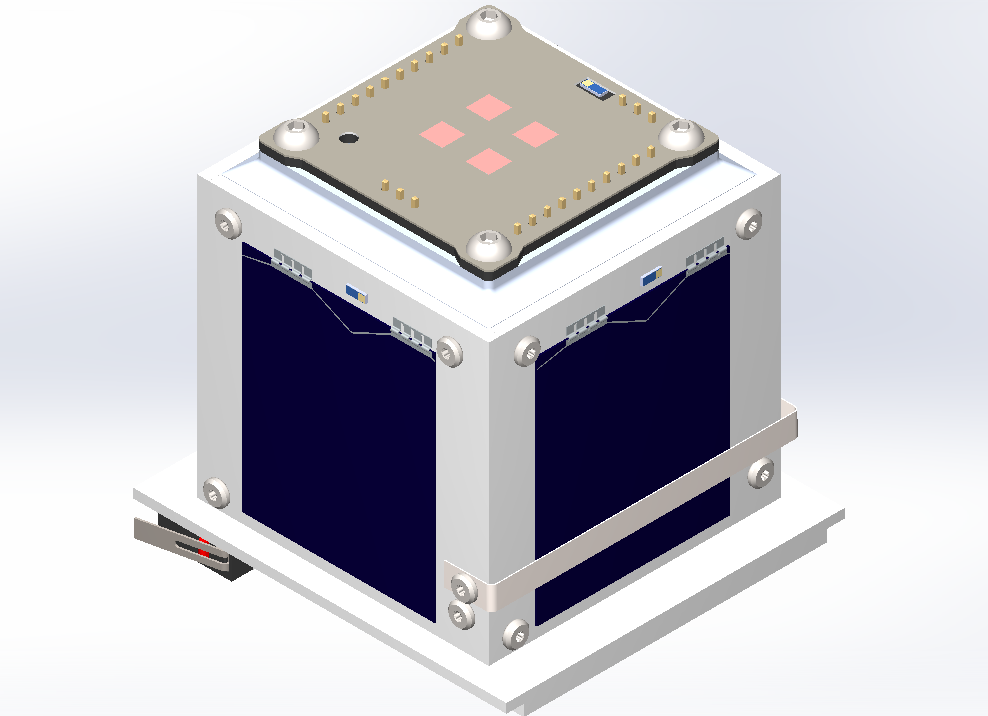
![image.png](https://wiki.nanosatlab.space/uploads/images/gallery/2026-03/scaled-1680-/image.png) [![image.png](https://wiki.nanosatlab.space/uploads/images/gallery/2026-03/scaled-1680-/46limage.png)](https://wiki.nanosatlab.space/uploads/images/gallery/2026-03/46limage.png)

#### 1.1 System Components

The assembly consists of the following key elements:

- Tether: A high-strength Dyneema string.
- Actuators: Two low-impedance resistors (acting as thermal knives) mounted on a dedicated lateral PCB.
- Mechanical Routing: An SMT Jumper (Harwin S1731-46R) used as a precision guide and two M2.5 screws secured with thread inserts.
- Tensioning System: A high-stiffness extension spring (McMaster-Carr 5108N98) and a cable clip attached to the antenna tip.

#### 1.2 Functional Description

The Dyneema string wraps around the satellite's perimeter, providing the primary constraint for the antenna. From its attachment point at the cable clip, the tether is routed to a primary screw that acts as a 90º pivot.

Following the pivot, the string passes directly over the thermal knives. To ensure high-reliability ignition, the SMT Jumper is positioned to provide constant downward pressure, forcing the Dyneema into direct contact with the resistors.

#### 1.3 Launch Integrity

To survive the high-vibration environment of the launch vehicle, the system must remain under constant tension. This is achieved by the extension spring, which compensates for any mechanical tolerances and prevents the antenna from oscillating or "wiggling." This tension ensures that the tether remains correctly seated over the thermal knives until the deployment sequence is initiated by heating the resistors to the tether's melting point.

<div id="bkmrk--1" style="display: flex; justify-content: space-between;"></div>## Description

The resistor is currently set at 4.7 Ohms, but further tests—including deployment in vacuum conditions—are planned to confirm its suitability. Other resistor values may offer better performance, so a trade-off analysis is needed to optimize results.

The wire connecting the antenna to the thermal knife is a dyneema, specifically commercially used fishing wire made from polyethylene. More precisely, it is ultrahigh-molecular-weight polyethylene (UHMWPE), a material known for its remarkable properties, including extremely high tensile strength (up to 26 kg), making it ideal for high-stress environments, such as rocket launches. In terms of thermal properties, UHMWPE has a breaking temperature between 120°C and 130°C.

The antenna is made from metallic metric tape, a coated stainless steel material. One end of the wire will be secured a cable clip at the antenna with a knot, while the other end will be tied to the spring. A final knot design is yet to be selected, as it will need to be validated during the vibration phase of environmental testing.

There are two inhibitors preventing the antenna's deployment:

1. Physical Inhibitor: The kill switches on the satellite, which disconnect the PocketQube from the battery while inside the deployer.
2. Software Inhibitor: The INIT mode, which enforces a 45-minute standby period after the kill switches are depressed, as described in the *[Satellite Operation Modes](https://wiki.nanosatlab.space/books/cat-introduction-requirements/page/satellite-operational-modes)* section.

## Mechanical Integrity Calculations

The following calculations verify the mechanical integrity of the jumper during the launch phase of the PocketQube. The objective is to ensure that vertical forces acting on the component do not lead to pad failure.

##### [![DeploymentForces.jpg](https://wiki.nanosatlab.space/uploads/images/gallery/2026-02/scaled-1680-/deploymentforces.jpg)](https://wiki.nanosatlab.space/uploads/images/gallery/2026-02/deploymentforces.jpg)Spring Force
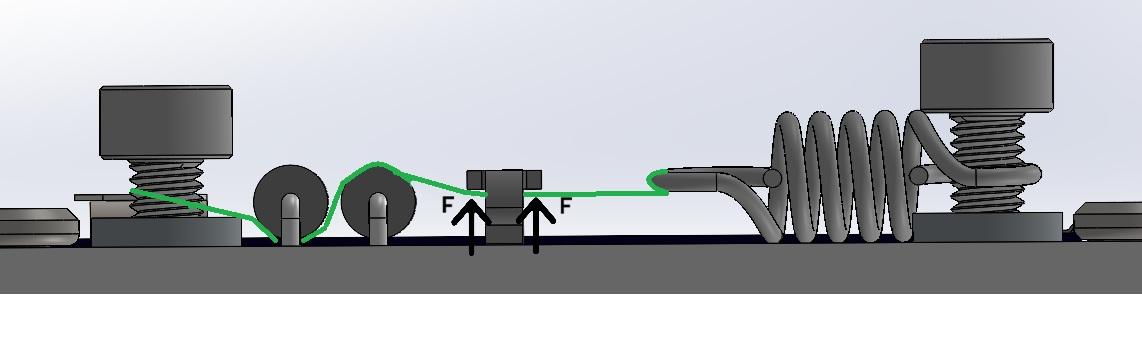
The axial force exerted by the spring is determined by the formula <span class="math-inline" data-index-in-node="67" data-math="F_s = k \cdot x">Fs = k\*x</span>. To establish a worst-case scenario for structural integrity, a total displacement of 3mm is assumed. This value accounts for a 1.5 mm installation pre-tension and an additional 1.5 mm dynamic displacement caused by launch vibrations and antenna mass.

Using the McMaster-Carr 5108N98 spring:

- **Spring Rate:** <span class="math-inline" data-index-in-node="17" data-math="2.758 \text{ N/mm}">2.758 N/mm</span>
- **Total Extension:** <span class="math-inline" data-index-in-node="21" data-math="3 \text{ mm}">3 mm}</span>
- **Resulting Axial Force:** <span class="math-inline" data-index-in-node="29" data-math="8.27 \text{ N}">8.27 N</span>

##### Static Case

In the static configuration, the axial force is decomposed into vertical components based on the thread geometry. Due to the "pulley effect" created by the Dyneema thread passing through the jumper, the vertical load is the sum of the components on both sides:

[![image.png](https://wiki.nanosatlab.space/uploads/images/gallery/2026-02/scaled-1680-/T41image.png)](https://wiki.nanosatlab.space/uploads/images/gallery/2026-02/T41image.png)
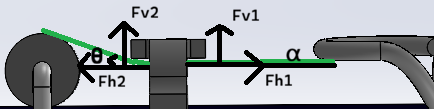
F<sub>v1</sub>= F \* sin ⍺ = 0 N

F<sub>v2</sub> = F \* sin θ = 2.28 N

F<sub>applied </sub>= F<sub>v1</sub>+ F<sub>v2 </sub>= 2.28 N

<sub>(Angles computed as ⍺ = 0, θ = 17.75º)</sub>

At this level the component is well within its safety margin, as each pad is estimated to support up to 4.13 N.

##### Vertical Displacement Case

The launch environment introduces random vibrations that induce lateral oscillation in the spring and a displacement that modifies the previous values.

[![image.png](https://wiki.nanosatlab.space/uploads/images/gallery/2026-02/scaled-1680-/98Pimage.png)](https://wiki.nanosatlab.space/uploads/images/gallery/2026-02/98Pimage.png)
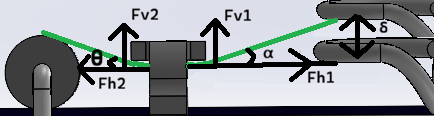
To calculate this displacement, we first determine the lateral stiffness (as it's not provided by the manufacturer) and the resonance frequency:<span style="color: rgb(236, 240, 241);"> </span>

 ![image.png](https://wiki.nanosatlab.space/uploads/images/gallery/2026-02/scaled-1680-/ib4image.png) ![image.png](https://wiki.nanosatlab.space/uploads/images/gallery/2026-02/scaled-1680-/FXkimage.png)

Frequency of 188Hz won't be affected by sinusoidal vibration but can be critical in random vibration.

Using ESA's PSD profile (0.16g<sup>2</sup>/Hz at 188Hz) the following formula is used to obtain effective acceleration, and then, converted into physical distance.
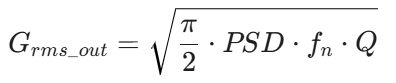
 ![11Gimage.png](https://wiki.nanosatlab.space/uploads/images/gallery/2026-02/scaled-1680-/n2P11gimage.png) ![Ifzimage.png](https://wiki.nanosatlab.space/uploads/images/gallery/2026-02/scaled-1680-/ifzimage.png)

Obtaining 21.7G<sub>rms</sub> and a displacement of 0.45mm

As said, during peak vibration, the dynamic displacement alters the thread angles, increasing the vertical load on the jumper.

F<sub>v1</sub>= F \* sin ⍺ = 2.7 N

F<sub>v2</sub> = F \* sin θ = 2.28 N

F<sub>applied </sub>= F<sub>v1</sub>+ F<sub>v2 </sub>= 4.98 N

<sub>(Angles computed as ⍺ = 21.21º, θ = 17.75º)</sub>

The total vertical force of 4.98N is distributed across two solder pads. While the load per pad exceeds the static ideal, it remains within a manageable range for the Harwin S1731-46R.

# Killswitches

<p>The satellite has 2 killswitches located on the bottom PCB. These are connected in series, allowing for redundancy in case one of them fails.</p>
<center>
<p><a href="https://wiki.nanosatlab.space/uploads/images/gallery/2024-11/scaled-1680-/image-1731254767476.PNG"><img src="https://wiki.nanosatlab.space/uploads/images/gallery/2024-11/scaled-1680-/image-1731254767476.PNG" alt="KS PCB" width="500"></a></p>
<p>Figure 1: Killswitches in Bottom PCB</p>
</center>
<p>During operations where the satellite needs to be disconnected, the switches should be pressed. When the satellite is inside the deployer rail, the switches will be pressed, keeping the satellite off. Once in space, the deployer rail will release the switches, turning the satellite on by releasing the killswitches. The location of the killswitches follows the PocketQube standard <a href="https://wiki.nanosatlab.space/attachments/441">[PQ Standard Alba]</a> recommendation, positioned on the bottom PCB, just below the direct contact area with the deployer rail.</p>
<center>
<p><a href="https://wiki.nanosatlab.space/uploads/images/gallery/2024-11/image-1731254966388.PNG"><img src="https://wiki.nanosatlab.space/uploads/images/gallery/2024-11/scaled-1680-/image-1731254966388.PNG" alt=""></a></p>
<p>Figure 2 and 3: Killswitches Close Look and PQ Standard Killswitch location</p>
</center>
<p>If we analyze the general electrical scheme of the satellite in figure 4, we can see that both killswitches interfere in the direct battery line. This allows that while both are pressed, the battery will not connect to the satellite, keeping it turned off. However, the solar cells will remain connected to the EPS, and with a sun simulator or sunlight, even under AM1.5 (air mass coefficient defines the direct optical path length through the Earth's atmosphere) conditions, the satellite could be started. Therefore, it is necessary to prevent sunlight from reaching the solar cells while the killswitches are pressed.</p>
<p>If we analyze the general electrical scheme of the satellite in figure 3.66, we can see that both killswitches interfere in the direct battery line. This allows that while both are pressed, the battery will not connect to the satellite, keeping it turned off. However, the solar cells will remain connected to the EPS, and with a sun simulator or sunlight, even under AM1.5 conditions, the satellite could be started. Therefore, it is necessary to prevent sunlight from reaching the solar cells while the killswitches are pressed. This is a current design flaw that is under revision and awaiting further updates after design changes.</p>
<center>
<p><a href="https://wiki.nanosatlab.space/uploads/images/gallery/2024-11/scaled-1680-/image-1731255119476.PNG"><img src="https://wiki.nanosatlab.space/uploads/images/gallery/2024-11/scaled-1680-/image-1731255119476.PNG" alt="KS Connections BD" width="400"></a></p>
<p>Figure 4: General Electric Scheme of the satellite with the killswitches and umbilical port</p>
</center>
<p>It can be observed that, even though the kill switches are pressed, the satellite still has a direct connection to the umbilical port, allowing communication with the satellite as well as the ability to charge the battery through the umbilical port.</p>
<p>Once the satellite is placed in the deployer rail and the kill switches are engaged, the battery will remain in standby mode, meaning it won&rsquo;t charge or discharge actively. However, this will lead to a slow, passive discharge of the battery over time.</p>
<center>
<p><a href="https://wiki.nanosatlab.space/uploads/images/gallery/2024-11/scaled-1680-/image-1731255285932.PNG"><img src="https://wiki.nanosatlab.space/uploads/images/gallery/2024-11/scaled-1680-/image-1731255285932.PNG" alt="KS Connections BD" width="500"></a></p>
<p>Figure 5: Capacity Discharged vs Storage Time and Temperature</p>
</center>
<p>According to the manufacturer&rsquo;s data (figure 5), the rate of discharge depends on the temperature and how long the battery remains without the ability to charge. While these values are theoretical, in practice, the actual discharge rate can vary due to several factors. Nonetheless, these estimates provide a general idea of how long the satellite&rsquo;s battery can remain without charging.</p>